2008 AUDI S8 warning
[x] Cancel search: warningPage 90 of 404

Seats and storage
& WARNING
• Never adjust the driver's or front passenger's seat while the
vehicle is moving. If you do this while the vehicle is moving, you
will be out of position . Always adjust the driver's or front
passenger's seat when the vehicle is not moving .
• Be careful when adjusting the seat height . Check to see that no
one is in the way, or serious injury could result!
• Because the seats can be electrically adjusted with the ignition
key removed, never leave children unattended in the vehicle. Unsu
pervised use of the electric seat adjustments may cause serious
injury. •
Upper thigh support
The adjustable upper thigh support provides optimal
support for the upper thigh when driving .
Fig. 82 Power seat :
Switch for upper thigh
support
- To extend the upper thigh support, push the switch
forward.
- To make the upper thigh support shorter, push the switch
to the rear.
& WARNING
Never adjust the seat cushion while the vehicle is moving . If you
adjust your seat while the vehicle is moving, you are out of posi
tion. Always adjust the seat cushion when the vehicle is not moving. •
Seat adjustment
Fig. 83 Power seat:
Switch for seat adjust
ment
Moving the seat forward and backward G)
- Press the switch forward or backward horizontally =>& .
Adjusting the seat height 0 and G) together
-Pull the switch evenly at both ends to raise the seat =>& .
-Push the switch evenly at both ends to lower the seat
=>& .
Angling the seat cushion up and down 0 or G)
-To angle the seat cushion up, pull the switch at the front
only=> &.
-Alternatively, push the switch at the rear only =>& . .,,_
Page 91 of 404

-To angle the seat cushion down, push the switch at the
front
only~ ,&.
Alternatively, pull the switch at the rear only~ ,&.
& WARNING
• Never adjust the driver's or front passenger's seat while the
vehicle is moving . If you do this while the vehicle is moving, you
will be out of position . Always adjust the driver's or front
passenger's seat when the vehicle is not moving.
• Be careful when adjusting the seat height . Check to see that no
one is in the way, or serious injury could result!
• Because the seats can be electrically adjusted with the ignition
key removed, never leave children unattended in the vehicle. Unsu
pervised use of the electric seat adjustments may cause serious
injury. •
Applies t o vehicles: with massage funct ion
Massage function
0 0
.. .. ······-t
Fig . 84 Power seat:
Massage function
-Press the switch to turn on the massage function.
The massage function runs for about 10 minutes. The passenger's
back is massaged by continuous adjustment of the lumbar support.
Contro ls a nd eq uip
ment
Seats and storage
The curvature of the lumbar support can also be adjusted during the
Massage to make it more or less aggressive. This varies the intensity
of the
Massage to the level desired by the occupant .
Once the massage function stops after about 10 minutes, the
lumbar support automatically returns to the position in which it was
last set.
[ i] Tips
The massage function can be interrupted at any time by pressing
the switch. The lumbar support remains in its current position. •
Adjusting the seatback
-:_____ ·----· ... ___ ..._._ ..
Vehicle care I I
Fig. 85 Power seat:
Switch for seat back
angle
Fig. 86 Power seat:
Switch for adjusting
upper seatback section ...
Technical data
Page 92 of 404
Seats and storage
Adjusting the angle of the seat back
Push the switch ~ page 89, fig. 85 forward or to the rear
in the direction of the arrow to adjust the angle of the
seat back
~ & .
Adjusting the angle of upper seatback section
-Push the switch ~ page 89, fig. 86 forward or to the rear
to adjust the angle of upper seatback
section ~& .
& WARNING
• Never adjust the seatback while the vehicle is moving. If you
adjust your seat while the vehicle is moving, you are out of posi
tion. Never adjust the seatback when the vehicle is moving.
• To reduce the risk of injury in the case of sudden braking or
accident, front passengers must never ride in a moving vehicle
with the seatback reclined. Safety belts and the airbag system only offer maximum protection when the seatback is upright and
the safety belts are properly positioned on the body. The more the seatback is reclined, the greater the risk of personal injury from an
incorrect seating position and improperly positioned safety
belts. •
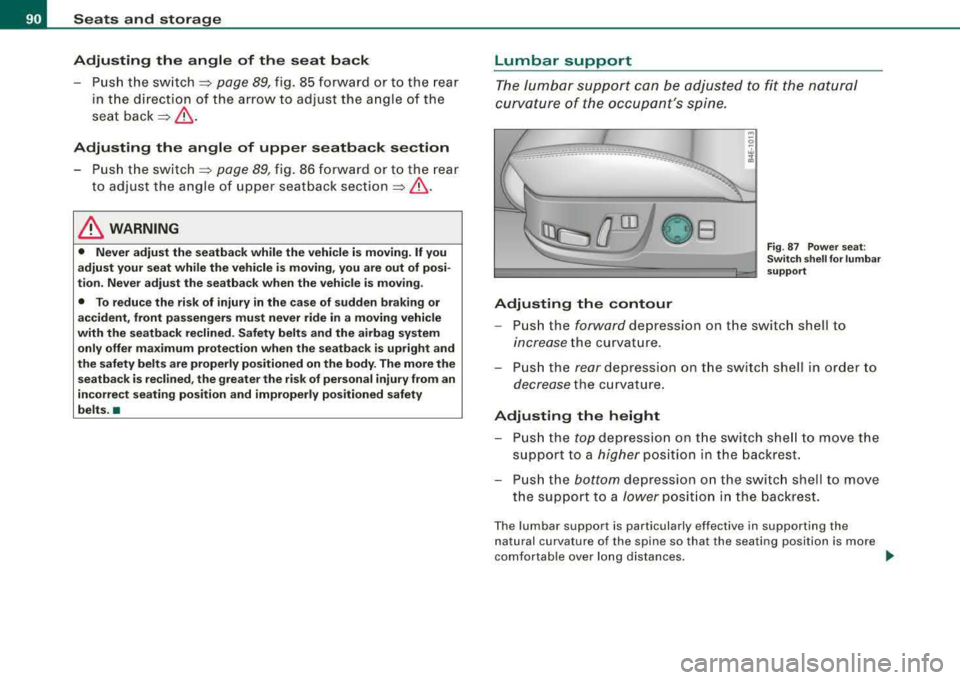
Lumbar support
The lumbar support can be adjusted to fit the natural
curvature of the occupant's spine.
__ ... _,.· _____ ---....... ·--_----... -··--
OB
Adjusting the contour
Fig . 87 Power seat:
Switch shell for lumbar
support
-Push the forward depression on the switch shell to
increase the curvature .
-Push the rear depression on the switch shell in order to
decrease the curvature.
Adjusting the height
-Push the top depression on the switch shell to move the
support to a
higher position in the backrest.
-Push the bottom depression on the switch shell to move
the support to a
lower position in the backrest.
The lumbar support is particularly effective in supporting the
natural curvature of the spine so that the seating position is more
comfortable over long distances.
~
Page 93 of 404

& WARNING
Never adjust the lumbar support while the vehicle is moving. If you
adjust your seat while the vehicle is moving, you are out of posi
tion. Never adjust the seatback when the vehicle is moving. •
Seat adjustments in MMI
The passenger's seat can be adjusted to various positions
by the driver.
Convenience side view
- Select Systems in the CAR menu.
Select Seat adjustment.
-Select Passenger's seat.
Fig. 88 MMI display :
Passenger's seat
-Select Convenience side view~ fig. 88.
- Continue to press the control knob until the adjustment
process is complete.
Seat symmetry
-Select Systems in the CAR menu.
Controls a nd eq uip
ment
Seats and storage
-Select Seat adjustment.
-Select Passenger's seat.
-Select Seat symmetry.
-Continue to press the control knob until the adjustment
process is complete.
Using the Convenience side view function, the passenger 's seat is
adjusted so that the d river has the best possible view to the r ight .
When the Convenience side view is set, the specific position of the
drive r's seat is taken into considera tion.
Using the
Seat symmetry function, the passenger's seat can be
moved to the same position as the driver's seat. The settings for the
driver's seat are imported and set automatically. •
Head restraints
Adjusting head restraints, front seats
The head restraints must be adjusted properly to provide
protection.
Vehicle care I I
Fig . 89 Driver's seat
head restraint
adjusting the height
..,
Technical data
Page 94 of 404

Seats a nd sto ra g e
Fig . 90 A djust ing t he
co mfort h ead re str ain t
s id e su pports
The head restrai nts on the front seats ca n be adjusted to
provide safe support to head and neck a t th e op timum
height and angle. When opt imally adjusted, the top of t he
restraint shou ld be level w ith the top of the head
~ page 203, "Proper adjustment of head restraints" .
Height adju stm ent
-Pus h the sw itch up or down to adjust the head restra int
to your
height ~ page 91, fig. 89 .
-Adjust the head restraints so that the top of the head
restraint is
at least level with your eyes or higher.
Adjust ing the angl e
-Grasp the side of the head restra ints with both hands a nd
push them forward or backward.
Adjusting the side supports
-Pull or press t he side supports into the desired positio n
~ fig. 90.
Refer to => page 203, "Proper adjustment of head restraints" for
guidelines on how to ad just the height of the front head restraints
t o suit the occupant's body s ize .
& WARNING
• Drivin g w ithout he ad r estraint s or with head re straint s th at are
not properly adju ste d incr eases the ri sk of serio us or f atal ne ck
i nj ury dram atically .
• Read and heed all WARNING S
:::> page 203.
[ i] Tips
• Correctly adjusted head restraints and safety belts are an
extremely effective combination of safety features .
• Power adjustable head restraints can only be removed by an
authorized repair faci lity.
• When you adjust the seat toward the front or upward, the head
restraints are automatically lowered to keep them clear of the roof
l iner. Be aware that after you move the seat back again toward the
rear or lower it again, the head restraints will
not automatical ly
resume their orig inal position and have to be readjusted. •
Rear head restraint (center seating position)
Fig . 9 1 Cente r rear
hea d re str aint:
a dju st ing t he h eight
Page 95 of 404

'
~
--~ _
- _-----:::: =---1 ~
Fig. 92 Center rear
head restraint:
adjusting the height
- Push the head restraint upward until it locks in the
desired
position =:> page 92, fig. 91.
- To lower it, push on the knob located on the side
=:> fig. 92.
The height of the center head restraint is adjustable . It should be
adjusted to the occupant's body size. Correctly adjusted head
restraints and safety belts are an extremely effective safety feature
=> page 203.
& WARNING
• Vehicles with power individual rear seats* have seating for
four. The long center console between the two rear seats is not a
seating position . For this reason, a safety belt and an adjustable
head restraint are not provided.
• Read and heed all WARNINGS =>
page 203, "Proper adjustment
of head restraints". •
Contro ls a nd eq uip
ment
Seats and storage
Arm rest
The arm rests for the driver and passenger can be
adjusted to several positions and contain a storage
compartment.
"' 0
-. w ;l!i
Fig . 93 Arm rests for
driver and passenger
Adjusting the arm rest
-To adjust the arm rest angle, pivot the arm rest fully
down.
- Lift the arm rest detent by detent until the desired posi-
tion is reached .
Opening storage compartment
- Press the release lever =:> fig. 93.
Please note that the driver's arm movements may be restricted with
the arm rest folded down. For this reason, the arm rest should not
be folded down when driving in city traffic. •
Vehicle care
I I irechnical data
Page 97 of 404

If your vehicle is driven by other persons using your remote control
key, you should save your individual seat posi tion on one of the
memory buttons. You can recall your settings again simply and
conveniently by pressing the corresponding memory bu tt o n. When
the vehicle is locked, these settings are automatically re -assigned to
the remote control key and stored .
& WARNING
• For safety reasons, the seat s etting can only be recalled whe n
the vehi cle i s sta tiona ry
-otherwi se you ri sk h aving an accident .
• In an emergency , the recall operation can be stopped by
pre ssing the
I ON /OF F) button or b y briefly pre ssing an y given
mem ory button . •
Activating remote control key memory
To be able to recall the stored settings with the remo te
con trol key, the function has to be activated in
MM/ .
-Selec t Systems in the CAR menu .
-Select Seat adjustment .
-Select Driver's seat.
Controls a nd eq uip
ment
Fig . 9 5 MMI disp lay :
Drive rs' seat
Seats and storage
Sel ect Remote control key on to activate the rem ote
contro l key
mem ory ~ fig. 95 .
Passenger's seat memory
Using the memory but tons in the passenger's door, you
ca n sto re an d rec all f our se at sett ings.
Storing and recalling settings
Fi g. 9 6 Pa ssenger's
d oo r: s eat m emo ry
Using the memory buttons 1, 2 , 3 and 4, you can store and recall the
settings for four di fferent
passengers ~ fig. 96 .
Tu rning s eat m emory on and off
If the I ON /OFF ) switch is depressed, the seat memory is inoperative .
The word
OFF next to the I ON /OFF ) swi tch illuminat es.
All the s tored settings are retained. Now the seat can on ly be
adjusted electrically in the normal way. •
Vehicle care I I irechnical data
Page 98 of 404

Seats and storage
Rear seats
General information
Safe transportation of passengers on the rear seats
requires proper safety precautions.
All passengers on the rear seats must be seated in compliance with
the safety guidelines explained
in => page 209 and => page 218. The
correct seating position is critica l for the safety of front and rear
seat passengers
alike => page 202.
& WARNING
• Occupants in the front and rear seats must always be properly
restrained.
• Do not let anyone ride in the vehicle without the head restraints
provided . Head restraints help to reduce injuries.
• Loose items inside the passenger compartment can fly forward
in a crash or sudden maneuver and injure occupants. Always store
articles in the luggage compartment and use the tie-down eyelets.
• Read and heed all WARNINGS
=> page 202, "Proper seating
positions for passengers in rear seats".•
Applies to vehi cles : wi th rea r lumb ar su pp ort
Rear seat lumbar support
Th e outer rear seats have a lumbar support.
Adjusting curvature
Fig . 97 Rear bench
seat: Controls
- Push the switch shell forward to increase the curvature.
- Push the switch shell to the rear to dec rease the curva-
ture.
Height adjustment
-Push the switch shell up to move the curvature higher.
- Push the switch shell down to move the curvature lower.
The lumb ar support is particularly effective in supporting the
natural curvature of the spine so that the seating position is more
comfortable over long distances.
•