2008 AUDI S6 light
[x] Cancel search: lightPage 119 of 390
![AUDI S6 2008 Owners Manual _________________________________________________ W_ a_ r_ m __ a_n_ d_ c_ o_ld _ __._
Manual air circulation I~]
Air recirculation prevents exhaust fumes or other pollu
tion from en](/manual-img/6/57596/w960_57596-118.png "AUDI S6 2008 Owners Manual _________________________________________________ W_ a_ r_ m __ a_n_ d_ c_ o_ld _ __._
Manual air circulation I~]
Air recirculation prevents exhaust fumes or other pollu
tion from en")
_________________________________________________ W_ a_ r_ m __ a_n_ d_ c_ o_ld _ __._
Manual air circulation I~]
Air recirculation prevents exhaust fumes or other pollu
tion from entering the vehicle.
Turn in g o n air re circ ulation
- Press [ ~]
=> page 112, fig. 109 => &
Turnin g off air r ecir cul ation
- Press@ agai n, or
- press [AUTO], or
press[@].
In the air recirculation mode, the air in the passenger compartment
is recirculated and filtered to prevent exhaust fumes and other
pollution from entering the vehicle . We recommend that you use the
manual air recirculation under the following conditions:
• when driving through tunnels
• in a traffic jam .
& WARNING
Do not u se this s ett ing f or exte nded p erio ds of time. The w in d ows
c ould f og up since no fre sh air can ente r the v ehi cle . If the
w indo ws fog up , pre ss the air recirculati on button ag ain imm edi
a tel y to swit ch off the air r eci rcu la ti on f unction or se le ct defr ost. •
Con tro ls and eq uip
ment
Rear window defogger QW
I ._ _ _._ __ u.
1-----------------i
Fig. 116 Switch fo r
r e ar window defo gger
Press the (ffiJ switch to turn the rear wi ndow defogger on
and off =:> fig . 11 6.
The rear window defogger works only when the engine is running.
The light in the switch will illuminate when the defogger is on.
The rear window defogger is switched automatically after 10 to 20 minutes, depending on the outs ide temperature .
At very low outside temperatures, the rear window defogger can
switched on continuously by pushing the
Qw button for more than 2
seconds. This remains stored until the ignition is switched off . A
rear window defogger that was switched on also remains stored for
15 minutes after the ignition is switched off.
If the engine is restarted within these 15 minutes, the rear window
defogger is activated for 10 to 20 minutes, depending on outside
temperature. With a vehicle that is parked for a short time, the rear
window defogger does not need to be manually activated again.
<£> For th e sake of th e environm ent
Turn the defogger off when the rear window is clear . When you save
electricity, you save fuel. •
Vehicle care I I Technical data
Page 121 of 390

_________________________________________________ w_ a_ r_ m __ a_n_ d_ c_ o_ld __ llll
The air outlets are actuated either automatically or manually
depending on the operating mode selected. Heated or unheated
fresh air, or cooled air flows from the vents.
The air outlets to heat the rear footwell are located under the front
seats .
[ i] Tips
If the climate control system is operating in cooling mode, air flows
primarily from the outlets in the center console and in the door
pillars. To achieve adequate cooling, you should never close the
outlets completely. •
Using climate control economically
Using the climate controls prudently can help save fuel.
When you use the air conditioner, engine power is reduced
and fuel consumption increases. To save fuel, you should use the air conditioner only when necessary. Also please
note the following points:
- If you want to save fuel, activate ECON.
- If you are going to drive with the windows open, use
ECON.
If the vehicle is extremely hot due to the heat of the sun,
briefly open doors and windows.
~ For the sake of the environment
By reducing the amount of fuel you use, you also reduce the amount
of pollutants emitted into the air. •
Controls and equip
ment
App lies to vehic les: with solar sliding/ti lt ing sunroof
Solar blower fan /solar roof
With sufficient sunlight, the blower fan continues to
operate with solar energy to bring in fresh air after the
ignition has been switched off.
The blower fan motor is operated by solar energy through the solar
roof after the ignition is turned off. Please make certain that vents
© and © are open to achieve optimal ventilation=>
page 118.
The v entilation operates only with the sunroof closed or in the tilted
position.
If the vehicle was switched off in the recirculation mode, the air
conditioning automatically switches to fresh air operation.
Solar operation is not activated at low outside temperatures. •
Basic settings [SETUP ]
General
The basic settings for the climate control are performed in
the[SETUP] menu.
''I
0 • Econ 1
~ &
I
autu
Fig. 118 MMI display :
Setup climate control
~
I • •
Page 123 of 390

Warm and cold -
-------------------'
Center air vent
The temperature of the air leaving the center vents can be
changed to differ from the temperature setting .
0 Center ai r ve nt 1 I
~
•
&-
auto
Fi
g. 119 M MI di splay:
Ce nter air vent
The air flow coming from the center vents can be adjusted to be
colder or warmer than the selected set temperature.
In this way you have the opportunity to have the air flow from the
center vents a little warmer or cooler, depending on the time of year.
A little cooler in the summer and a little warmer in the winter .•
Ap plies t o vehicles: with solar roof
Solar operation
With sufficient sunlight, the stationary ventilation fan
continues to operate with solar energy to bring in fresh air
after the ignition has been switched off.
- Switch solar operation to on.
The fan motor is operated by solar energy through the solar roof
after the ignition is turned off. Please make certain that vents©
and © are open to achieve optimal ventilation=>
page 118.
The ventilation operates only with the sunroof closed or in the tilted
position.
Con tro ls and eq uip
ment
If the vehicle was switched off in the recirculation mode, the air
conditioning automatically switches to fresh air operation .
Solar opera tion is not activated at low temperatures .•
Vehicle care I I Technical data
Page 128 of 390

• ..__O_ n_ t_h _e _ r_o _a _ d __________________________________________________ _
& WARNING
Never start or let the engine run in a confined or enc losed area .
Exhaust fumes from the engine contain carbon monoxide , a color
le ss and odorless gas . Carbon monoxide can be fatal if inhaled .
• Never leave the engine idling unattended . An unattended
vehi cle with a runn ing engine poses a danger of personal injury or
theft.
0 Note
• Avoi d high engine speed s, fa st a ccele rati on or heavy eng ine
loads while the engi ne is sti ll cold. This cou ld damage the engine.
• The e ngi ne canno t be sta rt e d by pushing o r to w ing the vehicle.
~ For the sake of the environment
To avoid unnecessary engine wear and to re duce ex hau st emis
sions, do not let your vehicle stand and warm up. Be ready to drive
off immed iate ly afte r start ing y our veh icle. Maintain modera te
sp eed unt il the engine is completely warm. Remembe r, th e engine
performs best a t operati ng tempe ra ture .•
Stopping the engine
- Turn t he ignit ion key to position ©~ page 125 , fig. 123 .
& WARNING
• Never turn off the engine until the vehicle has come to a
complete stop.
• The brake booster and servotroni c only work when the engine
is running . With the ignition turned off , you have to apply more
force when steering or braking . Since you cannot steer and stop
normally, this can lead to accidents and serious injuries .
& WARNING (continued )
• The radiator fan can continue to run for up to 10 minutes even
after you have turned off the engine and removed the ignition key .
The radiator fan can also turn on again if the engine coolant heats
up because of inten se sunlight or heat build -up in the engine
compartment .
0 Note
Do not stop the engine immediatel y after hard or extended driving.
Keep the eng ine runn ing f or ap proximate ly t wo minu tes to preven t
excessive heat build -up. •
Starting and stopping the engine
with Advanced Key
Ap plies to veh ic les : w ith Advan ce d Key
Starting the engine with the [ START) button
This button switches on the i gnition and starts the en gine.
Fig. 124 Advanced
Key: ENG INE START
button
T he [ S TA RT ] b utto n is prov ided with two-stage operation
~ fig . 12 4. .,,_
Page 131 of 390
___________________________________________________ O_ n_ t_h _e_ r_o _a_ d _ ___.9I
and then the driver's door is opened. In this instance, the steering is
not locked . The steering is locked :
• If you press the
I STOP ] button aga in for more than 1 second.
• If you c lose the driver's door and lock your vehicle from the
outside .•
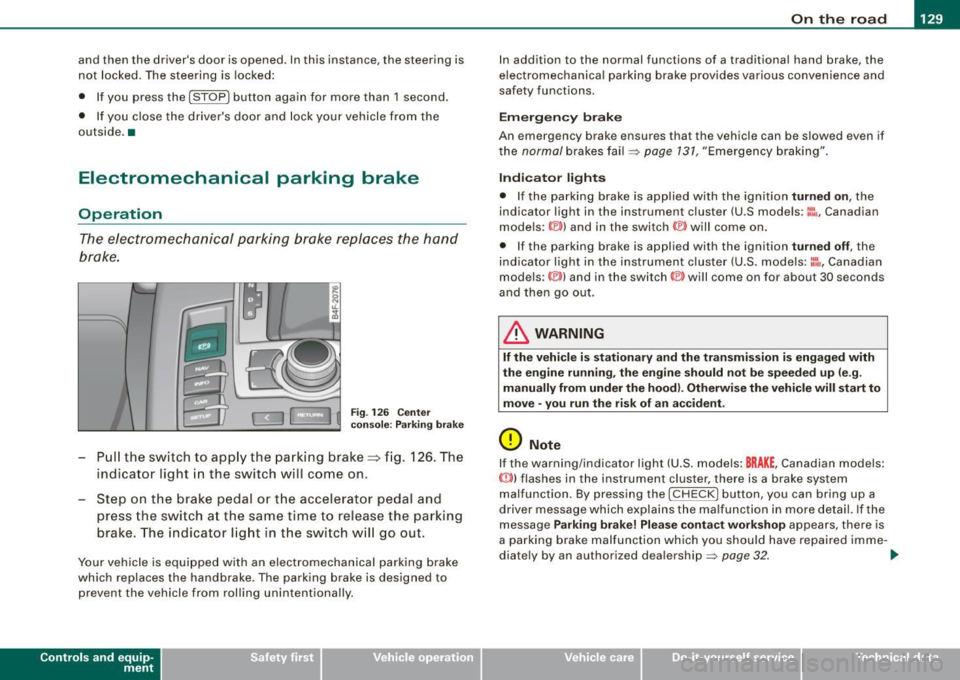
Electromechanical parking brake
Operation
The electromechanical parking brake replaces the hand
brake.
Fi g. 12 6 Center
co nso le: Parki ng bra ke
- Pull the switch to app ly the park ing brake => fig. 12 6. The
indicator light in the switch will come on .
- Step on the brake pedal or the accelerator pedal and
press the switch at the same time to rel ease the parking
brake. The indicator lig ht in the switch wi ll go out.
Your vehicle is equipped with an elect romechanical parking brake
which replaces the handbrake . T he parking brake is designed to
prevent the vehicle from rol ling unintentional ly.
Con tro ls and eq uip
ment
I n add ition to the normal functions of a traditional hand brake, the
e lectromechanica l parking brake provides various convenience and
safety functions.
Emergen cy brake
An emergency brake ensur es that the vehicle can be slowed even if
t he
normal brakes fail=> page 131, "Emergency braking".
Ind icator lights
• If the parking brake is applied with the ignition tu rned on , the
indicator light in the instrument cluster (U.S models :
::i.:,, Canadian
models: ®)) and in the switch <®) will com e on .
• I f the parking brake is app lie d with the ignition
tu rn ed off , the
indicator light in the instrument cluster (U.S. models: ::.:\,, Canadian
models :(®) ) and in the switch© will come on for about 30 seconds
and then go out .
& WARNING
If the vehicle i s stationary and the tr ansmi ssion is engag ed with
the engine ru nning , the engine should not be speeded up (e .g .
manu ally from under the hood ). Otherwi se the vehicle will sta rt to
move -you run the risk of a n accident .
0 Note
If the warning/indica tor light (U.S . mode ls: BRAKE , Canadian mode ls :
(Ci)) ) flashes in the instrument clus ter, there is a brake system
malfunction . By pressing the
I CHECK] button, you can bring up a
driver message which explai ns the ma lfunc tion in more detail. If the
message
P a rki ng brake ! Plea se conta ct w ork shop appears, there is
a par king brake malfunction which you should have repaired imme -
d iate ly by an authorized dealership=>
page 32. ..
Vehicle care
I I irechnical data
Page 135 of 390

On the road -
----------------
The display=> page 132, fig. 128 will show the set speed . The
display may vary depending on the type of disp lay in your vehicle .
The indicator light
CRU ISE (US model) I (')0 (Canadian mode l) wi ll also
light up in the instrument cluster.
The speed is kept constant via an engine output adjustment or active brake intervention .
_& WARNING
• Always pa y attent ion to traffic even whe n the crui se control is
switc hed on. You are alw ays r esp onsi ble for your speed and the
di sta nce b etween your vehi cle and other vehi cle s.
• For s afet y reason s, the crui se control should not be u sed in the
c ity , in stop- and-go traffic , on twi sting roads and when road condi
t ion s a re p oor (s uch a s ice , fo g, gra vel , he avy ra in and h ydro
planing ) - risk of accident.
• Turn off the crui se control tempor arily when e nte ring tu rn
lan es, highway exit lanes or in constru ction zone s.
• Plea se note that in adv ertentl y "re sting " yo ur foot on the accel
erator ped al cau se s the cruise control not to brake . Thi s is b ecau se
the crui se control i s overridden b y the dri ve r's acc eleration .
[ i] Tips
The brake lights il luminate as soon as the brakes decelerate
automatically .•
Ap plie s to v ehicl es: w it h c ruise contro l
Changing speed
-Press lever© in the 0 or O directi on => page 132,
fig. 127 t o in crease or d ec reas e your spe ed.
- Re lease the lever to s ave tha t speed.
Controls and equip
ment Change speed in increments of 1 mph (1 km/h) by
lightly pressing
the lever . If you keep the lever pressed down, you will a lter your
speed in 5 mph (10 km /h) increments .
You can a lso press the acce lerator pedal down to increase your
speed, e.g. if you want to pass someone. The speed you saved
earlier will resume as soon as you release the accelerator pedal.
If , however, you exceed your saved speed by 5 mph (10 km/h) for
longer than 5 minutes, the cruise control will turn off temporarily .
The symbol wi ll go ou t bu t the saved speed wi ll be retained. •
Applie s to v ehic le s: with c ruise cont ro l
Presetting your speed
You can prese t your desire d speed while the vehicle is not
moving.
- Turn o n the ignition .
Pu ll lever © into posit ion
G) => page 13 2, fig. 127 .
Press the lever in the
0 or O direction to increase or
decrease your speed .
- Release the lever to save that speed .
This function makes it possible, for example, to save the speed you
want before driving on the highway. Once on the highway , activate
the cruise contro l by pu lli ng the lever toward
G) . •
Ap plies to ve hic les: with c ruise contro l
Switching the system off
Temporary dea ctivation
- Press the brake pedal, or
I • •
Page 140 of 390

• ..__A_ d_a...: p:,..._ ti_v _ e_ C_ ru_ is_ e_ C_ o_n_ t_ r_ o _ l ___________________________________________ _
- Drive at the speed you want. The speed must be between
20 and 95 mph (30 and 150 km/h).
Press the !S ETI button ~
page 137, fig. 132 to store the
desired speed.
Af te r the (S ET) button is released, the current speed is stored and
maintained .
The saved speed is now shown in the LED display in the speedom
eter by one or two illuminat ed red light diod es =>
page 143. At the
same time, the saved speed is also shown for a short time in the
Information line=>
page 745.
[ i ) Tips
For safety reasons , the stored speed is dele ted when the ignition is
turned off. •
Applie s to vehi cle s: wi th Ad aptive Cruise Co ntrol
Changing stored speed
The speed can be changed without touching the acceler
ator or brake pedal.
Fig. 133 Control lever:
Changing speed
Increasing speed
- Press the lever up briefly upwards 0 ~ fig. 133. USA
models: the speed increases by about 2.5 mph. Canada
models: speed will increase by one mark on the speed
ometer scale.
- Press the lever upwards
0 and hold it. As long as you
hold the control switch down, the light diode display in
the speedometer LED display in the speedometer moves
forward and the speed is increased.
Reducing speed
- Press the lever downwards briefly Q. USA models: the
speed decreases by 2.5 mph. Canada models: speed will
decrease by one mark on the speedometer scale.
- Press the lever downwards
O and hold it. As long as you
hold the control switch down, the light diode display in
the speedometer LED display moves backward and the
speed is reduced .
After releasing the control switch, the system regulates the speed to
the value just set.
After each adjus tmen t, the n ewly-set speed is shown for a short
time in the Information line=>
page 145.
[ i ) Tips
You can increase your speed at any time by stepping on the acceler
ator pedal. After you release the accelerator pedal , the system
adjusts back down to the speed you previously set. A new desired
speed can be stored at any time by pressing the
( S ETI button
=> page 137, fig. 132. •
Page 144 of 390

• ..__A_ d_a...: p:,..._ ti_v _ e_ C_ ru_ is_ e_ C_ o_n_ t_ r_ o _ l ___________________________________________ _
& WARNING (continued)
• Setting short distances to the traffic ahead reduces the time
and distance available to bring your vehicle to a safe stop and
makes it even more necessary to pay close attention to traffic.
• Always use good judgment and select a safe following distance
for the traffic, road and weather conditions.
[ i ] Tips
The distance setting is reset to the factory default DISTANCE 3 the
next time the ignition is turned on.•
Driver information
Applies to veh icles : with Ada ptive C ru is e Cont ro l
Displays in the instrument cluster
Depending on the driving situation, driver information is
displayed in the instrument cluster.
Fig. 136 Overview instrument cluster
© Display in the speedometer
® Display in the instrument cluster
© Status indicator
© Display in the speedometer
Important information concerning vehicle operation with Adaptive
Cruise Control is shown in display area@. The desired speed you
set is indicated in the speedometer (LED lights around the edge)
and the indicator lights show whether the system has detected a
vehicle traveling ahead. -.,