2008 AUDI S6 light
[x] Cancel search: lightPage 84 of 390

Clear vision
& WARNING
Be sure to in sp ec t the cond it ion of y our wiper bl ad es regul arl y. See
y our authorized Audi deale r for repla ceme nt bl ade s.
0 Note
To prevent damage to the wiper sys tem:
• Always loosen blades which are frozen to the windshield before
operating wipers.
• Do not use gasoline, kerosene , paint thinner, or other solvents on
or near the wiper blades .
• Do not attempt to move the wipers by hand .
• The windshield wiper blades must only be replaced when in the
service position ~
page 80! Otherwise, you risk damaging the paint
on the hood or the windshield wiper motor.
[ i ] Tips
Commercial hot waxes app lied by au tomatic car washes affect the
cleanability of the windshield. •
Mirrors
Manual anti-glare adjustment
Standard setting
Move the small lever (located on the bottom edge of the
mi rror) to the fron t.
Anti-glare setting - Move th e sma ll leve r (located on the bottom edge of th e
m irror) to the rear. •
App lies to vehicles: with aut omat icall y dim ming in side mirro r wi th d igit al c om pass
Automatically dimming inside mirror
The automatic dimming function can be turned on and off
if required.
Disabling auto dimming
F ig . 73 Inside rea r
view mi rror
Press button @~ fig . 73 briefly , - the g reen ind icat or
ligh t® goes ou t.
A ctivating /reactivating auto dimming
- Press button @ briefly, -the green indicato r light ®
goes on.
Automat ic dimming fun ction
The automatic dimming function is activated every time the ignition
is turned on. The green indicator light is lit to ind icate auto dimming
is active.
When dimm ing is activated, the inside mirror will darken
automati
cally in response to the amount of light striking the mirror (such as
headlights from rearwa rd approaching vehicles}. Even in dimm ing
mode , the mirror surface turns bright when :
• the interior light is switched on
• reverse gear is engaged .
Page 85 of 390

& WARNING
The glass of the in sid e re ar view mirror is lay ered and contain s an
e lectrolyte to achieve it s propertie s. Be aware of liquid electr olyte
l e aki ng from a broken mi rror gl ass. This liqui d can cause irritation
to skin , eyes , and re spir ator y system . If you get electrolyte in your
eye s or on your skin , i mm ed iatel y rinse wi th plenty of w ater.
If irri
ta tion per sists , se ek medi cal attention .
0 Note
Liquid electrolyte leaked from a broken mirror glass wi ll damage any
p lastic sur faces it comes in contact with. Clean up spilled electrolyte
immediately with clear water and a sponge.
[ i ] Tip s
• If you sw it ch off the automati c dimming fun ction on the ins ide
mirror , automatic dimming of the out side mirror s will likewise be
disabled .
• Check to make sure there are no objects preventing ligh t from
reaching the inside mirror.
• Do not a ttach any stickers to the windshield in front of the light
sensor, as this wou ld interfere with the automatic operation of the
headlights and the automatic dimm ing of the inside m irror.
• Be aware that automatic dimming of the inside mirror can on ly
operate properly if the rear window sun blind* is retracted. •
Contro ls and eq uip
ment
Clear vision
Outsid e mirrors
The outside mirrors are electrically adjuste d.
Adjusting the outside mirrors
Fig. 74 F orwa rd
s e ction of dri ver's
a rm rest: po wer m ir ro r
co ntr ols
Turn the adjusting knob to position (0 ~ fig. 74 to adjust
the outs ide mirror on t he driver's side .
Turn the adjusting knob to position @ to adjust the
outside mirror on the passenger side.
Press the knob in the appropriate direct ion to
move the
m irror surface so that you have a good view to the rear.
H eated mirrors
- Turn the kn ob to positio n @.
Folding both outside mirrors flat *
-Turn the knob to @.
Depending on the outside temperature, the mirror surfaces are
heated until the ignition is switched off - even if the knob is no
longer in position
@ .
We recommend folding* the outs ide mirrors flat to help when
parking your vehicle or when maneuvering in very tight spaces .
Vehicle care I I irechnical data
Page 86 of 390

Clear vision
Mem ory settin g for th e out sid e mirro rs *
When the seat posi tion is saved in the memory, the posi tion of the
outs ide mirrors is saved at the same time=>
page 91.
If th e position of th e mirror surfac e is changed on a ti lted mirror, this
new position wil l be automatically saved to the remote key when the
vehic le is taken out of reverse gear .
Tilting th e passenger's side out side m irro r (on ly with
e xterior mirror m em ory )
When you move the se lector lever in to R (Reverse), the m irror on the
front passenger's door (knob turned to® =>
page 83, fig. 74) will tilt
s lightly downward. Th is m ake is easier for you to see the curb when
you are backing into a parking spac e.
The mirror returns to its ini tial posit ion as soon as reverse gear is
disengaged and vehic le speed is above about 9 mph (15 km/h). The
mirror also retur ns to its init ia l pos ition if the switch is moved to the
dr iver 's outside mirror
(0 or the ignition is switched off .
Automatic anti-glare for the outside mirror s*
The outside mirrors dim at the same time as the inside mirror . When
the ignition is switched on, the mi rrors automat ically dim
depending on the amount of light striking the mirrors (such as head
lights shi ning into the vehicle from the rear).
When you turn on the interior light, or when you move the selector
lever into
R (Rev erse), the anti-glare function stops and the mirrors
retur n to their original condition (not darkened).
0 Note
• Curved (i .e. convex) mirror surfaces increase you r field o f view .
Remember that vehicles or other objects will appear smaller and
farther away than w hen seen in a flat mirror. If you use this mirr or to
estimate distances of following vehicles when changing lanes , you
cou ld estimate incorrectly and cause an acc ident .
• If the mirror housing is moved unintentionally (for example ,
wh ile pa rking your vehicle), then you must firs t fold the mirro r elec - trically. Do not readjust the mirror housing manually. You cou
ld
damage the m otor wh ich contr ols the mirror .
[ i ] Tips
If the re shou ld be a malfunction in the electrica l system, you can
still adjust the outside mirrors by pressing the edge of the mirror .•
A pplies to vehicle s: w it h a utom ati c d imm ing for out sid e mirro rs
Automatic dimming for outside mirrors
The ou ts ide mirrors are dimmed together with the automa tic
dimming of the inside mirror. When the ign ition is switched on, the
mirrors darken a utomatical ly depending on the lig ht striking them
(e.g. headlights from the rear).
When the interior lighting is switched on and when reverse gear is engaged, the m irrors are switched back to the ir o rigi nal brightness
(not dimmed).
& WARNING
The glas s of the inside rear v iew mirror is layered and contain s an
electrolyte to achieve it s propertie s. Be aware of liquid electrolyte
leaking from a b rok en mirror gla ss . This liquid c an cause irr itat ion
to skin , eyes, and re spiratory sy stem . If you get electrolyte in your
eyes or on your skin , immed iately rinse with plenty of wate r. If i rri
tation persists , seek m edi cal attention .
0 Note
Electrolyte leaking fro m a broken mi rro r glass attacks the veh ic le
paint and p lastic surfaces . Clean up spilled electrolyte immediately
with clear water and a sponge. _,,,
Page 87 of 390

[ i J Tips
• If automatic dimming for the inside mirror is switched off, the
outside mirrors are also not dimmed automatically.
• Automatic dimming for the mirror only operates properly if the
sunshade* for the rear window is retracted, or the light striking the
inside mirror is not hindered by other objects. •
Digital compass
Applies to vehicles: with digital compass
Activating or deactivating the compass
The direction is displayed on the interior rear view mirror.
Fig. 75 Inside rear
view mirror: digital
compass activated
To activate or deactivate, hold the@ button down until
the red display appears or disappears.
The digital compass only works with the ignition turned on. The
directions are displayed as initials :
N (North), NE (Northeast), E
(East), SE (Southeast), S (South), SW (Southwest), W (West), NW
(Northwest).
Con tro ls and eq uip
ment
Clear vision
[ i J Tips
To avoid inaccurate directions, do not allow any remote controls,
e lectrical systems, or metal parts close to the mirror. •
Applies to veh ic le s: w ith d igi tal compass
Setting the magnetic deflection zone
The correct magnetic deflection zone must be set in order
to display the directions correctly.
I
I
I
\ ©
' ' ,,_ ... ___ _
@
©
Fig. 76 North America: magnetic deflection zone boundaries
Hold the@::::, fig. 75 button down until the number of
the set magnetic deflection zone appears on the interior rear view mirror. _,.
Vehicle care I I irechnical data
Page 89 of 390

Seats and storage
General recommendations
Why is your seat adjustment so important? The safety belts and the airbag system can only provide
maximum protection if the front seats are correctly
adjusted.
The re are various ways of adjusting the front seats to provide safe
and comfortable support for the driver and the front passenger.
Adjust your seat properly so that:
• you can easily and quickly reach all the switches and controls in
the instrument panel
• your body is properly supported thus reducing physical stress
and fatigue
• the safety belts and airbag system can offer maximum protec
tion
~ page 212.
In the follow ing sections, you will see exactly how you can best
adjust your seats.
There are special regulations and instructions for installing a child safety seat on the front passenger's seat. Always follow the informa
tion regarding child safety provided in~
page 234, "C hild Safety".
& WARNING
Incorrect seating position of the driver and all other passengers
can result in serious personal injury.
• Always keep your feet on the floor when the vehicle is in motion
- never put your feet on top of the instrument panel, out of the
window or on top of the seat cushion. This applies especially to
the passengers. If your seating position is incorrect, you increase
the risk of injury in the case of sudden braking or an accident. If
Controls and equip
ment
Seats and storage
& WARNING (continued)
the airbag inflates and the seating position is incorrect, this could
result in personal injury or even death.
• It is important for both the driver and front passenger to keep
a distance of at least 10 inches (25 cml between themselves and
the steering wheel and/or instrument panel. If you're sitting any closer than this, the airbag system cannot protect you properly. In
addition, the front seats and head restraints must be adjusted to
your body height so that they can give you maximum protection.
• Always try to keep as much distance as possible between your
self and the steering wheel or instrument panel.
• Do not adjust the driver's or front passenger's seat while the
vehicle is moving. Your seat may move unexpectedly, causing
sudden loss of vehicle control and personal injury . If you adjust
your seat while the vehicle is moving, you are out of position. •
Driver's seat
The correct seat position is important for safe and relaxed
driving.
We recommend that you adjust the driver's seat in the
following manner:
Adjust the seat in fore and aft direction so that you can
easily push the pedals to the floor while keeping your
knees slightly bent=>
& in "Why is your seat adjustment
so important?".
- Adjust the seatback so that when you sit with your back
against the seatback, you can still grasp the top of the
steering wheel. ..,
I • •
Page 93 of 390

Seat memory
Applies to vehicles: w ith seat memory
Driver's seat memory
The seat adjustment settings for two drivers con be stored
using the memory buttons in the driver's door.
Fig . 81 Driver's door :
Seat memory
In addition to the setting for the driver's seat, the settings for the
steering column* and both exterior mirrors can be stored.
Storing and reca lling settings
Using the memory buttons 1 and 2, you can store and recall the
settings for two different drivers=> fig. 81.
The current settings are also automatically stored on the remote control key being used when the vehicle is locked. When the vehicle
is unlocked, the settings stored on the remote contro l key being
used are automatically recalled. This function has to be activated in
the MMI =>
page 92, "Activating remote control key memory".
Turning seat memory on and off
If the [ ON/OFF ! switch is depressed, the seat memory is inoperative.
Th e word OFF next to the [ON/OFF) switch illuminates.
All the stored settings are retained. We recommend using the
I ON/OFF] switch and deactivating the seat memory if the vehic le is
Con tro ls and eq uip
ment
Seats and storage
only going to be used temporarily by a driver whose settings are not
going to be stored. •
Applies to veh icles: w ith seat memory
Storing and recalling a seat position
Before you can store or recall your seat position, the
I ON/OFF] button must be engaged (down) .
Storing settings
- Adjust the driver's seat~
page 88.
-Adjust the steering column*~ page 123.
-Adjust both outside mirrors~ page 83.
-Press the !SE T] button and hold it down. At the same
time, press one of the memory buttons for at least one
second.
- Release the buttons. The settings are now stored under
the corresponding memory button.
Recalling settings
- Driver's door open -press the desired memory button.
- Driver's door closed -press the corresponding memory
button until the stored position is reached.
Successful storage is confirmed audibly and by the light in the [ SET)
button illuminating.
When the vehicle is
locked, the current settings are stored and
assigned to the remote control key. But the settings stored on
memory buttons 1 and 2 are not deleted. They can be recalled at any
time. When the vehicle is
unloc ked, the settings stored on the
remote control key are restored . ..,
Vehicle care I I irechnical data
Page 95 of 390

Rear window shelf
You can place light articles of clothing on the rear
window shelf behind the seatback.
& WARNING
Whenever you are driving, do not leave any hard objects on the
rear window shelf or allow your pet to sit on the shelf. These could
become a hazard for vehicle occupants in the event of sudden
braking or a crash!
[ i] Tips
• A vent slot is located between the shelf and the rear window. Do
not block the vent with any items you may place on the rear window
shelf.
• Do not place bulky items on the rear window shelf as they would
restrict or block the driver's vision through the rear view mirror.•
Controls and equip
ment
Seats and storage
Head restraints
Adjusting head restraints, front seats
The head restraints must be adjusted properly to provide
protection.
Fig. 83 Front seats
head restraints
The head restraints on the front seats can be adjusted to
provide safe support to head and neck at the optimum
height. When optimally adjusted, the top of the restraint
should be level with the top of the head=>
page 197,
"Proper adjustment of head restraints".
Raising head restraint
-Grasp the side of the head restraint with both hands.
- Adjust the head restraints so that the top of the head
restraint is
at least level with your eyes or higher.
Lowering head restraint
-With one hand push down on the middle of the head
restraint.
- With the other hand press the release knob@=> fig. 83
and push the head restraint down. ..,
I • •
Page 100 of 390
Seats and storage
- Use the tie-down eyelets to secure your cargo properly
=> fig. 89 -arrows-.
Read and heed all WARNINGS=>
page 199, "Stowing
luggage".
In a collision, the laws of physics mean that even smaller items that
are loose in the vehicle will turn into heavy missiles that can cause
serious injury. Items in the vehicle pick up kinetic energy which
varies w ith the vehicle and the weight of the item. Vehicle speed is
the most significant factor.
For example , in a frontal collision a t a speed of 30 mph (48 km/h),
the forces acting on a 10 -lb (4.5 kg) object are about
20 times the
normal weight of the item . This means that the weight of the item
would suddenly be the equivalent of about 200 lbs (90 kg). One can
easily imagine the injuries that an item of that weight flying freely
through the passenger compartment can cause in a collision at a
speed considered relatively low .
& WARNING
Weak, damaged or improper straps used to secure items to tie
downs can fail during hard braking or in a collision and cause
serious personal injury.
• Always use suitable retaining straps and properly secure items
to the tie-downs in the luggage compartment to help prevent
items from shifting or flying forward.
• When the rear seat backrest is folded down, always use suit
able retaining straps and properly secure items to the tie-downs in
the luggage compartment to help prevent items from flying
forward into the passenger compartment.
• Never attach a child safety seat tether strap to a tie-down. •
App lies to veh ic les: with cargo net
Elastic cargo net
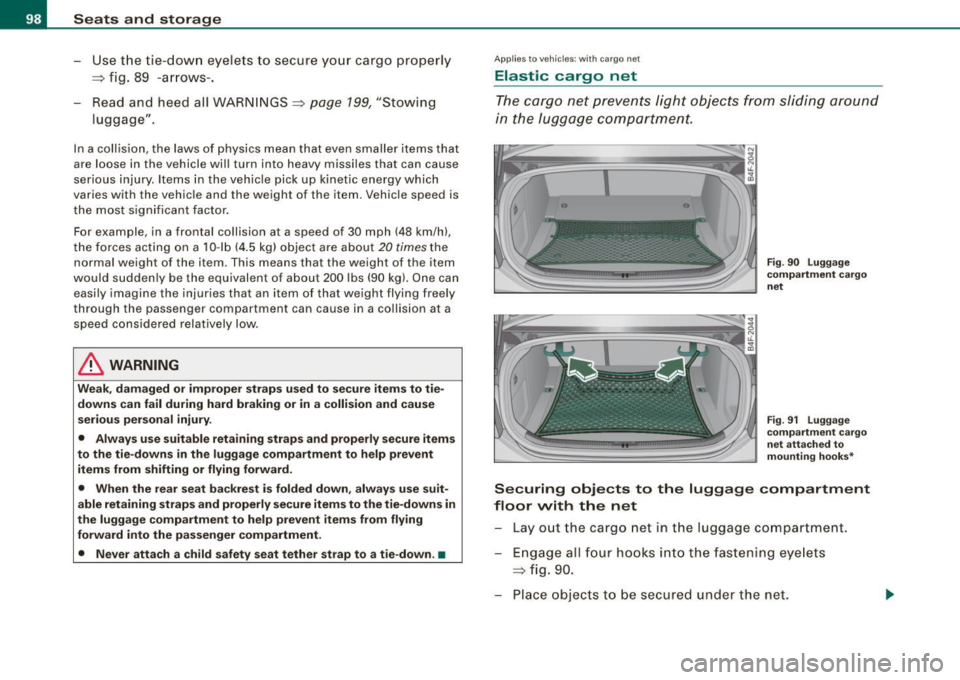
The cargo net prevents light objects from sliding around
in the luggage compartment.
Fig . 90 Luggage
compartment cargo
net
Fig. 91 Luggage
compartment cargo
net attached to
mounting hooks*
Securing objects to the luggage compartment
floor with the net
Lay out the cargo net in the luggage compartment .
Engage all four hooks into the fastening eyelets
=> fig. 90.
Place objects to be secured under the net.