2008 AUDI S6 warning
[x] Cancel search: warningPage 92 of 390
Seats and storage
& WARNING
• Never adjust the seatback while the vehicle is moving . If you
adjust your seat while the vehicle is moving, you are out of posi
tion . Never adjust the seatback when the vehicle is moving .
• To reduce the risk of injury in the case of sudden braking or
accident, front passengers must never ride in a moving vehicle
with the seatback reclined. Safety belts and the airbag system
only offer maximum protection when the seatback is upright and
the safety belts are properly positioned on the body. The more the
seatback is reclined, the greater the risk of personal injury from an
incorrect seating position and improperly positioned safety
belts. •
Lumbar support
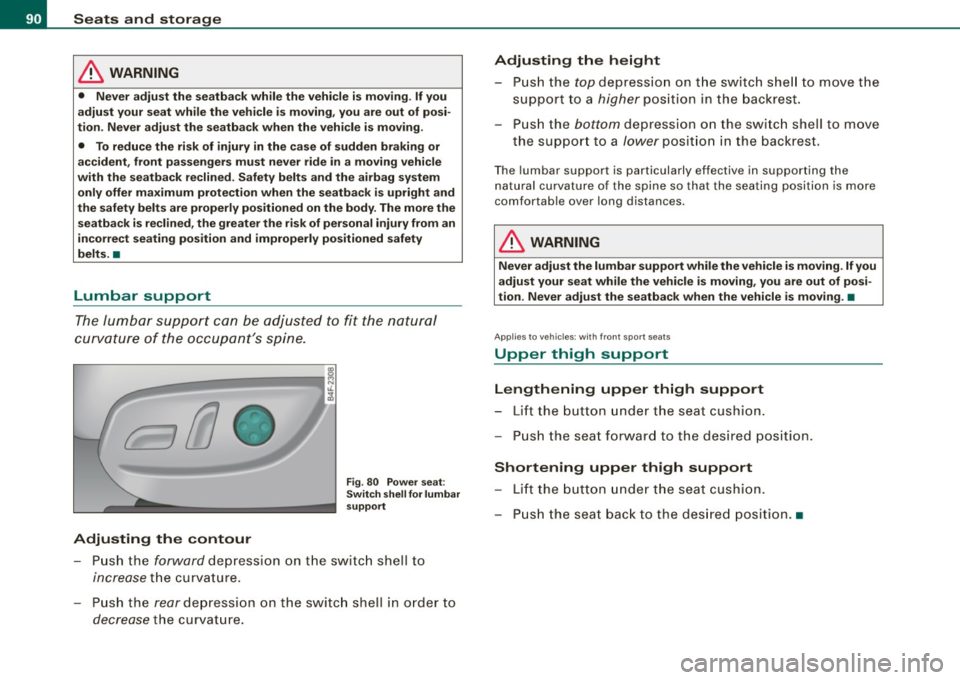
The lumbar support can be adjusted to fit the natural
curvature of the occupant's spine.
Adjusting the contour
Fig. 80 Power seat:
Switch shell for lumbar
support
- Push the forward depression on the switch shell to
increase the curvature.
- Push the
rear depression on the switch shell in order to
decrease the curvature.
Adjusting the height
- Push the top depression on the switch shell to move the
support to a
higher position in the backrest.
- Push the
bottom depression on the switch shell to move
the support to a
lower position in the backrest.
Th e lu mbar support is particularly effective in supporting the
natural curvature of the spine so that the seating position is more
comfortable over long distances.
& WARNING
Never adjust the lumbar support while the vehicle is moving. If you
adjust your seat while the vehicle is moving, you are out of posi
tion . Never adjust the seatback when the vehicle is moving. •
Appl ies to vehicles; with front spo rt seats
Upper thigh support
Lengthening upper thigh support
- Lift the button under the seat cushion.
- Push the seat forward to the desired position.
Shortening upper thigh support
-Lift the button under the seat cushion.
- Push the seat back to the desired position. •
Page 94 of 390

Seats and storage
If your vehicle is driven by other persons using your remote control key, you should save your individual seat position on one of the
memory buttons. You can recall your settings again simply and
conveniently by pressing the corresponding memory button. When
the vehicle is locked, these settings are automatically re-assigned to
the remote control key and stored.
& WARNING
• For safety reasons, the seat setting can only be recalled when
the vehicle is stationary -otherwise you risk having an accident .
• In an emergency, the recall operation can be stopped by
pressing the [
ON/OFF I button or by briefly pressing any given
memory button. •
Applies to vehicles: with seat memory
Activating remote control key memory
To be able to recall the stored settings with the remote
control key, the function hos to be activated in the MM/.
Fig . 82 MMI display :
Drivers' seat
- Select Seat adjustment in the CAR menu.
- Select
Driver's seat.
-Select Remote control key on to activate the remote
control key memory::::> fig. 82. •
Rear seats
General information
Safe transportation of passengers on the rear seats
requires proper safety precautions.
All passengers on the rear seats must be seated in compliance with
the safety guidelines explained in=>
page 202 and=> page 212. The
correct seating position is critical for the safety of front
and rear
seat passengers alike=>
page 196.
& WARNING
• Occupants in the front and rear seats must always be properly
restrained.
• Do not let anyone ride in the vehicle without the head restraints
provided. Head restraints help to reduce injuries.
• Loose items inside the passenger compartment, can fly
forward in a crash or sudden maneuver and injure occupants.
Always store articles in the luggage compartment and use the
fastening eyes, especially when the rear seat backs have been
folded down.
• Read and heed all WARNINGS=>
page 196, "Proper seating
positions for passengers in rear seats" .•
Page 95 of 390

Rear window shelf
You can place light articles of clothing on the rear
window shelf behind the seatback.
& WARNING
Whenever you are driving, do not leave any hard objects on the
rear window shelf or allow your pet to sit on the shelf. These could
become a hazard for vehicle occupants in the event of sudden
braking or a crash!
[ i] Tips
• A vent slot is located between the shelf and the rear window. Do
not block the vent with any items you may place on the rear window
shelf.
• Do not place bulky items on the rear window shelf as they would
restrict or block the driver's vision through the rear view mirror.•
Controls and equip
ment
Seats and storage
Head restraints
Adjusting head restraints, front seats
The head restraints must be adjusted properly to provide
protection.
Fig. 83 Front seats
head restraints
The head restraints on the front seats can be adjusted to
provide safe support to head and neck at the optimum
height. When optimally adjusted, the top of the restraint
should be level with the top of the head=>
page 197,
"Proper adjustment of head restraints".
Raising head restraint
-Grasp the side of the head restraint with both hands.
- Adjust the head restraints so that the top of the head
restraint is
at least level with your eyes or higher.
Lowering head restraint
-With one hand push down on the middle of the head
restraint.
- With the other hand press the release knob@=> fig. 83
and push the head restraint down. ..,
I • •
Page 96 of 390

Seats and stor ag e
- Adjus t the head restraints so that the top of the head
restraint is
at least l evel wit h your eyes or h igher .
Removing th e head re straint
- Pull the head restraint a ll the way up.
- Press t he release button @ and pull the restraint out and
clea r of t he seat .
Installing the h ead r estr aint
- Insert the rods in to the guides a nd pus h the restraint
back in unt il you hear it c lick.
Refer to::::> page 197, "Proper adjustment of head restraints" for
guidelines on how to adjust the height of the front head restraints
to suit the occupant's body s ize.
& WARNING
• Driving without he ad re str aint s or w ith head r estraint s th at are
not properl y adju sted in crea se s th e r is k of serio us o r fatal n eck
injury dr amatically.
• Rea d and h eed all WARNINGS =>
page 19 7.
[ i ] Tips
Correctly adjusted head restraints and safety belts are an extremely
ef fective combination of safety features .•
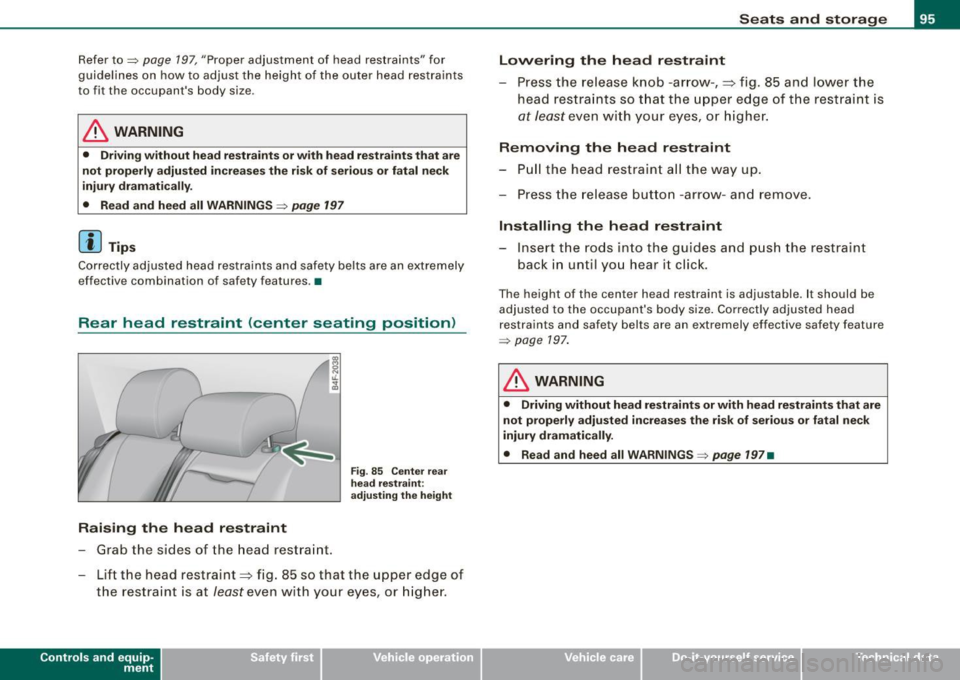
Rear head restraints (outer seating positions )
Ra is ing the he ad restr aint
- Grab the sides of the head restraint.
Fig . 8 4 Out er re ar
he ad rest rai nts:
a dju sting the height
- Lift the head restraint=;, fig. 84 so that the upper edge of
the restraint is
at least even w ith your eyes, preferably
h igher .
Lowering the head restraint
-Grab the sides of the he ad restraint .
- Press the release knob @,
=;, fig. 84 a nd push the head
restraint down . You should
not lower the top of the
rest rai nt below the leve l o f your eyes .
Removing the h ead r estr aint
- Pull the head restraint al l the way up.
- Press the release b utton @ and pull t he restraint out and
clear of the seat.
In sta lling the head re straint
- Insert the rods into the guides and push the restra in t
back in until you hear it clic k.
Page 97 of 390
Refer to=> page 197 , "Proper a djustment of head restraints" for
guidelines on how to adjust the height of the outer head restraints
to fit the occupant's body size .
& WARNING
• Driving without head restra ints or with he ad restraints that are
not properly adju sted increa ses the ri sk of seriou s or fatal neck
inj ury dram ati call y.
• Read and heed all WARNING S=>
page 197
[ i J Tip s
Correctly adjusted head restraints and safety belts are an extremely
effective combination of safety fea tures .•
Rear head restraint (center seating position)
I
Raising the head restraint
- Grab the sides of the head restraint .
Fig. 85 C enter rea r
he ad re stra in t:
adjust ing th e height
- Lift the head restraint=:> fig . 85 so that the u pper edge of
the restraint is at feast even with your eyes, or higher .
Contro ls and eq uip
ment
Seats and storag e
Lowering the head r estraint
- Press the release knob -ar row -, =:> fig. 85 and lowe r the
head restraints so t hat the uppe r edge of the restraint is
at feast even with your eyes, or higher .
Removing the head restraint
-Pull the head restraint a ll the way up .
- Press the re lease b utton -arrow- and remove .
Installing the head restraint
-Insert the rods into the guides and p ush the restraint
back in unt il you hear it clic k.
Th e height of th e center head restraint is adjustable . It should be
adjus ted to the occupant's body size . Correct ly adjusted head
restraints and safety belts are an extremely effective safety feature
=> page 197 .
& WARNING
• Driving without head re straint s or with head re straint s that are
not properly adj usted in cre ases the ris k of seriou s or fatal neck
injury dramaticall y.
• Read and heed all WARNINGS=>
page 197 •
Vehicle care I I irechnical data
Page 99 of 390
Returning backrest to upright position
-Pu sh rear seat back rest up until it engages~ &. You will
know that the sea t is proper ly engaged when you can not
see the red marki ng on the lever ®·
Locking the backrest
- Insert yo ur key into t he lock~ page 96, fig. 88 and t urn it
cloc kwise.
Unlocking the backrest
- Inse rt th e key i nto the lock a nd tu rn it co unter-cloc kw ise.
Stowing luggage
- For safe loading and securing of i tems read and follow
the guidelines on~ page 199.
The rear seatback is divided into two segments -one thi rd/two
thirds . You can fold down either or both parts o f the seatback.
T he release levers for the fold ing backrests can be locked when the
backrests are pro pe rly engaged in their up right pos itio n. This
prevents unauthorized access to the luggage compartment from
with in the veh icle. The release levers can on ly be locked with the
master key or emer gency key.
& WARNING
• The ba ck rest must al ways be securely lat ched so that the
safety b elt of the center seating position can work properly to help
protect the o ccupant .
• The backre st must be securely latched in po sition so that no
items contained in the luggage compartment can slide forward
upon sudden brak ing .
• Never allow safety belt s to be come damaged by being caught
in door or seat hardware .
Con tro ls and eq uip
ment
Seats and storag e
& WARNING !continued )
• Torn or frayed safety belts can tear and damaged belt hard
ware can b reak in a cra sh . Inspect the belts periodically . B elt s
showing damage to webbing , bindings, buckles , or retractor s
must be replaced .
& WARNING
Always read and heed WARNINGS ::::;, & in "Loading the luggage
c ompartment " on
page 199.
(D Note
When fo lding the backrest back into p lace, make sure the safety belt
does not get caught, because it can be damaged. A damaged belt
can fail to provide safe restraint . •
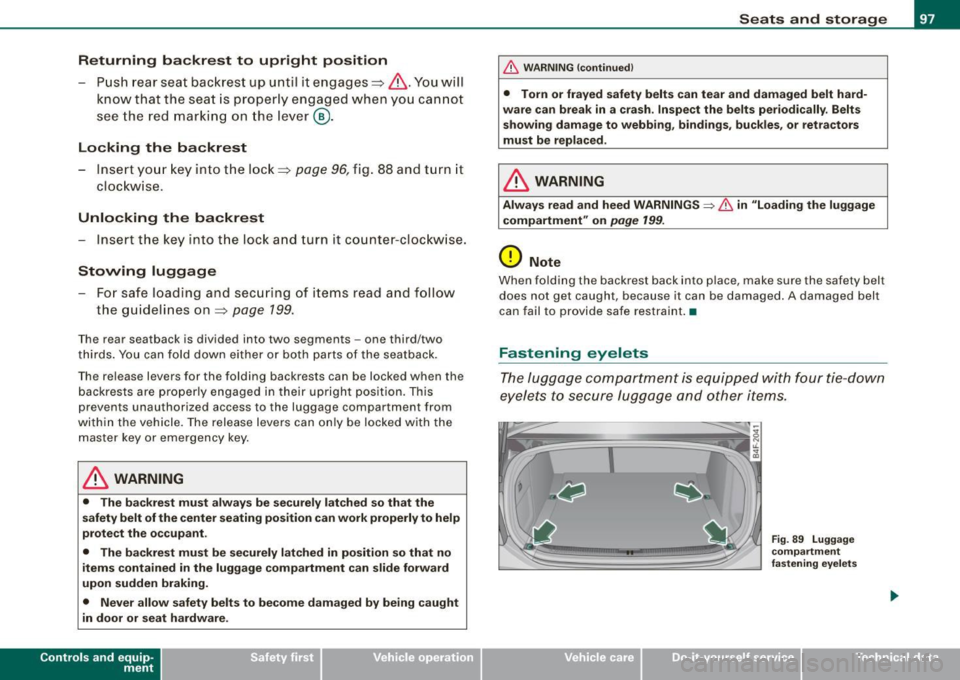
Fastening eyelets
T he luggage compartment is equipped with four tie -down
eyelets to secure lugga ge and other items.
Vehicle care I I
Fig . 8 9 Luggage
co mp artment
fastening eye lets
irechnical data
Page 100 of 390
Seats and storage
- Use the tie-down eyelets to secure your cargo properly
=> fig. 89 -arrows-.
Read and heed all WARNINGS=>
page 199, "Stowing
luggage".
In a collision, the laws of physics mean that even smaller items that
are loose in the vehicle will turn into heavy missiles that can cause
serious injury. Items in the vehicle pick up kinetic energy which
varies w ith the vehicle and the weight of the item. Vehicle speed is
the most significant factor.
For example , in a frontal collision a t a speed of 30 mph (48 km/h),
the forces acting on a 10 -lb (4.5 kg) object are about
20 times the
normal weight of the item . This means that the weight of the item
would suddenly be the equivalent of about 200 lbs (90 kg). One can
easily imagine the injuries that an item of that weight flying freely
through the passenger compartment can cause in a collision at a
speed considered relatively low .
& WARNING
Weak, damaged or improper straps used to secure items to tie
downs can fail during hard braking or in a collision and cause
serious personal injury.
• Always use suitable retaining straps and properly secure items
to the tie-downs in the luggage compartment to help prevent
items from shifting or flying forward.
• When the rear seat backrest is folded down, always use suit
able retaining straps and properly secure items to the tie-downs in
the luggage compartment to help prevent items from flying
forward into the passenger compartment.
• Never attach a child safety seat tether strap to a tie-down. •
App lies to veh ic les: with cargo net
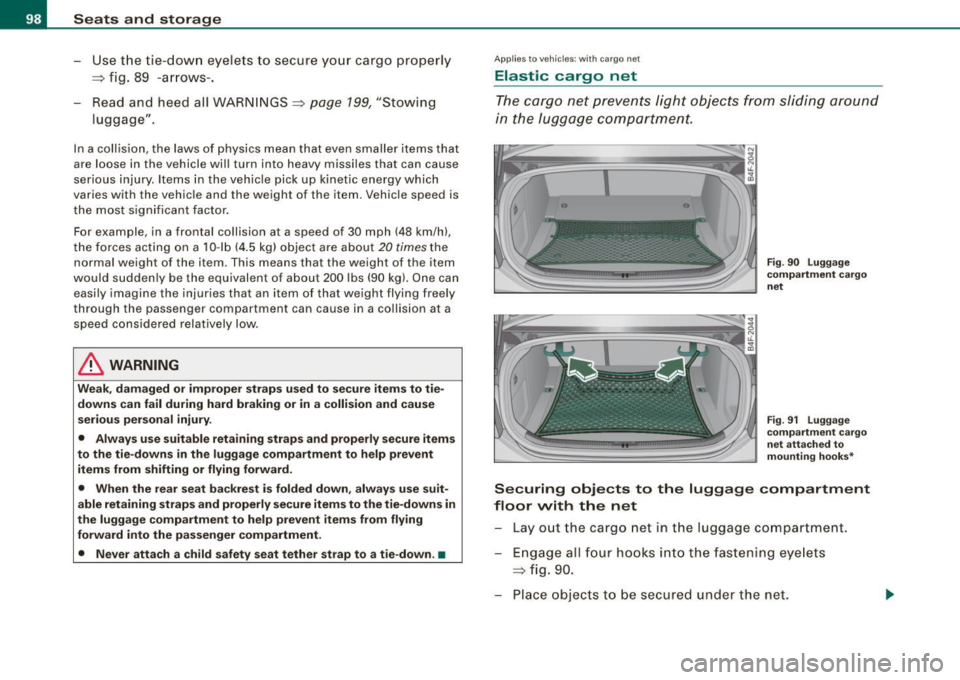
Elastic cargo net
The cargo net prevents light objects from sliding around
in the luggage compartment.
Fig . 90 Luggage
compartment cargo
net
Fig. 91 Luggage
compartment cargo
net attached to
mounting hooks*
Securing objects to the luggage compartment
floor with the net
Lay out the cargo net in the luggage compartment .
Engage all four hooks into the fastening eyelets
=> fig. 90.
Place objects to be secured under the net.
Page 101 of 390

Configuring the net to restrain small objects
-Lay out the cargo net in the luggage compartment.
- Engage the hooks on the cargo net in the fastening eyelets in the floor at the rear of the luggage compart
ment =>
page 98 , fig. 91.
Pull down the mounting hooks -arrows- located below
the base of the rear window.
- Connect each loop on the net to the corresponding hook
as illustrated.
- Place items inside the net.
Mounting hooks*
There are two mounting hooks under the base of the rear window
inside the luggage compartment. You can attach the cargo net as
well as
light objects to these hooks.
The mounting hooks are spring -loaded and will return to their
normal position when not in use .
& WARNING
For strength-related reasons, the mounting hooks can only be
used to secure objects weighing up to 10 lb. (5 kgl. Heavier objects
will not be adequately secured -there is a risk of injury. •
Con tro ls and eq uip
ment
Seats and storage
Left-side compartment
The DVD player for the navigation system* is in the left
side storage comportment.
• •
Fig . 92 Luggage
compartment : storage
compartment for DVD
player
Fig . 93 Luggage
compartment : DVD
player for the naviga
tion system
-To open, pull the handle forward => fig. 92.
CD-ROM player for Navigation System*
The CD-ROM playe r for the navigation system~ fig. 93 is located in
this storage compartment in the luggage compartment. Operation
is described in the instructions for the audio system. •
Vehicle care I I irechnical data