2008 AUDI S6 battery
[x] Cancel search: batteryPage 52 of 390

Opening and closing
Vehicle within range of the key
If the vehicle is within range of the key, the check light comes on
briefly once when a button is pressed .
Vehicle outside the range of the key
If the vehicle is outside the range of the key, the check light comes
on briefly once and then shows the status of the vehicle door locks:
• If the light is flashing quickly , the vehicle is not locked .
• If the light is flashing slowly, the vehicle is locked .
State of master key battery
If the check light does not come on, the battery is dead and has to
be replaced . In addition, when the battery is dead the symbol
appears in the instrument cluster display as well as the message:
Please replace master key battery
Battery replacement ~ page 50.
[ i J Tips
Please note that the current state of the vehicle door locks can only
be recalled with the master key that was last used to lock the
vehicle . It is possible that a different state is shown for the door
locks on the other master key which is not the same as that of the
vehicle .•
Master key battery replacement
Each master key contains a battery housed under the
cover.
Fig . 32 Master key :
opening the cover
We recommend having the battery changed by an autho
rized dealership. However, if you w ish to replace the dead
battery yourself, proceed as follows:
- Pry apart the base~ fig. 32 @and the
cover @carefully
with a coin.
- Remove the cover (arrow).
- Remove the dead battery from the cover.
- Install the new battery. Please make certain that the"+"
sign on the battery faces down. Correct polarity is shown
on the cover.
- Place the cover with the new battery on the key base and
press both parts together.
ci> For the sake of the environment
Dispose of dead batteries properly so as not to pollute the environ -
ment . _,,,
Page 53 of 390
![AUDI S6 2008 Owners Manual [ i] Tips
The replacement battery must be the same specification as the original. •
Electronic immobilizer
The immobilizer helps to prevent unauthorized use of
your vehicle.
A c](/manual-img/6/57596/w960_57596-52.png "AUDI S6 2008 Owners Manual [ i] Tips
The replacement battery must be the same specification as the original. •
Electronic immobilizer
The immobilizer helps to prevent unauthorized use of
your vehicle.
A c")
[ i] Tips
The replacement battery must be the same specification as the original. •
Electronic immobilizer
The immobilizer helps to prevent unauthorized use of
your vehicle.
A computer chip inside your key automatically deactivates the elec
tronic immobilizer when you insert the key in the ignition lock, or on
vehicles with Advanced Key *, when the key is inside the vehicle.
When you remove the key from the ignition lock, or on vehicles with
Advanced Key, when you remove the key from the vehicle, the elec
tronic immobilizer is automatically activated once again .
If an unauthorized key was used , SAFE is displayed continuously in
the odometer display field.
& WARNING
Always take the key with you when you leave the vehicle. The key
can disarm the electronic engine immobilizer and permit an unau
thorized person to start the engine and enable operation of the
vehicle systems such as power window or power sunroof* leading
to serious personal injury.
[ i] Tips
• Your engine can only be started using the factory -equipped key.
• You may no t be able to start your vehicle if an ignition key of a
different vehicle make is also located on your set of keys. •
Controls and equip
ment
Opening and closing
Valet key function
The valet key function prevents unauthorized persons
from opening the glove comportment or rear lid.
•
Fig . 33 Center
console: button for
valet key function
Activating and deactivating the function
Insert the master key into the ignition lock and switch on
the ignition.
Press the [VALET) button~ fig. 33 to activate/ deactivate
the function as desired. The indicator light in the button
illuminates when the function is active.
- Remove the master key from the ignition lock.
Hand over only the
valet key~ page 48, fig. 29 to the
person who will take charge of the vehicle.
When the function is switched on, the buttons for opening the rear
lid and glove compartment have no function . However, please note
the following exceptions:
Exceptions
If the ignition has been switched on using the master key, you can
still open the glove compartment .
As long as the ignition is switched off, you can still open the rear lid
using the rear lid button on the master key
.c::5. The same holds true .,,
I • •
Page 64 of 390

Opening and closing
H ow is th e a nti-th eft alarm s yste m swi tched off ?
The anti -theft alarm sys tem is switched off only whe n you un lock
your vehicle. If you do not open a door within 60 seconds after you have un locked with the remote control , the vehicle will lock itself
again automatically.
When will the anti -th eft alarm syst em be trigg ered ?
When the vehicle is locked, the alarm system monitors and protects
the following parts of the vehic le:
• engine compartment
• luggage compartment
• doors
• vehicle incline
• ignition
When the system is activated, the alarm will be trigge red if one of
the doors, the engine hood or the rear lid are opened, or if the igni
t ion is turned on or if the veh icle incline has been changed. The an ti
theft a larm system will also go off when the battery is disconnected.
You can also trigger the alarm by pressing the PA NIC button on your
remote control. This w ill alert other people in case of emergency.
Press the
PANIC button again to turn off the alarm.
H ow i s th e ant i-th eft al arm swit ch ed off whe n
tr igg ered ?
The alarm system is switched off when you unlock the vehic le or
when the ignition is switched on . T he alarm will a lso switch itself off
when it comes to the end of its cycle .
Emergency flasher and horn
The emergency flasher wi ll blink briefly and the horn sounds when
the doors, engine hood and rear lid are properly closed.
If the emergency flashers do not blink, or the horn does not sound ,
check the doors, engine hood and rear lid to make sure they are
properly c losed . If you close a doo r, the hood or the rear lid w ith the anti
-theft a larm switched on, the emergency flashers will blink and
t he horn will sound only af ter you have closed the door or l id .
Ii ] Tips
Fo r the anti -theft a larm system to function proper ly, make sure a ll
vehic le doors and windows are closed before leaving the vehicle .•
Tilt sensors 1Q
The tilt sensors trigger an alarm if they detect vehi cle
movement.
F ig . 4 5 Driver 's doo r:
tilt sensor swit ch
Sw itch o ff th e til t sensors if you ar e go ing to have your
vehic le transporte d.
Switch off the tilt sensors Press the switch
~ located in the driver's door~ fig. 45.
Lock the ve hicle .
When you turn off the tilt sensors, the diode in the switch~ will illu
minate. Also, the indicator light in the door trim will illuminate for
about three seconds. After you lock the vehicle, the indicator light
in the door t rim wil l bl ink quick ly for about three seconds . After that,
the blinking s lows down. .,.
Page 67 of 390
[ i J Tips
The windows can still be opened and closed for about ten minutes
after the ignition has been turned off. The power windows are not
shut off until one of the front doors is opened .•
Convenience close /open feature vvith the
lock in the driver's door
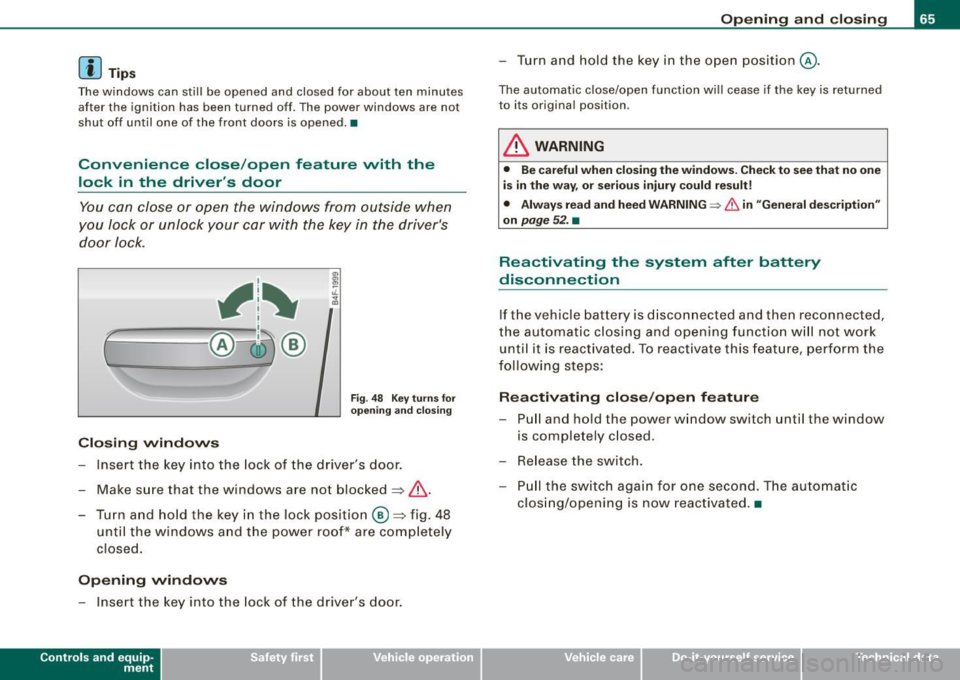
You can close or open the windows from outside when
you Jock or unlock your car with the key in the driver's
door lock.
, 1~
r~ -====-- @~ ®
Closing windows
Fig. 48 Key turns for
opening and closing
Insert the key into the lock of the driver's door.
Make sure that the windows are not blocked~
/n..
- Turn and hold the key in the lock position @~fig. 48
until the windows and the power roof* are completely
closed.
Opening windows
- Insert the key into the lock of the driver's door.
Contro ls and eq uip
ment
Opening and closing
- Turn and hold the key in the open position@.
The automatic close/open function will cease if the key is returned
to its original position .
& WARNING
• Be careful when closing the windows. Check to see that no one
is in the way, or serious injury could result!
• Always read and heed WARNING=>
& in "General description"
on
page 52. •
Reactivating the system after battery
disconnection
If the vehicle battery is disconnected and then reconnected,
the automatic closing and opening function will not work
until it is reactivated. To reactivate this feature, perform the
following steps:
Reactivating close/open feature
- Pull and hold the power window switch until the window
is completely closed .
- Release the switch.
- Pull the switch again for one second. The automatic
closing/opening is now reactivated. •
Vehicle care I I irechnical data
Page 77 of 390
0 Note
Do not use the high beam or headlight flasher if you know that these
could blind oncoming traffic.•
Interior lights
Front interior lights
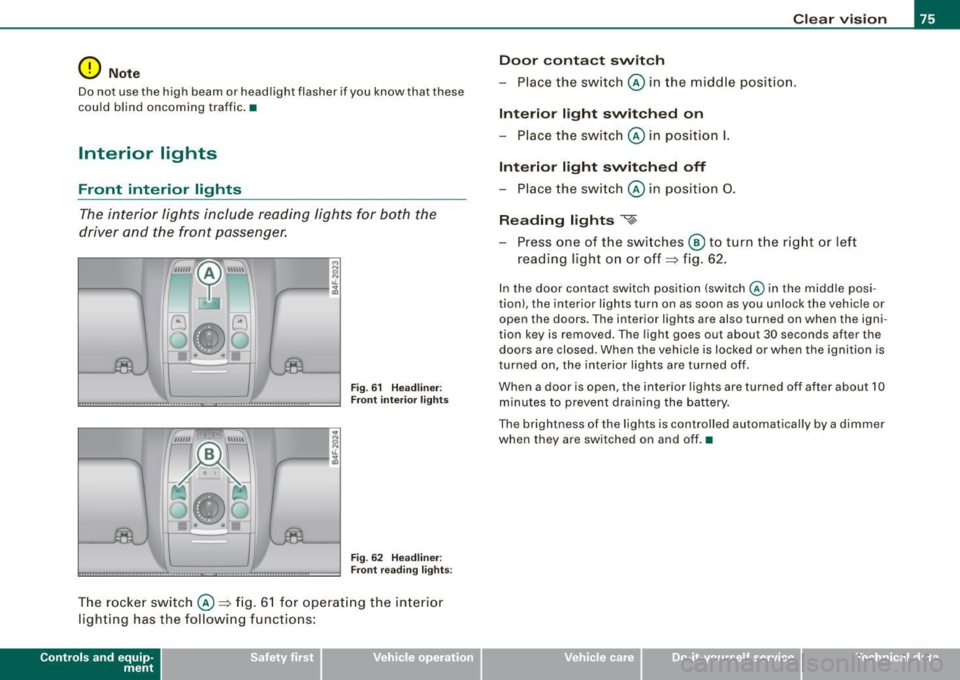
The interior lights include reading lights for both the
driver and the front passenger.
""'' ~ \\\\\
Fig. 61 Headliner :
Front interior lights
Fig . 62 Headliner :
Front reading lights :
The rocker switch @=:>fig. 61 for operating the interior
lighting has the following functions:
Contro ls and eq uip
ment
Clear vision
Door contact switch
- Place the switch @ in the middle position.
Interior light switched on
-Place the switch @ in position I.
Interior light switched off
- Place the switch @ in position 0.
Reading lights '<~
-Press one of the switches @ to turn the right or left
reading light on or off=:> fig. 62.
In the door contact switch position (switch @ in the middle posi
tion) , the interior lights turn on as soon as you unlock the vehicle or
open the doors. The interior lights are also turned on when the igni
tion key is removed . The light goes out about 30 seconds after the
doors are closed. When the vehicle is locked or when the ignition is
turned on, the interior lights are turned off .
When a door is open, the interior lights are turned off after about 10
minutes to prevent draining the battery.
The brightness of the lights is controlled automatically by a dimmer
when they are switched on and off. •
Vehicle care I I irechnical data
Page 108 of 390

• ..__S_ e_a _ t_ s_ a_ n_ d_ s_t _o _r_ a-' g==- e ________________________________________________ _
Before you purchase any accessories, always read and follow the
inf orma tion in
=> page 368, "Addi tional acce sso ries and parts
replacement".
& WARNING
Improper use of the cigarette lighter can cause ser ious injury or
start a fire .
• Be careful when using the cigarette lighter . If you do not pay
attention to what you are doing when you are u sing the cigarette
lighter you can burn yourself .
• The cigarette lighter and soc ket remain fu nctional even if the
ignition is sw itched off or the ignition key is removed . Never leave
c hildren in side the vehicle without supervision.
0 Note
To avoid damaging the socket, on ly use p lugs that fit pro perly .
[ i ] Tips
When the engine is o ff an d accessories are st ill plugged in and are
on, the vehicle battery can stil l be dra ined. •
Outlet
The ou tlet in the f ront an d re ar cen ter console m ay be
u sed fo r 12-v olt ap pliances.
- Fo ld th e cov er fo r th e o utlet do wn.
Fig. 103 Center
c o n sole , front : 12 -volt
outlet
Re ar ce nter console: remove the 12 V cove r from t he
out le t.
P lug in appliance to be used .
The outlet may be used for 1 2-vo lt appliances with maximum
consump tion o f up to 100 watts, such as a flash l ight, small vacu um
cleaner, etc.
Befo re yo u pu rchase any accessories, al ways read and f ollow t he
information in=>
page 368, "Additional accessories and parts
r eplacement".
& WARNING
The outlet plus any applian ces plugged into it remain functional
even if the ignition is swit ched off or the ignition key is removed .
Never leave children inside the vehicle without supervision. .,_
Page 109 of 390
![AUDI S6 2008 Owners Manual ________________________________________________ S_e_ a_ ts_ a_ n_d _ s_t _o _r_ a ....; g::;. e _ __._
0 Note
To avoid damaging the socket, only use plugs that fit properly.
[ i] Tips](/manual-img/6/57596/w960_57596-108.png "AUDI S6 2008 Owners Manual ________________________________________________ S_e_ a_ ts_ a_ n_d _ s_t _o _r_ a ....; g::;. e _ __._
0 Note
To avoid damaging the socket, only use plugs that fit properly.
[ i] Tips")
________________________________________________ S_e_ a_ ts_ a_ n_d _ s_t _o _r_ a ....; g::;. e _ __._
0 Note
To avoid damaging the socket, only use plugs that fit properly.
[ i] Tips
When the engine is off and accessories are still plugged in and are
on, the vehicle battery can still be drained. •
Storage
General overview
There are numerous places to store items in your vehicle.
Glove compartment
Storage compartment in roof
Coat hooks
Storage compartment in the trunk
& WARNING
~ page 107
~ page 108
~ page 109
~ page99
• Always remove objects from the instrument panel. Any items
not stored could slide around inside the vehicle while driving or
when accelerating or when applying the brakes or when driving
around a corner.
• When you are driving make sure that anything you may have
placed in the center console or other storage locations cannot fall
out into the footwells. In case of sudden braking you would not be
able to brake or accelerate.
• Any articles of clothing that you have hung up must not inter
fere with the driver's view. The coat hooks are designed only for
lightweight clothing. Never hang any clothing with hard, pointed
or heavy objects in the pockets on the coat hooks. During sudden
Con tro ls and eq uip
ment
& WARNING !continued)
braking or in an accident -especially if the airbag is deployed -
these objects could injure any passengers inside the vehicle. •
Glove compartment
The media player is in the glove compartment.
To open glove compartment
Fig. 104 Unlocking
button for glove
compartment
Press the button ::!}...--==> fig. 104 (arrow) - the lid opens
automatically.
To close glove compartment
Push the glove compartment lid up until the lock
engages.
In the glove compartment lid you will find a place to store a pen and
a pad of paper.
CD changer*
The CD changer for the radio system and the Navigation drive* is located in the glove compartment . How to change CDs is described
in the pertinent Owner's Manual.
tJ,,,
Vehicle care I I irechnical data
Page 112 of 390

• .___w_ a_ rm __ a_ n_ d_ c_o _l_d ________________________________________________ _
Warm and cold
Climate control
Description
The air conditioner is fully automatic and is designed to
maintain a comfortable and uniform climate inside the
vehicle.
We recommend the follow ing settings:
- Set the temperature to 75 °F (+23 °C).
- Press the !AUTO
I button.
With this setting, you attain maximum comfort in the least amount
of time. Change this setting, as desired, to meet your personal needs.
The climate controls are a combination of heating, ventilation and cooling systems, which automatically reduce humidity and cool the
air inside your vehicle.
The air temperature, air flow and air distribution are automatically
regulated to achieve and maintain the desired passenger compart
ment temperature as quickly as possible.
The system automatically compensates for changes in outside
temperature and for the intensity of the sunlight entering the
vehicle. We recommend you use the
Automatic mode=> page 113
for year-round comfort.
Please note the following:
Turn on the air conditioner to reduce humidity in the vehicle. This also prevents the windows from fogging up.
When the outside temperature is high and the air is very humid,
condensation from the evaporator may drip under the vehicle. This
is normal and does not indicate a leak. If the outside temperature is low,
the fan normally only switches to
a higher speed once the engine coolant has warmed up sufficiently.
The air conditioner temporarily switches off when you drive off from
a standstill using full throttle to save engine power.
The compressor also switches off if the coolant temperature is too
high, so that the engine can be adequately cooled under extreme
loads.
Air pollutants filter
The air pollutants filter (a combined particle filter and activated
charcoal filter) reduces or prevents outside air pollution (dust, or
pollen) from entering the vehicle.
The air pollutants filter must be changed at the intervals specified
in your Maintenance
& Warranty booklet, so that the air conditioner
can properly work.
If you drive your vehicle in an area with high air pollution, the filter
may need to be changed more frequently than specified in your
Audi Maintenance
& Warranty booklet. If in doubt, ask your autho
rized Audi Service Advisor for advice.
Key coded settings
The air conditioner settings selected are automatically stored and
assigned to the key being used. When the vehicle is started, the air
conditioner automatically selects the settings assigned to that key.
This way every driver will maintain his/her own personal settings
and does not have to reset them manually.
If a different driver uses your key and changes the air conditioner
settings, the latest adjustments will erase and replace the settings
you have stored.
Energy management
To prevent the battery from being discharged and to restore the
balance of energy, components which require large amounts of