2007 VOLVO XC90 ECU
[x] Cancel search: ECUPage 145 of 268

2007 Volvo XC90
WARNING!
l Remember that the power brakes and power steering will not function when\
engine is not running. The braking and
steering systems will function but the brake pedal pressure required is \
3 - 4 times above normal and greater steering
effort must be exerted.
l The towing eyelets must not be used for pulling another vehicle out of a\
ditch or for any similar purpose involving
severe strain.
l Do not use the towing eyelets to pull the vehicle up onto a flat bed tow\
truck.
Towing vehicles with front wheel drive/All Wheel Drive
Volvo recommends the use of flat bed equipment.
If wheel lift equipment must be used, please use extreme caution to help\
avoid damage to the vehicle. In this case, the
vehicle should be towed with the rear wheels on the ground if at all pos\
sible.
If it is absolutely necessary to tow the vehicle with the front wheels o\
n the ground, please refer to the towing information
on the previous page.
CAUTION!
Sling-type equipment applied at the front will damage radiator and air c\
onditioning lines.
It is equally important not to use sling-type equipment at the rear or a\
pply lifting equipment inside the rear wheels;
serious damage to the rear axle may result.
If the vehicle is being towed on a flat bed truck, the towing eyelets mu\
st not be used to secure the vehicle on the flat
bed. Consult the tow truck operator.
WARNING!
Do not use the towing eyelets to pull the vehicle up onto a flat bed tow\
truck.
pg. 136 Starting and driving
Jump starting
file:///K|/ownersdocs/2007/2007_XC90/07xc90_06.htm (21 of 32)12/30/200\
6 5:53:44 PM
Page 176 of 268

2007 Volvo XC90
guide it around the rear axle until it is securely seated in the storage\
area.
- When it is no longer possible to turn the crank any further, check tha\
t the spare wheel is securely in
position in the storage compartment.
Jack attachments
There are two attachment points for the jack on each side of the vehicle\
. These attachment points are
under the center of each door.
WARNING!
There is an attachment point on each side of the vehicle located under t\
he pillars between the front
and rear doors. This point is used during the production process only, a\
nd is NOT intended for
attaching the jack.
file:///K|/ownersdocs/2007/2007_XC90/07xc90_07.htm (20 of 23)12/30/200\
6 5:53:47 PM
Page 182 of 268

2007 Volvo XC90
WARNING!
l When the vehicle is driven immediately after being washed, apply the bra\
kes several times in order
to remove any moisture from the brake linings.
l Engine cleaning agents should not be used when the engine is warm. This \
constitutes a fire risk.
Automatic washing - simple and quick
l We do NOT recommend washing your vehicle in an automatic wash during the\
first six months
(because the paint will not have hardened sufficiently).
l An automatic wash is a simple and quick way to clean your vehicle, but i\
t is worth remembering that
it may not be as thorough as when you yourself go over the vehicle with \
sponge and water. Keeping the
underbody clean is most important, especially in the winter. Some automa\
tic washers do not have
facilities for washing the underbody.
l Before driving into an automatic car wash, make sure that side view mirr\
ors, auxiliary lamps, etc, are
secure, and that any antenna(s) are retracted or removed. Otherwise th\
ere is risk of the machine
dislodging them.
Exterior lighting
Condensation may form temporarily on the inside of the lenses of exterio\
r lights such as headlights, fog
lights, or tail lights. This is normal and the lights are designed to wi\
thstand moisture. Normally,
condensation will dissipate after the lights have been on for a short ti\
me.
Polishing and waxing
l Normally, polishing is not required during the first year after delivery\
, however, waxing may be
beneficial.
l Before applying polish or wax the vehicle must be washed and dried. Tar \
spots can be removed with
kerosene or tar remover. Difficult spots may require a fine rubbing comp\
ound.
l After polishing use liquid or paste wax.
l Several commercially available products contain both polish and wax.
l Waxing alone does not substitute for polishing a dull surface.
l A wide range of polymer-based car waxes can be purchased today. These wa\
xes are easy to use and
produce a long-lasting, high-gloss finish that protects the bodywork aga\
inst oxidation, road dirt and
fading.
l Do not polish or wax your vehicle in direct sunlight (the surface of th\
e vehicle should not be warmer
than 113° F (45° C).
file:///K|/ownersdocs/2007/2007_XC90/07xc90_08.htm (3 of 7)12/30/2006 \
5:53:48 PM
Page 200 of 268
2007 Volvo XC90
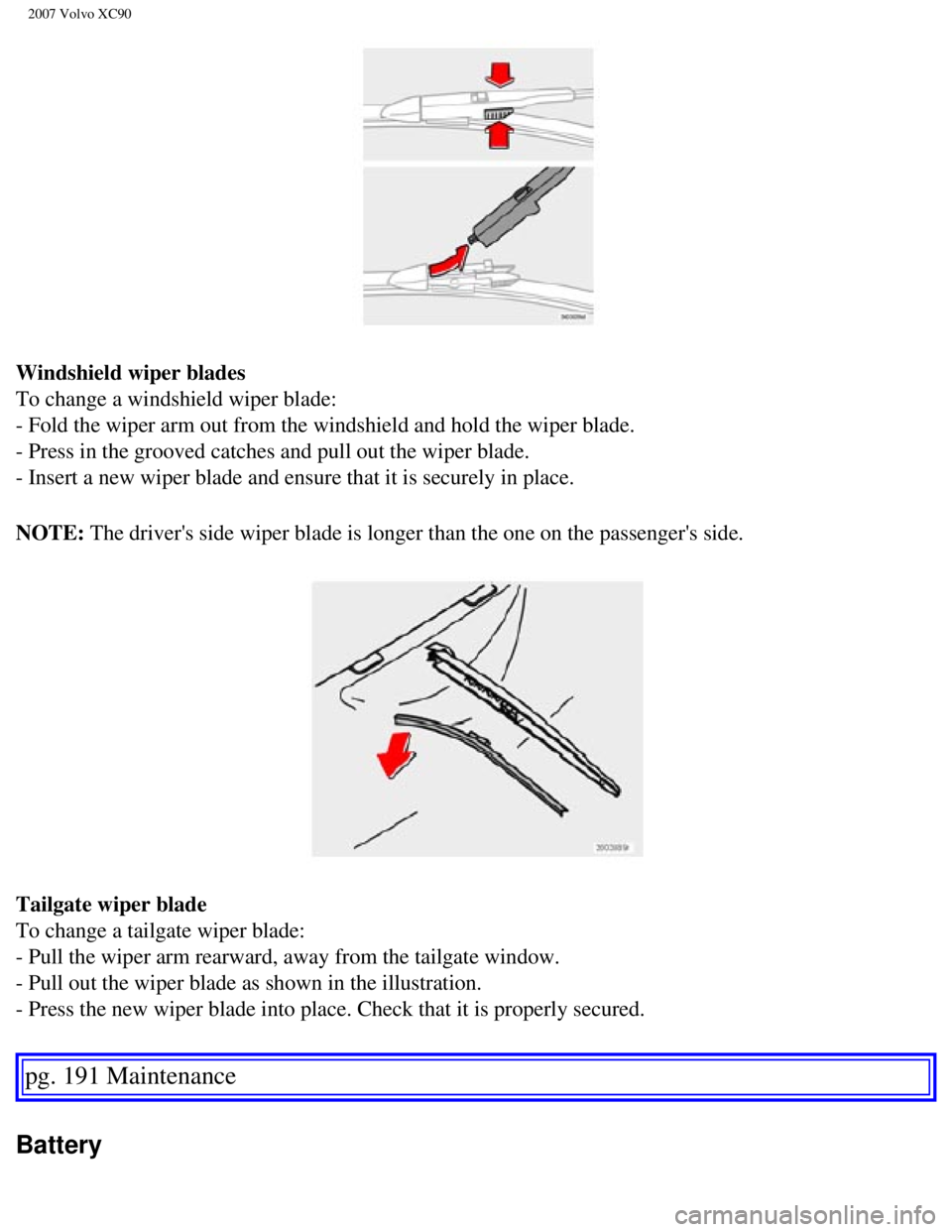
Windshield wiper blades
To change a windshield wiper blade:
- Fold the wiper arm out from the windshield and hold the wiper blade.
- Press in the grooved catches and pull out the wiper blade.
- Insert a new wiper blade and ensure that it is securely in place.
NOTE: The driver's side wiper blade is longer than the one on the passenger's\
side.
Tailgate wiper blade
To change a tailgate wiper blade:
- Pull the wiper arm rearward, away from the tailgate window.
- Pull out the wiper blade as shown in the illustration.
- Press the new wiper blade into place. Check that it is properly secure\
d.
pg. 191 Maintenance
Battery
file:///K|/ownersdocs/2007/2007_XC90/07xc90_09.htm (14 of 37)12/30/200\
6 5:53:50 PM
Page 204 of 268

2007 Volvo XC90
switching off the ignition before disconnecting the battery so that all \
information in the vehicle's
electrical system can be stored in the control modules.
pg. 193 Maintenance
Battery
- Disconnect the negative (ground) cable first.
- Disconnect the positive cable and pull the ventilation hose (see next\
page) from the battery.
- Lift out the old battery and put a new battery into place.
- Connect the positive cable first.
- Connect the negative (ground) cable. - Be sure that the ventilation \
hose (see below) is securely
connected to the battery and that the other end of the hose is properly \
routed through the ventilation
opening in the floor of the battery compartment.
- Reinstall the cover and retaining bracket and screw it securely in pla\
ce.
file:///K|/ownersdocs/2007/2007_XC90/07xc90_09.htm (18 of 37)12/30/200\
6 5:53:50 PM
Page 247 of 268

2007 Volvo XC90
l By pressing and holding the buttons to start the scroll function. The scrolling function
begins slowly and increases speed after approximately 5 seconds. Release\
the button to listen to the
currently displayed channel.
l Through direct channel entry
Direct channel entry
The Sirius satellite channels are numbered consecutively throughout all \
of the categories. To access a
channel directly:
- Press MENU and scroll to "Direct channel entry."
- Use the numerical keypad to enter the channel's number. Press EXIT if \
necessary to erase a digit.
- Press ENTER. The radio will tune to this channel, even if it belongs t\
o a category other than the
currently selected one.
NOTE:
l The numbers of skipped or locked channels will not be displayed.
l If a channel is locked, the access code must be entered before the chann\
el can
pg. 230 Audio
Sirius satellite radio (option or retailer-installed accessory)
be selected. See "Unlocking a channel" on page 231.
Scanning
SCAN automatically searches through the list of satellite channels. Storing a channel
A total of 20 satellite channels can be stored; 10 channels each for Sir\
ius 1 and 2.
l A long press on one of the number keys stores the currently tuned channel on t\
hat key.
l A short press on a number key while the radio is in Sirius 1or 2 mode will tune\
to the preset satellite
channel stored on that button, regardless of the currently selected chan\
nel category.
Song Seek and Song Memory
The Song Seek and Song Memory functions provide both audio and visual no\
tification when Sirius is
broadcasting your favorite songs. Song Seek enables you to store the nam\
e of the song for future
advance notification when that song is being played. The Song Memory fea\
ture makes it possible to
view all of the current songs that are stored in memory.
Song memory
Up to ten songs can be saved in the system's memory.
- Press MENU.
- Scroll to "Add song to song mem." and follow the instructions shown in\
the display.
If a new song is selected when the memory is full, you will be prompted \
to press ENTER to delete the
file:///K|/ownersdocs/2007/2007_XC90/07xc90_11.htm (14 of 26)12/30/200\
6 5:53:54 PM
Page 256 of 268
2007 Volvo XC90
See Audio Settings in the FM Menu.
AUX Menu (option)
1. AUX input vol
2. Audio Settings
1
See Audio Settings in the FM Menu
1. Certain audio systems
pg. 237 Audio
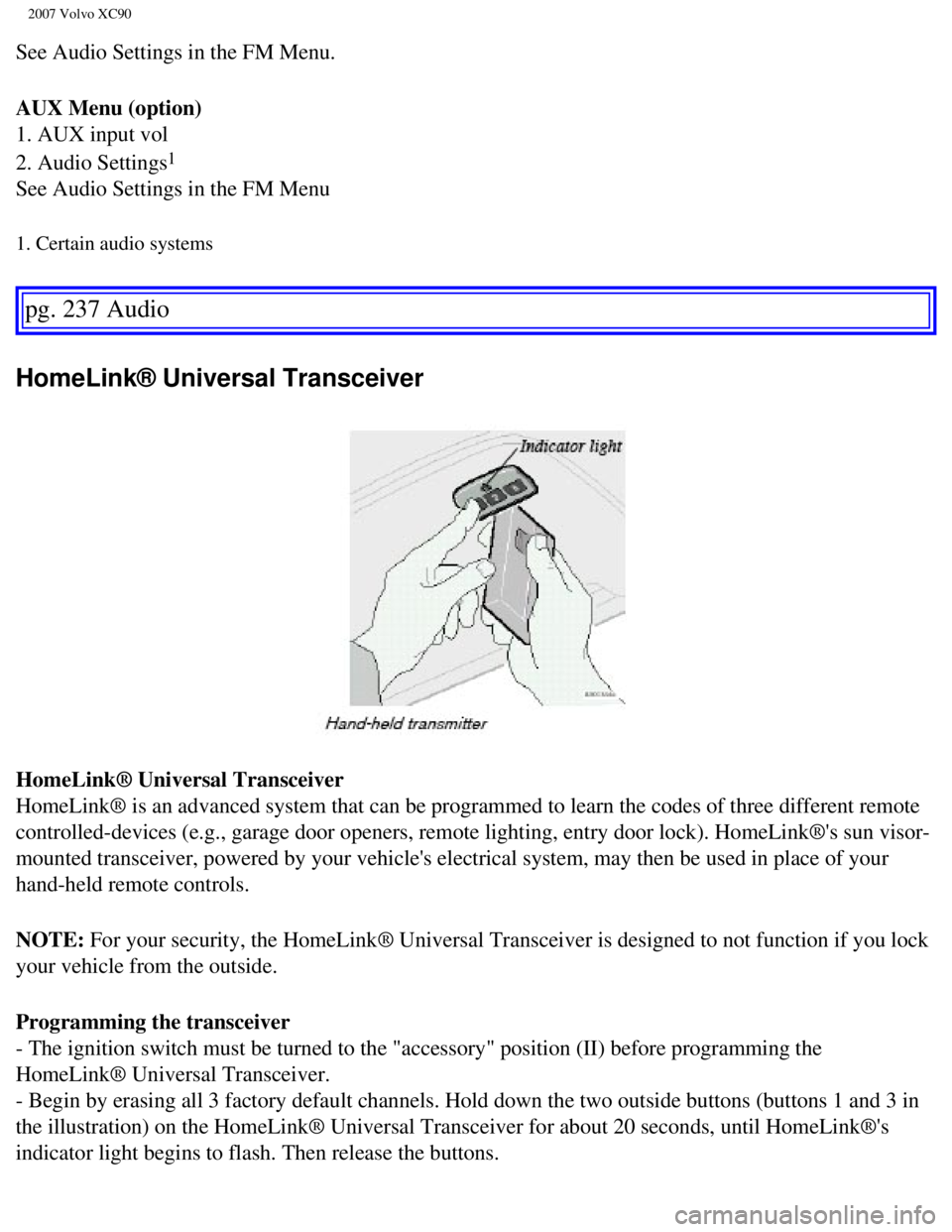
HomeLink® Universal Transceiver
HomeLink® Universal Transceiver
HomeLink® is an advanced system that can be programmed to learn the c\
odes of three different remote
controlled-devices (e.g., garage door openers, remote lighting, entry d\
oor lock). HomeLink®'s sun visor-
mounted transceiver, powered by your vehicle's electrical system, may th\
en be used in place of your
hand-held remote controls.
NOTE: For your security, the HomeLink® Universal Transceiver is designed t\
o not function if you lock
your vehicle from the outside.
Programming the transceiver
- The ignition switch must be turned to the "accessory" position (II) \
before programming the
HomeLink® Universal Transceiver.
- Begin by erasing all 3 factory default channels. Hold down the two out\
side buttons (buttons 1 and 3 in
the illustration) on the HomeLink® Universal Transceiver for about 2\
0 seconds, until HomeLink®'s
indicator light begins to flash. Then release the buttons.
file:///K|/ownersdocs/2007/2007_XC90/07xc90_11.htm (23 of 26)12/30/200\
6 5:53:54 PM
Page 258 of 268

2007 Volvo XC90
manufactured after 1996:
l Refer to the garage door opener owner's manual for verification.
l If your hand-held transmitter appears to program the HomeLink® Univer\
sal Transceiver but the
programmed button does not activate the garage door, your garage door op\
ener may have a rolling code.
l Press the programmed HomeLink® button. If the garage door opener has \
the rolling code feature, the
HomeLink® indicator light flashes rapidly and then glows steadily aft\
er approximately 2 seconds.
To train a rolling code garage door opener, follow these instructions after programming the desired
transceiver button according to "Programming the transceiver." The help \
of a second person may make
training easier.
- Locate the training button on the garage door opener motor head unit. \
The location and color of the
training button may vary. If you encounter difficulty, refer to the gara\
ge door opener owner's manual or
call toll-free 1-800-355-3515 (Internet:
www.HomeLink.com).
- Press the "training" button on the garage door opener motor head unit \
until the "training" light comes
on.
- Press and release the programmed HomeLink® button. Press and releas\
e the programmed HomeLink®
button a second time to complete the training process.
- Some garage door openers may require you to do this procedure a third \
time to complete the training.
- The programmed button on your HomeLink® Universal Transceiver shoul\
d now operate your garage
door opener. The original hand-held transmitter can also be used, as des\
ired, to operate the garage door.
The remaining two HomeLink® buttons can be programmed in the same way\
. In the event of any
problems in programming the HomeLink® Universal Transceiver, call tol\
l-free 1-800-355-3515
(Internet:
www.HomeLink.com).
pg. 239 Audio
HomeLink® Universal Transceiver
Operating the HomeLink® Universal Transceiver
Once programmed, the HomeLink® Universal Transceiver can be used in p\
lace of your hand-held
transmitters.
To operate, the key must be turned to the "accessory" position (II) or\
the engine must be running. Press
the programmed HomeLink® button to activate the garage door, driveway\
gate, security lighting, home
security system, etc.
Your original hand-held transmitters may, of course, be used at any time\
.
Erasing programmed buttons
Individual buttons cannot be erased. To erase all three programmed butto\
ns:
- Turn the ignition key to the "accessory" position (II).
file:///K|/ownersdocs/2007/2007_XC90/07xc90_11.htm (25 of 26)12/30/200\
6 5:53:54 PM