2007 VOLKSWAGEN JETTA Premium Sound
[x] Cancel search: Premium SoundPage 454 of 477

Booklet 3.4 Premium Sound System ®
System information
The follow ing sys tem messages can be di s
pla yed:
XM Messages
System messages
ANTENNA
UPDATING
N O SIGNA L
LOADING
OFF AIR
NO SA T
Sirius Messages
AN TENNA
LI NKING
CD
Taking care of your audio CDs
To assure a so und repro ducti on of the hi gh est
qu alit y, qu alit y, m ake su re you r CDs are clean
and fr ee of scratc hes o r any other type of
da mage.
Cleaning yo ur CD s
For routine cleaning, w ipe the playing surf ace
w ith a clea n, soft, lint-free cloth from th e ce nter
of the disc
to th e out er ed ge. If the surfa ce is
h eav ily soiled, dam pe n a clean soft cloth in a so
l ution of mild neutr al commercia l d eterge nt be
fore clea ning th e disc .
Note
• Never use fluid s su ch as benze ne, pa int
thinner or re cord cle aner s, otherw ise yo u may
dama ge the CD surfac e! Preventa tive meas ures
for lase r uni rs .
Meaning
No antenna is connected to tuner, or there
a re loos e plug contac ts on the antenna cable
Your syste m is being updated
The SAT tuner is present ly not receiv ing an y sa t-
e llite signa l
Your provider is se ndin g info rm ation w hich th e
sys tem is cur rentl y storing
Th e station selected h as shut down its program
(e.g. c hildren 's channel at night)
No conne ction can be establish ed to the SAT
tune r No SAT tuner exists
No anten na is co nnected t o th e tuner, or there
are loose plug contacts on the a ntenn a ca ble
You r sys tem is receivi ng s ig n al
• Whe n inse rtin g a CD into the slo t, make sure
th e printed side is facing T hen , gen tly in sert
th e CD into the s lo t until it is pu lled in au tomat
i cally by tl1 e pla yer. Never force the CD into
CD s lot!
• If you are going to ma ke yo ur own CD s, do
not stick an a dhesive lab el on the CD itse lf. The
h eat generat ed by th e CD player can l oosen the
adhesive labe l, w hi ch th en co ud come
and
jam up the unit. This could res ult in a costly re
pa ir. Use a marker to labe l yo ur CDs instead.
• Alwa ys sto re CDs in their cases w hen you ar c
n o t li ste nin g to th em.
• Keep the CD away fro m heat or o ut of dire ct
s un light.
• Avo id getti ng fin gerpr in ts on the CD .
Radio I CD 19
Page 455 of 477
® Booklet 3.4 Premium Sound System
Tips
Always hold the CD either by the center or by the
out er edge with the print ed sid e facing up.
LOAD button
The internal CD changer is operated easily and convenient ly usin g the cont rols
on the radio.
It allows you to load up to six CD's.
FM 1
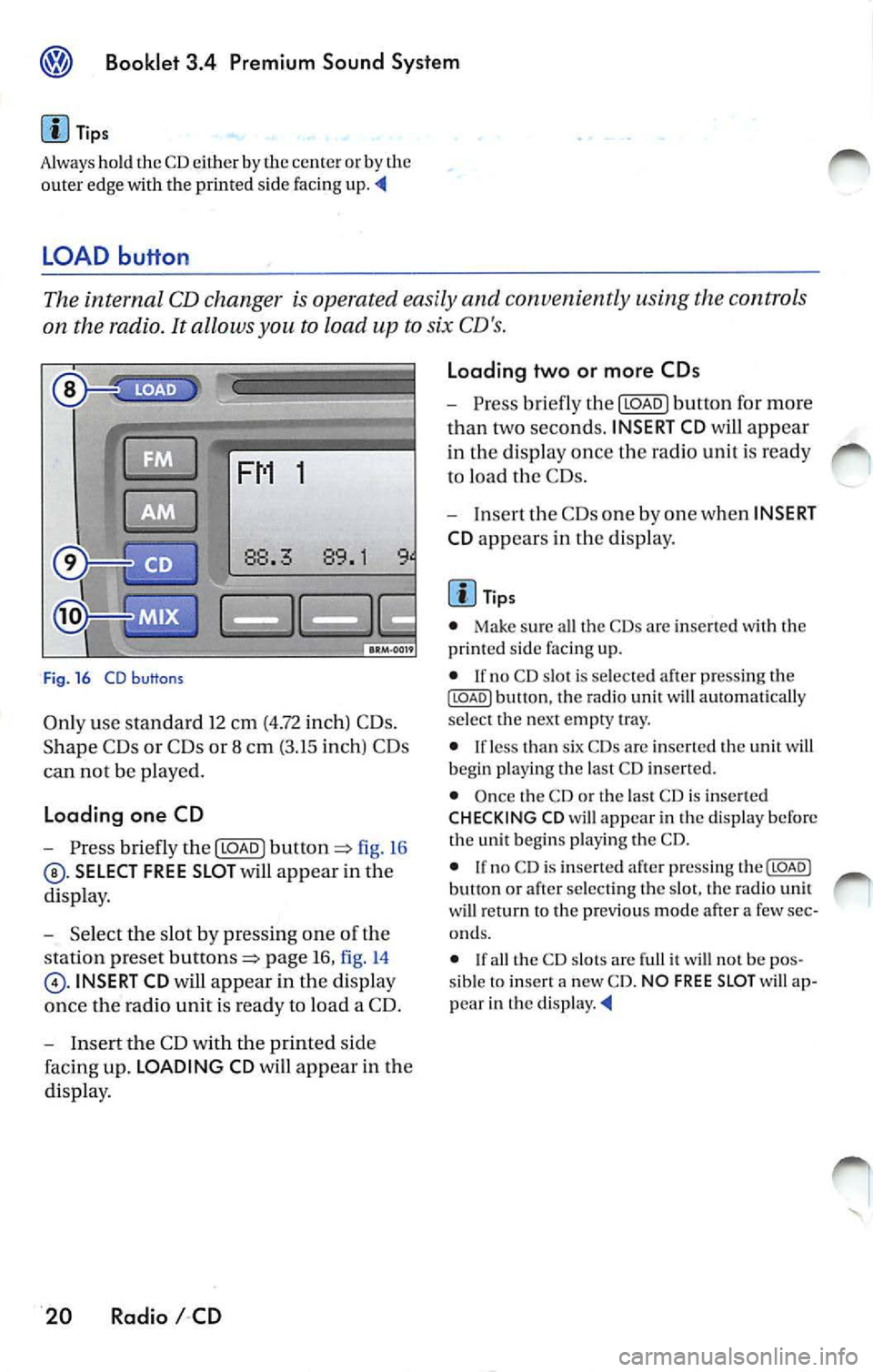
Fig . 16 CD b uttons
Only use standa rd 12 cm (4.72 inch) CD s.
Shape C Ds or CDs or 8 cm (3.15 inch) CDs
can not be played.
Loading one CD
- Press briefly the I LOAD J fi g. 16
SELECT FREE SLOT will appear in the
di spla y.
- Selec t th e slot by pressing one of t he
s tation pr eset
page 16, fig. 14
INSERT CD will app ear in the disp lay
once th e radio unit is read y to load a CD.
- I nse rt the CD with the printed side
faci ng up. LOADING CD will app ear in the
di splay .
20 Radio I CD Loading two or more CDs
-
Press briefly the I LOAD J button for more
t h an two second s. INSERT CD
will app ear
in the display once t he rad io unit i s ready
to load the CDs.
- Inse rt th e CDs one by one when INSERT
CD app ears in the di splay.
Tips
• Make sur e all the CDs arc inse rted wi th the
printed side facing up.
• If no CD slot is se lected a fter pressing th e
ILOADJ button, the rad io unit will automat ica lly
selec t the nex t empty tray.
• I f le ss than six CDs are inser te d th e uni t will
b egi n playi ng the last C D inserted.
• Once the CD or th e las t CD is inserted
CHECKING CD will appea r in the di spl ay before
the unit b egins playing the CD.
• If no C D is inserted afte r press ing th e(LOADJ
b utt on or after select ing the slot , the rad io unit
w ill r eturn to the p rev iou s m ode after a few sec
o nd s.
•
th e CD slot s are full it w ill not be pos
sib le to insert a new CD . NO FREE SLOT w ill ap
pear in th e
Page 456 of 477
Booklet 3.4 Premium Sound System
CD button
-Press the@button page 20, fig. 16
when you wan t to li ste n to the CD
pl aye r or to select an externa l CD changer •
if ava ilabl e.
Tips
• If no disc is lo aded in int ernal CD
c h anger you wi ll hear an a udibl e signal, and NO
C D
w ill app ear in th e disp lay.
M ix Mode bu tton
• If no disc is loaded in th e interna l C D
c h anger but there is a disc loaded in the ex terna l
C D changer •, t he exte rnal CD change r mode
w ill be selec ted.
• If neither a disc is loaded in internal CD
c h anger nor the external CD change r is ava ilab le
you
w ill hear an aud ible s igna l, a nd NO CD will app ear in th e display. '4
When you select MIX, the CD tracks will be played in random order.
Radios without SRDS: Playing tracks
in random order
-Press bu tton page 20, fig. 16
for more than 2 second s. MIX-CD a p
pears in the disp lay. Pr ess
again to stop the random play operat ion.
Radios with SRDS: Playing tracks in
random order
- Press the@button for more than 2
page 20, fig.16 MIX-CD
appe ars in the di splay. Press th e@button
aga in for more th an 2 seco nds agai n to
s top th e random play operat ion.
Select the type of random play mode
- Press and hold do wn the ISCA N/TU NEI
button :=> page 16, fig .14 long er than
2 seco nds to enter the set up mod e. You
w ill hear a signal tone. -
Pres s th e
!SCAN/TUN El button briefly,
until
SELECT MIX MODE appears in the
disp lay.
- In the lowe r part of the display the
words FLOR,
MAG will appear. By
u sing th e s tatio n pre set but tons=> page 16,
fig . 14
be low th ese wo rds se lect the
of scan operation you wan t.
- Press the
ISCAN/TUNEI button again for
l onge r than 2 seconds to confirm the set
t in g yo u have just made. You
will hear a
signa l tone.
Type of random play mode
• page 25
• CD -th e random play mode occ urs only
through the tracks of th e cu rrent disc , MIX-CD
ap pea rs in th e display.
• MAG -th e random play mode occ urs th rough
a ll th e i nserted discs in th e internal CD ch anger
o r in Lh e externa l C D
if availab le. MIXMAG ap pear s in th e di splay. '4
Radio I CD 21
Page 458 of 477
![VOLKSWAGEN JETTA 2007 Owners Manual Booklet 3.4 Premium Sound System
Automatic track selection
-Briefl y press the !SCAN/TUNE] butt on t o
start a utom ati c sca nnin g to t he nex t track.
Af te r 10 second s, sca nning wi](/manual-img/18/55689/w960_55689-457.png "VOLKSWAGEN JETTA 2007 Owners Manual Booklet 3.4 Premium Sound System
Automatic track selection
-Briefl y press the !SCAN/TUNE] butt on t o
start a utom ati c sca nnin g to t he nex t track.
Af te r 10 second s, sca nning wi")
Booklet 3.4 Premium Sound System
Automatic track selection
-Briefl y press the !SCAN/TUNE] butt on t o
start a utom ati c sca nnin g to t he nex t track.
Af te r 10 second s, sca nning will res um e an d
g o to th e ne xt trac k.
SCAN app ears in the
di sp lay.
- To stop sca nning, press the
ISC ANI
bu tton bri efl y durin g the 10 seco nd "h old "
tim e.
Selecting tracks
-Press briefly the !SEE K /TRACK] button
=:> page 3 , fig . 2 to s kip upw ard o r
dow nwa rd
((yj) throu gh th e trac ks or turn
th e
!SC AN/TUNE] rota ry k nob . Turni ng cloc k
w ise s kip up ward a nd turnin g counter
cl oc kwise sc roll downw ard.
"Scroll" through the same track (Fast
Forward /Fast Review)
- Press a nd hold th e (SEEK/TRACK] butto n
=> page 3, fig . 2 to sc roll up ward or
d ow nwa rd
((yj) tro ugh the sa me t rac k. The
trac k ela p se d tim e appears in the upp er
l e ft co rner of the d is pl ay.
- Release the b utton t o s top sc rolling
t h ro ug h th e trac k.
S electing on indi vidual CD
• T he curre ntly se lec ted CD w ill app ear in th e
di spl ay
CDl ... CD6.
• If there a re no CDs nei th er in th e i nternal CD
c han ger nor in the external C D ch an ger•, you
wi ll h ear a audibl e sig nal a nd
NO ap pea r
in di spl ay .
• If an ex te rnal CD ch anger is t ava ilabl e, but n o
CD is in se rted you w ill hea r a n aud ibl e sig n al a n
EXT NO CD will a ppear in the d isplay.
Automatic tra ck s ele ction
T he sca n fu nct io n sto ps a utomatica lly afte r one
l oop o f the tracks in the CD if th e operat io n is not
m anua lly stoppe d by press ing
bu tto n
aga in.
Selectin g tra ck s
• The c urrentl y se le cte d track a ppea rs in th e
di splay:
TRACK 01 ... TRACK 02 ... TRACK 03
Radio I CD 23
Page 459 of 477

Booklet 3.4 Premium Sound System
• Briefly press ing butto n wh ile a track is
pl ayi ng (more than 2 seconds play) will cause the u
nit to ''j um p" back to the beginning of the
track and resume playing from there.
What you see in the display when listening to a CD
Fig. 19 Dis pla y w he n liste ning to a CD
Track elap sed time
CDs inside the in te rnal CD-c hanger trays or
CDs in the external CD changer• trays
Which CD track is c urr ent ly being p layed
Th e CD being reproduced
The selected CD is indicated by an un
descore.
Error displays when using the CD-Player
The following error messages can be displayed:
NOCD
No disc in the CD c hanger.
PLEASE CHECK CD
There is a problem with the inserted CD. The CD
i s ejected.
FAIL
The CD is clirry, scratc hed or inserte d upside
down. The CD is au tomatically ejected. If th e
problem persists afte r reloading t he CD th e next
CD available will be reproduced
error mes
sage FAIL will appear in the corresponding CD
s lot in the display.
24 Radio I CD
ROM
A CD ROM has been inse rted into the int ernal or
externa l CD-C hange r. The CD is ejected.
HARDWARE ERROR
The CD ch anger mechanis m is ma lfunc tion ing.
NO EX TERNAL CD
No disc in the external CD changer i s available .
Tips
If the unit still malfunctions, contact your au
thorized Volkswagen dea ler for
Page 460 of 477

Booklet 3.4 Premium Sound System ®
MP3
MP3 player operation
The interna l CD-C hanger also allows you to play
CD-Rs co ntaining MP3 data. Howeve r, t he re
flectivity rate must be 60
% or high er.
D iff ere nt kind s of info rmation (e.g. name of the
so ng and artist) may appear in th e di sp lay
during MP3 player operation
On ly use s tandar d 12 cm (4.72 in ch) CDs. The
s h ape d CDs or 8 cm (3.15 inch ) CDs can not b e
p layed.
Tips
• The u nit ca n only play either discs con
taining audio or MP 3 data. If a CD co ntaining
both audio and M P3 data is inserted, an error
message will appear in the display and the CD
will be automatica lly ejected ..
• The ex terna l CD changer • can not play dis cs
co ntainin g MP3 files.
<4
Folder and play list search Buttons
fig. 20
se lect the des ired folder or play list to
sc ro ll upward
to scro ll downward
th roug h th e fo lders or pla y lists).
Fig . 21 Radios with Satellite D igital Rodia Service
Rad ios with SD RS: I CAT/F LOR) button
- Press CAT/FLOR l fig. 21 se
l ec t the desired folder or p lay list
to
s cro ll upward
to scro ll downward
th rough the fo lder s or p lay lists) .
Tips
I f only tracks are availab le in the CD with MP3
da ta (no folders or play lists), this button will
ha ve no funct ion . ._
Radio I CD 25
Page 461 of 477

Booklet 3.4 Premium Sound System
Mix Mode button
The MIX mode causes the tracks the disc to b e played random order .
1
Fig. 22 CD buttons
Radios without SRDS: Play ing tracks
in random order
Pre ss fig. 22 MIX
CD
appears in the dis pl ay . P ress
button again to stop th e random play oper
at io n .
Radio s with SRDS : Playing tracks in
random ord er
Press MI X CD
pears in the disp lay . Pre ss button
again to stop the random play op eration.
26 Radio I CD Select the type of random play mode
-
Press for mor e than 2
seconds,
MI X CD appears in th e d is p lay.
P re ss
again for more than 2
sec ond s to stop th e random play opera -
tion.
- Turn the [SCAN/TUNE] rotary knob , u ntil
SELECT MI X MODE appears in the dis play.
- T urn the lower part of th e dis p la y the
words
FLDR , CD , MAG w ill appear. By
us in g th e s ta tion pr eset buttons
below th ese words
lec t FLDR . The random play mode will now
occ ur in a part ic u la r fo lder.
MIX-FOLDER
appears in the disp lay .
- Pres s the
[SCAN/TUNE] button aga in for
l onger than 2 se conds to confirm the
ting you h ave just made. You hea r a
s igna l ton e.
Ty p e of rando m plo y mod e
• CD· th e random mode oc cur s through th e
e ntir e CD
• MAG
the random mode oc cur s through fere nt folder s of the sa me CD.
• FLDR th e rando m mode occurs throug h the
c urrent f older or play
Page 462 of 477
Booklet 3.4 Premium Sound System
Track selecting
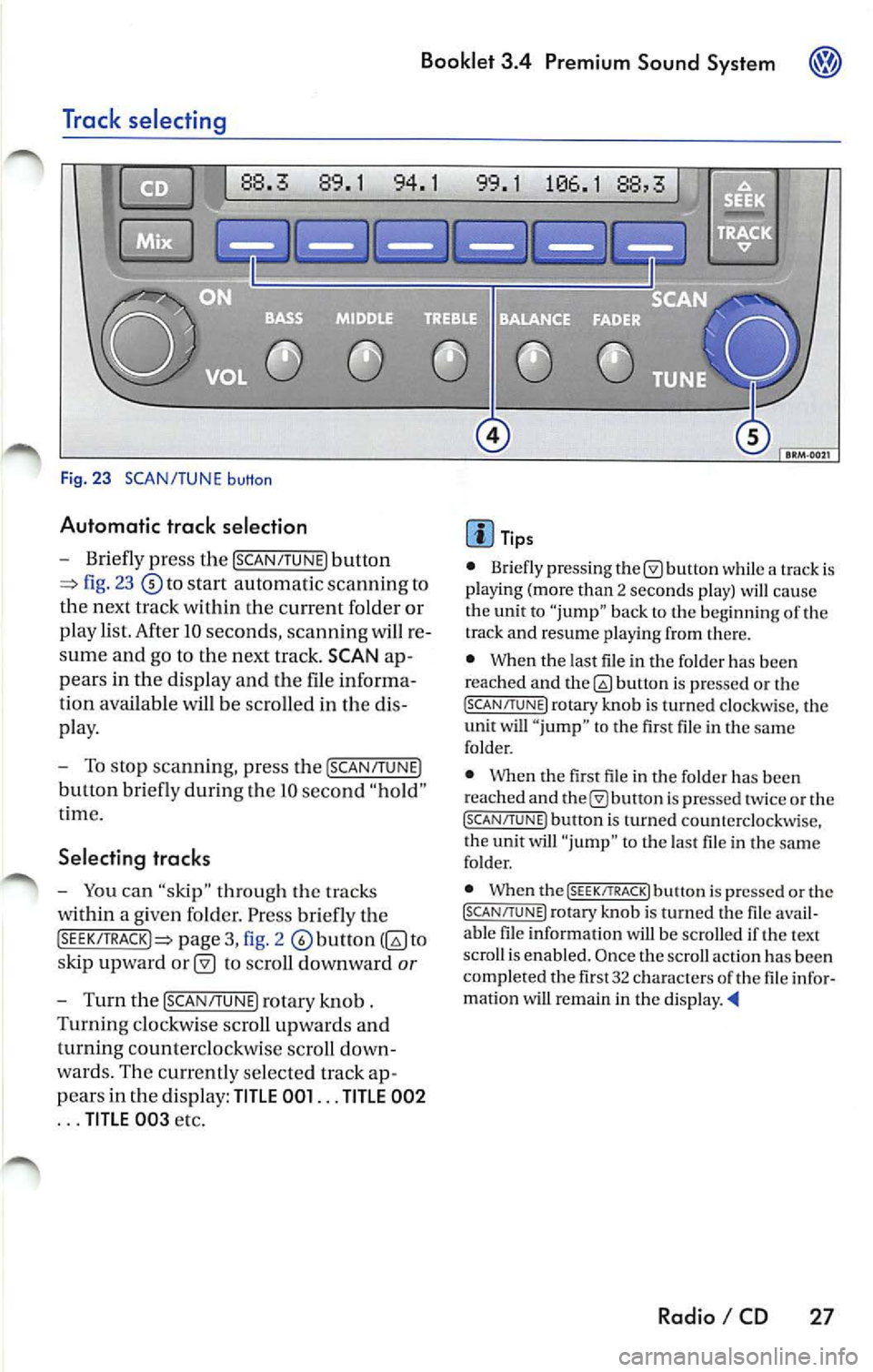
Fig. 23 SCAN/TUNE button
Automatic trac k selection
-Briefly press the !SCAN/TUNE) button
fig. 23 to sta rt automatic scannin g to
the next track within the curre nt folder or
p lay list. After 10 seconds , scannin g will re
sume and go to the next track. SCAN ap
pears in the display and the file informa
tion available
be scro lled in the dis
pla y.
- To stop scannin g, pre ss the [SCAN/T UNE)
button bri efly during Lhe IO seco nd "hold "
t ime.
Selecting tracks
-You can "skip" through th e trac ks
within a given fo lder. Pr ess briefly th e
pag e 3, fig. 2 to
s kip upward
to scroll downward or
- Turn th e !SCAN/TUNE) rotary knob .
Turnin g clo ckw ise sc roll up wards and
turning counterclockwi se scroll down
wa rds. Th e curr en tly se lected track ap
p ears in the di spl ay:
TITLE 001 ... TITLE 002
... TITLE 00 3 etc.
Tip s
• Briefly press ing butt on while a track is
pla ying (mo re than 2 seco nds play) cau se
the unit to "jump" bac k to the beginning of th e
track and resume pla yin g from there.
• When the last file in the fo lder has been
reached and
bu non is pre ssed or th e (SC AN/TUNE! rotary knob is turned clockwi se, the
unit will " jump " to th e first file in th e same
folder.
• Whe n the first fil e in t he folder has been
r eached and
is pr essed tw ice or the (SCAN/TUNE ) button is turned counterclockwise,
t he unit will "ju mp " to t he last file in the sa me
fo lder.
• When the
(SEEK/TRACK! butt on i s pre ssed or the (SCAN/TUNE) rotary kno b is turn ed the fil e avail
a bl e fil e in formation will be scro lled if th e text
scro ll is enabl ed. Once the scroll actio n ha s be en
comp le ted the fir st 32 characters
th e fil e infor
matio n wi U remain in the di sp la y. •
Radio I CD 27