Page 142 of 203

cxxxii (v) By one touch call
You can call by registered telephone
number which you selected from a phone
book, dialed numbers and received calls.
(See page cxxxvi for registering the one
touch dial.)
1. Touch the “1touch Dial” switch to
display “1touch Dial” screen.
2. Touch the desired number to call. You
can change the page by touching
“1touch Dial 2” or “1touch Dial
3”
.
When you push the telephone button while
you are driving, the screen above appears.
Touch the desired name to call. (The tele-
phone number is not displayed.)
(vi) By POI call
You can call by operating a switch when
“Call” is displayed on the screen from
Navigation system. (See page xlviii for
details.)
(e) Receive on the Bluetooth�
phone
When a call is received, this screen is dis-
played with a sound. Touch
“” or
push
of the telephone button to talk
on the phone.
To hang up the phone:
Touch
“” or push of the
telephone button again.
To refuse to receive the call:
Touch
“” and hold it.
To adjust the volume of received call:
Touch
“–” or “+”.
On the international phone call, the party’s
name may not be displayed correctly de-
pending on the cellular phone which you
have.
Page 143 of 203

cxxxiii
(f) Talk on the Bluetooth� phone
While you are talking on the phone, this
screen is displayed. You can do the op-
eration below on the screen.
To adjust the volume of the party’s voice:
Touch
“–” or “+” switch.
To hang up the phone:
Touch the
“” switch or push of
the telephone button.
To mute your voice:
Touch the
“Mute ON” switch.
To input the Key:
Touch the
“09” switch.
Touch the desired number to input the key.
To hang up the phone:
Touch
“” or push of the tele-
phone button.
This cannot be operated while you are driv-
ing.
If the continuous tone signal is registered
in a phone book, this screen appears. (If
not registered, “Send” and “Exit” is not
displayed.)
Confirm the number displayed on the
screen and touch
“Send”. The number
to marked sign will be sent.
When you touch
“Exit”, this function will
be finished and normal tone screen ap-
pears.
To hang up the phone:
Touch
“” or push of the
telephone button.
The continuous tone signal is the marked
sign (p or w) and the number following tele-
phone number. (ex. 056133p0123w#1
�)
Page 144 of 203
cxxxiv When you call the number registered in
phone book and input a code number and
the like to operate an answering machine or
use a telephone service in bank, you can do
this operation.
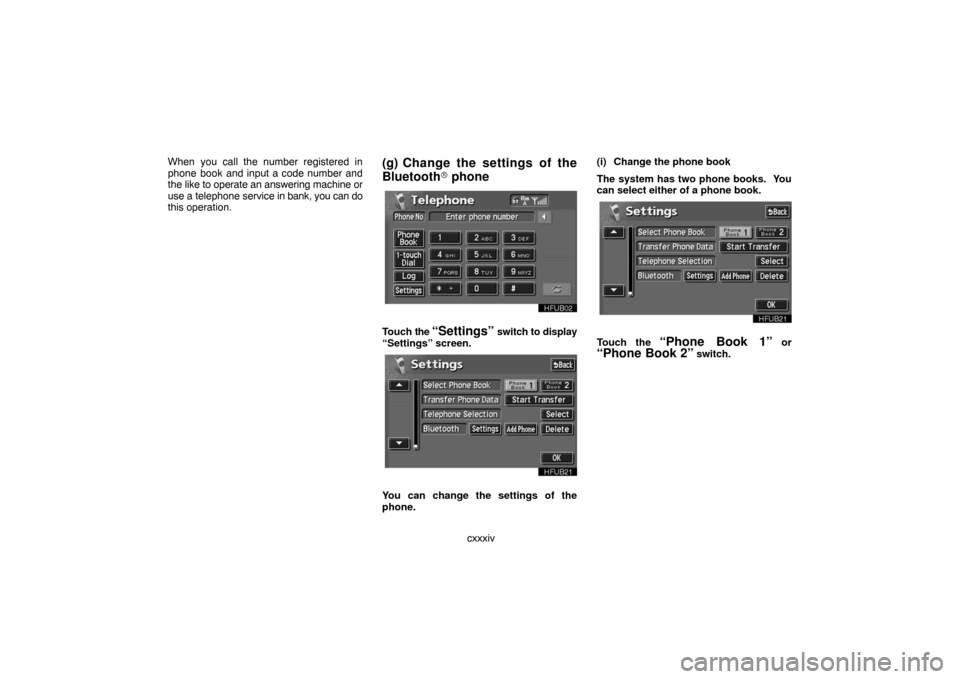
(g) Change the settings of the
Bluetooth� phone
Touch the “Settings” switch to display
“Settings” screen.
You can change the settings of the
phone.(i) Change the phone book
The system has two phone books. You
can select either of a phone book.
Touch the “Phone Book 1” or
“Phone Book 2” switch.
Page 145 of 203
cxxxv (ii) Transfer the telephone number
You can transfer the telephone numbers
in your Bluetooth� phone to the system.
Up to 500 numbers can be registered in
one phone book.Transfer it while the engine is running.
1. Touch the “Start Transfer” switch
to display “Data Transfer” screen.
2. Touch the “Overwrite” or “Add”
switch.
3. Transfer the phone book data to the
system using the Bluetooth� phone.
This screen appears while transferring. To
cancel it, touch the
“Cancel” switch. If the
transferring is interrupted on the way, the
phone book data transferred until then can
be memorized in the system.
Page 146 of 203
cxxxvi (iii) Register the one touch dial
You can register the desired telephone
number from phone books, dialed num-
bers and received calls. Up to 17 one
touch dial numbers a phone book can be
registered.
1. Touch the “Set One Touch”
switch in which you want to register the
phone number.
2. Touch the desired telephone number.
Select the new registration from 118 ex-
cept 6 and touch the switch.
A latest received number is registered in the
6th item.(iv) Delete the memory
�Delete the telephone number in the
phone book.
Touch the “Delete” switch of “Phone
Book”.
Select the desired number from the list.
Page 147 of 203
cxxxvii If you want to delete all the phone numbers
in phone book, touch the
“Delete All”switch.
Touch “YES” switch.
Touch
“NO” switch and the previous
screen appears.
�Delete the dialed number
Touch the “Delete” switch of “Outgo-
ing Calls”.
Select the desired number from the list.
If you want to delete all the dialed numbers,
touch the
“Delete All” switch.
Touch “YES” switch.
Touch
“NO” switch and the previous
screen appears.
Page 150 of 203

cxl
UNL303
�Microphone
It is unnecessary to speak directly into
the microphone when giving a command.Speech command example: Searching
for a route to your home.
1. Push the speech command switch.
2. Say “Home”.
If your home is not registered, you will hear
“Home is not registered”.
3. If the system recognized the com-
mand, the recognition result “Home” is
displayed on the top of the screen with
the screen message. (Displayed mes-
sage and the switches on the screen de-
pend on the situation.)
Touch or say “Cancel”, and the system will
be canceled. Touch or say “Help”, and dis-
plays the “Help” screen.
4. Touch “Enter” or say “Enter des-
tination”, and the system starts search-
ing for a route to your home. (If the des-
tination is already registered, “Add” or
“Replace” is displayed on the screen.)
Touch or say “Cancel”, and the search will be
canceled.
INFORMATION
In the following conditions, the sys-
tem may not recognize the command
properly.
�The command is not correct or clear.
�There are some noises such as wind
noise, etc.
Page 178 of 203

clxviii
(h) If the satellite radio tuner malfunctions
When problems occur with the XM� tuner, a message will appear on the display. Referring to the table below to identify the problem, take the
suggested corrective action.
ANTENNA
The XM� antenna is not connected. Check whether the XM� antenna cable is attached securely.
A short−circuit occurs in the antenna or the surrounding antenna cable. See a Toyota certified dealer.
UPDATING
You have not subscribed to the XM� satellite radio. The radio is being updated with the latest encryp-
tion code. Contact the XM� satellite radio for subscription information. When a contact is canceled,
you can choose the “CH000” and all free−to−air channels.
The premium channel you selected is not authorized. Wait for about 2 seconds until the radio returns
to the previous channel or “CH001”. If it does not change automatically, select another channel. If you
want to listen to the premium channel, contact the XM� satellite radio.
NO SIGNALThe XM� signal is too weak at the current location. Wait until your vehicle reaches a location with a
stronger signal.
LOADINGThe unit is acquiring audio or program information. Wait until the unit has received the information.
OFF AIRThe channel you selected is not broadcasting any programming. Select another channel.
−−−−−There is no song/program title or artist name/feature associated with the channel at that time. No ac-
tion needed.
−−−The channel you selected is no longer available. Wait for about 2 seconds until the radio returns to the
previous channel or “CH001”. If it does not change automatically, select another channel.
The XM� Listener Care Center is also available on the phone, please call (800) 967−2346 during the following hours:
Monday – Saturday: 7 a.m. – 1 a.m. Sunday: 12 p.m – 12 a.m.
VI