2007 SUZUKI AERIO light
[x] Cancel search: lightPage 102 of 232

Downloaded from www.Manualslib.com manuals search engine 4-37 INSTRUMENT PANEL
54G27-03E
Loading a CD
Insert a CD in the CD insertion slot (1).
When a CD is loaded, play starts and the
disc indicator (A) lights.
Ejecting a CD
Press the CD eject button (2).
The backup eject function:
This function allows you to eject a CD with
the power turned off by pressing the CD
eject button (2).
Listening to a CD
When a CD is inserted, it is automatically
played back.
When a CD is already inside the unit,
press the CD button (3) to play back the
CD. When a CD is inside the unit, the disc
indicator (A) is lit on the display unit.
When a disc included CD-DA and MP3/
WMA files is loaded and played back,
pressing and holding the CD/AUX button
(3) for 2 seconds changes the file type
between CD-DA and MP3/WMA. If a file
type is not selected, CD-DA files are
played back first. After all CD-DA files are
played back, MP3/WMA files are automati-
cally played back.Selecting a track
Press the track up button (4) to listen to
the next track.
Press the track down button (5) twice to
listen to the previous track.
When the track down button (5) is
pressed once, the track being currently
played will return to the beginning.
Fast forwarding/Rewinding a track
Press the fast forward button (4) to
advance a track rapidly.
Press the rewind button (5) to rewind a
track.
Selecting a folder (while an MP3/WMA
file is played back)
Turning button (9) clockwise advances
to the next folder.
Turning button (9) counterclockwise
returns to the previous folder.
Repeat play
Press the repeat button (6).
The repeat indicator “RPT” (B) lights and a
track being currently played is played
repeatedly.
Press the repeat button (6) again to cancel
repeat play.
Repeat play in the current folder (while
an MP3/WMA file is played back)
Press and hold the repeat button (6) for 2
seconds.The repeat indicator “D-RPT” (B) lights,
and tracks in the current folder are played
back repeatedly.
Press the repeat button (6) again to cancel
repeat play in the current folder.
Random play
Press the random button (7).
The random indicator “RDM” (C) lights and
tracks on the disc are played randomly.
Press the random button (7) again to can-
cel random play.
While an MP3/WMA file is played back,
tracks in the current folder are played back
at random. (If CD-DA and MP3/WMA files
are loaded and played back, the playback
operation is performed in the same for-
mat.)
All-folder random play (while an MP3/
WMA file is played back)
Press and hold the random button (7) for 2
seconds.
The random indicator “D-RDM” (C) lights,
and tracks in all folders in the current disc
are played back at random.
Press the random button (7) again to can-
cel the all-folder random play.
CAUTION
If you forcefully try to push an ejected
CD inside the unit before auto reload-
ing, the disc surface might be
scratched.
Audio Systems:
Page 105 of 232

Downloaded from www.Manualslib.com manuals search engine 4-40 INSTRUMENT PANEL
54G27-03E
NOTE:
About Single CDs (8 cm CDs)
Since the unit is not compatible with a
single CD, do not load it into the unit.
Keep in mind the fact that a single CD
cannot be played even using a single
CD adaptor for the unit.
When a single CD is loaded into the unit
accidentally, it will be ejected immedi-
ately. Please be sure to remove it.
If you forcefully try to push it into the unit
without removing it, the CD cannot be
ejected. This will damage the mecha-
nism. Please never do this.
Loading one CD
1) Press the load button (1), then press
one of the disc select buttons (2) that
corresponds to the slot into which you
want to load a CD.
The load indicator (10) will light up.
2) Load the CD into the CD insertion slot
(3). When the CD is loaded, play starts.
The disk number in the CD indicator (A)
will light.Loading multiple CDs
1) Press the load button (1) for 2 seconds
or longer. The unit will beep and the
load indicator (10) will light up.
2) Load a CD into the CD insertion slot
(3).
3) The next disc number will blink in the
display. Load the next CD.
4) After loading the required number of
CD’s, press any disc select button (2) to
select the desired CD to listen to. If no
select button is pressed, play will start
from the last loaded CD.
Only the numbers in the CD indicator (A)
that correspond to the loaded slots will
light.Ejecting one CD
1) Select the CD you want to remove with
the disc select buttons (2).
2) Press the CD eject button (4).
If you leave the ejected CD without
removing it, it will be drawn into the unit
automatically after about 15 seconds.
(Auto reload function)
The back up eject mechanism:
This function allows you to eject the CD
loaded in the unit with the unit turned off
only by pressing the CD eject button (4).
Ejecting all the CDs
Press the CD eject button (4) for 2 sec-
onds or longer. The unit will beep and the
load indicator (10) will light up. All the CDs
will be ejected from the unit in a sequential
manner.
Please prepare a location where
removed CDs can be stored.
If you leave the ejected CD without
removing it, it will be drawn into the unit
automatically after about 15 seconds.
(Auto reload function)
CAUTION
You can load a CD only while the load
indicator (10) lights up for about 15
seconds. During that period, the
shutter located in the depth of the CD
insertion slot (3) is opened. After 15
seconds time has elapsed, the load
indicator (10) turns off and the shut-
ter closes, making it impossible to
load a CD. If you try to load the CD
with the shutter closed, the CD may
damage the shutter. Never do this.
CAUTION
If you forcefully try to push an ejected
CD inside the unit before auto reload-
ing, the disc surface might be
scratched.
Audio Systems:
Page 106 of 232

Downloaded from www.Manualslib.com manuals search engine 4-41 INSTRUMENT PANEL
54G27-03E
The back up eject mechanism:
This function allows you to eject the CD
loaded in the unit with the unit turned off
only by pressing the CD eject button (4).
Listening to a CD
1) When a CD is inserted, it is automati-
cally played back.
When a CD is already inside the unit,
press the CD button (5) to play back the
CD. When a CD is inside the unit, the
CD indicator (A) is lit on the display
unit.
2) If you want to play another CD, select it
with the disc select buttons (2).
Play starts from the point on the disc
that the unit played last (Last position
memory).
When a disc included CD-DA and MP3/
WMA files is loaded and played back,
pressing and holding the CD/AUX button
(5) for 2 seconds changes the file type
between CD-DA and MP3/WMA. If a file
type is not selected, CD-DA files are
played back first. After all CD-DA files are
played back, MP3/WMA files are automati-
cally played back.Selecting a track
Press the track up button (6) to listen to
the next track.
Press the track down button (7) twice to
listen to the previous track.
When the track down button (7) is
pressed once, the track being currently
played will return to the beginning.
Fast forwarding/Rewinding a track
Press the fast forward button (6) to
advance a track rapidly.
Press the rewind button (7) to rewind a
track.
Selecting a folder (while an MP3/WMA
file is played back)
Turning button (11) clockwise advances
to the next folder.
Turning button (11) counterclockwise
returns to the previous folder.
Repeat play
Press the repeat button (8).
The repeat indicator “RPT” (C) lights and a
track being currently played is played
repeatedly.
Press the repeat button (8) again to cancel
repeat play.
Disc repeat play (while a CD-DA file is
played back)
Press the disc repeat play button (8) for 2
seconds or longer.
The repeat indicator “D-RPT” (C) lights.When all the tracks on a disc being cur-
rently played finish playing, the beginning
of the disc is returned and play starts.
To cancel disc repeat play, press the disc
repeat play button (8) again.
Repeat play in the current folder (while
an MP3/WMA file is played back)
Press and hold the repeat button (8) for 2
seconds.
The repeat indicator “D-RPT” (C) lights,
and tracks in the current folder are played
back repeatedly.
Press the repeat button (8) again to cancel
repeat play in the current folder.
CAUTION
If you try to push an ejected CD
inside the unit forcibly before auto
reloading, the disc surface might be
scratched.
Audio Systems:
Page 115 of 232
Downloaded from www.Manualslib.com manuals search engine OTHER CONTROLS AND EQUIPMENT
5
54G27-03E
60G407
OTHER CONTROLS AND EQUIPMENTParking Brake Lever ........................................................... 5-1
Pedals ................................................................................... 5-1
Gearshift Lever .................................................................... 5-2
Fuel Filler Cap ..................................................................... 5-3
Folding Rear Seats .............................................................. 5-4
Armrest (if equipped) .......................................................... 5-6
Sun Visor ............................................................................. 5-6
Interior Light Switch ........................................................... 5-6
Spot Light ............................................................................ 5-7
Assist Grips (if equipped) .................................................. 5-7
Coat Hooks (if equipped) .................................................... 5-8
Eyeglasses Holder (if equipped) ........................................ 5-8
Engine Hood ........................................................................ 5-8
Cup Holder and Storage Area (if equipped) ..................... 5-9
Accessory Socket (if equipped) ......................................... 5-10
Frame Hooks ....................................................................... 5-11
Tire Changing Tools ........................................................... 5-12
Front Seat Back Pocket (if equipped) ............................... 5-13
Trunk Light .......................................................................... 5-13
Page 116 of 232
Downloaded from www.Manualslib.com manuals search engine 5-1 OTHER CONTROLS AND EQUIPMENT
54G27-03E
Parking Brake Lever
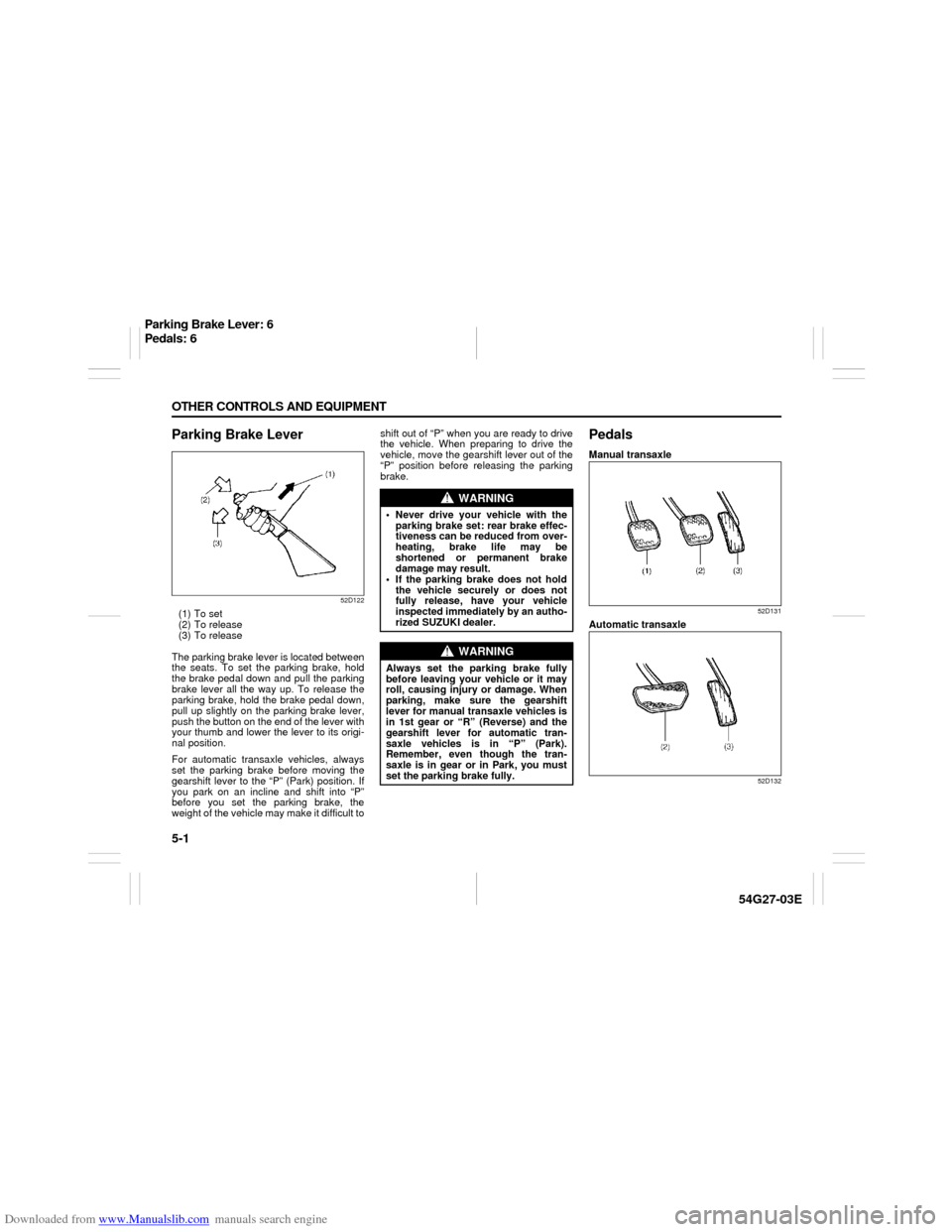
52D122
(1) To set
(2) To release
(3) To release
The parking brake lever is located between
the seats. To set the parking brake, hold
the brake pedal down and pull the parking
brake lever all the way up. To release the
parking brake, hold the brake pedal down,
pull up slightly on the parking brake lever,
push the button on the end of the lever with
your thumb and lower the lever to its origi-
nal position.
For automatic transaxle vehicles, always
set the parking brake before moving the
gearshift lever to the “P” (Park) position. If
you park on an incline and shift into “P”
before you set the parking brake, the
weight of the vehicle may make it difficult toshift out of “P” when you are ready to drive
the vehicle. When preparing to drive the
vehicle, move the gearshift lever out of the
“P” position before releasing the parking
brake.
PedalsManual transaxle
52D131
Automatic transaxle
52D132
WARNING
Never drive your vehicle with the
parking brake set: rear brake effec-
tiveness can be reduced from over-
heating, brake life may be
shortened or permanent brake
damage may result.
If the parking brake does not hold
the vehicle securely or does not
fully release, have your vehicle
inspected immediately by an autho-
rized SUZUKI dealer.
WARNING
Always set the parking brake fully
before leaving your vehicle or it may
roll, causing injury or damage. When
parking, make sure the gearshift
lever for manual transaxle vehicles is
in 1st gear or “R” (Reverse) and the
gearshift lever for automatic tran-
saxle vehicles is in “P” (Park).
Remember, even though the tran-
saxle is in gear or in Park, you must
set the parking brake fully.
Parking Brake Lever: 6
Pedals: 6
Page 120 of 232
Downloaded from www.Manualslib.com manuals search engine 5-5 OTHER CONTROLS AND EQUIPMENT
54G27-03E
54G374
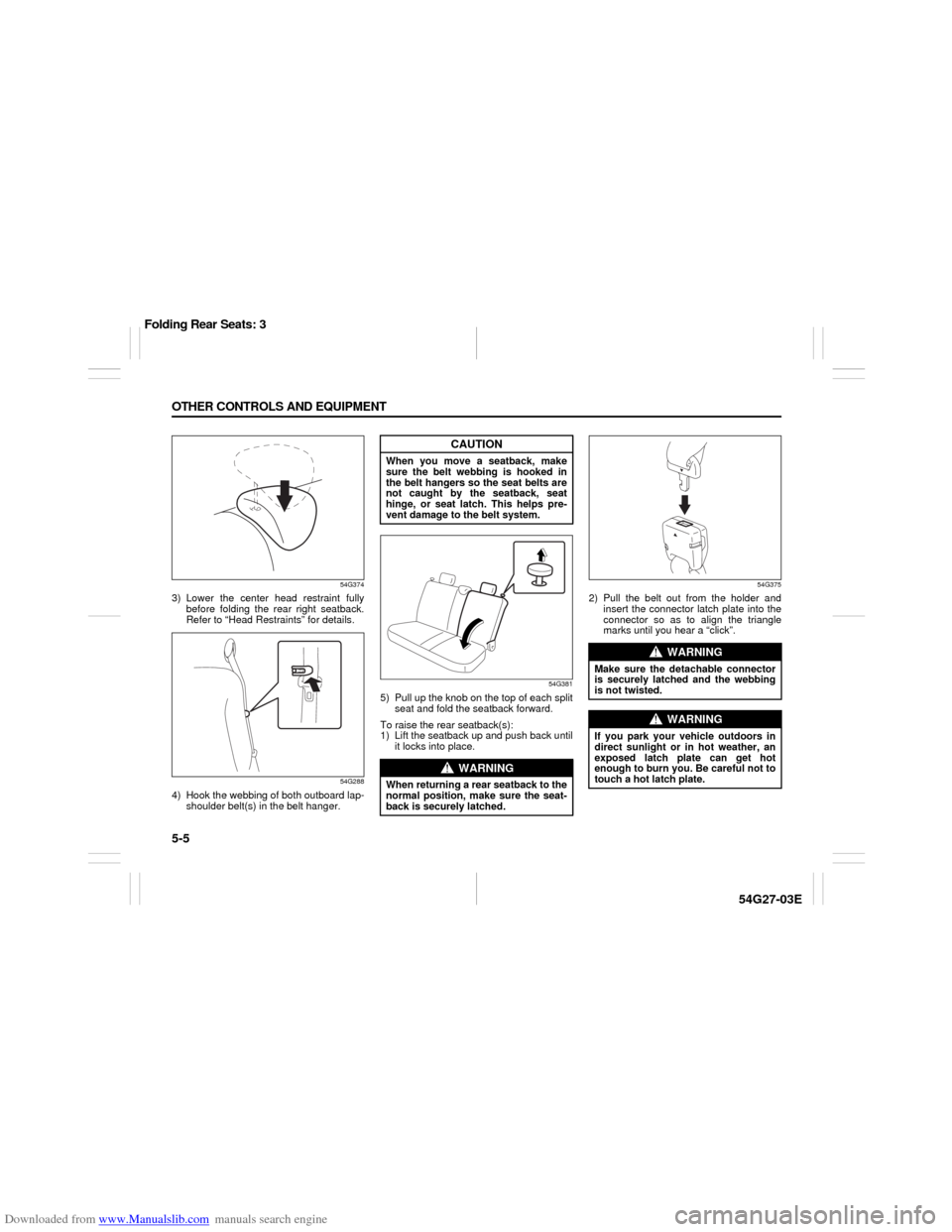
3) Lower the center head restraint fully
before folding the rear right seatback.
Refer to “Head Restraints” for details.
54G288
4) Hook the webbing of both outboard lap-
shoulder belt(s) in the belt hanger.
54G381
5) Pull up the knob on the top of each split
seat and fold the seatback forward.
To raise the rear seatback(s):
1) Lift the seatback up and push back until
it locks into place.
54G375
2) Pull the belt out from the holder and
insert the connector latch plate into the
connector so as to align the triangle
marks until you hear a “click”.
CAUTION
When you move a seatback, make
sure the belt webbing is hooked in
the belt hangers so the seat belts are
not caught by the seatback, seat
hinge, or seat latch. This helps pre-
vent damage to the belt system.
WARNING
When returning a rear seatback to the
normal position, make sure the seat-
back is securely latched.
WARNING
Make sure the detachable connector
is securely latched and the webbing
is not twisted.
WARNING
If you park your vehicle outdoors in
direct sunlight or in hot weather, an
exposed latch plate can get hot
enough to burn you. Be careful not to
touch a hot latch plate.
Folding Rear Seats: 3
Page 121 of 232

Downloaded from www.Manualslib.com manuals search engine 5-6 OTHER CONTROLS AND EQUIPMENT
54G27-03E
Armrest (if equipped)
54G464
From the stowed (fully up) position, lower
the armrest as far as it will go. Then raise it
slowly to the desired position. When not in
use, return the armrest to the stowed posi-
tion.
Sun Visor
79J161
The sun visors can be pulled down to block
glare coming through the windshield, or
they can be unhooked and turned to the
side to block glare coming through the side
window.
Interior Light Switch
52D071
The interior light switch has three posi-
tions, which functions as described below.
(1) The light comes on and stays on
regardless of whether the door is
open or closed.
(2) The light comes on when the door is
opened.
After closing all doors, the light will
remain on for about 15 seconds and
then fade out. If you insert the key into
the ignition switch during that time,
the light will start to fade out immedi-
ately.
After removing the key from the igni-
tion switch, the light will turn on for
about 15 seconds and then fade out.
(3) The light remains off even when the
door is opened.
CAUTION
To avoid damage to the armrest, do
not lean on it or allow a child to sit on
it.
1
2
CAUTION
When unhooking and hooking a sun
visor, be sure to handle it by the hard
plastic parts or the sun visor can be
damaged.EXAMPLE
Folding Rear Seats: 3
Page 122 of 232
Downloaded from www.Manualslib.com manuals search engine 5-7 OTHER CONTROLS AND EQUIPMENT
54G27-03E
54G051
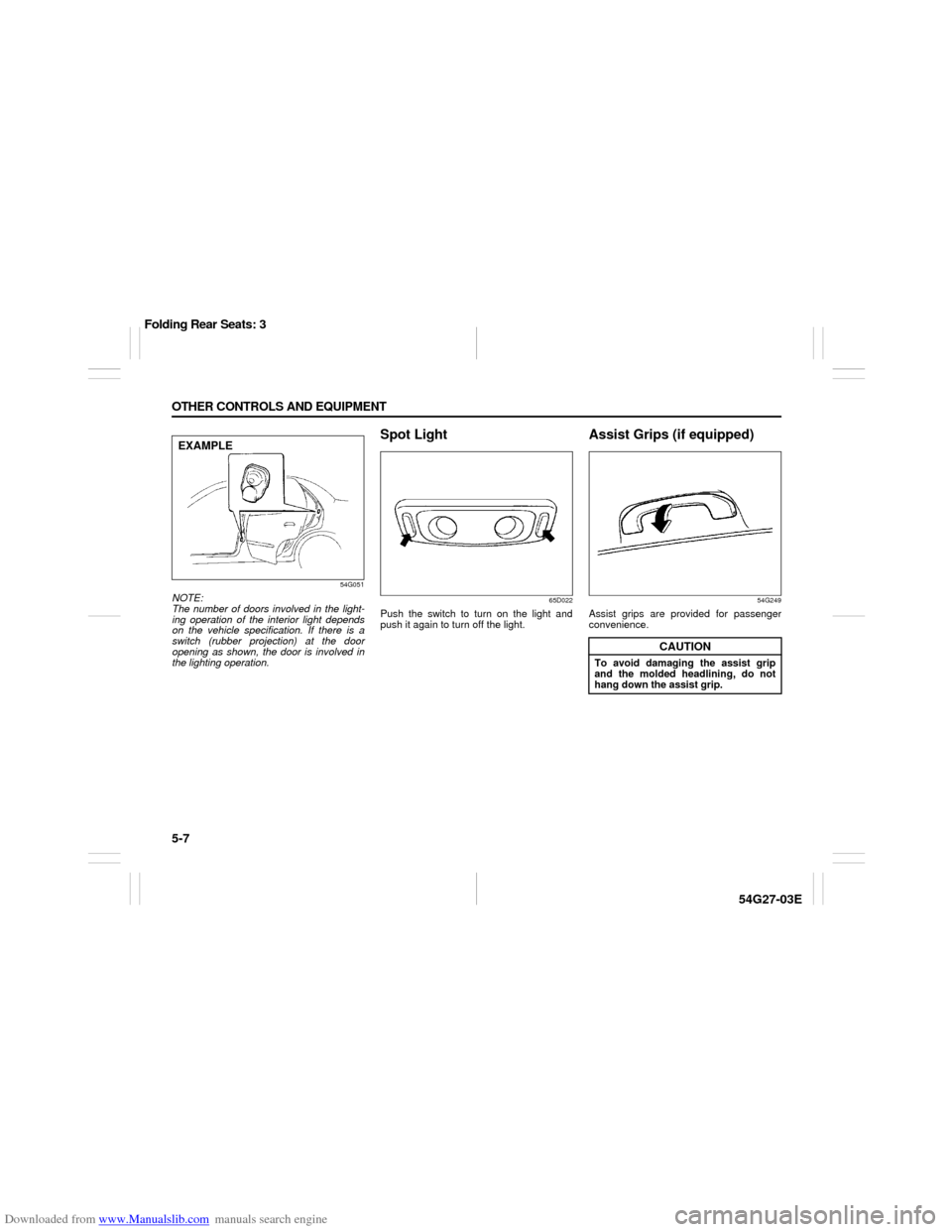
NOTE:
The number of doors involved in the light-
ing operation of the interior light depends
on the vehicle specification. If there is a
switch (rubber projection) at the door
opening as shown, the door is involved in
the lighting operation.
Spot Light
65D022
Push the switch to turn on the light and
push it again to turn off the light.
Assist Grips (if equipped)
54G249
Assist grips are provided for passenger
convenience.
EXAMPLE
CAUTION
To avoid damaging the assist grip
and the molded headlining, do not
hang down the assist grip.
Folding Rear Seats: 3