2007 SUZUKI AERIO light
[x] Cancel search: lightPage 49 of 232

Downloaded from www.Manualslib.com manuals search engine 2-36 BEFORE DRIVING
54G27-03E
Your vehicle has “dual stage” front air
bags, which adjust the air bag inflation
force according to crash severity, driver’s
seat fore/aft position and whether or not
the driver’s seat belt is fastened. Also, your
vehicle has a front passenger sensing sys-
tem, which turns off the front passenger’s
front air bag under certain conditions.Driver’s Seat Position SensorThe driver’s seat is equipped with a seat
position sensor to monitor the driver seat
fore/aft position. The seat position sensor
provides information which is used to
judge if the driver’s front air bag should
deploy at reduced power or at full power.
When the seat position sensor has a prob-
lem, the “AIR BAG” light on the instrument
cluster will turn on. If this happens, deploy-
ment of the driver’s front air bag will not
include consideration of seat fore/aft posi-
tion. Have the air bag system inspected by
an authorized SUZUKI dealer as soon as
possible.
Driver’s Seat Belt Buckle SensorThe driver’s seat belt buckle is equipped
with a sensor to monitor whether or not the
driver’s seat belt is fastened. The driver’s
seat belt buckle sensor provides informa-
tion which is used to judge if the driver’s
front air bag should deploy at reduced
power or at full power.
When the buckle sensor has a problem,
the “AIR BAG” light on the instrument clus-
ter will turn on. If this happens, deployment
of the driver’s front air bag will not include
consideration of whether the driver’s seat
belt is fastened or not. Have the air bag
system inspected by an authorized
SUZUKI dealer as soon as possible.Front Passenger Sensing SystemThe front passenger sensing system will
turn off the front passenger’s front air bag
under certain conditions. This system
works using weight sensors that are part of
the front passenger’s seat and a seat belt
sensor. The front passenger sensing sys-
tem is designed to detect whether an occu-
pant is present in the seat and, if an
occupant is present, to determine whether
the front passenger’s front air bag should
be enabled or disabled (turned off).
NOTE:
The front passenger’s side air bag is not
controlled by the front passenger sensing
system.
54G517
When the ignition switch is turned to the
“ON” position, the “PASS AIRBAG OFF”
indicator comes on for several seconds to
let you know the system is working. When
the front passenger sensing system has
turned off the front passenger’s front air
bag, the “PASS AIRBAG OFF” indicator
will come on and stay on to remind you
that the front passenger’s front air bag is
off.
The front passenger sensing system is
designed to turn off the front passenger’s
front air bag when the weight on the front
seat is 30 kg (65 lbs) or less. The front air
bag should be turned off in the following
situations:
There is no occupant in the front pas-
senger seat.
The occupant of the front passenger
seat leaves the seat for a period of time.
CAUTION
Do not put any cargo or metal objects
under the seat. The seat position sen-
sor may not work properly or may be
damaged if it is covered with some-
thing.
Seat Belts and Child Restraint Systems: 3
Supplemental Restraint System (advanced air bags):
3, 9, 12
Page 50 of 232

Downloaded from www.Manualslib.com manuals search engine 2-37 BEFORE DRIVING
54G27-03E
The occupant of the front passenger
seat is an infant or small child in a child
restraint system or a small child in a
booster seat.
A smaller person, such as a child who
has outgrown child restraints or a very
small adolescent is seated in the front
passenger seat.
NOTE:
If the front passenger seat is unoccupied,
the “PASS AIRBAG OFF” indicator will not
come on but the front passenger’s front air
bag will not deploy.
If you have secured a child in the front pas-
senger seat in a forward-facing child
restraint system or booster seat and the
“PASS AIRBAG OFF” indicator light is not
on, turn the vehicle off, remove the child
restraint or booster seat from the vehicle
and reinstall it following the child restraint
or booster seat manufacturer’s directions.
Refer to “Seat Belts and Child Restraint
Systems” in this section. If you have rein-
stalled the child restraint or booster seat
and restarted the vehicle, and the “PASS
AIRBAG OFF” indicator is still not on,
secure the child in the child restraint or
booster seat in a rear seat position in the
vehicle and check with your dealer.
65D607
According to accident statistics, children
are safer when properly restrained in rear
seating positions than in front seating posi-
tions. Whenever possible, SUZUKI recom-
mends you install child restraints in the
rear seat.
The front passenger sensing system is
designed to enable the front passenger’s
front air bag when the system senses a
properly-seated adult in the front passen-
ger’s seat. When the passenger sensing
system has allowed the front air bag to be
enabled, the “PASS AIRBAG OFF” indica-
tor will remain off to remind you that the air
bag is active.
If a person of adult size is sitting in the
front passenger’s seat and the “PASS AIR-
BAG OFF” indicator comes on, it could be
because that person isn’t sitting properly in
the seat. If this happens, unfasten the seat
belt, sit upright in the center of the seat
with the seatback nearly vertical and your
legs outstretched, and refasten the seat
belt.
WARNING
Do not install a rear-facing child
restraint in the front passenger’s
seat. If the passenger’s air bag
inflates, a child in a rear-facing child
restraint could be seriously injured.
The back of a rear-facing child
restraint would be too close to the
inflating air bag.
Supplemental Restraint System (advanced air bags):
3, 9, 12
Page 51 of 232

Downloaded from www.Manualslib.com manuals search engine 2-38 BEFORE DRIVING
54G27-03E
52D258
When seated as shown in the above illus-
tration, the front passenger sensing sys-
tem senses a properly-seated occupant
and enables the air bag.
When using a seat belt extender, follow the
instructions in the “Seat Belt Extender”
section.
WARNING
The front passenger sensing system
may not work properly in the follow-
ing situations:
The occupant is not wearing the
seat belt properly.
The occupant is sitting near the
dashboard or is not sitting in the
proper position.
A rear seat occupant is pushing or
pulling on the seatback or is push-
ing up the seat cushion using their
feet.
Objects placed under the seat are
pushing up on the seat cushion.
Heavy objects are hanging on the
seatback.
WARNING
If the “AIR BAG” light in the instru-
ment cluster ever comes on and
stays on, it means that something
may be wrong with the air bag sys-
tem. If this ever happens, have the
vehicle inspected by an authorized
SUZUKI dealer immediately, because
the air bags may not offer the protec-
tion for which they were designed.
WARNING
If the “PASS AIRBAG OFF” indicator
on the information display turns on
even though there is no occupant or
an adult occupant in the front pas-
senger’s seat, it means that some-
thing may be wrong with the
passenger sensing system. Have the
system inspected by an authorized
SUZUKI dealer as soon as possible.
WARNING
Do not spill any liquids on the seat.
Liquids can damage the sensors
under the front seat.
Have the driver’s seat position sen-
sor and the front passenger’s seat
weight sensors inspected by an
authorized SUZUKI dealer after a
collision.
Do not replace the front seats. If
you replace them, the air bags and
front passenger sensing system
may not work properly.
Do not use a seat cover. If you use
a seat cover, the front passenger
sensing system may not work prop-
erly.
Supplemental Restraint System (advanced air bags):
3, 9, 12
Page 55 of 232

Downloaded from www.Manualslib.com manuals search engine STEERING COLUMN CONTROLS
3
54G27-03E
60G405
STEERING COLUMN CONTROLSIgnition Switch ..................................................................... 3-1
Lighting/Turn Signal Control Lever ................................... 3-3
Windshield Wiper and Washer Lever ................................ 3-4
Rear Window Wiper/Washer Switch (if equipped) ........... 3-5
Tilt Steering Lock Lever ..................................................... 3-6
Cruise Control (if equipped) ............................................... 3-6
Remote Audio Controls (if equipped) ............................... 3-8
Horn ...................................................................................... 3-8
Page 57 of 232

Downloaded from www.Manualslib.com manuals search engine 3-2 STEERING COLUMN CONTROLS
54G27-03E
Automatic transaxle
54G513
If the gearshift lever can not be shifted
out of “P” (Park) in the normal way,
remove the cover (1) over the button,
and pushing the release button with the
key in the “ON” or “ACC” position will
permit movement of the gearshift lever
out of “P” (see “If You Can Not Shift
Automatic Transaxle Gearshift Lever Out
of “P” (PARK)” in the INDEX). The gear-
shift lever can be moved back to “P”
without pushing the release button.
To release the steering lock, insert the key
and turn the ignition switch clockwise to
one of the other positions. If you have trou-
ble turning the key to unlock the steering,
try turning the steering wheel slightly to the
right or left while turning the key.
60A300S
ACC
Accessories such as the radio can oper-
ate, but the engine is off.
ON
This is the normal operating position. All
electrical systems are on.
START
This is the position for starting the engine
using the starter motor. The key should be
released from this position as soon as the
engine starts.
(1)
WARNING
For manual transaxle vehicles,
never remove the ignition key while
the vehicle is moving. The steering
wheel will lock and you will not be
able to steer the vehicle.
Always carry the ignition key when
leaving the vehicle even if for a
short time. Also do not leave chil-
dren or pets alone in a parked vehi-
cle. Unattended children could
cause accidental movement of the
vehicle or could tamper with power
windows. Children or pets could
also suffer from heatstroke in warm
or hot weather, which could result
in severe injury or even death.
CAUTION
Do not turn the starter motor for
more than 15 seconds at a time. If
the engine does not start, wait 15
seconds before trying again. If the
engine does not start after several
attempts, check the fuel and igni-
tion systems or consult your
SUZUKI dealer.
Do not leave the ignition switch in
the “ON” position if the engine is
not running or the battery will dis-
charge.
Ignition Switch: 8
Page 58 of 232

Downloaded from www.Manualslib.com manuals search engine 3-3 STEERING COLUMN CONTROLS
54G27-03E
Lighting/Turn Signal Control
LeverThis control lever is located on the out-
board side of the steering column. Operate
the lever as described below.Lighting Operation
54G030
To turn the lights on or off, twist the knob
on the end of the lever. There are three
positions: in the “OFF” position all lights
are off; in the middle position the front
parking lights, tail-lights, license plate light
and instrument lights are on, but the head-
lights are off; in the third position the head-
lights come on in addition to the other
lights.
54G031
With the headlights on, push the lever for-
ward to switch to the high beams or pull
the lever toward you to switch to the low
beams. When the high beams are on, a
light on the instrument panel will come on.
To momentarily activate the high beams as
a passing signal, pull the lever slightly
toward you and release it when you have
completed the signal.
Daytime Running Light (D.R.L.) Sys-
temThe headlights light, but are dimmer than
the low beam, when the following three
conditions are all met. Also, the D.R.L. indi-
cator light on the instrument panel comes
on.
Conditions for D.R.L. system operation:
1) The engine is running.
2) The parking brake is released.
3) The lighting switch is at either the “OFF”
or the “Middle” position.
NOTE:
Be sure to turn the lighting switch to the
third position at night or at any time of the
day when driving or weather conditions
require the headlights to operate at full
brightness and the taillights to be on.
Lights “On” reminder
A buzzer sounds to remind you to turn off
the lights if they are left on when the igni-
tion key is removed and the driver’s door is
opened.
HIGH
LOW
PASS
Lighting/Turn Signal Control Lever: 8
Page 59 of 232
Downloaded from www.Manualslib.com manuals search engine 3-4 STEERING COLUMN CONTROLS
54G27-03E
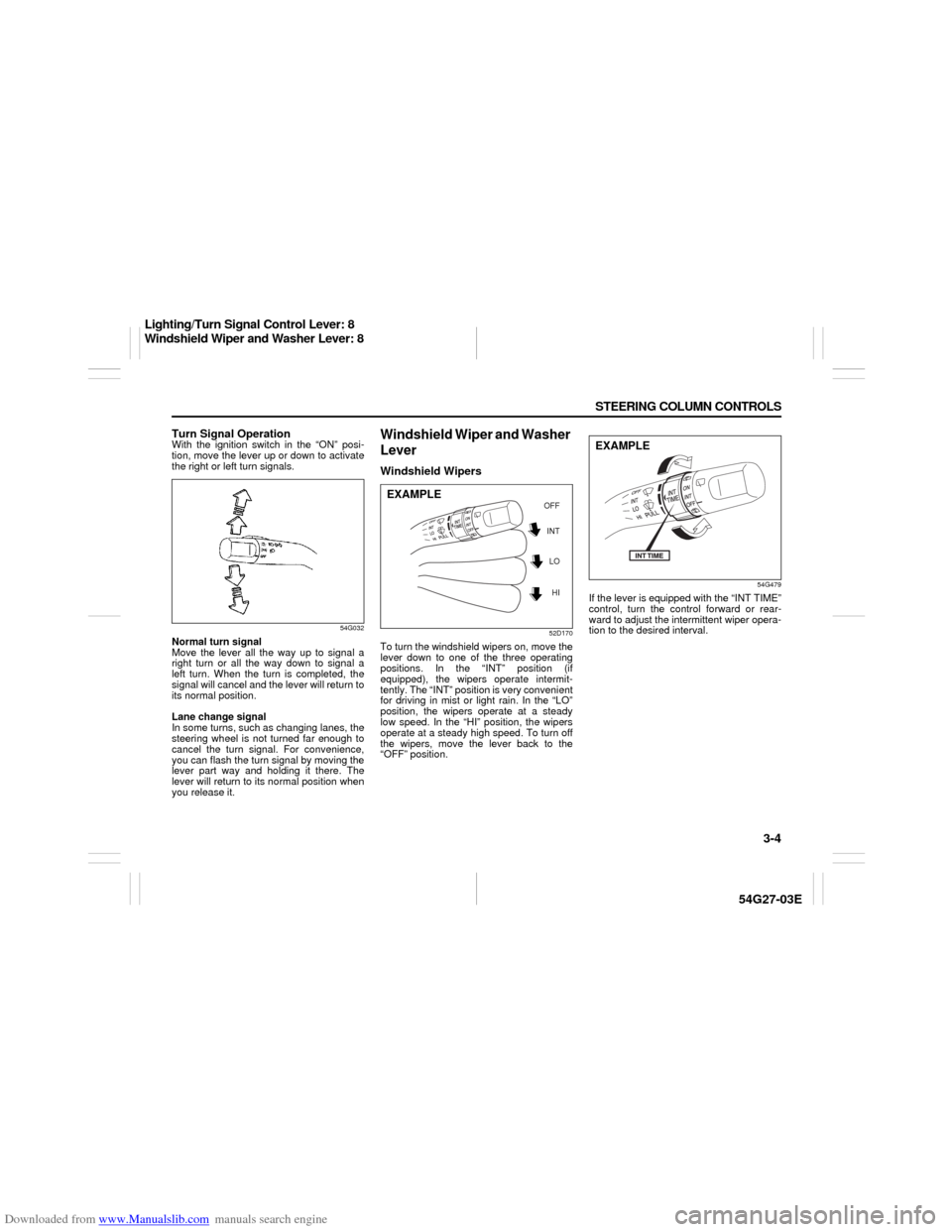
Turn Signal OperationWith the ignition switch in the “ON” posi-
tion, move the lever up or down to activate
the right or left turn signals.
54G032
Normal turn signal
Move the lever all the way up to signal a
right turn or all the way down to signal a
left turn. When the turn is completed, the
signal will cancel and the lever will return to
its normal position.
Lane change signal
In some turns, such as changing lanes, the
steering wheel is not turned far enough to
cancel the turn signal. For convenience,
you can flash the turn signal by moving the
lever part way and holding it there. The
lever will return to its normal position when
you release it.
Windshield Wiper and Washer
LeverWindshield Wipers
52D170
To turn the windshield wipers on, move the
lever down to one of the three operating
positions. In the “INT” position (if
equipped), the wipers operate intermit-
tently. The “INT” position is very convenient
for driving in mist or light rain. In the “LO”
position, the wipers operate at a steady
low speed. In the “HI” position, the wipers
operate at a steady high speed. To turn off
the wipers, move the lever back to the
“OFF” position.
54G479
If the lever is equipped with the “INT TIME”
control, turn the control forward or rear-
ward to adjust the intermittent wiper opera-
tion to the desired interval.
INT
LO
HI OFF
EXAMPLE
EXAMPLE
Lighting/Turn Signal Control Lever: 8
Windshield Wiper and Washer Lever: 8
Page 62 of 232
Downloaded from www.Manualslib.com manuals search engine 3-7 STEERING COLUMN CONTROLS
54G27-03E
52D113
When you push in the “CRUISE ON-OFF”
switch, the system is on and a “CRUISE”
indicator light on the instrument cluster will
be on.
65D474
When the vehicle’s speed is controlled by
the cruise control system, a “SET” indica-
tor light on the instrument cluster will be
on.
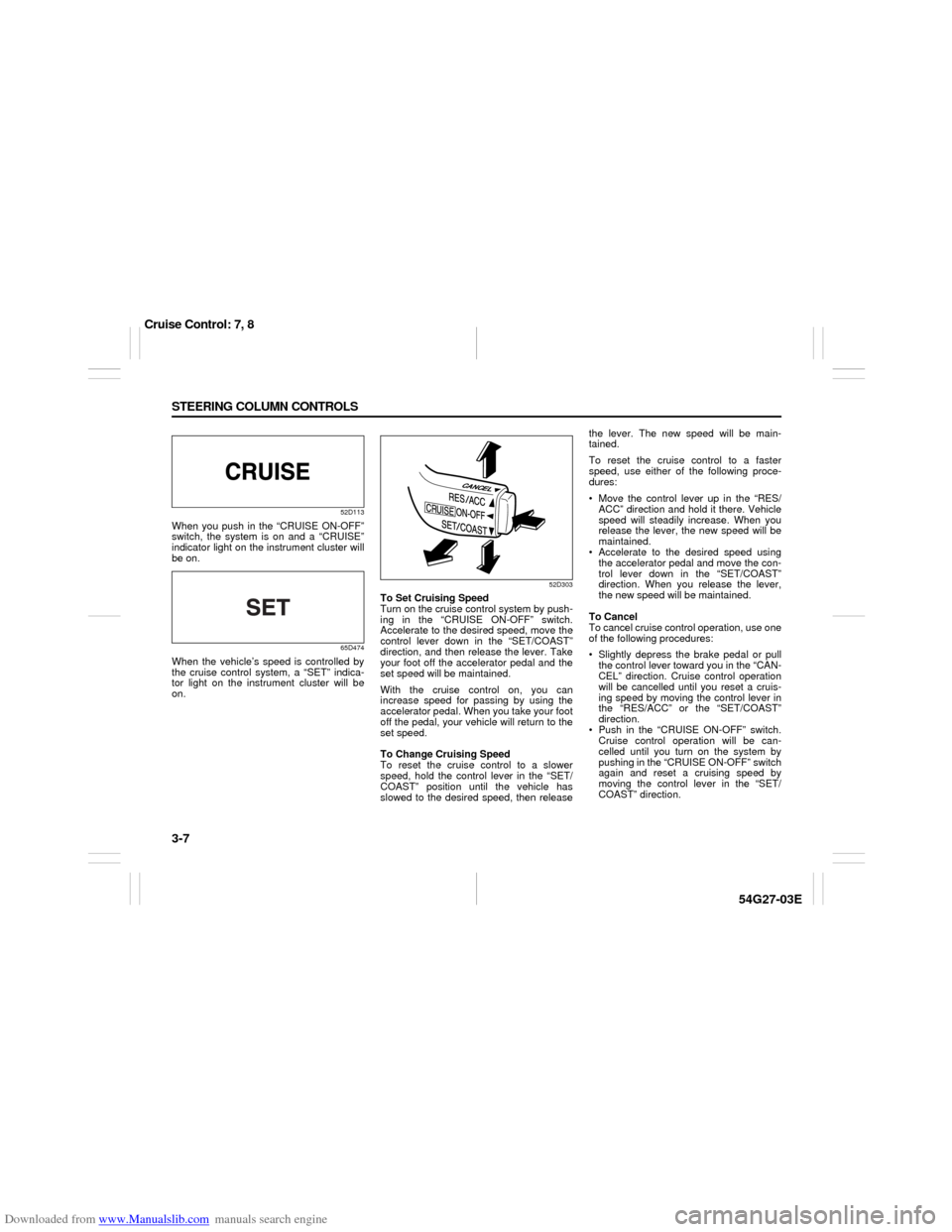
52D303
To Set Cruising Speed
Turn on the cruise control system by push-
ing in the “CRUISE ON-OFF” switch.
Accelerate to the desired speed, move the
control lever down in the “SET/COAST”
direction, and then release the lever. Take
your foot off the accelerator pedal and the
set speed will be maintained.
With the cruise control on, you can
increase speed for passing by using the
accelerator pedal. When you take your foot
off the pedal, your vehicle will return to the
set speed.
To Change Cruising Speed
To reset the cruise control to a slower
speed, hold the control lever in the “SET/
COAST” position until the vehicle has
slowed to the desired speed, then releasethe lever. The new speed will be main-
tained.
To reset the cruise control to a faster
speed, use either of the following proce-
dures:
Move the control lever up in the “RES/
ACC” direction and hold it there. Vehicle
speed will steadily increase. When you
release the lever, the new speed will be
maintained.
Accelerate to the desired speed using
the accelerator pedal and move the con-
trol lever down in the “SET/COAST”
direction. When you release the lever,
the new speed will be maintained.
To Cancel
To cancel cruise control operation, use one
of the following procedures:
Slightly depress the brake pedal or pull
the control lever toward you in the “CAN-
CEL” direction. Cruise control operation
will be cancelled until you reset a cruis-
ing speed by moving the control lever in
the “RES/ACC” or the “SET/COAST”
direction.
Push in the “CRUISE ON-OFF” switch.
Cruise control operation will be can-
celled until you turn on the system by
pushing in the “CRUISE ON-OFF” switch
again and reset a cruising speed by
moving the control lever in the “SET/
COAST” direction.
Cruise Control: 7, 8