2007 SUBARU OUTBACK lock
[x] Cancel search: lockPage 220 of 442
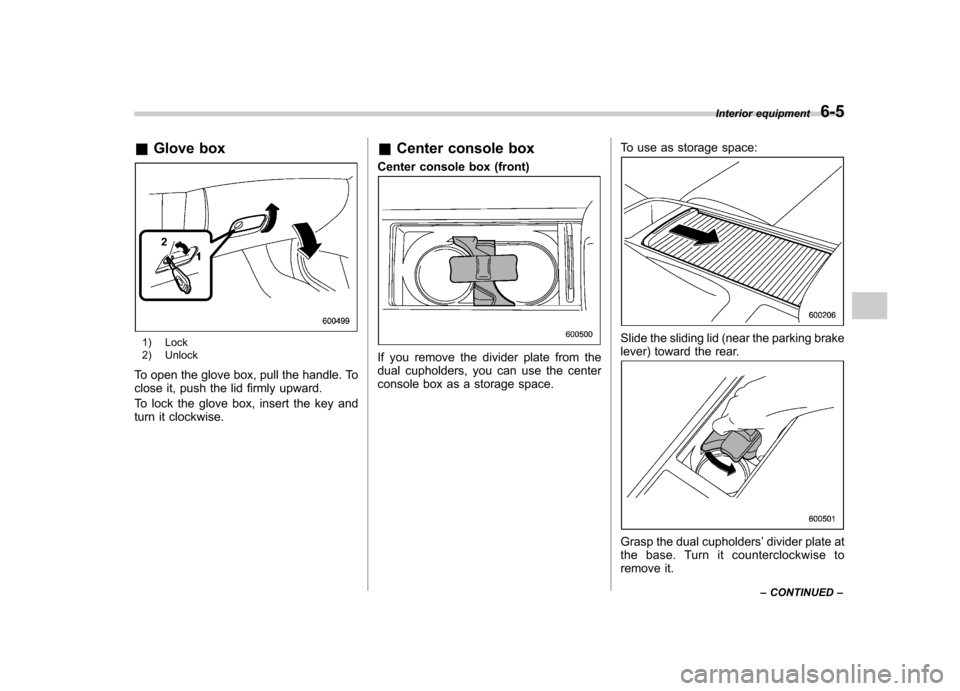
&Glove box
1) Lock
2) Unlock
To open the glove box, pull the handle. To
close it, push the lid firmly upward.
To lock the glove box, insert the key and
turn it clockwise. &
Center console box
Center console box (front)
If you remove the divider plate from the
dual cupholders, you can use the center
console box as a storage space. To use as storage space:
Slide the sliding lid (near the parking brake
lever) toward the rear.
Grasp the dual cupholders
’divider plate at
the base. Turn it counterclockwise to
remove it. Interior equipment
6-5
– CONTINUED –
Page 221 of 442
6-6Interior equipment
CAUTION
If you hold the divider plate at the
top while turning it counterclock-
wise, it may break.
To use again as cupholders:
Insert the protrusion on the back of the
divider plate into the hole in the center of
the console box. Grasp the divider plate at
the base, and turn it clockwise to fit it.
CAUTION
If you hold the divider plate at the
top while turning it clockwise, it maybreak. Center console box (rear)
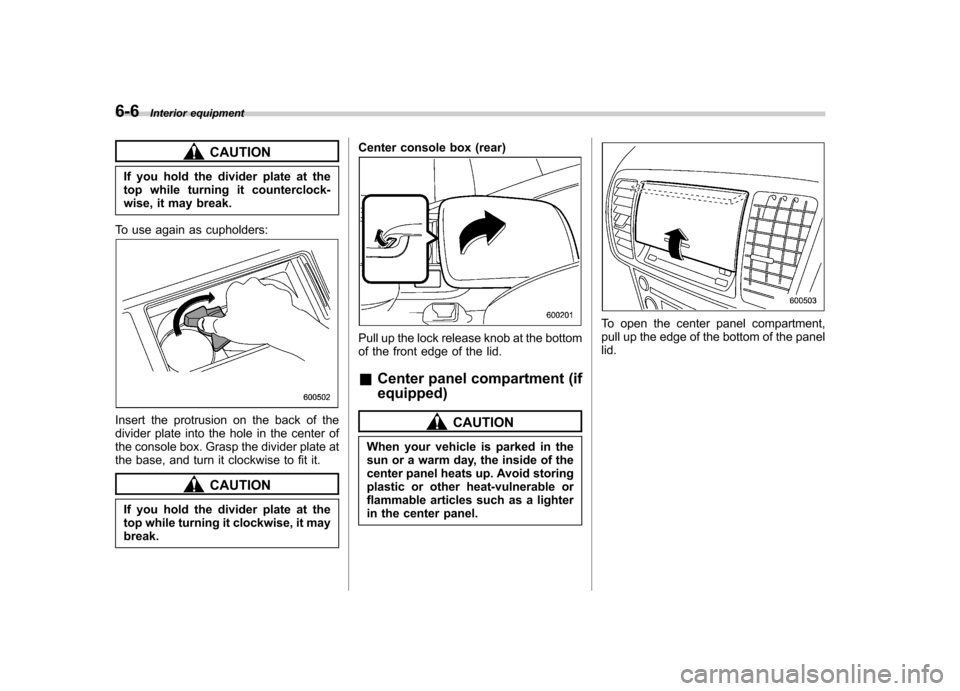
Pull up the lock release knob at the bottom
of the front edge of the lid. &
Center panel compartment (if equipped)
CAUTION
When your vehicle is parked in the
sun or a warm day, the inside of the
center panel heats up. Avoid storing
plastic or other heat-vulnerable or
flammable articles such as a lighter
in the center panel.
To open the center panel compartment,
pull up the edge of the bottom of the panellid.
Page 232 of 442

&Sedan
&Station wagon
Hang the hook provided on the underside
of the lid on the rear edge of the roof to keep the lid open.
HomeLink®Wireless Control
System (if equipped)
1) HomeLink® buttons
2) Indicator light
3) Hand-held transmitter* * Not part of your vehicle ’s keyless entry
system but of a HomeLink®-compatible device.
The HomeLink® Wireless Control System,
located on the driver ’s sun visor, is a
handy way to operate, from inside of your
vehicle, up to three remote-controlled
indoor and outdoor devices, such as
garage door openers, entrance gates,
door locks, home lighting, and security
systems. There are three HomeLink®
buttons on the sun visor, each of which
you can program for operation of one Interior equipment
6-17
– CONTINUED –
Page 236 of 442

memory of all three buttons.
3. Hold the end of the entrance gate’s/
garage door opener ’s hand-held transmit-
ter between 1 and 3 inches (25 and 76
mm) away from the HomeLink® buttons
on the driver ’s sun visor, keeping the
indicator light in view.
4. Press and hold the desired
HomeLink® button.
5. Press and release ( “cycle ”) the hand-
held transmitter button every two seconds
until step 6 is complete.
6. When the indicator light flashes slowly
and then rapidly after several seconds,
release both buttons.
7. Plug the motor of the entrance gate/
garage door opener to the outlet.
8. Test your entrance gate/garage door opener by pressing the programmed
HomeLink® button.
& Programming other devices
To program other devices such as door
locks, home lighting and security systems,
contact HomeLink at www.homelink.com
or call 1-800-355-3515. & Operating the HomeLink ®
Wireless Control System
Once programmed, the HomeLink® Wire-
less Control System can be used to
remote-control the devices to which its
buttons are programmed. To activate a
device, simply press the appropriate but-
ton. The indicator light illuminates, indicat-
ing that the signal is being transmitted. & Reprogramming a single HomeLink ®button
1. Press and hold the HomeLink® button
you wish to reprogram. DO NOT release
the button until step 4 has been com-pleted.
2. When the HomeLink® indicator light
begins to flash slowly (after 20 seconds),
position the hand-held transmitter of the
device for which you wish to program the
button at 1 to 3 inches (25 to 76 mm) away
from the HomeLink® button surface. 3. Press and hold the hand-held trans-
mitter button. The HomeLink® indicator
light will flash, first slowly and then rapidly.
4. When the indicator light begins to flash
rapidly, release both buttons.
The programming for the previous device
is now erased and the new device can be
operated by pushing the HomeLink®button. &
Erasing HomeLink ®button
memory
NOTE . Performing this procedure erases
the memory of all the preprogrammed
buttons simultaneously. The memory
of individual buttons cannot be erased.. It is recommended that upon the
sale of the vehicle, the memory of all
programmed HomeLink ®buttons be
erased for security purposes.
1. Press and hold the two outside buttons
until the indicator light begins to flash
(after 20 seconds).
2. Release both buttons.
& In case a problem occurs
If you cannot activate a device using the
corresponding HomeLink® button after
programming, contact HomeLink at Interior equipment
6-21
– CONTINUED –
Page 238 of 442

Fuel...................................................................... 7-3
Fuel requirements ............................................... 7-3
Fuel filler lid and cap ........................................... 7-5
State emission testing (U.S. only) ...................... 7-7
Preparing to drive ............................................... 7-9
Starting the engine .............................................. 7-9
Manual transmission vehicle ................................ 7-9
Automatic transmission vehicle .......................... 7-10
Stopping the engine ........................................... 7-11
Remote engine start system (dealer option) ................................................. 7-11
Starting your vehicle .......................................... 7-12
Remote start safety features ............................... 7-12
Entering the vehicle while it is running via remote start ................................................................. 7-12
Entering the vehicle following remote engine start shutdown ......................................................... 7-12
Pre-heating or pre-cooling the interior of the vehicle ............................................................. 7-13
Service mode ..................................................... 7-13
Remote transmitter programming and programmable feature option ............................ 7-13
System maintenance .......................................... 7-14
Manual transmission –5 speeds ...................... 7-15
Shifting speeds .................................................. 7-15
Driving tips ........................................................ 7-16
Manual transmission –6 speeds (2.5GT
spec.B) ............................................................. 7-17
Selecting reverse gear ........................................ 7-17
Shifting speeds .................................................. 7-17
Driving tips ........................................................ 7-18 Automatic transmission
–4-speed ................... 7-18
Selector lever .................................................... 7-19
Selector lever reverse inhibiting function ............ 7-20
Selection of manual mode .................................. 7-21
Maximum speeds ............................................... 7-22
Driving tips ........................................................ 7-23
SPORT mode ..................................................... 7-23
Shift lock release ............................................... 7-23
Automatic transmission –5-speed ................... 7-24
Selector lever .................................................... 7-25
Selector lever reverse inhibiting function ............ 7-26
Selection of manual mode .................................. 7-27
Maximum speeds ............................................... 7-29
Driving tips ........................................................ 7-29
SPORT mode (Non-turbo models) ....................... 7-30
Shift lock release ............................................... 7-30
SI-DRIVE (Turbo models) .................................. 7-31
Intelligent (I) mode ............................................. 7-31
Sport (S) mode .................................................. 7-32
Sport Sharp (S#) mode. ...................................... 7-32
SI-DRIVE selector .............................................. 7-32
Rear viscous limited slip differential (LSD) (if equipped) .................................................... 7-33
Power steering ................................................... 7-33
Braking ............................................................... 7-34
Braking tips ....................................................... 7-34
Brake system .................................................... 7-34
Disc brake pad wear warning indicators ............. 7-34
ABS (Anti-lock Brake System) .......................... 7-35
ABS system self-check ...................................... 7-35
Starting and operating
7
Page 243 of 442

7-6Starting and operating
2. Open the fuel filler lid.
1) Open
2) Close
3. Remove the fuel filler cap by turning it
slowly counterclockwise.
WARNING
. Gasoline vapor is highly flam-
mable. Before refueling, always
first stop the engine and make
sure that there are no lighted
cigarettes, open flames or elec-
trical sparks in the adjacent area. .
When opening the cap, do not
remove the cap quickly. Fuel may
be under pressure and spray out
of the fuel filler neck especially in
hot weather, which may cause
injury.
4. Stop filling the tank after the fuel filler
pump automatically clicks off. Do not add
any more fuel.
5. Put the cap back on, turn it clockwise
until you hear a clicking noise. Be certain
not to catch the tether under the cap whiletightening.
6. Close the fuel filler lid completely. If
you spill any fuel on the painted surface,
rinse it off immediately. Otherwise, the
painted surface could be damaged.
Page 248 of 442
started. The fuel injection system auto-
matically lowers the idle speed as the
engine warms up.
While the engine is warming up, make
sure that the selector lever is at the“P ”or
“ N ”position and that the parking brake is
applied. Stopping the engine
WARNING
Do not stop the engine when the
vehicle is moving. This will cause
loss of power to the power steering
and the brake booster, making steer-
ing and braking more difficult. It
could also result in accidental acti-
vation of the “LOCK ”position on the
ignition switch, causing the steering
wheel to lock.
The ignition switch should be turned off
only when the vehicle is stopped and the
engine is idling. Remote engine start system
(dealer option)
WARNING
. Do not remote start a vehicle in
an enclosed environment (e.g.
closed garage). Prolonged opera-
tion of a motor vehicle in an
enclosed environment can cause
a harmful build-up of Carbon
Monoxide. Carbon Monoxide is
harmful to your health. Exposure
to high levels of Carbon Monox-
ide can cause headaches, dizzi-
ness or in extreme cases
unconsciousness and/or death.
. Before performing any servicing
of the vehicle, temporarily place
the remote engine start system in
service mode to prevent the
system from unexpectedly start-
ing the engine. Starting and operating
7-11
– CONTINUED –
Page 249 of 442
7-12Starting and operating
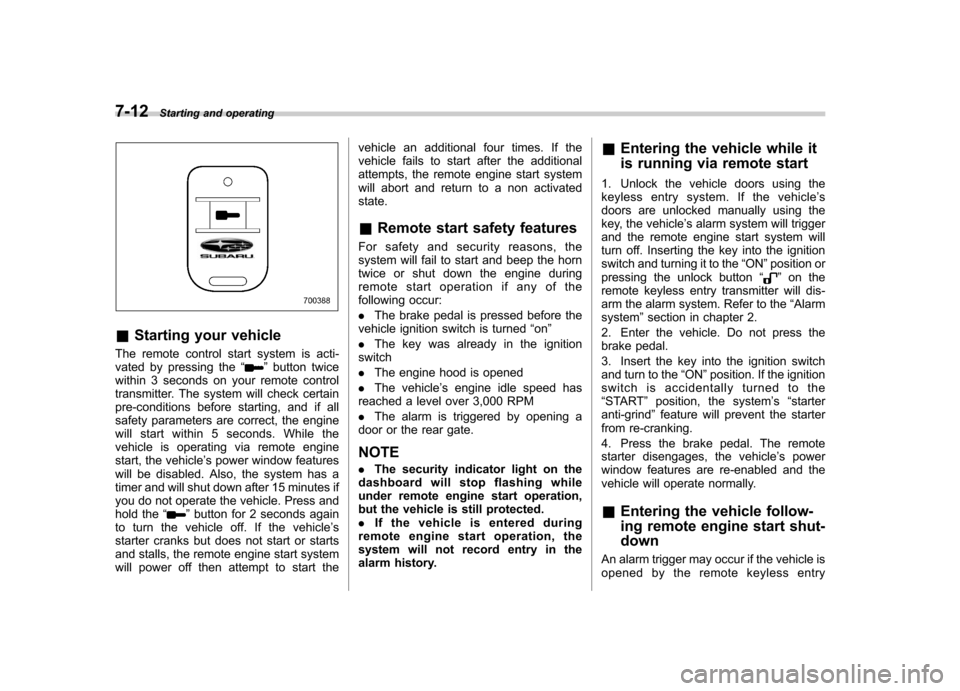
&Starting your vehicle
The remote control start system is acti-
vated by pressing the “
”button twice
within 3 seconds on your remote control
transmitter. The system will check certain
pre-conditions before starting, and if all
safety parameters are correct, the engine
will start within 5 seconds. While the
vehicle is operating via remote engine
start, the vehicle ’s power window features
will be disabled. Also, the system has a
timer and will shut down after 15 minutes if
you do not operate the vehicle. Press and
hold the “
”button for 2 seconds again
to turn the vehicle off. If the vehicle ’s
starter cranks but does not start or starts
and stalls, the remote engine start system
will power off then attempt to start the vehicle an additional four times. If the
vehicle fails to start after the additional
attempts, the remote engine start system
will abort and return to a non activatedstate.
& Remote start safety features
For safety and security reasons, the
system will fail to start and beep the horn
twice or shut down the engine during
remote start operation if any of the
following occur: . The brake pedal is pressed before the
vehicle ignition switch is turned “on ”
. The key was already in the ignition
switch. The engine hood is opened
. The vehicle ’s engine idle speed has
reached a level over 3,000 RPM. The alarm is triggered by opening a
door or the rear gate. NOTE . The security indicator light on the
dashboard will stop flashing while
under remote engine start operation,
but the vehicle is still protected.. If the vehicle is entered during
remote engine start operation, the
system will not record entry in the
alarm history. &
Entering the vehicle while it
is running via remote start
1. Unlock the vehicle doors using the
keyless entry system. If the vehicle ’s
doors are unlocked manually using the
key, the vehicle ’s alarm system will trigger
and the remote engine start system will
turn off. Inserting the key into the ignition
switch and turning it to the “ON ”position or
pressing the unlock button “
”on the
remote keyless entry transmitter will dis-
arm the alarm system. Refer to the “Alarm
system ”section in chapter 2.
2. Enter the vehicle. Do not press the
brake pedal.
3. Insert the key into the ignition switch
and turn to the “ON ”position. If the ignition
switch is accidentally turned to the“ START ”position, the system ’s “starter
anti-grind ”feature will prevent the starter
from re-cranking.
4. Press the brake pedal. The remote
starter disengages, the vehicle ’s power
window features are re-enabled and the
vehicle will operate normally. & Entering the vehicle follow-
ing remote engine start shut-down
An alarm trigger may occur if the vehicle is
opened by the remote keyless entry