2007 SUBARU OUTBACK lock
[x] Cancel search: lockPage 131 of 442

3-10Instruments and controls
Canada-spec. vehicles
This indication shows the distance that the
vehicle has been driven since you last set
it to zero.
To set the trip meter to zero, select the A
trip or B trip meter by pushing the multi-
information display toggle button and keep
the knob pushed for more than 0.8second.
If you press the multi-information display
toggle button when the ignition switch is in
the “LOCK ”position, the odometer/trip
meter will light up. It is possible to set
the trip meter to zero while the odometer/
trip meter is lit up. If you do not press the
trip knob within 5 seconds of illumination
of the odometer/trip meter, the odometer/
trip meter will go off. Also, if you open and
close the driver ’s door within 5 seconds of illumination of the odometer/trip meter, the
odometer/trip meter will go off.
NOTE
If the connection between the combina-
tion meter and battery is broken for any
reason such as vehicle maintenance or
fuse replacement, the data recorded on
the trip meter will be lost. & Current and average fuel consumption
U.S.-spec. vehicles
Canada-spec. vehicles
1) Current fuel consumption
2) Average fuel consumption
Current fuel consumption shows the rate
of fuel consumption at the present mo-
ment. Average fuel consumption shows
the average rate of fuel consumption since
the trip meter was last reset.
When the vehicle speed is less than
approximately 6 mph (9.5 km/h), the
current fuel consumption is not displayed.
The displayed number with “A ” is the
average fuel consumption corresponding
to the A trip meter indication, and the
displayed number with “B ” is the average
fuel consumption corresponding to the B
trip meter indication.
When either of the trip meter indications is
reset, the corresponding average fuel
Page 134 of 442

After 2 hours have passed for the journey
time, the display indication flashes“E/T
2:00 ”at the center of the display for 3
seconds and gives a notice to the driver to
take a rest. After 3 seconds, it returns to its
original indication of the outside tempera-
ture and journey time.
If you continue to drive your vehicle
without stopping the engine, the display
flashes the journey time for 3 seconds at
the center of the display after each
additional hour has elapsed. If the display
shows an indication other than the journey
time, the display switches to the journey
time for 3 seconds for each additional hour
that has elapsed after the first 2 hours.
After 3 seconds, it returns to its original
indication. However, if the journey time
indication overlaps with another indication,
the journey time indication is shortened.
NOTE
The journey time is reset when the
ignition switch is turned to the “OFF ”
position. It is also reset if the ignition
switch is turned to the “LOCK ”or
“ ACC ”position prior to restarting of
the engine. &
Driving range on remaining fuel
U.S.-spec. vehicles
Canada-spec. vehicles
The driving range indicates the distance in units of 10 miles (10 km) that can be
driven by taking into consideration the fuel
remaining in the tank and the average rate
of fuel consumption over the last 30 miles
(30 km).
U.S.-spec. vehicles
Instruments and controls
3-13
– CONTINUED –
Page 135 of 442

3-14Instruments and controls
Canada-spec. vehicles
If the driving range is shown as “
”,
there is only a tiny amount of fuel left in the
tank. You must refuel the vehicle immedi-
ately. NOTE
The driving range on remaining fuel is
only a guide. The indicated value may
differ from the actual driving range on
remaining fuel, so you must immedi-
ately fill the tank when the low fuel
warning light comes on. &
Clock (Vehicle with Naviga-
tion System)
NOTE
If your vehicle is a non-turbo model
equipped with a navigation system,
refer to the separate “Operating In-
structions for Monitor System ”.
For turbo models equipped with a naviga-
tion system, the clock can show the time.
The time shown by the clock receives the
time information from the navigation sys-
tem. To adjust the time shown by the
clock, refer to the separate “Operating
Instructions for Monitor System ”and
adjust the time of the navigation system.
CAUTION
To ensure safety, do not attempt to
set the time during driving, as an
accident could result.
& SI-DRIVE display
1) Sport Sharp (S#) mode*
2) Sport (S) mode
3) Intelligent (I) mode
4) Throttle angle
*: This display means that the Sport Sharp
(S#) mode is in the selected condition.
This indicates the current SI-DRIVE mode
with its throttle angle.
For details of SI-DRIVE mode, refer to the “ SI-DRIVE (Turbo models) ”section in
chapter 7.
Page 139 of 442

3-18Instruments and controls
Meters and gauges (Non-tur-
bo models) NOTE
Liquid-crystal displays are used in
some of the meters and gauges in the
combination meter. You will find their
indications hard to see if you wear
polarized glasses. &Combination meter illumina- tion
When the ignition switch is turned to the “ ON ”position, the various parts of the
combination meter are illuminated in the
following sequence:
1. Combination meter dials light up.
2. Meter needles and gauge needles
each show MAX position.
3. Meter needles and gauge needles
each show MIN position.
4. Regular illumination (for driving) be- gins. &
Canceling the function for
meter/gauge needle move-
ment upon turning on the
ignition switch
It is possible to activate or deactivate the
movement of the meter needles and
gauge needles that takes place when the
ignition switch is turned to the “ON ”
position.
Turn the ignition switch to the “ACC ”
position. With the A trip meter indication
selected, briefly press the trip knob twice.
You can now establish the activated/
deactivated setting for movement of the
meter needles and gauge needles. To
change the current setting, press the trip
knob for at least two seconds.
: Activated
: Deactivated
Briefly press the knob to return to the A trip
meter indication.
If you turn the ignition switch to the “ LOCK ”position, turn the ignition switch
to the “ON ”position, or open and close the
driver ’s door during the setting procedure,
the new setting will be canceled. Also, if
you do not press the trip knob for a period
of 10 seconds, the new setting will becanceled.
NOTE
It is not possible to cancel sequential
illumination of the combination meter
while sequential illumination is actually
taking place. Cancel sequential illumi-
nation when regular illumination (for
driving) has begun. & Speedometer
The speedometer shows the vehicle speed.
Page 140 of 442
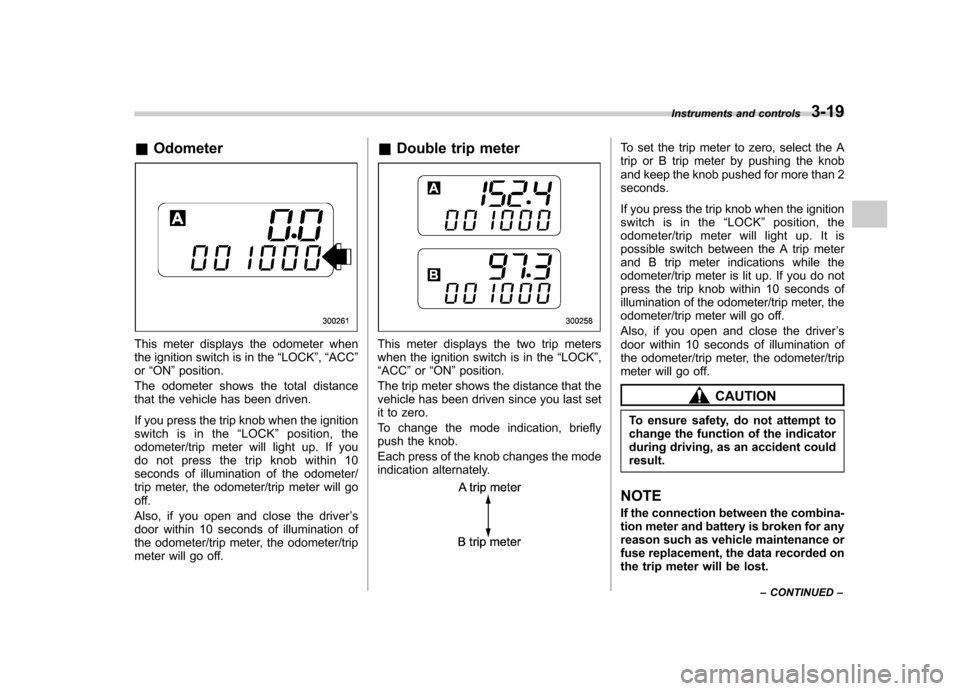
&Odometer
This meter displays the odometer when
the ignition switch is in the “LOCK ”, “ACC ”
or “ON ”position.
The odometer shows the total distance
that the vehicle has been driven.
If you press the trip knob when the ignition
switch is in the “LOCK ”position, the
odometer/trip meter will light up. If you
do not press the trip knob within 10
seconds of illumination of the odometer/
trip meter, the odometer/trip meter will go
off.
Also, if you open and close the driver ’s
door within 10 seconds of illumination of
the odometer/trip meter, the odometer/trip
meter will go off. &
Double trip meterThis meter displays the two trip meters
when the ignition switch is in the “LOCK ”,
“ ACC ”or “ON ”position.
The trip meter shows the distance that the
vehicle has been driven since you last set
it to zero.
To change the mode indication, briefly
push the knob.
Each press of the knob changes the mode
indication alternately.
To set the trip meter to zero, select the A
trip or B trip meter by pushing the knob
and keep the knob pushed for more than 2seconds.
If you press the trip knob when the ignition
switch is in the “LOCK ”position, the
odometer/trip meter will light up. It is
possible switch between the A trip meter
and B trip meter indications while the
odometer/trip meter is lit up. If you do not
press the trip knob within 10 seconds of
illumination of the odometer/trip meter, the
odometer/trip meter will go off.
Also, if you open and close the driver ’s
door within 10 seconds of illumination of
the odometer/trip meter, the odometer/trip
meter will go off.
CAUTION
To ensure safety, do not attempt to
change the function of the indicator
during driving, as an accident couldresult.
NOTE
If the connection between the combina-
tion meter and battery is broken for any
reason such as vehicle maintenance or
fuse replacement, the data recorded on
the trip meter will be lost. Instruments and controls
3-19
– CONTINUED –
Page 141 of 442
3-20Instruments and controls
!Vehicle communication system
fault indication
The vehicle communication system car-
ries various types of information (vehicle
speed, running conditions, etc.) to control
modules. In the event of a fault in this
communication system, the trip meter willshow “
”.
If the trip meter shows “
”, immediately
contact the nearest SUBARU dealer and
have the vehicle communication systeminspected. NOTE
If you press the trip knob while the trip
meter is showing “
”, the trip meter
indication will appear for 10 seconds. &
Tachometer
The tachometer shows the engine speed
in thousands of revolutions per minute.
CAUTION
Do not operate the engine with the
pointer of the tachometer in the red
zone. In this range, fuel injection will
be cut by the engine control module
to protect the engine from overrev-
ving. The engine will resume run-
ning normally after the engine speed
is reduced below the red zone.
NOTE (3.0-liter models only)
To protect the engine while the “P ” or
“ N ” position is selected, the engine is
controlled such that the engine speed
does not become too high even if the
accelerator pedal is pressed hard. &
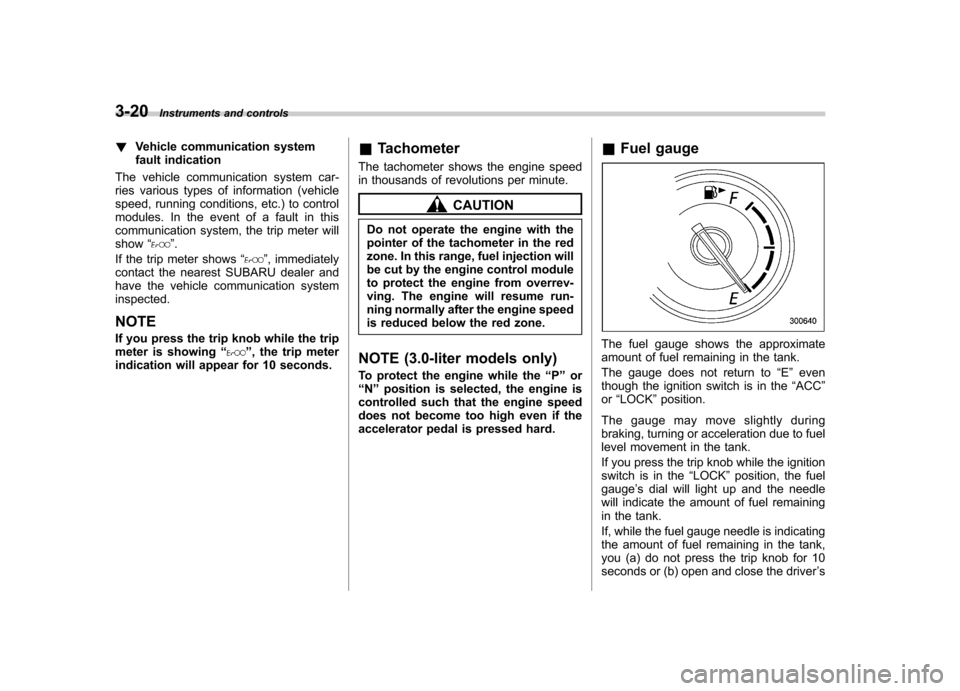
Fuel gauge
The fuel gauge shows the approximate
amount of fuel remaining in the tank.
The gauge does not return to “E ” even
though the ignition switch is in the “ACC ”
or “LOCK ”position.
The gauge may move slightly during
braking, turning or acceleration due to fuel
level movement in the tank.
If you press the trip knob while the ignition
switch is in the “LOCK ”position, the fuel
gauge ’s dial will light up and the needle
will indicate the amount of fuel remaining
in the tank.
If, while the fuel gauge needle is indicating
the amount of fuel remaining in the tank,
you (a) do not press the trip knob for 10
seconds or (b) open and close the driver ’s
Page 145 of 442
3-24Instruments and controls
.Do not install any accessory such as a
table or TV onto the seatback. . Do not store a heavy load in the
seatback pocket.. Do not allow the rear seat occupant to
place his/her hands or legs on the front passenger ’s seatback, or allow him/her to
pull the seatback. . Do not use front seats with their back-
ward-forward position and seatback not
being locked into place securely. If any of
them are not locked securely, adjust them
again. For adjusting procedure, refer tothe “Manual seat ”in the front seats section
in chapter 1 in this owner ’s manual.
(Models equipped with manual seats only)
If the seatbelt warning device for the front passenger ’s seat does not function cor-
rectly (e.g., it is activated even when the
front passenger ’s seat is empty or it is
deactivated even when the front passen-
ger has not fastened his/her seatbelt),
take the following actions. . Ensure that no article is placed on the
seat other than a child restraint system
and its child occupant. . Ensure that there is no article left in the
seatback pocket.. Ensure that the backward-forward po-
sition and seatback of front passenger ’s
seat are locked into place securely by moving the seat back and forth. (Models
equipped with manual seats only)
If still the seatbelt warning device for front passenger
’s seat does not function cor-
rectly after taking relevant corrective ac-
tions described above, immediately
contact your SUBARU dealer for aninspection.
& SRS airbag system
warning light
When the ignition switch is turned to the “ON ”position, the SRS airbag system
warning light will come on for approxi-
mately seven seconds and go out. This
shows the SRS frontal airbag and SRS
side airbag and SRS curtain airbag and
seatbelt pretensioners are in normal op-eration.
WARNING
If the warning light exhibits any of
the following conditions, there may
be a malfunction in the seatbelt
pretensioners and/or SRS airbag
system. Immediately take your vehi-
cle to your nearest SUBARU dealer
to have the system checked. Unless
checked and properly repaired, the
seatbelt pretensioners and/or SRS airbags will operate improperly (e.g.
SRS airbags may inflate in a very
minor collision or not inflate in a
severe collision), which may in-
crease the risk of injury. .
Flashing or flickering of the warn-
ing light
. No illumination of the warning
light when the ignition switch is
first turned to the “ON ”position
. Continuous illumination of the
warning light
. Illumination of the warning light
while driving
Page 150 of 442

switch in the“ON ”position and with the
parking brake fully released.
If the brake system warning light should
come on while driving (with the parking
brake fully released and with the ignition
switch positioned in “ON ”), it could be an
indication of leaking of brake fluid or worn
brake pads. If this occurs, immediately
stop the vehicle at the nearest safe place
and check the brake fluid level. If the fluid
level is below the “MIN ”mark in the
reservoir, do not drive the vehicle. Have
the vehicle towed to the nearest SUBARU
dealer for repair. ! Electronic Brake Force Distribution
(EBD) system warning
The brake system warning light also
illuminates if a malfunction occurs in the
EBD system. In that event, it comes on
together with the ABS warning light.
The EBD system may be faulty if the
brake system warning light and ABS
warning light illuminate simultaneously
during driving.
Even if the EBD system fails, the conven-
tional braking system will still function.
However, the rear wheels will be more
prone to locking when the brakes are
applied harder than usual and the vehi-cle ’s motion may therefore become some-
what harder to control. If the brake system warning light and ABS
warning light illuminate simultaneously,
take the following steps:
1. Stop the vehicle in the nearest safe,
flat place.
2. Shut down the engine, then restart it.
3. Release the parking brake. If both
warning lights go out, the EBD system
may be faulty.
Drive carefully to the nearest SUBARU
dealer and have the system inspected.
4. If both warning lights come on again
and stay illuminated after the engine has
been restarted, shut down the engine
again, apply the parking brake, and check
the brake fluid level.
5. If the brake fluid level is not below the “
MIN ”mark, the EBD system may be
faulty. Drive carefully to the nearest
SUBARU dealer and have the systeminspected.
6. If the brake fluid level is below the “ MIN ”mark, DO NOT drive the vehicle.
Instead, have the vehicle towed to the
nearest SUBARU dealer for repair.
& Low fuel warning light
The low fuel warning light comes on when
the tank is nearly empty approximately 2.6
US gal (10.0 liters, or 2.2 Imp gal). It only
operates when the ignition switch is in the “
ON ”position.
NOTE
This light does not go out unless the
tank is replenished up to an internal
fuel quantity of approximately 3.7 US
gal (14 liters, 3.1 Imp gal).
CAUTION
(Turbo model only) Promptly put
fuel in the tank whenever the low
fuel warning light comes on. Engine
misfires as a result of an empty tank
could cause damage to the engine.
& Door open warning light
When any of the doors, the rear gate
(Station wagon) or the trunk lid (Sedan) is
not fully closed, the door warning light
comes on.
For non-turbo models, the open door is
indicated by the corresponding part of the
door warning light.
For turbo models, the opening door is
indicated on the multi-information display.
Always make sure this light is out before
you start to drive. Instruments and controls
3-29
– CONTINUED –