2007 SKODA FABIA maintenance
[x] Cancel search: maintenancePage 88 of 242

Starting-off and Driving87
Using the systemSafetyDriving TipsGeneral MaintenanceBreakdown assistanceTechnical Data
Ignition lock
Petrol engines
- ignition switched off, engine off, the steering can be locked.
- ignition switched on
- start engine
Diesel engines
- interruption of fuel supply, ignition sw itched off, engine off, the steering can be locked.
- heating glow plugs on, ignition switched on
•You should not switch on any major elec trical components during the heating period otherwise the vehicle batter y will be drained unnecessarily.
- start engine
Applies to all models:
Position
To lock the steering, with the ignition key withdrawn, turn the steering wheel until the steering locking pin is heard to engage. You should always lock the steering as a general rule if you leave your vehicle. This acts as a deterrent against possible theft of your vehicle ⇒.
Position
Move the steering wheel back and forward a little if the ignition key cannot, or cannot easily be turned into this position, in order to release the steering lock.
Position
The engine is started in this position. At the same time switched on low beam or main beam or other electrical compon ents with major power consumption are briefly switched off. The ignition key moves back into position when one releases the key.
The ignition key must be turned back into position each time before starting the engine again. The starter repeat lock in th e ignition lock prevents the starter being engaged when the engine is ru nning and thus getting damaged.
WARNING
•When driving, the ignition key must always be in the position (igni- tion switched on) without the engine running. This position is indicated by the warning lights coming on. If this is not the case, it could result in unex- pected locking of the steering wheel - risk of accident!
•Do not withdraw the ignition key from the lock until the car has come to a stop. The steering lock can engage immediately - risk of accident!
•Always withdraw the ignition key if you are going to leave the vehicle, even for a short time. This is particularly important if children are left in the vehicle. The children migh t otherwise start the engine or operate electrical equipment (e.g. power windows) - risk of injury!
Starting the engine
General
You can only start the engine only using an original ignition key.
•Place the gearshift lever into neutral and put on the handbrake firmly before starting the engine.
•The clutch pedal should be fully depressed when starting the engine which means that the starter only has to crank the engine.
Fig. 90 Ignition lock positions
A1
A2
A3
A1
A2
A3
A1
A2
A3
A2
A1
A2
NKO A05F 20 MR08.book Page 87 Thursday, April 19, 2007 11:34 AM
Page 90 of 242
Starting-off and Driving89
Using the systemSafetyDriving TipsGeneral MaintenanceBreakdown assistanceTechnical Data
•Contact the nearest specialist garage to obtain professional assistance.
Starting the engine after fuel tank has run dry
It may take longer than normal to start the engine after refuelling if the fuel tank has run completely dry - up to one minute. This is because the fuel system must first of all be filled while the attempting to start the engine.
Switching off the engine
– The engine can be switched off by turning the ignition key from posi-
tion ⇒page 87, fig. 90 into position .
WARNING
•Never switch off the engine before the vehicle is stationary - risk of acci- dent!
•The brake booster only operates when the engine is running. Greater physical effort for braking is required when engine is switched off. Because if you do not stop as normal, this can cause an accident and severe injuries.
Caution
you should not switch the engine off right away at the end of your journey after the engine has been operated for a lengthy period at high loads but should be allowed it to run at idling speed for about 2 minutes . This prevents any accumulation of heat when the engine is switched off.
Note
•The radiator fan may continue running fo r a further 10 minutes or so after the engine and the ignition have been switched off. The coolant fan may, however, also switch on again after some time if the coolant temperature rises because of an accumulation of heat in the engine or if the engine is warm and the engine compartment is additionally heated by strong sunlight.
•This is why particular care is required when carrying out any work in the engine compartment ⇒page 173, “Working in the engine compartment”.
Shifting (manual gearbox)
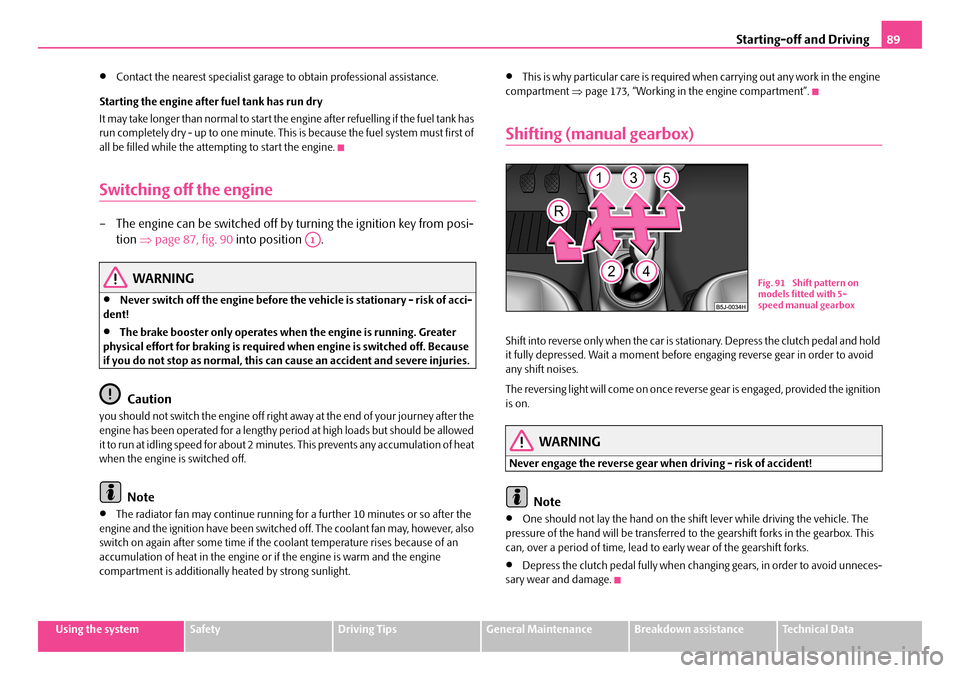
Shift into reverse only when the car is stationary. Depress the clutch pedal and hold it fully depressed. Wait a moment before engaging reverse gear in order to avoid any shift noises.
The reversing light will come on once reverse gear is engaged, provided the ignition is on.
WARNING
Never engage the reverse gear when driving - risk of accident!
Note
•One should not lay the hand on the shift lever while driving the vehicle. The pressure of the hand will be transferred to the gearshift forks in the gearbox. This can, over a period of time, lead to early wear of the gearshift forks.
•Depress the clutch pedal fully when changing gears, in order to avoid unneces- sary wear and damage.
A1
Fig. 91 Shift pattern on models fitted with 5-speed manual gearbox
NKO A05F 20 MR08.book Page 89 Thursday, April 19, 2007 11:34 AM
Page 92 of 242

Starting-off and Driving91
Using the systemSafetyDriving TipsGeneral MaintenanceBreakdown assistanceTechnical Data
Range of sensors
The clearance warning begins at a distance of about 160 cm from the obstacle (area ⇒page 90, fig. 93). The interval between the warning signals becomes shorter as the clearance is reduced.
A continuous tone sounds from a clearanc e of just 30 cm (Bereich ) - danger area. You should not reverse any further after this signal sounds!
Activating
The parking aid is activated automatically when reverse gear is engaged and the ignition is turned on. This is confirmed by a brief acknowledgement signal.
Deactivating
The parking aid is deactivated by removing the reverse gear.
WARNING
•The parking aid is not a substitute fo r the driver paying proper attention and it is always the driver's responsibility to take care when parking the vehicle or carrying out similar manoeuvres.
•You should therefore satisfy yourself, before reversing, that there is no small obstacle, such as a rock, thin po st, trailer drawbar etc., behind your vehicle. Such an obstacle might not be within the range detected by the sensors.
Note
•When operating with a trailer, the parking aid is without function.
•A system fault is indicated if a warning signal sounds for about 5 seconds after switching the ignition on and engaging reve rse gear and there is no obstacle close to your vehicle. It is possible that the audible warning does not function correctly (an obstacle behind the vehicle may not be detected - take extra care). Have the fault rectified by a specialist workshop.
•The sensors must be kept clean and free of ice to enable the parking aid to operate properly.
•If the parking aid is activated and the selector lever of the automatic gearbox is in the position , warning signal indicates interruption (vehicle can no longer move).
Cruise control system (CCS)*
Introduction
The cruise control system (CCS) maintains a constant speed, more than 30 km/h, once it has been set, withou t you having to depress the accelerator pedal. This is only possible within the range which is permitted by the power output and braking power of the engine. The cruise control syst em makes it possible - particularly on long journeys - for you to rest your “accelerator foot”.
WARNING
•The cruise control system must not, for safety reasons, be used in dense traffic or on unfavourable road surfaces (such as icy roads, slippery roads or loose chippings) - risk of accident!
•In order to prevent unintentional use of the cruise control system, always switch off the system after use.
Note
•Models fitted with a manual gearbox: Al ways depress the clutch pedal if you switch on the cruise control system when the gearbox is in Neutral. Otherwise the engine can rev up unintentionally.
•The cruise control system is not able to maintain a constant speed when driving on steep downhill sections. The weight of the vehicle increases the speed at which it travels. One should shift down in good time to a lower gear or slow the vehicle down by applying the foot brake.
•It is not possible on vehicles fitted with an automatic gearbox to switch on the cruise control system if the sele ctor lever is in the position P, N or R.
AA
AB
AP
NKO A05F 20 MR08.book Page 91 Thursday, April 19, 2007 11:34 AM
Page 94 of 242

Starting-off and Driving93
Using the systemSafetyDriving TipsGeneral MaintenanceBreakdown assistanceTechnical Data
Switching off the cruise control system temporarily
–You can switch off temporarily the cruise control system, if you
depress the brake or clutch pedal.
The set speed remains stored in the memory.
Press the rocker button in the position RES+ for the resumption of the stored speed after releasing the clutch or brake pedal.
WARNING
First ensure that it is not too high for the traffic conditions which exist at that moment before resuming the stored speed.
Switching off the cruise control system completely
– Press the switch ⇒page 92, fig. 94 to the right into position OFF.
AB
AA
NKO A05F 20 MR08.book Page 93 Thursday, April 19, 2007 11:34 AM
Page 96 of 242

Automatic gearbox95
Using the systemSafetyDriving TipsGeneral MaintenanceBreakdown assistanceTechnical Data
•When the engine is running and the vehicle is stationary, it is necessary to hold the car with the brake pedal in all the positions of the selector lever (except P and N) since the power transmission is never completely inter- rupted, also not when the engine is idling - the vehicle "creeps".
Selector lever positions
The selector lever position you have engaged is shown in the information display of the instrument cluster with the corresponding gear symbol highlighted ⇒fig. 96.
In the positions D and S the gear you have already engaged will be additionally displayed on the display.
P - Parklock
The driven wheels are locked me chanically in this position.
The Parklock must only be engage d when the vehicle is stationary ⇒.
If you wish to move the select or lever into or out of this position, you must press the Shiftlock button in the handle of the select or lever and at the same time depress the brake pedal.
R - Reverse
Reverse gear must only be engaged when the vehicle is stationary and the engine idling ⇒.
The brake pedal must be depressed and at the same time the Shiftlock must be pressed, if you wish to obtain the selector lever positions R, P or N.
When the ignition is switched on and the selector lever is in position R, the reverse lights will come on.
N - Neutral
The transmission is in Neutral in this position.
The brake pedal must be depressed (if the le ver is in its position for longer than 2 seconds) in order to move the selector lever out of the position N into the position D , with the ignition switched on, on a vehicle travelling at less than 5 km/hour or on a stationary vehicle.
The brake pedal must be depressed (if the le ver is in its position for longer than 2 seconds) in order to move the selector lever out of the position N into the position R , with the ignition switched on, on a vehicle travelling at less than 5 km/hour or on a stationary vehicle.
D - Drive, position for driving forward
When the selector lever is in this position, the forward gears are shifted up and down automatically in line with engine load, vehicle speed and the dynamic shift programme.
WARNING (continued)
Fig. 95 Selector lever
Fig. 96 Information display: Selector lever positions
NKO A05F 20 MR08.book Page 95 Thursday, April 19, 2007 11:34 AM
Page 98 of 242

Automatic gearbox97
Using the systemSafetyDriving TipsGeneral MaintenanceBreakdown assistanceTechnical Data
WARNING
Please note that using the kickdown function can result in the driven wheels spinning on a smooth or slippery road surface - risk of skidding!
Dynamic shift programme
The automatic gearbox of your vehicle is controlled electronically. Shifting up and down through the gears is performed auto matically on the basis of pre-defined driving programmes.
Adopting a moderate style of driving will cause the gearbox to select the most economical driving programme. Shifting up in to a higher gear as soon as possible and shifting down as late as possible will have a favourable effect on your fuel consumption.
Adopting a sporty style of driving with rapid movements of the accelerator pedal combined with sharp acceleration and freq uent changes in speed, exploiting the top speed of the car or depressing the a ccelerator pedal (kickdown function), will cause the gearbox to switch over to this style of driving and shift down earlier with frequent changes in gears in comparison to the moderate style of driving.
Selecting the most appropriate driving programme for the particular style of driving is a continuous process. Irrespective of this it is, however, possible to switch or shift down into a dynamic shift programme by depressing the accelerator rapidly. The gearbox shifts down into a lower gear matc hing the speed of the car and this allows you to accelerate rapidly (e.g. when ov ertaking) without having to depress the accelerator pedal fully into the kickdown range. The original programme will be reactivated to match your particular style of driving once the gearbox has shifted up again.
When driving in hilly regions, the gears are selected to match uphill and downhill sections. This avoids the gearbox frequently shifting up and down when negotiating an uphill stretch. When driving downhill, it is possible to shift down into the Tiptronic position, in order to exploit the engine brake torque.
Tiptronic
The Tiptronic allows the driver to also shift gears manually.
Switching over to manual shifting
– Push the selector lever to the right out of position D. As soon as the
gearbox has switched over, 6 5 4 3 2 1 appears in the display, with the
gear engaged being highlighted.
Shifting up gears
– One-touch forward of the selector lever (in the Tiptronic position)
⇒ fig. 97 .
Fig. 97 Selector lever: Manual shifting of gears
Fig. 98 Information display: Manual shifting of gears
A+
NKO A05F 20 MR08.book Page 97 Thursday, April 19, 2007 11:34 AM
Page 100 of 242

Communication99
Using the systemSafetyDriving TipsGeneral MaintenanceBreakdown assistanceTechnical Data
Communication
Operating the radio
The driver can set the basic functions of the radio system by simply operating the buttons on the multi-functional module* be hind the steering wheel so that he can concentrate on the traffic situation without being distracted as little as possible by operating the radio system ⇒fig. 99.
This applies only if your radio equipment has been installed at the factory. You can of course operate the radio system at the appliance. You will find a description in the operating instructions of your radio system.
By pressing the buttons, you can carry out the following functions:
The buttons apply for the respective oper ating mode of the current radio system.
Note
The loudspeakers in the vehicle are matched to a power output of 30 W.
ButtonRadioCD
Thumbwheel for stored transmitter
forward
back
Title search
forward
back
Increase volume
Decrease volume
Fig. 99 Multi-functional module: Buttons for the operation of the radio
A1
A2
A3
Frequency search back Reading the
previous CD
Frequency search forward
Reading the
following CD
Mute switch
ButtonRadioCD
A4
A5
A6
NKO A05F 20 MR08.book Page 99 Thursday, April 19, 2007 11:34 AM
Page 102 of 242

Communication101
Using the systemSafetyDriving TipsGeneral MaintenanceBreakdown assistanceTechnical Data
Universal telephone preinstallation with voice
control*
The voice control is activated according to equipment installed on the vehicle by pressing the button PTT (push to talk) on the adapter ⇒fig. 101 or the button on the multi-functional module* ⇒page 100.
A phone phonebook is part of the mobile ph one preinstallation with voice control. In the phone phonebook there are 1500 free memory locations available. This phone phonebook can be used in line with the mobile telephone.
For vehicles fitted with multi-functional module*, the operation is performed via the function buttons on the module ⇒page 100.
Furthermore the volume can be changed indi vidually at any time with the button for setting the radio or on vehicles fitted with multi-functional module* with func- tion buttons on the steering wheel.
If the system answers with the voice response “ Telephone is not ready”, please check the operating state of the telephone as follows:
•Is the telephone switched on?
•Is the PIN code entered?
Dialogue
The period, in which the telephone system is ready to receive voice commands and carry out the voice commands, is called DIALOGUE. The system gives audible feed-
back and guides you if necessary through the relevant functions. You can start or end the dialogue at any time by pressi ng the PTT button. You can also end the dialogue with the voice command CANCEL.
The dialogue is always automatically ended after carrying out an operation, e.g. after erasing the name from the phonebook.
The dialogue of the incoming call is im mediately interrupted and you can accept the call by pressing the button .
If a voice command is not detected, the system answers with “ Sorry?” and a new entry can be performed. After the 3rd error the answer “ Cancel” is given and the dialogue is ended.
Optimum understanding of the voice commands depends on the following factors:
•Speak with a normal tone of voice without intonation and excessive voice pauses.
•Avoid insufficient articulation.
•Close the doors, windows and sliding roof, in order to reduce or stop disturbing exterior noise.
•It is recommended to speak louder at higher speeds, so that the tone of your voice is louder than the increased surrounding noise.
•During the dialogue avoid additional noise in the vehicle, e.g. simultaneously talking occupants.
•Do not speak, if the system makes an announcement.
•The microphone for voice control is direct ed to the driver and front passenger. Therefore the driver and the front passenger can operate the equipment.
WARNING
Pay attention primarily to the traffic situation! As the driver you are fully responsible for the traffic safety. Use the telephone system only to such an extent, so that you are in full control of your vehicle at any time.
Fig. 101 Button for switching on the voice control
NKO A05F 20 MR08.book Page 101 Thursday, April 19, 2007 11:34 AM