2007 SKODA FABIA maintenance
[x] Cancel search: maintenancePage 40 of 242

Unlocking and locking39
Using the systemSafetyDriving TipsGeneral MaintenanceBreakdown assistanceTechnical Data
Synchonisation of the remote control
If the vehicle cannot be unlocked by actuating the remote control system then it is possible that the code in the key and the control unit in the vehicle are no longer synchronised. This can occur when the butt ons on the radio-operated key are actu- ated a number of times outside of the operative range of the equipment or the battery on the remote control was replaced.
This means it is necessary to synchronise the code as follows:
•Press any button on the remote control.
•pressing of the button means that the door will unlock with the key within 1 minute.
Anti-theft alarm system*
The anti-theft alarm system increases the le vel of protection against people seeking to break into the vehicle. The system tri ggers audible and visual warning signals if an attempt is made to break into the vehicle.
How is the alarm system switched on?
The anti-theft alarm system is activated automatically when the vehicle is locked with the key on the closed driver's door or by using the remote control. It is acti- vated 30 seconds after closing the door.
How is the alarm system switched off?
The anti-theft alarm system is switched of f if the vehicle is unlocked by only using the remote control. The vehi cle is automatically locked again if the vehicle is not opened within 30 seconds after reactivating the anti-theft alarm system.
Once you unlock the vehicle by inserting the key into the driver door you then have to insert the key into the ignition lock an d switch the ignition on within 15 seconds after unlocking the door in order to deac tivate the anti-theft alarm system. The alarm will be triggered if you do not switch on the ignition within 15 seconds.
When is the alarm triggered?
The following security areas of the locked vehicle are monitored:
•Bonnet,
•Boot lid,
•Doors,
•Ignition lock,
•Vehicle interior* ⇒page 40,
•Angle of the vehicle*,
•A drop in voltage of the on-board power supply.
An alarm is immediately triggered if either of the two battery terminals is discon- nected while the anti-theft alarm system is activated.
How is the alarm switched off?
You switch the alarm off if you unlock the car with the radio remote control in the key or if you switch the ignition on.
Note
•The working life of the alarm siren is 5 years. More detailed information is avail-able from your Škoda Service Partner.
•Before leaving the car, check that all the doors, windows and the electric sliding/tilting roof* are properly closed in order to ensure that the anti-theft alarm system is fully operational.
•Coding of the radio remote control and the receptor part precludes the use of the radio remote control from other vehicles.
NKO A05F 20 MR08.book Page 39 Thursday, April 19, 2007 11:34 AM
Page 42 of 242

Unlocking and locking41
Using the systemSafetyDriving TipsGeneral MaintenanceBreakdown assistanceTechnical Data
The power windows operate only when ignition is switched on.
Opening a window
– A window is opened by pres sing lightly on the respective butto n in the
door. The process stops when one releases the button.
– Additionally you can open the window automatically (fully opened) by
pressing the button up to the stop. Renewed pressing of the button
causes the window to stop immediately.
Closing a window
– A window is closed through pulling lightly on the respective button in
the door. The closing process stop s when one releases the button.
– Additionally you can close the window automatically (fully closed) by
pulling the button up to the stop. Renewed pulling of the button
causes the window to stop immediately.
The switches for the individual windows are located in the operating part in the driver's door ⇒page 40, fig. 28, front passenger door and in the rear doors*.
If the buttons for the rear doors are deactivated, the indicator light in the safety switch lights up.
The switch for the power window in th e operating part in the driver's door
Button for the power window in the driver's door
Button for the power window in the front passenger's door
Button for the power window in the rear door on the right*
Button for the power window in the rear door on the left*
Safety pushbutton*
Safety pushbutton*
You can deactivate the switches for power windows at rear doors by pressing the safety pushbutton ⇒page 40, fig. 28. The buttons for power windows at rear doors are activated again by pressing the safety pushbutton again.
WARNING
•If you lock the vehicle from the outside, do not leave any person in the vehicle since it is no longer possible to open the windows from the inside in an emergency.
•The system is fitted with a force limiter. The closing process will be stop if an obstruction is detected and the window will open again. You should then take particular care when closing the windows! You may otherwise suffer severe injuries as a result of getting an arm, for example, jammed in the window!
•It is recommended to deactivate the electrically operated power windows in the rear doors (safety pushbutton) ⇒page 40, fig. 28 when children are being transported on the rear seats.
•In the event of a freezing up of the wi ndscreen, first of all eliminate the ice ⇒ page 164 and then operate the power windows otherwise the power window mechanism could be damaged.
Note
•After switching the ignition off, it is still possible to open or close the windows for a further 10 minutes. The automatic closing and opening functions will not operate during this time. The power windows are switched off completely once you open the driver or front passenger door.
•When driving always use the existing he ating, air conditioning and ventilation system for ventilating the interior of the vehicle. If the windows are opened, dust as well as other dirt can get into the vehicle an d in addition the wind noise is more at certain speeds.
Force limiter of the power windows
The electrically operated power windows are fitted with a force limiter. It reduces the risk of bruises or injuri es when closing the windows.
If there is an obstacle, the closing process is stopped and the window goes down by several centimeters.
AS
AA
AB
AC
AD
AS
ASAS
AS
NKO A05F 20 MR08.book Page 41 Thursday, April 19, 2007 11:34 AM
Page 44 of 242
Unlocking and locking43
Using the systemSafetyDriving TipsGeneral MaintenanceBreakdown assistanceTechnical Data
Electric sliding/tilting roof*
Description
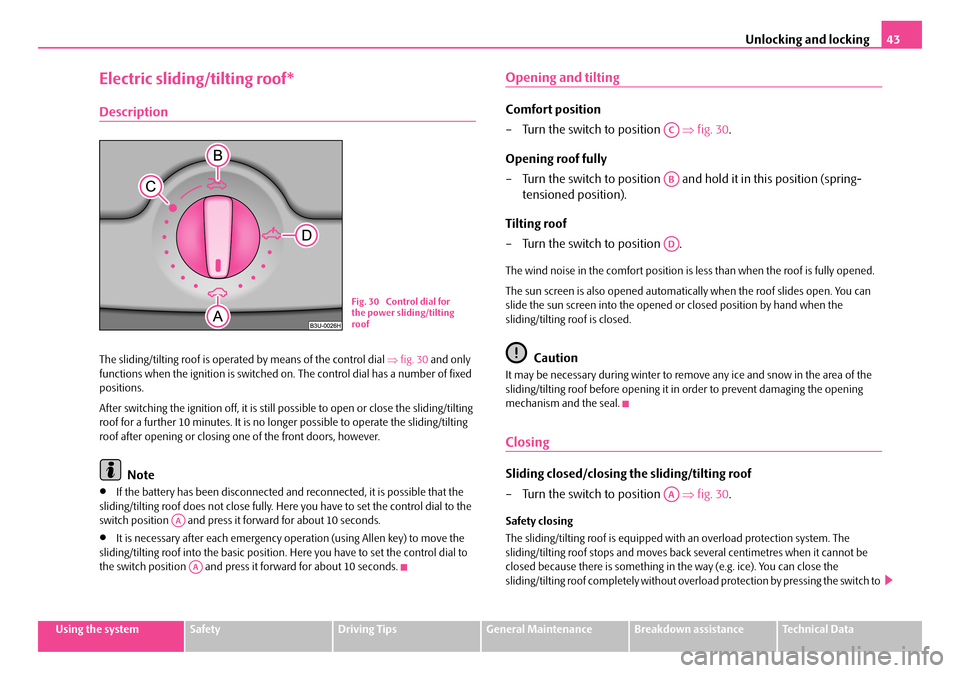
The sliding/tilting roof is operated by means of the control dial ⇒fig. 30 and only functions when the ignition is switched on . The control dial has a number of fixed positions.
After switching the ignition off, it is still possible to open or close the sliding/tilting roof for a further 10 minutes. It is no long er possible to operate the sliding/tilting roof after opening or closing on e of the front doors, however.
Note
•If the battery has been disconnected and reconnected, it is possible that the sliding/tilting roof does not close fully. He re you have to set the control dial to the switch position and press it forward for about 10 seconds.
•It is necessary afte r each emergency operation (using Allen key) to move the sliding/tilting roof into the basic position . Here you have to set the control dial to the switch position and press it forward for about 10 seconds.
Opening and tilting
Comfort position
– Turn the switch to position ⇒fig. 30.
Opening roof fully
– Turn the switch to position and hold it in this position (spring-
tensioned position).
Tilting roof
– Turn the switch to position .
The wind noise in the comfort position is less than when the roof is fully opened.
The sun screen is also opened automatica lly when the roof slides open. You can slide the sun screen into the opened or closed position by hand when the sliding/tilting roof is closed.
Caution
It may be necessary during winter to remo ve any ice and snow in the area of the sliding/tilting roof before opening it in order to prevent damaging the opening mechanism and the seal.
Closing
Sliding closed/closing the sliding/tilting roof
– Turn the switch to position ⇒fig. 30.
Safety closing
The sliding/tilting roof is equipped wi th an overload protection system. The sliding/tilting roof stops and moves back several centimetres when it cannot be closed because there is something in the way (e.g. ice). You can close the sliding/tilting roof completely without overlo ad protection by pressing the switch to
Fig. 30 Control dial for the power sliding/tilting roof
AA
AA
AC
AB
AD
AA
NKO A05F 20 MR08.book Page 43 Thursday, April 19, 2007 11:34 AM
Page 46 of 242

Lights and Visibility45
Using the systemSafetyDriving TipsGeneral MaintenanceBreakdown assistanceTechnical Data
Lights and Visibility
Lights
Switching lights on and off
Switching on side lights
– Turn the light switch ⇒fig. 33 into position .
Switching on the low beam and main beam
– Turn the light switch into position .
– Press the main beam lever forward in order to switch on the main
beam ⇒page 48, fig. 38.
Switching off all lights
– Turn the light switch into position O.
Switching on daylight driving lights*
– Remove the cover of the fuse box on the left side of the dash panel
⇒ page 205.
– Turn the light switch into position O ⇒fig. 33.
– Switch on the switch for daylight driving lights ⇒fig. 34.
– After switching on the ignition the side lights are switched on.
– After starting the engine the low beam is switched on.
Switching off daylight driving lights*
– Switch off the switch for daylight driving lights ⇒fig. 34.
– Turn the light switch to the position side lights or low beam
⇒ fig. 33.
Low beam comes on only if the ignition is switched on. The low beam is switched off automatically when the engine is started and after switching the ignition off; only the side lights come on.
On models fitted with right-hand steering* the position of certain switches differs from that shown in ⇒fig. 33. The symbols which mark the switch positions are identical, however.
Fig. 33 Dash panel: Light switch
Fig. 34 Fuse box: Switch for daylight driving lights
NKO A05F 20 MR08.book Page 45 Thursday, April 19, 2007 11:34 AM
Page 48 of 242

Lights and Visibility47
Using the systemSafetyDriving TipsGeneral MaintenanceBreakdown assistanceTechnical Data
Fog lights with integrated turning light*
The turning light is intended for a better illumination of the vehicle
close range when turning, parking etc.
The turning light is controlled in line with the steering angle or by switching on the turn signal light in the following circumstances:
•vehicle speed max. 40 km/h,
•low beam switched on,
•no reverse gear engaged,
•no hazard warning light system switched on.
A fault in the turning light is indicated by the warning light lighting up or flashing.
Note
If the fog lights are switched on, the function of the turning light is not active.
Rear fog light
Switching on the rear fog light
– First of all turn the light switch into position or ⇒page 46,
fig. 35 .
– Pull the light switch out to the second detent . The fog lights* light
up at the same time.
If the vehicle is not fitted with fog lights*, the rear fog light is switched on by turning the light switch to the position and is pulled out directly to the position . This switch does not have two posi tions, but only one position.
The rear fog light warning light ⇒page 20 lights up in the instrument cluster when the fog light is switched off.
Only the rear fog light of the trailer lights up if the vehicle is fitted with a towing device from Škoda original accessories and when you are towing a trailer which is fitted with the rear fog light.
Caution
The rear fog light should only be switched on if visibility is particularly poor (conform with any varying legal provisions) to avoid dazzling vehicles behind your vehicle.
Headlamp range adjustment
Once the low beam is switched on you can then adapt the range of
the headlights to the load of the vehicle.
– Turn the control dial ⇒fig. 36 until you have adjusted the low beam
so that oncoming traffic is not dazzled.
Settings
The positions correspond approximat ely to the following vehicle loads:
Front seats occupied, luggage compartment empty.
All seats occupied, lugga ge compartment empty.
All seats occupied, luggage compartment laden.
Driver seat occupied, lu ggage compartment laden.
A2
A2
Fig. 36 Dash panel: Lights and Visibility
A-
A1
A2
A3
NKO A05F 20 MR08.book Page 47 Thursday, April 19, 2007 11:34 AM
Page 50 of 242

Lights and Visibility49
Using the systemSafetyDriving TipsGeneral MaintenanceBreakdown assistanceTechnical Data
Headlight flasher
– Pull on the lever of the steering wheel (sprung position) - the main
beam and warning light in the instrument cluster come on.
Parking light
– Switch off the ignition.
– Push the lever up or down - the ri ght-hand or left-hand parking light
is switched on.
Information concerning the function of the lights.
•The turn signal system only operates when the ignition is switched on. The corresponding indicator light or in the instrument cluster also flashes.
•The turn signal is automatically cancelled after negotiating a curve.
•The side light and rear light on the appropriate side of the vehicle are switched on when the parking light is selected. The parking light function only operates if the ignition is switched off.
•An acoustic warning signal will sound when the driver's door is opened if the lever is not in the middle position after removing the ignition key. The acoustic warning signal will stop just as soon as the driver's door is closed.
Caution
Use main beam or the headlight flasher only if this does not risk dazzling other road users.
Note
Use only in accordance with the legal requirements the described lighting and signal systems.
Interior lighting
Front interior lighting and storage compartment on front
passenger side
Door contact switching mechanism (on the front and rear* door)
– Press the switch to the right into position ⇒fig. 39.
– On the version without reading lights press the switch into the
middle position .
Switching the interior light on
– Press the switch to the left into position .
Switching the interior light off
– Press the switch into the middle position O.
– On the version without reading lights press the switch to the right,
the symbol O appears.
Reading lights
– Press on one of the switches ⇒fig. 39 in order to switch the right
or left reading light on or off.
Fig. 39 Detail of the headliner: front interior lighting
AA
AA
AA
AA
AA
AB
NKO A05F 20 MR08.book Page 49 Thursday, April 19, 2007 11:34 AM
Page 52 of 242

Lights and Visibility51
Using the systemSafetyDriving TipsGeneral MaintenanceBreakdown assistanceTechnical Data
Visibility
Rear window heater
– Press switch ⇒fig. 42 to switch on the rear window heater.
The rear window heater only operates when the engine is running. An indicator light in the switch is illuminated when the rear window heater is switched on.
The rear window heater switches off automatically after 20 minutes. If you press the switch once again, the rear window heater is switched on permanently - the automatic deactivation is thus deactivated.
For the sake of the environment
You should switch off the rear window heater as soon as the rear window is clear. The reduced current consumption will have a favourable effect on fuel economy ⇒ page 155, “Saving electricity”.
Sun visors
Using the sun visors can contribu te to increasing road safety.
You can pull the sun visor for the driver or front passenger out of the fixture and swivel it toward the door in the direction of the arrow ⇒fig. 43.
A vanity mirror*, which is provided with a cover, is located in the sun visor on the front passenger side. Push the cover in direction of arrow .
WARNING
The sun visors must not be swivelled to the side windows into the deploy-ment area of the head airbags if any ob jects, such as ball-point pens etc. are attached to them. This might result in injuries to the occupants if the head airbag is deployed.
Fig. 42 Switch for rear window heater
Fig. 43 Sun visor: swivel-ling out
A1
A2
NKO A05F 20 MR08.book Page 51 Thursday, April 19, 2007 11:34 AM
Page 54 of 242

Lights and Visibility53
Using the systemSafetyDriving TipsGeneral MaintenanceBreakdown assistanceTechnical Data
Top up with wash liquid ⇒page 185.
WARNING
•Properly maintained windscreen wiper blades are essential for clear visi- bility and safe driving ⇒page 53.
•Do not use the windscreen washer system at low temperatures, without heating the windscreen beforehand. Otherwise the window cleaner could freeze on the windscreen and re strict the view to the front.
•In the event of a freezing up of the windscreen, first of all eliminate the ice ⇒ page 164 and then operate the windscreen wiper otherwise the wind- screen wiper blades could be damaged.
Caution
In frosty weather, please first of all check whether the windscreen wiper blades are not frozen to the windscreen before swit ching them on. Switching on windscreen wipers when the blades are frozen to the windscreen may result in damage both to the blades and the motor of the windscreen wipers!
Headlight cleaning system*
The headlights are being cleaned after the windscreen washer system has been operated for the fifth time, the low beam or main beam are switched on as well as the windscreen wiper lever is held in the position ⇒page 52, fig. 44 for about 1 second.
You should remove stubborn dirt (such as insect residues) from the headlight lenses at regular intervals, for example when refuelling. Please refer to the following guidelines ⇒page 164, “The headlight lenses”.
You should remove any snow from the fixt ures of the washer nozzles and clear ice in winter with a de-icing spray in order to ensure proper operation of the cleaning system.
Replacing wiper blades for the windscreen wipers
Taking off the wiper blade
– Fold windscreen wiper arm away from the windscreen.
– Press the locking button, in order to unlock the wiper blade and pull
off in the direction of arrow.
Attaching a wiper blade
– Push the wiper blade until it locks up to the stop.
– Check whether the wiper blade is correctly attached.
– Fold the windscreen wiper arm back onto the windscreen.
Wiper blades in proper condition are esse ntial to obtain good visibility. Wiper blades should not be allowed to become dirtied by dust, insect remains and preserving wax.
Juddering or smearing of the wiper blades could then be due to wax residues left on the windscreen by vehicle washing in automatic vehicle wash systems. It is therefore important to degrease the lips of the wiper blades after every pass through an automatic vehicle wash system.
A5
Fig. 45 Wiper blade for the windscreen wiper
NKO A05F 20 MR08.book Page 53 Thursday, April 19, 2007 11:34 AM