2007 KIA SPECTRA5 ignition
[x] Cancel search: ignitionPage 82 of 312

371
1
2
3
4
5
6
7
8
910
Knowing your vehicle
Air bag warning lightThe purpose of air bag warning light
in your instrument panel is to alert
you of a potential problem with your
air bag - Supplemental Restraint
System (SRS).When the ignition switch is turned
ON, the indicator light should blink or
illuminate for approximately 6 sec-
onds, then go off.
Have the system checked if:
The light does not turn on briefly
when you turn the ignition ON.
The light stays on after the engine
starts.
The light comes on while the vehi-
cle is in motion.
Air bag (Supplemental
Restraint System) service Your Supplemental Restraint System
is virtually maintenance-free. There
are no parts which you can service.
You must have the system serviced
under the following circumstances:
If an air bag ever inflates, the air
bag must be replaced. Do not try to
remove or discard the air bag by
yourself. This must be done by an
authorized Kia dealer.
If the air bag warning indicator light
alerts you to a problem, have the
air bag system checked as soon as
possible. Otherwise, your air bag
system may be ineffective.
A-BAG-W
Page 95 of 312
Knowing your vehicle84
3
1
2
3
4
5
6
7
8
910
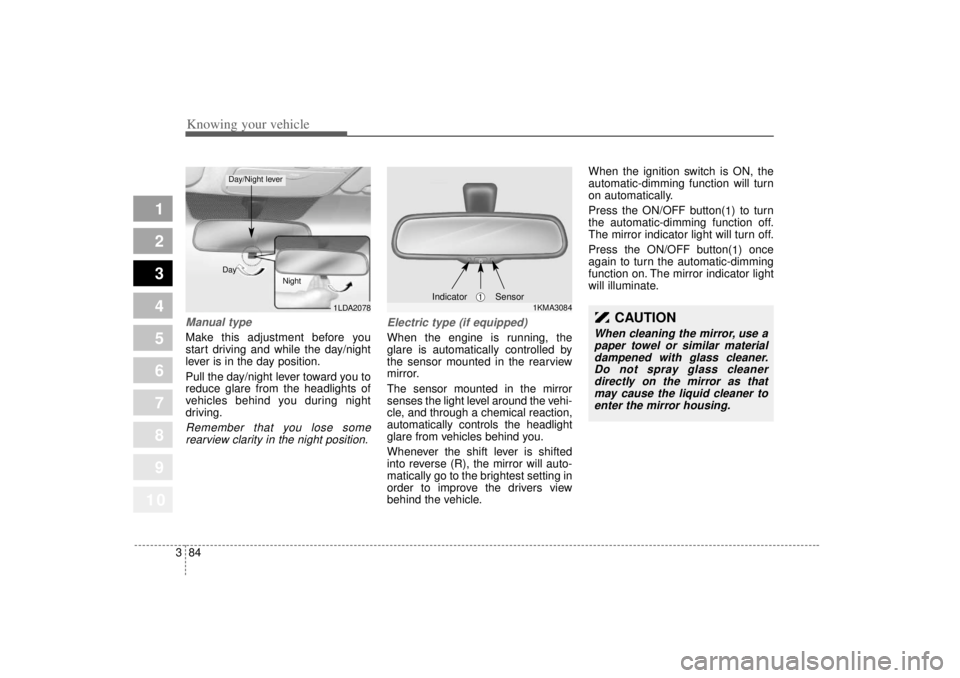
Manual type Make this adjustment before you
start driving and while the day/night
lever is in the day position.
Pull the day/night lever toward you to
reduce glare from the headlights of
vehicles behind you during night
driving.Remember that you lose some
rearview clarity in the night position. Electric type (if equipped)
When the engine is running, the
glare is automatically controlled by
the sensor mounted in the rearview
mirror.
The sensor mounted in the mirror
senses the light level around the vehi-
cle, and through a chemical reaction,
automatically controls the headlight
glare from vehicles behind you.
Whenever the shift lever is shifted
into reverse (R), the mirror will auto-
matically go to the brightest setting in
order to improve the drivers view
behind the vehicle. When the ignition switch is ON, the
automatic-dimming function will turn
on automatically.
Press the ON/OFF button(
1) to turn
the automatic-dimming function off.
The mirror indicator light will turn off.
Press the ON/OFF button( 1) once
again to turn the automatic-dimming
function on. The mirror indicator light
will illuminate.
1LDA2078
Day
Night
Day/Night lever
1KMA3084
➀
Sensor
Indicator
CAUTION
When cleaning the mirror, use apaper towel or similar materialdampened with glass cleaner.Do not spray glass cleanerdirectly on the mirror as thatmay cause the liquid cleaner toenter the mirror housing.
Page 96 of 312

385
1
2
3
4
5
6
7
8
910
Knowing your vehicle
Map light Front (if equipped)The lights are turned ON or OFF by
pressing the corresponding switch.
Dome light (if equipped)(1) OFF - The light stays off evenwhen a door is open.
(2) DOOR - The light turns on when a door is opened or when a door is
unlocked by the transmitter (if
equipped). Interior light goes out
slowly after 30 seconds if the
door is closed. However if the
ignition switch is ON or all vehicle
doors are locked when the door is
closed, interior light will turn off
even within 30 seconds.
(3) ON - The light turns on and stays on even when the doors are all
closed. Door courtesy lamp (if equipped)
The door courtesy lamp comes ON
when the door is opened to assist
entering or exiting the vehicle. It also
serves as a warning to passing vehi-
cles that the vehicle door is open.
INTERIOR LIGHTS
1LDA2113
OLD026111OLD026112
Type AType B
1LDN3202
Page 102 of 312

391
1
2
3
4
5
6
7
8
910
Knowing your vehicle
Digital clock (if equipped)Whenever the battery terminals,
ROOM fuse, or Power Connect are
disconnected, you must reset the
time.
When the ignition switch is in the
ACC or ON position, the clock but-
tons operate as follows:
•HOUR:
Pressing the “H” button with your
finger, a pencil or similar object will
advance the time displayed by one
hour. MINUTE:
Pressing the “M” button with your
finger, a pencil or similar object will
advance the time displayed by one
minute.
RESET: To clear away minutes, press the
“R” button with your finger, a pencil
or similar object. Then the clock will
be set precisely on the hour.
For example, if the “R” button is
pressed while the time is between
9:01 and 9:29, the display will be
reset to 9:00.
9:01 ~ 9:29 ➾ 9:00
9:30 ~ 9:59 ➾ 10:00
Display conversionTo change the 12 hour format to the
24 hour format, press the R button
for more than 4 seconds.
For example, if the R button is
pressed for more than 4 seconds
while the time is 10:15 p.m., the dis-
play will be changed to 22:15.
1LDN2150
CAUTION
Use when the engine is run-
ning, and remove a plug fromthe power outlet after usingthe electric appliance. Usingelectrical accessories whenthe engine is not running mayresult in battery discharge.
Only use 12V accessories which are rated for less than10A maximum current draw.
Adjust the air-conditioner or heater to the lowest operationlevel when you have to use thepower socket while using air-conditioner or heater.
Close the cover when not in use.
Some electronic devices can cause electronic interferencewhen plugged into a vehicle'spower outlet. These devicesmay cause excessive audiostatic and malfunctions inother electronic systems ordevices used in your vehicle.
Page 103 of 312

Knowing your vehicle92
3
1
2
3
4
5
6
7
8
910
If your vehicle is equipped with this
feature, you can slide or tilt your sun-
roof with the sunroof control buttons
located on the overhead console.
(1) Slide button
(2) Tilt button
(3) Close button
The sunroof can only be opened,
closed, or tilted when the ignition
switch is in the “ON” position.
Sliding the sunroof Autoslide open
To use the autoslide feature,
momentarily (less than 0.4 second)
press the SLIDE OPEN ( ) button
on the overhead console. The sun-
roof will slide all the way open. To
stop the sunroof sliding at any point,
press any sunroof control button.
Manual slide open
Press the SLIDE OPEN ( ) button
on the overhead console for more
than 0.4 second.
Close
To close the sunroof, press the
CLOSE ( ) button on the over-
head console and hold it until the
sunroof is closed.
SUNROOF (IF EQUIPPED)
OLD026022
CAUTION
Do not continue to press the
sunroof control button(s) afterthe sunroof is in the fullyopen, closed, or tiltposition(s). Damage to themotor or system componentscould occur.
The sunroof cannot slide when it is in the tilt positionnor can it be tilted while in anopen or slide position.
Page 105 of 312

Knowing your vehicle94
3
1
2
3
4
5
6
7
8
910
In case of an emergency If the sunroof does not open electri-
cally:
1. Open the sunglass holder.
2. Remove the two (2) screws, and
then remove the overhead con-
sole.
3. Insert the emergency handle (pro- vided with the vehicle) and turn
the handle clockwise to open or
counterclockwise to close.
Resetting the sunroofWhenever the vehicle battery is dis-
connected or discharged, or you use
the emergency handle to operate the
sunroof, you have to reset your sun-
roof system as follows:
1. Turn the ignition key to the ON position.
2. According to the position of the sunroof, do as follows.
1) in case that the sunroof hasclosed completely or been tilt-
ed
: Press the TILT UP ( ) but- ton for 1 second.
2) in case that the sunroof has slide-opened
: Press and hold the CLOSE ( ) button for more than 5
seconds until the sunroof has
closed completely. And then
press the TILT UP ( ) but-
ton for 1 second 3. Then, release it.
4. Press and hold the TILT UP ( )
button once again until the sun-
roof has returned to the original
position of TILT UP ( ) after it is
raised a little higher than the max-
imum TILT UP ( ) position.
When this is complete, the sunroof
system is reset.
1LDN3201
Page 113 of 312

Knowing your vehicle102
3
1
2
3
4
5
6
7
8
910
1. POWER ON-OFF Control
Knob The radio unit may be operated
when the ignition key is in the
“ACC”or “ON” position. Press the
knob to switch the power on. The
LCD shows the radio frequency in
radio mode, and displays the CD
track in CD mode. To switch the
power off, press the knob again.
Push the FM/AM or CD to turn on that function without pushing the
Power ON-OFF control knob.
VOLUME Control
Rotate the knob clockwise to
increase the volume and turn the
knob counterclockwise to reduce the
volume.2. BAND SelectorFM Selection Button
Pressing the button changes
the FM1 and FM2 bands.
AM Select Button
Pressing the button selects
the AM band. AM mode is displayed
on the LCD.
3. TUNE Select/AUDIO Control KnobRotate the knob clockwise to
increase the frequency and turn the
knob counterclockwise to reduce the
frequency.
Audio Control
Pressing the Audio Control knob
changes the BASS, MID-RANGE,
TREBLE, FADER and BALANCE
mode.
The mode selected is shown on the
display.
After selecting each mode, rotate the
Audio control knob clockwise or
counterclockwise.
BASS Control
To increase the BASS, rotate the
knob clockwise, while to decrease
the BASS, rotate the knob counter-
clockwise.
MID-RANGE Control
To increase the MID-RANGE, rotate
the knob clockwise, while to
decrease the MID-RANGE, rotate
the knob counterclockwise. TREBLE Control
To increase the TREBLE, rotate the
knob clockwise, while to decrease
the TREBLE, rotate the knob coun-
terclockwise.
FADER Control
Rotate the control knob clockwise to
emphasize rear speaker sound (front
speaker sound will be attenuated).
When the control knob is turned
counterclockwise, front speaker
sound will be emphasized (rear
speaker sound will be attenuated).
BALANCE Control
Rotate the knob clockwise to empha-
size right speaker sound (left speak-
er sound will be attenuated). When
the control knob is turned counter-
clockwise, left speaker sound will be
emphasized (right speaker sound
will be attenuated).
AMFM
Page 116 of 312

3 105
Knowing your vehicle
1
2
3
4
5
6
7
8
910
1. CD/AUX Select ButtonCD Select
Insert the CD with the label facingupward.
Insert the CD to start CD playback, during radio operation.
When a disc is in the CD deck, if you press the CD/AUX button the
CD player will begin playing even if
the radio player is being used.
The CD/AUX player can be used when the ignition switch is in either
the “ON” or “ACC” position.
Push the CD/AUX button to turn on that function without pushing the
Power ON-OFF control knob.✽ ✽ NOTICE• Do not stick paper or tape etc., on
the label side or the recording side
of any discs, as it may cause a mal-
function.
• The unit cannot play a CD- R(Recordable CD) and CD-
RW(Rewritable CD) that is not
finalized. (Continued)(Continued)
Please refer to the manual of CD-
R/CD-RW recoder or CD-R/CD-
RW software for more informa-
tion on finalization process.
• Depending on the recording sta- tus, some CD-Rs/CD-RWs may
not be played on this unit.
AUX-IN Select
When the AUX device (such as
portable MP3 players) is connect-
ed to vehicle's AUX-IN terminal,
you can switch to AUX-IN mode by
pressing CD/AUX button.
With a CD loaded and AUX device connected at the same time, this
button switches between AUX-IN
mode and CD mode.
✽ ✽ NOTICE• If the AUX device is not connect-
ed, you cannot switch to AUX-IN
mode.
• When the AUX device is discon- nected while in AUX-IN mode, the
unit automatically switches its
mode to last selected mode (CD
mode or RADIO mode).
• The quality of sound may be defected or distorted when the
unit's EQ (BASS/MID/TREBLE)
control and AUX device's EQ con-
trol are both enabled (not flat).
When you want to use the unit's
EQ control feature, disable the
AUX device's EQ control feature,
and vice versa.
• When using a portable audio device connected to the power out-
let, noise may occur during play-
back. If this happens, use the
power source of the portable audio
device.
AUX 3.5mm STEREO MINI PLUG