2007 INFINITI FX35 ignition
[x] Cancel search: ignitionPage 3477 of 4366

HEADLAMP - XENON TYPE - LT-21
C
D E
F
G H
I
J
L
M A
B
LT
Revision: 2006 July 2007 FX35/FX45
All Signals, Main Signals, Selection From Menu
NOTE:
Perform monitoring of IPDM E/R data with ignition switch ON. When ignition switch is at ACC, display may not
be correct.
ACTIVE TEST
Operation Procedure
1. Touch “ACTIVE TEST” on “SELECT DIAG MODE” screen.
2. Touch item to be tested, and check operation.
3. Touch “START”.
4. Touch “OFF” while testing to stop the operation.
Item name CONSULT-II
screen display Display
or unit Monitor item selection
Description
ALL
SIGNALS MAIN
SIGNALS SELECTION
FROM MENU
Position lights request TAIL & CLR REQ ON/OFF ×× ×Signal status input from BCM
Headlamp low beam request HL LO REQ ON/OFF ×× ×Signal status input from BCM
Headlamp high beam request HL HI REQ ON/OFF ×× ×Signal status input from BCM
Front fog lights request FR FOG REQ ON/OFF ×× ×Signal status input from BCM
Te s t i t e m CONSULT-II
screen display Description
Headlamp relay (HI, LO) output LAMPS Allows headlamp relay (HI, LO) to operate by switching operation (OFF, HI ON,
LO ON) at your option (Headlamp high beam repeats ON-OFF every 1 second).
Front fog lamp relay output Allows front fog lamp relay to operate by switching operation ON-OFF at your
option.
Tail lamp relay output TAIL LAMP Allows tail lamp relay to operate by switching operation ON-OFF at your option.
Page 3479 of 4366
HEADLAMP - XENON TYPE - LT-23
C
D E
F
G H
I
J
L
M A
B
LT
Revision: 2006 July 2007 FX35/FX45
4. CHECK HEADLAMP INPUT SIGNAL
With CONSULT-II
1. Turn ignition switch OFF.
2. Disconnect front combination lamp RH and LH connectors.
3. Select “IPDM E/R” on CONSULT-II, and select “ACTIVE TEST” on “SELECT DIAG MODE” screen.
4. Select “LAMPS” on “SELECT TEST ITEM” screen.
5. Touch “HI” screen.
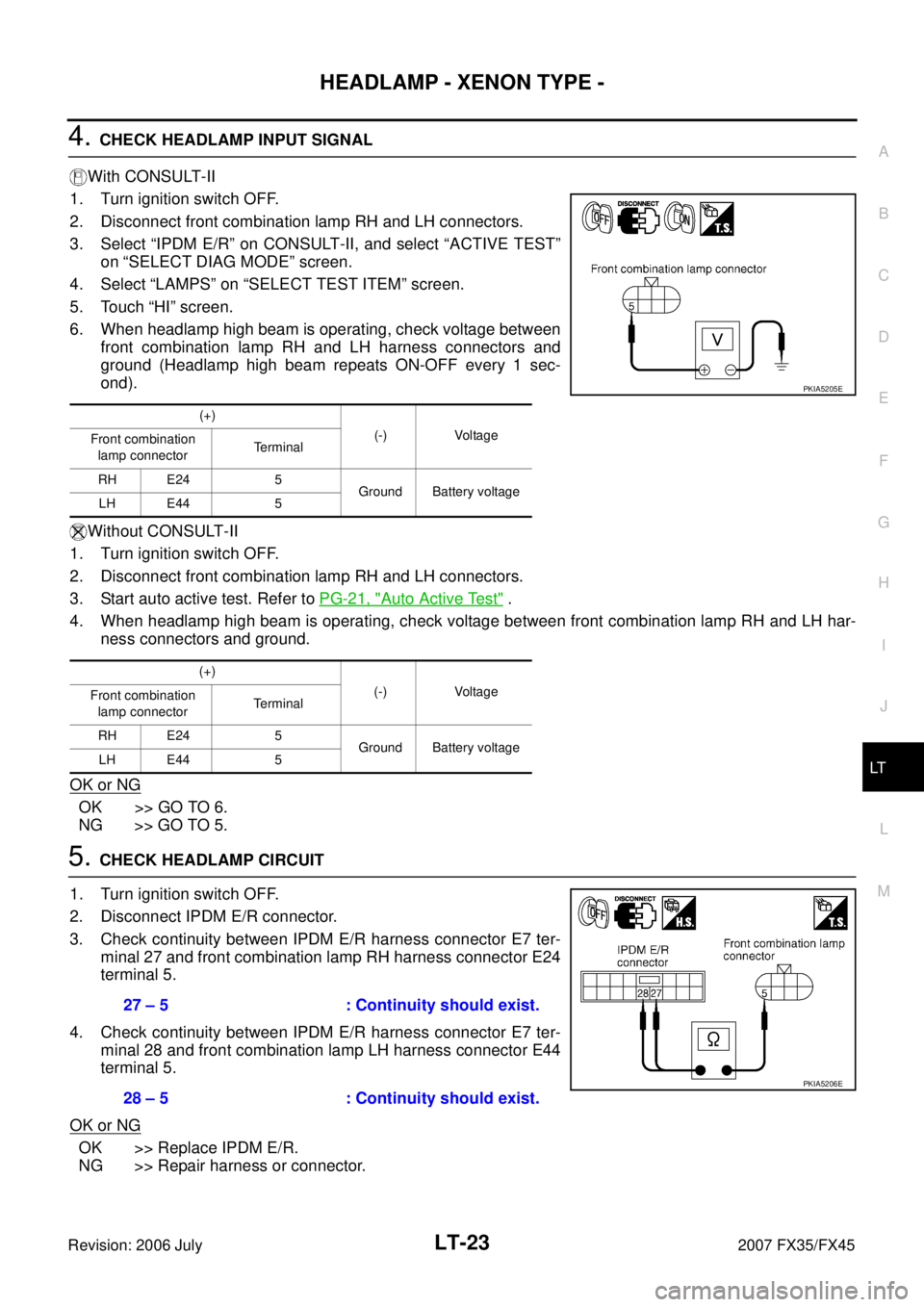
6. When headlamp high beam is operating, check voltage between front combination lamp RH and LH harness connectors and
ground (Headlamp high beam repeats ON-OFF every 1 sec-
ond).
Without CONSULT-II
1. Turn ignition switch OFF.
2. Disconnect front combination lamp RH and LH connectors.
3. Start auto active test. Refer to PG-21, "
Auto Active Test" .
4. When headlamp high beam is operating, check voltage between front combination lamp RH and LH har- ness connectors and ground.
OK or NG
OK >> GO TO 6.
NG >> GO TO 5.
5. CHECK HEADLAMP CIRCUIT
1. Turn ignition switch OFF.
2. Disconnect IPDM E/R connector.
3. Check continuity between IPDM E/R harness connector E7 ter- minal 27 and front combination lamp RH harness connector E24
terminal 5.
4. Check continuity between IPDM E/R harness connector E7 ter- minal 28 and front combination lamp LH harness connector E44
terminal 5.
OK or NG
OK >> Replace IPDM E/R.
NG >> Repair harness or connector.
(+)
(-) Voltage
Front combination
lamp connector Terminal
RH E24 5 Ground Battery voltage
LH E44 5
(+) (-) Voltage
Front combination
lamp connector Terminal
RH E24 5 Ground Battery voltage
LH E44 5
PKIA5205E
27 – 5 : Continuity should exist.
28 – 5 : Continuity should exist.
PKIA5206E
Page 3480 of 4366
LT-24
HEADLAMP - XENON TYPE -
Revision: 2006 July 2007 FX35/FX45
6. CHECK HEADLAMP GROUND
1. Turn ignition switch OFF.
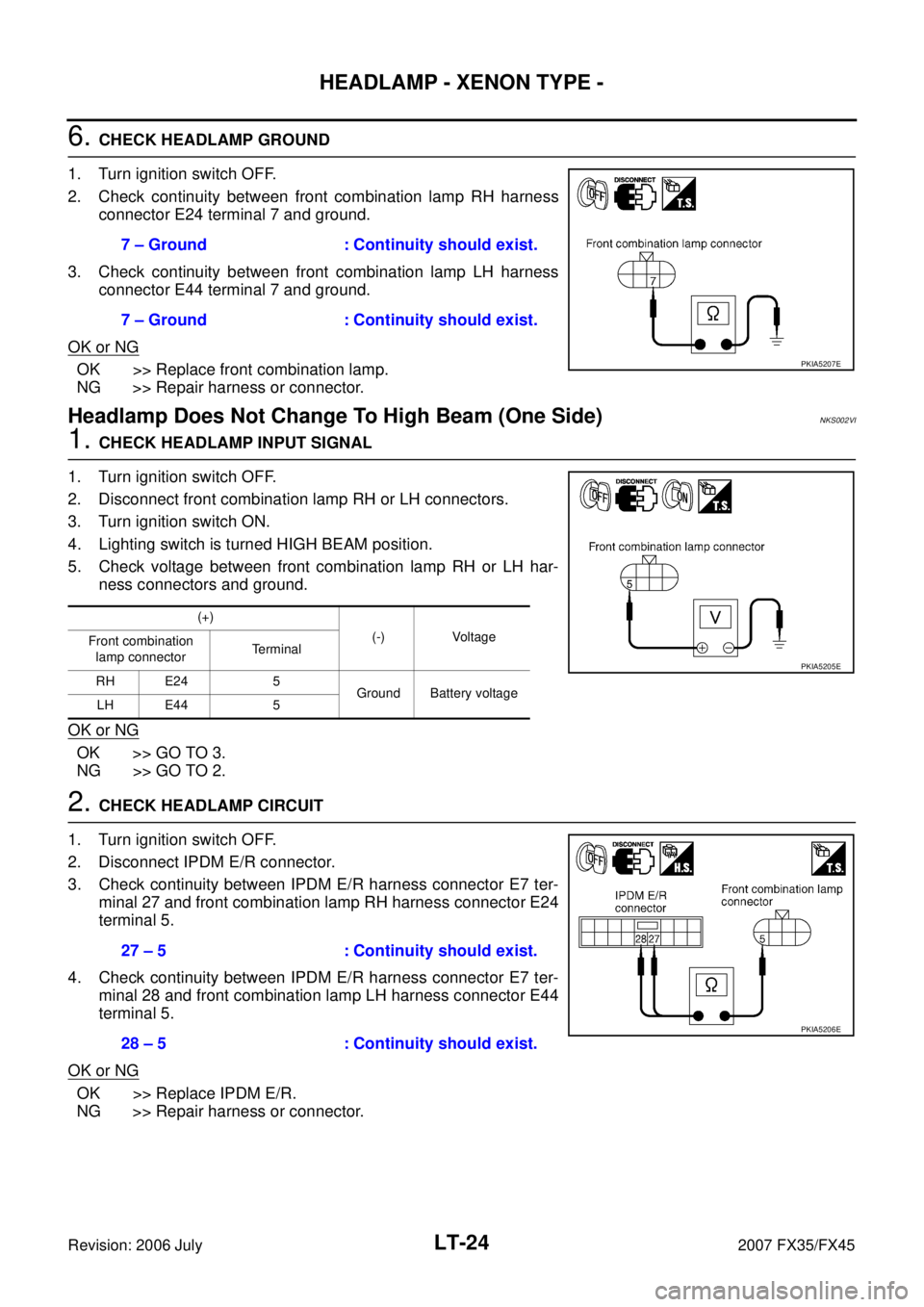
2. Check continuity between front combination lamp RH harness connector E24 terminal 7 and ground.
3. Check continuity between front combination lamp LH harness connector E44 terminal 7 and ground.
OK or NG
OK >> Replace front combination lamp.
NG >> Repair harness or connector.
Headlamp Does Not Change To High Beam (One Side)NKS002VI
1. CHECK HEADLAMP INPUT SIGNAL
1. Turn ignition switch OFF.
2. Disconnect front combination lamp RH or LH connectors.
3. Turn ignition switch ON.
4. Lighting switch is turned HIGH BEAM position.
5. Check voltage between front combination lamp RH or LH har- ness connectors and ground.
OK or NG
OK >> GO TO 3.
NG >> GO TO 2.
2. CHECK HEADLAMP CIRCUIT
1. Turn ignition switch OFF.
2. Disconnect IPDM E/R connector.
3. Check continuity between IPDM E/R harness connector E7 ter- minal 27 and front combination lamp RH harness connector E24
terminal 5.
4. Check continuity between IPDM E/R harness connector E7 ter- minal 28 and front combination lamp LH harness connector E44
terminal 5.
OK or NG
OK >> Replace IPDM E/R.
NG >> Repair harness or connector. 7 – Ground : Continuity should exist.
7 – Ground : Continuity should exist.
PKIA5207E
(+) (-) Voltage
Front combination
lamp connector Terminal
RH E24 5 Ground Battery voltage
LH E44 5
PKIA5205E
27 – 5 : Continuity should exist.
28 – 5 : Continuity should exist.
PKIA5206E
Page 3482 of 4366
LT-26
HEADLAMP - XENON TYPE -
Revision: 2006 July 2007 FX35/FX45
3. CHECK IPDM E/R
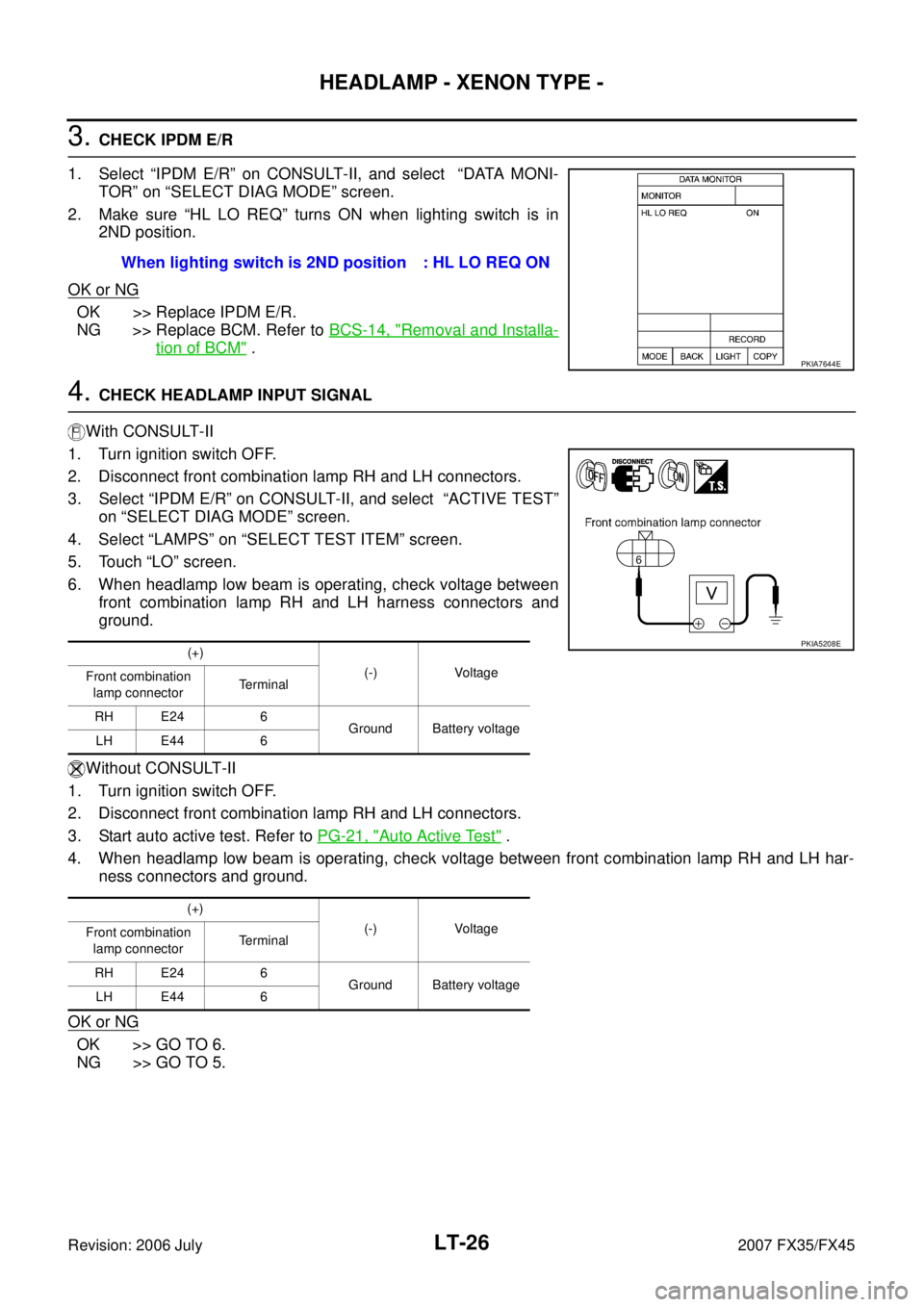
1. Select “IPDM E/R” on CONSULT-II, and select “DATA MONI- TOR” on “SELECT DIAG MODE” screen.
2. Make sure “HL LO REQ” turns ON when lighting switch is in 2ND position.
OK or NG
OK >> Replace IPDM E/R.
NG >> Replace BCM. Refer to BCS-14, "
Removal and Installa-
tion of BCM" .
4. CHECK HEADLAMP INPUT SIGNAL
With CONSULT-II
1. Turn ignition switch OFF.
2. Disconnect front combination lamp RH and LH connectors.
3. Select “IPDM E/R” on CONSULT-II, and select “ACTIVE TEST” on “SELECT DIAG MODE” screen.
4. Select “LAMPS” on “SELECT TEST ITEM” screen.
5. Touch “LO” screen.
6. When headlamp low beam is operating, check voltage between front combination lamp RH and LH harness connectors and
ground.
Without CONSULT-II
1. Turn ignition switch OFF.
2. Disconnect front combination lamp RH and LH connectors.
3. Start auto active test. Refer to PG-21, "
Auto Active Test" .
4. When headlamp low beam is operating, check voltage between front combination lamp RH and LH har- ness connectors and ground.
OK or NG
OK >> GO TO 6.
NG >> GO TO 5. When lighting switch is 2ND position : HL LO REQ ON
PKIA7644E
(+)
(-) Voltage
Front combination
lamp connector Terminal
RH E24 6 Ground Battery voltage
LH E44 6
(+) (-) Voltage
Front combination
lamp connector Terminal
RH E24 6 Ground Battery voltage
LH E44 6PKIA5208E
Page 3483 of 4366
HEADLAMP - XENON TYPE - LT-27
C
D E
F
G H
I
J
L
M A
B
LT
Revision: 2006 July 2007 FX35/FX45
5. CHECK HEADLAMP CIRCUIT
1. Turn ignition switch OFF.
2. Disconnect IPDM E/R connector.
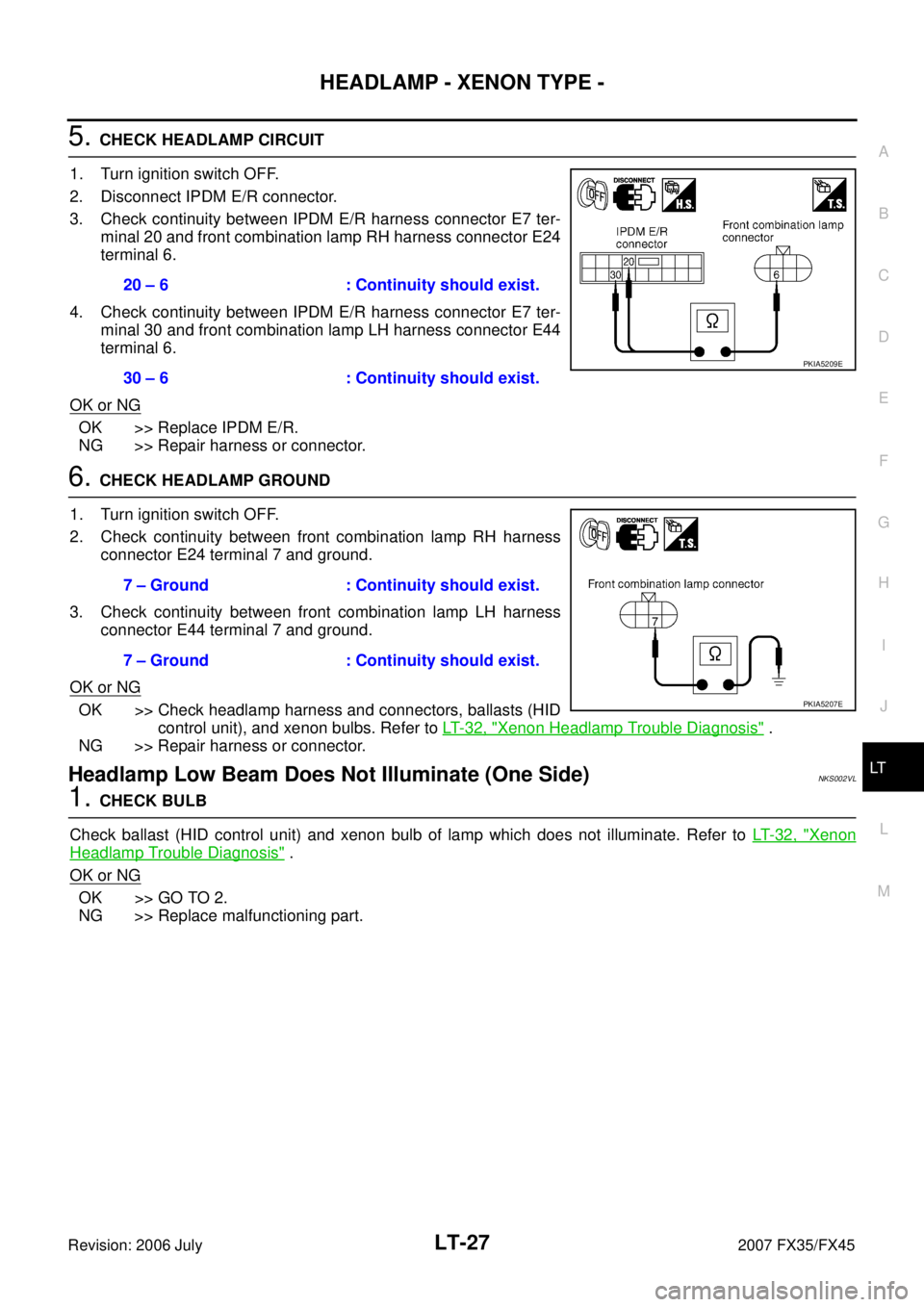
3. Check continuity between IPDM E/R harness connector E7 ter- minal 20 and front combination lamp RH harness connector E24
terminal 6.
4. Check continuity between IPDM E/R harness connector E7 ter- minal 30 and front combination lamp LH harness connector E44
terminal 6.
OK or NG
OK >> Replace IPDM E/R.
NG >> Repair harness or connector.
6. CHECK HEADLAMP GROUND
1. Turn ignition switch OFF.
2. Check continuity between front combination lamp RH harness connector E24 terminal 7 and ground.
3. Check continuity between front combination lamp LH harness connector E44 terminal 7 and ground.
OK or NG
OK >> Check headlamp harness and connectors, ballasts (HID control unit), and xenon bulbs. Refer to LT- 3 2 , "
Xenon Headlamp Trouble Diagnosis" .
NG >> Repair harness or connector.
Headlamp Low Beam Does Not Illuminate (One Side)NKS002VL
1. CHECK BULB
Check ballast (HID control unit) and xenon bulb of lamp which does not illuminate. Refer to LT- 3 2 , "
Xenon
Headlamp Trouble Diagnosis" .
OK or NG
OK >> GO TO 2.
NG >> Replace malfunctioning part. 20 – 6 : Continuity should exist.
30 – 6 : Continuity should exist.
PKIA5209E
7 – Ground : Continuity should exist.
7 – Ground : Continuity should exist.
PKIA5207E
Page 3484 of 4366
LT-28
HEADLAMP - XENON TYPE -
Revision: 2006 July 2007 FX35/FX45
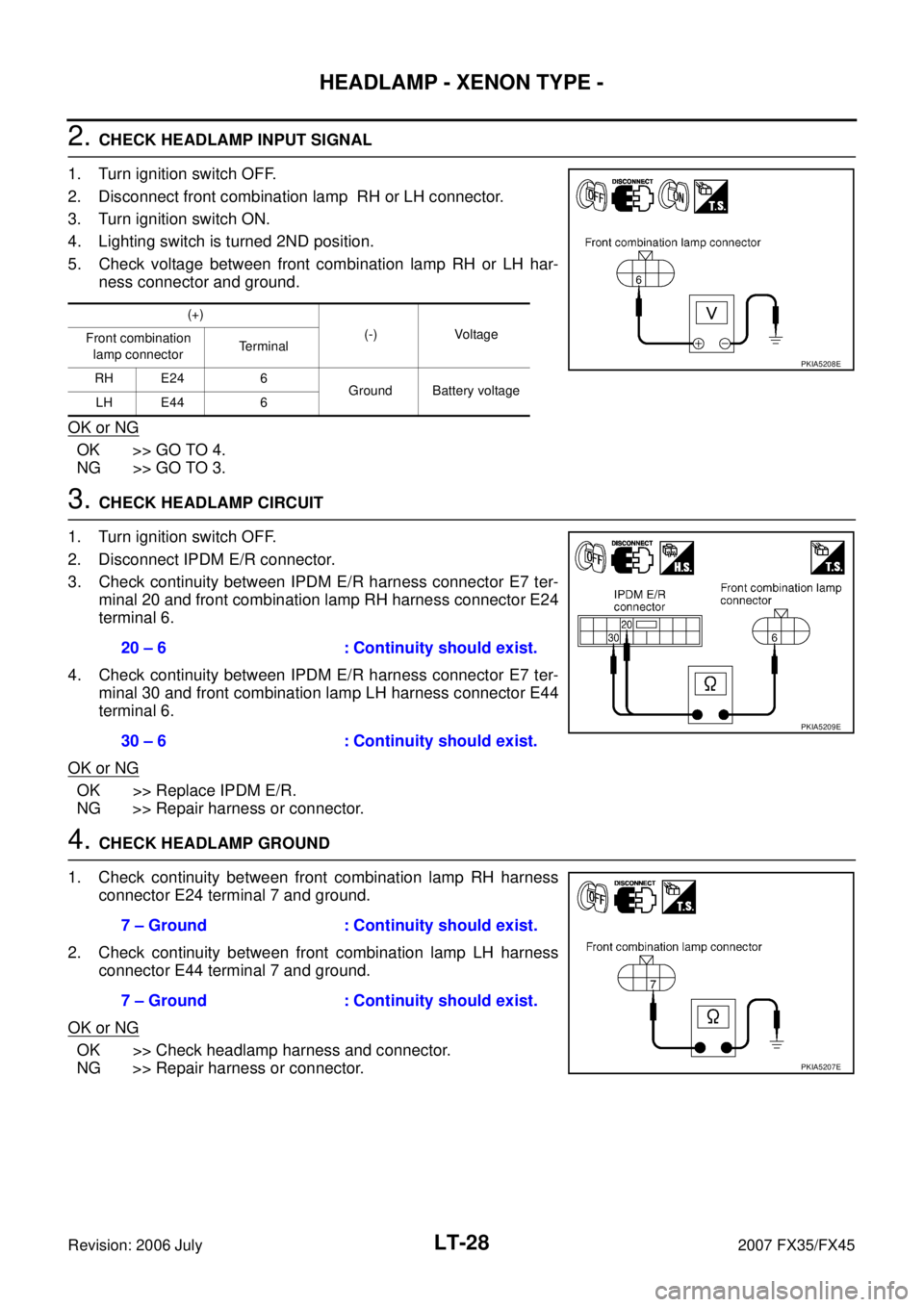
2. CHECK HEADLAMP INPUT SIGNAL
1. Turn ignition switch OFF.
2. Disconnect front combination lamp RH or LH connector.
3. Turn ignition switch ON.
4. Lighting switch is turned 2ND position.
5. Check voltage between front combination lamp RH or LH har- ness connector and ground.
OK or NG
OK >> GO TO 4.
NG >> GO TO 3.
3. CHECK HEADLAMP CIRCUIT
1. Turn ignition switch OFF.
2. Disconnect IPDM E/R connector.
3. Check continuity between IPDM E/R harness connector E7 ter- minal 20 and front combination lamp RH harness connector E24
terminal 6.
4. Check continuity between IPDM E/R harness connector E7 ter- minal 30 and front combination lamp LH harness connector E44
terminal 6.
OK or NG
OK >> Replace IPDM E/R.
NG >> Repair harness or connector.
4. CHECK HEADLAMP GROUND
1. Check continuity between front combination lamp RH harness connector E24 terminal 7 and ground.
2. Check continuity between front combination lamp LH harness connector E44 terminal 7 and ground.
OK or NG
OK >> Check headlamp harness and connector.
NG >> Repair harness or connector.
(+)
(-) Voltage
Front combination
lamp connector Terminal
RH E24 6 Ground Battery voltage
LH E44 6
PKIA5208E
20 – 6 : Continuity should exist.
30 – 6 : Continuity should exist.
PKIA5209E
7 – Ground : Continuity should exist.
7 – Ground : Continuity should exist.
PKIA5207E
Page 3485 of 4366
HEADLAMP - XENON TYPE - LT-29
C
D E
F
G H
I
J
L
M A
B
LT
Revision: 2006 July 2007 FX35/FX45
Headlamp RH Low Beam and High Beam Does Not Illuminate NKS002VM
1. CHECK BULB
Inspect ballast (HID control unit) and xenon bulb of lamp which does not illuminate. Refer to LT- 3 2 , "
Xenon
Headlamp Trouble Diagnosis" .
OK or NG
OK >> GO TO 2.
NG >> Replace malfunctioning part.
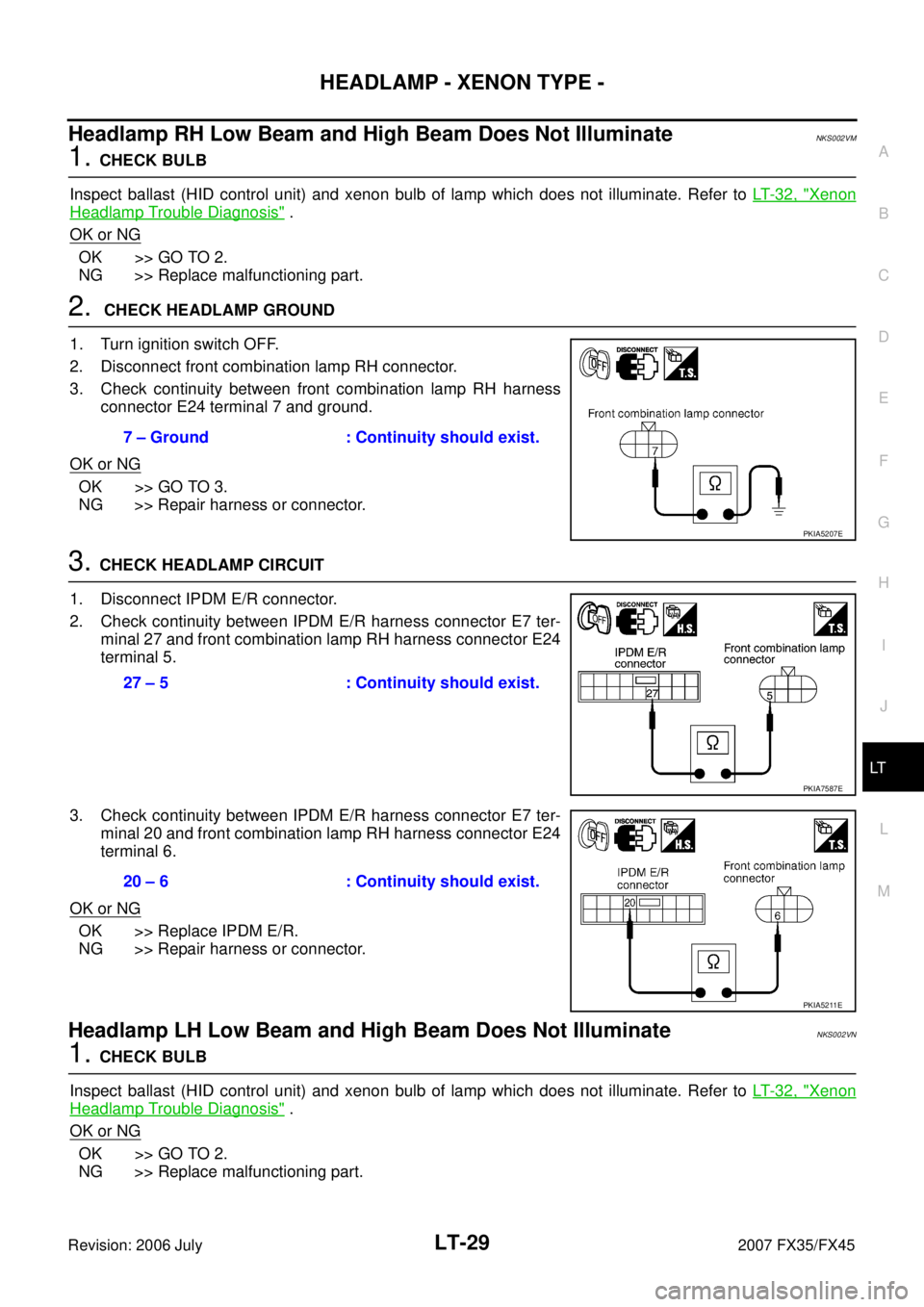
2. CHECK HEADLAMP GROUND
1. Turn ignition switch OFF.
2. Disconnect front combination lamp RH connector.
3. Check continuity between front combination lamp RH harness connector E24 terminal 7 and ground.
OK or NG
OK >> GO TO 3.
NG >> Repair harness or connector.
3. CHECK HEADLAMP CIRCUIT
1. Disconnect IPDM E/R connector.
2. Check continuity between IPDM E/R harness connector E7 ter- minal 27 and front combination lamp RH harness connector E24
terminal 5.
3. Check continuity between IPDM E/R harness connector E7 ter- minal 20 and front combination lamp RH harness connector E24
terminal 6.
OK or NG
OK >> Replace IPDM E/R.
NG >> Repair harness or connector.
Headlamp LH Low Beam and High Beam Does Not Illuminate NKS002VN
1. CHECK BULB
Inspect ballast (HID control unit) and xenon bulb of lamp which does not illuminate. Refer to LT- 3 2 , "
Xenon
Headlamp Trouble Diagnosis" .
OK or NG
OK >> GO TO 2.
NG >> Replace malfunctioning part. 7 – Ground : Continuity should exist.
PKIA5207E
27 – 5 : Continuity should exist.
PKIA7587E
20 – 6 : Continuity should exist.
PKIA5211E
Page 3486 of 4366
LT-30
HEADLAMP - XENON TYPE -
Revision: 2006 July 2007 FX35/FX45
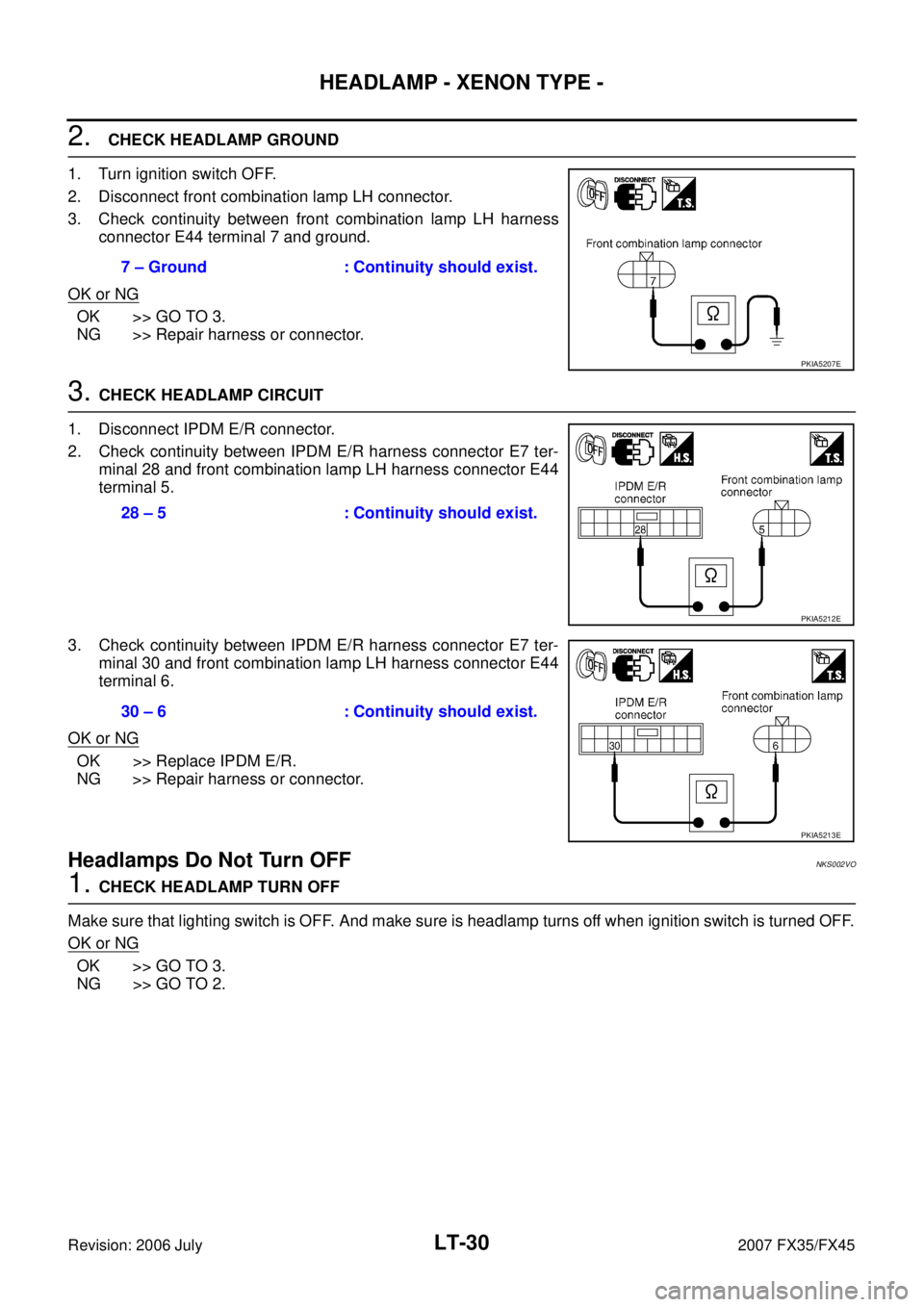
2. CHECK HEADLAMP GROUND
1. Turn ignition switch OFF.
2. Disconnect front combination lamp LH connector.
3. Check continuity between front combination lamp LH harness connector E44 terminal 7 and ground.
OK or NG
OK >> GO TO 3.
NG >> Repair harness or connector.
3. CHECK HEADLAMP CIRCUIT
1. Disconnect IPDM E/R connector.
2. Check continuity between IPDM E/R harness connector E7 ter- minal 28 and front combination lamp LH harness connector E44
terminal 5.
3. Check continuity between IPDM E/R harness connector E7 ter- minal 30 and front combination lamp LH harness connector E44
terminal 6.
OK or NG
OK >> Replace IPDM E/R.
NG >> Repair harness or connector.
Headlamps Do Not Turn OFFNKS002VO
1. CHECK HEADLAMP TURN OFF
Make sure that lighting switch is OFF. And make sure is headlamp turns off when ignition switch is turned OFF.
OK or NG
OK >> GO TO 3.
NG >> GO TO 2. 7 – Ground : Continuity should exist.
PKIA5207E
28 – 5 : Continuity should exist.
PKIA5212E
30 – 6 : Continuity should exist.
PKIA5213E