Page 66 of 331

a problem. For more information, seepage 289.
Theenginecanbeseverelydamaged
ifthisindicatorflashesorstayson
whenth eengineisrunning.For
moreinformation,seepage.
Ifthisindicatorcomesonwhenthe
engineisrunning,thebatteryisnot
beingcharged.Formoreinformation,
seepage. T
hi
si ndica t
orcomesonwhenyou
turntheignitionswitchtotheON
(II)position.Ifitcomeso natany
othertime,itindicatesthatthe
passenger’ ssideairbaghas
automaticallyshutoff.Formore
info rmation,seep age.
Thisindicatorcomesonforseveral
secondswh
enyouturntheignition
switchtoth eON(II)position.Ifit
comeso natanyothertime,it
indicatesapoten tialproblemwith
yourfrontairbags.Thisindicato rwill
alsoalertyoutoapoten tialproblem
withyoursideairbags,passenger’ s
sideairbagautoma ticcutoffsystem,
sidecu rtainairbags,automaticseat
belttensioners,driver’ sseatposition
sensor,andthefrontpassenger’ s
weightsensors.Formore
info rmation,seep age. 29
28
288
288 Malfunction Indicator
Lamp
L ow Oil Pressure
Indicator
Charging System
Indicator Supplemental Restraint
System Indicator
Side A irbag Of f
Indicator
Instrument Panel Indicators
62
U.S. Canada
If this indicator comes on while
driving, it means one of the engine’s
emissions control systems may have
Page 75 of 331

This meter shows the number of
miles (U.S.) or kilometers (Canada)
driven since you last reset it.
There are two trip meters: TRIP A
and TRIP B. Switch between these
displays by pressing the SELECT
button repeatedly. Each trip meter
works independently, so you can
keep track of two dif f erent distances.To reset a trip meter, display it, and
then press and hold the RESET
button until the number resets to
‘‘0.0’’. Both trip meters will reset if
the vehicle’s battery goes dead or is
disconnected. And both continue to
track mileage, even when only one is
displayed. When you turn the ignition switch to
the ON (II) position, the meter you
last selected is displayed.
This shows how much f uel you have.
It may show slightly more or less
than the actual amount. The needle
returns to the bottom after you turn
of f the ignition.
Trip Meter Fuel Gauge
Gauges
Inst rument s and Cont rols
71
SELECT BUTTON
RESET BUTTON
Avoid driving with an extremely low
f uel level. Running out of f uel could
cause the engine to misf ire, damaging
the catalytic converter.
Page 94 of 331
Avoid dropping or throwing the
transmitter.
Protect the transmitter from
extreme temperature.
Do not immerse the transmitter in
any liquid.
If you lose a transmitter, the
replacement needs to be
reprogrammed by your dealer.Remove the screw at the base of
the transmitter with a small
Phillips-head screwdriver.
To replace the battery: Battery type: CR1616 If it takes several pushes on the
button to lock or unlock the doors,
replace the battery as soon as
possible.
Inside the transmitter, separate
the inner cover f rom the keypad
by releasing the two tabs on the
cover. Separate the transmitter by prying
its middle seam with your
f ingernail.
1. 2.
3.
Remote Transmitter Care Replacing the Transmitter
Battery
Remote Transmitter
90
SCREWBATTERY
Page 95 of 331
�´
As required by the FCC:This device complies with Part 15 of theFCC rules. Operation is subject to thef ollowing two conditions: (1) This devicemay not cause harmf ul interf erence, and(2) this device must accept anyinterf erence received, includinginterf erence that may cause undesiredoperation.
Changes or modif ications not expresslyapproved by the party responsible f orcompliance could void the user’sauthority to operate the equipment.
This device complies with IndustryCanada Standard RSS-210.Operation is subject to the f ollowing twoconditions: (1) this device may not causeinterf erence, and (2) this device mustaccept any interf erence that may causeundesired operation of the device.Remove the old battery from the
back of the inner cover, and insert
a new battery into the back of the
cover with the side f acing down.
Install the parts in reverse order.
4.
5.
Remote Transmitter
Inst rument s and Cont rols
91
Page 99 of 331
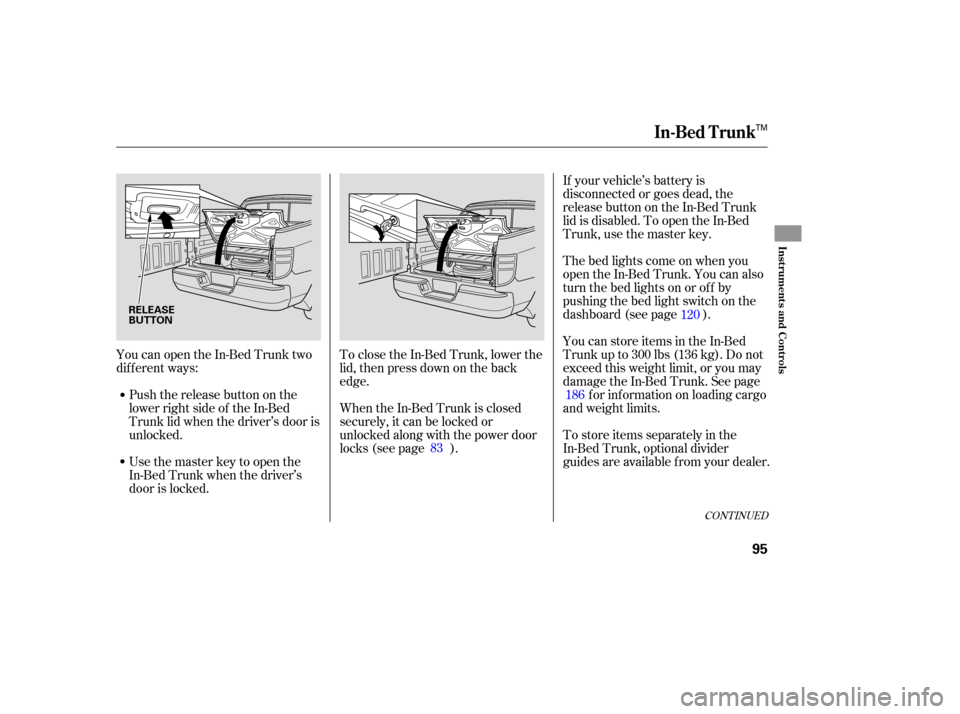
YoucanopentheIn-BedTrunktwo
different ways:
Push the release button on the
lower right side of the In-Bed
Trunk lid when the driver’s door is
unlocked. To
close the In-Bed Trunk, lower the
lid, then press down on the back
edge. If
your vehicle’s battery is
disconnected or goes dead, the
release button on the In-Bed Trunk
lid is disabled. To open the In-Bed
Trunk, use the master key.
Usethemasterkeytoopenthe
In-Bed Trunk when the driver’s
door is locked. Thebedlightscomeonwhenyou
open
the In-Bed Trunk. You can also
turn the bed lights on or off by
pushing the bed light switch on the
dashboard (see page ).
You can store items in the In-Bed
Trunk up to 300 lbs (136 kg). Do not
exceed this weight limit, or you may
damage the In-Bed Trunk. See page
for information on loading cargo
and weight limits.
To store items separately in the
In-Bed Trunk, optional divider
guides are available from your dealer.
When
the In-Bed Trunk is closed
secu rely, it can be locked or
unlocked along with the power door
locks (see page ). 83 120
186
CONT INUED
In-Bed Trunk
Inst rument s and Cont rols
95
RELEASE
BUTTON
TM
Page 108 of 331
In HI, the heater turns off when the
seat gets warm, and turns back on
after the seat’s temperature drops.
In LO, the heater runs continuously.
It does not cycle with temperature
ch anges.
Follow these precautions when using
the seat heaters:
Use the HI setting only to heat the
seats quickly, because it draws
large amounts of current from the
battery.
If the engine is left idling for an
extended period, do not use the
seat heaters, even on the LO
setting. It can weaken the battery,
causing hard starting.
Ma
ke sure all items in the cargo area
are secured. Loose items can f ly
f orward and cause injury if you have
to brake hard (See
on page ).
You can also store small items under
the rear seats. Make sure to secure
the items so they will not shift while
you are driving.
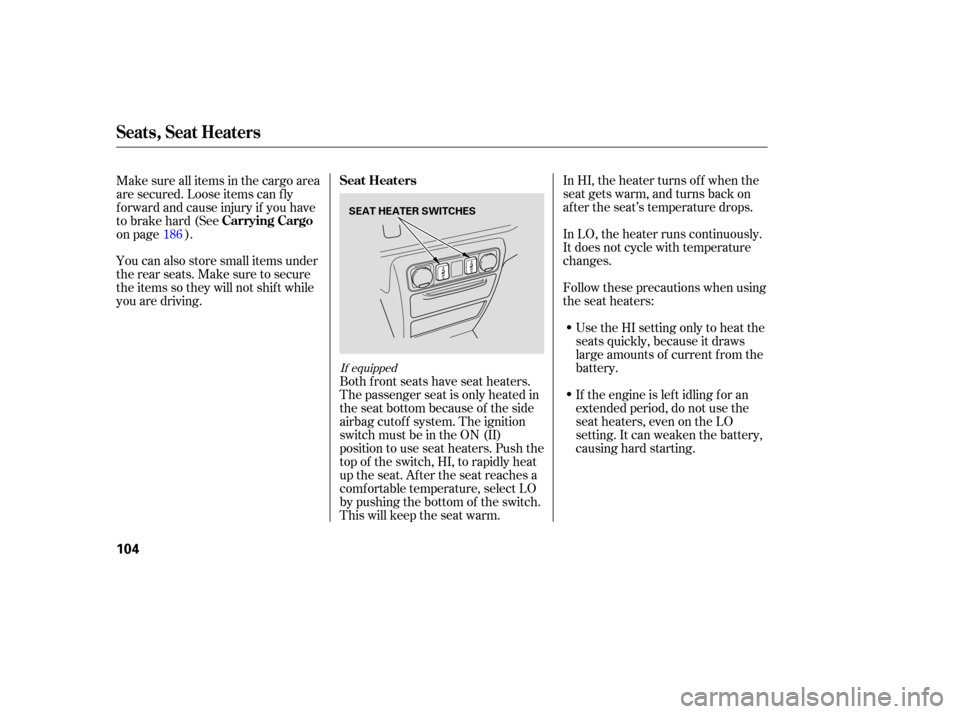
Both front seats have seat heaters.
The passenger seat is only heated in
the seat bottom because of the side
airbag cutoff system. The ignition
switch must be in the ON (II)
position to use seat heaters. Push the
top of the switch, HI, to rapidly heat
up the seat. After the seat reaches a
comf ortable temperature, select LO
by pushing the bottom of the switch.
This will keep the seat warm.
186
If equipped
Seat Heaters
Carrying Cargo
Seats, Seat Heaters
104
SEAT HEATER SWITCHES
Page 166 of 331

Your vehicle’s audio system will
disable itself if it is disconnected
f rom electrical power f or any reason.
To make it work again, you must
enter a specific code with the preset
bars. Because there are hundreds of
number combinations possible f rom
the f ive digits, making the system
work without knowing the exact
code is nearly impossible.
Youshouldhavereceivedacardthat
lists your audio system’s code and
serial numbers. It is best to store this
card in a saf e place at home. In
addition, you should write the audio
system’s serial number in this owner’s
manual.
If you lose the card, you must obtain
the code number f rom your dealer.
To do this, you will need the audio
system’s serial number.If your vehicle’s battery is
disconnected or goes dead, or the
radio f use is removed, the audio
system will disable itself . If this
happens, you will see ‘‘CODE’’ in the
frequencydisplaythenexttimeyou
turn on the system. Use the preset
bars to enter the code. The code is
locatedontheradiocodecard
included in your owner’s manual kit.
When it is entered correctly, the
radio will start playing.
If you make a mistake entering the
code, do not start over; complete the
sequence, then enter the correct
code. You have ten tries to enter the
correct code. If you are unsuccessf ul
in ten attempts, you must then leave
the system on f or 1 hour bef ore
trying again.
Radio T hef t Protection
162
Page 167 of 331

Press and hold the H (Preset 1) side
of the bar until the hour advances to
the desired time. Press and hold the
M (Preset 2) side of the bar until the
minutes advance to the desired time. To set the time, press the clock set
button until you hear a beep. The
displayed time begins to blink. If your vehicle’s battery is
disconnected or goes dead, you will
need to set the clock. You can quickly set the time to thenearest hour. If the displayed time is
bef ore the half hour, pressing the
clock set button until you hear a
beep, then pressing the R (Preset 3)
side of the bar sets the clock back to
the previous hour.
If the displayed time is after the half
hour, the clock sets f orward to the
beginning of the next hour. Press the clock set button again to
enter the set time.For example:
The navigation system receives
signals f rom the global positioning
system (GPS), and the displayed
time is updated automatically by the
GPS. Ref er to the navigation system
manual f or how to adjust the time.1:06 will reset to 1:00
1:52 will reset to 2:00
On models with Navigation System
On vehicles without Navigation System
Setting the Clock
Features
163
CLOCK SET
BUTTON
CLOCK SET
BUTTON
U.S. models are shown. PRESET BARS PRESET BARS
RTS, RTL, and
Canadian EXLmodels
RT,RTX,and
Canadian LXmodels

