2007 GMC SIERRA CLASSIC brake
[x] Cancel search: brakePage 146 of 674

Low Traction Mode
(Allison Transmission®)
If your vehicle has the DURAMAX®diesel engine
and the Allison Transmission®,ithasaLow
Traction Mode that assists in vehicle acceleration
when road conditions are slippery, such as
with ice or snow. While at a stop, selecting the
second gear range using the Range Selection
system, will allow the Allison Transmission
®to limit
torque to the wheels after it detects wheel slip,
preventing the tires from spinning.
Notice:Spinning the tires or holding the
vehicle in one place on a hill using only the
accelerator pedal may damage the
transmission. The repair will not be covered by
your warranty. If you are stuck, do not spin
the tires. When stopping on a hill, use the
brakes to hold the vehicle in place.
Cold Weather Operation
(Allison Transmission®)
On cold days, approximately 32°F (0°C) or colder,
your automatic transmission is designed to shift
differently. The transmission uses a warm-up mode
shift schedule until the engine reaches normal
operating temperature. While the transmission is
in warm-up mode it is normal for transmission
upshifts to be delayed or held longer. This feature
improves heater performance by giving quicker
vehicle warm-ups.
When temperatures are below−13°F (−25°C), the
transmission will prevent certain operations to
protect against damage. When active the DIC will
display the message “Trans in Warm-up”.
SeeDIC Warnings and Messages on page 270for
more information.
146
Page 148 of 674
Tow/Haul Mode (Allison
Transmission®)
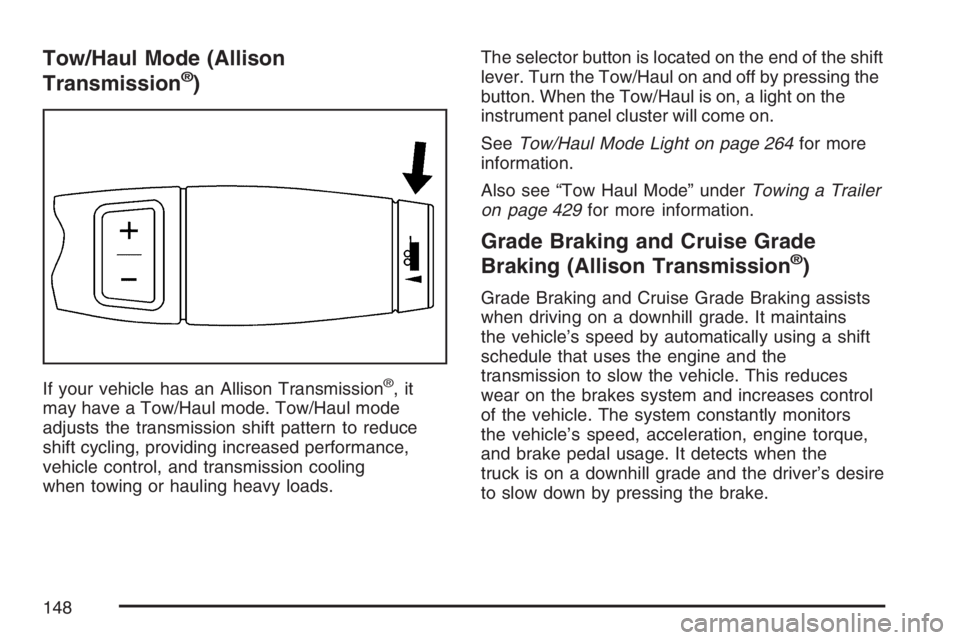
If your vehicle has an Allison Transmission®,it
may have a Tow/Haul mode. Tow/Haul mode
adjusts the transmission shift pattern to reduce
shift cycling, providing increased performance,
vehicle control, and transmission cooling
when towing or hauling heavy loads.The selector button is located on the end of the shift
lever. Turn the Tow/Haul on and off by pressing the
button. When the Tow/Haul is on, a light on the
instrument panel cluster will come on.
SeeTow/Haul Mode Light on page 264for more
information.
Also see “Tow Haul Mode” underTowing a Trailer
on page 429for more information.
Grade Braking and Cruise Grade
Braking (Allison Transmission®)
Grade Braking and Cruise Grade Braking assists
when driving on a downhill grade. It maintains
the vehicle’s speed by automatically using a shift
schedule that uses the engine and the
transmission to slow the vehicle. This reduces
wear on the brakes system and increases control
of the vehicle. The system constantly monitors
the vehicle’s speed, acceleration, engine torque,
and brake pedal usage. It detects when the
truck is on a downhill grade and the driver’s desire
to slow down by pressing the brake.
148
Page 150 of 674
FIRST (1):Press the clutch pedal and shift into
FIRST (1). Then, slowly let up on the clutch pedal
as you press the accelerator pedal. Shift into
FIRST (1) only when the vehicle is below
5 mph (8 km/h).
Notice:If you try to shift down into FIRST (1) at
excessive vehicle speeds, clutch or engine
damage could occur. Do not shift into FIRST (1)
unless you are going less than 5 mph (8km/h).
SECOND (2):Press the clutch pedal and shift into
SECOND (2). Then, slowly let up on the clutch
pedal as you press the accelerator pedal.
You can shift into SECOND (2) when you are going
less than 20 mph (32 km/h). If you have come to a
complete stop and it is hard to shift into
SECOND (2), put the shift lever into NEUTRAL and
let up on the clutch. Press the clutch pedal back
down. Then shift into SECOND (2).
Notice:If you try to shift down into
SECOND (2) at excessive vehicle speeds,
clutch or engine damage could occur. Do not
shift into SECOND (2) unless you are going
less than 20 mph (32km/h).THIRD (3):Press the clutch pedal and shift into
THIRD (3). Then, slowly let up on the clutch pedal
as you press the accelerator pedal.
FOURTH (4) and FIFTH (5):Shift into the higher
forward gears the same way you do for
THIRD (3). Slowly let up on the clutch pedal as
you press the accelerator pedal.
To stop, let up on the accelerator pedal and press
the brake pedal. Just before the vehicle stops,
press the clutch pedal and the brake pedal,
and shift to NEUTRAL.
NEUTRAL:Use this position when you start or
idle your engine.
REVERSE (R):To back up, rst press down the
clutch pedal. Wait for the vehicle to stop moving
and then, shift into REVERSE (R). Let up on
the clutch pedal slowly while pressing the
accelerator pedal.
Notice:Shifting to REVERSE (R) while your
vehicle is moving forward could damage the
transmission. The repairs would not be covered
by your warranty. Shift to REVERSE (R) only
after your vehicle is stopped.
150
Page 151 of 674
Also, use REVERSE (R), along with the parking
brake, when turning off your engine and parking
your vehicle.
Five-Speed (VORTEC™ 4.3L V6 and
4.8L V8 Engines)
Here is how to operate your transmission:
FIRST (1):Press the clutch pedal and shift into
FIRST (1). Then, slowly let up on the clutch pedal
as you press the accelerator pedal.
You can shift into FIRST (1) when you are going
less than 20 mph (32 km/h). If you have come to a
complete stop and it is hard to shift into FIRST (1),
put the shift lever into NEUTRAL and let up on
the clutch. Press the clutch pedal back down. Then
shift into FIRST (1).
Notice:If you try to shift down into FIRST (1)
at excessive vehicle speeds, clutch or
engine damage could occur. Do not shift into
FIRST (1) unless you are going less than
20 mph (32km/h).
SECOND (2):Press the clutch pedal as you let
up on the accelerator pedal and shift into
SECOND (2). Then, slowly let up on the clutch
pedal as you press the accelerator pedal.THIRD (3), FOURTH (4) and FIFTH (5):Shift into
THIRD (3), FOURTH (4) and FIFTH (5) the same
way you do for SECOND (2). Slowly let up on the
clutch pedal as you press the accelerator pedal.
To stop, let up on the accelerator pedal and press
the brake pedal. Just before the vehicle stops,
press the clutch pedal and the brake pedal, and
shift to NEUTRAL.
NEUTRAL:Use this position when you start or
idle your engine.
REVERSE (R):To back up, rst press down the
clutch pedal. Wait for the vehicle to stop moving
and then, shift into REVERSE (R). Let up on
the clutch pedal slowly while pressing the
accelerator pedal.
Notice:Shifting to REVERSE (R) while your
vehicle is moving forward could damage
the transmission. The repairs would not be
covered by your warranty. Shift to
REVERSE (R) only after your vehicle is
stopped.
Also, use REVERSE (R), along with the parking
brake, when turning off your engine and parking
your vehicle.
151
Page 152 of 674
Shift Speeds
{CAUTION:
If you skip a gear when you downshift,
you could lose control of your vehicle.
You could injure yourself or others. Do
not shift down more than one gear at a
time when you downshift.
Do not allow the engine Revolutions Per Minute
(RPM) to overspeed and enter the tachometer red
lines. Engine overspeed occurs when downshifting,
or descending a grade, at too high a vehicle
speed. When going down steep grades, always
select a gear at least one position lower than you
would use on climbing a grade. This will allow
the vehicle’s engine to provide some braking and
help to slow the vehicle as it goes down the
grade. Monitor your vehicle speed, acceleration
and engine RPM while applying the brakes as you
go down the grade to ensure you have complete
control over the vehicle.If your engine speed drops below 600 rpm, or if
the engine is not running smoothly, you should
downshift to the next lower gear. When operating
on slippery surfaces, downshift at lower than
normal vehicle speeds to prevent the tires from
slipping.
In vehicles that have a bench seat, move the
tallest beverage containers to the right cupholder
to provide additional clearance for the shift
lever.
For vehicles that have a center console, the front
cup holder pulls out and turns 180° to provide
additional clearance between tall beverage
containers and the shift lever.
Up-Shift Light
If your vehicle has a
manual transmission,
you may have a shift
light. This light will show
you when to shift to the
next higher gear for best
fuel economy.
152
Page 155 of 674

{CAUTION:
Shifting the transfer case to NEUTRAL
can cause your vehicle to roll even if the
transmission is in PARK (P), or if you
have a manual transmission, even if you
are in gear. You or someone else could be
seriously injured. Be sure to set the
parking brake before placing the transfer
case in NEUTRAL. SeeParking Brake on
page 169.
N (Neutral):Shift to this setting only when your
vehicle needs to be towed. SeeRecreational
Vehicle Towing on page 424orTowing Your
Vehicle on page 423.2H (Two-Wheel Drive High):This setting is used
for driving in most street and highway situations.
The front axle is not engaged in two-wheel
drive. This setting also provides the best fuel
economy.
4H (Four-Wheel Drive High):Use this setting
when you need extra traction, such as on snowy or
icy roads or in most off-road situations. This
setting also engages the front axle to help drive
your vehicle. This is the best setting to use
when plowing snow.
You can shift from 2H to 4H or 4H to 2H while the
vehicle is moving. The front axle will engage
faster if you take your foot off of the accelerator
for a couple of seconds after you shift. In
extremely cold weather, it may be necessary to
stop or slow the vehicle to shift into 4H.
155
Page 157 of 674

Shifting In or Out of 4L (Four-Wheel
Drive Low)
Notice:Shifting the transfer case into 4L
while moving at speeds faster than 3 mph
(5 km/h) may cause premature wear to
the transfer case, and may cause the gears to
grind. To avoid causing premature wear,
and grinding the gears, do not shift the transfer
case into 4L while the vehicle is moving
faster than 3 mph (5 km/h).
Shifts into 4L can be made with the vehicle at a
stop, or while slowly rolling about 1 to 3 mph
(2 to 5 km/h).
Shift the automatic transmission into
NEUTRAL (N), or with a manual transmission,
press the clutch pedal, or shift into NEUTRAL.
Shift the transfer case shift lever in one
continuous motion into the 4L position.
When in 4L do not drive faster than 45 mph.
This will reduce wear and extend the life of
the transfer case.
Shifting In or Out of NEUTRAL
1. With the vehicle running and the engine at an
idle set the parking brake and apply the
regular brake.
2. Place the transmission into NEUTRAL (N).
Shift the transfer case in one continuous motion
into or out of the NEUTRAL position.
Automatic Transfer Case
The transfer case
buttons are located to
the left of the instrument
panel cluster.
Use these switches to shift into and out of
four-wheel drive.
157
Page 159 of 674
2m(Two-Wheel Drive High):This setting is
used for driving in most street and highway
situations. Your front axle is not engaged in
two-wheel drive. This setting also provides the best
fuel economy.
{CAUTION:
Shifting the transfer case to NEUTRAL
can cause your vehicle to roll even if the
transmission is in PARK (P). You or
someone else could be seriously injured.
Be sure to set the parking brake before
placing the transfer case in NEUTRAL.
SeeParking Brake on page 169.
N (NEUTRAL):Shift the vehicle’s transfer case to
N (NEUTRAL) only when towing your vehicle.
SeeRecreational Vehicle Towing on page 424or
Towing Your Vehicle on page 423for more
information.4
m(Four-Wheel Drive High):Use this setting
when you need extra traction, such a on snowy
or icy roads or in most off-road situations.
This setting also engages your front axle to help
drive the vehicle. This is the best setting to
use when plowing snow.
4
n(Four-Wheel Drive Low):This setting also
engages the front axle and delivers extra
torque. You may never need Four-Wheel Drive
Low. It sends maximum power to all four wheels.
You might choose Four-Wheel Drive Low if
you are driving off-road in deep sand, deep mud,
deep snow, and while climbing or descending
steep hills. When operating in Four-Wheel Drive
Low, the gear ratio provides additional torque
when compared to Four-Wheel Drive High. The
transmission gear shift feel will be exaggerated.
If the SERVICE 4WD message stays on the Driver
Information Center (DIC), you should take your
vehicle to your dealer for service. SeeDIC
Warnings and Messages on page 270for further
information.
159