Page 153 of 554
Gate Operator and Canadian
Programming
Canadian radio-frequency laws require transmitter
signals to time out or quit after several seconds
of transmission. This may not be long enough
for Universal Home Remote to pick up the signal
during programming. Similarly, some U.S. gate
operators are manufactured to time out in
the same manner.
If you live in Canada, or you are having difficulty
programming a gate operator or garage door
opener by using the “Programming Universal
Home Remote” procedures, regardless of where
you live, replace Step 3 under “Programming
Universal Home Remote” with the following:
Continue to press and hold the Universal Home
Remote button while you press and release every
two seconds (cycle) the hand-held transmitter
button until the frequency signal has been
successfully accepted by the Universal Home
Remote. The Universal Home Remote indicator
light will ash slowly at rst and then rapidly.
Proceed with Step 4 under “Programming
Universal Home Remote” to complete.
Using Universal Home Remote
Press and hold the appropriate Universal Home
Remote button for at least half of a second.
The indicator light will come on while the signal is
being transmitted.
Erasing Universal Home Remote
Buttons
To erase programming from the three Universal
Home Remote buttons do the following:
1. Press and hold down the two outside buttons
until the indicator light begins to ash, after
20 seconds. Do not hold the two outside
buttons for longer than 30 seconds.
2. Release both buttons.
The Universal Home Remote is now in the training
(learning) mode and can be programmed at any
time beginning with Step 2 under “Programming
Universal Home Remote” shown earlier in
this section.
Individual buttons cannot be erased, but they can
be reprogrammed. See “Reprogramming a
Single Universal Home Remote Button” following
this section.
153
Page 161 of 554
Storage Areas
Glove Box
To open, lift the handle up. Use the key to lock
and unlock.
Cupholder(s)
There are two cupholders, with removable liners,
located in front of the center console. There
are cupholders located in the second row seat
armrest. To access, pull the armrest down. There
are additional cupholders located on each side
of the third row seat and in each door. There are
cupholders located behind the center console.
To access, pull down on the handle.
Instrument Panel Storage Area
Your vehicle has an instrument panel storage area
located above the radio. To open the cover,
press the button.
Center Console Storage Area
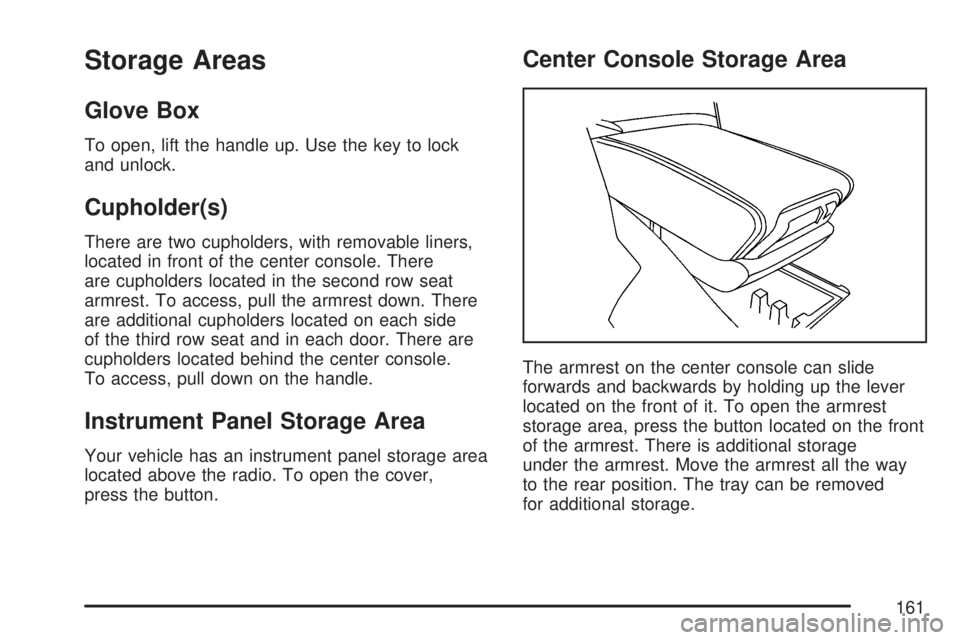
The armrest on the center console can slide
forwards and backwards by holding up the lever
located on the front of it. To open the armrest
storage area, press the button located on the front
of the armrest. There is additional storage
under the armrest. Move the armrest all the way
to the rear position. The tray can be removed
for additional storage.
161
Page 168 of 554
Warning Lights, Gages, and Indicators..... 214
Instrument Panel Cluster........................... 215
Speedometer and Odometer...................... 216
Tachometer............................................... 216
Safety Belt Reminder Light........................ 216
Passenger Safety Belt Reminder Light....... 217
Airbag Readiness Light............................. 217
Passenger Airbag Status Indicator............. 218
Charging System Light.............................. 220
Voltmeter Gage......................................... 221
Brake System Warning Light..................... 222
Anti-Lock Brake System Warning Light...... 223
StabiliTrak
®Indicator Light......................... 224
Engine Coolant Temperature Warning
Light...................................................... 224
Engine Coolant Temperature Gage............ 225
Tire Pressure Light.................................... 225
Malfunction Indicator Lamp........................ 226
Oil Pressure Light..................................... 229
Security Light............................................ 229
Fog Lamp Light......................................... 230Cruise Control Light.................................. 230
Highbeam On Light................................... 230
Tow/Haul Mode Light................................ 230
Fuel Gage................................................. 231
Driver Information Center (DIC).................. 232
DIC Operation and Displays
(With DIC Buttons)................................. 233
DIC Operation and Displays
(Without DIC Buttons)............................ 239
DIC Warnings and Messages.................... 244
DIC Vehicle Customization
(With DIC Buttons)................................. 255
Audio System(s)......................................... 264
Setting the Time........................................ 266
Radio with CD........................................... 268
Radio with CD and DVD........................... 278
Using an MP3 (Radio with CD or
Six-Disc CD Player)............................... 295
Using an MP3 (Radio with CD and
DVD Player)........................................... 301
Section 3 Instrument Panel
168
Page 169 of 554
XM Radio Messages................................. 309
Navigation/Radio System........................... 311
Rear Seat Entertainment System............... 311
Rear Seat Audio (RSA)............................. 322
Rear Audio Controller (RAC)..................... 324
Theft-Deterrent Feature............................. 325Audio Steering Wheel Controls.................. 325
Radio Reception........................................ 326
Care of Your CDs and DVDs.................... 328
Care of the CD and DVD Player............... 328
Multi-Band Antenna................................... 328
Section 3 Instrument Panel
169
Page 171 of 554

The main components of your instrument panel are listed here:
A. Air Vent. SeeOutlet Adjustment on page 210.
B. Multifunction Lever. SeeTurn
Signal/Multifunction Lever on page 174.
Windshield Wipers. SeeTurn
Signal/Multifunction Lever on page 174.
C. Instrument Panel Cluster. SeeInstrument
Panel Cluster on page 215.
D. Head-Up Display (HUD) Buttons. See
Head-Up Display (HUD) on page 190.
E. Audio System. SeeAudio System(s)
on page 264. Navigation/Radio System
(If Equipped). SeeNavigation/Radio System
on page 311.
F. Exterior Lamps Control. SeeExterior Lamps
on page 183.
G. Hood Release. SeeHood Release on
page 395.
H. Instrument Panel Brightness. SeeInstrument
Panel Brightness on page 186.I. Cruise Control Buttons. SeeCruise Control
on page 180.
J. Tilt and Telescopic Steering Wheel. SeeTilt
and Telescopic Steering Wheel on page 173.
Power Tilt Wheel and Telescopic Steering
(If Equipped). SeePower Tilt Wheel and
Telescopic Steering Column on page 174.
K. Horn. SeeHorn on page 173.
L. Audio Steering Wheel Control Buttons. See
Audio Steering Wheel Controls on page 325.
M. Driver Information Center. SeeDriver
Information Center (DIC) on page 232.
N. Dual Automatic Climate Controls. See
Dual Automatic Climate Control System
on page 203.
O. Center Console Shift Lever (If Equipped).
See “Console Shift Lever” underShifting
Into Park (P) on page 135.
171
Page 190 of 554

Head-Up Display (HUD)
{CAUTION:
If the HUD image is too bright or too high
in your eld of view, it may take you more
time to see things you need to see when
it is dark outside. Be sure to keep the
HUD image dim and placed low in your
eld of view.
If the vehicle has the Head-Up Display (HUD),
some information concerning the operation of the
vehicle is projected onto the windshield. This
includes the speedometer reading, RPM reading,
transmission position, outside air temperature, the
tap shift gear, and a brief display of the current
radio station, including XM information or CD track.It will also display turn-by-turn navigation
information if the vehicle has a navigation radio.
The images are projected by the HUD lens located
on the driver’s side of the instrument panel.
The tap shift gear will also appear on the HUD if
the vehicle has tap shift and it is active.
The HUD information can be displayed in one of
three languages, English, French, or Spanish.
The speedometer reading and other numerical
values can be displayed in either English or
metric units.
The language selection and the units of
measurement are changed through the trip
computer in the Driver Information Center (DIC).
SeeDIC Vehicle Customization (With DIC Buttons)
on page 255.
190
Page 191 of 554

The HUD information appears as an image
focused out toward the front of the vehicle.
When the ignition key is turned to RUN, the HUD
will display an introductory message for a short
time, until the HUD is ready.
The following indicator lights come on the
instrument panel when activated and will also
appear on the HUD:
Turn Signal Indicators
High-Beam Indicator SymbolThe HUD will temporarily display CHECK GAGES
and ICE POSSIBLE when there are messages
on the DIC trip computer.
The HUD will also display the following messages
when these systems are active:
TRACTION CONTROL ACTIVE
STABILITRAK ACTIVE
Notice:If you try to use the HUD image as a
parking aid, you may misjudge the distance
and damage your vehicle. Do not use the
HUD image as a parking aid.
When the HUD is on, the speedometer reading
will continually be displayed. The current radio
station or CD track number will display for a short
period of time after the radio or CD track status
changes. This will happen whenever radio
information is changed. The speedometer size
will be reduced when radio, CD information,
warnings, or turn-by-turn navigation information
are displayed on the HUD.
191
Page 193 of 554

Format Two:This display includes the information
in Format One without the transmission information
and the outside air temperature.
Format Three:This display includes all the
information in Format One along with a circular
tachometer, but without outside air temperature.
All formats will show the turn-by-turn navigation
information and provide details about the next
driving maneuver to be made. When you near your
destination, the HUD will display a distance bar
that will ll in the closer you get to your destination.All navigation information is provided to the HUD
by the navigation radio, if the vehicle has one.
The HUD image displayed on the windshield will
automatically dim and brighten to compensate
for outside lighting.
The HUD image can temporarily light up
depending on the angle and position of the
sunlight on the HUD display. This is normal and
will change when the angle of the sunlight on
the HUD display changes.
Polarized sunglasses could make the HUD image
harder to see.
Care of the HUD
Clean the inside of the windshield as needed to
remove any dirt or lm that could reduce the
sharpness or clarity of the HUD image.
To clean the HUD lens, use a soft, clean cloth
that has household glass cleaner sprayed
on it. Wipe the HUD lens gently, then dry it.
Do not spray cleaner directly on the lens
because the cleaner could leak into the unit.
193
