2007 GMC ACADIA lock
[x] Cancel search: lockPage 368 of 554

Dinghy Towing
If you have a front-wheel-drive vehicle, it can be
dinghy towed from the front. These vehicles
may also be towed by putting the front wheels on
a dolly. See “Dolly Towing” later in this section.
If you have an all-wheel-drive vehicle, it can
be dinghy towed from the front. You can also tow
these vehicles by placing them on a platform
trailer with all four wheels off of the ground.
These vehicles cannot be towed using a dolly.
For vehicles being dinghy towed, the vehicle
should be run at the beginning of each day and
at each RV fuel stop for about ve minutes.
This will ensure proper lubrication of transmission
components. Put the IGN (Ignition) fuse in to
start the vehicle.To tow your vehicle from the front with all four
wheels on the ground:
1. Position the vehicle to tow and then secure it.
2. Turn the ignition to OFF.
3. Set the parking brake.
4. To prevent your battery from draining while
the vehicle is being towed, remove the IGN
(Ignition) fuse from the underhood fuse block.
SeeUnderhood Fuse Block on page 493.
5. Turn the ignition to ACCESSORY.
368
Page 378 of 554
Safety Chains
You should always attach chains between your
vehicle and your trailer. Cross the safety
chains under the tongue of the trailer so that the
tongue will not drop to the road if it becomes
separated from the hitch. Instructions about safety
chains may be provided by the hitch manufacturer
or by the trailer manufacturer. Follow the
manufacturer’s recommendation for attaching
safety chains and do not attach them to the
bumper. Always leave just enough slack so you
can turn with your rig. And, never allow safety
chains to drag on the ground.
Trailer Brakes
If you tow more than 1,000 lbs (450 kg), use trailer
brakes. Because your vehicle has anti-lock brakes,
don’t try to tap into your vehicle’s hydraulic brake
system. If you do, both brake systems won’t
work well, or at all.
Be sure to read and follow the instructions for the
trailer brakes so you’ll be able to install, adjust
and maintain them properly.
Driving with a Trailer
Towing a trailer requires a certain amount of
experience. Before setting out for the open road,
you’ll want to get to know your rig. Acquaint
yourself with the feel of handling and braking with
the added weight of the trailer. And always
keep in mind that the vehicle you are driving is
now a good deal longer and not nearly as
responsive as your vehicle is by itself.
Before you start, check all trailer hitch parts and
attachments, safety chains, electrical connector,
lamps, tires and mirror adjustment. If the trailer has
electric brakes, start your vehicle and trailer moving
and then apply the trailer brake controller by hand
to be sure the brakes are working. This lets you
check your electrical connection at the same time.
During your trip, check occasionally to be sure
that the load is secure, and that the lamps and any
trailer brakes are still working.
Following Distance
Stay at least twice as far behind the vehicle ahead
as you would when driving your vehicle without
a trailer. This can help you avoid situations
that require heavy braking and sudden turns.
378
Page 384 of 554

Buying New Tires...................................... 450
Different Size Tires and Wheels................ 452
Uniform Tire Quality Grading..................... 453
Wheel Alignment and Tire Balance............ 454
Wheel Replacement.................................. 454
Tire Chains............................................... 456
If a Tire Goes Flat.................................... 457
Changing a Flat Tire................................. 458
Removing the Spare Tire and Tools.......... 459
Removing the Flat Tire and Installing
the Spare Tire....................................... 463
Secondary Latch System........................... 468
Storing a Flat or Spare Tire and Tools...... 472
Compact Spare Tire.................................. 477
Appearance Care........................................ 478
Cleaning the Inside of Your Vehicle.......... 478
Fabric/Carpet............................................. 480
Leather...................................................... 481
Instrument Panel, Vinyl, and Other
Plastic Surfaces..................................... 481
Care of Safety Belts.................................. 482
Weatherstrips............................................ 482
Washing Your Vehicle............................... 482
Cleaning Exterior Lamps/Lenses................ 483Finish Care............................................... 483
Windshield, Backglass, and
Wiper Blades......................................... 484
Aluminum or Chrome-Plated Wheels
and Trim................................................ 484
Tires......................................................... 485
Sheet Metal Damage................................. 486
Finish Damage.......................................... 486
Underbody Maintenance............................ 486
Chemical Paint Spotting............................ 486
Vehicle Care/Appearance Materials............ 487
Vehicle Identication.................................. 488
Vehicle Identication Number (VIN)........... 488
Service Parts Identication Label............... 488
Electrical System........................................ 489
High Voltage Devices and Wiring.............. 489
Add-On Electrical Equipment..................... 489
Windshield Wiper Fuses............................ 490
Power Windows and Other
Power Options....................................... 490
Fuses and Circuit Breakers....................... 490
Instrument Panel Fuse Block..................... 490
Underhood Fuse Block.............................. 493
Capacities and Specications.................... 497
Section 5 Service and Appearance Care
384
Page 385 of 554
Service
Your dealer/retailer knows your vehicle best and
wants you to be happy with it. We hope you will go
to your dealer/retailer for all your service needs.
You will get genuine GM parts and GM-trained and
supported service people.
We hope you will want to keep your GM vehicle all
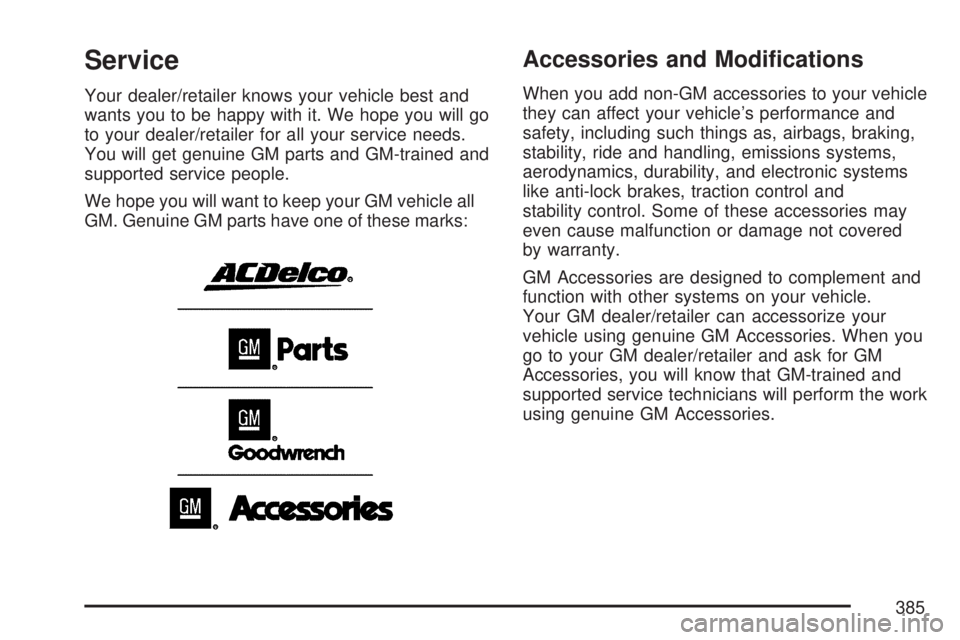
GM. Genuine GM parts have one of these marks:
Accessories and Modications
When you add non-GM accessories to your vehicle
they can affect your vehicle’s performance and
safety, including such things as, airbags, braking,
stability, ride and handling, emissions systems,
aerodynamics, durability, and electronic systems
like anti-lock brakes, traction control and
stability control. Some of these accessories may
even cause malfunction or damage not covered
by warranty.
GM Accessories are designed to complement and
function with other systems on your vehicle.
Your GM dealer/retailer can accessorize your
vehicle using genuine GM Accessories. When you
go to your GM dealer/retailer and ask for GM
Accessories, you will know that GM-trained and
supported service technicians will perform the work
using genuine GM Accessories.
385
Page 391 of 554
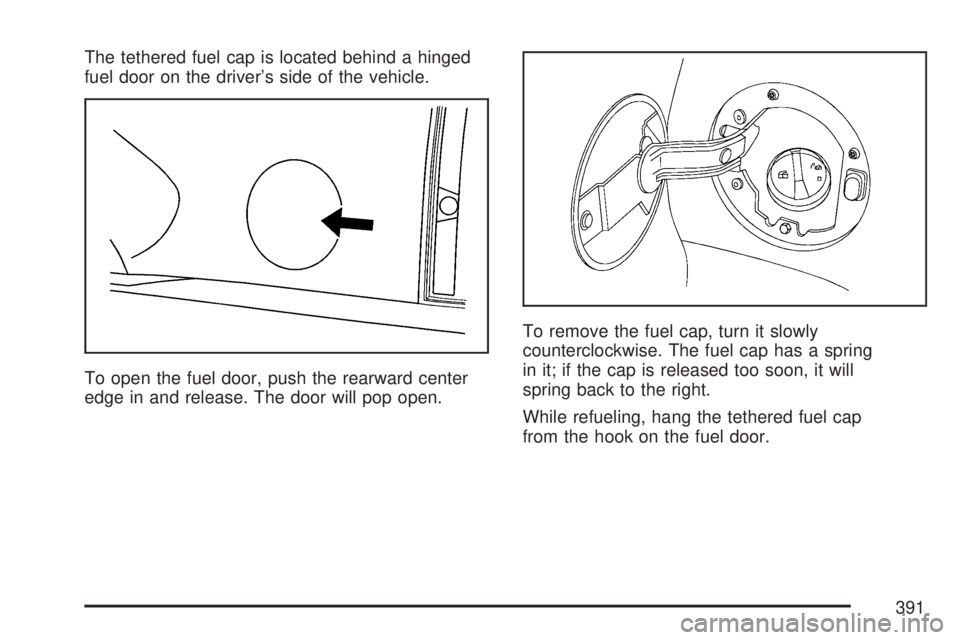
The tethered fuel cap is located behind a hinged
fuel door on the driver’s side of the vehicle.
To open the fuel door, push the rearward center
edge in and release. The door will pop open.To remove the fuel cap, turn it slowly
counterclockwise. The fuel cap has a spring
in it; if the cap is released too soon, it will
spring back to the right.
While refueling, hang the tethered fuel cap
from the hook on the fuel door.
391
Page 392 of 554

{CAUTION:
Fuel can spray out on you if you open the
fuel cap too quickly. If you spill fuel and
then something ignites it, you could be
badly burned. This spray can happen if
your tank is nearly full, and is more likely
in hot weather. Open the fuel cap slowly
and wait for any hiss noise to stop.
Then unscrew the cap all the way.
Be careful not to spill fuel. Do not top off or overll
the tank and wait a few seconds after you have
nished pumping before removing the nozzle.
Clean fuel from painted surfaces as soon as
possible. SeeWashing Your Vehicle on page 482.
When replacing the fuel cap, turn it clockwise until
it clicks. Make sure the cap is fully installed.
The diagnostic system can determine if the fuel
cap has been left off or improperly installed.
This would allow fuel to evaporate into the
atmosphere. SeeMalfunction Indicator Lamp
on page 226.If your vehicle has a Driver Information Center
(DIC), the TIGHTEN GAS CAP message will be
displayed if the fuel cap is not properly installed.
{CAUTION:
If a re starts while you are refueling, do
not remove the nozzle. Shut off the ow
of fuel by shutting off the pump or by
notifying the station attendant. Leave the
area immediately.
Notice:If you need a new fuel cap, be sure to
get the right type. Your dealer/ retailer can
get one for you. If you get the wrong type,
it may not t properly. This may cause your
malfunction indicator lamp to light and
may damage your fuel tank and emissions
system. SeeMalfunction Indicator Lamp
on page 226.
392
Page 397 of 554

A. Radiator Pressure Cap (Out of View).
SeeRadiator Pressure Cap on page 410.
B. Engine Coolant Recovery Cap. SeeCooling
System on page 413.
C. Underhood Fuse Block. SeeUnderhood Fuse
Block on page 493.
D. Remote Positive (+) Terminal. SeeJump
Starting on page 425.
E. Power Steering Fluid Reservoir. SeePower
Steering Fluid on page 419.
F. Engine Oil Fill Cap. See “When to Add Engine
Oil” underEngine Oil on page 397.
G. Engine Oil Dipstick. See “Checking Engine Oil”
underEngine Oil on page 397.
H. Automatic Transmission Fluid Dipstick.
See “Checking the Fluid Level” under
Automatic Transmission Fluid on page 404.
I. Brake Master Cylinder Reservoir. See “Brake
Fluid” underBrakes on page 421.
J. Engine Air Cleaner/Filter. SeeEngine Air
Cleaner/Filter on page 402.
K. Windshield Washer Fluid Reservoir.
See “Adding Washer Fluid” under
Windshield Washer Fluid on page 420.Engine Oil
Checking Engine Oil
It is a good idea to check the engine oil every time
you get fuel. In order to get an accurate reading,
the oil must be warm and the vehicle must be
on level ground.
The engine oil dipstick handle is a yellow loop.
SeeEngine Compartment Overview on page 396
for the location of the engine oil dipstick.
1. Turn off the engine and give the oil
several minutes to drain back into the oil
pan. If you do not do this, the oil dipstick might
not show the actual level.
2. Pull out the dipstick and clean it with a paper
towel or cloth, then push it back in all the
way. Remove it again, keeping the tip down,
and check the level.
397
Page 405 of 554

Checking the Fluid Level
Prepare the vehicle as follows:
1. Park the vehicle on a level place. Keep the
engine running.
2. With the parking brake applied, place the shift
lever in PARK (P).
3. With your foot on the brake pedal, move the
shift lever through each gear, pausing for
about three seconds in each one. Then,
position the shift lever in PARK (P).
4. Let the engine run at idle for three to
ve minutes.
Then, without shutting off the engine, follow
these steps:
The transmission uid
dipstick cap has this
symbol on it, and
is located near the
front of the engine
compartment.SeeEngine Compartment Overview on page 396
for more information on location.
1. Remove the dipstick and wipe it with a clean
rag or paper towel.
2. Reinstall back in all the way, wait
three seconds and then pull it back out
again.
3. Check both sides of the dipstick, and read the
lower level. The uid level must be in the
crosshatched area.
4. If the uid level is in the acceptable range,
twist & lock dipstick cap in place.
405