2007 FORD EXPEDITION center console
[x] Cancel search: center consolePage 36 of 328
Troubleshooting:
1. Do not connect the audio input jack to a line level output. Line level
outputs are intended for connection to a home stereo and are not
compatible with the AIJ. The AIJ will only work correctly with devices
that have a headphone output with a volume control.
2. Do not set the portable music player’s volume level higher than is
necessary to match the volume of the CD or FM radio in your audio
system as this will cause distortion and will reduce sound quality. Many
portable music players have different output levels, so not all players
should be set at the same levels. Some players will sound best at full
volume and others will need to be set at a lower volume.
3. If the music sounds distorted at lower listening levels, turn the
portable music player volume down. If the problems persists, replace or
recharge the batteries in the portable music player.
4. The portable music player must be controlled in the same way manner
when it is used with headphones as the AIJ does not provide control
(play, pause, etc.) over the attached portable music player.
5. For safety reasons, connecting or adjusting the settings on your
portable music player should not be attempted while the vehicle is
moving. Also, the portable music player should be stored in a secure
location, such as the center console or the glove box, when the vehicle is
in motion. The audio extension cable must be long enough to allow the
portable music player to be safely stored while the vehicle is in motion.
Rear seat radio controls (if equipped)
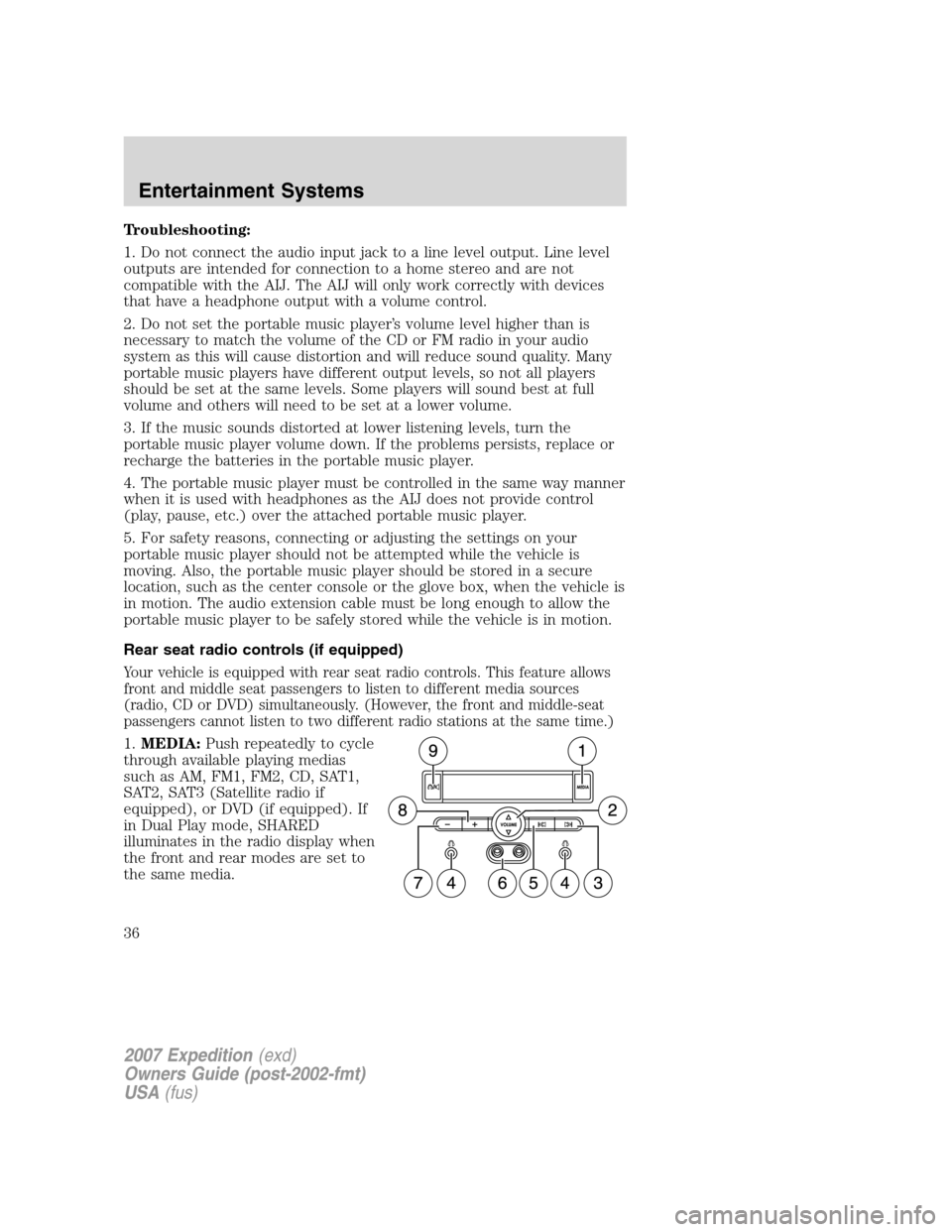
Your vehicle is equipped with rear seat radio controls. This feature allows
front and middle seat passengers to listen to different media sources
(radio, CD or DVD) simultaneously. (However, the front and middle-seat
passengers cannot listen to two different radio stations at the same time.)
1.MEDIA:Push repeatedly to cycle
through available playing medias
such as AM, FM1, FM2, CD, SAT1,
SAT2, SAT3 (Satellite radio if
equipped), or DVD (if equipped). If
in Dual Play mode, SHARED
illuminates in the radio display when
the front and rear modes are set to
the same media.
2007 Expedition(exd)
Owners Guide (post-2002-fmt)
USA(fus)
Entertainment Systems
36
Page 67 of 328
Power quarter rear windows (if equipped)
Press the
portion of the
control to open the power rear
quarter windows.
Press the left portion of the control
to close the power rear quarter
windows.
Do not leave children unattended in the vehicle and do not let
children play with the power rear quarter windows. They may
seriously injure themselves.
When closing the power rear quarter windows, you should verify
that it is free of obstructions and ensure that children and/or
pets are not in the proximity of the window opening.
CENTER CONSOLE (IF EQUIPPED)
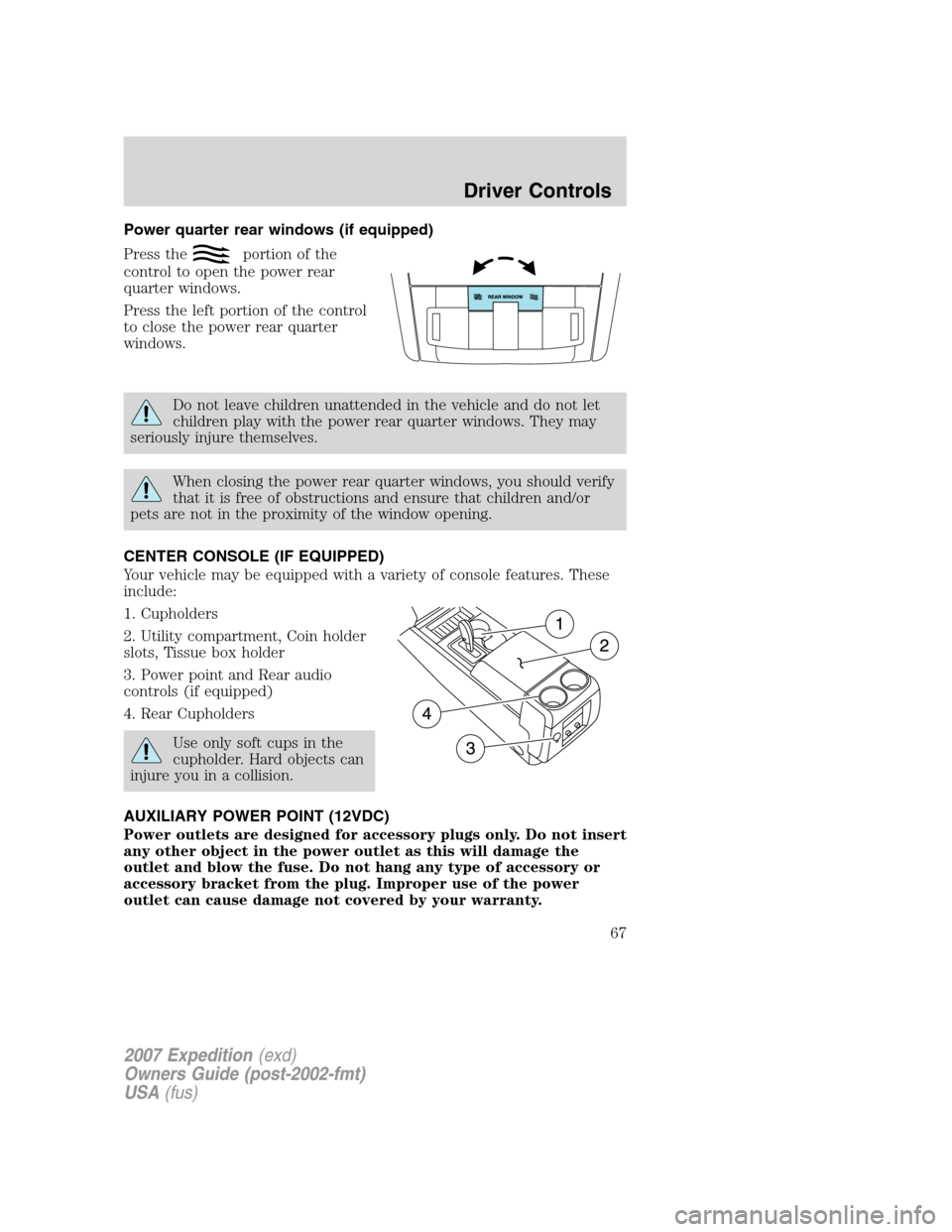
Your vehicle may be equipped with a variety of console features. These
include:
1. Cupholders
2. Utility compartment, Coin holder
slots, Tissue box holder
3. Power point and Rear audio
controls (if equipped)
4. Rear Cupholders
Use only soft cups in the
cupholder. Hard objects can
injure you in a collision.
AUXILIARY POWER POINT (12VDC)
Power outlets are designed for accessory plugs only. Do not insert
any other object in the power outlet as this will damage the
outlet and blow the fuse. Do not hang any type of accessory or
accessory bracket from the plug. Improper use of the power
outlet can cause damage not covered by your warranty.
2007 Expedition(exd)
Owners Guide (post-2002-fmt)
USA(fus)
Driver Controls
67
Page 68 of 328
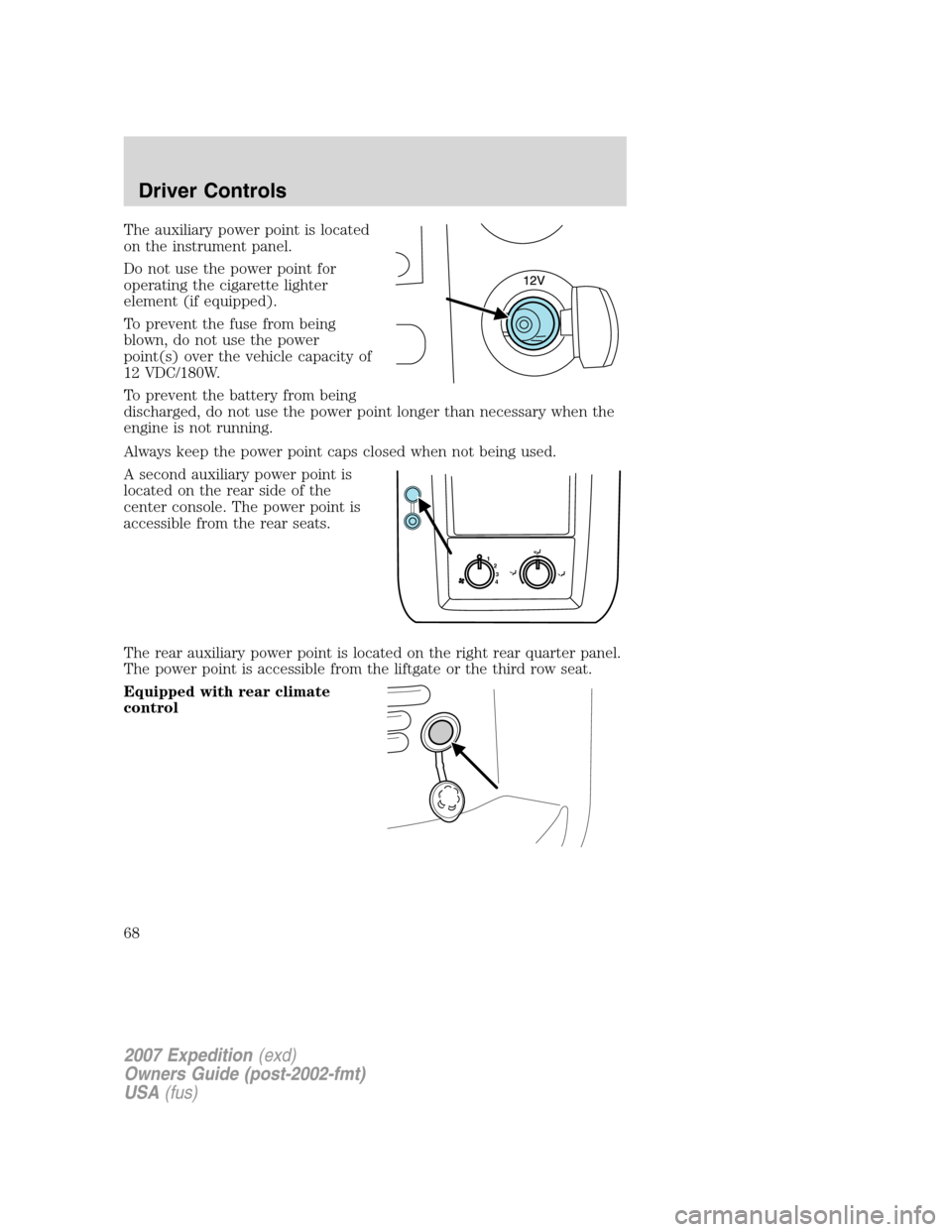
The auxiliary power point is located
on the instrument panel.
Do not use the power point for
operating the cigarette lighter
element (if equipped).
To prevent the fuse from being
blown, do not use the power
point(s) over the vehicle capacity of
12 VDC/180W.
To prevent the battery from being
discharged, do not use the power point longer than necessary when the
engine is not running.
Always keep the power point caps closed when not being used.
A second auxiliary power point is
located on the rear side of the
center console. The power point is
accessible from the rear seats.
The rear auxiliary power point is located on the right rear quarter panel.
The power point is accessible from the liftgate or the third row seat.
Equipped with rear climate
control
1
2
3
4
2007 Expedition(exd)
Owners Guide (post-2002-fmt)
USA(fus)
Driver Controls
68
Page 91 of 328
Autolock
This feature automatically locks all vehicle doors when the vehicle is
shifted into any gear, putting the vehicle in motion.
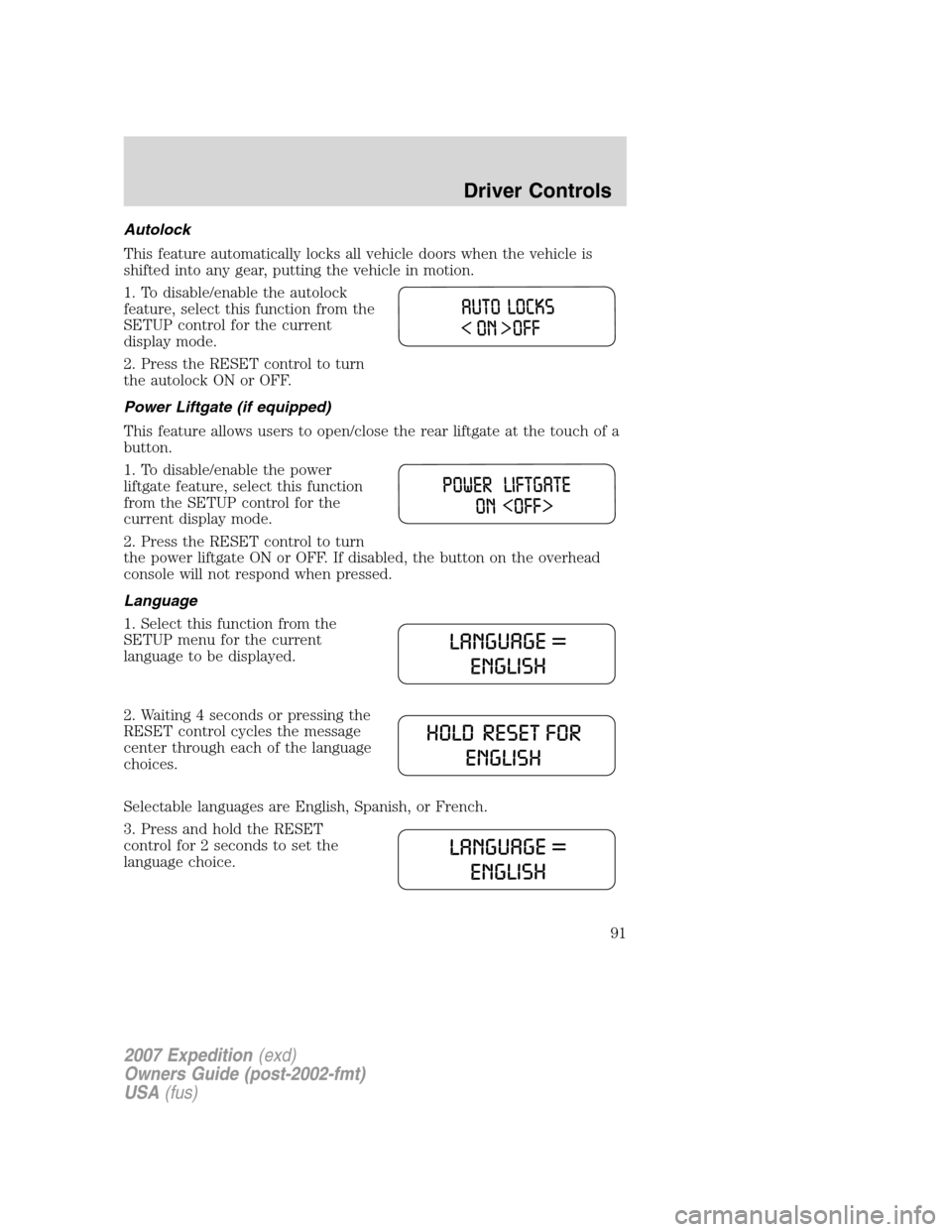
1. To disable/enable the autolock
feature, select this function from the
SETUP control for the current
display mode.
2. Press the RESET control to turn
the autolock ON or OFF.
Power Liftgate (if equipped)
This feature allows users to open/close the rear liftgate at the touch of a
button.
1. To disable/enable the power
liftgate feature, select this function
from the SETUP control for the
current display mode.
2. Press the RESET control to turn
the power liftgate ON or OFF. If disabled, the button on the overhead
console will not respond when pressed.
Language
1. Select this function from the
SETUP menu for the current
language to be displayed.
2. Waiting 4 seconds or pressing the
RESET control cycles the message
center through each of the language
choices.
Selectable languages are English, Spanish, or French.
3. Press and hold the RESET
control for 2 seconds to set the
language choice.
2007 Expedition(exd)
Owners Guide (post-2002-fmt)
USA(fus)
Driver Controls
91
Page 324 of 328
instrument panel ....................279
interior .....................................280
interior trim ............................280
plastic parts ............................278
safety belts ..............................280
washing ....................................276
waxing .....................................277
wheels ......................................277
wiper blades ............................279
Clock adjust
6-CD in dash .............................29
AM/FM/CD .................................23
Compass, electronic ....................83
calibration .................................84
set zone adjustment ...........84, 86
Console ........................................67
overhead ..............................66–67
Controls
power seat ...............................121
steering column ........................76
Coolant
checking and adding ..............293
refill capacities ................297, 315
specifications ..........................315
Cruise control
(see Speed control) ....................74
Customer Assistance ................240
Ford Extended Service Plan...272
Getting assistance outside
the U.S. and Canada ..............273
Getting roadside assistance ...240
Getting the service you
need .........................................268
Ordering additional owner’s
literature .................................274
Utilizing the
Mediation/Arbitration
Program ...................................272D
Daytime running lamps
(see Lamps) ................................53
Defrost
rear window ..............................51
Dipstick
automatic transmission fluid...311
engine oil .................................288
Driving under special
conditions ..................227, 234, 237
sand .........................................236
snow and ice ...........................238
through water .................236, 239
DVD system .................................42
E
Electronic message center .........85
Emergencies, roadside
jump-starting ..........................259
Emission control system ..........307
Engine ........................................318
cleaning ...................................278
coolant .....................................293
fail-safe cooling .......................297
idle speed control ...................291
lubrication specifications .......315
refill capacities ........................315
service points ..........................285
starting after a collision .........242
Engine block heater .................211
Engine oil ..................................288
change oil soon warning,
message center .......................288
checking and adding ..............288
dipstick ....................................288
filter, specifications ........290, 314
recommendations ...................290
2007 Expedition(exd)
Owners Guide (post-2002-fmt)
USA(fus)
Index
324