2007 DODGE DAKOTA horn
[x] Cancel search: hornPage 18 of 400

General Information
The Sentry Key system complies with FCC rules part 15
and with RSS-210 of Industry Canada. Operation is
subject to the following conditions:
•This device may not cause harmful interference.
•This device must accept any interference that may be
received, including interference that may cause undes-
ired operation.
SECURITY ALARM SYSTEM — IF EQUIPPED
This system monitors the vehicle doors and ignition for
unauthorized operation. When the alarm is activated, the
system provides both audible and visual signals. The
horn will sound repeatedly for 3 minutes and the head-
lights and security light in the instrument cluster will
flash for an additional 15 minutes. The engine will not
run until the system is disarmed.
To Set the Alarm:
The alarm will set when you use the power door locks or
use the Keyless Entry transmitter to lock the doors. After
all the doors are locked and closed, the security light in
the instrument cluster will flash rapidly to signal that the
system is arming. The security light in the instrument
panel cluster will flash rapidly for about 15 seconds to
indicate that the alarm is being set. After the alarm is set,
the security light will flash at a slower rate to indicate
that the system is armed.
NOTE:If the security light stays on continuously during
vehicle operation, have the system checked by your
dealer.
To Disarm the System:
Use the Remote Keyless Entry transmitter to unlock the
doors. If something has triggered the system in your
absence, the horn will sound three times when you
unlock the doors. Check the vehicle for tampering.
18 THINGS TO KNOW BEFORE STARTING YOUR VEHICLE
Page 19 of 400

The security system will also disarm, if the vehicle is
started with a programmed Sentry Key. If an unpro-
grammed Sentry Key is used to start a vehicle, the engine
will start and run for 2 seconds and then shut down.
After six unsuccessful attempts at starting the engine, the
system will shut down until the correct key is used. To
exit alarming mode, press the transmitter Unlock button
or start the vehicle with a programmed Sentry Key.
The security alarm system is designed to protect your
vehicle; however, you can create conditions where the
system will arm unexpectedly. If you remain in the
vehicle and lock the doors with the transmitter, the alarm
will sound when you pull the door handle to exit.
NOTE:You may accidentally activate the security sys-
tem (horn sounds and lights flash) by entering the vehicle
without using the key fob to unlock the door(s). The
security system can be disarmed with the key fob’sUNLOCK button or by inserting a programmed Sentry
Key into the ignition and turning the key to the ON
position.
ILLUMINATED ENTRY
Vehicles Equipped With Power Door Locks
All interior lights will illuminate in the vehicle when the
doors are unlocked using the key fob.
The interior lights will remain on for 30 seconds after the
last door is closed, or until all doors are closed and either
the ignition is turned to the ON position or a key fob
LOCK button is pressed.
There is also a battery saver feature that will turn the
interior lights off after 8 minutes if the ignition is OFF
and a door is left open or the dimmer control is in the
interior lights ON position.
THINGS TO KNOW BEFORE STARTING YOUR VEHICLE 19
2
Page 21 of 400

3. Release both buttons at the same time.
4. Test the feature while outside of the vehicle, by
pressing the LOCK/UNLOCK button on the transmitter.
NOTE:Pressing the LOCK button on the transmitter
while you are inside the vehicle will activate the Security
Alarm. Opening a door with the Security Alarm activated
will cause the alarm to sound. Press the UNLOCK button
to deactivate the Security Alarm.
5. If the desired programming was not achieved or to
reactivate this feature, repeat the above steps.
To lock the doors:
Press and release the LOCK button on the key fob to lock
all doors. If the ignition is OFF, when the doors are
locked, the parking lights will flash on once and the horn
will chirp once.
Horn Chirp Programming
The horn chirp feature will be shipped from the assembly
plants activated. If desired this feature can be disabled by
using the following procedure:
1. Press and hold the LOCK button on the transmitter.
2. After holding the LOCK button for four seconds, also
press the PANIC button within 6 seconds. A single chime
will sound to indicate that this feature has changed.
3. Release both buttons at the same time.
4. To reactivate this feature, repeat the above steps.
5. Test the horn chirp feature while outside of the ve-
hicle, by pressing the LOCK button on the transmitter
with the ignition in the OFF position and the key
removed.
THINGS TO KNOW BEFORE STARTING YOUR VEHICLE 21
2
Page 22 of 400

NOTE:Pressing the LOCK button on the transmitter,
while you are inside the vehicle, will activate the Security
Alarm. Opening a door with the Security Alarm activated
will cause the alarm to sound. Press the UNLOCK button
to deactivate the Security Alarm.
6. If the desired programming was not achieved or to
reactivate this feature, repeat the above steps.
Flash Lamps with Lock Programming
1. Press and hold the UNLOCK button on the transmit-
ter.
2. After holding the UNLOCK button for four seconds,
also press the LOCK button within 6 seconds. A single
chime will sound to indicate that this feature has
changed.
3. Release both buttons at the same time.4. Test the flash lamps with LOCK feature while outside
of the vehicle, by pressing the LOCK button on the
transmitter with the ignition in the OFF position, and the
key removed.
NOTE:Pressing the LOCK button on the transmitter,
while you are in the vehicle, will activate the Security
Alarm. Opening a door with the Security Alarm activated
will cause the alarm to sound. Press the UNLOCK button
to deactivate the Security Alarm.
5. If the desired programming was not achieved or to
reactivate this feature, repeat the above steps.
Using the Panic Alarm
To activate the Panic mode while the ignition is OFF press
and release the PANIC button on the transmitter once.
When the Panic mode is activated, the interior lights will
illuminate, the headlamps and parking lights will flash,
and the horn will sound.
22 THINGS TO KNOW BEFORE STARTING YOUR VEHICLE
Page 26 of 400

REMOTE STARTING SYSTEM — IF EQUIPPED
Your vehicle may be equipped with a remote starting
system, which will allow the vehicle to be started from
distances up to approximately 300 feet away from the
vehicle using the remote keyless entry key fob which is
part of your ignition key.
In order to remote start your vehicle, the hood, and all the
doors must be closed.
To remote start your vehicle, press the REMOTE START
button on the key fob twice within three seconds. To
indicate that the vehicle is about to start, the parking
lights will flash and the horn will sound briefly.
Once the vehicle has started, the engine will run for 15
minutes. To cancel remote start, press the REMOTE
START button once.
To enter the vehicle while the engine is running during a
remote start, you must first unlock the vehicle using the
UNLOCK button on the key fob. After the vehicle is
Remote Start Transmitter
26 THINGS TO KNOW BEFORE STARTING YOUR VEHICLE
Page 329 of 400
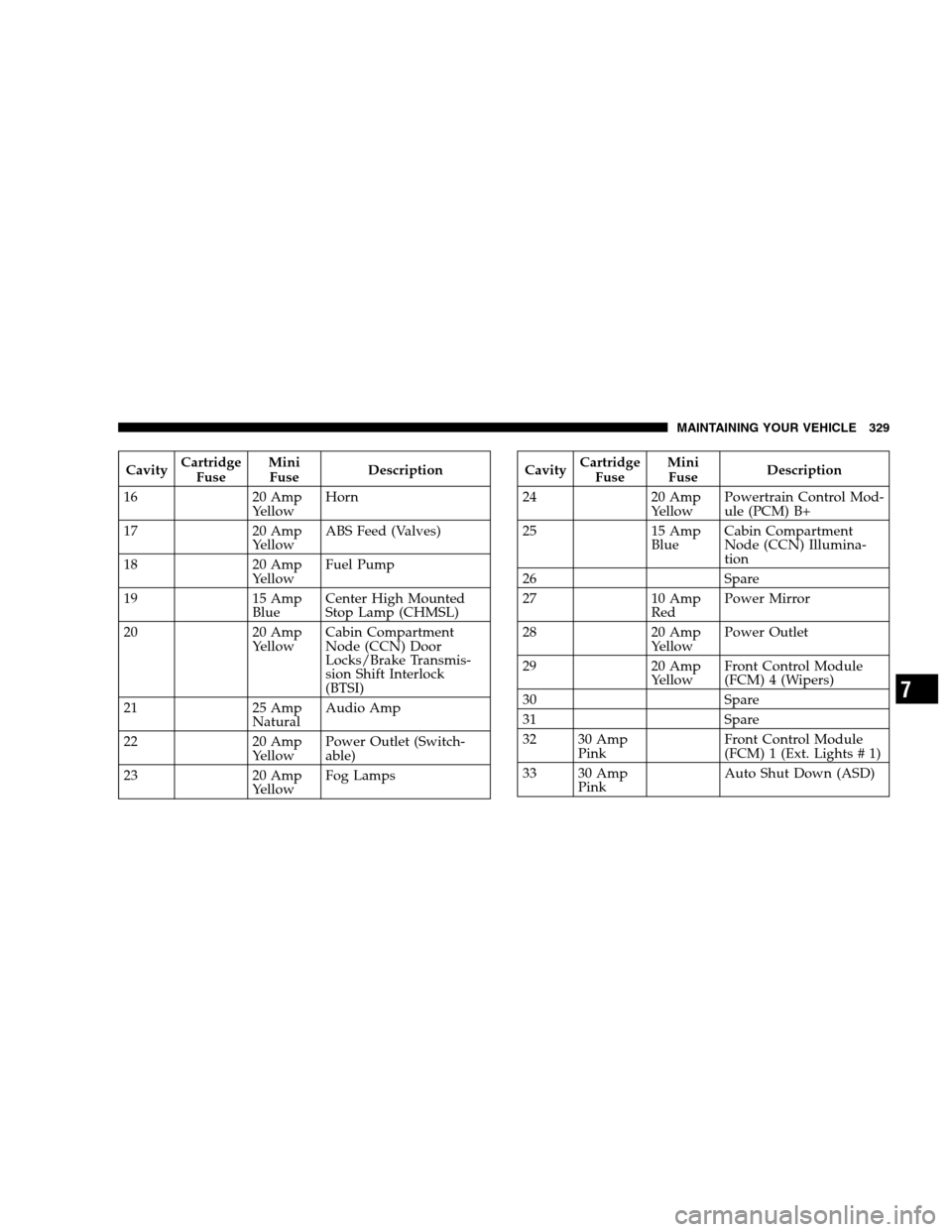
CavityCartridge
FuseMini
FuseDescription
16 20 Amp
YellowHorn
17 20 Amp
YellowABS Feed (Valves)
18 20 Amp
YellowFuel Pump
19 15 Amp
BlueCenter High Mounted
Stop Lamp (CHMSL)
20 20 Amp
YellowCabin Compartment
Node (CCN) Door
Locks/Brake Transmis-
sion Shift Interlock
(BTSI)
21 25 Amp
NaturalAudio Amp
22 20 Amp
YellowPower Outlet (Switch-
able)
23 20 Amp
YellowFog LampsCavityCartridge
FuseMini
FuseDescription
24 20 Amp
YellowPowertrain Control Mod-
ule (PCM) B+
25 15 Amp
BlueCabin Compartment
Node (CCN) Illumina-
tion
26 Spare
27 10 Amp
RedPower Mirror
28 20 Amp
YellowPower Outlet
29 20 Amp
YellowFront Control Module
(FCM) 4 (Wipers)
30 Spare
31 Spare
32 30 Amp
PinkFront Control Module
(FCM) 1 (Ext. Lights # 1)
33 30 Amp
PinkAuto Shut Down (ASD)
MAINTAINING YOUR VEHICLE 329
7