Page 190 of 464

— The ESP Control System will make buzzing or clicking
sounds when it is active. This is normal; the sounds will
stop when ESP becomes inactive following the maneuver
that caused the ESP activation.
29. Electronic Throttle Control (ETC.) Light
This light informs you of a problem with the
Electronic Throttle Control system. If a prob-
lem is detected the light will come on while the
engine is running. Cycle the ignition key when
the vehicle has completely stopped and the gear selector
is placed in the PARK position. The light should turn off.
If the light remains lit with the engine running your
vehicle will usually be drivable, however, see your dealer
for service as soon as possible. If the light is flashing
when the engine is running, immediate service is re-
quired and you may experience reduced performance, an
elevated/rough idle or engine stall and your vehicle may
require towing. The light will come on when the ignitionis first turned on and remain on briefly as a bulb check.
If the light does not come on during starting, have the
system checked by an authorized dealer.
30. All-Wheel-Drive Failure Indicator Light — If AWD
equipped
This light monitors the All-Wheel-Drive
(AWD) system.
When lit solid:There is an AWD system fault. AWD
performance will be at a reduced level. Service the AWD
system soon.
When blinking:The AWD system is temporarily dis-
abled due to overload condition.
190 UNDERSTANDING YOUR INSTRUMENT PANEL
Page 196 of 464
Reset Service Distance (Displays Only if Service
Interval was Changed)
When this feature is selected the current accumulated
service distance can be reset to the newly selected service
interval. Pressing the STEP button when in this display
will select “Yes” or “No.”
Power Accessory Delay?
When this feature is selected, the power window
switches, radio, hands–free system, DVD video system,
power sunroof, and power outlets will remain active for
up to 45 seconds after the ignition switch has been turned
off. Opening a vehicle door or liftgate will cancel this
feature.
Easy Exit Seat? (Available with Memory Seat Only)
This feature provides automatic driver’s seat positioning
which will enhance driver mobility out of and into the
vehicle.
The Easy Entry Easy Exit feature is not enabled when the
vehicle is delivered from the factory. The Easy Entry Easy
Exit feature is enabled (or later disabled) through the
programmable features in the Electronic Vehicle Informa-
tion Center (EVIC). Pressing the STEP button when in this
display will select “Yes” or “No.” The seat will return to the
memorized seat location (if REMOTE LINK TO MEMORY
is set to YES) when the remote keyless entry transmitter is
used to unlock the door. For more information refer to
“Easy Entry/Exit Seat in the Driver Memory Seat section.
Tilt Mirrors in Reverse? (Available with Memory
Seat Only)
When this feature is selected the outside mirrors will
move slightly downward from the present position when
the vehicle is shifted into the Reverse position. The
outside mirrors will then return to the original position
when the vehicle is shifted out of Reverse position.
Pressing the STEP button when in this display will select
�Ye s�or�No�.
196 UNDERSTANDING YOUR INSTRUMENT PANEL
Page 197 of 464
Compass Display — If Equipped
This display provides one of eight compass readings to
indicate the direction the vehicle is facing.
Automatic Compass Calibration
This compass is self calibrating which eliminates the
need to manually set the compass. When the vehicle is
new, the compass may appear erratic and the EVIC will
display “COMPASS CALIBRATING” until the compass
is calibrated. The compass will calibrate automatically
after approximately 40 seconds if no buttons are pressed
and the vehicle is in Park. You may also calibrate the
compass by completing three, 360° turns in an area free
from large metal or metallic objects, the “COMPASS
CALIBRATING” EVIC message will turn off and the
compass will function normally.
Manual Compass Calibration
If the compass appears erratic and the “COMPASS CALI-
BRATING” message does not appear in the EVIC display,
you must put the compass into the Calibration Mode
manually.
To put into a Calibration Mode:Turn on the ignition
switch and set the display to Compass. Press the RESET
button for at least 10 seconds until the “COMPASS
CALIBRATING” message appears. Release the MENU
button and complete three, 360° turns in an area free from
large metal objects. The “COMPASS CALIBRATING”
message will turn off and the compass will function
normally.
UNDERSTANDING YOUR INSTRUMENT PANEL 197
4
Page 199 of 464
To set the variance:Turn the ignition switch ON and set
the display to Compass. Press the MENU button for
approximately 5 seconds but no more than 10 seconds.
The “COMPASS VARIANCE” message and the last vari-
ance zone number will be displayed. Press the STEP
button to select the proper variance zone as shown in the
map. Press the RESET button to set the new variance
zone and resume normal operation.
Mini-Trip Functions — If Equipped
This displays information on the following:
•Average Fuel Economy (ECO AVG)
Shows the average fuel economy since the last reset. The
minimum average fuel economy that will be displayed
on reset is 0.3 mpg.
•Distance To Empty (DTE)
Shows the estimated distance that can be travelled with
the fuel remaining in the tank. This estimated distance is
determined using the MPG for the last few minutes.
•Off Mode
Shows a blank display.
•Step Button
Push this button to cycle through all the Mini-trip
functions.
To Reset The Display
Pressing and releasing the Reset button once will clear
the resettable function currently being displayed. The
resettable function is average fuel economy. Reset will
only occur if the resettable function is currently being
displayed.
SETTING THE ANALOG CLOCK
To set the analog clock at the top center of the instrument
panel, press and hold the button until the setting is
correct.
UNDERSTANDING YOUR INSTRUMENT PANEL 199
4
Page 200 of 464
ELECTRONIC DIGITAL CLOCK
The clock and radio each use the display panel built into
the radio. A digital readout shows the time in hours and
minutes whenever the ignition switch is in the ON or
ACC position and the time button is pressed.
When the ignition switch is in the OFF position, or when
the radio frequency is being displayed, time keeping is
accurately maintained.
Clock Setting Procedure
1. Turn the ignition switch to the ON or ACC position
and press the time button. Using the tip of a ballpoint pen
or similar object, press either the hour (H) or minute (M)
buttons on the radio.
2. Press the H button to set hours or the M button to set
minutes. The time setting will increase each time you
press a button.
RADIO GENERAL INFORMATION
Radio Broadcast Signals
Your new radio will provide excellent reception under
most operating conditions. Like any system, however, car
radios have performance limitations, due to mobile op-
eration and natural phenomena, which might lead you to
believe your sound system is malfunctioning. To help
you understand and save you concern about these “ap-
parent” malfunctions, you must understand a point or
two about the transmission and reception of radio sig-
nals.
Two Types of Signals
There are two basic types of radio signals... AM or
Amplitude Modulation, in which the transmitted sound
causes the amplitude, or height, of the radio waves to
vary... and FM or Frequency Modulation, in which the
frequency of the wave is varied to carry the sound.
200 UNDERSTANDING YOUR INSTRUMENT PANEL
Page 201 of 464
Electrical Disturbances
Radio waves may pick up electrical disturbances during
transmission. They mainly affect the wave amplitude,
and thus remain a part of the AM reception. They
interfere very little with the frequency variations that
carry the FM signal.
AM Reception
AM sound is based on wave amplitude, so AM reception
can be disrupted by such things as lightning, power lines
and neon signs.
FM Reception
Because FM transmission is based on frequency varia-
tions, interference that consists of amplitude variations
can be filtered out, leaving the reception relatively clear,
which is the major feature of FM radio.
NOTE:The radio, steering wheel radio controls (if
equipped), and 6 disc CD/DVD changer (if equipped)
will remain active for up to 10 minutes after the ignition
switch has been turned off. Opening a vehicle front door
will cancel this feature.
UNDERSTANDING YOUR INSTRUMENT PANEL 201
4
Page 202 of 464
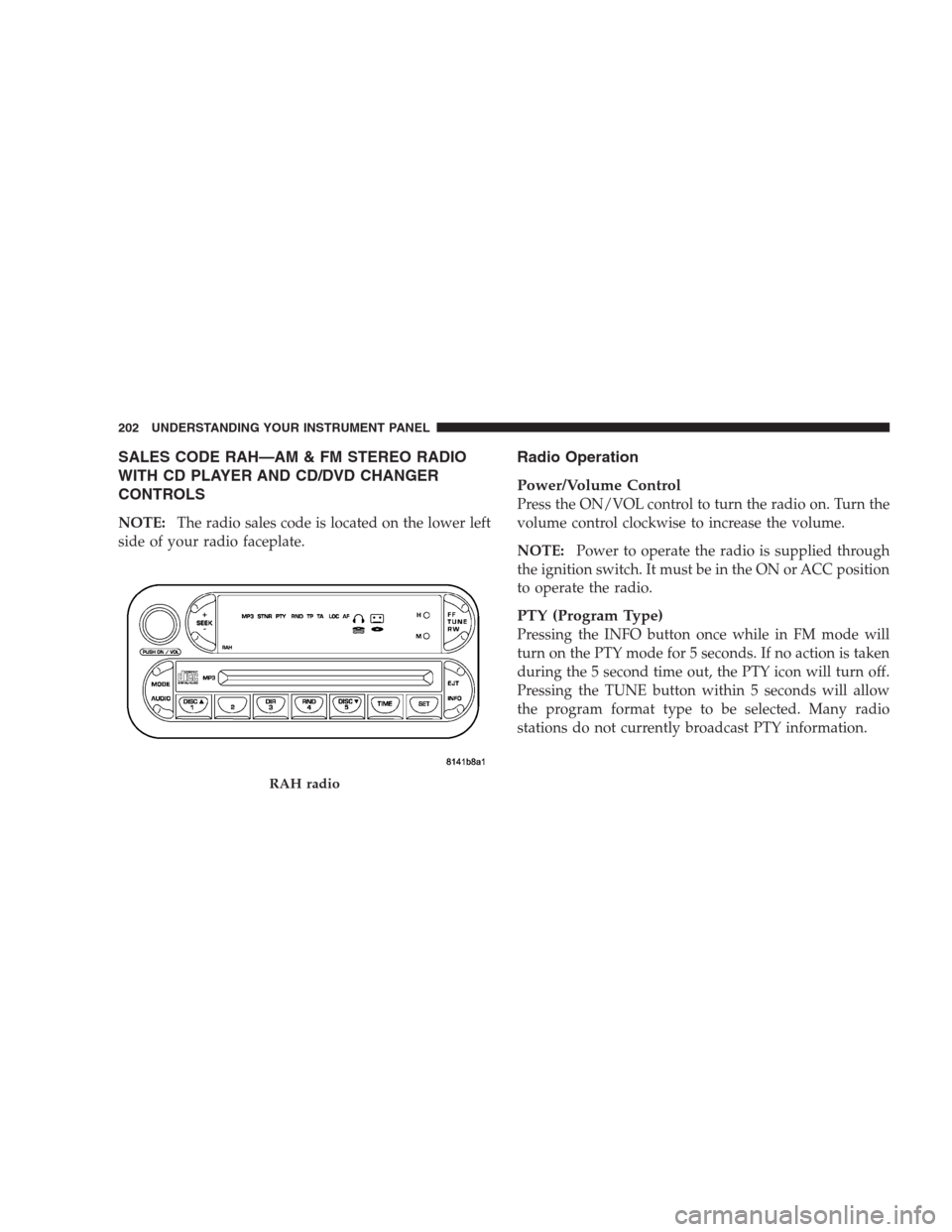
SALES CODE RAH—AM & FM STEREO RADIO
WITH CD PLAYER AND CD/DVD CHANGER
CONTROLS
NOTE:The radio sales code is located on the lower left
side of your radio faceplate.
Radio Operation
Power/Volume Control
Press the ON/VOL control to turn the radio on. Turn the
volume control clockwise to increase the volume.
NOTE:Power to operate the radio is supplied through
the ignition switch. It must be in the ON or ACC position
to operate the radio.
PTY (Program Type)
Pressing the INFO button once while in FM mode will
turn on the PTY mode for 5 seconds. If no action is taken
during the 5 second time out, the PTY icon will turn off.
Pressing the TUNE button within 5 seconds will allow
the program format type to be selected. Many radio
stations do not currently broadcast PTY information.
RAH radio
202 UNDERSTANDING YOUR INSTRUMENT PANEL
Page 206 of 464

NOTE:Changes or modifications not expressively ap-
proved by the party responsible for compliance could
void the user’s authority to operate the equipment.
CD Player Operation
NOTE:
•The ignition switch must be in the ON or ACC
position and the volume control ON before the CD
player will operate.
•This Radio is capable of playing compact discs (CD),
recordable compact discs (CD-R), rewritable compact
discs (CD-RW) compact discs with MP3 tracks and
multisession compact discs with CD and MP3 tracks.
Inserting The Compact Disc
CAUTION!
This CD player will accept only 4–3/4 inch (12 cm)
discs only. The use of other sized discs may damage
the CD player mechanism.
You may either insert or eject a disc with the radio OFF.
If you insert a disc with the ignition ON and the radio
OFF, the display will show the time of day. If you insert
a disc with the ignition OFF, the display will show the
time of day for about 5 seconds, then go out.
If the power is ON, the unit will switch from radio to CD
mode and begin to play when you insert the disc. The
display will show the track number and index time in
minutes and seconds. Play will begin at the start of track
one.
206 UNDERSTANDING YOUR INSTRUMENT PANEL