2007 CHEVROLET CORVETTE ignition
[x] Cancel search: ignitionPage 168 of 488
Exterior Lamps
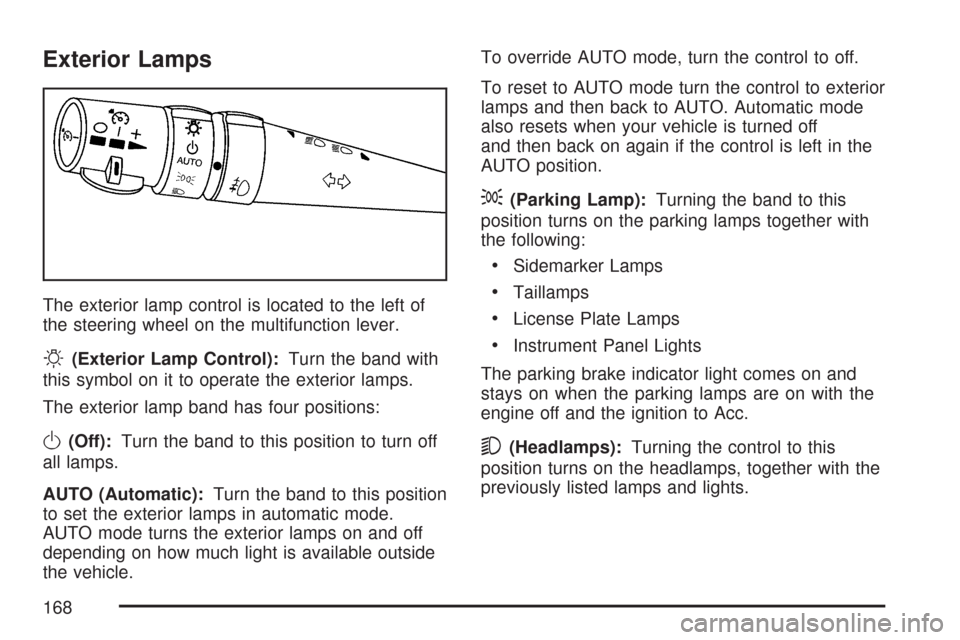
The exterior lamp control is located to the left of
the steering wheel on the multifunction lever.
O(Exterior Lamp Control):Turn the band with
this symbol on it to operate the exterior lamps.
The exterior lamp band has four positions:
O(Off):Turn the band to this position to turn off
all lamps.
AUTO (Automatic):Turn the band to this position
to set the exterior lamps in automatic mode.
AUTO mode turns the exterior lamps on and off
depending on how much light is available outside
the vehicle.To override AUTO mode, turn the control to off.
To reset to AUTO mode turn the control to exterior
lamps and then back to AUTO. Automatic mode
also resets when your vehicle is turned off
and then back on again if the control is left in the
AUTO position.
;(Parking Lamp):Turning the band to this
position turns on the parking lamps together with
the following:
Sidemarker Lamps
Taillamps
License Plate Lamps
Instrument Panel Lights
The parking brake indicator light comes on and
stays on when the parking lamps are on with the
engine off and the ignition to Acc.
5(Headlamps):Turning the control to this
position turns on the headlamps, together with the
previously listed lamps and lights.
168
Page 169 of 488
Wiper Activated Headlamps
This feature activates the headlamps and parking
lamps after the windshield wipers have been in
use for approximately 15 seconds and deactivates
and returns to ambient lighting conditions
15 seconds after the wipers are turned off.
If the exterior lamp control has been turned off or
is in the parking lamp position while the wiper
control is active in any position, the HEADLAMPS
SUGGESTED message appears on the Driver
Information Center (DIC). SeeDIC Warnings and
Messages on page 214.
When the ignition is turned off, the wiper-activated
headlamps will immediately turn off.
Headlamps on Reminder
A warning chime will sound if the exterior lamp
control is left on in either the headlamp or parking
lamp position and the driver’s door is opened
with the ignition off.
Daytime Running Lamps (DRL)
Daytime Running Lamps (DRL) can make it easier
for others to see the front of your vehicle during
the day. DRL can be helpful in many different
driving conditions, but they can be especially
helpful in the short periods after dawn and before
sunset. Fully functional daytime running lamps
are required on all vehicles rst sold in Canada.
The DRL system will make the front turn signal
lamps come on when the following conditions
are met:
It is still daylight and the ignition is on.
The exterior lamp control is in the
AUTO position.
The transmission is not in PARK (P) or
the parking brake is off.
The parking brake is off or the vehicle
speed is greater than 8 mph (13 km/h).
When DRL are on, only the front turn signal lamps
will be on. No other exterior lamps such as the
parking lamps, taillamps, etc. will be on when the
DRL are being used. Your instrument panel
will not be lit up either.
169
Page 171 of 488

Fog Lamps
Use fog lamps for better vision in foggy or misty
conditions.
The fog lamps control is located on the
multifunction lever next to the exterior lamp
control.
-(Fog Lamps):Turning the band to this
position will turn the fog lamps on.
When you turn the fog lamps on, the fog lamp
light will appear on the instrument panel cluster
to indicate that the fog lamps and the parking
lamps are on.
If you turn the high-beam headlamps on, the
fog lamps will turn off. They will turn on again
when you switch to low-beam headlamps.
The ignition must be on for the fog lamps to
operate.
Some localities have laws that require the
headlamps to be on along with the fog lamps.
Twilight Sentinel®
Twilight Sentinel®can turn your lamps on and off
for you. A light sensor on top of the instrument
panel makes the Twilight Sentinel
®work, so
be sure it is not covered.
With Twilight Sentinel
®, you will see the following
happen:
When it is dark enough outside, the front
turn signal lamps (DRL) will go off, and
the headlamps and parking lamps will come
on. The other lamps that come on with
headlamps will also come on.
When it is bright enough outside, the
headlamps will go off, and the front turn signal
lamps (DRL) will come on, as long as the
exterior lamp switch is in the AUTO position.
If you start your vehicle in a dark garage, the
automatic headlamp system will come on
immediately. Once you leave the garage, it will
take about one minute for the automatic headlamp
system to change to DRL if it is light outside. During
that delay, your instrument panel cluster may not
be as bright as usual. Make sure your instrument
panel brightness control is in full bright position.
SeeInstrument Panel Brightness on page 172.
171
Page 172 of 488
You can idle the vehicle with the lamps off, even
when it is dark outside.
After starting the vehicle, turn the exterior lamp
control band on the multifunction lever to off
and then release it. The lamps will remain off until
you turn the control band to off again.
Twilight Sentinel
®also provides exterior
illumination as you leave the vehicle. If Twilight
Sentinel
®has turned on the lamps when you turn
off the ignition, your lamps will remain on until:
The exterior lamp switch is moved from
off to the parking lamp position, or
A delay time that you select has elapsed.
See “Personal Options” underDIC Vehicle
Personalization on page 234to select the
delay time that you want. You can also select
no delay time.
If you turn off the ignition with the exterior lamp
switch in the parking lamp or headlamp position, the
Twilight Sentinel
®delay will not occur. The lamps
will turn off as soon as the switch is turned off.
As with any vehicle, you should turn on the regular
headlamp system when you need it.
Exterior Lighting Battery Saver
If the manual parking lamps or headlamps have
been left on, the exterior lamps will turn off as soon
as the ignition is turned off or Retained Accessory
Power (RAP) is active. This protects against
draining the battery in case you have accidentally
left the headlamps or parking lamps on. The battery
saver does not work if the headlamps are turned on
after the ignition switch is turned to off.
If you need to leave the lamps on, use the exterior
lamp control to turn the lamps back on.
Instrument Panel Brightness
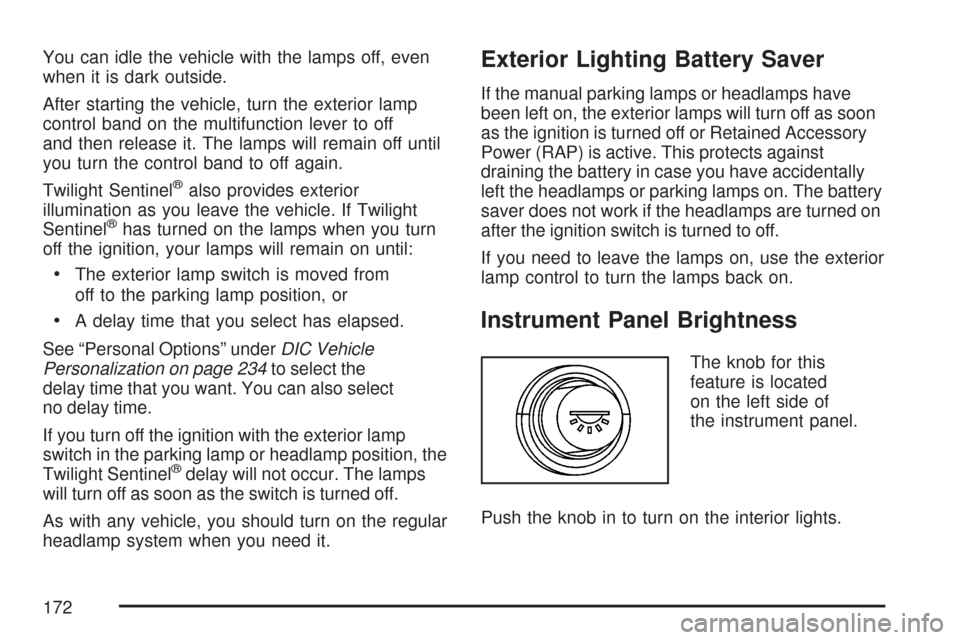
The knob for this
feature is located
on the left side of
the instrument panel.
Push the knob in to turn on the interior lights.
172
Page 173 of 488

Turn and hold the knob clockwise to brighten the
lights or counterclockwise to dim them. During
the day, this knob will adjust the instrument panel
brightness and at night will adjust all interior
lighting.
Be sure not to have this knob turned all the way
down with the lamps on during the day. Your
Driver Information Center (DIC) may not be visible.
Courtesy Lamps
When any door or the hatch/trunk lid is opened,
the interior lamps will go on unless it is bright
outside.
You can also turn the courtesy lamps on and off
by pressing the instrument panel brightness knob.
Entry/Exit Lighting
With entry lighting, the interior lamps will come on
when entering the vehicle. The interior lamps
will come on for about 20 seconds when the
engine is off.
You can turn exit and entry lighting off by quickly
turning the courtesy lamps on and off.
Reading Lamps
The inside rearview mirror includes two reading
lamps. The lamps will go on when a door is
opened. When the doors are closed, each lamp
can be turned on individually by pressing the
switch for that lamp.
An ambient light is located in the passenger sun
visor clip. This light stays on while driving to
keep the cabin from being too dark.
Battery Run-Down Protection
This vehicle has a feature to help prevent the
battery from being drained in case any of
the following lamps are left on; the underhood
lamp, if your vehicle has this feature, vanity mirror
lamps, cargo lamps, reading lamps, console or
glove box lamps. If any of these lamps are left on,
they will automatically time-out after about
10 minutes. To reset it, all of the above lamps
must be turned off or the ignition key on.
173
Page 175 of 488
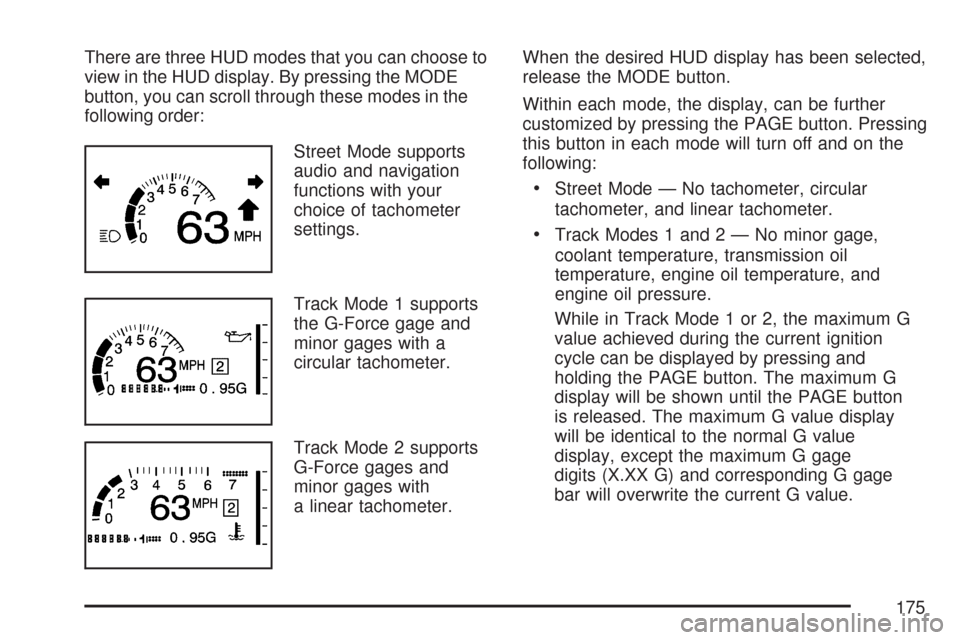
There are three HUD modes that you can choose to
view in the HUD display. By pressing the MODE
button, you can scroll through these modes in the
following order:
Street Mode supports
audio and navigation
functions with your
choice of tachometer
settings.
Track Mode 1 supports
the G-Force gage and
minor gages with a
circular tachometer.
Track Mode 2 supports
G-Force gages and
minor gages with
a linear tachometer.When the desired HUD display has been selected,
release the MODE button.
Within each mode, the display, can be further
customized by pressing the PAGE button. Pressing
this button in each mode will turn off and on the
following:
Street Mode — No tachometer, circular
tachometer, and linear tachometer.
Track Modes 1 and2—Nominor gage,
coolant temperature, transmission oil
temperature, engine oil temperature, and
engine oil pressure.
While in Track Mode 1 or 2, the maximum G
value achieved during the current ignition
cycle can be displayed by pressing and
holding the PAGE button. The maximum G
display will be shown until the PAGE button
is released. The maximum G value display
will be identical to the normal G value
display, except the maximum G gage
digits (X.XX G) and corresponding G gage
bar will overwrite the current G value.
175
Page 177 of 488
It is possible for sunlight to enter the HUD
making it difficult to see the image. The display
will return to normal when the sunlight is no
longer entering the HUD.
2. Adjust the seat to a comfortable driving
position. If you change your seat position later,
you may have to re-adjust your HUD.
3. Press the up or down arrows to center the
HUD image in your view.
The HUD image can only be adjusted up and
down, not side-to-side.
4. Press the dimmer control downward until the
HUD image is no brighter than necessary.
To turn HUD off, press and hold the (–) button
until the HUD display turns off.
If the sun comes out or it becomes cloudy, you
may need to adjust the HUD brightness again
using the dimmer control. Polarized sunglasses
could make the HUD image harder to see.
The HUD information can be displayed in one
of six languages including English, Spanish,
French, German, Italian or Japanese. The
speedometer can be displayed in either
English or Metric units.To change the language and unit selections, see
“OPTION” underDIC Controls and Displays
on page 208.
Clean the inside of the windshield as needed to
remove any dirt or lm that reduces the sharpness
or clarity of the HUD image.
To clean the HUD, spray household glass cleaner
on a soft, clean cloth. Wipe the HUD lens gently,
then dry it. Do not spray cleaner directly on the lens
because the cleaner could leak into the unit.
If the ignition is on and you can not see the HUD
image, check to see if:
Something is covering the HUD unit.
The HUD dimmer control is adjusted properly.
The HUD image is adjusted to the proper
height.
Ambient light is low, in the direction your
vehicle is facing.
A fuse is blown. SeeFuses and Circuit
Breakers on page 419.
Keep in mind that your windshield is part of the
HUD system. SeeWindshield Replacement
on page 375.
177
Page 184 of 488

These delays prevent false readings. If the
temperature goes down, the outside temperature
will be shown when you start the vehicle. If it
has been turned off for less than three hours, the
temperature will be recalled from the previous
vehicle operation.
There is also an inside temperature sensor
located to the left of the ignition switch. The
automatic climate control system uses this sensor
to receive information, so if you block or cover
it, the system will not function properly.
Defogging and Defrosting
Fog on the inside of windows is a result of high
humidity and moisture condensing on the cool
window glass. This can be minimized if the climate
control system is used properly. There are two
modes to clear fog or frost from your windshield.
Use the oor/defog mode to clear the windows of
fog or moisture and warm the passengers. Use
defrost to remove fog or frost from the windshield
more quickly. To prevent fogging on the inside of
the windows in modes other than oor/defog and
defrost, make sure the air conditioning compressor
is on and recirculation mode is off.
Press the mode button until the defog mode
appears on the display.
-(Floor/Defog):This mode directs the air
equally between the windshield and the oor
outlets with a small amount to the side window
outlets. When you select this mode, the system
turns off recirculation and runs the air-conditioning
compressor unless the outside temperature is
at or below freezing. The recirculation mode
cannot be selected while in the defog mode.
1(Defrost):Pressing this button directs most
of the air to the windshield, with a small amount
directed to the side window outlets. The light on the
button will come on and the digital display will show
the defrost mode symbol and fan speed when the
front defrost mode is being used. In this mode, the
system will automatically turn off the recirculation
and run the air-conditioning compressor, unless
the outside temperature is at or below freezing.
Recirculation cannot be selected while in the
defrost mode. Pressing this button again will return
the system to the last operating mode.
For severe ice conditions, turn the driver’s
temperature knob to 90°F (32°C) while in
defrost mode.
Do not drive the vehicle until all the windows
are clear.
184