2007 CHEVROLET AVALANCHE audio
[x] Cancel search: audioPage 341 of 618

c(Stop):Press this button to stop playing,
rewinding, or fast forwarding a DVD. Press this
button twice to return to the beginning of
the DVD.
s(Play/Pause):Press this button to start
playing a DVD. Press this button while a DVD
is playing to pause it. Press it again to continue
playing the DVD.
When the DVD is playing, depending on the radio,
you may be able to do slow play by pressing
the pause button then pressing the fast forward
button. The DVD continues playing in a slow
play mode. You may also, depending on the
radio, perform reverse slow play by pressing the
pause button and then pressing the fast reverse
button. To cancel slow play mode, press the
play/pause button.
t(Previous Track/Chapter):Press this button
to return to the start of the current track or chapter.
Press this button again to go to the previous
track or chapter. This button might not work when
the DVD is playing the copyright information or
the previews.
u(Next Track/Chapter):Press this button
to go to the beginning of the next chapter or track.
This button might not work when the DVD is
playing the copyright information or the previews.
r(Fast Reverse):Press this button to quickly
reverse the DVD or CD. To stop fast reversing
a DVD video, press the play button. To stop fast
reversing a DVD audio or CD, release the fast
reverse button. This button might not work when
the DVD is playing the copyright information or
the previews.
[(Fast Forward):Press this button to fast
forward the DVD or CD. To stop fast forwarding
a DVD video, press the play button. To stop
fast forwarding a DVD audio or CD, release the
fast forward button. This button may not work
when the DVD is playing the copyright information
or the previews.
e(Audio):Press this button to change audio
tracks on DVDs that have this feature when
the DVD is playing. The format and content of
this function varies for each disc.
341
Page 343 of 618

Problem Recommended Action
In auxiliary mode, the
picture moves or scrolls.Check the auxiliary
input connections at
both devices.
The remote contro
does not work.Check to make sure
there is no obstruction
between the remote
control and the
transmitter window.
Check the batteries to
make sure they are
not dead or installed
incorrectly.
After stopping the player,
I push Play but sometimes
the DVD starts where
I left off and sometimes
at the beginning.If the stop button was
pressed one time, the
DVD player resumes
playing where the DVD
was stopped. If the
stop button was pressed
two times the DVD player
begins to play from the
beginning of the DVD.Problem Recommended Action
The auxiliary source is
running but there is no
picture or sound.Check that the RSE video
screen is in the auxiliary
source mode.
Check the auxiliary input
connections at both
devices.
Sometimes the wireless
headphone audio cuts
out or buzzes.Check for obstructions,
low batteries, reception
range, and interference
from cellular telephone
towers or by using your
cellular telephone in
the vehicle.
Check that the
headphones are on
correctly using the
L (left) and R (right)
on the headphones.
I lost the remote and/or
the headphones.See your dealer for
assistance.
The DVD is playing,
but there is no picture
or sound.Check that the RSE video
screen is sourced to
the DVD player.
343
Page 345 of 618
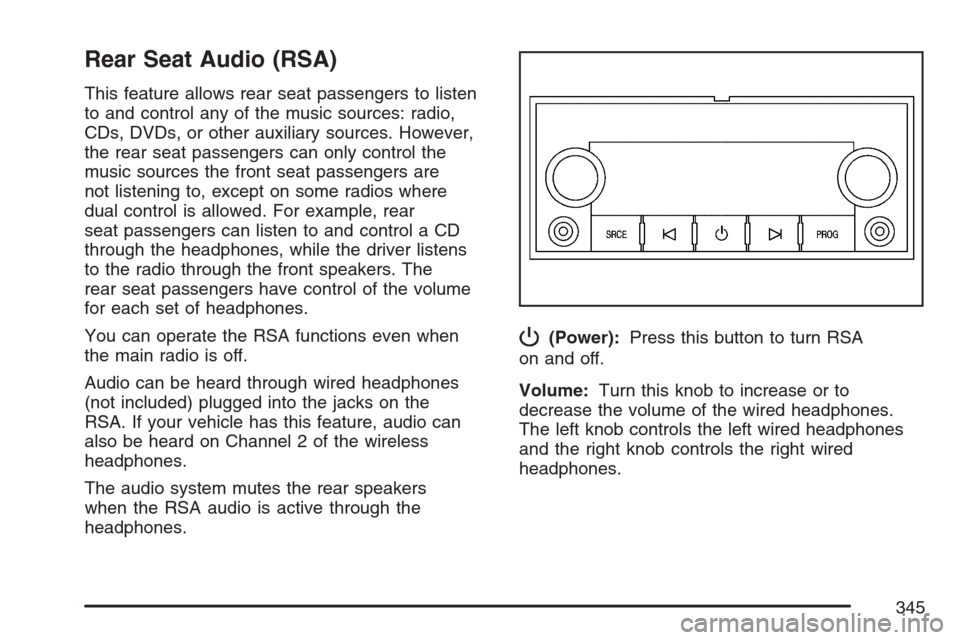
Rear Seat Audio (RSA)
This feature allows rear seat passengers to listen
to and control any of the music sources: radio,
CDs, DVDs, or other auxiliary sources. However,
the rear seat passengers can only control the
music sources the front seat passengers are
not listening to, except on some radios where
dual control is allowed. For example, rear
seat passengers can listen to and control a CD
through the headphones, while the driver listens
to the radio through the front speakers. The
rear seat passengers have control of the volume
for each set of headphones.
You can operate the RSA functions even when
the main radio is off.
Audio can be heard through wired headphones
(not included) plugged into the jacks on the
RSA. If your vehicle has this feature, audio can
also be heard on Channel 2 of the wireless
headphones.
The audio system mutes the rear speakers
when the RSA audio is active through the
headphones.
P(Power):Press this button to turn RSA
on and off.
Volume:Turn this knob to increase or to
decrease the volume of the wired headphones.
The left knob controls the left wired headphones
and the right knob controls the right wired
headphones.
345
Page 346 of 618

SRCE (Source):Press this button to switch
between the radio FM, AM, or XM™ (if equipped),
CD, and if your vehicle has these features,
DVD, front auxiliary, and rear auxiliary.
©¨(Seek):When listening to FM, AM, or
XM™ (if equipped), press the seek up or the
seek down arrow to go to the next or the previous
station or channels and stay there. This function
is inactive, with some radios, if the front seat
passengers are listening to the radio.
Press and hold the seek up or seek down arrow
until the display ashes, to tune to an individual
station. The display will stop ashing after
the buttons have not been pushed for more
than two seconds. This function is inactive,
with some radios, if the front seat passengers
are listening to the radio.
While listening to a disc, press the seek up arrow
to go to the next track or chapter on the disc.
Press the seek down arrow to go back to the
start of the current track or chapter (if more than
ten seconds have played). This function is inactive,
with some radios, if the front seat passengers
are listening to the disc.When a DVD video menu is being displayed,
press the seek up arrow or seek down arrow
to perform a cursor up or down on the menu.
Hold the seek up arrow or seek down arrow
to perform a cursor right or left on the menu.
PROG (Program):Press this button to go to
the next preset radio station or channel set on the
main radio. This function is inactive, with some
radios, if the front seat passengers are listening
to the radio.
When a CD or DVD audio is playing, press
this button to go to the beginning of the CD
or DVD audio. This function is inactive, with
some radios, if the front seat passengers are
listening to the disc.
When a disc is playing in the CD or DVD
changer, press this button to select the next
disc, if multiple discs are loaded. This function
is inactive, with some radios, if the front seat
passengers are listening to the disc.
When a DVD video menu is being displayed,
press the PROG button to perform the menu
function, Enter.
346
Page 347 of 618

Theft-Deterrent Feature
THEFTLOCK®is designed to discourage theft
of your vehicle’s radio. The feature works
automatically by learning a portion of the
Vehicle Identication Number (VIN). If the radio
is moved to a different vehicle, it does not operate
and LOCKED displays.
Audio Steering Wheel Controls
If your vehicle has
audio steering wheel
controls, they could
differ depending on
your vehicle’s options.
Some audio controls
can be adjusted at the
steering wheel. They
include the following:
xw(Next/Previous):Press the up or the down
arrow to go to the next or to the previous radio
station stored as a favorite.When a CD/DVD is playing, press the up or the
down arrow to go to the next or previous track or
chapter.
g(Mute/Voice Recognition):Press and release
this button to silence the vehicle speakers only.
The audio of the wireless and wired headphones,
if your vehicle has these features, does not
mute. Press and release this button again, to turn
the sound on.
If your vehicle has the navigation system, press
and hold this button for longer than one second to
initiate voice recognition. See “Voice Recognition”
in the Navigation System manual for more
information.
If your vehicle has OnStar
®, press and hold this
button for longer than one second to interact
with the OnStar
®system. If your vehicle also
has the navigation system, press and hold this
button for longer than one second to initiate voice
recognition and say “OnStar” to enter OnStar
®
mode. See theOnStar®System on page 156
in this manual for more information.
SRCE (Source):Press this button to switch
between the radio (AM, FM), XM™ (if equipped),
CD, and if your vehicle has these features,
DVD, front auxiliary, and rear auxiliary.
347
Page 554 of 618

Fuses Usage
30 Daytime Running Lamps
31Driver’s Side High-Beam
Headlamp
32 Not Used
33 Sunroof
34Key Ignition System,
Theft Deterrent System
35 Windshield Wiper
36 SEO B2 Uptter Usage (Battery)
37 Electric Adjustable Pedals
38 Climate Controls (Battery)
39 Airbag System (Ignition)
40 Amplier
41 Audio System
42 Four-Wheel Drive
43Miscellaneous (Ignition),
Rear Vision Camera,
Cruise ControlFuses Usage
44 Liftgate Release
45OnStar
®, Rear Seat
Entertainment Display
46 Instrument Panel Cluster
47 Not Used
48 Not Used
49Auxiliary Climate Control (Ignition),
Compass-Temperature Mirror
50 Rear Defogger
51 Airbag System (Battery)
52 SEO B1 Uptter Usage (Battery)
53Cigarette Lighter, Auxiliary
Power Outlet
54Automatic Level Control
Compressor Relay,
SEO Uptter Usage
55 Climate Controls (Ignition)
56Engine Control Module,
Secondary Fuel Pump (Ignition)
554
Page 604 of 618

Audio System(s).......................................... 286
Audio Steering Wheel Controls................. 347
Care of Your CD and DVD Player............ 349
Care of Your CDs and DVDs................... 349
Fixed Mast Antenna................................. 349
Navigation/Radio System,
see Navigation Manual......................... 334
Radio with CD......................................... 291
Radio with CD and DVD.......................... 301
Rear Seat Audio (RSA)............................ 345
Setting the Time.....................288, 289, 290
Theft-Deterrent Feature............................ 347
Understanding Radio Reception............... 348
XM™ Satellite Radio Antenna System...... 349
Automatic Headlamp System....................... 217
Automatic Transmission
Fluid........................................................ 454
Operation................................................. 128
BBattery........................................................ 475
Electric Power Management..................... 220
Run-Down Protection............................... 221
Before Leaving on a Long Trip.................... 392
Brake
Anti-Lock Brake System (ABS)................. 357
Emergencies............................................ 359Brake (cont.)
Parking.................................................... 138
System Warning Light.............................. 246
Brake Pedal, Throttle................................... 126
Brakes........................................................ 472
Braking....................................................... 356
Braking in Emergencies............................... 359
Break-In, New Vehicle................................. 122
Bulb Replacement....................................... 488
Halogen Bulbs......................................... 488
Headlamp Aiming..................................... 485
License Plate Lamps................................ 490
Replacement Bulbs.................................. 490
Taillamps, Turn Signal, Sidemarker,
Stoplamps, and Back-Up Lamps........... 488
Buying New Tires........................................ 508
C
Calibration..........................................145, 148
California Fuel............................................. 436
California Proposition 65 Warning................ 433
Canadian Owners........................................... 3
Capacities and Specications...................... 556
Carbon Monoxide......................105, 115, 143,
396, 414
604
Page 613 of 618

Pretensioners, Safety Belt............................. 44
Programmable Automatic Door Locks.......... 103
Q
Questions and Answers About
Safety Belts............................................... 25
R
Radios........................................................ 286
Care of Your CD and DVD Player............ 349
Care of Your CDs and DVDs................... 349
Navigation/Radio System,
see Navigation Manual......................... 334
Radio with CD......................................... 291
Radio with CD and DVD.......................... 301
Rear Seat Audio...................................... 345
Setting the Time.....................288, 289, 290
Theft-Deterrent......................................... 347
Understanding Reception......................... 348
Rainsense™ II Wipers................................. 210
Reading Lamps........................................... 220
Rear Axle.................................................... 482
Locking.................................................... 359Rear Door Security Locks........................... 104
Rear Safety Belt Comfort Guides.................. 41
Rear Seat Audio (RSA)............................... 345
Rear Seat Entertainment System................. 334
Rear Seat Operation..................................... 19
Rear Seat Passengers, Safety Belts.............. 37
Rear Storage Area...................................... 173
Rearview Mirror, Automatic Dimming with
Compass and Temperature Display.......... 148
Rearview Mirror, Automatic Dimming
with OnStar®, Compass and
Temperature Display................................ 145
Reclining Seatbacks...................................... 14
Recommended Fluids and Lubricants.......... 574
Recovery Hooks.......................................... 401
Recreational Vehicle Towing........................ 408
Remote Keyless Entry (RKE) System............ 94
Remote Keyless Entry (RKE)
System, Operation..................................... 95
Removing the Flat Tire and Installing
the Spare Tire.......................................... 522
Removing the Spare Tire and Tools............ 518
Replacement Bulbs..................................... 490
613