Page 209 of 618

Headlamp High/Low-Beam Changer
53(Headlamp High/Low Beam Changer):
To change the headlamps from low to high beam,
push the lever toward the instrument panel.
To return to low-beam headlamps, pull the
multifunction lever toward you. Then release it.
When the high beams
are on, this indicator
light on the instrument
panel cluster will also
be on.
Flash-to-Pass
This feature lets you use your high-beam
headlamps to signal a driver in front of you that
you want to pass. It works even if your headlamps
are in the automatic position.
To use it, pull the turn signal lever toward you,
then release it.If your headlamps are in the automatic position
or on low beam, your high-beam headlamps
will turn on. They will stay on as long as you hold
the lever toward you. The high-beam indicator
on the instrument panel cluster will come on.
Release the lever to return to normal operation.
Windshield Wipers
Be sure to clear ice and snow from the wiper
blades before using them. If they are frozen to
the windshield, gently loosen or thaw them.
Damaged wiper blades may not clear the
windshield well, making it harder to see and
drive safely. If the blades do become damaged,
install new blades or blade inserts. For more
information, seeWindshield Wiper Blade
Replacement on page 491.
Heavy snow or ice can overload the wiper motor.
A circuit breaker will stop the motor until it
cools down. Clear away snow or ice to prevent
an overload.
209
Page 213 of 618
SET−(Set/Coast):Press this button to set the
speed or make the vehicle decelerate.
[(Cancel):Press this button to cancel cruise
control without erasing the set speed from memory.
Setting Cruise Control
Cruise control will not work if your parking brake is
set, or if the master cylinder brake uid level is low.
The cruise control light on the instrument panel
cluster will come on after the cruise control
has been set to the desired speed.
{CAUTION:
If you leave your cruise control on when
you are not using cruise, you might hit a
button and go into cruise when you do not
want to. You could be startled and even
lose control. Keep the cruise control switch
off until you want to use cruise control.
1. Press the cruise control On/Off button.
2. Get up to the desired speed.3. Press the SET−button located on the steering
wheel and release it.
4. Take your foot off the accelerator.
Resuming a Set Speed
Suppose you set your cruise control at a
desired speed and then you apply the brake.
This shuts off the cruise control. But you do
not need to reset it.
Once you are driving about 25 mph (40 km/h) or
more, press the +RES button on your steering
wheel. The vehicle will go back to the previous
set speed and stay there.
Increasing Speed While Using
Cruise Control
To increase the cruise speed while using
cruise control:
Press and hold the +RES button on the steering
wheel until you reach your new desired speed,
then release it.
To increase vehicle speed in small increments,
press the +RES button. Each time you do this,
you will go about 1 mph (1.6 km/h) faster.
213
Page 218 of 618

There is a delay in the transition between
the daytime and nighttime operation of the
Daytime Running Lamps (DRL) and the
automatic headlamp systems so that driving
under bridges or bright overhead street lights
does not affect the system. The DRL and
automatic headlamp system will only be affected
when the light sensor sees a change in lighting
lasting longer than the delay.
If you start your vehicle in a dark garage,
the automatic headlamp system will come
on immediately. Once you leave the garage,
it will take approximately one minute for the
automatic headlamp system to change to DRL
if it is light outside. During that delay, your
instrument panel cluster may not be as bright
as usual. Make sure your instrument panel
brightness control is in the full bright position.
SeeInstrument Panel Brightness on page 219.Fog Lamps
If your vehicle has fog lamps you can use them
for better vision in foggy or misty conditions.
Your parking lamps and/or low-beam headlamps
must be on for your fog lamps to work.
The fog lamp button is located on the left side of
your instrument panel.
-(Fog Lamps):Press the button to turn the
fog lamps on. An indicator light will glow near
the button when the fog lamps are on. Press the
button again to turn them off.
Remember, fog lamps alone will not give off as
much light as your headlamps. Never use your
fog lamps in the dark without turning on the
headlamps.
218
Page 240 of 618
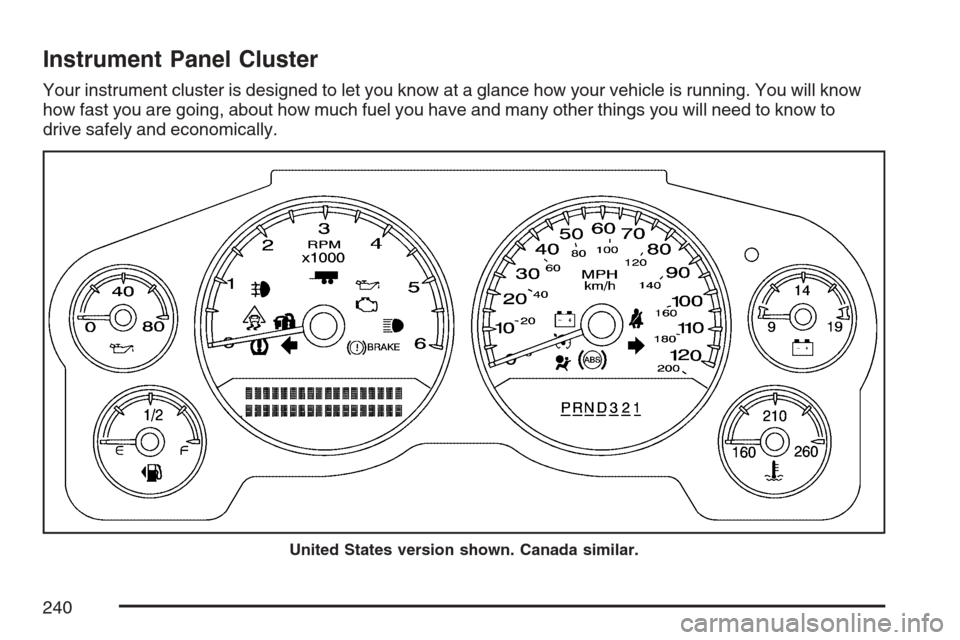
Instrument Panel Cluster
Your instrument cluster is designed to let you know at a glance how your vehicle is running. You will know
how fast you are going, about how much fuel you have and many other things you will need to know to
drive safely and economically.
United States version shown. Canada similar.
240
Page 241 of 618

Speedometer and Odometer
Your speedometer lets you see your speed in
both miles per hour (mph) and kilometers per
hour (km/h). Your odometer shows how far
your vehicle has been driven, in either miles
(used in the United States) or kilometers
(used in Canada).
Trip Odometer
The trip odometer can tell you how far your
vehicle has been driven since you last set the
trip odometer to zero.
Press the reset button, located on the instrument
panel cluster next to the trip odometer display,
to toggle between the trip odometer and the
regular odometer. Holding the reset button for
approximately one second while the trip odometer
is displayed will reset it.
To display the odometer reading with the ignition
off, press the reset button.
Tachometer
Your tachometer displays the engine speed in
revolutions per minute (rpm).
Safety Belt Reminder Light
When the key is turned to RUN or START, a
chime will sound for several seconds to remind
people to buckle their safety belts. The driver
safety belt light will also be provided and stay on
for several seconds, then it will ash for several
more. You should buckle your seat belt.
This chime and light
will be repeated if
the driver remains
unbuckled and
the vehicle is
in motion.
If the driver’s belt is buckled, neither the chime
nor the light will come on.
241
Page 257 of 618

When the fuel tank is low, the FUEL LEVEL LOW
message will appear in the Driver Information
Center (DIC). SeeDIC Warnings and Messages
on page 267for more information.
Here are some situations you may experience with
your fuel gage. None of these indicate a problem
with the fuel gage.
At the gas station, the fuel pump shuts off
before the gage reads full.
It takes a little more or less fuel to ll up than
the fuel gage indicated. For example, the
gage may have indicated the tank was half full,
but it actually took a little more or less than
half the tank’s capacity to ll the tank.
The gage goes back to empty when you turn
off the ignition.
Driver Information Center (DIC)
Your vehicle has a Driver Information Center (DIC).
The DIC displays information about your vehicle.
It also displays warning messages if a system
problem is detected.
All messages will appear in the DIC display
located below the tachometer in the instrument
panel cluster.
The DIC comes on when the ignition is on.
After a short delay, the DIC will display the
information that was last displayed before the
engine was turned off.
If your vehicle has DIC buttons, see “DIC
Operation and Displays (With DIC Buttons)”
later in this section andDIC Vehicle
Customization (With DIC Buttons) on page 278
for the displays available.
If your vehicle does not have DIC buttons, see
“DIC Operation and Displays (Without DIC
Buttons)” later in this section for the displays
available.
257
Page 264 of 618

DIC Operation and Displays
(Without DIC Buttons)
If your vehicle does not have DIC buttons,
the information below explains the operation
of this system.
The DIC has different displays which can be
accessed by pressing the trip odometer reset
stem located on the instrument panel cluster.
Pressing the trip odometer reset stem will also
turn off, or acknowledge, DIC messages.
The DIC displays trip and vehicle system
information, and warning messages if a system
problem is detected.
If your vehicle does not have DIC buttons, you
can use the trip odometer reset stem to view
the following displays: odometer, engine hours,
trip odometer, oil life, Tire Pressure Monitor (TPM)
system programming for vehicles with a TPM
system, Remote Keyless Entry (RKE) transmitter
programming, and display language.
If your vehicle has DIC buttons, you can use the
trip odometer reset stem to view the following
displays: odometer, engine hours, trip odometer,
and display language.
Trip Odometer Reset Stem
Menu Items
Odometer
Press the trip odometer reset stem until
ODOMETER displays. This display shows the
distance the vehicle has been driven in either
miles (mi) or kilometers (km).
Engine Hours
To display the ENGINE HOURS, place the ignition
in LOCK or ACCESSORY, then press and hold
the trip odometer reset stem for four seconds while
viewing the ODOMETER. This display shows
the total number of hours the engine has run.
Trip Odometer
Press the trip odometer reset stem until TRIP
displays. This display shows the current distance
traveled in either miles (mi) or kilometers (km)
since the last reset for the trip odometer.
The trip odometer can be reset to zero by pressing
and holding the trip odometer reset stem while
the trip odometer is displayed.
264
Page 267 of 618

Language
This display allows you to select the language
in which the DIC messages will appear.
To select a language, do the following:
1. Press the trip odometer reset stem until
ODOMETER displays.
2. While in the ODOMETER display, press
and hold the trip odometer reset stem
for three seconds until the currently set
language displays.
3. Continue to press and hold the trip odometer
reset stem to scroll through all of the
available languages.
The available languages are ENGLISH
(default), FRANCAIS (French), ESPANOL
(Spanish), and NO CHANGE.
4. Once the desired language is displayed,
release the trip odometer reset stem to
set your choice.
DIC Warnings and Messages
Messages are displayed on the DIC to notify the
driver that the status of the vehicle has changed
and that some action may be needed by the driver
to correct the condition. Multiple messages may
appear one after another.
Some messages may not require immediate
action, but you can press any of the DIC buttons
on the instrument panel or the trip odometer
reset stem on the instrument panel cluster
to acknowledge that you received the messages
and to clear them from the display.
Some messages cannot be cleared from the
DIC display because they are more urgent.
These messages require action before they can
be cleared. You should take any messages
that appear on the display seriously and remember
that clearing the messages will only make the
messages disappear, not correct the problem.
The following are the possible messages that can
be displayed and some information about them.
267