2007 BMW 760LI SEDAN check engine
[x] Cancel search: check enginePage 212 of 253
Maintenance
210
Maintenance
BMW Maintenance System
The BMW Maintenance System serves to
retain the operating and road safety of your
BMW. The service schedule also includes oper-
ations related to the vehicle's comfort and con-
venience features, such as replacement of the
filters for the inside air. The aim is to optimize
maintenance procedures with a view to reduc-
ing the cost of running the vehicle.
Should the day come when you decide to sell
your BMW, you will find that a complete dealer
service history is an asset of inestimable value.
CBS Condition Based Service
Sensors and special algorithms take the differ-
ent driving conditions of your BMW into
account. As a result, Condition Based Service
determines the current and future maintenance
requirements. By letting you define a service
and maintenance regimen that reflects your
own individual requirements, the system forms
the basis for trouble-free driving.
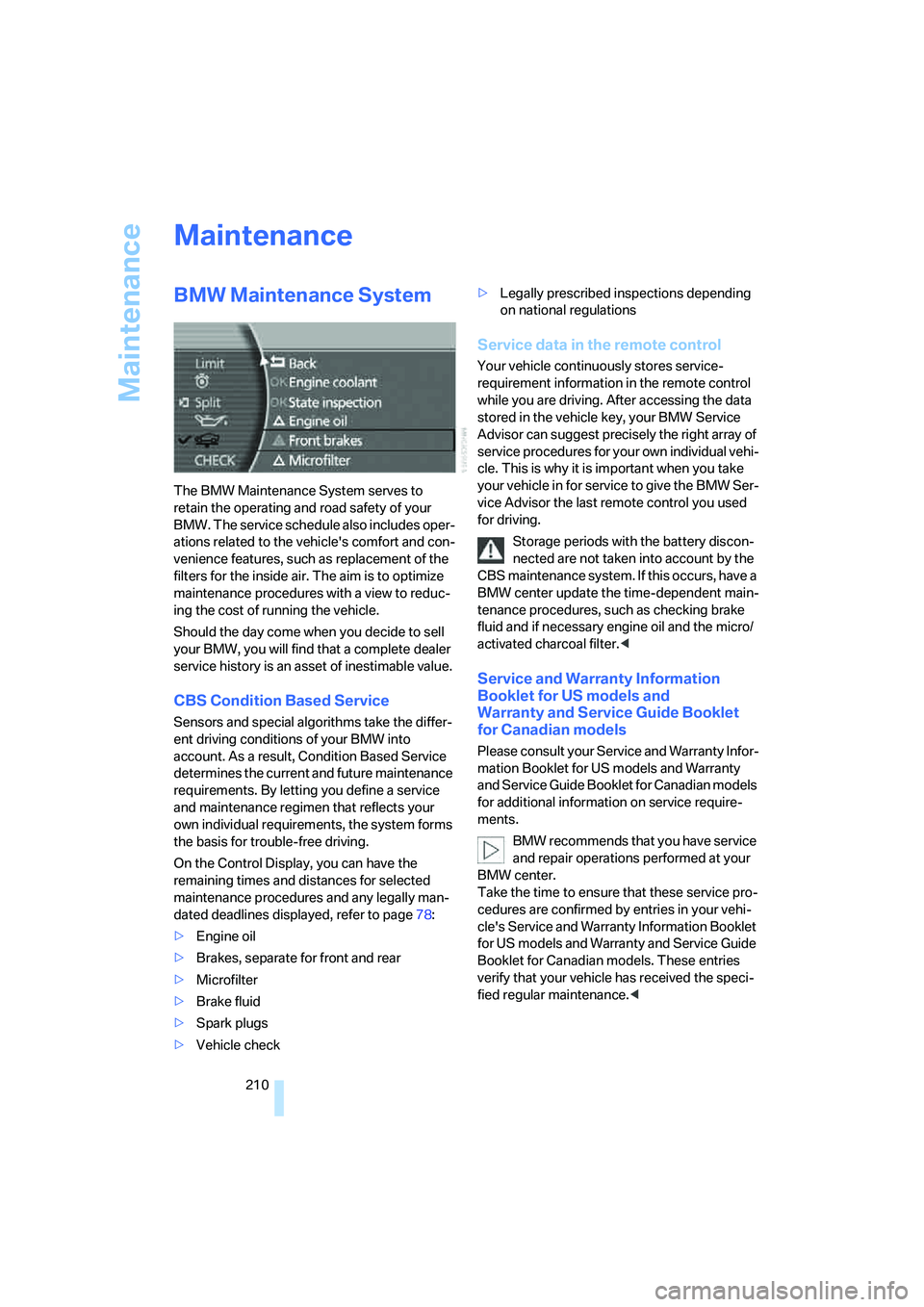
On the Control Display, you can have the
remaining times and distances for selected
maintenance procedures and any legally man-
dated deadlines displayed, refer to page78:
>Engine oil
>Brakes, separate for front and rear
>Microfilter
>Brake fluid
>Spark plugs
>Vehicle check>Legally prescribed inspections depending
on national regulations
Service data in the remote control
Your vehicle continuously stores service-
requirement information in the remote control
while you are driving. After accessing the data
stored in the vehicle key, your BMW Service
Advisor can suggest precisely the right array of
service procedures for your own individual vehi-
cle. This is why it is important when you take
your vehicle in for service to give the BMW Ser-
vice Advisor the last remote control you used
for driving.
Storage periods with the battery discon-
nected are not taken into account by the
CBS maintenance system. If this occurs, have a
BMW center update the time-dependent main-
tenance procedures, such as checking brake
fluid and if necessary engine oil and the micro/
activated charcoal filter.<
Service and Warranty Information
Booklet for US models and
Warranty and Service Guide Booklet
for Canadian models
Please consult your Service and Warranty Infor-
mation Booklet for US models and Warranty
and Service Guide Booklet for Canadian models
for additional information on service require-
ments.
BMW recommends that you have service
and repair operations performed at your
BMW center.
Take the time to ensure that these service pro-
cedures are confirmed by entries in your vehi-
cle's Service and Warranty Information Booklet
for US models and Warranty and Service Guide
Booklet for Canadian models. These entries
verify that your vehicle has received the speci-
fied regular maintenance.<
Page 213 of 253
Mobility
211Reference
At a glance
Controls
Driving tips
Communications
Navigation
Entertainment
Socket for OBD Onboard
Diagnostics
Components which are decisive for the
exhaust-gas composition can be checked via
the OBD socket with a device.
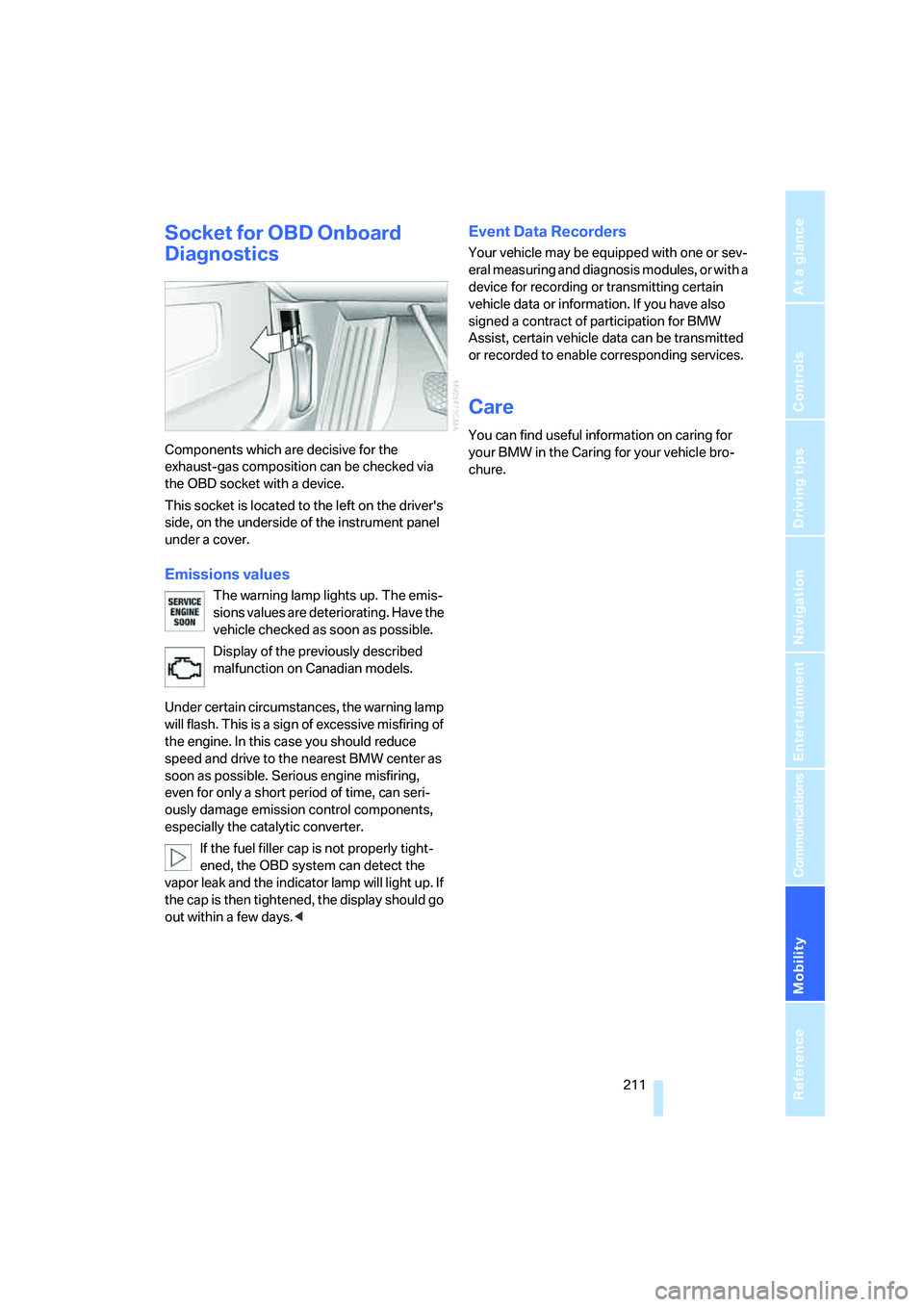
This socket is located to the left on the driver's
side, on the underside of the instrument panel
under a cover.
Emissions values
The warning lamp lights up. The emis-
sions values are deteriorating. Have the
vehicle checked as soon as possible.
Display of the previously described
malfunction on Canadian models.
Under certain circumstances, the warning lamp
will flash. This is a sign of excessive misfiring of
the engine. In this case you should reduce
speed and drive to the nearest BMW center as
soon as possible. Serious engine misfiring,
even for only a short period of time, can seri-
ously damage emission control components,
especially the catalytic converter.
If the fuel filler cap is not properly tight-
ened, the OBD system can detect the
vapor leak and the indicator lamp will light up. If
the cap is then tightened, the display should go
out within a few days.<
Event Data Recorders
Your vehicle may be equipped with one or sev-
eral measuring and diagnosis modules, or with a
device for recording or transmitting certain
vehicle data or information. If you have also
signed a contract of participation for BMW
Assist, certain vehicle data can be transmitted
or recorded to enable corresponding services.
Care
You can find useful information on caring for
your BMW in the Caring for your vehicle bro-
chure.
Page 218 of 253
Replacing components
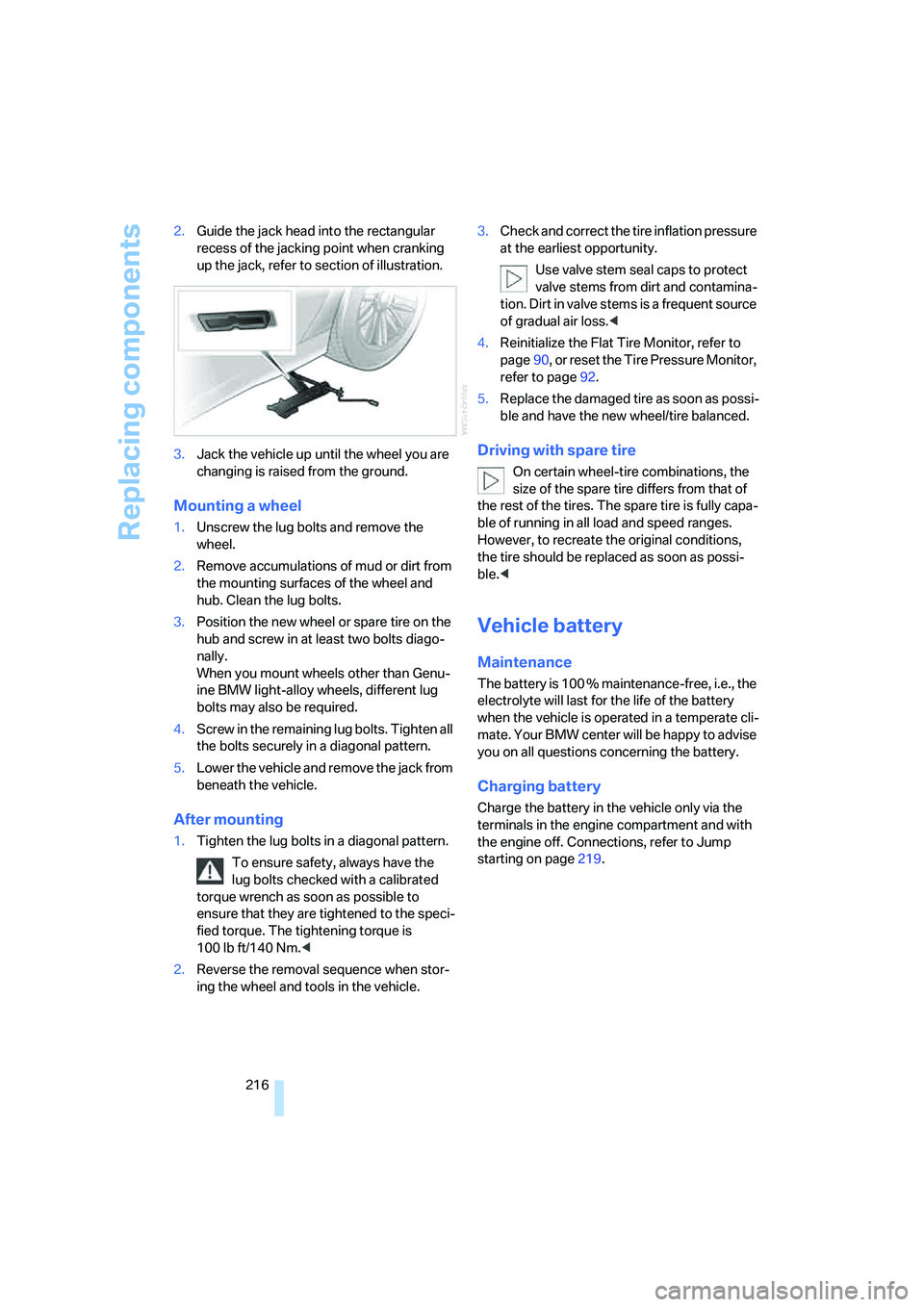
216 2.Guide the jack head into the rectangular
recess of the jacking point when cranking
up the jack, refer to section of illustration.
3.Jack the vehicle up until the wheel you are
changing is raised from the ground.
Mounting a wheel
1.Unscrew the lug bolts and remove the
wheel.
2.Remove accumulations of mud or dirt from
the mounting surfaces of the wheel and
hub. Clean the lug bolts.
3.Position the new wheel or spare tire on the
hub and screw in at least two bolts diago-
nally.
When you mount wheels other than Genu-
ine BMW light-alloy wheels, different lug
bolts may also be required.
4.Screw in the remaining lug bolts. Tighten all
the bolts securely in a diagonal pattern.
5.Lower the vehicle and remove the jack from
beneath the vehicle.
After mounting
1.Tighten the lug bolts in a diagonal pattern.
To ensure safety, always have the
lug bolts checked with a calibrated
torque wrench as soon as possible to
ensure that they are tightened to the speci-
fied torque. The tightening torque is
100 lb ft/140 Nm.<
2.Reverse the removal sequence when stor-
ing the wheel and tools in the vehicle.3.Check and correct the tire inflation pressure
at the earliest opportunity.
Use valve stem seal caps to protect
valve stems from dirt and contamina-
tion. Dirt in valve stems is a frequent source
of gradual air loss.<
4.Reinitialize the Flat Tire Monitor, refer to
page90, or reset the Tire Pressure Monitor,
refer to page92.
5.Replace the damaged tire as soon as possi-
ble and have the new wheel/tire balanced.
Driving with spare tire
On certain wheel-tire combinations, the
size of the spare tire differs from that of
the rest of the tires. The spare tire is fully capa-
ble of running in all load and speed ranges.
However, to recreate the original conditions,
the tire should be replaced as soon as possi-
ble.<
Vehicle battery
Maintenance
The battery is 100 % maintenance-free, i.e., the
electrolyte will last for the life of the battery
when the vehicle is operated in a temperate cli-
mate. Your BMW center will be happy to advise
you on all questions concerning the battery.
Charging battery
Charge the battery in the vehicle only via the
terminals in the engine compartment and with
the engine off. Connections, refer to Jump
starting on page219.
Page 221 of 253
Mobility
219Reference
At a glance
Controls
Driving tips
Communications
Navigation
Entertainment
Warning triangle*
The warning triangle is conveniently stored in
the onboard tool kit mounted on the inside of
the luggage compartment lid.
First-aid kit*
The first-aid kit is also located in the container
of the onboard tool kit.
Some of the articles contained in the first-aid kit
have a limited service life. Check the expiration
dates of the contents regularly and replace the
contents concerned in a timely fashion as
needed.
Jump starting
When your battery is discharged, you can use
two jumper cables to start your vehicle with
power from the battery in a second vehicle. You
can also use the same method to help start
another vehicle. Use only jumper cables with
fully-insulated terminal clamps.
To avoid the risk of potentially fatal injury,
always avoid all contact with electrical
components while the engine is running. Care-
fully adhere to the following sequence, both to
prevent damage to one or both vehicles, and to
guard against possible personal injury.<
Preparing
1.Check whether the battery of the other
vehicle has a voltage of 12 Volts and
approximately the same capacitance in Ah.
This information is listed on the battery.2.Switch off the engine of the assisting vehi-
cle.
3.Switch off any electrical systems and com-
ponents in both vehicles.
Make sure that there is no contact
between the bodywork of the two vehi-
cles; otherwise, there is a danger of short cir-
cuits.<
Connecting jumper cables
To avoid personal injury from sparks, fol-
low this sequence when connecting jum-
per cables.<
In your BMW, the so-called jump starting termi-
nal in the engine compartment functions as the
positive battery terminal. The symbol + is
embossed on the cover.
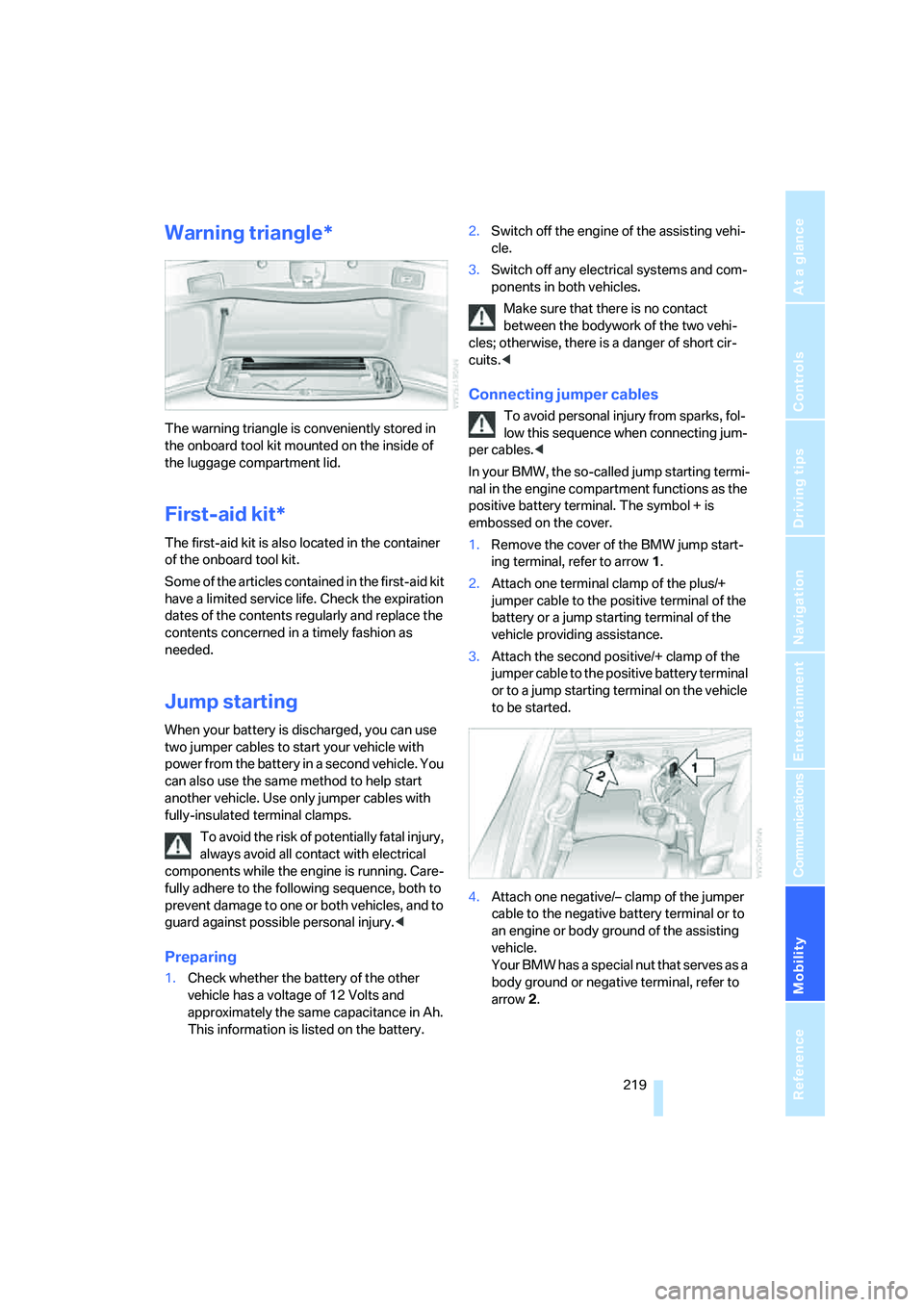
1.Remove the cover of the BMW jump start-
ing terminal, refer to arrow1.
2.Attach one terminal clamp of the plus/+
jumper cable to the positive terminal of the
battery or a jump starting terminal of the
vehicle providing assistance.
3.Attach the second positive/+ clamp of the
jumper cable to the positive battery terminal
or to a jump starting terminal on the vehicle
to be started.
4.Attach one negative/– clamp of the jumper
cable to the negative battery terminal or to
an engine or body ground of the assisting
vehicle.
Your BMW has a special nut that serves as a
body ground or negative terminal, refer to
arrow2.
Page 222 of 253
Giving and receiving assistance
220 5.Attach the second negative/– clamp of the
jumper cable to the negative battery termi-
nal or to an engine or body ground on the
vehicle to be started.
Starting engine
1.Start the engine of the assisting vehicle and
allow it to run for several minutes at a fast
idle.
2.Start the engine on the other vehicle in the
usual way.
If the first start attempt is not successful,
wait a few minutes before another attempt
in order to allow the discharged battery to
recharge.
3.Allow the engines to run for several min-
utes.
4.Disconnect the jumper cables again in the
reverse sequence.
If need be, have the battery checked and
recharged.
Never use spray fluids to start the
engine.<
Towing and tow starting
Observe applicable laws and regulations
for tow-starting and towing.<
Do not transport any passengers other
than the driver in a vehicle that is being
towed.<
Using tow fitting
The threaded tow fitting is stored in the
onboard tool kit and must always remain in the
vehicle. It can be screwed in at the front or rear
of the BMW.
Only use the tow fitting that comes with
the vehicle and screw it in as far as it will
go. Use the tow fitting for towing only on roads.
Avoid lateral loading of the tow fitting, e.g. do
not lift the vehicle by the tow fitting. Otherwise,
damage to the tow fitting and the vehicle can
occur.<
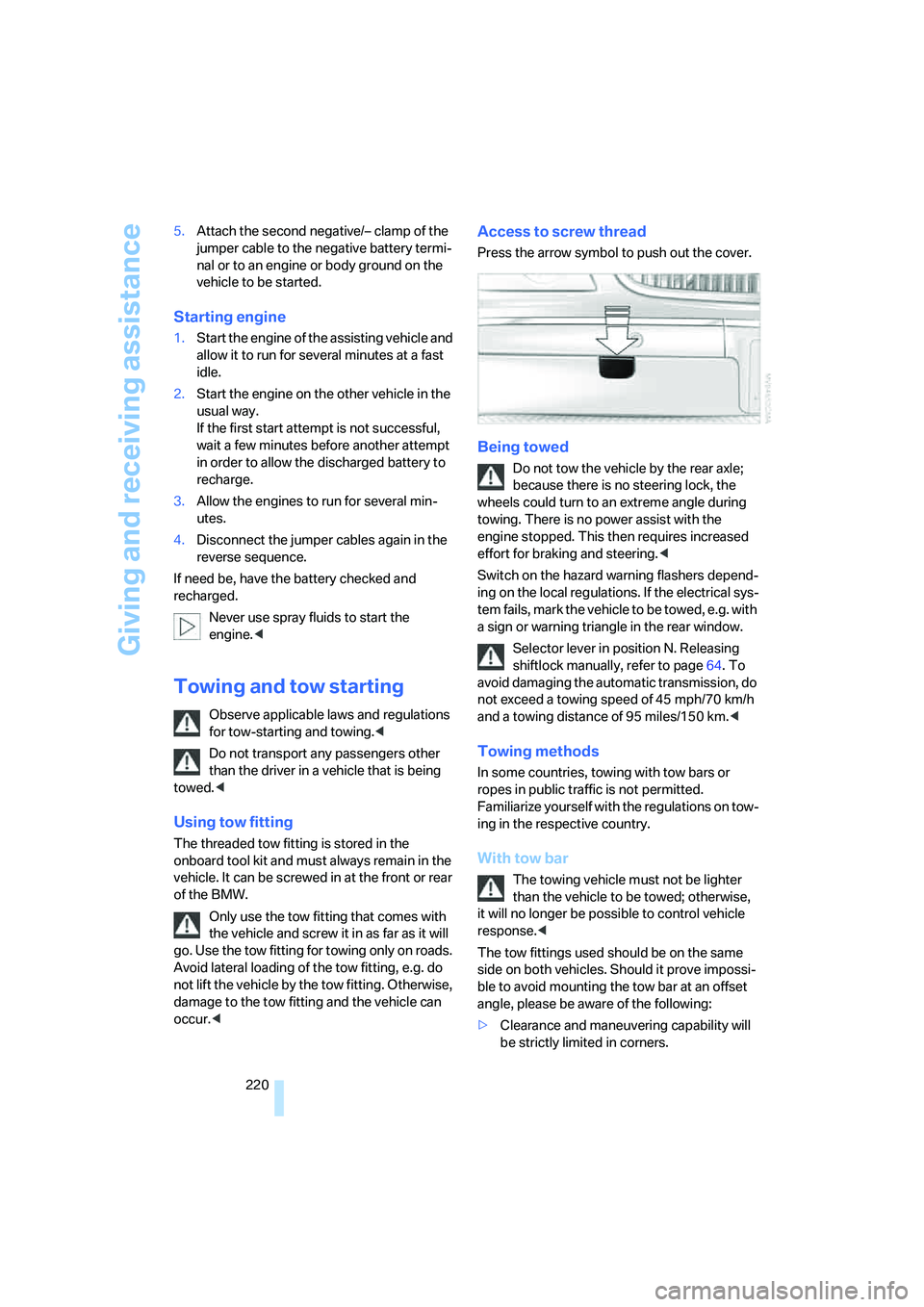
Access to screw thread
Press the arrow symbol to push out the cover.
Being towed
Do not tow the vehicle by the rear axle;
because there is no steering lock, the
wheels could turn to an extreme angle during
towing. There is no power assist with the
engine stopped. This then requires increased
effort for braking and steering.<
Switch on the hazard warning flashers depend-
ing on the local regulations. If the electrical sys-
tem fails, mark the vehicle to be towed, e.g. with
a sign or warning triangle in the rear window.
Selector lever in position N. Releasing
shiftlock manually, refer to page64. To
avoid damaging the automatic transmission, do
not exceed a towing speed of 45 mph/70 km/h
and a towing distance of 95 miles/150 km.<
Towing methods
In some countries, towing with tow bars or
ropes in public traffic is not permitted.
Familiarize yourself with the regulations on tow-
ing in the respective country.
With tow bar
The towing vehicle must not be lighter
than the vehicle to be towed; otherwise,
it will no longer be possible to control vehicle
response.<
The tow fittings used should be on the same
side on both vehicles. Should it prove impossi-
ble to avoid mounting the tow bar at an offset
angle, please be aware of the following:
>Clearance and maneuvering capability will
be strictly limited in corners.
Page 235 of 253
Reference 233
At a glance
Controls
Driving tips
Communications
Navigation
Entertainment
Mobility
Central locking system31
– Comfort Access38
"CHANGE", navigation138
Changes, technical, refer to
For your own safety5
Changing scale, map view in
navigation144
Changing settings on Control
Display84
Changing time display84
Changing units of measure on
Control Display84
Changing wheels214
– run-flat tires204
"Channels", radio160
Check Control80
– "CHECK"81
– CHECK button81
Child's seats, refer to
Installing child restraint
systems54
Child restraint fixing system
LATCH55
Child restraint systems54
Child-safety lock56
Chrome parts, refer to Caring
for your vehicle brochure
Chrome-plated parts, care,
refer to Caring for your
vehicle brochure
Cigarette lighter116
"City / Postal Code",
navigation133
Cleaning, vehicle, refer to
Caring for your vehicle
brochure
Cleaning windshield65
"Climate"
– enabling activation time of
parked car ventilation110
– preselecting activation time
for parked car
ventilation109
– rear air conditioner108
– rear refrigerator117
– switching parked car
ventilation on and off
directly109Climate comfort
windshield126
Clock75
– 12/24-hour mode84
– also refer to Assistance
window21
– display format84
– setting84
"Clock", settings84
Closing
– from inside34
– from outside32
Clothes hooks114
Cockpit10
Cold start, refer to Starting
engine57
"Color", DVD changer172
Combined instrument, refer to
Info Display
12
"Comfort", EDC Electronic
Damper Control90
Comfort Access38
– before driving into a car
wash39
– changing battery39
Comfort features14
Comfort program, EDC
Electronic Damper
Control90
Comfort seat44
– in rear45
"Communication", phone184
Compact Disc
– refer to CD changer165
– refer to CD player163
Compartments, refer to
Storage compartments113
Compressed audio files,
CD changer166
Computer76
– displays on Control
Display77
– units of measure and display
format84
"Concierge", BMW Assist191
Condensation, refer to When
vehicle is parked123Condition Based Service
CBS210
Connecting car vacuum
cleaner, refer to Power
socket116
Consumption, refer to
Average fuel
consumption77
Consumption display, refer to
– Average fuel
consumption77
– Displays on Info Display76
Consumption statistics, refer
to Average fuel
consumption77
"Continue route guidance?",
navigation143
"Contrast"
– BMW Night Vision98
– DVD changer172
Control Center, refer to
iDrive16
Control Display
– rear seat screen21
– refer to iDrive16
– setting brightness85
Controller
– programmable button52
– rear seat screen21
– refer to iDrive16
Controls and displays10,14
Coolant208
– level209
Coolant temperature76
Cooler, refer to Rear
refrigerator117
Cooling
– maximum106,108
– refer to AUTO program104
– refer to Rear climate
control108
– refer to Rear refrigerator117
– refer to Switching cooling
function on and off
manually107
Cornering Brake Control
CBC87
Page 236 of 253
Everything from A to Z
234 Cradle for mobile phone, refer
to Using snap-in
adapter178
Creating voice address
book141
Cruise control67,69
– refer to Programmable
cruise control67
Cruising range77
Cup holders115
Curb weight, refer to
Weights226
Current consumption, refer to
Energy Control77
Currentness of Owner's
Manual5
Current position
– displaying146
– storing139
Cursor for navigation, refer to
Selecting destination via
map134
"Curve mode", BMW Night
Vision98
Customizing settings, refer to
Key Memory31
D
Dashboard, refer to
Cockpit10
Data224
– dimensions225
– engine224
– filling capacities227
– weights226
Date, refer to Assistance
window21
– display format84
– setting84
"Date", setting84
Daytime running lamps101
DBC Dynamic Brake
Control87
"DEACTIV.", BMW Assist192
Deactivating front passenger
airbags54Defroster, rear window107
Defrosting windows106
Defrosting windows and
removing condensation106
Dehumidifying air, refer to
Cooling function, switching
on and off manually107
"DELETE", navigation140
Delete entire list, refer to
Deleting entries in lists186
Deleting address book140
Deleting entries in lists186
Destination for navigation131
– selecting using voice140
– selecting via information135
Destination list in navigation
system, deleting138
"Dest. input", navigation131
"Dest. list", navigation137
Dialed numbers, refer to
Redialing185
Diamond button52
Digital clock75
Dimensions225
Directional indicators, refer to
Turn signals65
Direction announcements,
refer to Route guidance by
voice instructions145
Direction instructions, refer to
Voice instructions145
Directory, refer to
– Address book138
– Phone book186
Displacement, refer to Engine
specifications224
Display, refer to
– iDrive16
– Info Display12
Display illumination, refer to
Instrument lighting102
Displaying track information,
CD changer
167
Display lighting, refer to
Instrument lighting102
Display of malfunctions, refer
to Check Control80Disposal
– remote control battery39
– vehicle battery217
Distance-adjusting cruise
control, refer to Active cruise
control69
Distance to destination77
– refer to Remaining
distance77
– units of measure84
Distance warning, refer to
PDC Park Distance
Control86
Door entry lighting, refer to
Interior lamps102
Door key, refer to Remote
control/key30
Door lock34
Doors
– unlocking and locking from
inside34
– unlocking and locking from
outside32
DOT Quality Grades202
Draft-free ventilation107
Driving lamps, refer to Parking
lamps/low beams100
Driving notes122
Driving route, refer to
Displaying route144
Driving stability control87
Driving tips, refer to Driving
notes122
Dry air, refer to Cooling
function107
DSC Dynamic Stability
Control87
– indicator lamp13
"DTC"88
DTC Dynamic Traction
Control88
– indicator lamp13
"DVD", DVD changer171
Page 237 of 253
Reference 235
At a glance
Controls
Driving tips
Communications
Navigation
Entertainment
Mobility
DVD changer170
– adjusting picture172
– adjusting volume153
– controls152
– country codes171
– DVD controller171
– fast forward172
– freeze frame173
– opening specific menu174
– playing DVD171
– reverse172
– searching for chapter172
– selecting language173
– selecting picture format173
– selecting subtitles173
– starting171
– tone control153
DVD multimedia changer,
refer to DVD changer170
Dynamic Brake Control
DBC87
Dynamic Drive89
Dynamic Stability Control
DSC87
– indicator lamp13
Dynamic Traction Control
DTC88
– indicator lamp13
E
"EDC"89
EDC Electronic Damping
Control89
Eject button, refer to Buttons
on CD player152
Electrical malfunction
– door lock34
– driver's door34
– fuel filler door196
– glass sunroof, electric42
– luggage compartment lid36
– parking brake60
Electric steering wheel
adjustment52
Electronic brake-force
distribution87Electronic Damping Control
EDC89
Electronic Stability Program
ESP, refer to DSC Dynamic
Stability Control87
Electronic toll collection
device, refer to Entry/pass
tags126
Emergency actuation, refer to
Manual operation
– door lock34
– driver's door34
– fuel filler door196
– glass sunroof42
– luggage compartment lid36
– parking brake60
– transmission lock for
automatic transmission with
Steptronic64
Emergency call218
Emergency release of luggage
compartment lid from inside
the luggage
compartment37
Emergency services, refer to
Roadside
Assistance189,218
Energy-conscious driving,
refer to Energy Control/
current fuel consumption77
Energy Control77
Engine
– breaking-in122
– data224
– overheated, refer to Coolant
temperature76
– speed75,224
– starting57
– starting difficulties58
– switching off58
Engine compartment207
Engine coolant208Engine oil
– additives, refer to Approved
engine oils208
– approved oils208
– checking oil level207
– electronic oil level check207
– oil types, also refer to
Approved engine oils208
– possible displays of oil level
check208
"Engine oil level O.K."208
"Engine oil level too high"208
Engine output, refer to Engine
specifications224
Engine overheating, refer to
Coolant temperature76
Engine speed224
"Enter", navigation134
Entering activation time of
parked car ventilation109
– "Time 1"110
– "Time 2"110
Entering destination
address133
Entering destination town/
city132
Entering house number or
intersection, navigation133
Entering intersection,
navigation133
Entering name, destination in
navigation132
Entering street,
navigation133
"Entertainment", tone
control153
Entertainment sound output
on/off153
Entry/pass tags126
Entry for current position and
destination, refer to Entering
destination manually131
Environmentally friendly
driving, refer to Energy
Control77
Erasing entire list, refer to
Deleting entries in lists186