2007 BMW 760LI SEDAN heating
[x] Cancel search: heatingPage 125 of 253
Driving tips
123Reference
At a glance
Controls
Communications
Navigation
Entertainment
Mobility
Hydroplaning
When driving on wet or slushy roads,
reduce road speed. If you do not, a wedge
of water can form between tires and road sur-
face. This phenomenon is referred to as hydro-
planing, and is characterized by a partial or
complete loss of contact between tires and
road surface, ultimately undermining your abil-
ity to steer and brake the vehicle.<
Driving through water
Only drive through water with a maximum
depth of 1 ft/30 cm and then, at no more
than walking speed. Otherwise, you run the risk
of damaging the vehicle's engine, electrical sys-
tems, and transmission.<
Safe braking
Your BMW is equipped with ABS as standard
equipment. In situations that require it, it is best
to apply the brakes fully. Since the vehicle
maintains steering responsiveness, you can
nevertheless avoid possible obstacles with a
minimum of steering effort.
Pulsation at the brake pedal combines with
sounds from the hydraulic circuits to indicate to
the driver that ABS is in its active mode.
Driving in wet conditions
When driving in wet conditions and in heavy
rain, it is a good idea to apply light pressure to
the brake pedal every few miles. Monitor traffic
conditions to ensure that this maneuver does
not endanger other road users. The heat gener-
ated helps dry the pads and rotors to ensure
that full braking efficiency will then be available
when you need it.
Hills
To prevent overheating and reduced effi-
ciency of the brake system, drive long or
steep downhill grades in the gear that requires
the least amount of braking. Otherwise, even
light but consistent pedal pressure can lead to
high temperatures, brake wear, and possibly
even failure of the brake system.
transmission's manual mode, downshifting as
far as first gear on extremely steep stretches,
refer to page63. This strategy helps you avoid
placing excessive loads on the brake system.
Do not drive in idle or with the engine
switched off; otherwise, there will be no
engine braking action or power-assist for the
brakes and steering.
Never allow floor mats, carpets or any other
objects to protrude into the area of movement
of the pedals and impair their operation.<
Corrosion on brake rotors
When the vehicle is driven only occasionally,
during extended periods when the vehicle is not
used at all, and in operating conditions where
brake applications are less frequent, there is an
increased tendency for corrosion to form on
rotors, while contaminants accumulate on the
brake pads. This occurs because the minimal
pressure that must be exerted by the pads dur-
ing brake applications to clean the rotors is not
reached.
Should corrosion form on the brake rotors, the
brakes will tend to respond with a pulsating
effect that even extended application will fail to
cure.
When vehicle is parked
Condensation forms in the automatic climate
control during operation, and then exits under
the vehicle. Traces of condensed water under
the vehicle are therefore normal.
Before driving into a car wash
1.Fold in the exterior mirrors, refer to page50;
otherwise, they could be damaged due to
the width of the vehicle.
To permit the vehicle to roll, follow the
instructions on page58.
2.Release the parking brake, especially when
you have activated Automatic Hold. Refer to
page59.
Page 126 of 253
Things to remember when driving
124
Cargo loading
To avoid loading the tires beyond their
approved carrying capacity, never over-
load the vehicle. Overloading can lead to over-
heating of the tires and increases the rate at
which damage develops inside them. The ulti-
mate result can come in the form of a sudden
blow-out.<
Determining loading limit
1.Locate the following statement on your
vehicle's door pillar
*:
The combined weight of occupants
and cargo should never exceed
XXX lbs. or YYY kg; otherwise, the vehicle
may be damaged and unstable driving con-
ditions may result.<
2.Determine the combined weight of the
driver and passengers that will be riding in
your vehicle.
3.Subtract the combined weight of the driver
and passenger from XXX lbs. or YYY kg.
4.The resulting figure equals the available
amount of cargo and luggage load capacity.
For example, if the XXX amount equals
1,400 lbs. and there will be five 150-lb. pas-
sengers in your vehicle, the amount of avail-
able cargo and luggage load capacity is
650 lbs.:
1400 lbs. minus 750 lbs. = 650 lbs.
5.Determine the combined weight of luggage
and cargo being loaded into the vehicle.
This weight may not safely exceed the avail-
able cargo and luggage load capacity calcu-
lated in step 4.6.If your vehicle will be towing a trailer, part of
the load from your trailer will be transferred
to your vehicle. Consult the manual for
transporting a trailer to determine how this
may reduce the available cargo and luggage
load capacity of the vehicle.
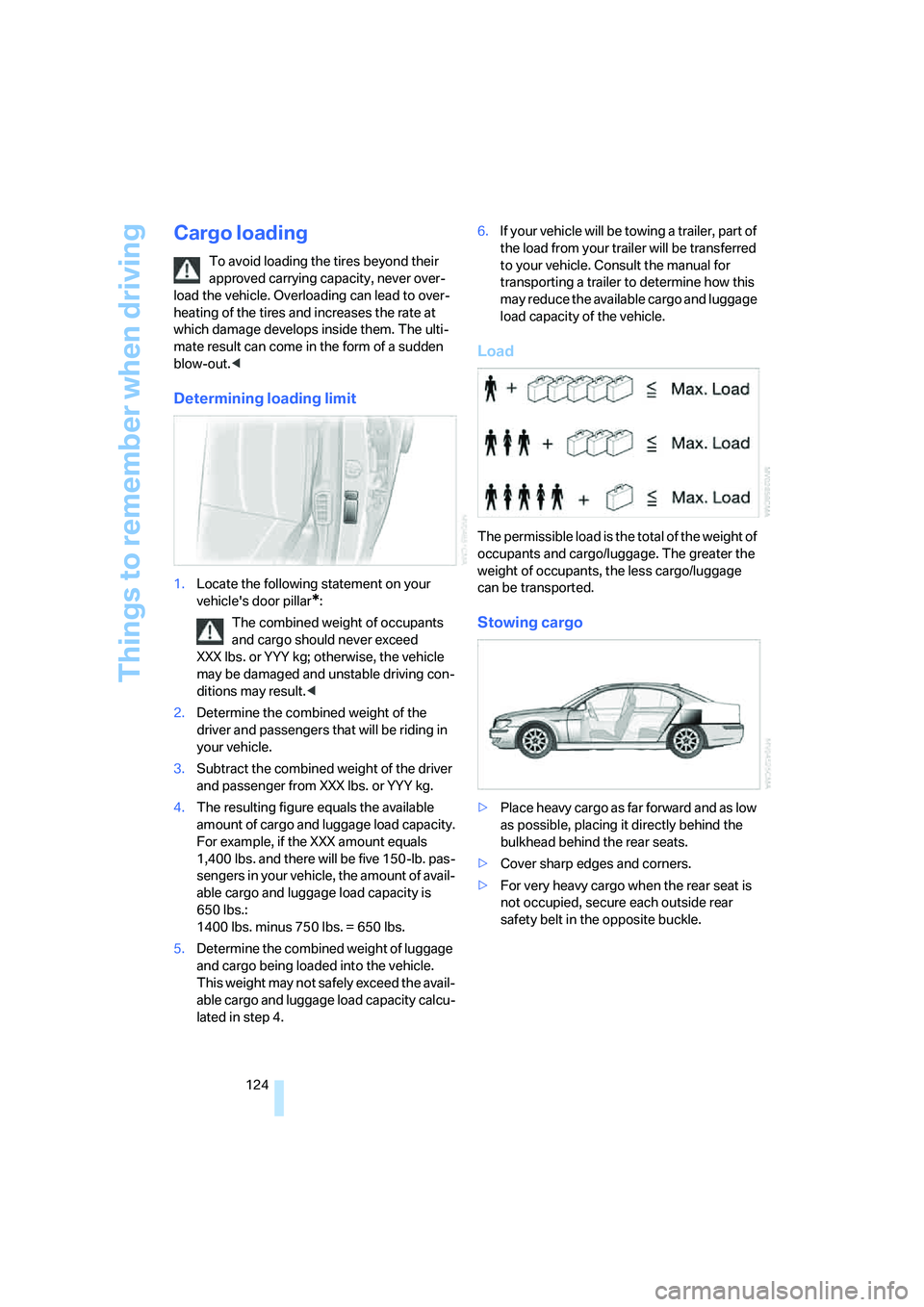
Load
The permissible load is the total of the weight of
occupants and cargo/luggage. The greater the
weight of occupants, the less cargo/luggage
can be transported.
Stowing cargo
>Place heavy cargo as far forward and as low
as possible, placing it directly behind the
bulkhead behind the rear seats.
>Cover sharp edges and corners.
>For very heavy cargo when the rear seat is
not occupied, secure each outside rear
safety belt in the opposite buckle.
Page 128 of 253
Things to remember when driving
126
Entry/pass tags
Infrared windshield technology has been used
on your vehicle to minimize solar heating of the
vehicle interior. This technology also reduces
the ability of electronic devices to transmit and
receive through the windshield, which will
impair their performance and operating range.
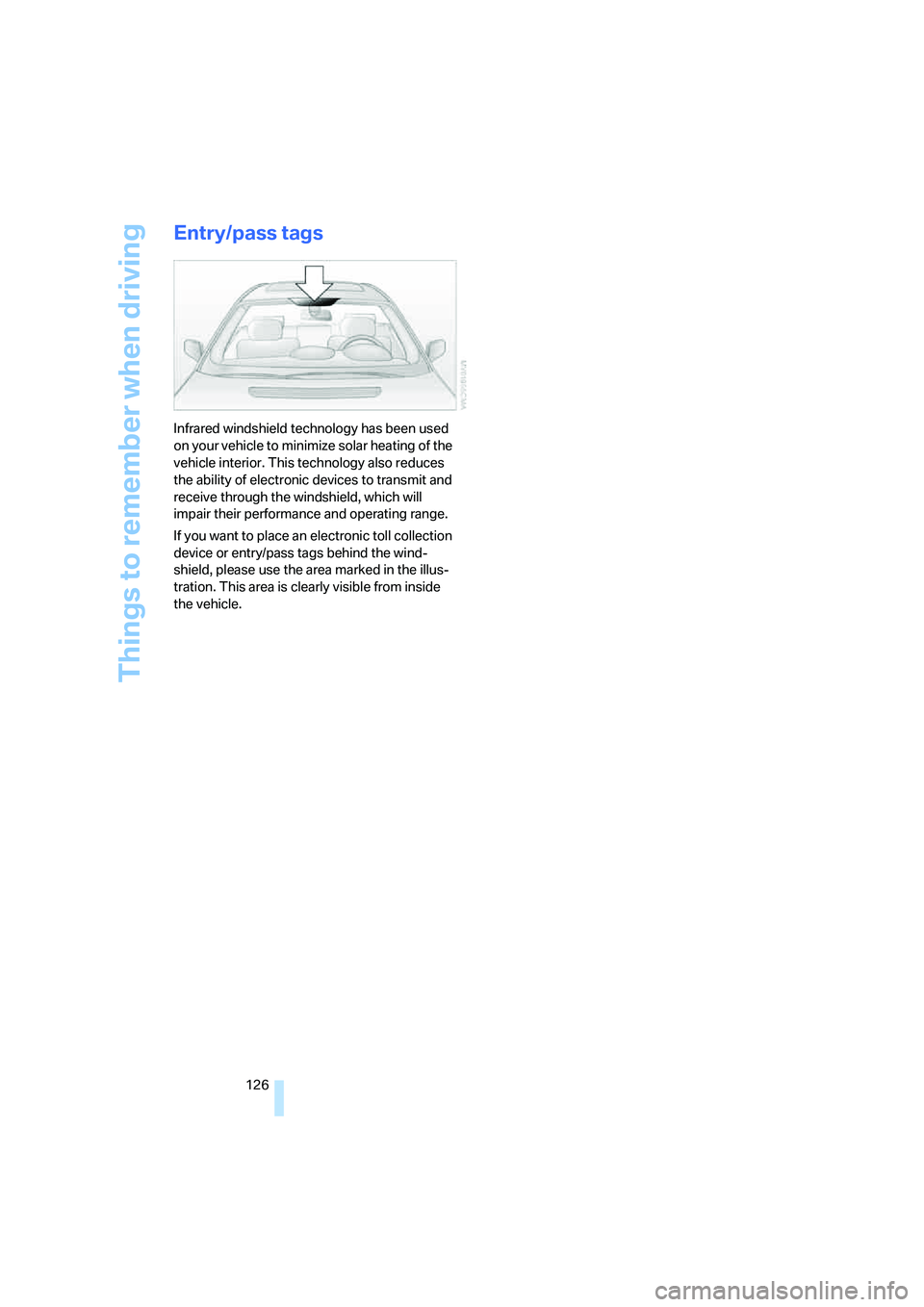
If you want to place an electronic toll collection
device or entry/pass tags behind the wind-
shield, please use the area marked in the illus-
tration. This area is clearly visible from inside
the vehicle.
Page 237 of 253
Reference 235
At a glance
Controls
Driving tips
Communications
Navigation
Entertainment
Mobility
DVD changer170
– adjusting picture172
– adjusting volume153
– controls152
– country codes171
– DVD controller171
– fast forward172
– freeze frame173
– opening specific menu174
– playing DVD171
– reverse172
– searching for chapter172
– selecting language173
– selecting picture format173
– selecting subtitles173
– starting171
– tone control153
DVD multimedia changer,
refer to DVD changer170
Dynamic Brake Control
DBC87
Dynamic Drive89
Dynamic Stability Control
DSC87
– indicator lamp13
Dynamic Traction Control
DTC88
– indicator lamp13
E
"EDC"89
EDC Electronic Damping
Control89
Eject button, refer to Buttons
on CD player152
Electrical malfunction
– door lock34
– driver's door34
– fuel filler door196
– glass sunroof, electric42
– luggage compartment lid36
– parking brake60
Electric steering wheel
adjustment52
Electronic brake-force
distribution87Electronic Damping Control
EDC89
Electronic Stability Program
ESP, refer to DSC Dynamic
Stability Control87
Electronic toll collection
device, refer to Entry/pass
tags126
Emergency actuation, refer to
Manual operation
– door lock34
– driver's door34
– fuel filler door196
– glass sunroof42
– luggage compartment lid36
– parking brake60
– transmission lock for
automatic transmission with
Steptronic64
Emergency call218
Emergency release of luggage
compartment lid from inside
the luggage
compartment37
Emergency services, refer to
Roadside
Assistance189,218
Energy-conscious driving,
refer to Energy Control/
current fuel consumption77
Energy Control77
Engine
– breaking-in122
– data224
– overheated, refer to Coolant
temperature76
– speed75,224
– starting57
– starting difficulties58
– switching off58
Engine compartment207
Engine coolant208Engine oil
– additives, refer to Approved
engine oils208
– approved oils208
– checking oil level207
– electronic oil level check207
– oil types, also refer to
Approved engine oils208
– possible displays of oil level
check208
"Engine oil level O.K."208
"Engine oil level too high"208
Engine output, refer to Engine
specifications224
Engine overheating, refer to
Coolant temperature76
Engine speed224
"Enter", navigation134
Entering activation time of
parked car ventilation109
– "Time 1"110
– "Time 2"110
Entering destination
address133
Entering destination town/
city132
Entering house number or
intersection, navigation133
Entering intersection,
navigation133
Entering name, destination in
navigation132
Entering street,
navigation133
"Entertainment", tone
control153
Entertainment sound output
on/off153
Entry/pass tags126
Entry for current position and
destination, refer to Entering
destination manually131
Environmentally friendly
driving, refer to Energy
Control77
Erasing entire list, refer to
Deleting entries in lists186
Page 238 of 253
Everything from A to Z
236 ESP Electronic Stability
Program, refer to DSC
Dynamic Stability
Control87
Event Data Recorders211
Exhaust system, refer to Hot
exhaust system122
Exterior mirrors50
– adjusting50
– automatic dimming
feature51
– automatic heating51
– folding in and out51
– tilting down passenger-side
mirror51
External audio
device114,169
"Extra"
– rear air conditioner108
– rear refrigerator117
Eyes for lashing, refer to
Securing cargo125
F
"Fader", balance and
fader154
Failure messages, refer to
Check Control80
Failure of an electrical device,
refer to Fuses217
False alarm, refer to Avoiding
unintentional alarms38
Fastening safety belts48
"Fastest route",
navigation141
Fast forward
– CD changer167
– CD player164
– DVD changer172
Filter, refer to Microfilter/
activated-charcoal filter107
First-aid kit219
Fittings for towing and tow
starting220
Flashlight, refer to
Rechargeable flashlight113Flat tire
– Flat Tire Monitor90
– refer to Changing
wheels214
– refer to Tire condition203
– run-flat tires91,93,204
– spare tire215
– Tire Pressure Monitor91
Flat Tire Monitor90
– initializing system90
– limits of system90
– show chains205
– warning lamp91
Flooding, refer to Driving
through water123
Floor coverings, carpet, refer
to Caring for your vehicle
brochure
Floor mat, refer to Caring for
your vehicle brochure
"FM", radio156
FM, refer to Radio156
Fog lamps, refer to Front fog
lamps101
Footbrake, refer to Braking
safely123
Footwell lamps, refer to
Interior lamps102
For specified oil grades, refer
to Approved engine oils208
Fresh air vents, refer to
Ventilation107
Front airbags95
Front fog lamps, indicator
lamp11,13
Fuel197
– average fuel
consumption77
– gauge76
– quality197
– refer to Average fuel
consumption77
– reserve, refer to Fuel
gauge76
– tank capacity227
Fuel consumption display,
refer to Energy control/
current consumption77Fuel filler door196
– manually unlocking196
Fuel level, refer to Fuel
gauge76
Fuel-saving driving, refer to
Energy Control77
"Full", rear seat screen22
"FULL MENU", DVD
changer173
"Full screen", BMW Night
Vision98
Fuses217
G
Garage door opener, refer to
Integrated universal remote
control111
Gas
– display, refer to Fuel
gauge76
– fuel quality197
Gear changes, refer to
Automatic transmission with
Steptronic62
Gear display, refer to Displays
on Info Display62
"General destination",
navigation135
General driving notes122
Glasses compartment115
Glass sunroof, electric41
– convenience operation32
– moving manually42
Glove compartment113
Grilles, refer to Ventilation107
Gross weight, refer to
Weights226
Page 239 of 253
Reference 237
At a glance
Controls
Driving tips
Communications
Navigation
Entertainment
Mobility
H
Handbrake, refer to Parking
brake58
Hands-free system179
Hazard warning flashers15
"HD", High Definition
Radio162
Head airbags95
Headlamp control,
automatic100
Headlamp flasher65
– indicator lamp13
Headlamps100
– care, refer to Caring for your
vehicle brochure
– cleaning, refer to Wiper
system65
– replacing bulbs212
Head light, refer to Adaptive
Head Light101
Headphones22
Head restraints46
– front head restraints,
active47
– installation, front47
– removal, front47
– sitting safely43
Heater, windshield, refer to
Defrosting windows and
removing condensation106
Heating103
– exterior mirrors51
– mirrors51
– rear window, refer to Rear
window defroster107
– residual heat106
– seats49
– steering wheel52
– windshield washer
nozzles66
Heating and ventilation103
Heating when parked, refer to
Residual heat106
Heavy cargo, refer to Stowing
cargo124
Height, refer to
Dimensions225Height adjustment
– seats44
– steering wheel52
"Help"
– assistance window21
– menu guidance19
"Help text", assistance
window21
Help text on Control
Display21
"Hide map icons",
navigation137
"high", automatic climate
control105
High beams101
– headlamp flasher101
– indicator lamp11
High Definition Radio162
Hills123
Holder for cups115
Home address
– selecting140
– storing140
Hood206
Horn11
Hotel function, refer to
Locking separately35
Hot exhaust system122
Hour signal activation85
"House number",
navigation134
Hydraulic brake assistant,
refer to DBC87
Hydroplaning123
I
ID3 tag, refer to Displaying
track information167
iDrive16
– assistance window21
– automatic climate
control104
– changing date and time84
– changing language84
– changing settings84
– changing units of measure
and display format84
– confirming selection or
entry19
– controller16
– controls16
– displays, menus17
– menus17
– rear seat screen21
– selecting menu item19
– setting brightness85
– showing help text21
– start menu18
– status lines20
– symbols19
Ignition key30
Ignition lock57
Illuminated vanity mirror52
Imitation leather, refer to
Caring for your vehicle
brochure
"Indep. ventil.", automatic
climate control109
Indicator/warning lamps12
– airbags96
– alarm system37
– DSC88
– DTC88
– Flat Tire Monitor91
– fog lamps101
– safety belt warning49
– Tire Pressure Monitor93
Individually programmable
buttons11,52
Individual settings, refer to
Key Memory31
Page 240 of 253
Everything from A to Z
238 Inflation pressure, refer to Tire
inflation pressure198
Inflation pressure monitoring
– refer to Flat Tire Monitor90
– refer to Tire Pressure
Monitor91
Info Display12
"Information", navigation135
Information, navigation
– "On country"135
– "On dest."135
– "On location"135
– "On town/city"135
Info service191
Infrared windshield, refer to
Entry/pass tags126
"INITIALIZE", BMW
Assist193
Inserting navigation CD/
DVD130
Installation location
– CD changer165
– DVD changer170
– mobile phone, refer to
Inserting mobile phone181
– navigation drive130
Instructions, navigation
system, refer to Route
guidance by voice
instructions145
Instrument cluster, refer to
Info Display12
Instrument lighting102
Instrument panel, refer to
Cockpit
– all around the steering
wheel10
– comfort features14
Integrated universal remote
control111
Interior lamps102
– switching on with remote
control32
Interior motion sensor38
– switching off38
Interior rearview mirror,
automatic dimming
feature51Interlock, refer to Switching
off engine58
"INTERM. TIME",
stopwatch83
Interval Display, refer to
Service requirements78
J
Joystick, refer to iDrive16
Jump starting219
K
Keyless-Go, refer to Comfort
Access38
Keyless opening and closing,
refer to Comfort Access38
Key Memory31
Keys30
– adapter for spare key30
– key-related settings, refer to
Key Memory31
Kick-down63
Knock control197
L
Lamps and bulbs212
"Language", settings84
Lashing eyes, refer to
Securing cargo125
"Last", phone186
"Last dest.", navigation137
Last destination driven to,
refer to Destination list137
Last numbers on mobile
phone, refer to Dialing
numbers stored in a list186
LATCH child restraint fixing
system55
Leather care, refer to Caring
for your vehicle brochure
LEDs light-emitting
diodes212
"Left", seat heating49
Length, refer to
Dimensions225Level control system89
Light, refer to Parking lamps/
low beams100
Light alloy wheels, care and
maintenance, refer to Caring
for your vehicle brochure
Light-emitting diodes
LEDs212
Lighter116
Lighter socket, refer to Power
socket116
Lighting
– of instruments102
– of vehicle100
Light switch100
"Limit"82
Limit, refer to Speed limit82
"Limited", rear seat screen22
Load, refer to Loading124
Loading
– securing cargo125
– vehicle124
"LOC.", navigation140
"Location",
navigation139,146,147
Lock buttons in the doors,
refer to Locking34
Locking
– from inside34
– from outside32
Locking without key, refer to
Comfort Access38
Locking without remote
control, refer to Comfort
Access38
"LOGIC7", tone control154
Longlife oils, approved
oils208
"low", automatic climate
control105
Low beams100
– automatic100
– changing bulb, refer to
Xenon light212
Lower back support, refer to
Lumbar support
adjustment45
Page 241 of 253
Reference 239
At a glance
Controls
Driving tips
Communications
Navigation
Entertainment
Mobility
Lug bolts
– refer to Preparing for a wheel
change215
– tightening torque, refer to
After mounting216
– wrench, refer to What you
will need214
Luggage compartment119
– capacity226
– convenient access39
– locking separately35
– net119
– opening/closing, refer to
Luggage compartment
lid35
– opening from inside36
– opening from outside35
– opening with remote
control33
– refer to Luggage
compartment lid35
Luggage compartment lid
– automatic operation33,36
– Comfort Access39
– emergency actuation, refer
to Manual operation36
– emergency release37
– locking separately35
– opening from inside36
– opening from outside35
– opening separately35
– opening with remote
control33
– remote control33
– unlocking manually, refer to
Opening separately35
Luggage rack, refer to Roof-
mounted luggage rack125
Lumbar support
adjustment45
M
M+S tires, refer to Winter
tires205
Maintenance210
– refer to Service required78
Maintenance System210Make-up mirror, refer to
Illuminated vanity mirror52
Malfunction
– door lock34
– fuel filler door196
– glass sunroof42
– luggage compartment lid37
Malfunction displays, refer to
Check Control80
"MANUAL",
radio157,159,162
Manually releasing
transmission lock64
Manual operation
– door lock34
– driver's door34
– fuel filler door196
– glass sunroof42
– luggage compartment lid36
– parking brake60
– transmission lock for
automatic transmission with
Steptronic64
Manual station scan157
Map CD, refer to Navigation
CD/DVD130
"Map dir. travel",
navigation144
"Map facing N.",
navigation144
Map for navigation
– changing scale25,144
– destination entry134
Map view facing north144
Master key, refer to Remote
control/key30
Maximum cooling106,108
"medium", automatic climate
control105
"Memo", hour signal85
Memory, refer to
– Key Memory31
– Seat, mirror and steering
wheel memory46
"MENU", DVD changer174
"menu", rear seat screen22
"Menu name"19
Menus, Control Display17Microfilter, automatic climate
control107
Microphone for voice
command179
Mirror dimming feature51
Mirrors50
– automatic curb monitor51
– folding in and out51
– heating51
– memory, refer to Seat, mirror
and steering wheel
memory46
"Missed", phone186
Missed calls, refer to Dialing
numbers stored in a list186
Mobile phone
– changing between mobile
phone and hands-free
system187
– changing from hands-free
system to mobile phone187
– changing from mobile phone
to hands-free system187
– dialing a number from Top 8
list186
– hands-free system179
– initiating an emergency
call218
– inserting181
– inserting phone cradle181
– logging off from vehicle183
– logging onto vehicle182
– missed calls186
– operating181
– operating via retracting
telephone keypad179
– operating with buttons on
steering wheel11
– overview178
– phone book185
– redialing185
– refer to Telephone
overview178
– removing182
– removing phone cradle181
– snap-in adapter178
– volume adjustment179