Page 157 of 256
Navigation
Entertainment
Driving tips
155Reference
At a glance
Controls
Communications
Mobility
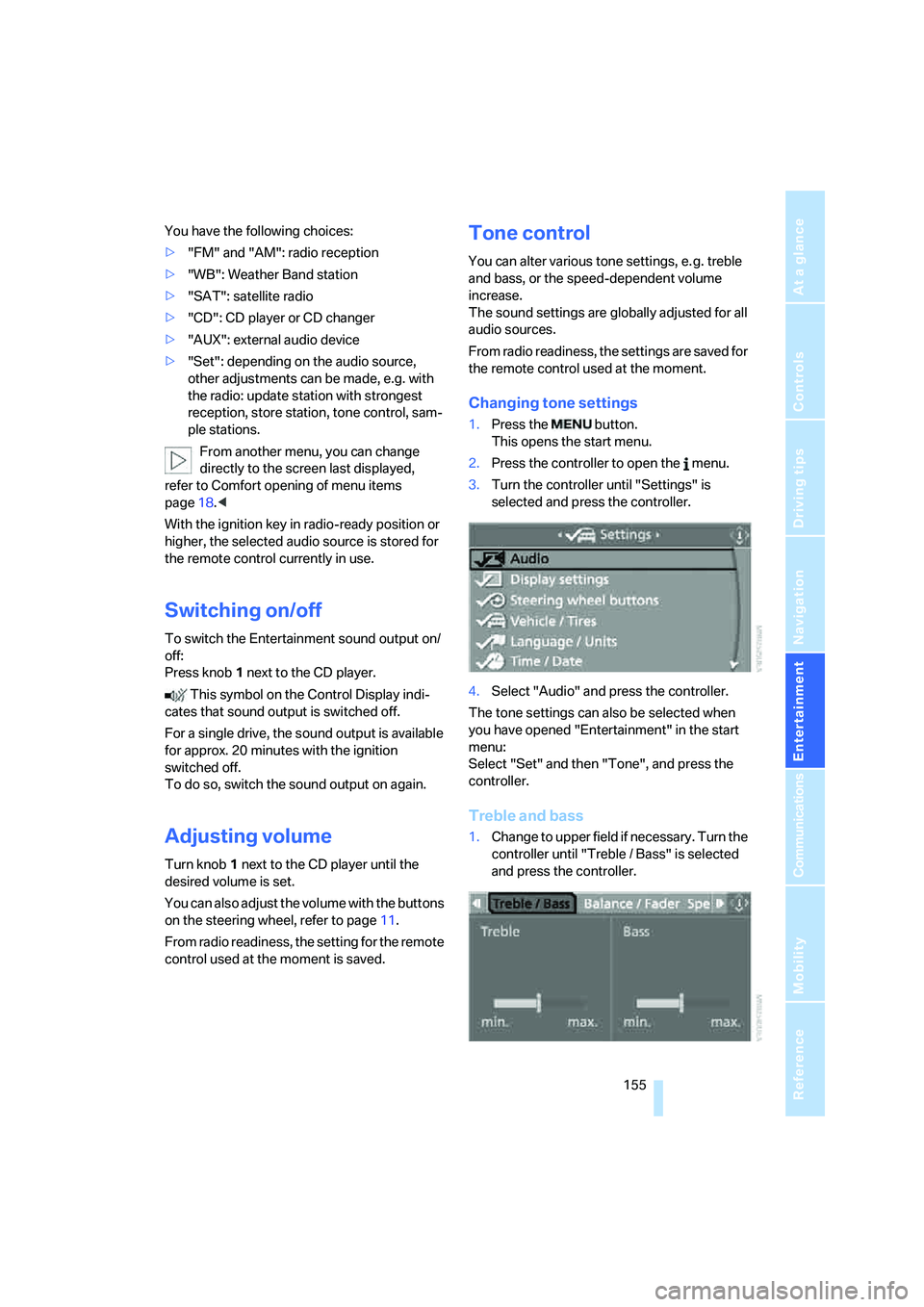
You have the following choices:
>"FM" and "AM": radio reception
>"WB": Weather Band station
>"SAT": satellite radio
>"CD": CD player or CD changer
>"AUX": external audio device
>"Set": depending on the audio source,
other adjustments can be made, e.g. with
the radio: update station with strongest
reception, store station, tone control, sam-
ple stations.
From another menu, you can change
directly to the screen last displayed,
refer to Comfort opening of menu items
page18.<
With the ignition key in radio-ready position or
higher, the selected audio source is stored for
the remote control currently in use.
Switching on/off
To switch the Entertainment sound output on/
off:
Press knob1 next to the CD player.
This symbol on the Control Display indi-
cates that sound output is switched off.
For a single drive, the sound output is available
for approx. 20 minutes with the ignition
switched off.
To do so, switch the sound output on again.
Adjusting volume
Turn knob1 next to the CD player until the
desired volume is set.
You can also adjust the volume with the buttons
on the steering wheel, refer to page11.
From radio readiness, the setting for the remote
control used at the moment is saved.
Tone control
You can alter various tone settings, e. g. treble
and bass, or the speed-dependent volume
increase.
The sound settings are globally adjusted for all
audio sources.
From radio readiness, the settings are saved for
the remote control used at the moment.
Changing tone settings
1.Press the button.
This opens the start menu.
2.Press the controller to open the menu.
3.Turn the controller until "Settings" is
selected and press the controller.
4.Select "Audio" and press the controller.
The tone settings can also be selected when
you have opened "Entertainment" in the start
menu:
Select "Set" and then "Tone", and press the
controller.
Treble and bass
1.Change to upper field if necessary. Turn the
controller until "Treble / Bass" is selected
and press the controller.
Page 175 of 256
Navigation
Entertainment
Driving tips
173Reference
At a glance
Controls
Communications
Mobility
External audio device
You can connect an external audio device, e.g.
an MP3 player, and play the sound via the vehi-
cle loudspeakers. The sound can be adjusted
via iDrive.
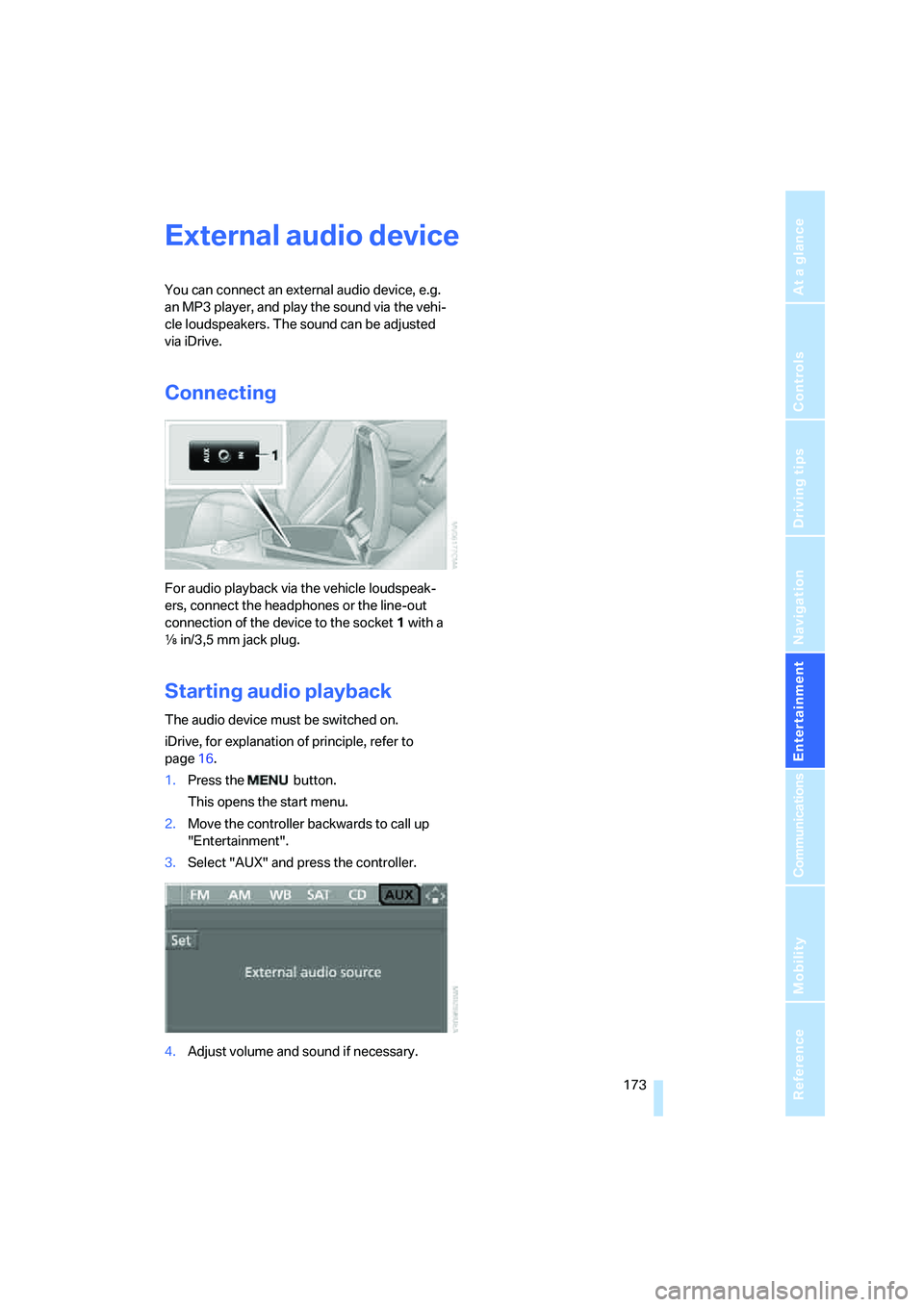
Connecting
For audio playback via the vehicle loudspeak-
ers, connect the headphones or the line-out
connection of the device to the socket1 with a
εin/3,5 mm jack plug.
Starting audio playback
The audio device must be switched on.
iDrive, for explanation of principle, refer to
page16.
1.Press the button.
This opens the start menu.
2.Move the controller backwards to call up
"Entertainment".
3.Select "AUX" and press the controller.
4.Adjust volume and sound if necessary.
Page 234 of 256
Short commands of voice command system
232
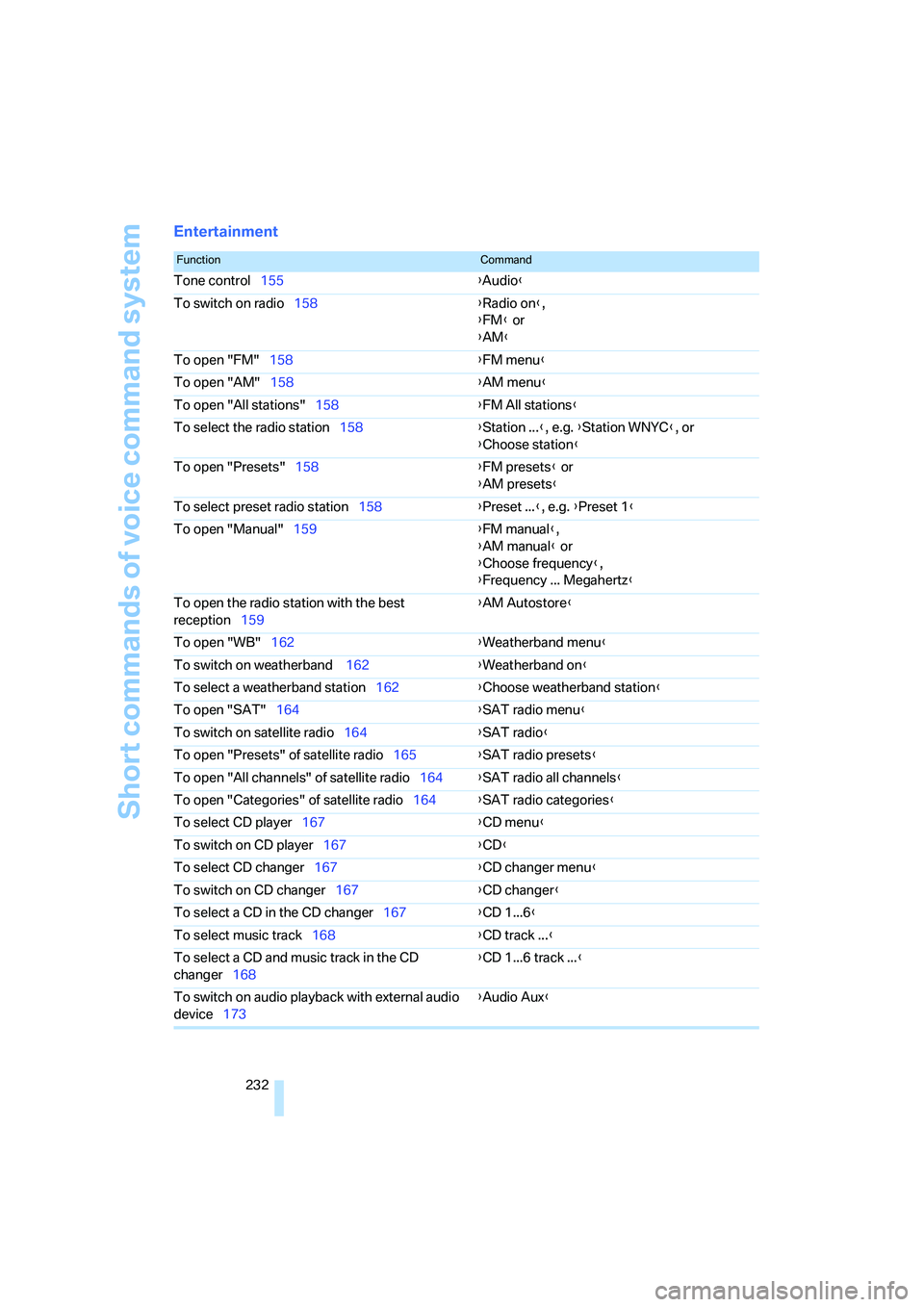
Entertainment
FunctionCommand
Tone control155{Audio}
To switch on radio158{Radio on},
{FM} or
{AM}
To open "FM"158{FM menu}
To open "AM"158{AM menu}
To open "All stations"158{FM All stations}
To select the radio station158{Station ...}, e.g. {Station WNYC}, or
{Choose station}
To open "Presets"158{FM presets} or
{AM presets}
To select preset radio station158{Preset ...}, e.g. {Preset 1}
To open "Manual"159{FM manual},
{AM manual} or
{Choose frequency},
{Frequency ... Megahertz}
To open the radio station with the best
reception159{AM Autostore}
To open "WB"162{Weatherband menu}
To switch on weatherband 162{Weatherband on}
To select a weatherband station162{Choose weatherband station
}
To open "SAT"164{SAT radio menu}
To switch on satellite radio164{SAT radio}
To open "Presets" of satellite radio165{SAT radio presets}
To open "All channels" of satellite radio164{SAT radio all channels}
To open "Categories" of satellite radio164{SAT radio categories}
To select CD player167{CD menu}
To switch on CD player167{CD}
To select CD changer167{CD changer menu}
To switch on CD changer167{CD changer}
To select a CD in the CD changer167{CD 1...6}
To select music track168{CD track ...}
To select a CD and music track in the CD
changer168{CD 1...6 track ...}
To switch on audio playback with external audio
device173{Audio Aux}
Page 237 of 256
Reference 235
At a glance
Controls
Driving tips
Communications
Navigation
Entertainment
Mobility
Around the center console14
Around the steering wheel10
Arrival time
– refer to Computer77
– refer to Starting destination
guidance141
"Arrow display" during
Navigation142
Artificial leather, refer to
Caring for your vehicle
brochure
Ashtray116
Assist, refer to
BMW Assist190
Assistance systems, refer to
Driving stability control
systems88
Assistance window20
"Assist. window off"21
AUC Automatic recirculated-
air control110
"Audio"155,157,162
Audio154
– controls154
– switching on/off154
– tone control155
– volume155
Audio device, external115
Automatic
– air distribution108
– air volume108
– cruise control67
– headlamp control103
– recirculated-air control
AUC110
– service notification192
– steering wheel
adjustment50
– storing stations159
Automatic car washes124
– also refer to Caring for your
vehicle brochure
– also refer to Comfort
access38Automatic climate control107
– automatic air
distribution108
– convertible program108
– switching on and off110
– ventilation with vehicle
parked111
Automatic closing of doors,
refer to Automatic soft
closing34
Automatic curb monitor54
Automatic lighting
– refer to Automatic headlamp
control103
– refer to Daytime running
lamps104
– refer to Interior lamps
105
– refer to Pathway lighting103
"Automatic programs"108
Automatic soft closing34
Automatic station search159
Automatic transmission with
Steptronic63
– deactivating selector lever
interlock64
– Dynamic Driving Control65
– interlock63
– kick-down64
– selector lever lock,
interlock63
– shiftlock63
– towing222
– tow-starting223
– with comfort access38
"Automatic ventilation"111
AUTO program with
automatic climate
control108
"Autostore" on the
radio158,160
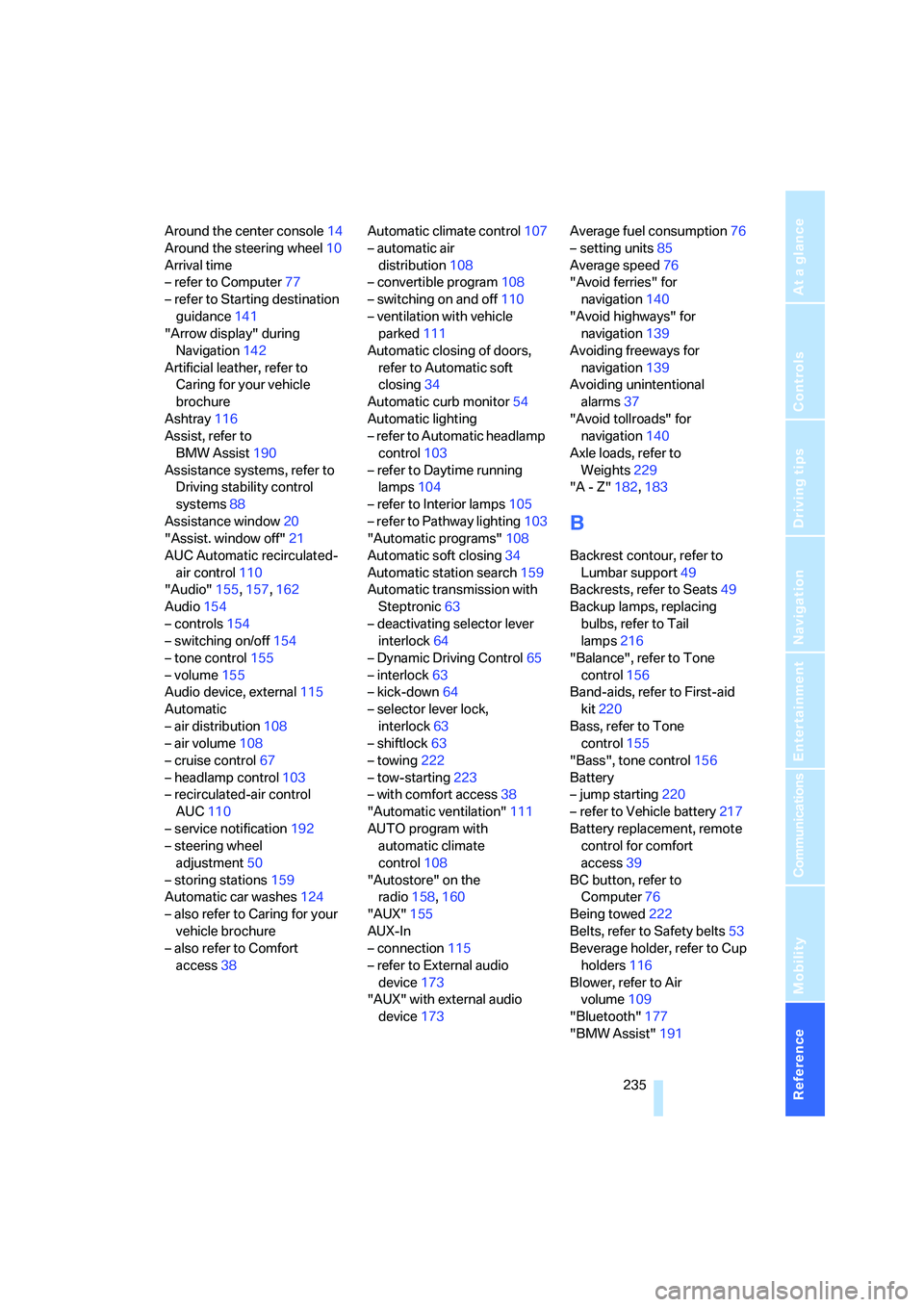
"AUX"155
AUX-In
– connection115
– refer to External audio
device173
"AUX" with external audio
device173Average fuel consumption76
– setting units85
Average speed76
"Avoid ferries" for
navigation140
"Avoid highways" for
navigation139
Avoiding freeways for
navigation139
Avoiding unintentional
alarms37
"Avoid tollroads" for
navigation140
Axle loads, refer to
Weights229
"A - Z"182,183
B
Backrest contour, refer to
Lumbar support49
Backrests, refer to Seats49
Backup lamps, replacing
bulbs, refer to Tail
lamps216
"Balance", refer to Tone
control156
Band-aids, refer to First-aid
kit220
Bass, refer to Tone
control155
"Bass", tone control156
Battery
– jump starting220
– refer to Vehicle battery217
Battery replacement, remote
control for comfort
access39
BC button, refer to
Computer76
Being towed222
Belts, refer to Safety belts53
Beverage holder, refer to Cup
holders116
Blower, refer to Air
volume109
"Bluetooth"177
"BMW Assist"191