Page 107 of 273
Controls
105Reference
At a glance
Driving tips
Communications
Navigation
Entertainment
Mobility
High beams/
roadside parking lamps
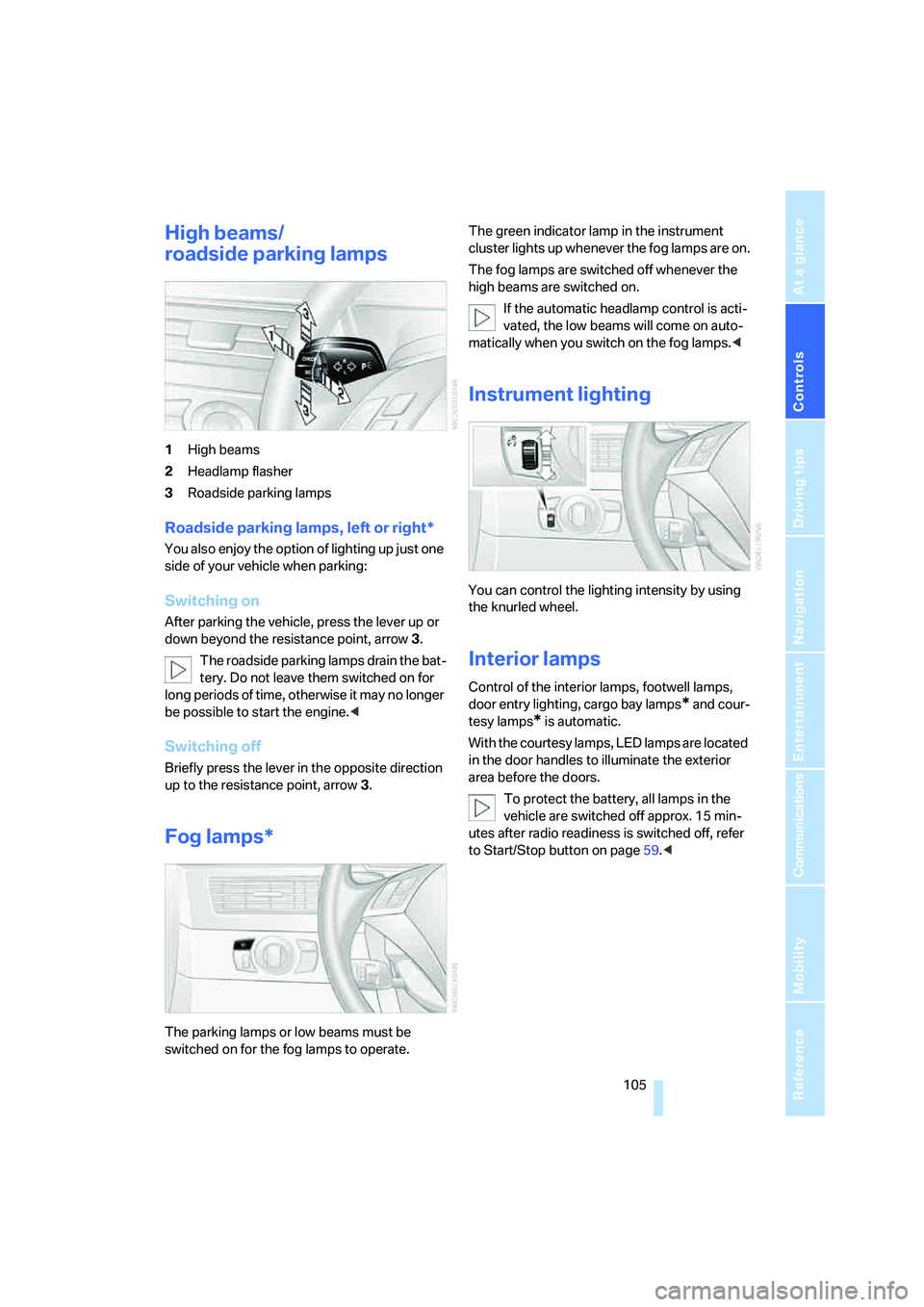
1High beams
2Headlamp flasher
3Roadside parking lamps
Roadside parking lamps, left or right*
You also enjoy the option of lighting up just one
side of your vehicle when parking:
Switching on
After parking the vehicle, press the lever up or
down beyond the resistance point, arrow 3.
The roadside parking lamps drain the bat-
tery. Do not leave them switched on for
long periods of time, otherwise it may no longer
be possible to start the engine.<
Switching off
Briefly press the lever in the opposite direction
up to the resistance point, arrow3.
Fog lamps*
The parking lamps or low beams must be
switched on for the fog lamps to operate. The green indicator lamp in the instrument
cluster lights up whenever the fog lamps are on.
The fog lamps are switched off whenever the
high beams are switched on.
If the automatic headlamp control is acti-
vated, the low beams will come on auto-
matically when you switch on the fog lamps.<
Instrument lighting
You can control the lighting intensity by using
the knurled wheel.
Interior lamps
Control of the interior lamps, footwell lamps,
door entry lighting, cargo bay lamps
* and cour-
tesy lamps
* is automatic.
With the courtesy lamps, LED lamps are located
in the door handles to illuminate the exterior
area before the doors.
To protect the battery, all lamps in the
vehicle are switched off approx. 15 min-
utes after radio readiness is switched off, refer
to Start/Stop button on page59.<
Page 255 of 273

Reference 253
At a glance
Controls
Driving tips
Communications
Navigation
Entertainment
Mobility
Decommissioning the vehicle
– refer to Caring for your
vehicle brochure
Decommissioning the vehicle,
refer to Caring for your
vehicle brochure
Defect
– door lock32
– fuel filler door206
– glass sunroof43
– luggage compartment lid34
– panorama glass roof44
– tailgate36
Defrosting windows109
Defrosting windows and
removing condensation109
Defrosting windshield, refer to
Defrosting windows109
Defrost position, refer to
Defrosting windows109
"Delete address book" for
navigation144
"Delete all numbers" on the
mobile phone190
"Delete data" for
navigation144
"Delete" for mobile
phone190
Destination address
– deleting144
– entering135,138
Destination for navigation
– destination list141
– entering via voice138
– entry135
– selecting from address
book143
– selecting using
information141
– storing142Destination guidance147
– bypassing route
sections151
– canceling voice
instructions54
– changing specified
route145
– displaying route148
– distance and arrival147
– interrupting147
– starting147
– terminating/continuing147
– voice instructions150
– volume of voice
instructions150
Destination list for
navigation141
Destinations recently driven
to141
"Details" in audio mode175
"Detour" for navigation154
"Dial" for mobile phone187
"Dial number"188
"Diamond button"54
Diamond button53
Digital clock75
Digital radio, refer to High
Definition Radio168
Dimensions239
Directional indicators, refer to
Turn signals65
Direction announcements,
refer to Voice
instructions150
Direction instructions, refer to
Voice instructions150
Directory, refer to Phone
book188
Directory for navigation, refer
to Address book142
Displacement, refer to Engine
data238
"Display"85
Display, refer to iDrive
controls16
Display elements, refer to
Instrument cluster12
Displaying vehicle data202Display lighting, refer to
Instrument lighting105
"Display off"21
Displays
– on Control Display, refer to
iDrive16
– refer to Instrument
cluster12
"Display settings"84,99
Displays on the windshield,
refer to Head-Up Display98
Disposal
– battery of remote control
with comfort access40
– coolant219
– vehicle battery229
Distance, refer to
Computer77
Distance cruise control, refer
to Active cruise control69
"Distance to dest."77
Distance to destination, refer
to Computer77
Distance warning, refer to
PDC Park Distance
Control86
Divided rear backrest, refer to
Through-loading
system119
Door entry lighting105
Door key, refer to Keys/
remote control28
Door lock32
Door locking, confirmation
signals31
"Door locks"30
Doors
– manual operation
32
– remote control30
DOT Quality Grades212
Draft-free ventilation110
Drinks holder, refer to Cup
holders116
Drive mode63
"Driver's door only"30
Driving lamps, refer to Parking
lamps/low beams103
Driving route, refer to
Displaying route148
Page 259 of 273

Reference 257
At a glance
Controls
Driving tips
Communications
Navigation
Entertainment
Mobility
iDrive16
– assistance window20
– automatic climate control
with expanded scope108
– changing date and time83
– changing language85
– changing menu page19
– changing settings83
– changing units of measure
and display type85
– confirming selection or
entry19
– controller16
– controls16
– displays, menus17
– operating principle17
– selecting menu item19
– setting brightness84
– start menu17
– status information20
– symbols18
Ignition59
– switched off60
– switched on59
Ignition key, refer to Keys/
remote control28
Ignition key position 1, refer to
Radio readiness59
Ignition key position 2, refer to
Ignition on59
Ignition lock59
– starting engine with comfort
access40
i menu17
Imprint2
Indicator/warning lamps
– ABS Antilock Brake
System90
– active steering96
– airbags98
– brake system90
– DSC13,88
– DTC13,88
– Flat Tire Monitor92
– fog lamps13
– safety belt warning50
– TPM Tire Pressure
Monitor94Indicator and warning
lamps13
Inflation pressure, refer to Tire
inflation pressure208
Inflation pressure monitoring,
refer to Flat Tire Monitor91
Inflation pressure monitoring,
refer to TPM Tire Pressure
Monitor92
Info menu17
Information
– on another location141
– on current position141
– on destination location141
"Information" for
navigation141
Information menu, refer to
imenu17
"Information on
destination"142
Information service199
"Info sources"78
Initializing
– Flat Tire Monitor91
– radio, refer to Storing
stations166
– refer to Power failure229
– refer to Setting time and
date83
– seat, mirror and steering
wheel memory47
"Input map"140
Installation location
– CD changer177
– drive for navigation DVD134
– mobile phone115
Instructions for navigation
system, refer to Voice
instructions150
Instrument cluster12
Instrument illumination, refer
to Instrument lighting105
Instrument lighting105
Instrument panel, refer to
Cockpit10
Instrument panel, refer to
Instrument cluster12
Integrated key28Integrated universal remote
control113
Interesting destination for
navigation141
"Interim time"83
Interior lamps105
– switching on with remote
control31
Interior motion sensor38
– switching off38
Interior rearview mirror52
– automatic dimming
feature53
Interlock on automatic
transmission64
Intermittent mode of the
wipers66
J
Jacking points228
Joystick, refer to iDrive16
Jumpering, refer to Jump
starting232
Jump starting232
K
Keyless-Go, refer to Comfort
access38
Keyless opening and closing,
refer to Comfort access38
Key Memory, refer to Personal
Profile29
"Keypad"191
Keys28
– key-related settings, refer to
Personal Profile29
– spare key28
Kick-down
– automatic transmission with
Steptronic65
– SMG Sequential Manual
Transmission63
Knock control207
Page:
< prev 1-8 9-16 17-24