2007 AUDI R8 ignition
[x] Cancel search: ignitionPage 93 of 210

Automatic gearbox91
Controls
Safety
Driving tips
General maintenance
Self-help
Technical data
WARNING
•
The accelerator pedal must on no account be pressed inadvert-
ently when a gear is engaged with the vehicle stationary. If this
were to happen, the vehicle would start to move immediately, and
even a firmly applied handbrake might not restrain it (accident
risk).
•
To avoid accidents, apply the handbrake firmly and select
neutral gear (N) before opening the engine lid and working on the
vehicle with the engine running. Please observe the important
safety warnings ⇒page 155, “Working on components in the
engine compartment”.Note
If you accidentally shift to N when driving, you can engage a gear in
the normal way using the selector lever or paddle levers.Applies to vehicles: with R tronicManual modeR tronic allows the driver to change gears manually.Driving away from a standstill
– Press and hold the brake pedal.
– Move the selector lever to the left.
– Briefly push the selector lever forwards .
– Release the brake and press the accelerator ⇒.
Changing gear
– Briefly push the selector lever forwards to change up
a gear.– Briefly pull the selector lever back to change down a
gear.
Stopping briefly
– Apply the foot brake to hold the vehicle when stationary
(for instance at traffic lights).
– Do not press the accelerator while waiting. Neutral gear
(N) will be engaged automatically and a warning tone will
sound after a certain period if the vehicle is at a standstill
and you do not press the brake pedal or accelerator.
Parking
– Press and hold the brake pedal ⇒.
– Apply the handbrake firmly.
– Engage a gear.
– Switch off the ignition.
Stopping on a slope
–Always apply the footbrake to hold the vehicle and
prevent it “rolling back” down the slope ⇒. Do not try
to stop the vehicle “rolling back” by increasing the
engine speed when a gear is engaged.
– Apply the handbrake firmly.
Driving away on a slope
– Once you have engaged a gear, release the footbrake,
press the accelerator and gradually release the hand-
brake.
When accelerating in 1st, 2nd, 3rd, 4th or 5th gear, the R tronic
gearbox automatically shifts up into the next gear shortly before the
A+A+
A-
document_0900452a816e6cc9.book Seite 91 Mittwoch, 21. Februar 2007 1:32 13
Page 98 of 210

HomeLink 96
At the operating unit
1. Switch on the ignition (do not start the engine).
2. Press and hold down the two outer buttons of the
HomeLink® operating unit ⇒page 95, fig. 80 until the
indicator diode ⇒page 95, fig. 80 begins to flash after
about 20 seconds. This means that all previously stored
data has been deleted.
3. Press the particular HomeLink button which you would
like to program.
4. Wait until the diode ⇒page 95, fig. 80 begins to flash.
The HomeLink module now remains in training mode for
5 minutes.
5. Now step in front of your vehicle with the original hand-
held transmitter for the garage door opener or any other
device you wish to assign to the HomeLink control button
⇒fig. 81.
At the front bumper
6. Hold the original hand-held transmitter for the device
you wish to program close to the front bumper, directly
above the radiator grille ⇒fig. 81.7. Press the activator button on the original hand-held
transmitter.
8. As you do so, watch the turn signals on your vehicle.
HomeLink confirms successful programming by flashing
all four turn signals three times.
9. If the turn signals fail to flash three times, repeat the
procedure with the transmitter held at a different
distance from the bumper.
The proper distance between the hand-held transmitter and the
HomeLink module inside the front bumper depends on the system
you want to train. It may require several attempts.
The turn signals will flash once if the time limit for the programming
mode has been exceeded. In this case the programming procedure
needs to be performed again. Repeat the sequence on the operating
unit starting with step 3.
The programming instructions above also apply to the other control
buttons. Start with step 3 on the operating unit if you wish to
proceed and program the other two buttons.
If the garage door or other devices still fail to be activated with the
HomeLink control buttons after programming is completed, it is
possible that these systems might be working with a rolling code
instead of the normal fixed security code. If this is the case, a rolling
code programming is required in addition to the steps described
above ⇒page 97.
Fig. 81 Front bumper
AA
AA
document_0900452a816e6cc9.book Seite 96 Mittwoch, 21. Februar 2007 1:32 13
Page 99 of 210

HomeLink97
Controls
Safety
Driving tips
General maintenance
Self-help
Technical data
Applies to vehicles: with HomeLinkRolling code programming
Some devices require rolling code programming of the
HomeLink universal transmitter.Identifying a rolling code
– Press the already programmed HomeLink button again
and hold it down.
–Watch HomeLink diode ⇒page 95, fig. 80. If the diode
starts flashing rapidly and turns into a constant light
after about 2 seconds, this indicates that the device you
wish to operate (e.g. a garage door opener) is equipped
with a rolling code.
– Program the rolling code as follows:
Activating the garage door opener drive unit
– Locate the programming button on the garage door
drive. The exact location and colour of the button may
vary depending on the type of garage door opener.
– Press the programming button on the door drive unit
(this will normally cause a “programming mode indicator
lamp” on the unit to light up). You now have about 30
seconds to start and complete programming of the
HomeLink control button on the operating unit.
Programming of the operating unit above the
interior mirror
– Press and release the already programmed HomeLink
button.
– Press the HomeLink button again to complete rolling
code programming.
After programming at the operating unit, the garage door opener
should recognise the HomeLink signal and respond when the
HomeLink button is pressed. Now the other control buttons can be
programmed as required.
Note
•
Having a second person assist you makes programming of the
rolling code easier and faster. For some makes of garage door
openers the HomeLink button may have to be pressed a third time
to complete the training sequence.
•
If you encounter problems programming the rolling code you
may find helpful information in the operating instructions of the
garage door opener or other device you wish to operate.
Applies to vehicles: with HomeLinkOperating HomeLink
The programmed devices are activated by means of the
HomeLink control buttons above the interior mirror.– Switch on the ignition (do not start the engine).
– Press the programmed HomeLink button ⇒page 95,
fig. 80. The device assigned to that button (e.g. garage
door) will be activated.The HomeLink indicator diode ⇒page 95, fig. 80 will light up when
you press the button.Applies to vehicles: with HomeLinkErasing the HomeLink® button programming
You can erase the complete HomeLink programming by
pressing the two outer buttons.– Switch on the ignition (do not start the engine).
AA
document_0900452a816e6cc9.book Seite 97 Mittwoch, 21. Februar 2007 1:32 13
Page 117 of 210

Airbag system115
Controls
Safety
Driving tips
General maintenance
Self-help
Technical data
Airbag systemDescription of airbag systemGeneral notes on airbag system
The airbag is an integral part of the car's passive safety
system.In conjunction with the three-point seat belts, the airbag system
gives the front occupants additional protection for the head and
chest in the event of a severe frontal collision.
In a side collision the side airbags reduce the risk of injury to the
areas of the body facing the impact ⇒.
In addition to their normal function of protecting the occupants in a
collision, the seat belts also hold them in a position where the
airbags can inflate properly and provide maximum protection.
The airbag system will only work with the ignition on. The airbag
system is monitored electronically; the airbag warning lamp indi-
cates whether the system is functioning properly.
The main parts of the airbag system are:•
the electronic monitoring system (control unit and sensors),
•
the two front airbags,
•
The two side airbags,
•
The airbag warning lamp in the instrument cluster.
There is a fault in the airbag system if the warning
lamp
•
does not come on when the ignition is switched on,
•
does not go out about 3 seconds after the ignition is switched
on,
•
goes out and then comes on again after the ignition is switched
on,
•
comes on or flickers while the car is moving.
WARNING
•
The airbags are not a substitute for the seat belts; they are an
integral part of the car's overall passive safety system. The airbags
can only offer effective protection if the occupants are wearing
their seat belts. For this reason it is very important to wear the
seat belts at all times ⇒page 109, “Why is it so important to use
seat belts?”.
•
The seat belts and airbags can only provide maximum protec-
tion if the occupants are seated correctly ⇒page 67, “Seats and
storage”.
•
If you do not wear a seat belt, if you lean forward, or are not
seated correctly while the vehicle is in motion, you are at greater
risk of injury should the airbag system be triggered in an accident.
•
Components of the airbag system are located in various parts
of the vehicle. If repairs to other vehicle components make it
necessary to perform work on the airbag system or to remove or
install parts of the airbag system, this may cause damage to the
airbag system. As a result, the airbags may not inflate correctly or
may not be triggered at all in an accident situation.
•
If a fault should occur in the airbag system, have the system
checked immediately by a qualified workshop. Otherwise the
system may fail to trigger in an accident.
•
Do not attempt to modify components of the airbag system in
any way.
•
Never make any alterations to the front bumper or the body.
•
The airbag system can only be activated once; if the airbag has
been triggered, the system must be replaced. Should the airbag
system or airbag modules have to be replaced, the qualified work-
shop carrying out the replacement will document all details in the
appropriate section of the Service Schedule.
document_0900452a816e6cc9.book Seite 115 Mittwoch, 21. Februar 2007 1:32 13
Page 122 of 210
Airbag system 120•
Any damage to the original seat upholstery or around the
seams of the side airbag units must be repaired immediately by a
qualified workshop.
•
Any work involving the side airbag system or removal and
installation of the airbag components for other repairs (such as
repairs to the seats) should always be performed by a qualified
workshop. Otherwise the airbag system may fail to work
properly.
Deactivating the airbagsDeactivating airbags
If airbags have been deactivated, they should be reacti-
vated as soon as possible so that they can continue to
give the required protection.There are two ways of deactivating the airbags: you can deactivate
the front passenger's airbag yourself by means of the key-operated
switch ⇒page 120. The other airbags can be deactivated by your
Audi R8 dealer.
Deactivating front passenger's airbag when a child
safety seat is in use
If you have no alternative but to install a rearward-facing child safety
seat on the front passenger's seat you must deactivate the front
passenger's airbag beforehand.
Monitoring of airbag system
The airbag warning lamp will light up for a few seconds every time
the ignition is switched on.
WARNING
•
Never install a rearward-facing child safety seat on the front
passenger's seat unless the front passenger's airbag has been
deactivated – this can result in potentially fatal injuries to the child
⇒page 123.
•
Make sure that the front passenger's airbag is reactivated by
means of the key-operated switch as soon as the child seat is no
longer needed on the front passenger's seat.
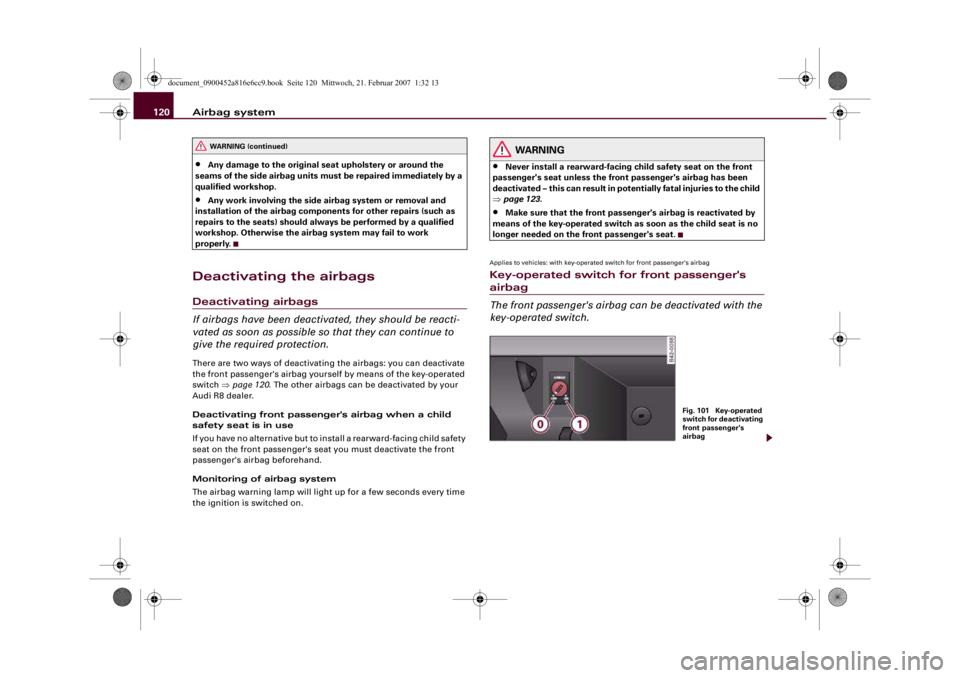
Applies to vehicles: with key-operated switch for front passenger's airbagKey-operated switch for front passenger's airbag
The front passenger's airbag can be deactivated with the
key-operated switch.
WARNING (continued)
Fig. 101 Key-operated
switch for deactivating
front passenger's
airbag
document_0900452a816e6cc9.book Seite 120 Mittwoch, 21. Februar 2007 1:32 13
Page 123 of 210

Airbag system121
Controls
Safety
Driving tips
General maintenance
Self-help
Technical data
The key-operated switch for deactivating the front
passenger's airbag is located in the glove box ⇒page 120,
fig. 101.
– To deactivate the front passenger's airbag, insert the
ignition key in the switch and turn it to position .
– The front passenger's airbag can be reactivated by
turning the key to position .If the front passenger's airbag has been deactivated via the key-
operated switch, the indicator lamp “PASSENGER AIRBAG OFF” will
light up constantly as a reminder ⇒page 121, fig. 102. Please refer
also to the description of the AIRBAG warning lamp in the instru-
ment cluster ⇒page 17.
WARNING
•
If you have no alternative but to install a rearward-facing child
seat on the front passenger's seat, the front passenger's airbag
must be deactivated beforehand – otherwise this can result in
potentially fatal injuries to the child.
•
If you have deactivated the front passenger's airbag, reactivate
it as soon as the child seat is no longer needed so that the airbag
can continue to give the required protection.
•
It is the driver's responsibility to ensure that the key-operated
switch is set to the correct position.
Fig. 102 Lamp indi-
cates that front
passenger's airbag has
been deactivated via
key-operated switch
A0
A1
WARNING (continued)
document_0900452a816e6cc9.book Seite 121 Mittwoch, 21. Februar 2007 1:32 13
Page 147 of 210

Care of vehicle and cleaning145
Controls
Safety
Driving tips
General maintenance
Self-help
Technical data
WARNING
•
Do not wash the vehicle with the ignition switched on – risk of
accident.
•
Do not clean the underside of the car or inside the wheel arches
without protecting your hands and arms. You may cut yourself on
sharp metal parts.
•
Take care when washing the car during the winter: moisture
and ice on the brakes may affect braking efficiency – this could
cause an accident.Caution
•
Compare the track width of your vehicle with the distance
between the guide rails for the wheels in the car wash. Otherwise
there may be a risk of damaging the wheel rims and tyres.
•
Compare the ground clearance of your vehicle with the height of
the guide rails for the wheels in the car wash to prevent any damage
to the underside.
•
Compare the width of your vehicle with the available width when
entering and driving through the car wash.
•
Retract the exterior mirrors to avoid damage. Electrically retract-
able exterior mirrors must NOT be folded in or out by hand. Always
use the electrical power control.
•
Do not wash the vehicle in direct sunlight – otherwise the paint
can be damaged.
•
Do not use insect sponges, or abrasive household sponges, etc.
– they can damage the surfaces.
•
The headlights should only be washed with water – do not wipe
them with a dry cloth or sponge. It is best to use soapy water.
•
Never wash tyres with a jet that sprays the water out in a direct
stream. This could damage the tyres – even if the spray is kept at a
distance and only used for a very short time.
For the sake of the environment
The car should only be washed in special wash bays. This prevents
oily water from getting into the public drains. In some districts,
washing vehicles anywhere else may be prohibited.Waxing and polishingWaxi ng
Waxing protects the paintwork. It is time to apply a good coat of wax
when water no longer forms droplets and rolls off the clean paint-
work.
Even if a wax solution is used regularly in the car wash, it is advis-
able to protect the paint with a coat of wax at least twice a year.
In the summer, you will find it is much easier to remove dead insects
(which accumulate on the bumper and front lid) if the car has been
waxed recently.
Polishing
Polishing is only necessary if the paint has lost its shine, and the
gloss cannot be brought back by putting on wax.
The car must be waxed after polishing if the polish used does not
contain wax compounds to seal the paint.
Caution
Matt painted and plastic parts must not be treated with wax or
polish.Ornamental trim and mouldingsThe metal brightwork on the body is made of aluminium rather than
chrome (for environmental reasons).
document_0900452a816e6cc9.book Seite 145 Mittwoch, 21. Februar 2007 1:32 13
Page 157 of 210

Checking and topping up fluids155
Controls
Safety
Driving tips
General maintenance
Self-help
Technical data
Checking and topping up fluidsEngine lidOpening the engine lid
The engine lid is released from inside the vehicle.– Open the driver's door.
– Make sure that the rear spoiler is retracted ⇒page 134.
– To release the engine lid, pull the lever under the dash-
board ⇒fig. 115.
– Open the engine lid ⇒.The engine lid is held open by two gas-filled struts.
WARNING
To avoid the risk of being scalded, never open the engine lid if you
see steam or coolant escaping from the engine compartment.
Wait until no steam or coolant can be seen before opening the
engine lid.
Working on components in the engine compartment
Extra caution is necessary when working on components
in the engine compartment.Always be aware of the danger of injury and scalding as well as the
risk of accident or fire when working in the engine compartment
(e.g. when checking and refilling fluids). Always observe the warn-
ings listed below and follow all normal safety precautions. The
engine compartment of any motor vehicle is a potentially hazardous
area ⇒.
WARNING
•
Switch off the engine.
•
Apply the handbrake firmly.
•
Put the gear lever in neutral or the R tronic selector lever in N.
•
Remove the ignition key.
•
Wait for the engine to cool down.
•
Keep children away from engine compartment.
•
Never spill fluids on hot engine components. These fluids can
cause a fire (e.g. radiator anti-freeze).
•
Take care not to cause short circuits in the electrical system,
especially when working on the battery.
•
Do not unscrew the cap on the expansion tank when the engine
is hot. The cooling system is under pressure.
•
Protect face, hands and arms by covering the cap with a large,
thick rag to protect against escaping coolant and steam.
•
If any tests have to be performed with the engine running,
there is an extra safety risk from the rotating parts, such as the
Fig. 115 Detail of foot-
well on driver's side:
Release lever
document_0900452a816e6cc9.book Seite 155 Mittwoch, 21. Februar 2007 1:32 13