Page 261 of 527
’06 TUNDRA_U (L/O 0508)
249
2006 TUNDRA from Oct. ’06 Prod. (OM 34458U)
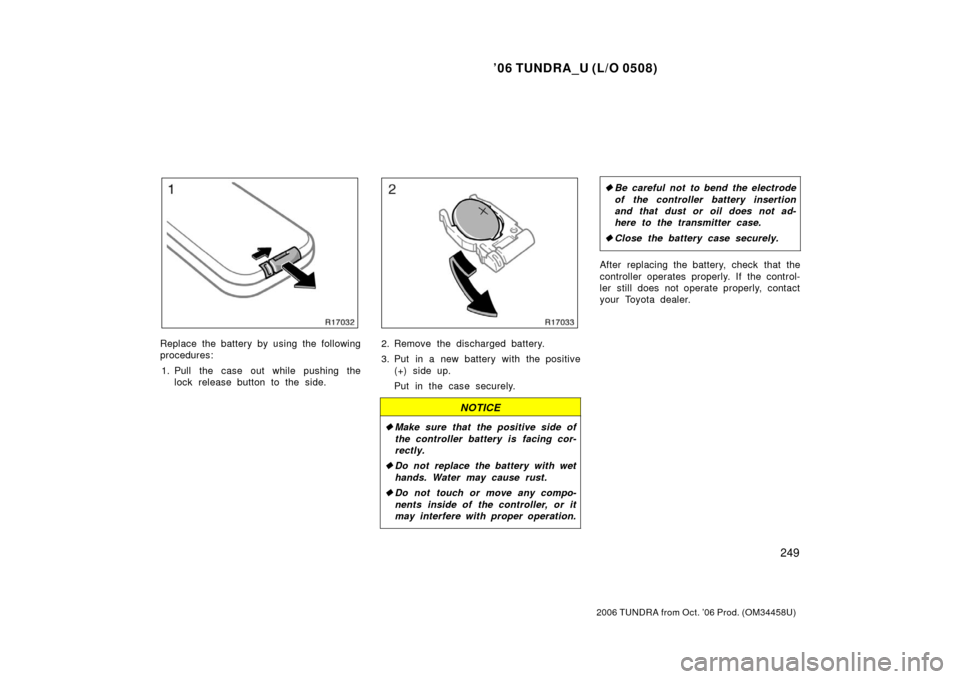
Replace the battery by using the following
procedures:
1. Pull the case out while pushing the lock release button to the side.2. Remove the discharged battery.
3. Put in a new battery with the positive
(+) side up.
Put in the case securely.
NOTICE
�Make sure that the positive side of
the controller battery is facing cor-
rectly.
� Do not replace the battery with wet
hands. Water may cause rust.
� Do not touch or move any compo-
nents inside of the controller, or it
may interfere with proper operation.
�Be careful not to bend the electrode
of the controller battery insertion
and that dust or oil does not ad-
here to the transmitter case.
� Close the battery case securely.
After replacing the battery, check that the
controller operates properly. If the control-
ler still does not operate properly, contact
your Toyota dealer.
Page 265 of 527
’06 TUNDRA_U (L/O 0508)
253
2006 TUNDRA from Oct. ’06 Prod. (OM 34458U)
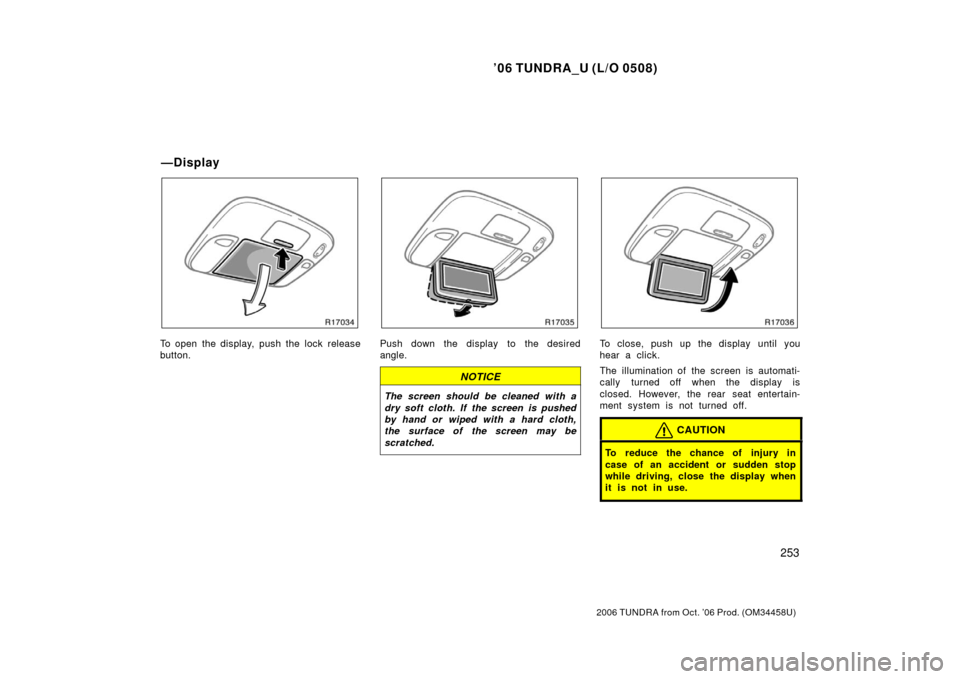
To open the display, push the lock release
button.Push down the display to the desired
angle.
NOTICE
The screen should be cleaned with a
dry soft cloth. If the screen is pushed
by hand or wiped with a hard cloth,
the surface of the screen may be
scratched.
To close, push up the display until you
hear a click.
The illumination of the screen is automati-
cally turned off when the display is
closed. However, the rear seat entertain-
ment system is not turned off.
CAUTION
To reduce the chance of injury in
case of an accident or sudden stop
while driving, close the display when
it is not in use.
—Display
Page 269 of 527
’06 TUNDRA_U (L/O 0508)
257
2006 TUNDRA from Oct. ’06 Prod. (OM 34458U)
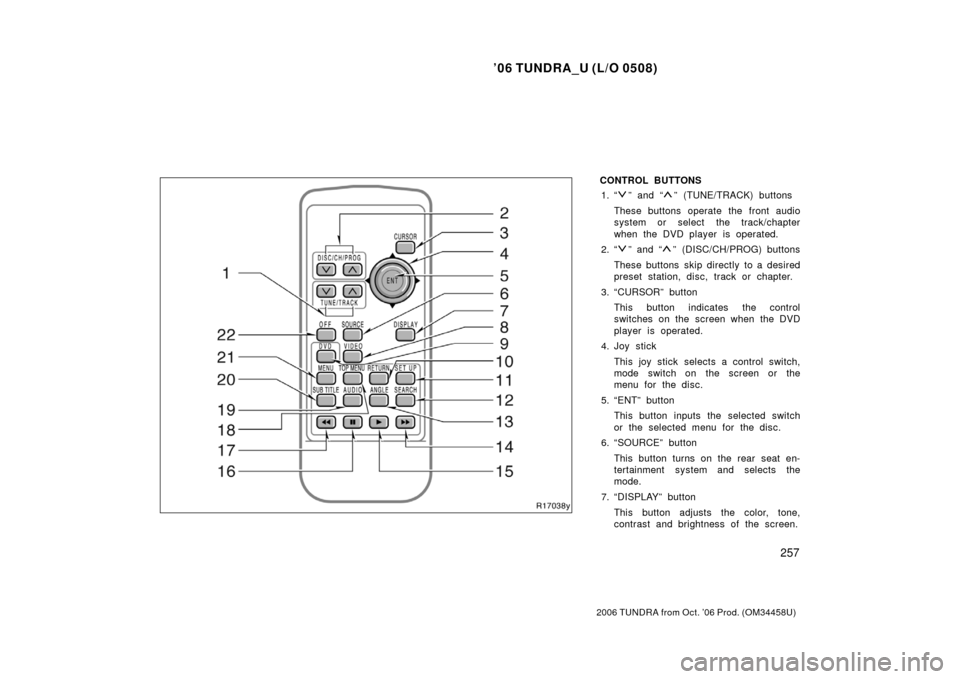
CONTROL BUTTONS
1. “
” and “” (TUNE/TRACK) buttons
These buttons operate the front audio
system or select the track/chapter
when the DVD player is operated.
2. “
” and “” (DISC/CH/PROG) buttons
These buttons skip directly to a desired
preset station, disc, track or chapter.
3. “CURSOR” button This button indicates the control
switches on the screen when the DVD
player is operated.
4. Joy stick
This joy stick selects a control switch,
mode switch on the screen or the
menu for the disc.
5. “ENT” button This button inputs the selected switch
or the selected menu for the disc.
6. “SOURCE” button
This button turns on the rear seat en-
tertainment system and selects the
mode.
7. “DISPLAY” button This button adjusts the color, tone,
contrast and brightness of the screen.
Page 270 of 527

’06 TUNDRA_U (L/O 0508)
258
2006 TUNDRA from Oct. ’06 Prod. (OM 34458U)
8. “VIDEO” button
This button turns on the video mode
when your personal audio device is
connected.
9. “DVD” button
This button turns on the DVD mode.
10. “RETURN” button
This button skips to the predetermined
scene for the disc when the DVD play-
er is operated.
11. “SET UP” button This button indicates the initial set up
screen when the DVD player is oper-
ated.
12. “SEARCH” button This button indicates the title search
screen when the DVD player is oper-
ated.
13. “ANGLE” button
This button selects the angle of the
screen when the DVD player is oper-
ated.
14. “ ��” button
This button fast forwards a screen
when the DVD player is operated. 15. “
�” button
This button plays a screen when the
DVD player is operated.
16. “
” button
This button pauses a screen when the
DVD player is operated.
17. “ ��” button
This button reverse a screen when the
DVD player is operated.
18. “TOP MENU” button
This button indicates the title selection
screen for DVD video when the DVD
player is operated.
19. “AUDIO” button
This button indicates the changing au-
dio screen when the DVD player is
operated.
20. “SUB TITLE” button This button indicates the changing sub-
title screen when the DVD player is
operated.
21. “MENU” button
This button indicates the menu screen
for DVD video when the DVD player is
operated. 22. “OFF” button
This button turns off the rear seat en-
tertainment system.
Page 271 of 527
’06 TUNDRA_U (L/O 0508)
259
2006 TUNDRA from Oct. ’06 Prod. (OM 34458U)
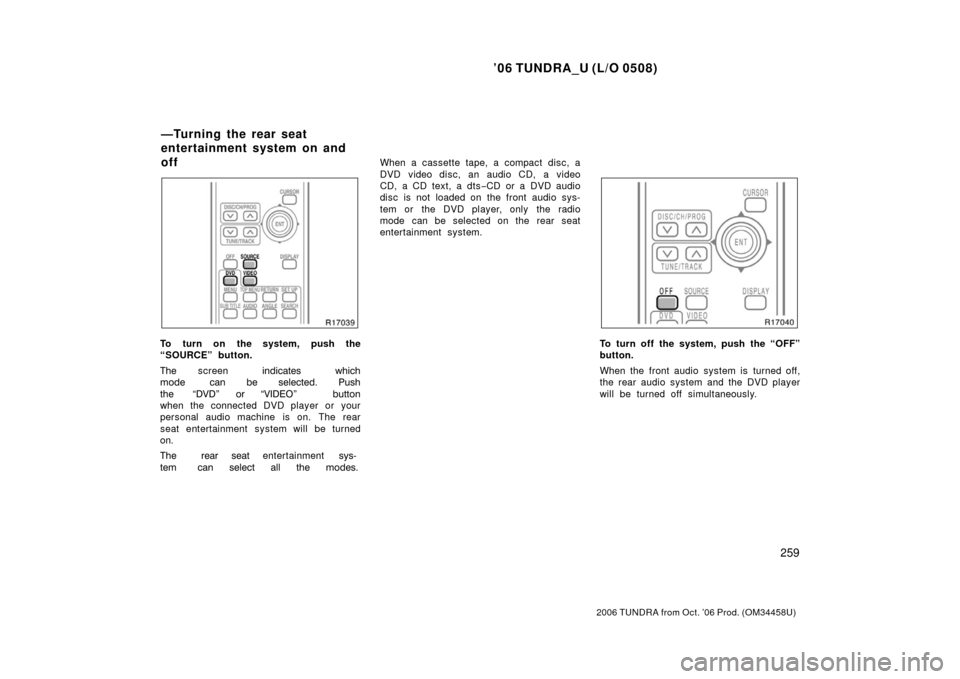
To turn on the system, push the
“SOURCE” button.
��� screen ����\b
�� \f��\b�
��� \b � �� ����\b
��� ����
�� “���� �� “������ ��
��
when the connected DVD player or your
personal audio machine is on. The rear
seat entertainment system will be turned
on �
��� �� � ��
entertainment ����
�
\b � ����\b
��
��
����� When a cassette tape, a compact disc, a
DVD video disc, an audio CD, a video
CD, a CD text, a dts
−CD or a DVD audio
disc is not loaded on the front audio sys-
tem or the DVD player, only the radio
mode can be selected on the rear seat
entertainment system.To turn off the system, push the “OFF”
button.
When the front audio system is turned off,
the rear audio system and the DVD player
will be turned off simultaneously.
—Turning the rear seat
entertainment system on and
off
Page 272 of 527
’06 TUNDRA_U (L/O 0508)
260
2006 TUNDRA from Oct. ’06 Prod. (OM 34458U)
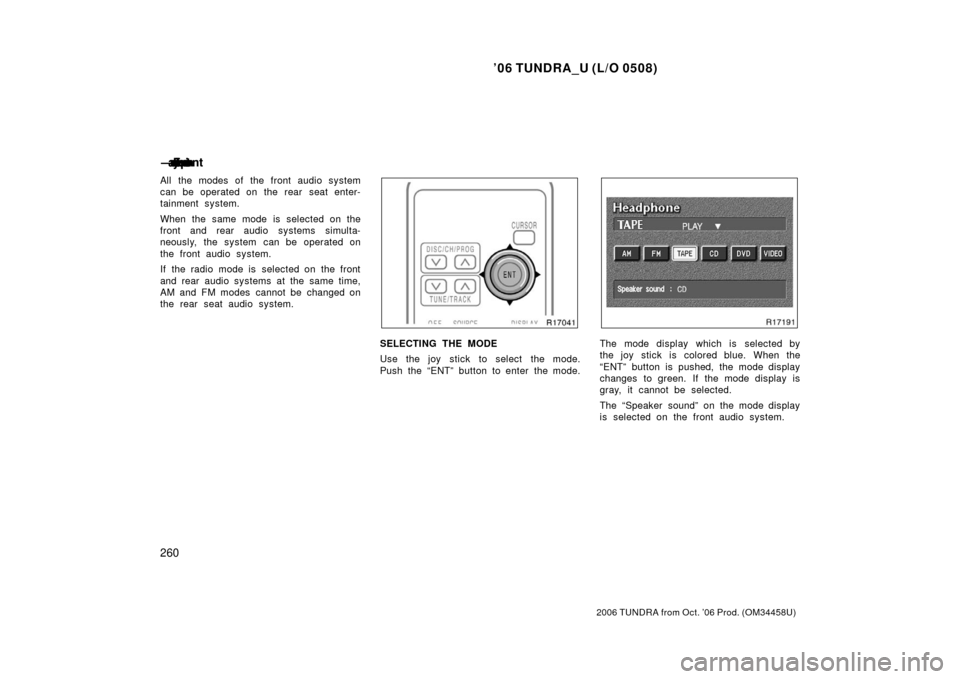
All the modes of the front audio system
can be operated on the rear seat enter-
tainment system.
When the same mode is selected on the
front and rear audio systems simulta-
neously, the system can be operated on
the front audio system.
If the radio mode is selected on the front
and rear audio systems at the same time,
AM and FM modes cannot be changed on
the rear seat audio system.
SELECTING THE MODE
Use the joy stick to select the mode.
Push the “ENT” button to enter the mode.The mode display which is selected by
the joy stick is colored blue. When the
“ENT” button is pushed, the mode display
changes to green. If the mode display is
gray, it cannot be selected.
The “Speaker sound” on the mode display
is selected on the front audio system.
—����� �\b
� �\f��
� ��
���
��
Page 273 of 527
’06 TUNDRA_U (L/O 0508)
261
2006 TUNDRA from Oct. ’06 Prod. (OM 34458U)
Radio
Cassette tape player and compact disc
player
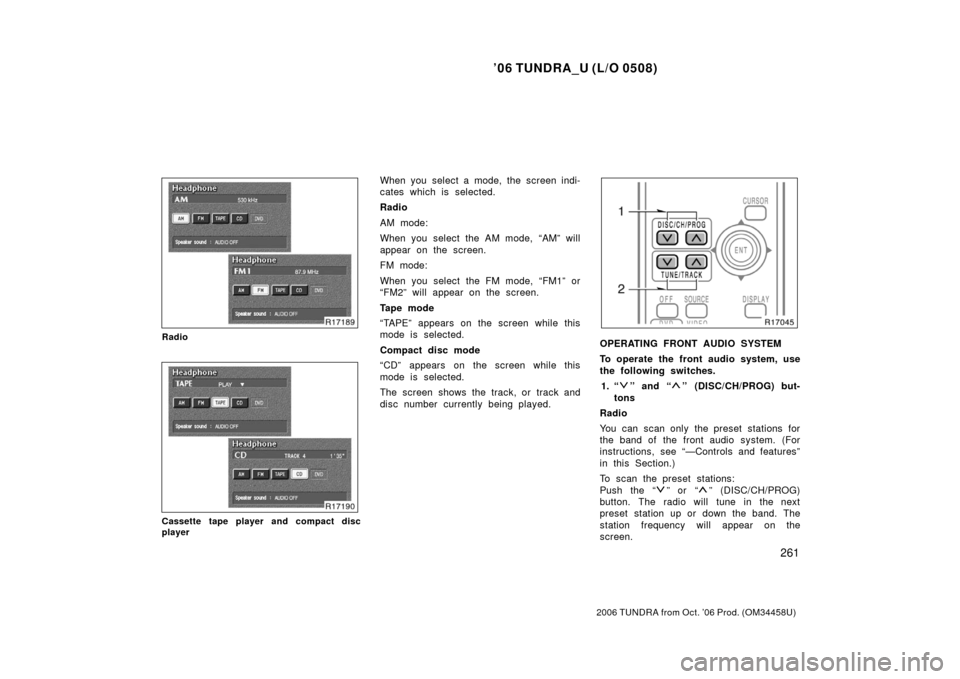
When you select a mode, the screen indi-
cates which is selected.
Radio
AM mode:
When you select the AM mode, “AM” will
appear on the screen.
FM mode:
When you select the FM mode, “FM1” or
“FM2” will appear on the screen.
Tape mode
“TAPE” appears on the screen while this
mode is selected.
Compact disc mode
“CD” appears on the screen while this
mode is selected.
The screen shows the track, or track and
disc number currently being played.
OPERATING FRONT AUDIO SYSTEM
To operate the front audio system, use
the following switches.
1. “
” and “” (DISC/CH/PROG) but-
tons
Radio
You can scan only the preset stations for
the band of the front audio system. (For
instructions, see “—Controls and features”
in this Section.)
To scan the preset stations:
Push the “
” or “” (DISC/CH/PROG)
button. The radio will tune in the next
preset station up or down the band. The
station frequency will appear on the
screen.
Page 274 of 527

’06 TUNDRA_U (L/O 0508)
262
2006 TUNDRA from Oct. ’06 Prod. (OM 34458U)
Cassette tape player
Push the “
” or “” (DISC/CH/PROG)
button to select the other side of a cas-
sette tape. The screen indicates which
side is currently selected. (“
” indicates
t he top si de, “
” indicates the bottom
side.)
Auto −reverse feature: After the cassette
player reaches the end of a tape side, it
automatically reverses and begins to play
the other side. This is true whether the
cassette was playing or fast forwarding.
Compact disc player with changer
Use these buttons to select a disc you
want to listen to.
Push the “
” or “” (DISC/CH/PROG)
button until the number of the disc you
want to listen appears on the display. 2. “
” and “” (TUNE/TRACK) buttons
Radio
Push the “
” or “” (TUNE/TRACK) but-
ton to tune or seek.
Tuning:
Quickly push and release the “
” or “”
(TUNE/TRACK) button. Each time you
push the button, the radio will step up or
down to another frequency. If you push
and hold the button, and the radio will go
into the seek mode.
Seeking:
Push and hold the “
” or “” (TUNE/
TRACK) button. The radio will seek up or
down for a station of the nearest frequen-
cy and will stop on reception. Each time
you push the button, the stations will be
searched one after another.
Cassette tape player
This button has the following features—
To fast forward or reverse:
Push and hold the “
” (TUNE/TRACK)
button until “FF” will appears on the dis-
play to forward a tape. Push and hold the
“
” (TUNE/TRACK) button until “REW”
appears on the display to rewind a tape. To stop the tape while it is fast forward-
ing, push the “
” (TUNE/TRACK) button.
To stop the tape while it is rewinding,
push the “
” (TUNE/TRACK) button.
If a tape rewinds completely, the cassette
player will stop and then play that same
side. If a tape fast forwards completely,
the cassette will play the other side of the
tape using the auto −reverse feature.
To skip up or down to locate a song or
recording:
You can select up to nine recordings (in-
cluding current one).
Push the “
” or “” (TUNE/TRACK) but-
ton. “FF 1” or “REW 1” will appear on the
screen.
Next, push either side of the track button
until the number on the screen reaches
the number of tracks you want to skip. If
you push the button 10 times, the skip
feature will be turned off.
For the skip feature to work correctly a
blank space of at least 3 seconds is con-
sidered to be a start of a recording.
When a beginning of a tape is reached,
the player automatically resumes play.
When the end of the tape is reached, the
player automatically reverses sides and
resumes normal play.