2006 TOYOTA RAV4 light
[x] Cancel search: lightPage 136 of 2000

CHASSIS - 4WD SYSTEMCH-69
4. Function of Main Components
ComponentFunction
Combination
4WD LOCK
Indicator LightIlluminates to inform the driver of the 4WD LOCK mode control.Combination
Meter4WD
Warning LightIlluminates to warn the driver of a malfunction in the 4WD system.
Speed Sensor (4)Detects the wheel speed of each 4 wheel.
Steering Angle SensorDetects the direction and angle of the steering wheel.
Yaw Rate & Deceleration SensorDetects the vehicle’s longitudinal and lateral acceleration.
Crankshaft Position SensorDetects the engine speed and outputs it to the ECM.
Accelerator Pedal Position SensorDetects the accelerator pedal position and outputs it to the ECM.
Throttle Position SensorDetects the throttle valve position and outputs it to the ECM.
Park / Neutral Position SwitchDetects the neutral position of the transaxle and outputs it to the
ECM.
Stop Light SwitchDetects the brake pedal depressing signal.
Parking Brake SwitchDetects when the parking brake lever is pulled up.
Four-wheel Drive Lock SwitchSwitches between the AUTO and LOCK modes.
4WD ECU
Controls the amperage that is applied to the electromagnetic
solenoid of the electric control coupling based on the signals
provided by the sensors in order to optimally distribute drive torque
in accordance with driving conditions.
ECMOutputs signals such as the shift position signal, throttle position
signal, and crankshaft position signal to the 4WD ECU.
Skid Control ECUOutputs signals such as the vehicle speed signal and deceleration
signal to the 4WD ECU.
Electric Control CouplingDistributes drive torque in accordance with the amperage applied
by the 4WD ECU.
Page 137 of 2000

CHASSIS - 4WD SYSTEM
01NCH38Y
Torque Distribution
to Rear WheelsTorque Distribution
to Rear Wheels
Straightline Driving Low-Speed Cornering
01NCH39Y
Torque Distribution
to Rear WheelsTorque Distribution
to Rear Wheels
Steady Driving Straightline Acceleration
NOTICE
In the LOCK mode after the four-wheel drive lock switch is pressed, the system starts control upon
judging that the vehicle is operating in a stable manner. During this judgment, the 4WD LOCK
indicator light blinks.
CH-70
5. System Operation
Auto Mode
1) Starting Off
The system ensures start-off performance by optimally distributing the entire drive torque, which is
transmitted by the engine, to the front and rear wheels.
To prevent the tight corner braking phenomenon from occurring during low-speed cornering, the
system reduces the amount of torque distribution to the rear wheels.
2) Normal Driving
During normal driving, when the system judges that the vehicle is traveling steadily, it reduces the
amount of torque distribution to the rear wheels. This allows the vehicle to operate in conditions
similar to front-wheel-drive, which improves fuel economy.
To ensure excellent acceleration performance during straightline acceleration and excellent driving
stability during cornering, the system controls the amount of torque distribution to the rear wheels.
Lock Mode
When the vehicle is in a situation that poses difficulty for it to pull itself out, such as sand, the driver can
switch to LOCK mode by operating the four-wheel drive lock switch. Thus, this mode effects optimal
control in accordance with the driving conditions and transmits as much drive torque as possible to the rear
wheels, in a mode that is similar to the locked 4WD mode.
Page 138 of 2000
CHASSIS - 4WD SYSTEM
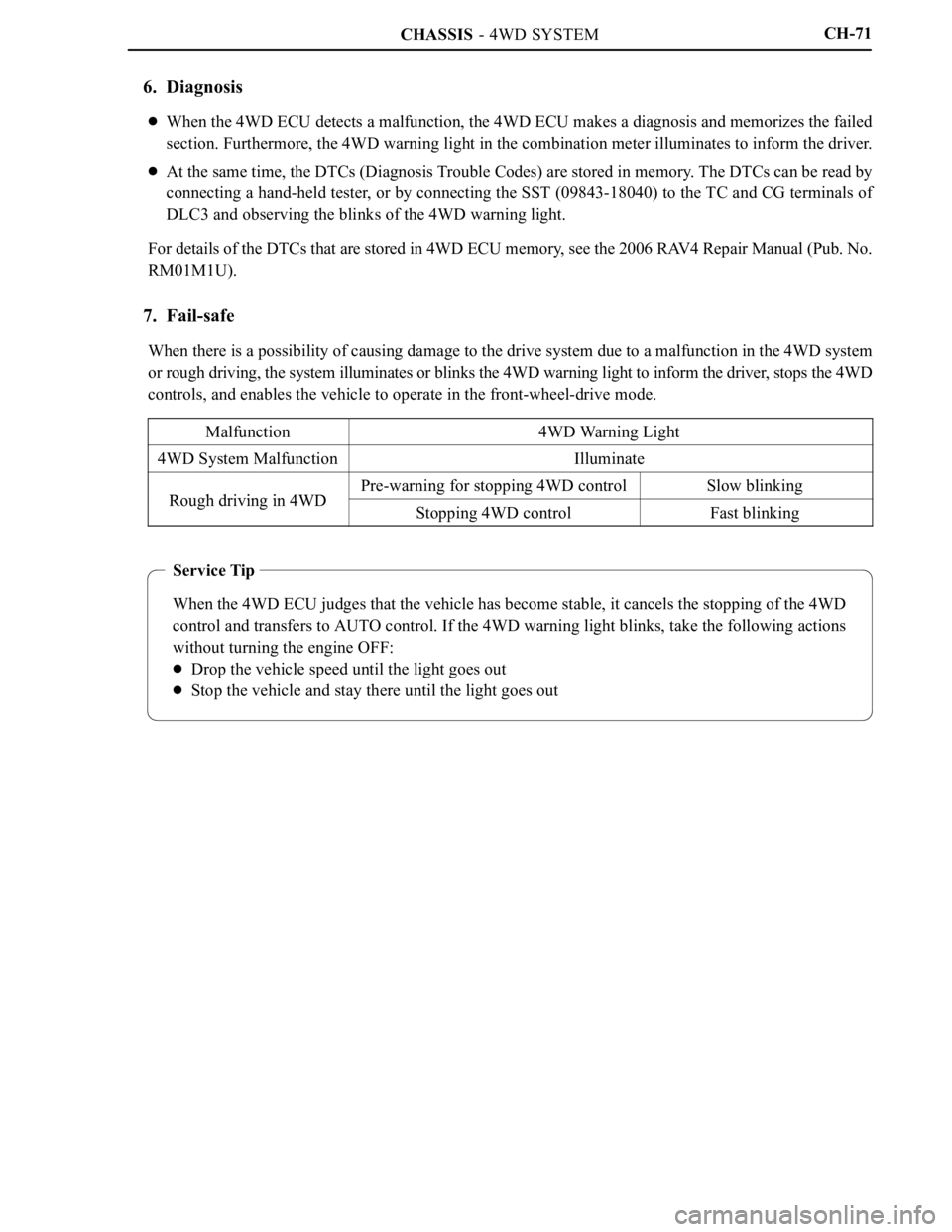
Service Tip
When the 4WD ECU judges that the vehicle has become stable, it cancels the stopping of the 4WD
control and transfers to AUTO control. If the 4WD warning light blinks, take the following actions
without turning the engine OFF:
Drop the vehicle speed until the light goes out
Stop the vehicle and stay there until the light goes out
CH-71
6. Diagnosis
When the 4WD ECU detects a malfunction, the 4WD ECU makes a diagnosis and memorizes the failed
section. Furthermore, the 4WD warning light in the combination meter illuminates to inform the driver.
At the same time, the DTCs (Diagnosis Trouble Codes) are stored in memory. The DTCs can be read by
connecting a hand-held tester, or by connecting the SST (09843-18040) to the TC and CG terminals of
DLC3 and observing the blinks of the 4WD warning light.
For details of the DTCs that are stored in 4WD ECU memory, see the 2006 RAV4 Repair Manual (Pub. No.
RM01M1U).
7. Fail-safe
When there is a possibility of causing damage to the drive system due to a malfunction in the 4WD system
or rough driving, the system illuminates or blinks the 4WD warning light to inform the driver, stops the 4WD
controls, and enables the vehicle to operate in the front-wheel-drive mode.
Malfunction
4WD Warning Light
4WD System MalfunctionIlluminate
Rough driving in 4WDPre-warning for stopping 4WD controlSlow blinkingRough driving in 4WDStopping 4WD controlFast blinking
Page 170 of 2000
INTRODUCTION – REPAIR INSTRUCTIONIN–25
IN
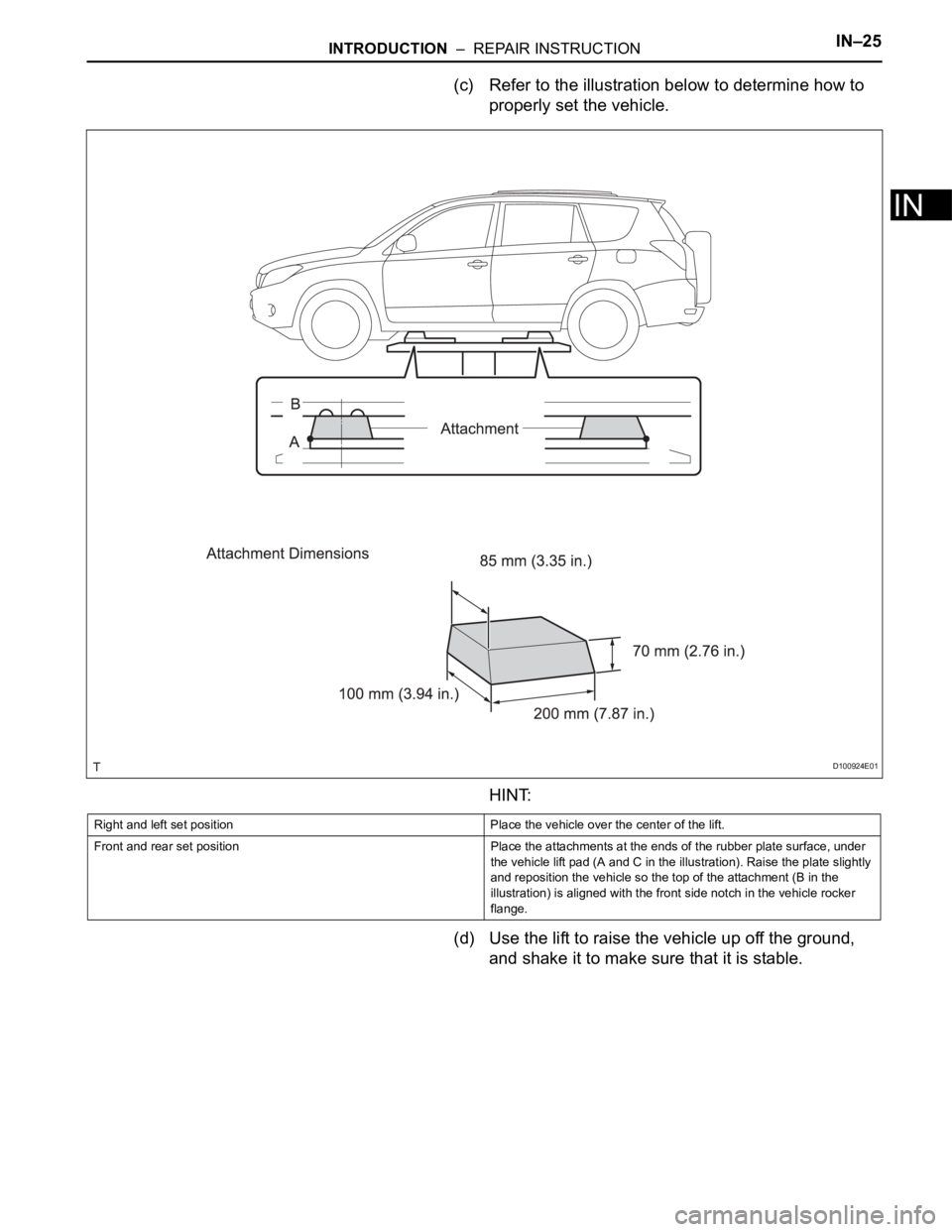
(c) Refer to the illustration below to determine how to
properly set the vehicle.
HINT:
(d) Use the lift to raise the vehicle up off the ground,
and shake it to make sure that it is stable.
D100924E01
Right and left set position Place the vehicle over the center of the lift.
Front and rear set position Place the attachments at the ends of the rubber plate surface, under
the vehicle lift pad (A and C in the illustration). Raise the plate slightly
and reposition the vehicle so the top of the attachment (B in the
illustration) is aligned with the front side notch in the vehicle rocker
flange.
Page 182 of 2000

MAINTENANCE – UNDER HOODMA–7
MA
GENERAL MAINTENANCE
(2006/01- )
1. GENERAL NOTES
• Maintenance requirements vary depending on the
country.
• Check the maintenance schedule in the owner's
manual supplement.
• Following the maintenance schedule is mandatory.
• Determine the appropriate time to service the vehicle
using either miles driven or time elapsed, whichever
reaches the specification first.
• Maintain similar intervals between periodic
maintenance, unless otherwise noted.
• Failing to check each vehicle part could lead to poor
engine performance and increase exhaust emissions.
2. WINDSHIELD WASHER FLUID
(a) Check that there is sufficient fluid in the tank.
3. ENGINE COOLANT LEVEL
(a) Check that the coolant level is between the "FULL"
and "LOW" lines on the see-through reservoir.
4. RADIATOR AND HOSES
(a) Check that the front of the radiator is clean and not
blocked by leaves, dirt or bugs.
(b) Check the hoses for cracks, kinks, rot or loose
connections.
5. BATTERY ELECTROLYTE LEVEL
(a) Check that the electrolyte level of all the battery
cells is between the upper and lower level lines on
the case.
HINT:
If the electrolyte level is difficult to see, lightly shake
the vehicle.
6. BRAKE FLUID LEVEL
(a) Check that the brake fluid levels are near the upper
level lines on the see-through reservoirs.
7. ENGINE DRIVE BELT
(a) Check the drive belt for fraying, cracks, wear or
oiliness.
8. ENGINE OIL LEVEL
(a) Check the level on the dipstick with the engine
stopped.
9. AUTOMATIC TRANSAXLE FLUID LEVEL
10. EXHAUST SYSTEM
(a) Check for unusual exhaust sounds or abnormal
exhaust fumes. Inspect the cause and repair it.
Type See procedures
U151E See page AX-126
U151F See page AX-126
Page 209 of 2000

IN–26INTRODUCTION – REPAIR INSTRUCTION
IN
CUSTOMIZE PARAMETERS
NOTICE:
• When the customer requests a change in a function,
first make sure that the function can be customized.
• Make a note of the current settings before
customizing.
• When troubleshooting a function, first make sure that
the function is set to the default setting.
1. Combination meter
2. Air conditioning system
3. Power Door Lock Control System
4. Wireless Door Lock Control System
Display (Item) Default Function Setting
SEAT BELT WARN D/P ON Seat belt warning buzzer ON /
OFF settingD/P ON: Driver and passenger
buzzer ON
D ON: Driver buzzer ON
P ON: Passenger buzzer ON
D/P OFF: Driver and passenger
buzzer OFF
Display (Item) Default Contents Setting
SET TEMP SHIFT
(Set Temperature Shift)NORMALTo control with shifted temperature against
display temperature+2 C / +1 C / NORMAL / -1 C / -2
C
AIR INLET MODE
(Air Inlet Mode)AUTOIn case of turning A/C ON when you desire to
make compartment cool down quickly, this is
function to change mode automatically to
RECIRCULATION modeMANUAL / AUTO
COMPRESSOR MODE
(Compressor Mode)AUTOFunction to turn A/C ON automatically by
pressing AUTO button when blower is ON
and A/C is OFFMANUAL / AUTO
COMPRS / DEF OPER
(Compressor / Air Inlet DEF
Operation)LINKFunction to turn A/C ON automatically linked
with FRONT DEF button when A/C is OFFNORMAL / LINK
EVAP CTRL
(Evaporator Control)AUTOFunction to set evaporator control to
AUTOMATIC position (AUTO) to save power,
or to coldest position (MANUAL) to dehumidify
air and to prevent windows from fogging upMANUAL / AUTO
FOOT / DEF MODE
(Foot / DEF auto mode)ONFunction to turn airflow from FOOT / DEF ON
automatically when AUTO MODE is ONOFF / ON
AUTO BLOW UP
(Foot / DEF automatic blower up
function)ONFunction to change blower level automatically
when defroster is ONOFF / ON
Display (Item) Default Function Setting
UNLK/KEY TWICE ON Unlocks only driver side door
when driver side door key
cylinder turned to unlock once,
and unlocks all doors when
turned to unlock twice. For OFF
setting, turning it once unlocks all
doors.ON / OFF
Display (Item) Default Contents Setting
HAZARD ANS BACK ONWhen LOCK switch on
transmitter pressed, all hazard
warning lights illuminate once.
When UNLOCK switch pressed,
all hazard warning lights
illuminate twiceON / OFF
Page 210 of 2000

INTRODUCTION – REPAIR INSTRUCTIONIN–27
IN
5. Lighting System
WIRLS BUZZ OPER ONFunction that makes wireless
buzzer sound for answer-back
when transmitter LOCK /
UNLOCK switch pressedON / OFF
OPEN DOOR WARN ONIf door is not completely closed
and transmitter LOCK switch is
pressed, this function sounds a
buzzer for 10 secondsON / OFF
WIRELESS OPER ONON / OFF of wireless door lock
functionON / OFF
ALARM FUNCTION ONOperates security alarm when
PANIC switch on transmitter
continuously pressed for 1
secondON / OFF
UNLOCK / 2 OPER ONFunction that unlocks driver side
door when unlock switch on
transmitter is pressed once, and
unlocks all doors when pressed
twice. If setting is OFF, pressing
unlock switch once makes all
doors unlock.ON / OFF
AUTO LOCK DELAY 30sThis function controls amount of
time from unlocking doors to
automatic re-locking function30s / 60s Display (Item) Default Contents Setting
Display (Item) Default Contents Setting
LIGHTING TIME
(Lighting Time)15 secondsChanges illumination duration
after door closure.
(It will quickly fade out in case of
turning ignition switch ON.)7.5/15/30 (seconds)
I/L ON /ACC OFF
(Room light illuminates when
ignition switch turned OFF)ONIlluminates light when ignition
switch turned to ACC.
(Room light illuminated when
interior light switch in DOOR
position)ON / OFF
I/L ON / UNLOCK
(Room light illuminates when
door key unlocked.)ONFunction to light up room light
when unlocking with door key
cylinder.
(Room light illuminated when
interior light switch in DOOR
position)ON / OFF
LIGHT CONTROL ONFunction to light up foot light
when ignition switch is ON and
shift position is not P.ON / OFF
Page 215 of 2000
IN–38INTRODUCTION – HOW TO TROUBLESHOOT ECU CONTROLLED SYSTEMS
IN
ELECTRONIC CIRCUIT INSPECTION
PROCEDURE
1. BASIC INSPECTION
(a) WHEN MEASURING RESISTANCE OF
ELECTRONIC PARTS
(1) Unless otherwise stated, all resistance
measurements should be made at an ambient
temperature of 20
C (68F). Resistance
measurements may be inaccurate if measured
at high temperatures, i.e. immediately after the
vehicle has been running. Measurements should
be made after the engine has cooled down.
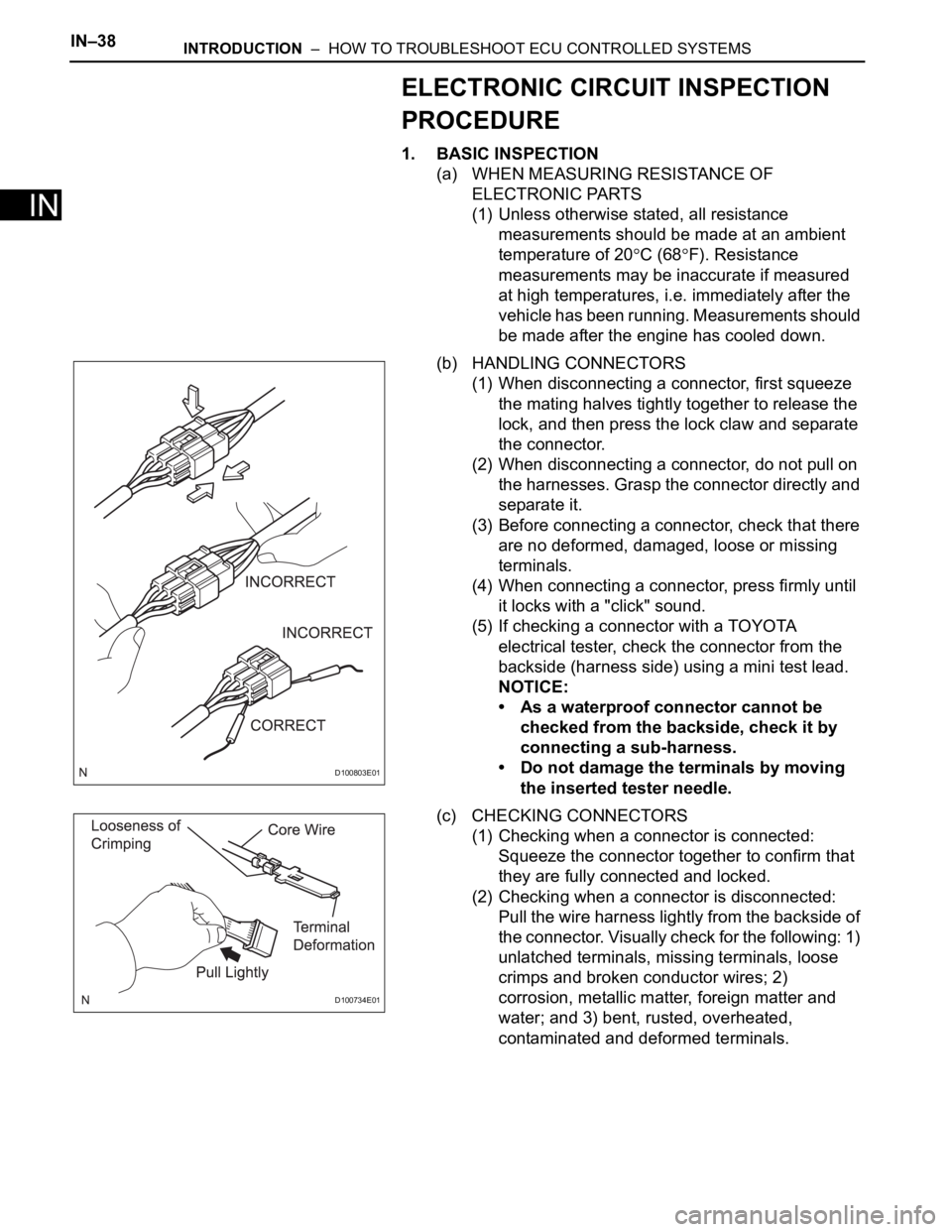
(b) HANDLING CONNECTORS
(1) When disconnecting a connector, first squeeze
the mating halves tightly together to release the
lock, and then press the lock claw and separate
the connector.
(2) When disconnecting a connector, do not pull on
the harnesses. Grasp the connector directly and
separate it.
(3) Before connecting a connector, check that there
are no deformed, damaged, loose or missing
terminals.
(4) When connecting a connector, press firmly until
it locks with a "click" sound.
(5) If checking a connector with a TOYOTA
electrical tester, check the connector from the
backside (harness side) using a mini test lead.
NOTICE:
• As a waterproof connector cannot be
checked from the backside, check it by
connecting a sub-harness.
• Do not damage the terminals by moving
the inserted tester needle.
(c) CHECKING CONNECTORS
(1) Checking when a connector is connected:
Squeeze the connector together to confirm that
they are fully connected and locked.
(2) Checking when a connector is disconnected:
Pull the wire harness lightly from the backside of
the connector. Visually check for the following: 1)
unlatched terminals, missing terminals, loose
crimps and broken conductor wires; 2)
corrosion, metallic matter, foreign matter and
water; and 3) bent, rusted, overheated,
contaminated and deformed terminals.
D100803E01
D100734E01