2006 SUZUKI SX4 PPL
[x] Cancel search: PPLPage 62 of 1556
Downloaded from www.Manualslib.com manuals search engine 1A-12 Engine General Information and Diagnosis:
Operation Description
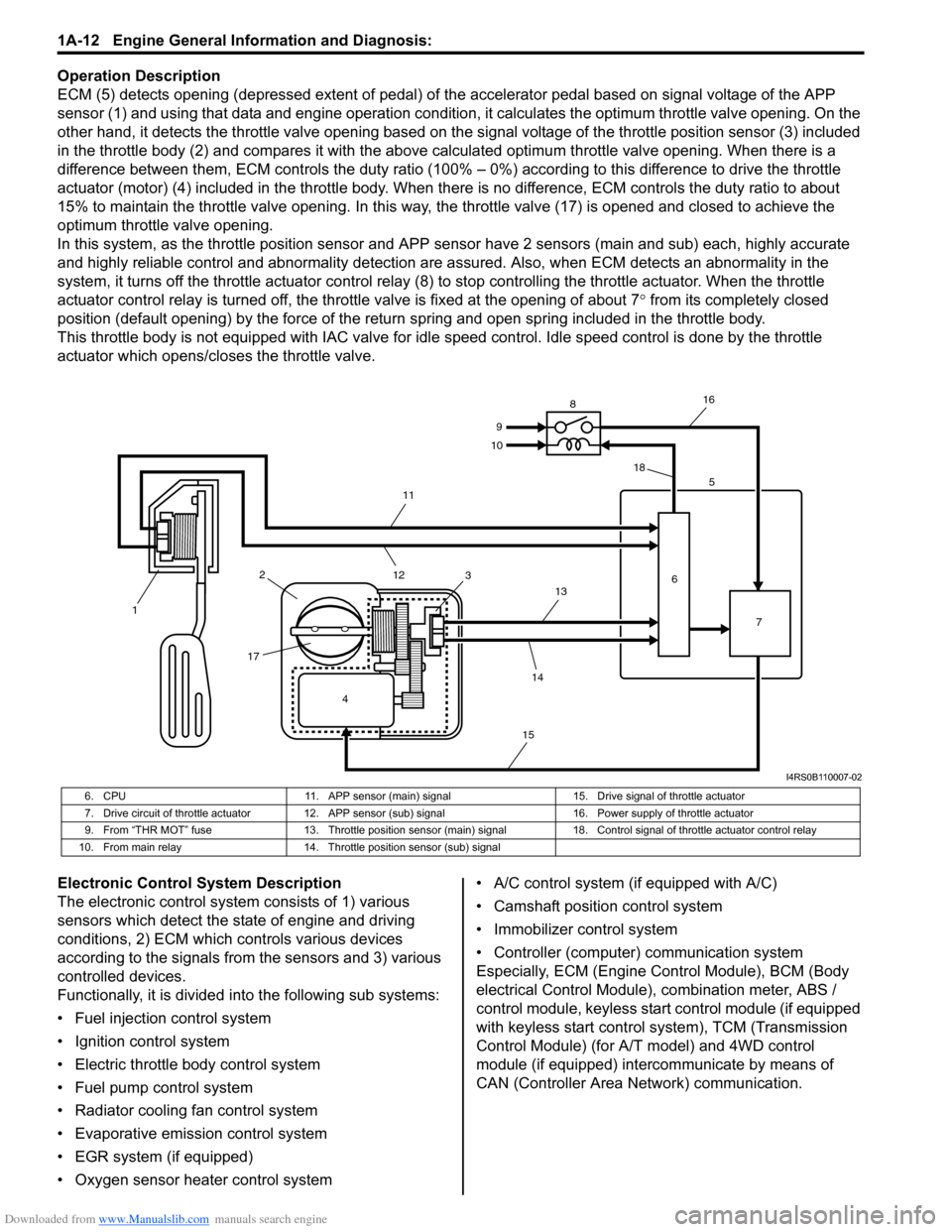
ECM (5) detects opening (depressed extent of pedal) of the accelerator pedal based on signal voltage of the APP
sensor (1) and using that data and engine operation condition, it calculates the optimum throttle valve opening. On the
other hand, it detects the throttle valve opening based on the signal voltage of the throttle position sensor (3) included
in the throttle body (2) and compares it with the above calculated optimum throttle valve opening. When there is a
difference between them, ECM controls the duty ratio (100% – 0%) according to this difference to drive the throttle
actuator (motor) (4) included in the throttle body. When there is no difference, ECM controls the duty ratio to about
15% to maintain the throttle valve opening. In this way, the throttle valve (17) is opened and closed to achieve the
optimum throttle valve opening.
In this system, as the throttle position sensor and APP sensor have 2 sensors (main and sub) each, highly accurate
and highly reliable control and abnormality detection are assured. Also, when ECM detects an abnormality in the
system, it turns off the throttle actuator control relay (8) to stop controlling the throttle actuator. When the throttle
actuator control relay is turned off, the throttle valve is fixed at the opening of about 7° from its completely closed
position (default opening) by the force of the return spring and open spring included in the throttle body.
This throttle body is not equipped with IAC valve for idle speed control. Idle speed control is done by the throttle
actuator which opens/closes the throttle valve.
Electronic Control System Description
The electronic control system consists of 1) various
sensors which detect the state of engine and driving
conditions, 2) ECM which controls various devices
according to the signals from the sensors and 3) various
controlled devices.
Functionally, it is divided into the following sub systems:
• Fuel injection control system
• Ignition control system
• Electric throttle body control system
• Fuel pump control system
• Radiator cooling fan control system
• Evaporative emission control system
• EGR system (if equipped)
• Oxygen sensor heater control system• A/C control system (if equipped with A/C)
• Camshaft position control system
• Immobilizer control system
• Controller (computer) communication system
Especially, ECM (Engine Control Module), BCM (Body
electrical Control Module), combination meter, ABS /
control module, keyless start control module (if equipped
with keyless start control system), TCM (Transmission
Control Module) (for A/T model) and 4WD control
module (if equipped) intercommunicate by means of
CAN (Controller Area Network) communication.
4 12
1735
6
7 8
9
10
11
12
13
14
1516
18
I4RS0B110007-02
6. CPU 11. APP sensor (main) signal 15. Drive signal of throttle actuator
7. Drive circuit of throttle actuator 12. APP sensor (sub) signal 16. Power supply of throttle actuator
9. From “THR MOT” fuse 13. Throttle position sensor (main) signal 18. Control signal of throttle actuator control relay
10. From main relay 14. Throttle position sensor (sub) signal
Page 67 of 1556

Downloaded from www.Manualslib.com manuals search engine Engine General Information and Diagnosis: 1A-17
Connector: E01
Terminal Wire color Circuit Terminal Wire color Circuit
1 BLK/RED Main power supply 31 BLK Ground for ECM
2WHT/REDPower source for ECM internal
memory32 GRNPower supply of throttle
actuator drive circuit.
3REDCAN communication line (active
high signal) to ABS control
module assembly33 — —
4BRNEngine revolution signal output
for EPS control module34 REDOutput for 5 V power source of
APP sensor (sub)
5— — 35BRNOutput for 5 V power source of
APP sensor (main)
6 — — 36 YEL APP sensor (sub) signal
7 — — 37 GRN APP sensor (main) signal
8— — 38— —
9— — 39— —
10 — — 40 — —
11 — — 4 1 — —
12 — — 42 — —
13 YEL/REDClock signal for immobilizer coil
antenna43 — —
14 — — 44 — —
15 GRN/WHT Fuel pump relay output 45 BRNThrottle actuator control relay
output
16 BLK/RED Main power supply 46 LT GRNRadiator cooling fan relay
output
17 — — 47 GRYA/C compressor relay output
(if equipped with A/C)
18 WHTCAN communication line (active
low signal) to ABS control
module assembly48 — —
19 BLU/WHTElectric load signal for heater
blower motor49 — —
20 GRN/WHT Brake light switch signal 50 BLKGround for shield wire of APP
sensor
21 — — 51 WHTGround for APP sensor (sub)
signal
22 — — 52 BLUGround for APP sensor (main)
signal
23 — — 53 — —
24 YEL/RED Fuel level sensor signal 54 ORN Ground for sensors
25 — — 55 RED/BLUA/C refrigerant pressure
sensor signal
(if equipped with A/C)
26 RED/BLU EPS signal 56 WHT/GRN —
27 — — 57 WHT/BLKA/C evaporator outlet air temp.
sensor signal
(if equipped with A/C)
28 YEL/BLKSerial communication line for
immobilizer coil antenna58 RED/BLK —
29 BLK/WHT Ignition switch signal 59 — —
30 WHTStarting motor control relay
output60 BRN/WHT Main power supply relay output
Page 72 of 1556

Downloaded from www.Manualslib.com manuals search engine 1A-22 Engine General Information and Diagnosis:
Diagnostic Information and Procedures
Engine and Emission Control System CheckS6RW0D1104001
Refer to the following items for the details of each step.
Step Action Yes No
1) Customer complaint analysis
1) Perform customer complaint analysis referring to
“Customer Complaint Analysis”.
Was customer complaint analysis performed?Go to Step 2. Perform customer
complaint analysis.
2) DTC / Freeze frame data check, record and clearance
1) Check for DTC (including pending DTC) referring to
“DTC / Freeze Frame Data Check, Record and
Clearance”.
Is there any DTC(s)?Print DTC and freeze
frame data or write them
down and clear them by
referring to “DTC
Clearance”, and go to
St ep 3 .Go to Step 4.
3) Visual inspection
1) Perform visual inspection referring to “Visual Inspection”.
Is there any faulty condition?Repair or replace
malfunction part, and go
to Step 11.Go to Step 5.
4) Visual inspection
1) Perform visual inspection referring to “Visual Inspection”.
Is there any faulty condition?Repair or replace
malfunction part, and go
to Step 11.Go to Step 8.
5) Trouble symptom confirmation
1) Confirm trouble symptom referring to “Trouble Symptom
Confirmation”.
Is trouble symptom identified?Go to Step 6. Go to Step 7.
6) Rechecking and record of DTC / Freeze frame data
1) Recheck for DTC and freeze frame data referring to
“DTC Check”.
Is there any DTC(s)?Go to Step 9. Go to Step 8.
7) Rechecking and record of DTC / Freeze frame data
1) Recheck for DTC and freeze frame data referring to
“DTC Check”.
Is there any DTC(s)?Go to Step 9. Go to Step 10.
8) Engine basic inspection and engine symptom
diagnosis
1) Check and repair according to “Engine Basic Inspection”
and “Engine Symptom Diagnosis”.
Are check and repair complete?Go to Step 11. Check and repair
malfunction part(s), and
go to Step 11.
9) Troubleshooting for DTC
1) Check and repair according to applicable DTC diag. flow.
Are check and repair complete?Go to Step 11. Check and repair
malfunction part(s), and
go to Step 11.
10) Intermittent problems check
1) Check for intermittent problems referring to “Intermittent
Problems Check”.
Is there any faulty condition?Repair or replace
malfunction part(s), and
go to Step 11.Go to Step 11.
Page 75 of 1556

Downloaded from www.Manualslib.com manuals search engine Engine General Information and Diagnosis: 1A-25
Step 2: DTC / Freeze Frame Data Check, Record and
Clearance
First, check DTC (including pending DTC), referring to
“DTC Check”. If DTC is indicated, print it and freeze
frame data or write them down and then clear them by
referring to “DTC Clearance”. DTC indicates malfunction
that occurred in the system but does not indicate
whether it exists now or it occurred in the past and the
normal condition has been restored now. To check which
case applies, check the symptom in question according
to Step 5 and recheck DTC according to Step 6 and 7.
Attempt to diagnose a trouble based on DTC in this step
only or failure to clear the DTC in this step will lead to
incorrect diagnosis, trouble diagnosis of a normal circuit
or difficulty in troubleshooting.
Step 3 and 4: Visual Inspection
As a preliminary step, be sure to perform visual check of
the items that support proper function of the engine
referring to “Visual Inspection”.
Step 5: Trouble Symptom Confirmation
Based on information obtained in “Step 1: Customer
Complaint Analysis: ” and “Step 2: DTC / Freeze Frame
Data Check, Record and Clearance: ”, confirm trouble
symptoms. Also, reconfirm DTC according to “DTC
Confirmation Procedure” described in each DTC diag.
flow.
Step 6 and 7: Rechecking and Record of DTC /
Freeze Frame Data
Refer to “DTC Check” for checking procedure.
Step 8: Engine Basic Inspection and Engine
Symptom Diagnosis
Perform basic engine check according to “Engine Basic
Inspection” first. When the end of the flow has been
reached, check the parts of the system suspected as a
possible cause referring to “Engine Symptom Diagnosis”
and based on symptoms appearing on the vehicle
(symptoms obtained through steps of customer
complaint analysis, trouble symptom confirmation and/or
basic engine check) and repair or replace faulty parts, if
any.
Step 9: Troubleshooting for DTC (See each DTC
Diag. Flow)
Based on the DTC indicated in Step 6 or 7 and referring
to the applicable DTC diag. flow, locate the cause of the
trouble, namely in a sensor, switch, wire harness,
connector, actuator, ECM or other part and repair or
replace faulty parts.Step 10: Intermittent Problems Check
Check parts where an intermittent trouble is easy to
occur (e.g., wire harness, connector, etc.), referring to
“Intermittent and Poor Connection Inspection in Section
00” and related circuit of DTC recorded in Step 2.
Step 11: Final Confirmation Test
Confirm that the problem symptom has gone and the
engine is free from any abnormal conditions. If what has
been repaired is related to the DTC, clear the DTC once,
perform DTC confirmation procedure and confirm that no
DTC is indicated.
Malfunction Indicator Lamp (MIL) CheckS6RW0D1104002
1) Turn ON ignition switch (with engine at stop) and
check that MIL (1) lights.
If MIL does not light up (or MIL dims) but engine can
be starting, go to “Malfunction Indicator Lamp Does
Not Come ON with Ignition Switch ON and Engine
Stop (but Engine Can Be Started)” for
troubleshooting.
If MIL does not light with ignition switch ON and
engine does not start though it is cranked up, go to
“ECM Power and Ground Circuit Check”.
2) Start engine and check that MIL turns OFF.
If MIL remains ON and no DTC is stored in ECM, go
to “Malfunction Indicator Lamp Remains ON after
Engine Starts” for troubleshooting.
DTC CheckS6RW0D1104085
NOTE
• There are two types of OBD system
depending on the vehicle specification.
For identification, refer to “Precaution on
On-Board Diagnostic (OBD) System”.
1
I4RS0A110012-01
Page 79 of 1556

Downloaded from www.Manualslib.com manuals search engine Engine General Information and Diagnosis: 1A-29
Troubleshooting
Step Action Yes No
1Scan tool check
1) Disconnect scan tool from DLC with ignition switch
turned OFF.
2) Check for proper connection to all terminals of scan tool
connector.
3) If OK, connect scan tool to another vehicle of this type
with ignition switch turned OFF.
4) Check communication between scan tool and ECM by
DTC check in ECM.
Is it possible to check DTC in ECM?Go to Step 2. Scan tool faulty. Refer
to its operator’s manual.
2DLC power circuit check
1) Check for proper connection to all DLC (1) terminals with
ignition switch turned OFF.
2) If OK, measure voltage between +B terminal (2) of DLC
and vehicle body ground with ignition switch turned to
ON position.
Is voltage 10 – 14 V?Go to Step 3. Repair power circuit.
3DLC ground circuit check
1) Ignition switch turn to OFF position.
2) Check DLC (1) ground circuits as follows.
• Measure resistance between signal ground terminal
(2) of DLC and vehicle body ground.
• Measure resistance between body ground terminal (3)
of DLC and vehicle body ground.
Is resistance 1
Ω or less?Go to Step 4. Repair ground circuit(s).
4DTC Check
1) Turn ignition switch to OFF position.
2) Connect scan tool to DLC.
3) Check DTC in the following control modules that
communicate with scan tool by K-line.
•BCM
• Keyless start control module
• 4WD control module
Is there any DTC other than CAN-DTC?Go to applicable
troubleshooting of DTC
other than CAN-DTC.Go to Step 5.
2
9 10 11 12 13 14 15 16
1 2 3 4 5 6 7 8
1
I7RW01110096-01
23 1
9 10 11 12 13 14 15 16
1 2 3 4 5 6 7 8
I7RW01110097-01
Page 84 of 1556

Downloaded from www.Manualslib.com manuals search engine 1A-34 Engine General Information and Diagnosis:
)
U*P0420Catalyst system efficiency below
thresholdOutput waveforms of HO2S-1 and HO2S-2 are similar.2 driving
cycles
)
U*P0443Evaporative emission system purge
control valve circuitMonitor signal of EVAP canister purge valve is different
from command signal. (circuit open or shorted to ground)2 driving
cycles
) P0462 Fuel level sensor circuit lowCircuit voltage of fuel level sensor is less than
specification.—
) P0463 Fuel level sensor circuit highCircuit voltage of fuel level sensor is more than
specification.—
)
U*P0480Fan 1 control circuitMonitor signal of radiator cooling fan relay is different from
command signal.1 driving
cycle
)
UP0481Fan 2 control circuitMonitor signal of A/C condenser cooling fan relay is
different from command signal.—
) *P0500 Vehicle speed sensor No VSS signal during fuel cut for specified time or longer.2 driving
cycles
) P0532A/C refrigerant pressure sensor
circuit lowOutput voltage of A/C refrigerant pressure sensor is less
than specification.—
) P0533A/C refrigerant pressure sensor
circuit highOutput voltage of A/C refrigerant pressure sensor is more
than specification.—
) *P0601Internal control module memory
check sum errorData write error or check sum error.1 driving
cycle
) P0602 Control module programming error Data programming error.1 driving
cycle
) *P0607 Control module performance Data programming error.1 driving
cycle
)
U*P0616Starter relay circuit lowStarter signal is low voltage even though engine is started
with vehicle at stop.2 driving
cycles
)
U*P0617Starter relay circuit highStarter signal is high voltage for specified time while
engine is running.2 driving
cycles
) *P1510
ECM backup power supply
malfunctionBackup power voltage is out of specification after starting
engine.1 driving
cycle
) *P2101Throttle actuator control motor
circuit range/performanceMonitor signal of throttle actuator output (duty output) is
inconsistent with throttle actuator control command.1 driving
cycle
) *P2102Throttle actuator control motor
circuit lowPower supply voltage of throttle actuator control circuit is
lower than specification even if throttle actuator control
relay turned on.1 driving
cycle
) *P2103Throttle actuator control motor
circuit highPower supply voltage of throttle actuator control circuit is
higher than specification even if throttle actuator control
relay turned off.1 driving
cycle
) *P2111Throttle actuator control system –
stuck openThrottle valve default opening is greater than 8° from
complementary closed position when diagnosing throttle
valve at ignition switch turned OFF.1 driving
cycle
) *P2119Throttle actuator control throttle
body range/performanceDifference between actual throttle valve opening angle
and opening angle calculated by ECM is more than
specification.1 driving
cycle
) *P2122Pedal position sensor (main) circuit
low inputOutput voltage of pedal position sensor (main) is lower
than specification.1 driving
cycle
) *P2123Pedal position sensor (main) circuit
high inputOutput voltage of pedal position sensor (main) is higher
than specification.1 driving
cycle
) *P2127Pedal position sensor (sub) circuit
low inputOutput voltage of pedal position sensor (sub) is lower
than specification.1 driving
cycle
) *P2128Pedal position sensor (sub) circuit
high inputOutput voltage of pedal position sensor (sub) is higher
than specification.1 driving
cycle
) *P2135Throttle position sensor (main / sub)
voltage correlationDifference between the opening angle based on throttle
position sensor (main) and the opening angle based on
throttle position sensor (sub) is more than specification.1 driving
cycle DTC No. Detecting itemDetecting condition
(DTC will set when detecting:)MIL
Page 92 of 1556

Downloaded from www.Manualslib.com manuals search engine 1A-42 Engine General Information and Diagnosis:
CANIST PRG DUTY (EVAP CANISTER PURGE FLOW
DUTY, %)
This parameter indicates valve ON (valve open) time
rate within a certain set cycle of EVAP canister purge
valve which controls the amount of EVAP purge.
IGNITION ADVANCE (IGNITION TIMING ADVANCE
FOR NO.1 CYLINDER, °)
Ignition timing of No.1 cylinder is commanded by ECM.
The actual ignition timing should be checked by using
the timing light.
EGR VALVE OPENING (%)
This parameter indicates opening rate of EGR valve
which controls the amount of EGR flow.
VVT GAP (TARGET-ACTUAL POSITION, °) (VVT
model)
It is calculated using the formula: target valve timing
advance – actual valve timing advance.
FUEL PUMP (ON/OFF)
ON is displayed when ECM activates the fuel pump via
the fuel pump relay switch.
STARTER SW (STARTER SWITCH, ON/OFF)
This parameter indicates condition of starting motor relay
output.
ON: Starting motor relay is ON
OFF: Starting motor relay is OFF
A/C PRESSURE (A/C REFRIGERANT ABSOLUTE
PRESSURE, kPa)
This parameter indicates A/C refrigerant absolute
pressure calculated by ECM.
A/C SWITCH (ON/OFF)
ON: Command for A/C operation being output from ECM
to HVAC.
OFF: Command for A/C operation not being output.
A/C COMP RELAY (A/C COMPRESSOR RELAY, ON/
OFF)
This parameter indicates the state of the A/C switch.
BLOWER FAN (ON/OFF)
This parameter indicates the state of the blower fan
motor switch.
ELECTRIC LOAD (ON/OFF)
ON: Headlight or small light ON signal inputted.
OFF: Above electric loads all turned OFF.
RADIATOR COOLING FAN (RADIATOR COOLING
FAN CONTROL RELAY, ON/OFF)
ON: Command for radiator cooling fan control relay
operation being output.
OFF: Command for relay operation not being output.A/C COND FAN (A/C CONDENSER COOLING FAN
CONTROL RELAY, ON/OFF)
ON: Command for A/C condenser cooling fan control
relay operation being output.
OFF: Command for relay operation not being output.
TP SENSOR 1 VOLT (THROTTLE POSITION SENSOR
(MAIN) OUTPUT VOLTAGE, V)
The Throttle Position Sensor (Main) reading provides
throttle valve opening information in the form of voltage.
TP SENSOR 2 VOLT (THROTTLE POSITION SENSOR
(SUB) OUTPUT VOLTAGE, V)
The Throttle Position Sensor (Sub) reading provides
throttle valve opening information in the form of voltage.
APP SENSOR 1 VOLT (ACCELERATOR PEDAL
POSITION (APP) SENSOR (MAIN) OUTPUT
VOLTAGE, V)
The Accelerator Pedal Position (APP) Sensor (Main)
reading provides accelerator pedal opening information
in the form of voltage.
APP SENSOR 2 VOLT (ACCELERATOR PEDAL
POSITION (APP) SENSOR (SUB) OUTPUT VOLTAGE,
V)
The Accelerator Pedal Position (APP) Sensor (Sub)
reading provides accelerator pedal opening information
in the form of voltage.
ACCEL POSITION (RELATIVE ACCELERATOR
PEDAL POSITION, %)
When accelerator pedal is at fully released position,
accelerator pedal is indicated as 0 – 3% and 90 – 100%
fully depressed position.
TARGET THROTTLE POSI (TARGET THROTTLE
VALVE POSITION, %)
Target Throttle Valve Position is ECM internal parameter
which indicates the ECM requested throttle valve
position.
IAC THROTTLE OPENING (IDLE AIR (SPEED)
CONTROL THROTTLE VALVE OPENING, %)
This parameter indicates throttle valve opening of idle air
control in %.
(100% indicates the maximum idle air flow.)
THROTTLE MOTOR VOLT (V)
This parameter indicates power supply voltage of throttle
actuator (motor) control circuit (input voltage from
throttle actuator control relay).
CLOSED THROTTLE POS (CLOSED THROTTLE
POSITION, ON/OFF)
This parameter reads ON when throttle valve is fully
closed, or OFF when it is not fully closed.
Page 94 of 1556

Downloaded from www.Manualslib.com manuals search engine 1A-44 Engine General Information and Diagnosis:
4Check keyless start control system malfunction
1) Check keyless start control system referring to “Keyless
Start System Operation Inspection in Section 10E”.
Is check result satisfactory?Go to Step 5. Keyless start control
system malfunction.
5Is engine cranked?Go to Step 6. Go to “Cranking System
Symptom Diagnosis in
Section 1I”.
6Does engine start?Go to Step 7. Go to Step 9.
7Check idle speed
1) Check engine idle speed referring to “Idle Speed and
IAC Throttle Valve Opening Inspection”.
Is check result as specified?Go to Step 8. Go to “Engine Symptom
Diagnosis”.
8Check ignition timing
1) Check ignition timing referring to “Ignition Timing
Inspection in Section 1H”.
Is check result as specified?Go to “Engine Symptom
Diagnosis”.Check ignition control
related parts referring to
“Ignition Timing
Inspection in Section
1H”.
9Check immobilizer system malfunction
1) Check immobilizer indicator lamp for flashing.
Is it flashing when ignition switch is turned to ON position?Go to “DTC Check in
Section 10C”.Go to Step 10.
10Check fuel supply
1) Check to make sure that enough fuel is filled in fuel tank.
2) Turn ON ignition switch for 2 seconds and then OFF.
3) Repeat Step 2) a few times.
Is fuel pressure felt from fuel feed hose when ignition switch
is turned ON?Go to Step 12. Go to Step 11.
11Check fuel pump for operation
Was fuel pump operating sound heard from fuel filler for
about 2 seconds after ignition switch ON and stop?Go to “Fuel Pressure
Check”.Go to “Fuel Pump and
Its Circuit Check”.
12Check ignition spark
1) Check ignition spark referring to “Ignition Spark Test in
Section 1H”.
Is it in good condition?Go to Step 13. Go to “Ignition System
Symptom Diagnosis in
Section 1H”.
13Check fuel injector circuit
1) Check fuel injector circuit referring to “Fuel Injector
Circuit Check.”
Is it in good condition?Go to “Engine Symptom
Diagnosis”.Go to “Fuel Injector
Circuit Check”. Step Action Yes No
I5RW0A110014-01