2006 SUZUKI SX4 engine mount
[x] Cancel search: engine mountPage 1035 of 1556
Downloaded from www.Manualslib.com manuals search engine Seat Belts: 8A-4
Repair Instructions
Front Seat Belt ComponentsS6RW0D8106001
WARNING!
• Never attempt to disassemble or repair the seat belt pretensioner (retractor). If any abnormality is
found, be sure to replace it with new one as an assembly.
• Be sure to read “Precautions on Service and Diagnosis of Seat Belt” before starting to work and
observe every precaution during work. Neglecting them may result in personal injury or
unactivation of the seat belt pretensioner when necessary.
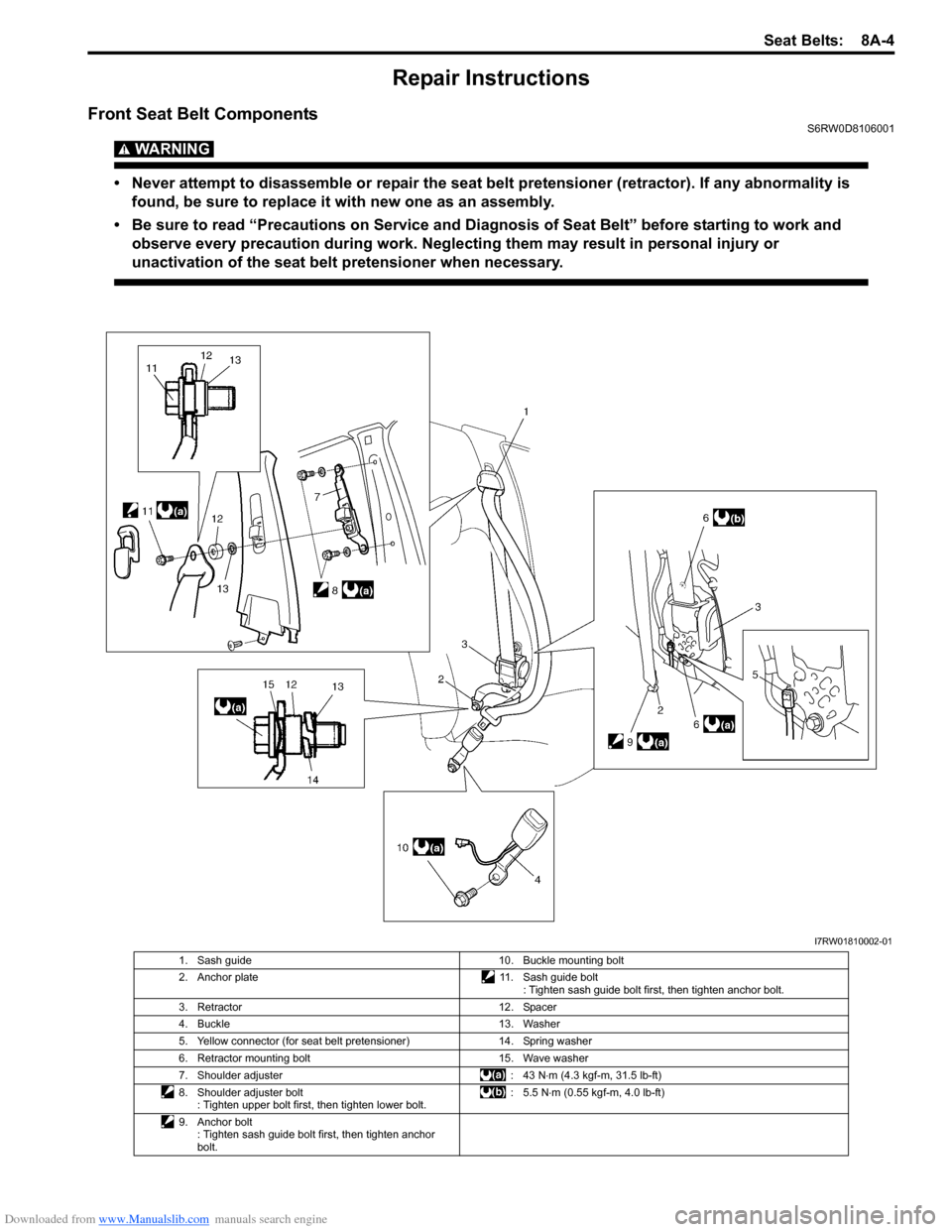
I7RW01810002-01
1. Sash guide 10. Buckle mounting bolt
2. Anchor plate 11. Sash guide bolt
: Tighten sash guide bolt first, then tighten anchor bolt.
3. Retractor 12. Spacer
4. Buckle 13. Washer
5. Yellow connector (for seat belt pretensioner) 14. Spring washer
6. Retractor mounting bolt 15. Wave washer
7. Shoulder adjuster : 43 N⋅m (4.3 kgf-m, 31.5 lb-ft)
8. Shoulder adjuster bolt
: Tighten upper bolt first, then tighten lower bolt.: 5.5 N⋅m (0.55 kgf-m, 4.0 lb-ft)
9. Anchor bolt
: Tighten sash guide bolt first, then tighten anchor
bolt.
Page 1038 of 1556
Downloaded from www.Manualslib.com manuals search engine 8A-7 Seat Belts:
Rear Seat Belt ComponentsS6RW0D8106004
WARNING!
Be sure to read “Precautions on Service and Diagnosis of Seat Belt” before starting to work and
observe every precaution during work.
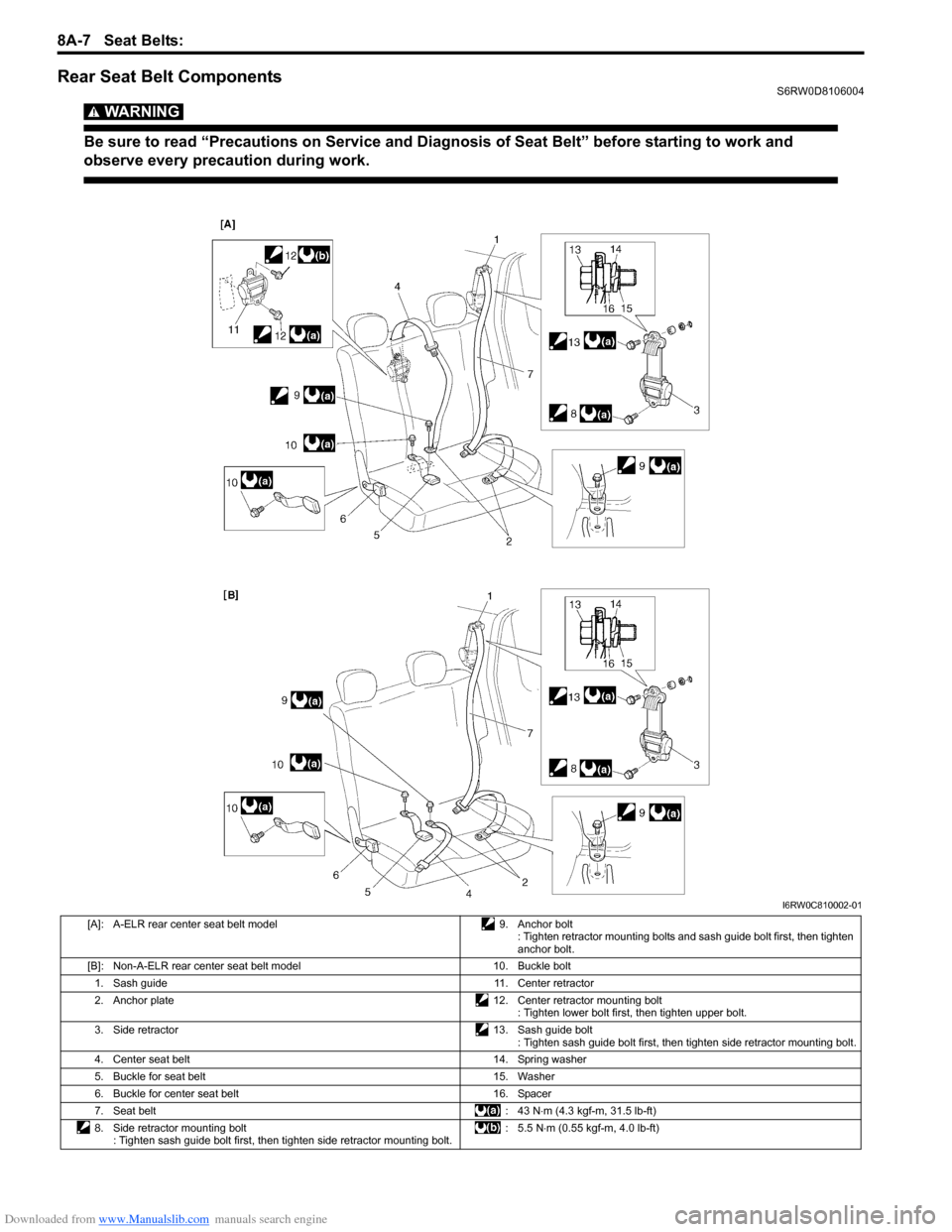
I6RW0C810002-01
[A]: A-ELR rear center seat belt model 9. Anchor bolt
: Tighten retractor mounting bolts and sash guide bolt first, then tighten
anchor bolt.
[B]: Non-A-ELR rear center seat belt model 10. Buckle bolt
1. Sash guide 11. Center retractor
2. Anchor plate 12. Center retractor mounting bolt
: Tighten lower bolt first, then tighten upper bolt.
3. Side retractor 13. Sash guide bolt
: Tighten sash guide bolt first, then tighten side retractor mounting bolt.
4. Center seat belt 14. Spring washer
5. Buckle for seat belt 15. Washer
6. Buckle for center seat belt 16. Spacer
7. Seat belt: 43 N⋅m (4.3 kgf-m, 31.5 lb-ft)
8. Side retractor mounting bolt
: Tighten sash guide bolt first, then tighten side retractor mounting bolt.:5.5 N⋅m (0.55 kgf-m, 4.0 lb-ft)
Page 1041 of 1556
Downloaded from www.Manualslib.com manuals search engine Air Bag System: 8B-2
• Never attempt disassembly of SDM.
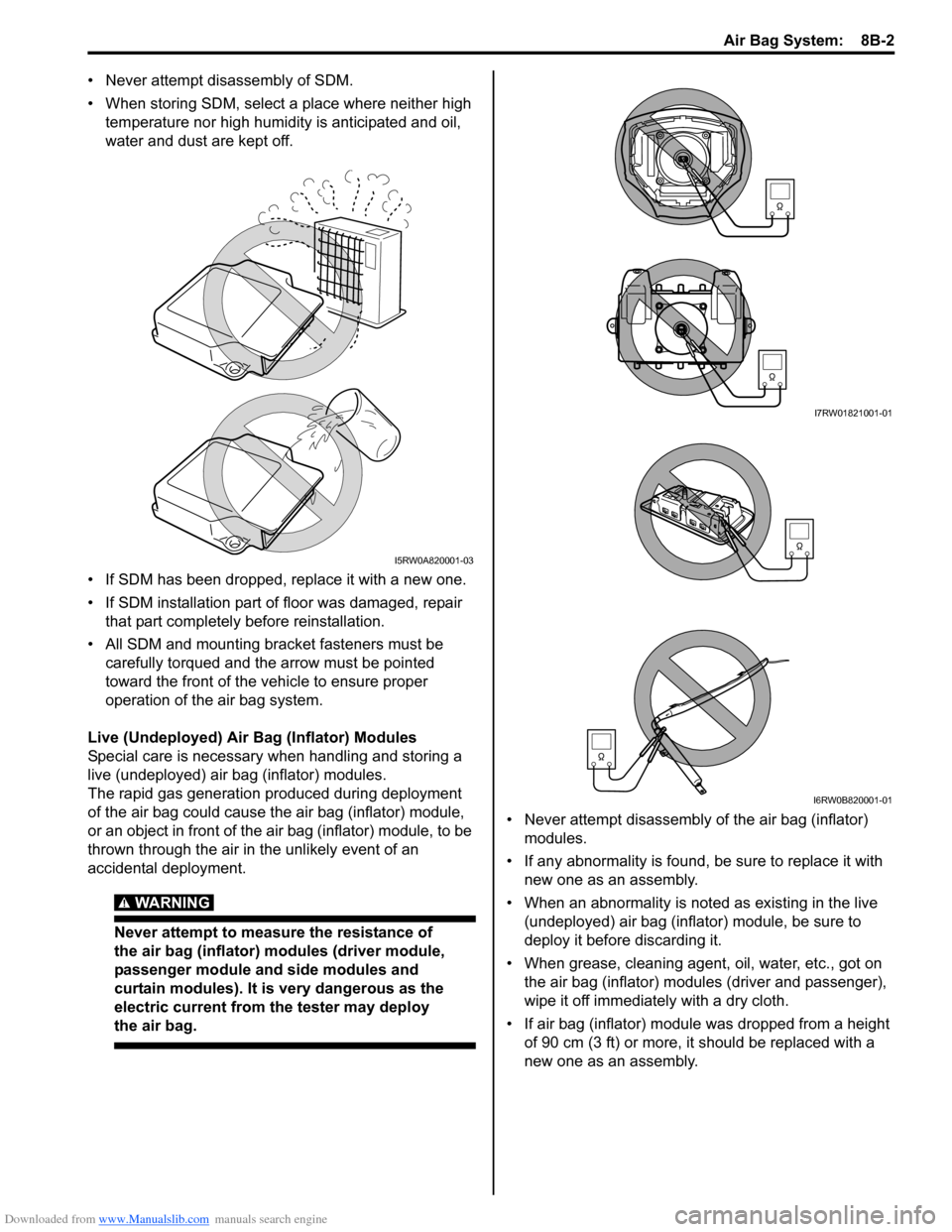
• When storing SDM, select a place where neither high
temperature nor high humidity is anticipated and oil,
water and dust are kept off.
• If SDM has been dropped, replace it with a new one.
• If SDM installation part of floor was damaged, repair
that part completely before reinstallation.
• All SDM and mounting bracket fasteners must be
carefully torqued and the arrow must be pointed
toward the front of the vehicle to ensure proper
operation of the air bag system.
Live (Undeployed) Air Bag (Inflator) Modules
Special care is necessary when handling and storing a
live (undeployed) air bag (inflator) modules.
The rapid gas generation produced during deployment
of the air bag could cause the air bag (inflator) module,
or an object in front of the air bag (inflator) module, to be
thrown through the air in the unlikely event of an
accidental deployment.
WARNING!
Never attempt to measure the resistance of
the air bag (inflator) modules (driver module,
passenger module and side modules and
curtain modules). It is very dangerous as the
electric current from the tester may deploy
the air bag.
• Never attempt disassembly of the air bag (inflator)
modules.
• If any abnormality is found, be sure to replace it with
new one as an assembly.
• When an abnormality is noted as existing in the live
(undeployed) air bag (inflator) module, be sure to
deploy it before discarding it.
• When grease, cleaning agent, oil, water, etc., got on
the air bag (inflator) modules (driver and passenger),
wipe it off immediately with a dry cloth.
• If air bag (inflator) module was dropped from a height
of 90 cm (3 ft) or more, it should be replaced with a
new one as an assembly.
I5RW0A820001-03
I7RW01821001-01
I6RW0B820001-01
Page 1060 of 1556
Downloaded from www.Manualslib.com manuals search engine 8B-21 Air Bag System:
NOTE
Upon completion of inspection and repair work, perform the following items.
• Reconnect all air bag system components and ensure all components are properly mounted.
• Repeat “Air Bag Diagnostic System Check” to confirm that the trouble has been corrected.
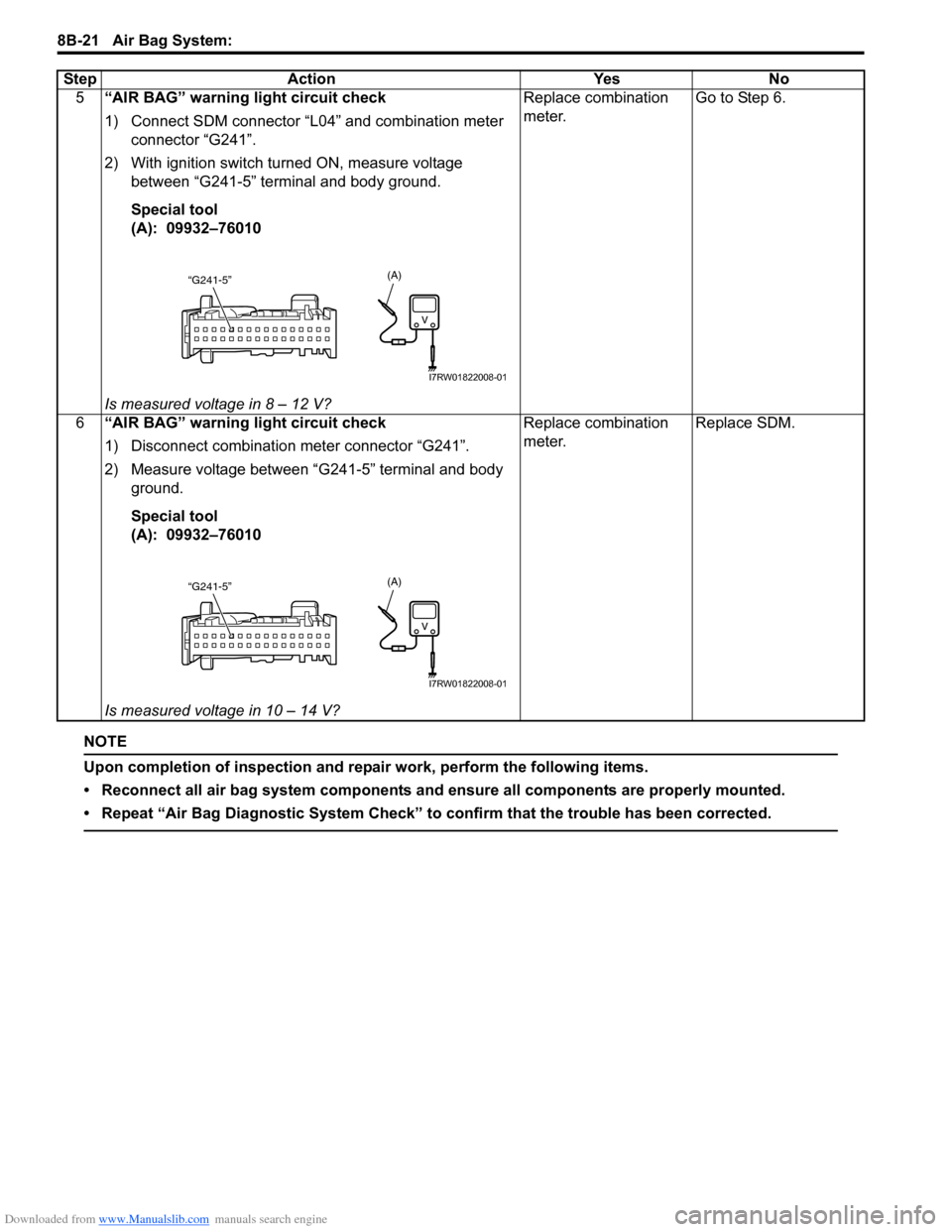
5“AIR BAG” warning light circuit check
1) Connect SDM connector “L04” and combination meter
connector “G241”.
2) With ignition switch turned ON, measure voltage
between “G241-5” terminal and body ground.
Special tool
(A): 09932–76010
Is measured voltage in 8 – 12 V?Replace combination
meter.Go to Step 6.
6“AIR BAG” warning light circuit check
1) Disconnect combination meter connector “G241”.
2) Measure voltage between “G241-5” terminal and body
ground.
Special tool
(A): 09932–76010
Is measured voltage in 10 – 14 V?Replace combination
meter.Replace SDM. Step Action Yes No
“G241-5”(A)
I7RW01822008-01
“G241-5”(A)
I7RW01822008-01
Page 1061 of 1556
Downloaded from www.Manualslib.com manuals search engine Air Bag System: 8B-22
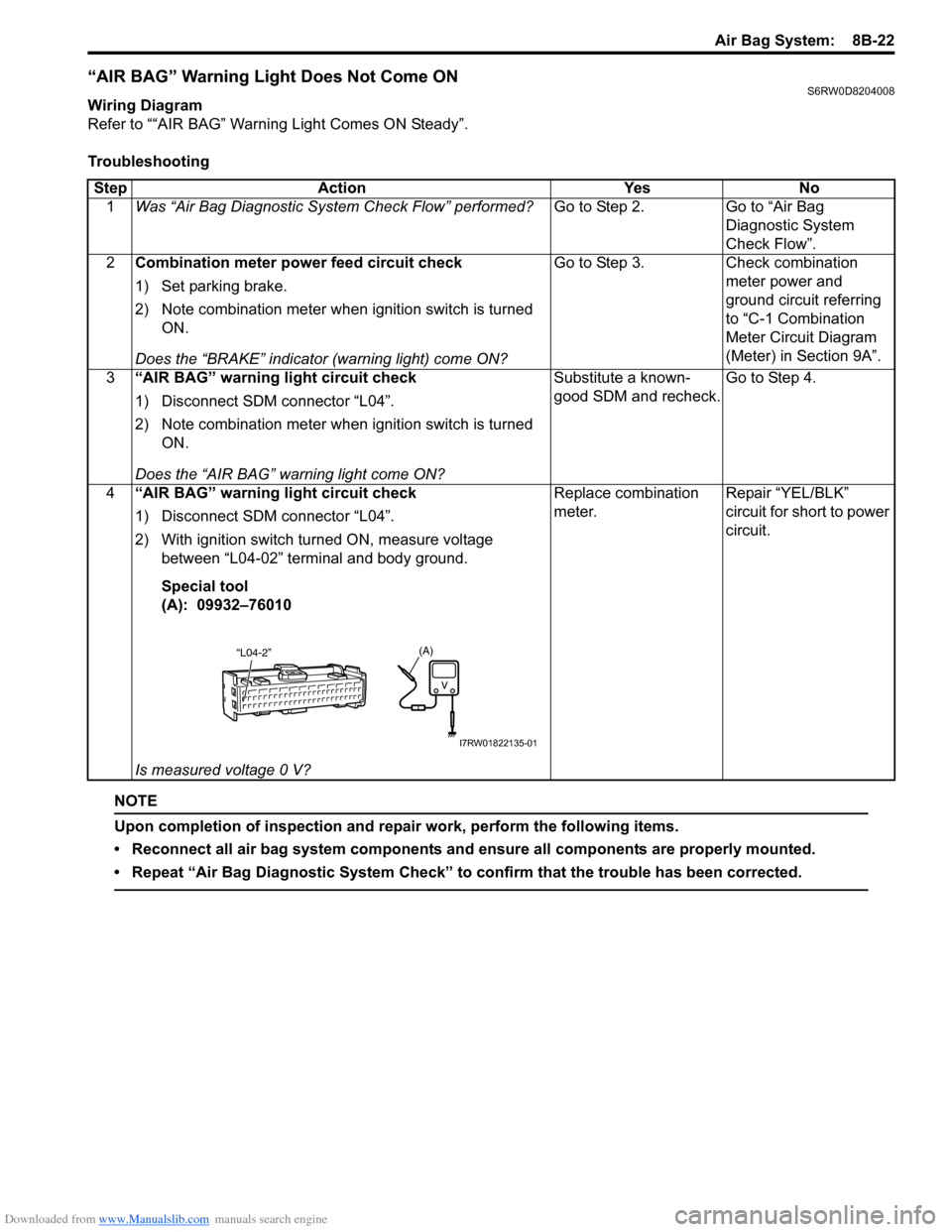
“AIR BAG” Warning Light Does Not Come ONS6RW0D8204008
Wiring Diagram
Refer to ““AIR BAG” Warning Light Comes ON Steady”.
Troubleshooting
NOTE
Upon completion of inspection and repair work, perform the following items.
• Reconnect all air bag system components and ensure all components are properly mounted.
• Repeat “Air Bag Diagnostic System Check” to confirm that the trouble has been corrected.
Step Action Yes No
1Was “Air Bag Diagnostic System Check Flow” performed?Go to Step 2. Go to “Air Bag
Diagnostic System
Check Flow”.
2Combination meter power feed circuit check
1) Set parking brake.
2) Note combination meter when ignition switch is turned
ON.
Does the “BRAKE” indicator (warning light) come ON?Go to Step 3. Check combination
meter power and
ground circuit referring
to “C-1 Combination
Meter Circuit Diagram
(Meter) in Section 9A”.
3“AIR BAG” warning light circuit check
1) Disconnect SDM connector “L04”.
2) Note combination meter when ignition switch is turned
ON.
Does the “AIR BAG” warning light come ON?Substitute a known-
good SDM and recheck.Go to Step 4.
4“AIR BAG” warning light circuit check
1) Disconnect SDM connector “L04”.
2) With ignition switch turned ON, measure voltage
between “L04-02” terminal and body ground.
Special tool
(A): 09932–76010
Is measured voltage 0 V?Replace combination
meter.Repair “YEL/BLK”
circuit for short to power
circuit.
(A)“L04-2”
I7RW01822135-01
Page 1064 of 1556
Downloaded from www.Manualslib.com manuals search engine 8B-25 Air Bag System:
DTC B1013: SDM Internal FailureS6RW0D8204010
DTC Detecting Condition and Trouble Area
NOTE
DTC B1013 can never be cleared once it has been set.
DTC Troubleshooting
NOTE
Upon completion of inspection and repair work, perform the following items.
• Reconnect all air bag system components and ensure all components are properly mounted.
• Clear DTCs referring to “DTC Clearance”, if any.
• Repeat “Air Bag Diagnostic System Check” to confirm that the trouble has been corrected.
7Serial communication circuit check
1) With ignition switch turned OFF, disconnect SDM
connector “L04” and check for proper connection at
SDM connector terminal.
2) If connections are OK, check that “Serial data circuit” is
as follows.
• Insulation resistance of “Serial data circuit” wire is
infinity between its terminal and other terminals at
SDM connector.
• Insulation resistance of “Serial data circuit” wire is
infinity between its terminal and vehicle body ground.
Is circuit in good condition?Go to Step 8. Repair or replace
defective circuit.
8Scan tool operation check
1) Check if communication is possible by making
communication with other vehicles.
Is it possible to communicate with the other vehicle?Scan tool is in good
condition, check
intermittent trouble
referring to “Intermittent
and Poor Connection
Inspection in Section
00”.Recheck PCMCIA card
and DLC cable for faulty
condition. If they are
OK, scan tool is faulty. Step Action Yes No
DTC detecting condition Trouble area
Malfunctioned SDM internal circuit, G sensor, memory or CPU. • SDM
Step Action Yes No
1Was “Air Bag Diagnostic System Check Flow” performed?Go to Step 2. Go to “Air Bag
Diagnostic System
Check Flow”
2DTC check
1) Clear DTC referring to “DTC Clearance”.
2) Turn OFF ignition switch.
3) Turn ON ignition switch and check DTC.
Is DTC B1013 still indicated?Go to Step 3. Intermittent trouble.
Check for intermittent
referring to “Intermittent
and Poor Connection
Inspection in Section
00”.
3SDM power supply and ground circuit check
1) Check SDM power supply and ground circuit referring to
“SDM Power Supply and Ground Circuit Check”.
Is SDM power supply and ground circuit in good condition?Substitute a known-
good SDM and recheck.Repair power supply
and ground circuit.
Page 1065 of 1556
Downloaded from www.Manualslib.com manuals search engine Air Bag System: 8B-26
DTC B1014: “AIR BAG” Warning Light CircuitS6RW0D8204011
Wiring Diagram
Refer to““AIR BAG” Warning Light Comes ON Steady”.
DTC Detecting Condition and Trouble Area
DTC Troubleshooting
NOTE
Upon completion of inspection and repair work, perform the following items.
• Reconnect all air bag system components and ensure all components are properly mounted.
• Clear DTCs referring to “DTC Clearance”, if any.
• Repeat “Air Bag Diagnostic System Check” to confirm that the trouble has been corrected.
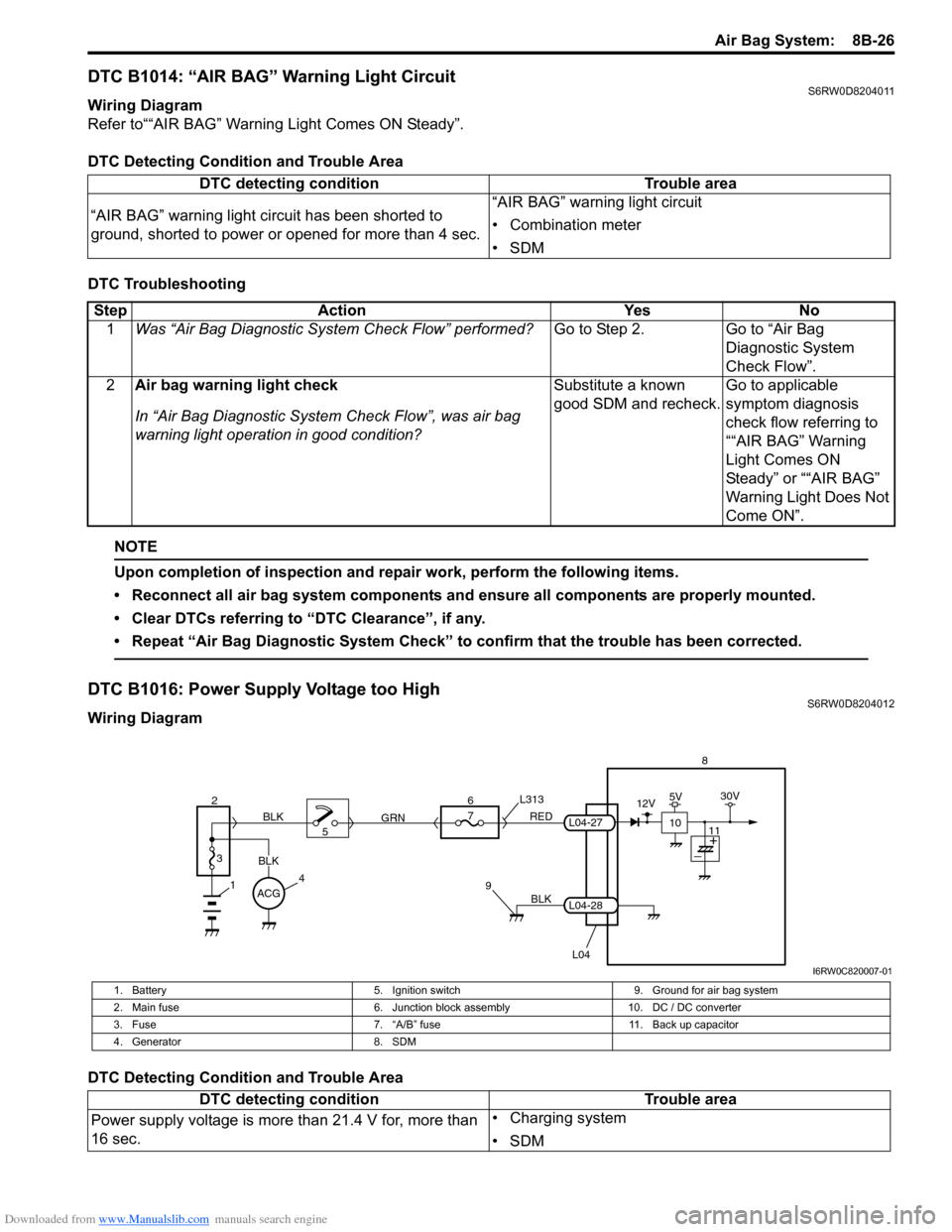
DTC B1016: Power Supply Voltage too HighS6RW0D8204012
Wiring Diagram
DTC Detecting Condition and Trouble AreaDTC detecting condition Trouble area
“AIR BAG” warning light circuit has been shorted to
ground, shorted to power or opened for more than 4 sec.“AIR BAG” warning light circuit
• Combination meter
•SDM
Step Action Yes No
1Was “Air Bag Diagnostic System Check Flow” performed?Go to Step 2. Go to “Air Bag
Diagnostic System
Check Flow”.
2Air bag warning light check
In “Air Bag Diagnostic System Check Flow”, was air bag
warning light operation in good condition?Substitute a known
good SDM and recheck.Go to applicable
symptom diagnosis
check flow referring to
““AIR BAG” Warning
Light Comes ON
Steady” or ““AIR BAG”
Warning Light Does Not
Come ON”.
BLK
L04
7
RED
GRN L313
98
L04-28
L04-27
1
2
3
BLK
45 BLK6
ACG
10
12V5V30V
11
I6RW0C820007-01
1. Battery 5. Ignition switch 9. Ground for air bag system
2. Main fuse 6. Junction block assembly 10. DC / DC converter
3. Fuse 7. “A/B” fuse 11. Back up capacitor
4. Generator 8. SDM
DTC detecting condition Trouble area
Power supply voltage is more than 21.4 V for, more than
16 sec.• Charging system
•SDM
Page 1066 of 1556
Downloaded from www.Manualslib.com manuals search engine 8B-27 Air Bag System:
DTC Troubleshooting
NOTE
Upon completion of inspection and repair work, perform the following items.
• Reconnect all air bag system components and ensure all components are properly mounted.
• Clear DTCs referring to “DTC Clearance”, if any.
• Repeat “Air Bag Diagnostic System Check” to confirm that the trouble has been corrected.
DTC B1017: Power Supply Voltage too LowS6RW0D8204013
Wiring Diagram
Refer to “DTC B1016: Power Supply Voltage too High”.
DTC Detecting Condition and Trouble AreaStep Action Yes No
1Was “Air Bag Diagnostic System Check Flow” performed?Go to Step 2. Go to “Air Bag
Diagnostic System
Check Flow”.
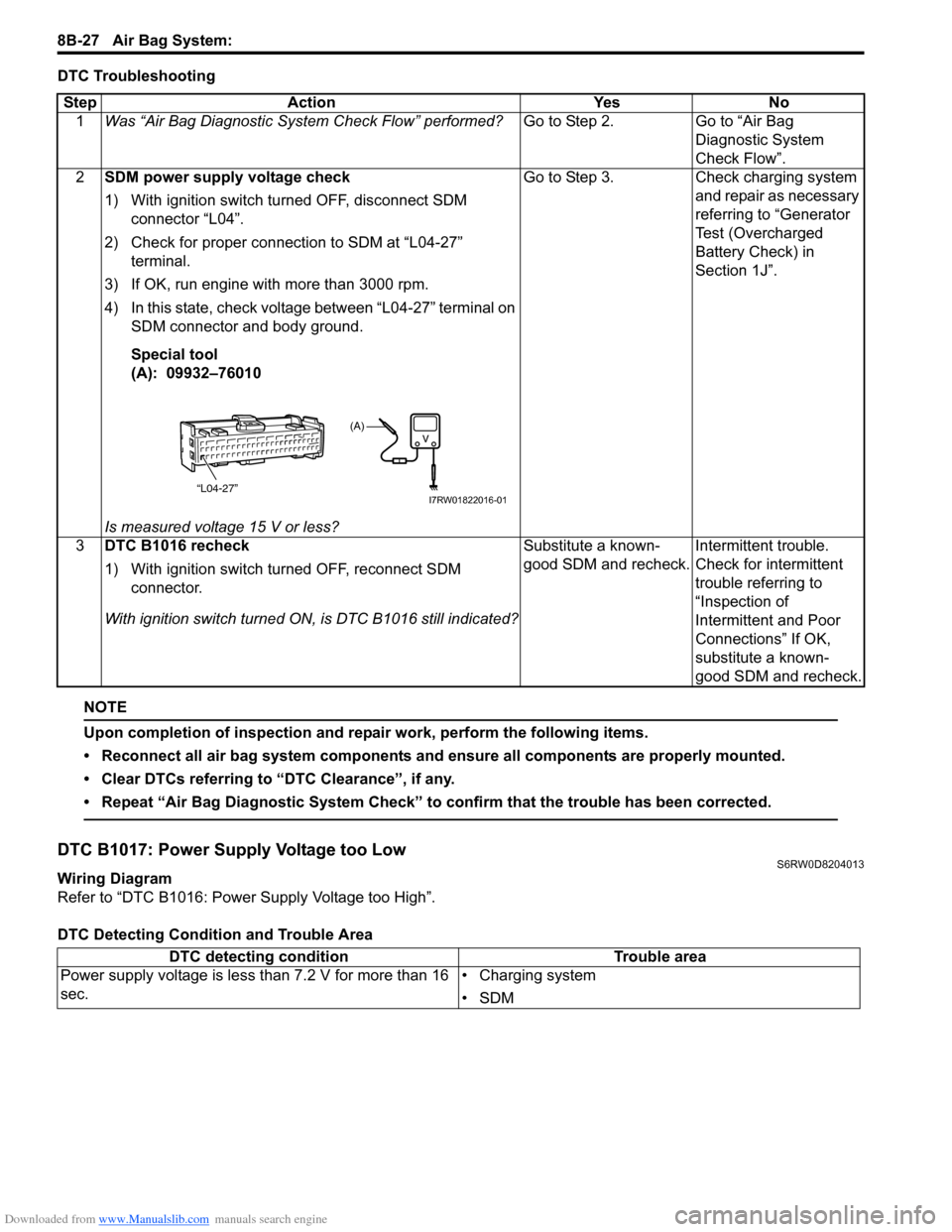
2SDM power supply voltage check
1) With ignition switch turned OFF, disconnect SDM
connector “L04”.
2) Check for proper connection to SDM at “L04-27”
terminal.
3) If OK, run engine with more than 3000 rpm.
4) In this state, check voltage between “L04-27” terminal on
SDM connector and body ground.
Special tool
(A): 09932–76010
Is measured voltage 15 V or less?Go to Step 3. Check charging system
and repair as necessary
referring to “Generator
Test (Overcharged
Battery Check) in
Section 1J”.
3DTC B1016 recheck
1) With ignition switch turned OFF, reconnect SDM
connector.
With ignition switch turned ON, is DTC B1016 still indicated?Substitute a known-
good SDM and recheck.Intermittent trouble.
Check for intermittent
trouble referring to
“Inspection of
Intermittent and Poor
Connections” If OK,
substitute a known-
good SDM and recheck.
“L04-27”
(A)
I7RW01822016-01
DTC detecting condition Trouble area
Power supply voltage is less than 7.2 V for more than 16
sec.• Charging system
•SDM