2006 SUZUKI SX4 Cool
[x] Cancel search: CoolPage 242 of 1556

Downloaded from www.Manualslib.com manuals search engine 1A-192 Engine General Information and Diagnosis:
Resistance Check
1) Remove ECM from its bracket referring to “Engine Control Module (ECM) Removal and Installation in Section 1C”.
CAUTION!
Never touch terminals of ECM itself or connect voltmeter or ohmmeter (2).
2) Connect special tool to ECM connectors (1) securely.
NOTE
Do not connect the other connector of special tool to ECM.
Special tool
(A): 09933–06320
3) Check resistance between each pair of terminals of special tool connectors (1) as listed in the following table.
CAUTION!
• Be sure to connect ohmmeter probe from wire harness side of coupler.
• Be sure to turn OFF ignition switch for this check.
• Resistance in the following table represents that measured when parts temperature is 20 °C (68 °F).
1
(A)
2
3
I7RW01110032-02
Terminals Circuit Standard resistance Condition
C01-47 to E01-29 Heater of HO2S-2 4 – 15 Ω—
E01-46 to E01-1/16 Radiator cooling fan relay No.1 160 – 240 Ω—
E01-60 to E01-29 Main relay 160 – 240 ΩBattery disconnected and
ignition switch turned ON
E01-15 to E01-29 Fuel pump relay 160 – 240 Ω—
C01-16 to E01-1/16No.3 fuel injector
10.8 – 18.2 Ω—
C01-17 to E01-1/16No.4 fuel injector
C01-4 to E01-1/16EGR valve (stepping motor No.1 coil) (if
equipped)20 – 31 Ω—
C01-29 to E01-1/16 EVAP canister purge valve 28 – 35 Ω—
C01-2 to E01-1/16 No.2 fuel injector 10.8 – 18.2 Ω—
C01-3 to E01-1/16EGR valve (stepping motor No.2 coil) (if
equipped)
20 – 31 Ω— C01-18 to E01-1/16EGR valve (stepping motor No.4 coil) (if
equipped)
C01-19 to E01-1/16EGR valve (stepping motor No.3 coil) (if
equipped)
C01-46 to E01-29 Heater of HO2S-1 2 – 11 Ω—
C01-1 to E01-1/16 No.1 fuel injector 10.8 – 18.2 Ω—
E01-29 to E01-47 A/C compressor relay (if equipped with A/C) 160 – 240 Ω—
E01-58 to E01-1/16A/C condenser cooling fan relay
(if equipped with A/C)160 – 240 Ω—
C01-60 to C01-59 Oil control valve (for engine with VVT system) 6 – 15 Ω—
E01-45 to E01-1/16 Throttle actuator control relay 160 – 240 Ω—
Page 245 of 1556

Downloaded from www.Manualslib.com manuals search engine Engine General Information and Diagnosis: 1A-195
6ECM ground circuit check
1) Turn ignition switch to OFF position.
2) Disconnect connectors from ECM.
3) Measure resistance between each “E01-31”, “C01-58”,
“C01-15” and “C01-30” terminals of ECM connector and
body ground.
Is resistance 1
Ω or less?Substitute a known-
good ECM and recheck.“BLK/ORN” or “BLK”
wire is open or high
resistance circuit.
7Main relay circuit check
1) Disconnect connectors from ECM with ignition switch
turned OFF.
2) Using service wire, ground “E01-60” terminal of ECM
connector and measure voltage between each “E01-1”
and “E01-16” terminals of ECM connector and body
ground.
Is voltage 10 – 14 V?Go to Step 11. Go to Step 8.
8Main relay circuit check
1) Remove main relay (1) from individual circuit fuse box
No.1.
2) Check for proper connection to main relay connector at
“BLK/YEL” and “BLK/RED” wire terminals.
3) If OK, measure resistance between each “E01-1” and
“E01-16” wire terminals of ECM connector and “BLK/
RED” wire terminal of main relay connector.
Is resistance 1
Ω or less?Go to Step 9. “BLK/RED” wire is open
circuit or high resistance
circuit.
9Main relay circuit check
1) Remove main relay from individual circuit fuse box No.1
with ignition switch turned OFF.
2) Measure voltage between “BLK/YEL” wire terminal of
main relay connector and body ground.
Is voltage 10 – 14 V?Go to Step 10. “BLK/YEL” wire is open
circuit.
10Main relay check
1) Check main relay referring to “Main Relay, Fuel Pump
Relay, Starting Motor Control Relay, Throttle Actuator
Control Relay and Radiator Cooling Fan Relay
Inspection in Section 1C”.
Is main relay in good condition?“BRN/WHT” wire is
open or high resistance
circuit.Replace main relay. Step Action Yes No
1
I5RW0A110059-02
Page 249 of 1556

Downloaded from www.Manualslib.com manuals search engine Engine General Information and Diagnosis: 1A-199
Troubleshooting
NOTE
• Before performed trouble shooting, be sure to read the “Precautions of ECM Circuit Inspection”.
• When measuring circuit voltage, resistance and/or pulse signal at ECM connector, connect the
special tool to ECM and/or the ECM connectors referring to “Inspection of ECM and Its Circuits”.
Step Action Yes No
1Fuel pump control system check for operation
Is fuel pump heard to operate 2 sec. after ignition switch is
turned ON?Fuel pump circuit is in
good condition.Go to Step 2.
2Fuel pump relay power supply check
1) Disconnect fuel pump relay from individual circuit fuse
box No.1 with ignition switch turned OFF.
2) Check for proper connection to fuel pump relay at each
terminal.
3) If OK, turn ON ignition switch, measure voltage between
“BLK/WHT” wire terminal of fuel pump relay connector
and engine ground.
Is voltage 10 – 14 V?Go to Step 3. “BLK/WHT” wire is open
or shorted to ground
circuit.
3Fuel pump relay power supply check
1) Turn ON ignition switch, measure voltage between “BLK/
RED” wire terminal of fuel pump relay connector and
engine ground.
Is voltage 10 – 14 V?Go to Step 4. “BLK/RED” wire is open
circuit.
4Fuel pump relay check
1) Check fuel pump relay referring to “Main Relay, Fuel
Pump Relay, Starting Motor Control Relay, Throttle
Actuator Control Relay and Radiator Cooling Fan Relay
Inspection in Section 1C”.
Is relay in good condition?Go to Step 5. Faulty relay.
5Fuel pump relay drive signal check
1) Connect fuel pump relay to individual circuit fuse box
No.1.
2) Connect voltmeter between “E01-15” terminal of ECM
connector and vehicle body ground.
3) Measure voltage 2 second after ignition switch is turned
ON.
Is voltage 10 – 14 V?Go to Step 6. “GRN/WHT” wire is
open circuit or shorted
to ground circuit.
I2RH01110132-01
Page 252 of 1556
Downloaded from www.Manualslib.com manuals search engine 1A-202 Engine General Information and Diagnosis:
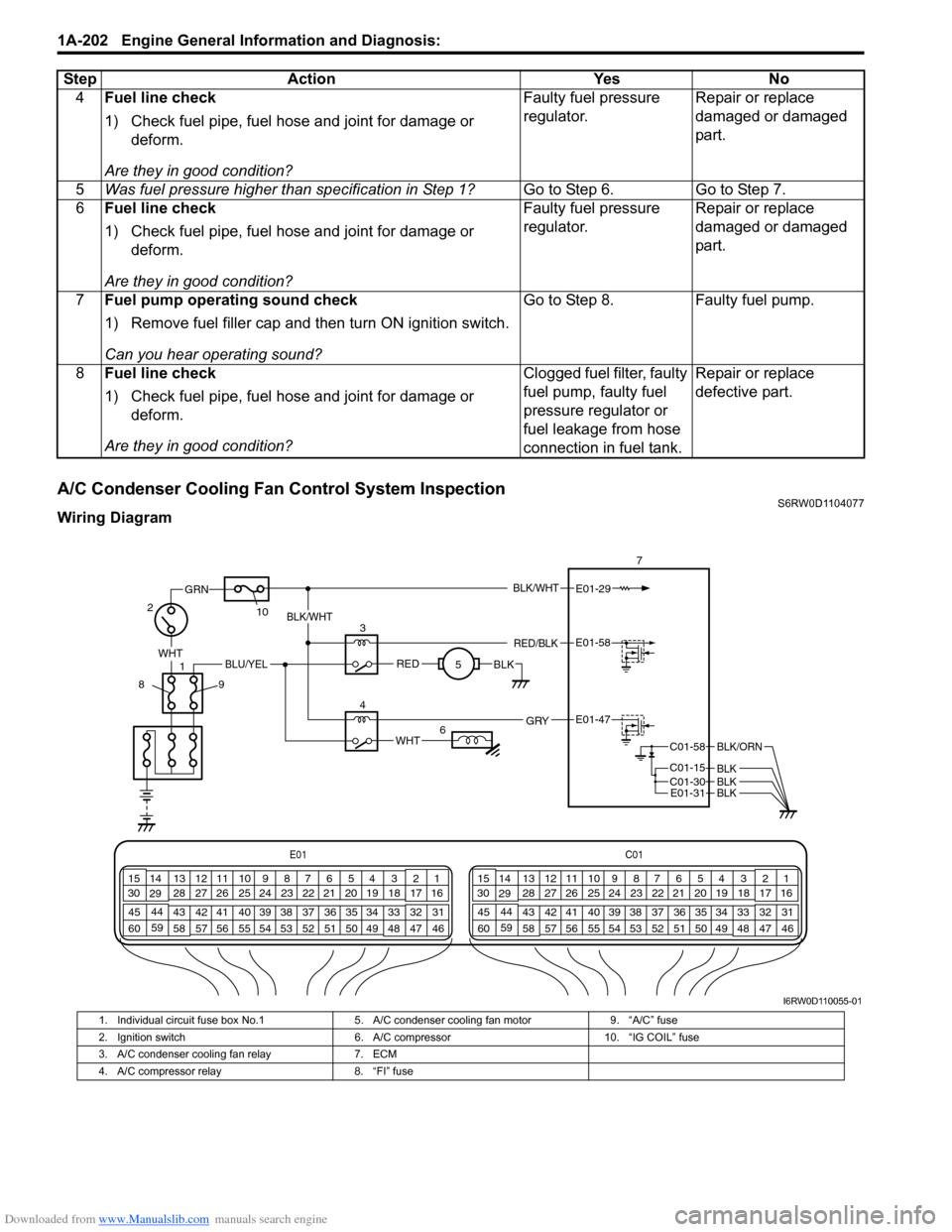
A/C Condenser Cooling Fan Control System InspectionS6RW0D1104077
Wiring Diagram4Fuel line check
1) Check fuel pipe, fuel hose and joint for damage or
deform.
Are they in good condition?Faulty fuel pressure
regulator.Repair or replace
damaged or damaged
part.
5Was fuel pressure higher than specification in Step 1?Go to Step 6. Go to Step 7.
6Fuel line check
1) Check fuel pipe, fuel hose and joint for damage or
deform.
Are they in good condition?Faulty fuel pressure
regulator.Repair or replace
damaged or damaged
part.
7Fuel pump operating sound check
1) Remove fuel filler cap and then turn ON ignition switch.
Can you hear operating sound?Go to Step 8. Faulty fuel pump.
8Fuel line check
1) Check fuel pipe, fuel hose and joint for damage or
deform.
Are they in good condition?Clogged fuel filter, faulty
fuel pump, faulty fuel
pressure regulator or
fuel leakage from hose
connection in fuel tank.Repair or replace
defective part. Step Action Yes No
E01C01
3 4
18 19 5 6 7 10 11
17 20
47 46 49 50 51 21 22
5216 259
24 14
29
55 57 54 53 59
60 582
26 27 28 15
30
56 4832 31 34 35 36 37 40 42 39 38 44
45 43 41 331 12 13
238 3 4
18 19 5 6 7 10 11
17 20
47 46 49 50 51 21 22
5216 259
24 14
29
55 57 54 53 59
60 582
26 27 28 15
30
56 4832 31 34 35 36 37 40 42 39 38 44
45 43 41 331 12 13
238
BLK/WHT
WHT
1
GRN
27
E01-29
10
89
REDBLK
3
5BLK/WHT
RED/BLKE01-58
WHT
4E01-47 GRY
BLU/YEL
6
C01-58
C01-15 C01-30
BLK/ORN
BLKBLKE01-31BLK
I6RW0D110055-01
1. Individual circuit fuse box No.1 5. A/C condenser cooling fan motor 9. “A/C” fuse
2. Ignition switch 6. A/C compressor 10. “IG COIL” fuse
3. A/C condenser cooling fan relay 7. ECM
4. A/C compressor relay 8. “FI” fuse
Page 253 of 1556

Downloaded from www.Manualslib.com manuals search engine Engine General Information and Diagnosis: 1A-203
Troubleshooting
Step Action Yes No
1Check A/C condenser fan control system
Is A/C condenser fan started when A/C is operating?Intermittent trouble.
Check for intermittent
referring to “Intermittent
and Poor Connection
Inspection in Section
00”.Go to Step 2.
2Check A/C condenser fan relay and its circuit
1) Connect scan tool to DLC with ignition switch OFF.
2) Check pending DTC and DTC with scan tool.
Is DTC P0481 displayed?Go to “DTC P0481:
Cooling Fan 2 (A/C
Condenser Fan) Control
Circuit”.Go to Step 3.
3Check A/C refrigerant
1) Check amount of A/C refrigerant referring to “A/C
System Performance Inspection in Section 7B”.
Is it good condition?Go to Step 4. Recharge refrigerant.
4Check wire circuit
1) Disconnect A/C condenser cooling fan control relay from
individual circuit fuse box No.1 with ignition switch
turned OFF.
2) Turn ON ignition switch, measure voltage between
engine ground and “BLU/YEL” wire terminal of A/C
condenser cooling fan control relay connector.
Is voltage 10 – 14V?Go to Step 7. Go to Step 5.
5Check wire circuit
1) Disconnect A/C compressor control relay from individual
circuit fuse box No.1 with ignition switch turn OFF.
2) Turn ON ignition switch, measure voltage between
engine ground and “BLU/YEL” wire terminal of A/C
compressor control relay connector.
Is voltage 10 – 14 V?Faulty A/C compressor
control relay.Go to Step 6.
6Check wire circuit
1) Remove “A/C” fuse “20 A” from individual circuit fuse box
No.1 with ignition switch turned OFF.
2) Measure resistance between “BLU/YEL” wire terminal of
main fuse connector and engine ground.
Is resistance infinity?Open wire in “BLU/YEL”
circuit. If OK, go to Step
7.“BLU/YEL” wire shorted
to ground circuit.
7Check wire circuit
1) Disconnect connector from A/C condenser cooling fan
with ignition switch tun OFF.
2) Measure resistance between engine ground and “RED”
wire terminal of A/C condenser fan connector.
Is resistance infinity?Go to Step 8. “RED” wire shorted to
ground circuit.
8Check A/C condenser cooling fan control relay
1) Check A/C condenser cooling fan control relay referring
to “A/C System Relay Inspection in Section 7B”.
Is result in good condition?Go to Step 9. Replace relay.
Page 254 of 1556

Downloaded from www.Manualslib.com manuals search engine 1A-204 Engine General Information and Diagnosis:
9Check wire circuit
1) Install “A/C” fuse “20 A” to individual circuit fuse box
No.1.
2) Connect A/C condenser cooling fan control relay to
individual circuit fuse box No.1 with ignition switch turn
OFF.
3) Start engine then turn ON A/C switch and blower motor
switch.
4) Measure voltage between engine ground and “RED”
wire terminal in A/C condenser fan harness connector.
Is voltage 10 – 14 V?Go to Step 10. Open wire in “RED”
circuit.
10Check wire circuit
1) Disconnect connector from A/C condenser cooling fan
with ignition switch turned OFF.
2) Measure resistance between “BLK” wire terminal of A/C
condenser cooling fan connector and engine ground.
Is resistance below 1
Ω?Go to Step 11. Open or high resistance
wire in “BLK” circuit.
11Check A/C condenser cooling fan
1) Check A/C condenser cooling fan operates referring to
“Condenser Cooling Fan Inspection in Section 7B”.
Is it good condition?Substitute a known-
good ECM and recheck.Faulty A/C condenser
cooling fan. Step Action Yes No
Page 255 of 1556

Downloaded from www.Manualslib.com manuals search engine Engine General Information and Diagnosis: 1A-205
A/C System Circuits CheckS6RW0D1104078
Wiring Diagram
BLU/WHT
BLU/WHTE01-19
E01-19
21
E01C01
3 4
18 19 5 6 7 10 11
17 20
47 46 49 50 51 21 22
5216 259
24 14
29
55 57 54 53 59
60 582
26 27 28 15
30
56 4832 31 34 35 36 37 40 42 39 38 44
45 43 41 331 12 13
238 3 4
18 19 5 6 7 10 11
17 20
47 46 49 50 51 21 22
5216 259
24 14
29
55 57 54 53 59
60 582
26 27 28 15
30
56 4832 31 34 35 36 37 40 42 39 38 44
45 43 41 331 12 13
238
BLK/RED
BRN/WHT
12V5V
17
10
8
E01-1
E01-60
BLK/YEL
REDBLK11
WHT9
34
RED/BLK
BLK/REDE01-47
E01-58
BLU/YELGRY
19
2 1
20
5 15
WHT
RED
WHT
RED
WHT
RED
WHT
RED
E01-18E01-3
WHT/BLK
C01-14
E01-57
E01-54
E01-55RED/BLU
ORN
GRY/RED
BLK/YEL
GRN/WHT
BLK/WHT
WHT
1423
24
6
22 18
80A
1316 7 12
GRN
25
BLK/RED
BLU/YEL
YEL
WHT/BLU
BLK/YELBLK/YEL
BLU
I6RW0D110056-01
1. BCM 10. A/C condenser cooling fan motor relay 19. A/C switch
2. ABS control module 11. A/C condenser cooling fan motor 20. Blower motor
3. Blower speed selector (Auto A/C model) 12. “FI” fuse 21. Blower speed selector (Manual A/C model)
4. ECM 13. “IGN” fuse 22. Blower motor relay
5. A/C evaporator outlet air temp. sensor (Manual
A/C model)14. Ignition switch 23. “IG2 SIG” fuse
6. “IG COIL” fuse 15. A/C refrigerant pressure sensor 24. “BACK” fuse
7. “A/C” fuse 16. “BLW” fuse 25. Individual circuit fuse box No.1
8. A/C compressor relay 17. Main relay
9. A/C compressor 18. Junction block assembly
Page 256 of 1556

Downloaded from www.Manualslib.com manuals search engine 1A-206 Engine General Information and Diagnosis:
Troubleshooting
NOTE
• Before performed trouble shooting, be sure to read the “Precautions of ECM Circuit Inspection”.
• When measuring circuit voltage, resistance and/or pulse signal at ECM connector, connect the
special tool to ECM and/or the ECM connectors referring to “Inspection of ECM and Its Circuits”.
• When A/C evaporator outlet air temp. is below 2.5 °C (36.5 °F), A/C remains OFF (“E01-47” terminal
voltage becomes 10 – 14 V). This condition is not abnormal.
Step Action Yes No
1Reception data check from BCM
1) Connect scan tool to DLC with ignition switch turned
OFF.
2) Turn ON ignition switch.
3) Check DTC for CAN-DTC.
Is there CAN-DTC?Go to “Troubleshooting
for CAN-DTC”.Go to Step 2.
2A/C switch signal circuit check
1) Start engine and select “Data List” mode on scan tool.
2) Check A/C switch signal under following conditions
respectively.
A/C switch signal
Engine running, A/C switch OFF: OFF
Engine running, A/C switch ON and blower speed
selector turned 1st position or more: ON
Is check result satisfactory?Go to Step 3. Check A/C switch
circuit.
3DTC check of ECT sensor circuit
1) Check ECM for DTC of ECT sensor circuit.
Is there DTC P0116, DTC P0117 or DTC P0118?Go to applicable DTC
diag. flow.Go to Step 4.
4A/C condenser cooling fan control system check
Is A/C condenser cooling fan started when A/C and blower
speed selector switch are turned ON with engine running?Go to Step 10. Go to Step 5.
5A/C condenser cooling fan control circuit check
1) Check DTC with scan tool.
Is DTC P0481 displayed?Go to “DTC P0481:
Cooling Fan 2 (A/C
Condenser Fan) Control
Circuit”.Go to Step 6.