Page 182 of 365
Audio 5-19
CONTINUED
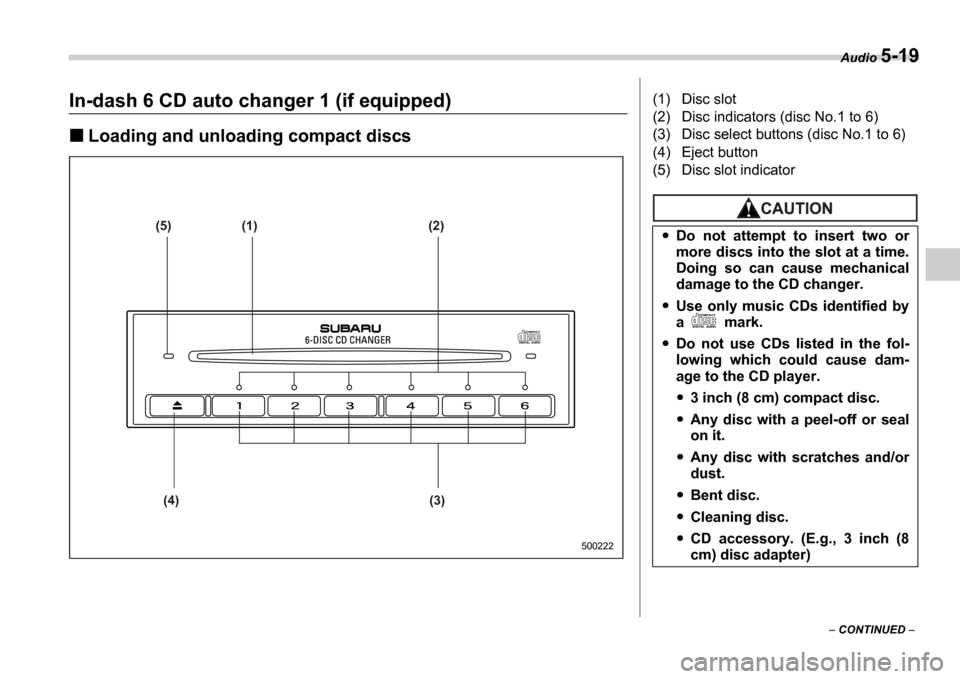
In-dash 6 CD auto changer 1 (if equipped)
Loading and unloading compact discs
(5) (1) (2)
(4) (3)
500222
(1) Disc slot
(2) Disc indicators (disc No.1 to 6)
(3) Disc select buttons (disc No.1 to 6)
(4) Eject button
(5) Disc slot indicator
Do not attempt to insert two or
more discs into the slot at a time.
Doing so can cause mechanical
damage to the CD changer.
Use only music CDs identified by
a mark.
Do not use CDs listed in the fol-
lowing which could cause dam-
age to the CD player.
3 inch (8 cm) compact disc.
Any disc with a peel-off or seal
on it.
Any disc with scratches and/or
dust.
Bent disc.
Cleaning disc.
CD accessory. (E.g., 3 inch (8
cm) disc adapter)
Page 183 of 365

5-20 Audio
To insert a disc
1. Press one of the Disc select buttons
(3) (numbered from 1 to 6) for which the
disc indicator light (2) is OFF .
The disc indicator lights are located direct-
ly above the corresponding Disc select
buttons.
2. The indicator will begin blinking. The
blinking will last for 15 seconds.
During this period, insert a desired disc,
and the disc will begin to play. (If any disc
is not inserted during this period, the Disc
slot (1) door will close. Repeat Step 1.)
Be sure to hold a disc with the label side
(the side where titles are printed) up.
3. To insert another disc, repeat Steps 1
and 2 choosing a different disc select but-
ton.
To insert six discs at a time
1. Press and hold the Disc select button
number 1 until all disc indicators begin
blinking (approximately 1.5 seconds). 2. The indicators will blink for 15 seconds.
During this period, insert desired six discs.
3. When all discs are loaded, the first disc
will begin to play. (If no disc is inserted
within this 15 seconds, the entire disc load
sequence will be canceled.)
To remove a disc
1. Press the desired one of the Disc se-
lect buttons (3) (numbered from 1 to 6) for
which the disc indicator light is on.
2. Press the Eject button (4). The select-
ed disc will be ejected and the indicator
light will begin blinking.
3. To remove another disc, repeat Steps
1 and 2 choosing a different Disc select
button.
(To remove discs when the ignition switch
is in the Lock position, press the Eject
button, and the first disc will be ejected.
Press the Eject button again, and the
next disc will be ejected and so on. At this
time, the Disc select buttons are dis-
abled.)
To remove all discs at one time
1. Press and hold the Eject button (4)
until all Disc indicators begin blinking
(approximately 1.5 seconds), and the first
disc will be ejected.
2. When the disc is removed, the next
one will be ejected, and so on.
To replace a playing disc with an-
other
Simply press the desired one of Disc se-
lect buttons (3) (numbered from 1 to 6) or
press the Disc select button on the radio
unit to select the desired disc, and the disc
will begin to play.
Disc indicators
Lit: when the corresponding storage tray
is occupied by a disc.
Blinking: Disc player is either in loading,
eject or changing mode.
OFF: No disc is loaded or the ignition
switch is in the LOCK position.
Open/Closed disc slot indicator
When the disc slot is open, the disc indica-
tors on both sides of the slot illuminate.
Function control
Refer to CD changer control operating in-
structions described in the Type B audio
set (if equipped) section.
Do not insert or remove any disc
when the automatic transmission
selector lever is in the park posi-
tion; the selector lever in that po-
sition can interfere with disc in-
sertion or removal, causing
scratches on the disc surface (for
AT vehicles).
Page 184 of 365
Audio 5-21
CONTINUED
Precautions to observe when
handling a compact disc
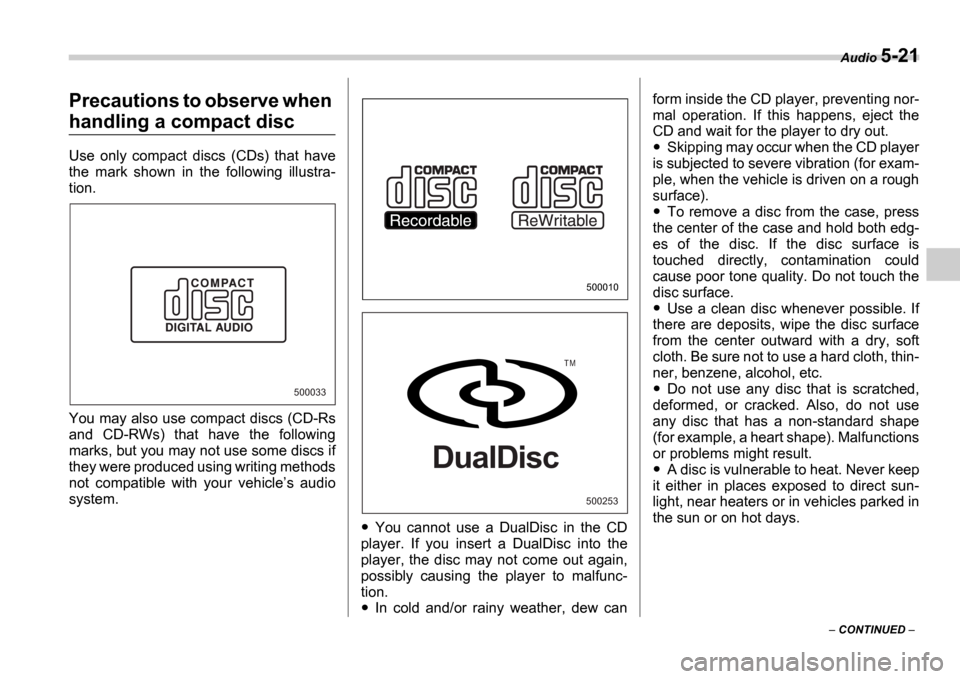
Use only compact discs (CDs) that have
the mark shown in the following illustra-
tion.
You may also use compact discs (CD-Rs
and CD-RWs) that have the following
marks, but you may not use some discs if
they were produced using writing methods
not compatible with your vehicle s audio
system.
You cannot use a DualDisc in the CD
player. If you insert a DualDisc into the
player, the disc may not come out again,
possibly causing the player to malfunc-
tion.
In cold and/or rainy weather, dew can form inside the CD player, preventing nor-
mal operation. If this happens, eject the
CD and wait for the player to dry out.
Skipping may occur when the CD player
is subjected to severe vibration (for exam-
ple, when the vehicle is driven on a rough
surface).
To remove a disc from the case, press
the center of the case and hold both edg-
es of the disc. If the disc surface is
touched directly, contamination could
cause poor tone quality. Do not touch the
disc surface.
Use a clean disc whenever possible. If
there are deposits, wipe the disc surface
from the center outward with a dry, soft
cloth. Be sure not to use a hard cloth, thin-
ner, benzene, alcohol, etc.
Do not use any disc that is scratched,
deformed, or cracked. Also, do not use
any disc that has a non-standard shape
(for example, a heart shape). Malfunctions
or problems might result.
A disc is vulnerable to heat. Never keep
it either in places exposed to direct sun-
light, near heaters or in vehicles parked in
the sun or on hot days.
500033
500010
500253
T M
DualDisc