2006 SKODA SUPERB service
[x] Cancel search: servicePage 47 of 281

Unlocking and locking
46
•Never drive with the tailgate fully opened or slightly ajar other-
wise exhaust gases may get into the interior of the vehicle - risk of
poisoning!
Note
After closing the tailgate, it is au tomatically locked within 5 seconds
and the anti-theft alarm system* is activated. This applies only if the
vehicle was locked before closing the boot lid.
Remote control
Description
You can use the remote control:
•to unlock and lock the car,
•unlocking boot lid,
•opening and closing window.
The transmitter with the battery is housed in the handle of the master key.
The receiver is located in the interior of the car. The operating range of the
remote control is 10 metres but this range can be reduced if the batteries
are weak.
The master key has a fold-open key bit which can be used for unlocking
and locking the car manually and also for starting the engine.
If a lost key is replaced or if the receiver unit has been repaired or a new
unit installed, it is then necessary for a Škoda Service Partner to initialise
the system. Only after this is it possible to again use the remote control.
Note
•The remote control is automatically deactivated when the ignition is
switched on.
•The operation of the remote control may temporarily be affected by
interference from transmitters close to the car and which operate in the
same frequency range (e.g. mobile phone, TV transmitter).
•The battery must be replaced, ideally by a Škoda Service Partner, if
the central locking or anti-theft alarm system does react to the remote
control at less than 3 metres away.
Unlocking and locking car
Unlocking th e vehicle
– Press button ⇒fig. 28 for about 1 second.
WARNING (continued)
Fig. 28 Key: Assign-
ment of buttons
AA
NKO B5 20.book Page 46 Monday, July 3, 2006 2:09 PM
Page 49 of 281

Unlocking and locking
48
Anti-theft alarm system*
Description
The anti-theft alarm system increases the level of protection against
people seeking to break into the vehicle. The system triggers audible and
visual warning signals if an attempt is made to break into the vehicle.
How is the alarm system switched on?
The anti-theft alarm system is activated automatically when the vehicle is
locked with the key on the closed driver's door or by using the remote
control. It is activated 30 seconds after closing the door.
How is the alarm system switched off?
The anti-theft alarm system is switched off if the vehicle is unlocked by
only using the remote control. The vehicle is automatically locked again if
the vehicle is not opened within 30 seconds after reactivating the anti-theft
alarm system.
Once you unlock the vehicle by inserting the key into the driver door you
then have to insert the key into the ignition lock and switch the ignition on
within 15 seconds after opening the door in order to deactivate the anti-
theft alarm system. The alarm will be triggered if you do not switch on
the ignition within 15 seconds.
When is the alarm triggered?
The following security areas of the locked vehicle are monitored:
•Bonnet,
•Boot lid,
•Doors,
•Ignition lock,
•Vehicle interior* ⇒page 49,
•A drop in voltage of the on-board power supply. An alarm is immediately triggered if either of the two battery terminals is
disconnected while the anti-theft alarm system is activated.
If you unlock and open the boot lid with the key, the alarm is immediately
triggered.
How is the alarm switched off?
You switch the alarm off if you unlock the car with the radio remote control
in the key or if you switch the ignition on.
Indicator light (LED)
The LED in the top of the door trim on the driver door first of all flashes
rapidly after the car is locked, then slowly. This indicates that the anti-theft
alarm system
including the interior monitor* is activated.
Note
•The working life of the alarm siren is 5 years. More detailed information
is available from your Škoda Service Partner.
•Before leaving the car, check that all the doors, windows and the elec-
tric sliding/tilting roof* are properly closed in order to ensure that the anti-
theft alarm system is fully operational.
•Coding of the radio remote control and the receptor part precludes the
use of the radio remote control from other vehicles.
NKO B5 20.book Page 48 Monday, July 3, 2006 2:09 PM
Page 68 of 281
Lights and Visibility67
Using the systemSafetyDriving TipsGeneral MaintenanceBreakdown assistanceTechnical Data
Replacing the wiper blades
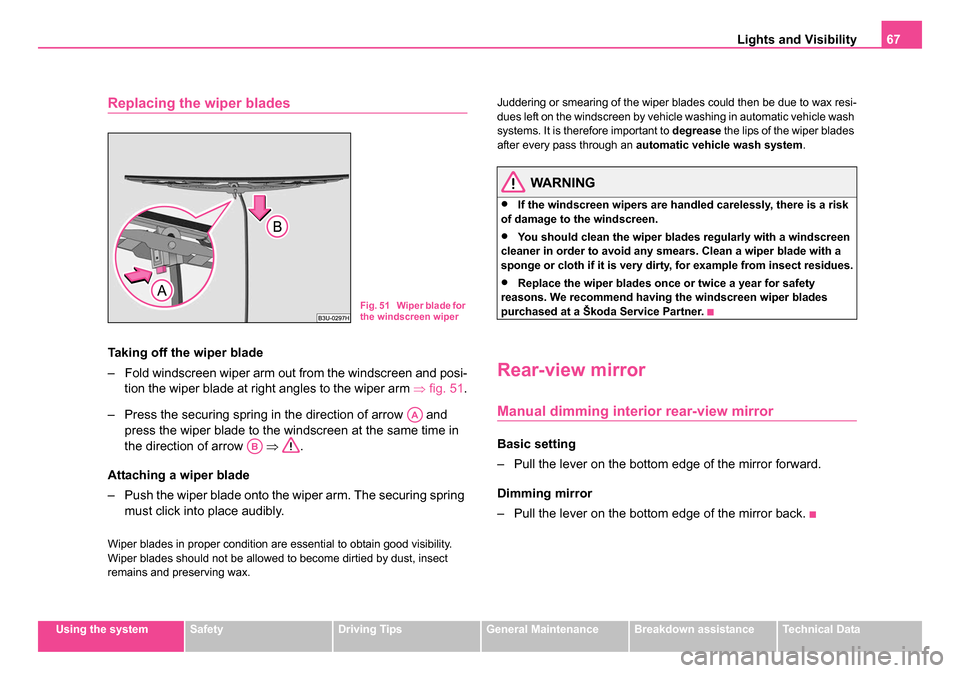
Taking off the wiper blade
– Fold windscreen wiper arm out from the windscreen and posi-
tion the wiper blade at right angles to the wiper arm ⇒fig. 51.
– Press the securing spring in the direction of arrow and press the wiper blade to the windscreen at the same time in
the direction of arrow ⇒.
Attaching a wiper blade
– Push the wiper blade onto the wiper arm. The securing spring must click into place audibly.
Wiper blades in proper condition are essential to obtain good visibility.
Wiper blades should not be allowed to become dirtied by dust, insect
remains and preserving wax. Juddering or smearing of the wiper blades could then be due to wax resi-
dues left on the windscreen by vehicle washing in automatic vehicle wash
systems. It is therefore important to
degrease the lips of the wiper blades
after every pass through an automatic vehicle wash system .
WARNING
•If the windscreen wipers are handled carelessly, there is a risk
of damage to the windscreen.
•You should clean the wiper blades regularly with a windscreen
cleaner in order to avoid any smears. Clean a wiper blade with a
sponge or cloth if it is very dirty, for example from insect residues.
•Replace the wiper blades once or twice a year for safety
reasons. We recommend having the windscreen wiper blades
purchased at a Škoda Service Partner.
Rear-view mirror
Manual dimming interior rear-view mirror
Basic setting
– Pull the lever on the bottom edge of the mirror forward.
Dimming mirror
– Pull the lever on the bottom edge of the mirror back.
Fig. 51 Wiper blade for
the windscreen wiper
AA
AB
NKO B5 20.book Page 67 Monday, July 3, 2006 2:09 PM
Page 76 of 281

Seats and Stowage75
Using the systemSafetyDriving TipsGeneral MaintenanceBreakdown assistanceTechnical Data
Note
•When storing settings with the memory buttons, we recommend that
you begin with the front button and assign a memory button to each addi-
tional driver.
•Each new setting stored with the same button erases the previous
setting.
•Each time you store the seat and exterior mirror settings for driving
forward you also have to re-store the individual setting of the exterior
mirror on the passenger side for reversing.
Assigning remote control to the memory buttons
After storing the settings of the seat and exterior mirrors, you
have 10 seconds in order to assign the remote control to the
appropriate memory button.
– Withdraw the ignition key.
– Press the release button ⇒page 46 and hold it pressed for 1
second until an audible signal confirms that the setting has
been stored. The setting is stored with the memory button
which you have selected.
If you wish to be able to retrieve the settings which are stored in the
memory by also using the remote control, you have to assign the remote
control to a memory button in each case.
We recommend that you assign one of the two remote controls supplied
with your car, to the front memory button, and the other remote control key
to the middle memory button. If you wish, you can obtain an additional key with radio remote control from
a Škoda Service Partner and then assign the radio remote control to the
rear memory button.
Note
•If the remote control had previously been assigned to another memory
button, this setting is then erased by the new assignment.
•If you assign the remote control to a memory button which has already
been assigned to a remote control, the old assignment is also replaced by
a new assignment in this case.
•The assignment of the remote control to a memory button is retained,
however, after reassigning the seats and exterior mirrors.
Retrieving seat and exterior mirror settings for driving
forward
You can retrieve the stored settings either with the
memory buttons or with the remote control*.
Retrieving settings with memory buttons
– For safety reasons, you can only retrieve the seat and mirror
settings if the ignition is switched off. You have a choice of two
different ways of retrieving the settings:
– One-touch automatic memory: with the driver door open,
operate the desired memory button ⇒page 74, fig. 56
with one-touch. The seat and the exterior mirrors now move
automatically into the stored position.
AD
NKO B5 20.book Page 75 Monday, July 3, 2006 2:09 PM
Page 95 of 281

Seats and Stowage
94
– Close the lid in direction of arrow 2.
– Press on the button marked “PUSH” ⇒page 93, fig. 84
and push the folding box into the secured middle position.
– Once again press on the button marked “PUSH” and push the folding box carefully into the secured position against the
partition of the luggage compartment in direction of arrow 3
(ready position). If correctly locked, the button marked “PUSH” is moved back into its initial position.
You can leave the folding box in the ready position for use, or fold it down
into the transport position ⇒page 91.
Caution
•The parts of the folding box can be damaged if handled roughly or in
an unprofessional way.
•First check for yourself whether the cover for the through-loading bag*
is closed before you lower the folding box into the ready position on the
partition of the luggage compartment ⇒page 87.
The roof luggage rack system
Description
Pay attention to the following points if you wish to transport luggage or
other items on the roof of your vehicle:
•Your car has streamlined rain channels integrated into the roof. For
this reason, it is not possible to use conventional roof racks. We therefore recommend that you only use base roof bars from the Škoda Genuine
Accessories.
•These base roof bars are the supporting elements for a complete roof
bar system. Separate additional components are required for safety
reasons for transporting luggage, bikes, surfboards, skis and boats. All
these components you can obtain replacement fuses from a Škoda
Service Partner.
Caution
•If you use other roof rack systems or if the roof bars are not properly
fitted, then any damage which may result to your car is not covered by the
warranty agreements. It is therefore essential to pay attention to the fitting
instructions supplied with the roof luggage rack system.
•On models fitted with a power sliding/tilting roof, ensure that the
opened sliding/tilting roof does not strike any items of luggage transported
on the roof.
For the sake of the environment
The increased aerodynamic drag results in a higher fuel consumption.
One should therefore take off the roof bar system after use.
AB
AB
AB
NKO B5 20.book Page 94 Monday, July 3, 2006 2:09 PM
Page 119 of 281

Heating and air conditioning system
118
Air outlet vents
Fig. 111 Air vents at the front
Fig. 112 Air vents at the rear
You can also set the vents 3 and 4 ⇒ fig. 111 and 6 ⇒ fig. 112
individually. Open air outlet vents
– Turn the vertical thumbwheel (not when in the end position).
Close air outlet vents
– Turn the vertical thumbwheel into the end position.
Redirecting air flow
– Swivel upward or downward the gr
ille of the vents in order to
change the direction of the air flow using the vertically
arranged thumbwheel.
– Turn the horizontal thumbwheel on the vent to the right or left in order to change the air flow to the appropriate side.
Switching Climatronic system off
If the symbols in the display flash for about 15 seconds
after the ignition is switched on, switch the Climatronic
system off as this indicates an operational fault.
– Continue pressing the button until OFF is shown in the
display ⇒ .
– Drive to the nearest Škoda Service Partner and have the Climatronic system checked.
WARNING
•If the Climatronic system is switched off (OFF), there is no
supply of fresh air from the outside. “Stale air” may result in fatigue
NKO B5 20.book Page 118 Monday, July 3, 2006 2:09 PM
Page 141 of 281

Communicating and Navigating
140
In the menu SETUP you can select the following entries:
•LANGUAGE - Here you can set in which language the messages
should be displayed. You can select one of the following languages:
Czech, English, German, Italian, French, Spanish. The set language is
displayed inversely.
•MEMORY - Here you can set which telephone memory should be
transmitted into the information display after inserting the mobile phone in
the adapter. You can choose between the phonebook PHONE
PHONEBOOK and the memory of the SIM card SIM PHONEBOOK The
set memory is displayed inversely.
•Certain mobile phones do not have any phone phonebook, but only a
phonebook in the memory of the SIM card.
•Overview of the next possible functions and read outs:
Note
•If the setting of the memory is changed, you must take the mobile
phone out of the adapter and insert it again in order to transmit the data
from the newly set memory into the information display.
•If you do not operate the mobile phone (do not scroll in the memory, do
no call, etc.) it switches automatically over to radio mode after 60 seconds.
•If you switch the ignition off and leave the mobile phone inserted in the
adapter, the system switches off automatically the mobile phone after 30
minutes.
•If you have stored in the phonebook names with special characters
(ticks, lines etc.), the special characters will not always be correctly
displayed on the information display.
•The function of the convenience operating feature with the buttons on
the multifunction steering wheel is not available on all mobile phones and
adapters. Please contact your Škoda Service Partner, who will tell you
which adapter and which mobile phone you can use.
ActivityRead out in display
Selected call numberCALLING name
or
CALLING number
accepted callCALL name or
CALL number or
CALL
Call rejectedCALL REJECTED
Call terminatedEND OF CALL
Number engagedLINE ENGAGED
No service foundNO SERVICE
Enter PIN codeENTER PIN CODE
NKO B5 20.book Page 140 Monday, July 3, 2006 2:09 PM
Page 144 of 281

Communicating and Navigating143
Using the systemSafetyDriving TipsGeneral MaintenanceBreakdown assistanceTechnical Data
•TR01, TR02 etc. - title of the selected CD.
Note
For more details see Radio Owners Manual.
Fault displays
On the radio display the following fault displays can be displayed:
•NO CD CHANGER - CD-changer is not connected to the magazine.
•NO CD MAGAZINE - no magazine in the CD-changer.
•NO CD - the selected compartment in the magazine of the CD-changer
is empty.
•SURFACE - in the selected compartment the CD with playback side is
inserted upwards.
Tips for operating the CD-changer
Please pay attention to the following notes for operating the CD-
changer.
•Only clean CDs without scratches and damages should be used, in
order to guarantee a proper, high-quality CD-playback.
•Affix no labels to the CDs.
•Always store non-used CDs in the CD-storage from the Škoda
genuine accessories provided for this as well as in the original folding box.
•Never expose CDs to direct sun rays.
•Use a soft, non-fluffy cloth to clean the CDs. Wipe the CD straight-lined
from the middle to the outside. Strong dirt must be eliminated with usual
CD-cleaner.
•Please never use liquids such as gasoline, paint thinner or disk
cleaner, otherwise the surface of the CD could get damaged.
Precaution measures for laser equipment
Laser equipment is classified according to DIN IEC 76 (CO) 6/VDE 0837
in the safety categories 1 - 4.
The Škoda CD-changer corresponds to the safety category 1.
The laser used for equipment of category 1 is to such an extent energy-
poor and/or shielded that there is no risk of danger when used in accord-
ance with the regulation.
WARNING
Please always pay full attention to the traffic situation around you!
Note
Do not remove the equipment cover. The equipment does not contain any
parts, which can be serviced by the user.
Warranty
The same guarantee conditions apply for our factory-fitted radio system
as for new vehicles.
NKO B5 20.book Page 143 Monday, July 3, 2006 2:09 PM