2006 SKODA ROOMSTER instrument cluster
[x] Cancel search: instrument clusterPage 61 of 274
Lights and Visibility
60
Main beam
– Switch on the low beam.
– Push the lever forwards - the main beam and warning light in the instrument cluster come on.
– Pull the lever back into the initial position in order to switch the main beam off again.
Headlight flasher
– Pull on the lever of the steering wheel (sprung position) - the main beam and warning light in the instrument cluster come
on.
Parking light
– Switch off the ignition.
– Push the lever up or down - the right-hand or left-hand parking light is switched on.
Information concerning the function of the lights.
•The turn signal system only operates when the ignition is switched
on. The corresponding indicator light or in the instrument cluster also
flashes.
•The turn signal is automatically cancelled after negotiating a curve.
•The side light and rear light on the appropriate side of the vehicle are
switched on when the parking light is selected. The parking light function
only operates if the ignition is switched off.
•An acoustic warning signal will sound when the driver's door is opened
if the lever is not in the middle position after removing the ignition key. The
acoustic warning signal will stop just as soon as the driver's door is closed.
Caution
Use main beam or the headlight flasher only if this does not risk dazzling
other road users.
Note
Use only in accordance with the legal requirements the described lighting
and signal systems.
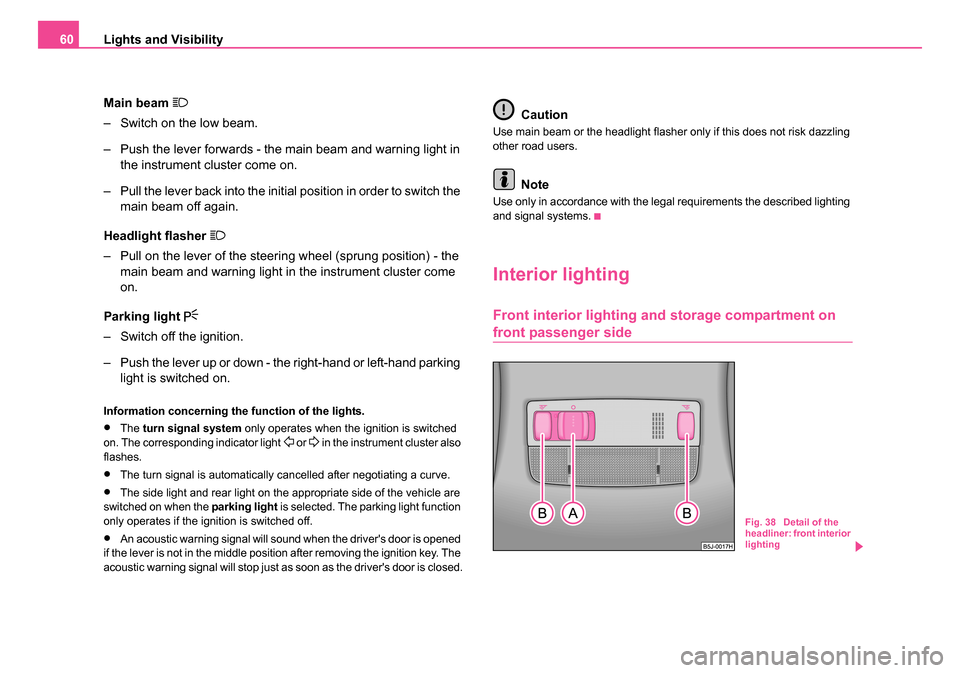
Interior lighting
Front interior lighting and storage compartment on
front passenger side
Fig. 38 Detail of the
headliner: front interior
lighting
NKO 20 A05.book Page 60 Wednesday, June 21, 2006 1:42 PM
Page 121 of 274
Automatic gearbox
120
WARNING
•Do not depress the accelerator when changing the position of
the selector lever if the car is stationary and the engine is running
- risk of accident!
•Never move the selector lever into position R or P when driving
- risk of an accident!
•When the engine is running and the vehicle is stationary, it is
necessary to hold the car with the brake pedal in all the positions
of the selector lever (except P and N) since the power transmission
is never completely interrupted, also not when the engine is idling
- the vehicle "creeps".
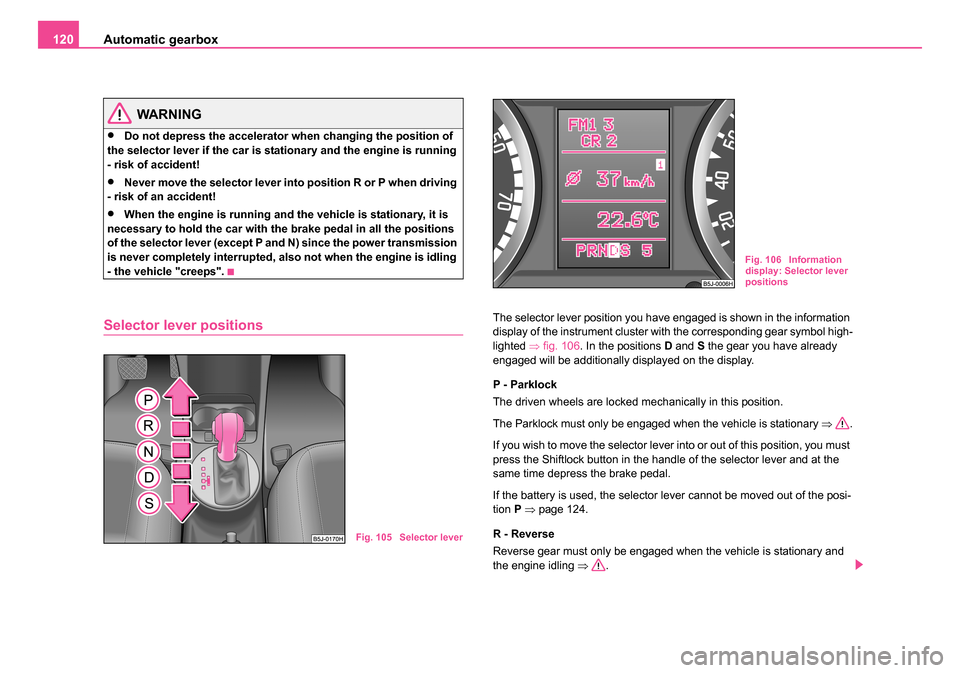
Selector lever positionsThe selector lever position you have engaged is shown in the information
display of the instrument cluster with the corresponding gear symbol high-
lighted ⇒fig. 106 . In the positions D and S the gear you have already
engaged will be additionally displayed on the display.
P - Parklock
The driven wheels are locked mechanically in this position.
The Parklock must only be engaged when the vehicle is stationary ⇒.
If you wish to move the selector lever into or out of this position, you must
press the Shiftlock button in the handle of the selector lever and at the
same time depress the brake pedal.
If the battery is used, the selector lever cannot be moved out of the posi-
tion P ⇒ page 124.
R - Reverse
Reverse gear must only be engaged when the vehicle is stationary and
the engine idling ⇒.
Fig. 105 Selector lever
Fig. 106 Information
display: Selector lever
positions
NKO 20 A05.book Page 120 Wednesday, June 21, 2006 1:42 PM
Page 123 of 274
Automatic gearbox
122
up in the instrument cluster as a reminder for the driver when the selector
lever is in position P and N:
In addition, the symbol
for the automatic selector lever lock in the shift
gate lights up.
A time delay element ensures that the selector lever is not blocked when
rapidly switching over the position N (e.g. from R to D). This does, for
example, allow one to seesaw out a stuck vehicle. The selector lever lock
will click into place if the lever is in the N position for more than 2 seconds
without the brake pedal being pressed.
The selector lever lock is only active if the vehicle is stationary or moving
at speed of less than 5 km/hour. The lock is switched off automatically into
position N when the car is travelling at a higher speed.
Shiftlock button
The Shiftlock button in the handle of selector lever prevents certain
selector lever positions being engaged inadvertently. The selector lever
lock is cancelled when you press the Shiftlock button.
Keylock - Ignition key withdrawal lock
You can only withdraw the ignition key after switching off the ignition if the
selector lever is in position P. If the ignition key is withdrawn, the selector
lever is blocked in position P.
Kickdown function
The kickdown function provides you with maximum accel-
eration power.
Depressing the accelerator pedal allows the kickdown function to be acti-
vated in the desired driving program. This function has precedence over
the driving programme and serves for maximum acceleration of the
vehicle when exploiting the maximum power potential of the engine without taking into account the current selector lever position (
D, S or
Tiptronic ). The gearbox shifts down to one or several gears in line with
the driving state and the vehicle accelerates. The gearbox does not shift
up into the highest gear until the engine has reached its maximum revolu-
tions for this gear range.
WARNING
Please note that using the kickdown function can result in the
driven wheels spinning on a smooth or slippery road surface - risk
of skidding!
Dynamic shift programme
The automatic gearbox of your vehicle is controlled electronically. Shifting
up and down through the gears is performed automatically on the basis of
pre-defined driving programmes.
Adopting a moderate style of driving will cause the gearbox to select the
most economical driving programme. Shifting up into a higher gear as
soon as possible and shifting down as late as possible will have a favour-
able effect on your fuel consumption.
Adopting a sporty style of driving with rapid movements of the acceler-
ator pedal combined with sharp acceleration and frequent changes in
speed, exploiting the top speed of the car or depressing the accelerator
pedal (kickdown function), will cause the gearbox to switch over to this
style of driving and shift down earlier with frequent changes in gears in
comparison to the moderate style of driving.
Selecting the most appropriate driving programme for the particular style
of driving is a continuous process. Irrespective of this it is, however,
possible to switch or shift down into a dynamic shift programme by
depressing the accelerator rapidly. The gearbox shifts down into a lower
NKO 20 A05.book Page 122 Wednesday, June 21, 2006 1:42 PM
Page 155 of 274
Airbag system
154
Airbag system
Description of the airbag system
General information on the airbag system
The front airbag system is complementary to the three-point seat belts
and offers additional protection in the head and chest area of the driver
and passenger in the event of a frontal collision.
In the event of a side collision, the side airbags reduce the risk of injury to
the occupants to the part of their body facing the side of the accident.
The airbag system is only functional after the ignition has been switched
on.
The operational readiness of the airbag system is monitored electroni-
cally. The airbag warning light comes on for a few seconds each time the
ignition is switched on.
The airbag system (according to vehicle equipment) essentially
consists of:
•an electronic control unit,
•the front airbags for the driver and front passenger ⇒page 156,
•the side airbags ⇒page 159,
•Head airbags ⇒page 161,
•an airbag warning light in the instrument cluster ⇒page 36,
•a front passenger airbag switch* ⇒page 164,
•an indicator light for a switched off front seat passenger airbag* in the
middle of the dash panel ⇒page 164. A fault in the airbag system exists if:
•the airbag indicator light does not light up when the ignition is switched
on,
•the airbag indicator light does not go out after about 3 seconds after
the ignition is switched on,
•the airbag indicator light goes out and comes on again after the ignition
is switched on,
•the airbag indicator light comes on or flickers when driving,
•an airbag indicator light showing a switched-off front passenger
airbag* in the middle of the dash panel flashes.
WARNING
•To enable the occupants of a car to be protected with the
greatest possible effect when the airbag is deployed, the front
seats must be ⇒page 143, “Correct seated position” correctly
adjusted to match the body size of the occupant.
•If you do not fasten the seat belts when driving, lean too far
forward or adopt an incorrect seated position, you are exposing
yourself to increased risk of injury in the event of an accident.
•Have the airbag system checked immediately by a specialist
garage if a fault exists. Otherwise, there is a risk of the airbag not
being activated in the event of an accident.
•No modifications of any kind may be made to parts of the airbag
system.
•It is prohibited to manipulate individual parts of the airbag
system as this might result in the airbag being deployed.
NKO 20 A05.book Page 154 Wednesday, June 21, 2006 1:42 PM
Page 164 of 274

Airbag system163
Using the systemSafetyDriving TipsGeneral MaintenanceBreakdown assistanceTechnical Data
Deactivating an airbag
Deactivating airbags
If any airbags have been deactivated, switch them on
again as soon as possible so that they are able to again
provide their proper protection.
There is the technical means installed within your vehicle to switch off the
front, side* or head airbag* (take out of commission).
This is why you should have the deactivation of the airbags carried out by
a specialist garage.
On vehicles equipped with the switch for deactivation of the airbags, you
can deactivate the front passenger airbag or passenger side airbag by
means of this switch ⇒page 164.
Deactivation of airbags is envisaged only for particular instances,
such as if:
•you must in exceptional cases use a child seat on the front
passenger seat where the child has its back to the direction of travel of the
vehicle (in some countries this must be in the direction of travel due to
other legal regulations applying) ⇒page 166, “Important safety informa-
tion regarding the use of child safety seats”
•you are not able to maintain the distance of at least 25 cm between
middle of steering wheel and chest, despite the driver seat being correctly
adjusted,
•special attachments are required in the area of the steering wheel
because of a physical disability,
•you have installed other seats (e.g. orthopaedic seats without side
airbags). Monitoring the airbag system
The functionality of the airbag system is also monitored electronically,
when one airbag has been switched off
If the airbag was switched off using diagnostic equipment:
•The airbag indicator light in the instrument cluster lights up for about 3
seconds after switching on the ignition and then flashes after that for about
12 seconds.
If the airbag was switched off using the airbag switch* on the side of
the dash panel:
•The airbag warning light comes on in the instrument cluster for about
3 seconds each time the ignition is switched on.
•Switching off airbags is indicated in the middle of the dash panel by the
lighting up of the indicator light ⇒ page 164, fig. 134 .
Note
Your Škoda Service Partner will be able to advise you whether national
legislation in your country allows airbags in your vehicle to be deactivated,
and which ones.
NKO 20 A05.book Page 163 Wednesday, June 21, 2006 1:42 PM
Page 179 of 274

Intelligent Technology
178
The ESP warning light ⇒page 35 lights up in the instrument cluster when
there is a fault on the ESP.
Switching off
You can switch the ESP off and on again as you wish, by pressing the
button ⇒page 177, fig. 145 . The ESP warning light ⇒page 35 lights up
in the instrument cluster when the ESP is switched off.
The ESP should normally always be switched on. It may be good practice
in certain exceptional cases, such as when you wish to have wheel slip,
to switch off the system.
Examples:
•when driving with snow chains,
•when driving in deep snow or on a loose surface,
•when it is necessary to rock a car free when it has become stuck.
Then you should switch on the ESP again.
WARNING
It is also not possible for the E SP to overcome the physical limits
of the vehicle. Even if a vehicle fitted with ESP you should still
always adapt your style of driving to the condition of the road
surface and the traffic situation. This particularly applies when
driving on slippery and wet roads. The increased safety offered
must not tempt you to take greater risks than otherwise - risk of an
accident!
Note
•All four wheels must be fitted with the same tyres in order to achieve
problem-free operation of the ESP. Differing rolling circumferences of the
tyres can lead to an undesirable reduction in the engine output.
•Changes to vehicle (e.g. on engine, on the brakes, on chassis or other
assignment of tyres and wheels) can influence the function of the ESP
⇒ page 232, “Accessories, changes and replacement of parts”.
Traction control system (TCS)*
The traction control system prevents the driven wheels
from spinning when accelerating.
General
The TCS makes it much easier, and sometimes at all possible, to start off,
accelerate and climb a steep hill when the conditions of the road surface
are unfavourable.
Operating principle
The TCS switches on automatically when the engine is started and then
conducts a self-test. The system monitors the speeds of the driven wheels
with the aid of the ABS sensors. If the wheels are spinning, the force trans-
Fig. 146 TCS switch
NKO 20 A05.book Page 178 Wednesday, June 21, 2006 1:42 PM
Page 180 of 274

Intelligent Technology179
Using the systemSafetyDriving TipsGeneral MaintenanceBreakdown assistanceTechnical Data
mitted to the road surface is automatically adapted by reducing the engine
speed. This occurs at all speeds.
The TCS operates in combination with the ABS
⇒page 181, “Antilock
brake system (ABS)*”. The TCS will not f unction if a fault exists in the ABS
system.
The TCS warning light ⇒page 34 lights up in the instrument cluster when
there is a fault on the TCS.
Switching off
You can switch the TCS off and on again as you wish by pressing the
button ⇒page 178, fig. 146 . The TCS warning light ⇒page 34 lights up
in the instrument cluster when the TCS is switched off.
The TCS should normally always be switched on. It may be good practice
in certain exceptional cases, such as when you wish to have wheel slip,
to switch off the system.
Examples:
•when driving with snow chains,
•when driving in deep snow or on a loose surface,
•when it is necessary to rock a car free when it has become stuck.
then you should switch on the TCS again.
WARNING
You should always adjust your style of driving to the conditions of
the road surface and the traffic situation. The increased safety
offered must not tempt you to take greater risks than otherwise -
risk of an accident!
Note
•All four wheels must be fitted with the same tyres in order to achieve
problem-free operation of the TCS. Differing rolling circumferences of the
tyres can lead to an undesirable reduction in the engine output.
•Changes to vehicle (e.g. on engine, on the brakes, on chassis or other
assignment of tyres and wheels) can influence the function of the TCS
⇒ page 232, “Accessories, changes and replacement of parts”.
Electronic Differential Lock (EDL)*
The electronic differential lock prevents an individual
wheel from slipping.
Models fitted with ESP are equipped with electronic differential lock (EDL).
General
The EDL makes it much easier, and sometimes at all possible, to start off,
accelerate and climb a steep hill when the conditions of the road surface
are unfavourable.
Operating principle
The EDL is activated automatically, that is without any action on the part
of the driver. It monitors the speeds of the driven wheels with the aid of the
ABS sensors. Should only one drive wheel begin spinning on a slippery
surface there will be an appreciable difference in the speed of the driven
wheels. The EDL function brakes the slipping wheel and the differential
transmits a greater driving force to the other driven wheel. This control
process is also accompanied by noises.
Overheating of the brakes
The EDL switches off automatically if unusually severe stresses exist in
order to avoid excessive heat generation in the disc brake on the wheel
NKO 20 A05.book Page 179 Wednesday, June 21, 2006 1:42 PM
Page 196 of 274

Towing a trailer195
Using the systemSafetyDriving TipsGeneral MaintenanceBreakdown assistanceTechnical Data
You must always reduce your speed immediately as soon as you detect
even just the
slightest swaying of the trailer. On no account attempt to
stop the trailer from “swaying” by accelerating.
Apply the brakes in good time! If the trailer is fitted with a trailer brake,
apply the brakes gently at first and then brake firmly. This will avoid brake
jolts resulting from the trailer wheels locking. Shift down gears in good
time before negotiating a downhill section to allow the engine to also act
as a brake.
Engine overheating
Please keep a check on the coolant temperature gauge if you have to
negotiate a lengthy slope in a low gear at a high engine speed when the
outside temperature is very high ⇒page 14.
If the needle of the coolant temperature gauge moves into the right-hand
area or even the red area of the scale, reduce your speed immediately.
Stop and switch off the engine if the warning light
in the instrument
cluster begins flashing. Wait a few minutes and check the level of coolant
in the coolant expansion bottle ⇒page 216, “Inspecting the coolant level”.
Please refer to the following guidelines ⇒page 31, “Coolant tempera-
ture/coolant level ”.
The coolant temperature can be reduced by switching on the heating.
Any increase in the cooling effect of the coolant fan through shifting down
a gear and increasing the engine speed is not possible since the fan
speed is independent of the engine speed. One should also not drop a
gear for this reason when towing a trailer as long as the engine can
manage the slope without any drop in speed.
NKO 20 A05.book Page 195 Wednesday, June 21, 2006 1:42 PM