2006 SKODA FABIA lock
[x] Cancel search: lockPage 113 of 258

Automatic gearbox112
Automatic gearbox
6-speed automatic gearbox*
Introduction
Your car is equipped with an electronically controlled 6-speed automatic gearbox. Shifting up and also down through the gears is performed automati-cally.
At the same time this is a conventional automatic gearbox. The maximum speed is reached in the 5th gear. The 6th gear serves as an economic driving programme, which is intended to reduce the fuel consumption.
Information for driving with an automatic gearbox
Shifting up and down through the gears is performed auto-
matically.
You can also, however, switch the gearbox over into the Tiptronic
mode . This mode makes it possible for you to also shift gears manu-
ally ⇒page 116.
Starting-off and Driving
– Depress the brake pedal and hold it depressed.
– Press the Shiftlock button (button in handle of the selector lever),
move the selector lever into the desired position, e.g. D
⇒ page 113, and then release the Shiftlock button.
– Wait a moment until the gearbox ha s shifted (a slight engagement
nudge can be felt).
– Release the brake pedal and depress the accelerator ⇒.
Stopping for a short time
– The selector lever position N does not have to be selected when
s t o p p i n g j u s t fo r a s h o r t t i m e , s u c h a s a t a c ro s s ro a d s . I t i s s u f f i c i e n t
to hold the vehicle stationary usin g the foot brake. The engine can,
however, be allowed just to idle.
Parking
– Depress the brake pedal and hold it depressed.
– Apply the handbrake firmly.
– Press and Shiftlock button in the selector lever, move the selector
lever to P and then release the Shiftlock button.
The engine can only be started when the selector lever is in position P or N ⇒ page 105.
It is sufficient to engage selector lever position P when parking on a flat surface. When parking on a slope you should firs t apply the handbrake firmly and then move the selector lever into position P. This is to ensure that there is no exces- sive pressure acting on the lock mechanism and that it is easier to subsequently move the selector lever out of position P.
If the selector lever position N is selected by accident while driving it is first necessary to release pressure on the acce lerator pedal and wait for idling speed of the engine to be reached before enga ging a drive position in the selector lever.
NKO A05Fabia 20.book Page 112 Tuesday, September 26, 2006 8:38 AM
Page 114 of 258
Automatic gearbox113
Using the systemSafetyDriving TipsGeneral MaintenanceBreakdown assistanceTechnical Data
WARNING
•Do not depress the accelerator when changing the position of the selector lever if the car is stationary and the engine is running - risk of accident!
•Never move the selector lever into position R or P when driving - risk of an accident!
•When the engine is running and the vehicle is stationary, it is neces- sary to hold the car with the brake pedal in all the positions of the selector lever (except P and N) since the power transmission is never completely interrupted, also not when the engine is idling - the vehicle "creeps".
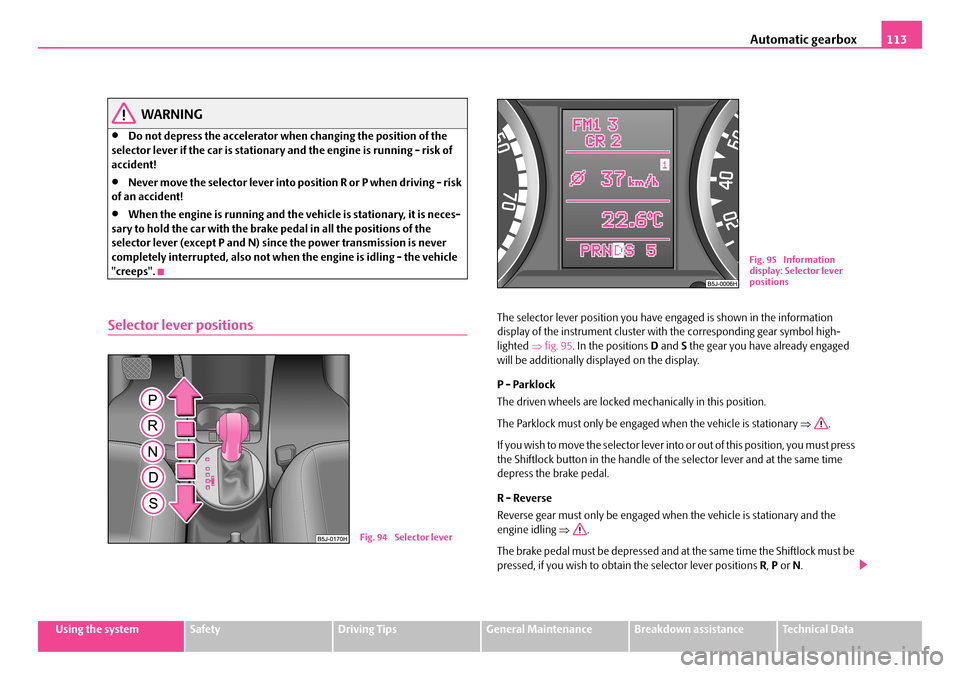
Selector lever positionsThe selector lever position you have engaged is shown in the information display of the instrument cluster with the corresponding gear symbol high- lighted ⇒fig. 95. In the positions D and S the gear you have already engaged will be additionally displayed on the display.
P - Parklock
The driven wheels are locked me chanically in this position.
The Parklock must only be engaged when the vehicle is stationary ⇒.
If you wish to move the sele ctor lever into or out of this position, you must press the Shiftlock button in the handle of the selector lever and at the same time depress the brake pedal.
R - Reverse
Reverse gear must only be engaged when the vehicle is stationary and the engine idling ⇒.
The brake pedal must be depressed and at the same time the Shiftlock must be pressed, if you wish to obtain the selector lever positions R, P or N.
Fig. 94 Selector lever
Fig. 95 Information display: Selector lever positions
NKO A05Fabia 20.book Page 113 Tuesday, September 26, 2006 8:38 AM
Page 115 of 258

Automatic gearbox114
When the ignition is switched on and the selector lever is in position R, the reverse lights will come on.
N - Neutral
The transmission is in Neutral in this position.
The brake pedal must be depressed (if the lever is in its position for longer than 2 seconds) in order to move the se lector lever out of the position N into the position D, with the ignition switched on, on a vehicle travelling at less than 5 km/hour or on a stationary vehicle.
The brake pedal must be depressed (if the lever is in its position for longer than 2 seconds) in order to move the se lector lever out of the position N into the position R, with the ignition switched on, on a vehicle travelling at less than 5 km/hour or on a stationary vehicle.
D - Drive, position for driving forward
When the selector lever is in this position, the forward gears are shifted up and down automatically in line with engi ne load, vehicle speed and the dynamic shift programme.
You must depress the brake pedal ⇒ if you wish to move the selector lever into position D from N when the vehicle is travelling at less than 5 km/hour or is stationary.
In certain circumstances (e.g. when driving in mountainous regions or when towing a trailer) it may be beneficial to select the manual shift programme ⇒ page 116 for a short time in order to adapt the gearbox ratios manually to the driving situations.
S - Position for sporty style of driving
Shifting up later into a higher gear make s it possible to fully exploit the power potential of the engine. The gearbox also then shifts down at higher engine speeds as in the position D.
The gearbox does not shift into the 6th gear in the position S, because the maximum speed is achieved with the 5th gear.
The Shiftlock on the selector lever grip must be pressed when moving the selector lever out of the position D into the position S.
WARNING
•Never move the selector lever into position R or P when driving - risk of an accident!
•When the engine is running and the vehicle is stationary, it is neces- sary to hold the car with the brak e pedal in all the positions of the selector lever (except P and N) since the power transmission is never completely interrupted, also not when the engine is idling - the vehicle "creeps".
•You must on no account unintentionally operate the throttle (e.g. by hand from the engine compartment) if a drive position is engaged when the car is stationary. The vehicle wo uld otherwise immediately start off - also when the handbrake is firmly applied - risk of an accident!
•You must move the selector lever into position P and firmly apply the handbrake first before you or any other person opens the bonnet and starts working on the engine when it is running - risk of accident! It is also essential to observe all warnings ⇒page 198, “Working in the engine compartment”.
Selector lever lock
Automatic selector lever lock
With the ignition on, the selector lever is locked when it is in the positions P and N . You must first of all depress the brake pedal in order to move the selector lever out of this position. The warning light ⇒page 33 lights up in the instru- ment cluster as a reminder for the driver when the selector lever is in position P and N:
A time delay element ensures that the selector lever is not blocked when rapidly switching over the position N (e.g. from R to D). This does, for example, allow
NKO A05Fabia 20.book Page 114 Tuesday, September 26, 2006 8:38 AM
Page 116 of 258

Automatic gearbox115
Using the systemSafetyDriving TipsGeneral MaintenanceBreakdown assistanceTechnical Data
one to seesaw out a stuck vehicle. The sele ctor lever lock will click into place if the lever is in the N position for more than 2 seconds without the brake pedal being pressed.
The selector lever lock is only active if the vehicle is stationary or moving at speed of less than 5 km/hour. The lock is switched off automatically into posi- tion N when the car is travelling at a higher speed.
Shiftlock button
The Shiftlock button in the handle of selector lever prevents certain selector lever positions being engaged inadvertently. The selector lever lock is cancelled when you press the Shiftlock button.
Kickdown function
The kickdown function provides you with maximum accelera-
tion power.
Depressing the accelerator pedal allows th e kickdown function to be activated in the desired driving program. This function has precedence over the driving programme and serves for maximum a cceleration of the vehicle when exploiting the maximum power potential of the engine without taking into account the current selector lever position ( D, S or Tiptronic). The gearbox shifts down to one or several gears in line with the driving state and the vehicle accelerates. The gearbox does not shift up into the highest gear until the engine has reached its maximum revolutions for this gear range.
WARNING
Please note that using the kickdown function can result in the driven wheels spinning on a smooth or slippery road surface - risk of skidding!
Dynamic shift programme
The automatic gearbox of your vehicle is controlled electronically. Shifting up and down through the gears is performe d automatically on the basis of pre- defined driving programmes.
Adopting a moderate style of driving will cause the gearbox to select the most economical driving programme. Shifting up into a higher gear as soon as possible and shifting down as late as possible will have a favourable effect on your fuel consumption.
Adopting a sporty style of driving with rapid movements of the accelerator pedal combined with sharp accelerati on and frequent changes in speed, exploiting the top speed of the car or depressing the accelerator pedal (kick- down function), will cause the gearbox to sw itch over to this style of driving and shift down earlier with frequent changes in gears in comparison to the moderate style of driving.
Selecting the most appropriate driving programme for the particular style of driving is a continuous process. Irrespective of this it is, however, possible to switch or shift down into a dynamic sh ift programme by depressing the accel- erator rapidly. The gearbox shifts down into a lower gear matching the speed of the car and this allows you to accelerate rapidly (e.g. when overtaking) without having to depress the accelerator pedal fu lly into the kickdown range. The orig- inal programme will be reactivated to ma tch your particular style of driving once the gearbox has shifted up again.
When driving in hilly regions, the gears are selected to match uphill and down- hill sections. This avoids the gearbox fr equently shifting up and down when negotiating an uphill stretch. When driving downhill, it is possible to shift down into the Tiptronic position, in order to exploit the engine brake torque.
NKO A05Fabia 20.book Page 115 Tuesday, September 26, 2006 8:38 AM
Page 122 of 258

Communication121
Using the systemSafetyDriving TipsGeneral MaintenanceBreakdown assistanceTechnical Data
•It is recommended to speak louder at higher speeds, so that the tone of your voice is louder than the increased surrounding noise.
•During the dialogue avoid additional noise in the vehicle, e.g. simultane- ously talking occupants.
•Do not speak, if the system makes an announcement.
•The microphone for voice control is directed to the driver and front passenger. Therefore the driver and the front passenger can operate the equip- ment.
WARNING
Pay attention primarily to the traffic situation! As the driver you are fully responsible for the traffic safety. Use the telephone system only to such an extent, so that you are in full control of your vehicle at any time.
Caution
Taking the mobile phone out of the adapte r during the call can lead to interrup- tion of the connection. When taking ou t the mobile phone, the connection to the factory-fitted antenna is interrupted, this reduces the quality of the trans- mitting and receiving signal. This might result additionally in harmful radiation from the mobile phone in the interior of the vehicle and the charging of the tele-phone battery is interrupted.
Note
•Please also refer to the additional instructions ⇒page 129, “Mobile phones and two-way radio systems”.
•Please contact your Škoda Service Part ner if there are any points which are not clear.
•The voice control of the telephone is only possible for adapters with PTT button. Suitable adapters are available at a Škoda Service Partner.
Inserting the mobile phone and adapter
A telephone mount is factory-fitted. The mount is attached to the
centre console. The adapter “Paragon - Fidelity” is offered as Škoda
Original Accessory.
Inserting the mobile phone and adapter
– First of all push the adapter in the direction of arrow ⇒fig. 101 up
to the stop into the mount. Press the adapter slightly downwards,
until it locks securely into position.
– Insert the mobile phone into the adapter (as specified in manufac-
turer's instructions).
Removing the mobile phone and adapter
– Press simultaneouly the side locks of the mount and remove the
mobile phone and adapter ⇒fig. 101.
Fig. 101 Universal prep- aration for the mobile phone
NKO A05Fabia 20.book Page 121 Tuesday, September 26, 2006 8:38 AM
Page 125 of 258

Communication124
Enter PIN code
A PIN code must be entered before operating the system.
– Press the PTT button.
– Give the command ENTER PIN/PIN CODE after the signal tone.
After this command the PIN code can be entered.
The entry of the PIN code is only possible if:
•the ignition and,
•the mobile phone are switched on.
The digits zero to nine are permitted. The system detects no continuous digit combinations such as twenty-three, but only individually spoken digits (two, three). After each order of digits (separation through brief voice pause) the detected digits are repeated.
Notes for entering the PIN code
•When entering a PIN code with more than 8 digits, the system indicates “ The PIN is too long”.
•When entering an incorrect PIN code, the system indicates “The PIN is incorrect ”.
•If the incorrect PIN code has been entered three times consecutively, the card is blocked. With the aid of the personal unblocking code PUK (Personal Unblock Key), the SIM card can be unblocked. The unblocking code can only be entered via the phone keypad and not through the voice control.
Example for entering the PIN code
You can interrupt the dialogue at any time by pressing the PTT button or with the voice command CANCEL.
Select number
– Press the PTT button.
– Give the command DIAL NUMBER after the signal tone.
BACK
The entered name or the last entered order of digits is erased. Previously entered groups of digits are repeated. Then the system requests with voice response “ please proceed” the entry of further digits or commands.
DELETE
All entered digits are erased. Then the system requests with voice response “ The number is deleted. The number please ” the entry of further digits or commands.
CANCELThe dialogue is ended.
Voice commandActivity
Voice commandAnnouncement
ENTER PIN/PIN CODE“ The PIN please”
e.g. ZERO ONE TWO THREE“Zero One Two Three”
If no entry is put in, the following announcement is made after about 5 sec- onds.
“ Possible commands are: store, repeat, back, delete or more digits ”
STORE“The PIN is saved” (end of dialogue)
NKO A05Fabia 20.book Page 124 Tuesday, September 26, 2006 8:38 AM
Page 137 of 258
Passive Safety136
always be correctly fastened in order to provide an optimal protection for you and your occupants.
•The driver must maintain a distance of at least 25 cm to the steering wheel ⇒page 135, fig. 104. Not maintaining this minimum distance will mean that the airbag system will not be able to properly protect you - hazard!
•When driving, hold the steering wheel with both hands firmly on the outer edge in the 9 o'clock and 3 o'cl ock position. Never hold the steering wheel firmly in the 12 o'clock position or in another way (e.g. in the middle of the steering wheel or at the inner steering wheel edge). In such cases, injuries to the arms, the hands and the head can occur when the driver airbag is deployed.
•Ensure that there are no objects in the footwell as any objects may get behind the pedals during a driving or braking manoeuvre. You would then no longer be able to operate the clutch, to brake or accelerate.
Correct seated position for the front passenger
The front passenger must maintain a distance of at least 25 cm
from the dash panel so that the airbag offers the greatest
possible safety when an airbag is deployed.
For the safety of the front passenger and to reduce the risk of injury in the event of an accident, we recommend the following setting.
•Adjust the front passenger seat as far as possible to the rear.
•Adjust the head restraint so that the top edge of the head restraint is at the same level as the upper part of your head ⇒page 135, fig. 105.
•Fasten the seat belt correctly ⇒page 141, “How are seat belts correctly fastened?”.
In exceptional cases the front pass enger airbag can be deactivated ⇒page 152, “Deactivating an airbag”.
Adjusting the passenger seat ⇒page 70, “Adjusting the front seats”.
WARNING
•The front seats and the head restraints must always be adjusted to match the body size of the seat occupant as well as the seat belts must always be correctly fastened in order to provide an optimal protection for you and your occupants.
•The front passenger must maintain a distance of at least 25 cm to the dash panel. Not maintaining this minimum distance will mean that the airbag system will not be able to properly protect you - hazard!
•Always keep your feet in the footwe ll when the car is being driven - never place your feet on the instrument panel, out of the window or on the surfaces of the seats. You will be exposed to increased risk of injury if it becomes necessary to apply the brake or in the event of an accident. If an airbag is deployed, you may suffer fatal injuries when adopting an incorrect seated position!
•The backrests must not be angled too far back when driving other- wise this will affect proper operation of the seat belts and of the airbag system - risk of injury!
Correct seated position for the occupants on the rear seats
Occupants on the rear seats must sit upright, keep the feet in
the footwell and must have their seat belts correctly fastened.
To reduce the risk of injury in the event of a sudden braking manoeuvre or an accident, the occupants on the rear seats must observe the following.
WARNING (continued)
NKO A05Fabia 20.book Page 136 Tuesday, September 26, 2006 8:38 AM
Page 141 of 258

Seat belts140
Important safety information regarding the
use of seat belts
The correct use of the seat belts considerably reduces the risk
of injury!
WARNING
•The belt webbing must not be ja mmed in-between at any point or twisted, or chafe against any sharp edges.
•It is important that the belt webbing is properly routed if the seat belts are to offer their maximum protection ⇒page 141, “How are seat belts correctly fastened?”.
•No two persons (also not children) should ever use a single seat belt together.
•The maximum protection which seat belts can offer is only achieved if you are correctly seated ⇒page 135, “Correct seated position”.
•The belt webbing must not run across solid or fragile objects (e.g. spectacles, ball-point pens , keys etc.) as this may be a cause of injuries.
•Bulky, loose clothing (e.g. a winter coat over a jacket) does not allow you to be correctly seated and impairs proper operation of the seat belts.
•It is prohibited to use clamps or other objects to adjust seat belts (e.g. for shortening the belts for smaller persons).
•The lock tongue should only be inserted into the lock which is the correct one for your seat. Wrong use of the safety belt will reduce its capacity to protect and the risk of injury increases.
•The backrests must not be tilted too far to the rear otherwise the seat- belts can lose their effectiveness.
•The belt webbing must always be ke pt clean. Soiled belt webbing may impair proper operation of the inertia reel ⇒page 192, “Seat belts”.
•The slot of the belt tongue must not be blocked by paper or similar objects otherwise the belt tongue will not lock in place properly.
•Inspect the seat belts r egularly to ensure they are in good condition. If you find seat belts which have damage to the seat belt webbing, seat belt connections, to the inertia reels or to the lock, the relevant safety belt must be replaced by a specialist garage.
•The seat belts must not be removed or changed in any way. Do not make an attempt to repair the seat belts yourself.
•Damaged seat belts which have been subjected to stress in an acci- dent and were therefore stretched, must be replaced - this is best done by a specialist garage. The anchorage points of the belts must also be inspected. The anchorage points for the belts should also be checked.
•In certain countries it is possible to use seat belts which differ in terms of their operation from the seat belts which are described on the pages which follow.
WARNING (continued)
NKO A05Fabia 20.book Page 140 Tuesday, September 26, 2006 8:38 AM