2006 PORSCHE BOXSTER ESP
[x] Cancel search: ESPPage 79 of 296

Controls, Instruments
79
Instrument Panel USA Models Also refer to the corresponding chapter in
the Owner’s Manual.
1 Speedometer with analogue display
2 Tire pressure warning light
3 Turn signal indicator light left/right
4 Tachometer
5 High beam indicator light
6 ABS warning light
7 Cooling system
Temperature gauge, warning light
8Fuel
Level gauge, warning light
9 Adjusting button for instrument illumination
and trip counter
10 Odometer and daily trip mileage display
11 Automatic speed control indicator light
12 Light sensor for instrument illumination13 Airbag warning light
14 Emission control warning light (Check Engine)
15 Central warning light
16 On-board computer display
17 Porsche Stability Management
Multifunctional PSM light
18 Brake warning light
19 Safety belt warning light
20 Tiptronic indicator
21 Clock and outside temperature display
22 Adjustment button for clockWhen the ignition is switched on, the warning
lights light up for a lamp check.
Note
Warnings that have been given are stored in the
appropriate control unit memory and can be read
out at an authorized Porsche dealer.
This information can help to warn you about situa-
tions which may be hazardous to you or your car.
Page 81 of 296

Controls, Instruments
81
Instrument Panel Canada Models Also refer to the corresponding chapter in
the Owner’s Manual.
1 Speedometer with analogue display
2 Tire pressure warning light
3 Turn signal indicator light left/right
4 Tachometer
5 High beam indicator light
6 ABS warning light
7 Cooling system
Temperature gauge, warning light
8Fuel
Level gauge, warning light
9 Adjusting button for instrument illumination
and trip counter
10 Odometer and daily trip mileage display
11 Automatic speed control indicator light
12 Light sensor for instrument illumination13 Airbag warning light
14 Emission control warning light (Check Engine)
15 Central warning light
16 On-board computer display
17 Porsche Stability Management
Multifunctional PSM light
18 Brake warning light
19 Safety belt warning light
20 Tiptronic indicator
21 Clock and outside temperature display
22 Adjustment button for clockWhen the ignition is switched on, the warning
lights light up for a lamp check.
Note
Warnings that have been given are stored in the
appropriate control unit memory and can be read
out at an authorized Porsche dealer.
This information can help to warn you about situa-
tions which may be hazardous to you or your car.
Page 87 of 296
Controls, Instruments
87
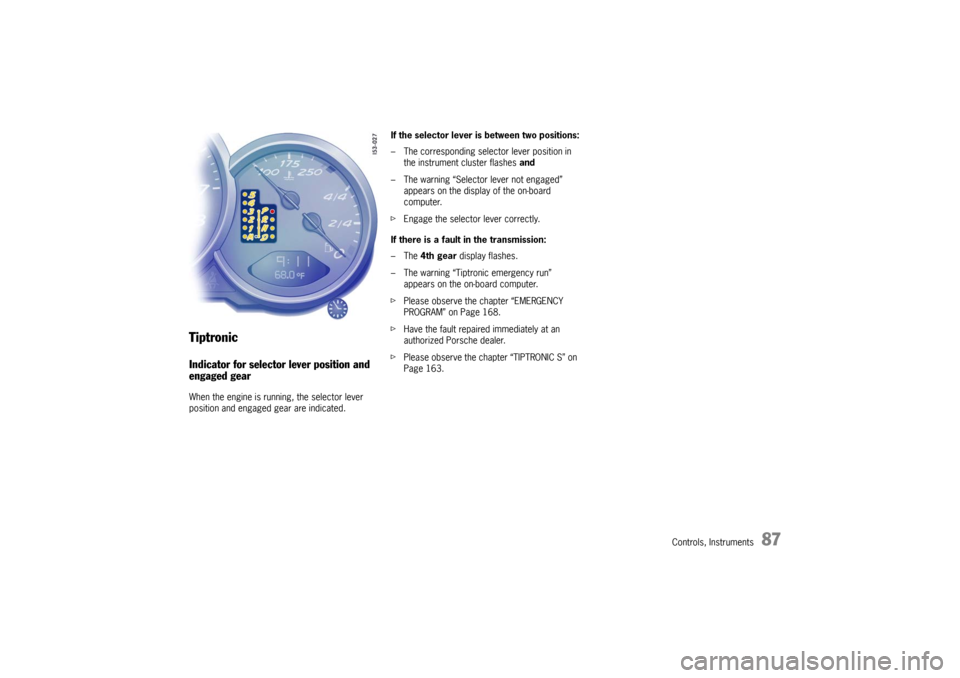
TiptronicIndicator for selector lever position and
engaged gearWhen the engine is running, the selector lever
position and engaged gear are indicated.If the selector lever is between two positions:
– The corresponding selector lever position in
the instrument cluster flashes and
– The warning “Selector lever not engaged”
appears on the display of the on-board
computer.
fEngage the selector lever correctly.
If there is a fault in the transmission:
–The 4th gear display flashes.
– The warning “Tiptronic emergency run”
appears on the on-board computer.
fPlease observe the chapter “EMERGENCY
PROGRAM” on Page 168.
fHave the fault repaired immediately at an
authorized Porsche dealer.
fPlease observe the chapter “TIPTRONIC S” on
Page 163.
Page 103 of 296

Controls, Instruments
103
TPC
Tire pressure monitoringfPlease observe the chapter “TIRES, RIMS,
TRACKS” on Page 282.
The tire pressure monitoring continuously
monitors tire pressure and tire temperature on all
four wheels and warns the driver when the tire
pressure is too low.
The display as well as the settings for the tire
pressure monitoring take place on the on-board
computer.
However, you must still adjust the tire pressure on
the wheel.
fThe driver is responsible for filling the tires
correctly and making the correct settings on
the on-board computer.
The tire pressure monitoring offers the following
functions:
– Display of the actual tire pressure while the
vehicle is in motion
– Display of the deviation from the required
pressure (refilling pressure)
– Display of currently set tire size and type
– Tire pressure warnings in two stages
Safety notes!
Despite the advantages offered by the tire
pressure monitoring, it is still the driver’s
responsibility to update the corresponding
settings in the on-board computer and
maintain the pressure in the tires. Low tire
pressure reduces the road safety of the
vehicle and destroys the tire and wheel.
fWhen a flat tire has been displayed, immedi-
ately stop in a suitable place and check the
tires for damage. If necessary, remedy the
damage with a tire sealant.
fDo not by any means continue to drive with
defective tires.
fSealing the tire with tire sealant is only an
emergency repair, so you can drive to the next
authorized Porsche dealer. The maximum per-
mitted speed is 50 mph (80 km/h).
fDo not drive with tires whose tire pressure
drops again in a short period of time. In cases
of doubt, have tires checked by an authorized
Porsche dealer.
fDefective tires must be immediately replaced
by an authorized Porsche dealer.
Tire repairs are not permissible under any
circumstances.fIf the tire pressure monitoring is defective (e.g.
defective wheel transmitter), contact an
authorized Porsche dealer immediately and
have the damage repaired.
The tire pressure will not be monitored by a
defective tire pressure monitoring.
fTires lose air over time without a tire defect
being present. A tire pressure warning will then
appear in the on-board computer display.
Correct the tire pressure at the next oppor-
tunity.
fThe tire pressure monitoring gives a warning
about tire damage due to natural pressure loss
as well as about a gradual loss of pressure due
to foreign objects.
The tire pressure monitoring cannot warn you
about tire damage that occurs suddenly (e.g.
flat tire due to abrupt external effects).
Page 109 of 296

Controls, Instruments
109
The warning light in the speedometer lights up:
– When a loss in pressure has been detected
– If the tire pressure monitoring is faulty
– When learning newly mounted wheels/wheel
sensors, as long as the vehicle’s own wheels
have not yet been recognized.
The tire pressure warning light in the instrument
panel goes out only when the cause of the fault
has been rectified.
No monitoringIn the event of faults the tire pressure monitoring
cannot monitor the tire pressure.
The warning light on the instrument panel lights up
and a corresponding message appears on the
on-board computer.
Monitoring is not active when:
– the tire pressure monitoring is faulty,
– wheel transmitters for the tire pressure
monitoring are missing,
– temporarily after changing a wheel (learning
phase),
– more than four wheel transmitters are
detected,
– there is external interference by other radio
sources, e.g. wireless headphones,
– tire temperatures are too high.
fPlease observe the chapter “WARNINGS ON
THE INSTRUMENT PANEL AND THE ON-
BOARD COMPUTER” on Page 116.
Pressure increase as the result of
temperature increaseA Tire pressure
B Tire temperature
C Tire pressures for cold tires
D Tire pressure for hot tires
E Pressure increase as the result of temperature
increase
F Pressure drop in faulty/leaking tires
1. Required-pressure line
2. Warning stage 1 (from –3 to –6 psi
(–0.2 bar to –0.4 bar))
3. Warning stage 2 (from –6 psi (–0.4 bar))
Warning light
Page 112 of 296
112
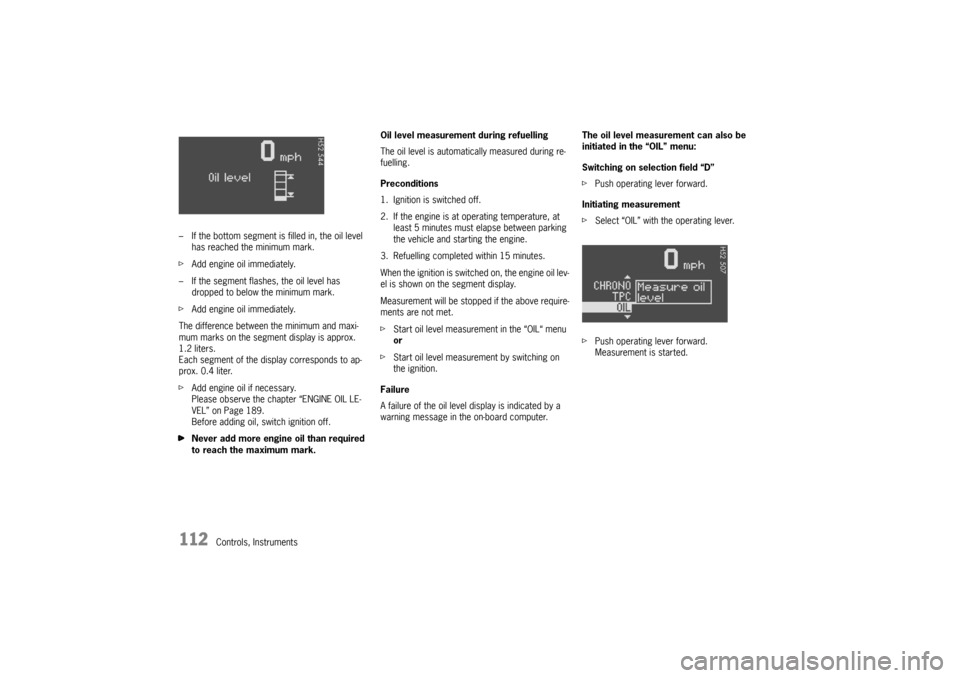
Controls, Instruments – If the bottom segment is filled in, the oil level
has reached the minimum mark.
fAdd engine oil immediately.
– If the segment flashes, the oil level has
dropped to below the minimum mark.
fAdd engine oil immediately.
The difference between the minimum and maxi-
mum marks on the segment display is approx.
1.2 liters.
Each segment of the display corresponds to ap-
prox. 0.4 liter.
fAdd engine oil if necessary.
Please observe the chapter “ENGINE OIL LE-
VEL” on Page 189.
Before adding oil, switch ignition off.
fNever add more engine oil than required
to reach the maximum mark.Oil level measurement during refuelling
The oil level is automatically measured during re-
fuelling.
Preconditions
1. Ignition is switched off.
2. If the engine is at operating temperature, at
least 5 minutes must elapse between parking
the vehicle and starting the engine.
3. Refuelling completed within 15 minutes.
When the ignition is switched on, the engine oil lev-
el is shown on the segment display.
Measurement will be stopped if the above require-
ments are not met.
fStart oil level measurement in the “OIL“ menu
or
fStart oil level measurement by switching on
the ignition.
Failure
A failure of the oil level display is indicated by a
warning message in the on-board computer.The oil level measurement can also be
initiated in the “OIL” menu:
Switching on selection field “D”
fPush operating lever forward.
Initiating measurement
fSelect “OIL” with the operating lever.
fPush operating lever forward.
Measurement is started.
Page 116 of 296

116
Controls, Instruments
Warnings on the instrument panel and the on-board computerIf a warning message appears, always refer to the corresponding chapters in the Owner’s Manual.
Warning messages are issued only if all measurement preconditions are met. Therefore, check all fluid levels regularly –
in particular, always check the engine oil level after refuelling.
Instrument
panelOn-board
computerText display on on-board
computerMeaning/measure
Seat belt Driver and passengers must fasten their seat
belts.
Handbrake Handbrake is still on.
Ignition key
not removed
Replace battery
in ignition keyReplace the remote-control battery.
Ignition lock faulty,
please go to workshopHave the fault remedied at an authorized
Porsche dealer.
Ignition lock faulty,
visit workshop nowHave the fault remedied at an authorized
Porsche dealer.
Relieve steering Relieve the steering l o c k b y m o v i n g t h e s t e e r i n g
wheel to the left or right.
Steering locked The steering wheel lock remains engaged.
Have the fault remedied at an authorized
Porsche dealer.
Lights on Dipped beam/side light on.
Parking light on Left/right parking light on.
Page 130 of 296
130
Controls, Instruments
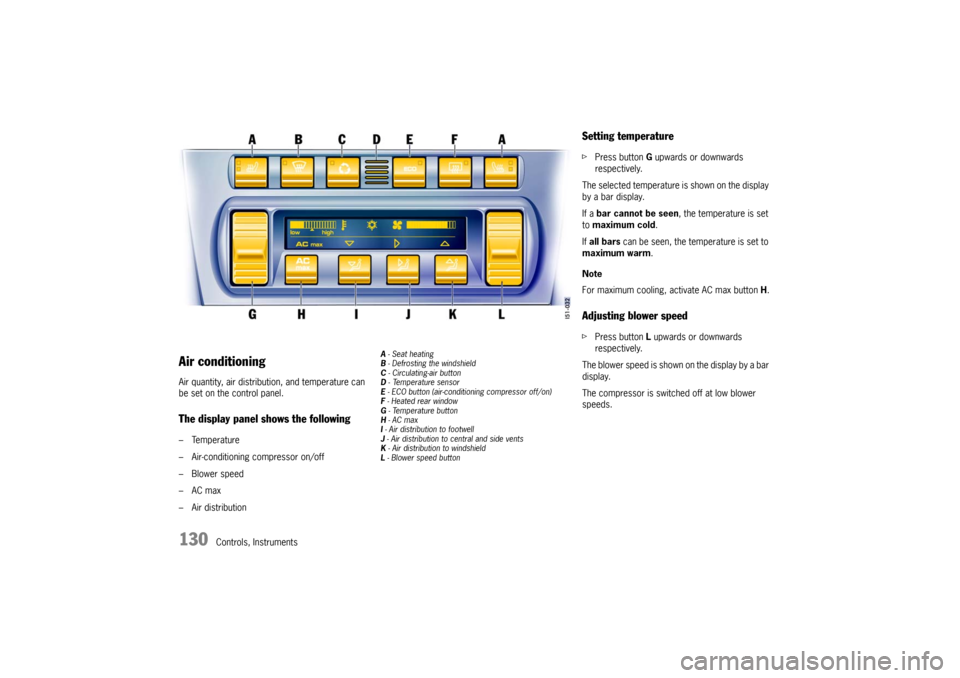
Air conditioningAir quantity, air distribution, and temperature can
be set on the control panel.The display panel shows the following– Temperature
– Air-conditioning compressor on/off
–Blower speed
–AC max
– Air distribution
A - Seat heating
B - Defrosting the windshield
C - Circulating-air button
D - Te m p e r a t u r e s e n s o r
E - ECO button (air-conditioning compressor off/on)
F - Heated rear window
G - Temperature button
H - AC max
I - Air distribution to footwell
J - Air distribution to central and side vents
K - Air distribution to windshield
L - Blower speed button
Setting temperaturefPress button G upwards or downwards
respectively.
The selected temperature is shown on the display
by a bar display.
If a bar cannot be seen, the temperature is set
to maximum cold.
If all bars can be seen, the temperature is set to
maximum warm.
Note
For maximum cooling, activate AC max button H.Adjusting blower speedfPress button L upwards or downwards
respectively.
The blower speed is shown on the display by a bar
display.
The compressor is switched off at low blower
speeds.