Page 27 of 493
00X010a
Right or left turnLane change
(Right or left)
00X009e
00X011eWiper on
(Normal operation) 4
Automatic operation
Washer on Low speed operation
1
High speed operation
2
Wiper on
(Intermittent operation)
3Washer also on
5Washer on
6
QUICK REFERENCE
5
�TURN SIGNAL SWITCH5. WIPER SWITCH
�Front
� Rear
Page 32 of 493
KEYS AND DOORS
10
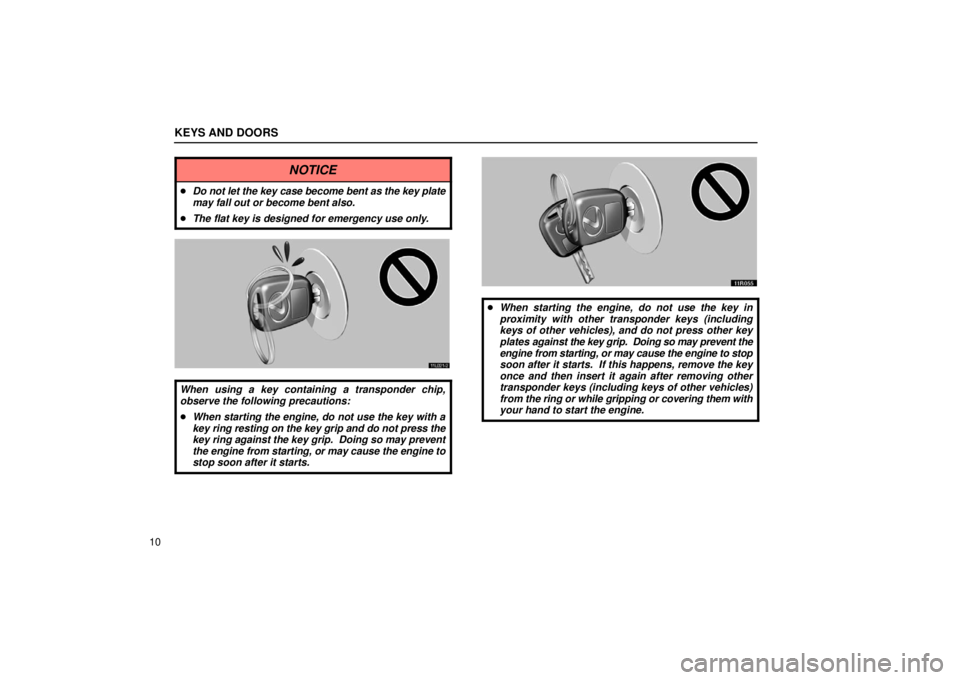
NOTICE
�Do not let the key case become bent as the key plate
may fall out or become bent also.
� The flat key is designed for emergency use only.
11L021-2
When using a key containing a transponder chip,
observe the following precautions:
�When starting the engine, do not use the key with a
key ring resting on the key grip and do not press the
key ring against the key grip. Doing so may prevent
the engine from starting, or may cause the engine to
stop soon after it starts.
11R055
�When starting the engine, do not use the key in
proximity with other transponder keys (including
keys of other vehicles), and do not press other key
plates against the key grip. Doing so may prevent the
engine from starting, or may cause the engine to stop
soon after it starts. If this happens, remove the key
once and then insert it again after removing other
transponder keys (including keys of other vehicles)
from the ring or while gripping or covering them with
your hand to start the engine.
Page 34 of 493

KEYS AND DOORS
12For your Lexus dealer to make you a new key with built
−in
transponder chip, your dealer will need your key number and
master key. However, there is a limit to the number of
additional keys your Lexus dealer can make for you.
If you make your own duplicate key, you will not be able
to cancel the system or start the engine.
For vehicles sold in U.S.A.
FCC ID: MOZRI20BTY
This device complies with Part 15 of the FCC Rules.
Operation is subject to the following two conditions:
(1) This device may not cause harmful interference,
and (2) this device must accept any interference
received, including interference that may cause
undesired operation.
CAUTION
Changes or modifications not expressly approved by
the party responsible for compliance could void the
user’s authority to operate the equipment.
For vehicles sold in Canada
This device complies with RSS− 210 of Industry
Canada.
Operation is subject to the following two conditions: (1)
This device may not cause interference, and (2) this
device must accept any interference, including
interference that may cause undesired operation of the
device.
Page 35 of 493

KEYS AND DOORS
13
WIRELESS REMOTE CONTROL*
11X013a
1Locking the doors
2Unlocking the doors and opening the windows and
moon roof
3Indicator light
4Sounding an alarm
NOTE: *This feature can be deactivated as vehicle theft
deterrent measure in case of the loss of the wireless remote
control key. Ask your Lexus dealer for details.
When you operate any button on the key, push it slowly and
surely. At this time, the indicator light on the key grip flashes
once.
The operational range of the wireless remote control is
approximately 1 meter (3 ft.). The effective range may vary
with different conditions. To activate the wireless remote
control without fail, do it approximately 1 meter (3 ft.) from your
Lexus. In the following cases, th
e battery in the key may be
discharged. If this is the case, replace it using a special
screwdriver.
� The remote control does not work.
� The operational range of wireless remote control becomes
extremely short.
� The indicator light on the key is dimmed or does not come
on.
For the replacement of the battery, see “Replacing the battery”
on page 17. You can also have the battery of the key replaced
by your Lexus dealer.
If you lose the wireless key, contact your Lexus dealer as soon
as possible to avoid the possibility of theft, or an accident.
You can use up to 4 wireless remote control keys for the same
vehicle. Contact your Lexus dealer for detailed information.
The wireless remote control key is an electronic
component. Observe the following instructions in order
not to cause damage to the key.
� Do not leave the wireless re mote control key in places
where the temperature becomes high such as on the
dashboard.
� Do not disassemble it.
� Avoid knocking it hard against other objects or dropping it.
� Avoid putting it in water.
Page 38 of 493

KEYS AND DOORS
16For vehicles sold in U.S.A.
This device complies with
Part 15 of the FCC Rules.
Operation is subject to the following two conditions: (1)
This device may not cause harmful interference, and (2)
this device must accept any interference received,
including interference that may cause undesired
operation.
NOTICE:
This equipment has been tested and found to comply
with the limits for a Class B digital device, pursuant to
Part 15 of the FCC Rules. These limits are designed to
provide reasonable protection against harmful
interference in a residential installation. This equipment
generates, uses and can radiate radio frequency
energy and, if not installed and used in accordance with
the instructions, may cause harmful interference to
radio communications. However, there is no guarantee
that interference will not occur in a particular
installation. If this equipment does cause harmful
interference to radio or television reception, which can
be determined by turning the equipment off and on, the
user is encouraged to try to correct the interference by
one or more of the following measures:
� Reorient or relocate the receiving antenna.
� Increase the separation between the equipment and
receiver.
�Connect the equipment into an outlet on a circuit differ-
ent from that to which the receiver is connected.
� Consult the dealer or an experienced radio / TV techni-
cian for help.
FCC WARNING:
Changes or modifications not expressly approved
by the party responsible for compliance could void
the user’s authority to operate the equipment.
For vehicles sold in Canada
Operation is subject to the following two conditions: (1)
this device may not cause interference, and (2) this
device must accept any interference, including
interference that may cause undesired operation of the
device.
Page 39 of 493
KEYS AND DOORS
17
Replacing the battery
When you replace the battery, prepare a lithium battery
CR2016 or equivalent and a special screwdriver.
CAUTION
Special care should be taken to prevent small children
from swallowing the removed battery or components.
NOTICE
�When replacing the battery, be careful not to lose the
components.
� Replace only with the same or equivalent type
recommended by a Lexus dealer.
� Dispose of used battery according to the local laws.
11L0281
1. Remove the screw, and then the cover while pushing it in the
arrow direction.
11x602
2. Remove the module from the key frame.
Page 43 of 493

KEYS AND DOORS
21
Locking with power door lock switch
11X003e
� 1Lock 2Unlock
To lock all the side doors and back door simultaneously,
push the power door lock switch down on the front side.
Pushing down on the rear side will unlock them.
The same switch is also found on the front passenger’s side.
When the front doors are locked from the outside or locked with
the wireless remote control transmitter, the power door lock
switch will not work until either front door is unlocked with the
key, lock button or wireless remote control transmitter.
Automatic door locking and unlocking
functions
AUTOMATIC DOOR LOCKING
You can select the following functions:
� Locking linked with the shift position
All doors are automatically locked when the selector lever is
moved out of “P” position.
� Locking linked with vehicle speed
All doors are automatically locked when the vehicle speed
goes above about 20 km/h (12 mph).
You can set or cancel the automatic door locking
functions:
Be sure to apply the parking brake when performing the
following operations.
To select the locking linked with the shift position:
1. Close all doors and turn the ignition switch to the “ON”
position.
2. Shift the selector lever to the “P” position.
3. Within 10 seconds of turning the ignition switch to the “ON”
position, press and hold the driver’s side power door lock
switch in the lock position for 5 seconds and then release.
The doors will be locked and unlocked to indicate that the
function is set.
To cancel the function, do the above operation again.
Page 44 of 493

KEYS AND DOORS
22To select the locking linked with the vehicle speed:
1. Close all doors and turn the ignition switch to the “ON”
position.
2. Shift the selector lever from “P” to the “N” position.
3. Within 10
seconds of turning the ignition switch to the “ON”
position, press and hold the driver’s side power door lock
switch in the lock position for 5 seconds and then release.
The doors will be locked and unlocked to indicate that the
function is set.
To cancel the function, do the above operation again.
AUTOMATIC DOOR UNLOCKING
You can select the following functions:
� Unlocking linked with the shift position
All doors are automatically unlocked when the selector lever
is moved to “P” position.
� Unlocking linked with the ignition switch
All doors are automatically unlocked when the the driver’s door
is opened within 10 seconds after the ignition switch is turned
to the “ACC” or “LOCK” position, or the key is removed.
You can set or cancel the automatic unlocking functions:
Be sure to apply the parking brake when performing the
following operations.
To select the unlocking linked with the shift position:
1. Close all doors and turn the ignition switch to the “ON”
position. 2. Shift the selector lever to the “P” position.
3. Within 10
seconds of turning the ignition switch to the “ON”
position, press and hold the driver’s side power door lock
switch in the unlock position for 5 seconds and then release.
The doors will be locked and unlocked to indicate that the
function is set.
To cancel the function, do the above operation again.
To select the unlocking linked with the ignition switch:
1. Close all doors and turn the ignition switch to the “ON”
position.
2. Shift the selector lever from “P” to the “N” position.
3. Within 10 seconds of turning the ignition switch to the “ON”
position, press and hold the driver’s side power door lock
switch in the unlock position for 5 seconds and then release.
The doors will be locked and unlocked to indicate that the
function is set.
To cancel the function, do the above operation again.

