Page 83 of 493

GAUGES, METERS AND SERVICE REMINDER INDICATORS
61
(n) Lexus Night View System Warning Light
When this light comes on, the bulb for the near−infrared
floodlight (night view projector) is burned out. Have it replaced
at Lexus dealer.
(o) Charging System Warning Light
This warning light comes on when the ignition switch is turned
to the “ON” position, and goes off when the engine is started.
When there are problems in the charging system while the
engine is running, the warning light comes on.
NOTICE
When the charging system warning light comes on
while the engine is running, malfunctions such as the
engine drive belt being broken may have occurred. If
the warning light comes on, immediately stop the
vehicle in a safe place and contact your Lexus dealer.
(p) Low Fuel Level Warning Light
This light comes on when the fuel level in the tank becomes
very low. Fill the tank as soon as possible.
On inclines or curves, due to the movement of fuel in the tank,
the low fuel level warning light may come on earlier than usual.
(q) Low Washer Fluid Warning Light
This light comes on when the fluid level in the tank becomes
very low. Fill the tank as soon as possible.
(r) Key Reminder Buzzer
This buzzer acts as a reminder to remove the key when you
open the driver’s door with the ignition key in the “ACC” or
“LOCK” position.
Page 84 of 493
GAUGES, METERS AND SERVICE REMINDER INDICATORS
62
How to check all the service reminder
indicators
(except the low fuel level warning light):
1. Apply the parking brake.
2. Open the door.
The following service reminder indicator should come on. It
goes off when you close the door completely.
3. Place the four−wheel drive control lever in “N” position and
the selector lever in “P” position and turn the ignition key to
“ACC”.
The following service reminder indicator should come on. It
goes off when you place the four −wheel drive control lever in
“H” or “L” position.
4. Turn the ignition key to “ON”.
The following service reminder indicators should come on.
222
w73
w72a
214
218
wtracorw227
orw16
or
or
Page 85 of 493
222
GAUGES, METERS AND SERVICE REMINDER INDICATORS
63
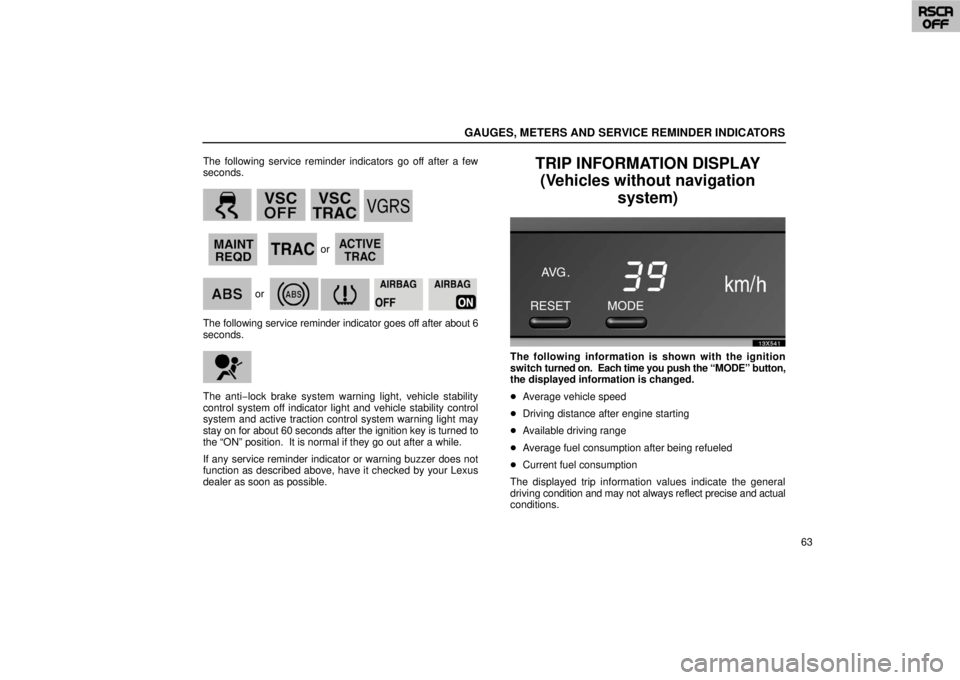
The following service reminder indicators go off after a few
seconds.
w73
w72a
218
214 wtracorw227
or
The following service reminder indicat
or goes off after about 6
seconds.
The anti −lock brake system warning light, vehicle stability
control system off indicator light and vehicle stability control
system and active traction control system warning light may
stay on for about 60 seconds after the ignition key is turned to
the “ON” position. It is normal if they go out after a while.
If any service reminder indicator or warning buzzer does not
function as described above, have it checked by your Lexus
dealer as soon as possible.
TRIP INFORMATION DISPLAY (Vehicles without navigation system)
13x541z
The following information is shown with the ignition
switch turned on. Each time you push the “MODE” button,
the displayed information is changed.
� Average vehicle speed
� Driving distance after engine starting
� Available driving range
� Average fuel consumption after being refueled
� Current fuel consumption
The displayed trip information values indicate the general
driving condition and may not always reflect precise and actual
conditions.
Page 87 of 493
GAUGES, METERS AND SERVICE REMINDER INDICATORS
65
�Average fuel consumption after refueling
13x552
The average fuel consumption after refueling is
calculated and displayed based on the total driving
distance and the total fuel consumption after refueling.
The value is updated every 10 seconds.
When refueling, be sure to stop your vehicle and turn the
ignition switch off.
�Current fuel consumption
13x554
The current fuel consumption is calculated and displayed
based on the driving distance and the fuel consumption
per 2 second interval with the engine running.
The value is updated every 2 seconds.
If you are driving at low speeds just before stopping, the
accurate figure may not be shown.
Page 88 of 493
GAUGES, METERS AND SERVICE REMINDER INDICATORS
66
13x531a
The unit shown on the display can be changed using the
following procedure:
1. Hold down the “MODE” button until the unit flashes.
2. Push the “RESET” button to change the unit.
3. Push the “MODE” button.
When you change the unit shown on the trip information
display, the unit on the outside temperature display is also
changed.
INSTRUMENT PANEL LIGHTCONTROL
13X019
To adjust the brightness of the instrument panel lights,
turn the dial.
When the surroundings are dark and when the headlight
switch is in the first or second click stop, you can also adjust
the brightness of the displays on the clock and audio and air
conditioning systems using this dial.
Page 91 of 493

INTERIOR EQUIPMENT
69
INTERIOR LIGHTS
Front
14X081
To turn on the interior light, slide the switch.
With the switch in the “DOOR” position, the light comes on
when any door is opened or when the ignition key is turned to
“LOCK”. After all the doors are closed, the light remains on for
about 15 seconds and then goes out.*
However, in the following cases, the light goes out
immediately:
1. All the doors are closed when the ignition key is in “ACC” or
“ON” position.
2. The ignition key is turned to “ACC” or “ON” when the light
is still on.
3. All the doors are locked when the light is still on. 4. One door is closed with the lock button pushed in while the
other doors are locked.
NOTE: * The interior lights can be set not to come on or the
duration of lighting can be changed. Ask your Lexus dealer
for details.
Rear
14X002
To turn on the interior light, slide the switch.
With the switch in the “DOOR” position, the light comes on
when the rear door or back door is opened. The light goes out
immediately when the rear door and back door are closed.
Page 97 of 493
INTERIOR EQUIPMENT
75
Rear
14X603
The power outlets are designed for power supply for car
accessories.
The ignition key must be in the “ACC” or “ON” position for t\
he
power outlets to be used.
NOTICE
�To prevent the fuse from being blown, do not use the
electricity over the total vehicle capacity of 12V/120W
(front and rear outlets together).
� To prevent the battery from being discharged, do not
use the power outlets longer than necessary when
the engine is not running.
�Close the power outlet lids when the power outlets
are not in use. Inserting anything other than an
appropriate plug that fits the outlet, or allowing any
liquid to get into the outlet may cause electrical
failure or short circuits.
REAR CONSOLE BOX
14X074
� 1
For upper box 2For lower box
To use the rear console box, open as shown in the
illustration.
Page 99 of 493
INTERIOR EQUIPMENT
77
The battery side of the hand
−held transmitter must be pointed
away from the HomeLink
� during the programming process.
For Canadian users, follow the procedure in “Programming an
entrance gate/Programming all devices in the Canadian
market”.
1. Decide which of 3 HomeLink
� buttons you want to program.
14x607
� 1
HomeLink�
2 Handheld garage transmitter
325 to 75 mm (1 to 3 in.)
2. Place your hand− held garage transmitter 25 to 75 mm (1 to
3 in.) away from the surface of the HomeLink
�.
Keep the indicator light on the HomeLink
� in view while
programming.
14x608
3. Simultaneously press and hold the hand −held garage
transmitter button along with the selected HomeLink� button.
Do not release the buttons until step 4 has been completed.
4. When the indicator light on the HomeLink
� changes from a
slow to a rapid flash after 20 seconds, you can release both
buttons.


