Page 93 of 344

XENON HEADLIGHTS
WARNING HIGH VOLTAGE
O When xenon headlights are on, they pro-
duce a high voltage. To prevent an elec-
tric shock, never attempt to modify or
disassemble. Always have your xenon
headlights replaced at an INFINITI
dealer.
O Xenon headlights provide considerably
more light than conventional headlights.
If they are not correctly aimed, they
might temporarily blind an oncoming
driver or the driver ahead of you and
cause a serious accident. If headlights
are not aimed correctly, immediately
take your vehicle to an INFINITI dealer
and have the headlights adjusted
correctly. When the xenon headlight is initially
turned on, its brightness or color varies
slightly. However, the color and bright-
ness will soon stabilize.
O The life of xenon headlights will be
shortened by frequent on-off opera-
tion. It is generally desirable not to
turn off the headlights for short inter-
vals (for example, when the vehicle
stops at a traffic signal). Even when the
daytime running lights are active
(Canada only), the xenon headlights do
not turn on. This way the life of the
xenon headlights is not reduced.
O If a xenon headlight bulb is close to
burning out, the brightness will drasti-
cally decrease, the light will start
blinking, or the color of the light will
become reddish. If one or more of the
above signs appear, contact an INFINITI
dealer.
HEADLIGHT SWITCH
Lighting
q 1
Turn the switch to the position:
The front park, side marker, tail, li-
cense plate and instrument lights will
come on.
q 2
Turn the switch to the position:
Headlights will come on and all the
other lights remain on. SIC2227
Type AHEADLIGHT AND TURN SIGNAL SWITCH
Instruments and controls
2-21
w 06.1.13/V35-D/V5.0
X
Page 94 of 344

CAUTIONUse the headlights with the engine running
to avoid discharging the vehicle battery.
Autolight system (if so equipped) The autolight system allows the head-
lights to be set so they turn on and off
automatically.
To set the autolight system:
1. Make sure the headlight switch is in
the AUTO
q 1
position.
2. Turn the ignition switch to the ON po-
sition.
3. The autolight system automatically
turns the headlights on and off. To turn the autolight system off, turn the
switch to the OFF, or position.
The autolight system can turn on the
headlights automatically when it is dark,
turn off the headlights when it is light,
and keep the headlights on for up to 45
seconds after you turn the ignition switch
to the OFF position and open any door
then close all the doors.
If the ignition switch is turned off and one
of the doors is opened and this condition
is continued, the headlights remain on for
5 minutes.SIC2228
Type B SIC2229
Autolight system
2-22 Instruments and controls
w 06.1.13/V35-D/V5.0
X
Page 95 of 344

Be sure not to put anything on top of the
photo sensor
q A
located on the top left-
hand side of the instrument panel. The
photo sensor controls the autolamp; if it is
covered, the photo sensor reacts as if it is
dark and the headlights will illuminate.
Headlight beam select
q 1
To select the low beam, put the lever
in the neutral position as shown.
q 2
To select the high beam, push the
lever forward while the switch is in the
position. Pull it back to select the
low beam.
q 3
Pulling the lever toward you will flash
the headlight high beam even when
the headlight switch is in the OFF posi-
tion. Battery saver system O When the headlight switch is in the
or position while the igni-
tion switch is in the ON position, the
lights (including the front fog light)
will automatically turn off 5 minutes
after the ignition switch has been
turned to the OFF position.
O When the headlight switch remains in
the or position after the
lights automatically turn off, the lights
will turn on for 5 minutes when the
headlight switch is turned to the OFF
position and then turned to the
or position.
CAUTION Even though the battery saver feature auto-
matically turns off the headlights after a pe-
riod of time, you should turn the headlight
switch to the OFF position when the engine
is not running to avoid discharging the ve-
hicle battery.SIC1230C SIC2230
Instruments and controls
2-23
w 06.1.4/V35-D/V5.0
X
Page 96 of 344

Daytime running light system
(Canada only) The headlights automatically illuminate at
a reduced intensity when the engine is
started with the parking brake released.
The daytime running lights operate with
the headlight switch in the OFF position
or in the position. Turn the headlight
switch to the position for full illumi-
nation when driving at night.
If the parking brake is applied before the
engine is started, the daytime running
lights do not illuminate. The daytime run-
ning lights illuminate once the parking
brake is released. The daytime running
lights will remain on until the ignition
switch is turned off.
WARNINGWhen the daytime running light system is
active, tail lights on your vehicle are not on.
It is necessary at dusk to turn on your head-
lights. Failure to do so could cause an acci-
dent injuring yourself and others. Instrument brightness control The instrument brightness control oper-
ates when the light switch is in the AUTO
(when lighting), or position.
Turn the control to the darkening direc-
tion
q A
or the brightening direction
q B
to
adjust the brightness of the instrument
panel (except power window switch
lights).
When the control is turned to the upper
end, the light intensity will be at
maximum. When the control is turned to
the lower end, the light will be turned off. TURN SIGNAL SWITCH
Turn signal
q 1
Turn signal Move the lever up or down to signal the
turning direction. When the turn is com-
pleted, the turn signals cancel automati-
cally.
q 2
Lane change signal To indicate a lane change, move the lever
up or down to the point where lights
begin flashing. SIC2566 SIC2231
2-24 Instruments and controls
w 06.1.4/V35-D/V5.0
X
Page 97 of 344

FOG LIGHT SWITCH To turn the fog lights on, turn the head-
light switch to the position, then
turn the switch to the position. To
turn them off, turn the switch to the OFF
position.
The headlights must be on and the low
beams selected for the fog lights to oper-
ate. The fog lights automatically turn off
when the high beam headlights are se-
lected. Push the switch on to warn other drivers
when you must stop or park under emer-
gency conditions. All turn signal lights
will flash.
Some state or provincial laws may prohibit
the use of the hazard warning flasher
switch while driving.
WARNING O If stopping for an emergency, be sure to
move the vehicle well off the road. O Do not use the hazard warning flashers
while moving on the highway unless un-
usual circumstances force you to drive
so slowly that your vehicle might be-
come a hazard to other traffic.
O Turn signals do not work when the
hazard warning flasher lights are on.
The flasher can be actuated with the igni-
tion switch either off or on.SIC1836A SIC2574
HAZARD WARNING FLASHER SWITCH
Instruments and controls
2-25
w 06.1.4/V35-D/V5.0
X
Page 101 of 344

If the power supply is disconnected, the
clock will not indicate the correct time. Re-
adjust the time.
ADJUSTING THE TIME To move the time forward, push the
button
q 1
.
To move the time backward, push the
button
q 2
.
Push and hold each adjusting switch to
move the time forward or backward con-
tinuously. The power outlet is for powering electrical
accessories such as cellular telephones.
CAUTION O The outlet and plug may be hot during or
immediately after use.
O This power outlet is not designed for use
with a cigarette lighter unit.
O Do not use with accessories that exceed a
12 volt, 120W (10A) power draw. Do not
use double adapters or more than one
electrical accessory. O Use power outlets with the engine running
to avoid discharging the vehicle battery.
O Avoid using power outlets when the air
conditioner, headlights or rear window de-
froster is on.
O Before inserting or disconnecting a plug,
be sure the electrical accessory being used
is turned OFF.
O Push the plug in as far as it will go. If good
contact is not made, the plug may overheat
or the internal temperature fuse may open.
O When not in use, be sure to close the cap.
Do not allow water to contact the outlet.SIC2568 SIC1840B
Automatic transmission model SIC2673
Manual transmission modelsCLOCK POWER OUTLET
Instruments and controls
2-29
w 06.1.5/V35-D/V5.0
X
Page 107 of 344
GLOVE BOX To open the glove box, pull the handle
q 1
.
To close, push the lid in until the lock
latches.
To lock
q 2
/unlock
q 3
the glove box, use
the master key.
The glove box light illuminates when the
glove box is opened with the headlight
switch on. WARNING Keep glove box lid closed while driving to
help prevent injury in an accident or a
sudden stop.
UPPER GLOVE BOX (except for
navigation system equipped
models) To open the upper glove box, push the
button
q A
.
To close, push the lid down until the lock
latches.
The upper glove box light illuminates
when the upper glove box is opened with
the headlight switch on.SIC2573 SIC1848A
Instruments and controls
2-35
w 06.1.4/V35-D/V5.0
X
Page 154 of 344
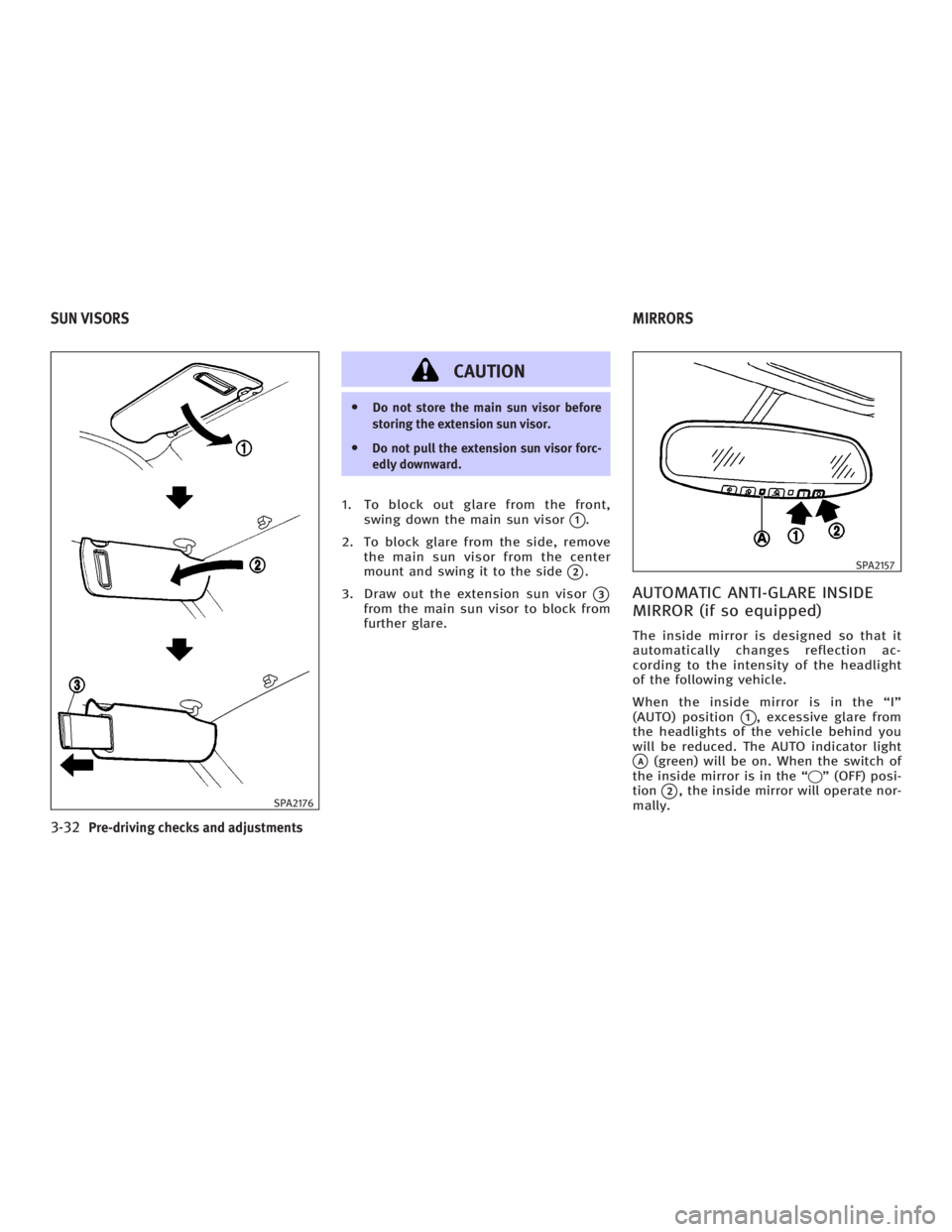
CAUTION O Do not store the main sun visor before
storing the extension sun visor.
O Do not pull the extension sun visor forc-
edly downward.
1. To block out glare from the front,
swing down the main sun visor
q 1
.
2. To block glare from the side, remove
the main sun visor from the center
mount and swing it to the side
q 2
.
3. Draw out the extension sun visor
q 3
from the main sun visor to block from
further glare.
AUTOMATIC ANTI-GLARE INSIDE
MIRROR (if so equipped) The inside mirror is designed so that it
automatically changes reflection ac-
cording to the intensity of the headlight
of the following vehicle.
When the inside mirror is in the ªIº
(AUTO) position
q 1
, excessive glare from
the headlights of the vehicle behind you
will be reduced. The AUTO indicator light
q A
(green) will be on. When the switch of
the inside mirror is in the ª q º (OFF) posi-
tion
q 2
, the inside mirror will operate nor-
mally.SPA2176 SPA2157
SUN VISORS MIRRORS
3-32 Pre-driving checks and adjustments
w 06.1.4/V35-D/V5.0
X
