Page 66 of 316

This indicator has three f unctions:It comes on as a reminder that you
have turned off the vehicle
stability assist (VSA) system.
It flashes when VSA is active (see
page ).
It comes on along with the VSA
system indicator if there is a
problem with the VSA system.
This indicator normally comes on f or
a f ew seconds when you turn the
ignition switch to the ON (II)
position. For more inf ormation, see
page .
This indicator normally comes on f or
a f ew seconds when you turn the
ignition switch to the ON (II)
position.
If itcomesonandstaysonatany
other time, or it does not come on
when you turn the ignition switch to
the ON (II) position, there is a
problem with the VSA system. Have
your vehicle checked by your dealer.
Without VSA, your vehicle still has
normal driving ability, but will not
have VSA traction and stability
enhancement. See page f or more
inf ormation on the VSA system.
This indicator comes on f or a f ew
seconds when you turn the ignition
switch to the ON (II) position. It will
gooffifyouhaveinserteda
properly-coded ignition key. If it is
not a properly-coded key, the
indicator will blink and the engine
will not start (see page ).
This indicator also blinks several
times when you turn the ignition
switch f rom the ON (II) position to
the ACCESSORY (I) or the LOCK
(0) position.
1.
2.
3.
211 211
211
79
Instrument Panel Indicators
VSA A ctivation Indicator
Vehicle Stability Assist
(VSA ) System Indicator
Immobilizer System
Indicator
64
Page 71 of 316
This indicator reminds you that the
exterior lights are on. It comes on
when the light switch is in either theor position. If you turn the
ignition switch to the ACCESSORY
(I) or the LOCK (0) position without
turning of f the light switch, this
indicator will remain on. A reminder
chime will also sound when you open
the driver’s door. This indicator comes on when you
turn on the fog lights. See page
f or inf ormation on f og light
operation. This indicator reminds you that it is
time to take your vehicle in for
scheduled maintenance. The
maintenance main items and sub
items will be displayed in the
inf ormation display. See page f or
more inf ormation on the
maintenance minder.
This indicator goes of f when your
dealer resets it after completing the
required maintenance service.229
75
On EX and EX-L models
Instrument Panel Indicators
L ights On Indicator
Fog L ight IndicatorMaintenance Minder
Indicator
Instruments and Controls
69
Page 75 of 316
�Î�Î
�Î
�Î
�Î
�Î If equipped. To use the horn, press the pad around the ‘‘Honda’’ logo.
:
1:
Controls Near the Steering Wheel
Instruments and Controls
73
LIGHT CONTROL
SWITCH HAZARD WARNING BUTTON
HEADLIGHTS/TURN SIGNALS
WINDSHIELD WIPERS/
WASHERS
VSA OFF SWITCH
STEERING WHEEL
ADJUSTMENT PASSENGER AIRBAG
OFF INDICATOR
(P.96)
(P.102) (P.212)
CRUISE CONTROL
MASTER BUTTON
(P.175)
REMOTE AUDIO
CONTROLS(P.138)
(P.78) CRUISE CONTROL
BUTTONS
(P.175)
(P.75)
HORN
(P.77)
VTM-4LOCK
(P.204)
(P.35)
(P.77)
(P.74)
MOONROOF BUTTONS
REAR WINDOW
DEFOGGER
1 1
1
Page 76 of 316

�µ
�µ
�µ
�µ �µ�µ
�µ
�µ �µ
MIST
OFF
INT Intermittent
LO Low speed
HI High speed
Windshield washers
Push the right lever up or down to
select a position. The wipers run at high
speed until you release the lever. Rotate the switch clockwise to
turn the rear window wiper ON.
Hold past ON to turn the rear
window wiper on and to spray the
rear window washer.
OFF
Rotate the switch
counterclockwise to spray the
window washer without activating
the wiper.
The wipers run at low speed. The wipers are not activated.
The length of the wiper
interval is varied automatically
according to the vehicle’s speed.
Vary the delay by turning the INT
TIME ring. If you turn it to the
shortest delay, the wipers will
change to low speed operation
when the vehicle speed exceeds 12
mph (20 km/h).
The wipers run at high speed. Pull the
wiper control lever toward you,
andholdit.Thewashersspray
until you release the lever. The
wipers run at low speed, then
complete one more sweep af ter
you release the lever.
1.
2.
3.
4.
5.
6.
1.
2.
3.
4. Rear Window Wiper and Washer
MIST LO OFF
INT
HI
Windshield Washer
Windshield Wipers and Washers
74
Page 77 of 316
�µ
�µ
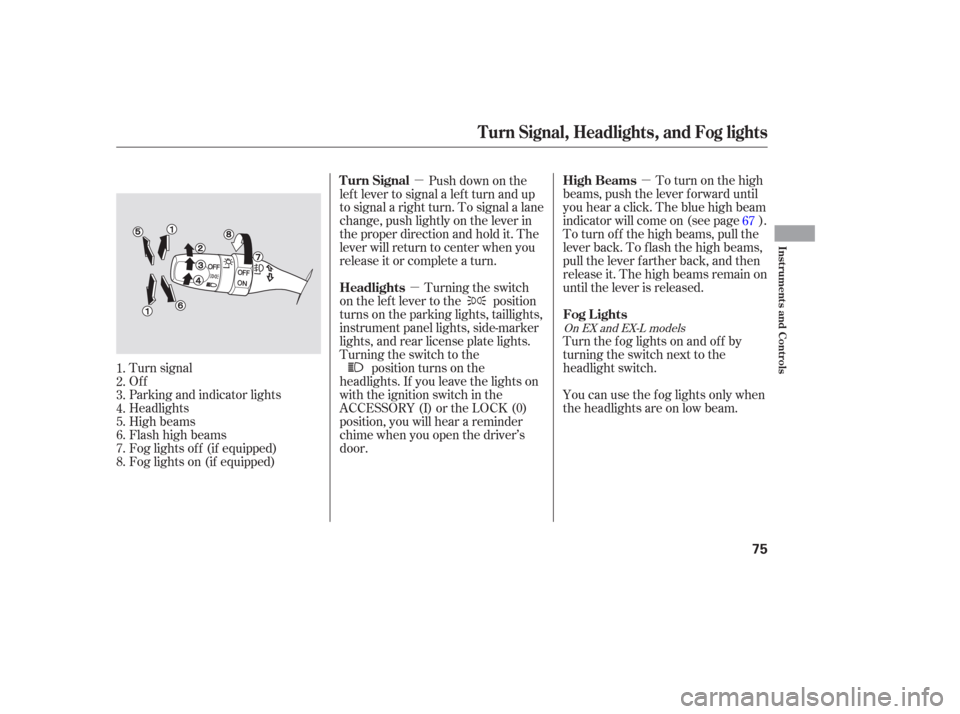
�µ To turn on the high
beams, push the lever f orward until
you hear a click. The blue high beam
indicator will come on (see page ).
To turn of f the high beams, pull the
lever back. To flash the high beams,
pull the lever f arther back, and then
release it. The high beams remain on
until the lever is released.
Push down on the
lef t lever to signal a lef t turn and up
to signal a right turn. To signal a lane
change, push lightly on the lever in
the proper direction and hold it. The
lever will return to center when you
release it or complete a turn.
Turning the switch
on the lef t lever to the position
turns on the parking lights, taillights,
instrument panel lights, side-marker
lights, and rear license plate lights.
Turning the switch to the position turns on the
headlights. If you leave the lights on
with the ignition switch in the
ACCESSORY (I) or the LOCK (0)
position, you will hear a reminder
chime when you open the driver’s
door. You can use the f og lights only when
the headlights are on low beam. Turn the f og lights on and of f by
turning the switch next to the
headlight switch.
Turn signal
Of f
Parking and indicator lights
Headlights
High beams
Flashhighbeams
Fog lights of f (if equipped)
Fog lights on (if equipped) 67
1.
2.
3.
4.
5.
6.
7.
8.
On EX and EX-L models
High Beams
Turn Signal
Headlights
Fog Lights
Turn Signal, Headlights, and Fog lights
Instruments and Controls
75
Page 78 of 316

The knob on the instrument panel
controls the brightness of the instru-
ment panel lights. Turn the knob to
adjust the brightness.
The lights will turn on again when
you unlock or open the driver’s door.
With the headlight switch off, the
high beam headlights come on with
reduced brightness when you turn
the ignition switch to the ON (II)
position and release the parking
brake. They remain on until you turn
the ignition switch of f , even if you
set the parking brake.
The headlights revert to normal
operation when you turn the switch
to the ‘‘ ’’ position. If you unlock the door, but do not
open it within 15 seconds, the lights
will go off. With the driver’s door
open, you will hear a lights-on
reminder chime.
This f eature turns of f the headlights,
parking lights, taillights, side marker
lights, license plate lights, and
instrument panel lights within 15
seconds of removing the key f rom
the ignition switch and closing the
driver’s door.
This feature activates if you leave
the headlight switch in the or
position, remove the key, then
open and close the driver’s door.
If you remove the key f rom the
ignition switch with the headlight
switch on, but do not open the door
and get out, the lights will turn of f
af ter 10 minutes.
On EX and EX-L models
Instrument Panel Brightness
Daytime Running L ights
(Canadian Models)
Automatic Lighting Of f Feature
Headlights, Instrument Panel Brightness
76
INSTRUMENT PANEL BRIGHTNESS
CONTROL KNOB
Page 80 of 316
Push the lever under the steering
column all the way down.
Move the steering wheel so it
points to your chest, not toward
your f ace. Make sure you can see
the instrument panel gauges and
indicators.Push the lever up to lock the
steering wheel in that position.
Make sure you have securely
locked the steering wheel in place
by trying to move it up and down.
Make any steering wheel adjustment
bef ore you start driving.
1.
2.3.
4.
Steering Wheel A djustment
78
Adjusting the steering wheel
position while driving may
cause you to lose control of the
vehicle and be seriously injured
inacrash.
Adjust the steering wheel only
when the vehicle is stopped.
Page 81 of 316
The master key fits all the locks on
your vehicle. The valet key works
only in the ignition and the door
locks. You can keep the glove box
locked when you leave your vehicle
and the valet key at a parking f acility.Youshouldhavereceivedakey
number tag with your set of keys.
You will need this key number if you
ever have to get a key replaced. Use
only Honda-approved key blanks.
These keys contain electronic
circuits that are activated by the
immobilizer system. They will not
work to start the engine if the
circuits are damaged.
Protect the keys f rom direct
sunlight, high temperature, and
high humidity.
Donotdropthekeysorsetheavy
objects on them.
Keep the keys away f rom liquids.
If they get wet, dry them
immediately with a sof t cloth.
CONT INUED
Immobilizer System
Keys and Locks, Immobilizer System
Instruments and Controls
79
MASTER
KEY
(BLACK)
KEY
NUMBER
TAG VALET KEY
(GRAY)


