Page 231 of 420

�Û�µ
�Î
�Î
The ignition switch must be in the
ACCESSORY (I) or the ON (II)
position. Make sure the open side of
thetapeisfacingright,theninsert
thetapemostof thewayintotheslot.
Thesystemwillpullthetapeinthe
rest of the way and begin to play it.
The tape direction indicator will
come on to show you which side of
the tape is playing. The indicates
the side you inserted upward is now
playing. If you want to play the other
side, press the PLAY/PROG button.
When the player reaches the end of
the tape, it will automatically reverse
direction and play the other side.Dolby noise reduction turns on
when you insert a tape. The
indicator will come on in the
display. If the tape was not recorded
in Dolby, turn it of f by pressing the
NR button. Dolby remains of f until
you press the NR button again.
To remove the tape, press the
EJECT button. If you want to turn
the player of f , press the PWR/VOL
knob or turn of f the ignition. The
tape will remain in the drive. When
youturnthesystembackon,the
tape will begin playing where it lef t
off. To switch to the radio or CD player
while a tape is playing, press the AM
or FM button or AM/FM button, or
CD button. To change back to the
tape player, press the AUX button.
To rewind the tape,
push the REW button. You will see
REW in the display. To f ast f orward
the tape, push the FF button. You
will see FF displayed. Press the FF,
REW, or PLAY/PROG button to
take the system out of rewind or fast
forward.
Dolby noise reduction is manufactured under
license from Dolby Laboratories Licensing
Corporation. ‘‘DOLBY’’ and the double-D symbol are trademarks of Dolby Laboratories
Licensing Corporation.
Optional on all models
To Play a Tape
To Stop Playing a TapeT ape Search Functions
FF/REW
Playing a T ape
230
Page 237 of 420

Press the REAR PWR button. To
turn on the rear controls (ceiling
panel/remote control), press the RR
CTRL knob. The system’s icon
shows in the upper display. Your
passengers can then operate the rear
system with the control panel in the
ceiling. The rear control panel can be
used as a remote control when it is
detached f rom the ceiling unit. Press
the RR CTRL knob again to turn the
rear controls of f . You will see the
RearControlsOff iconintheupper
display.
The rear system selects the source it
waslastsetto.Ifthatsourcehas
been removed (the DVD has been
ejected f rom the player, f or example),
you will see ‘‘DVD EJECT’’ in the
display. You must select another
source.Whenyouturnonthesystem,the
rear speakers are automatically
turned of f if the rear system selects
a dif f erent entertainment source
than the front system. You will see
the Rear Speakers Of f icon in the
upper display. The sound f or the rear
system is sent to the wireless
headphones.
If youwanttoturntherearspeakers
on again, press and hold the REAR
PWR button until the Rear Speakers
Of f icon goes of f .
The rear speakers are
connected to the f ront system, so
they will always play the source that
the f ront system is set to.
Your vehicle is equipped with a rear
entertainment system that includes a
DVD player f or the enjoyment of the
rear passengers.
With this system, the rear
passengers can enjoy a dif f erent
entertainment source (radio, CD
changer, DVD player, or optional
tape player) than the f ront seat
occupants. The audio is broadcast
through the supplied wireless
headphones.
The ignition switch must be in the
ACCESSORY (I) or ON (II) position
to operate the rear entertainment
system.
Available on EX-L and Touring modelsTo Turn On the System
Rear Speakers
Rear Entertainment System
236
NOTE:
Page 239 of 420
�µ�µ
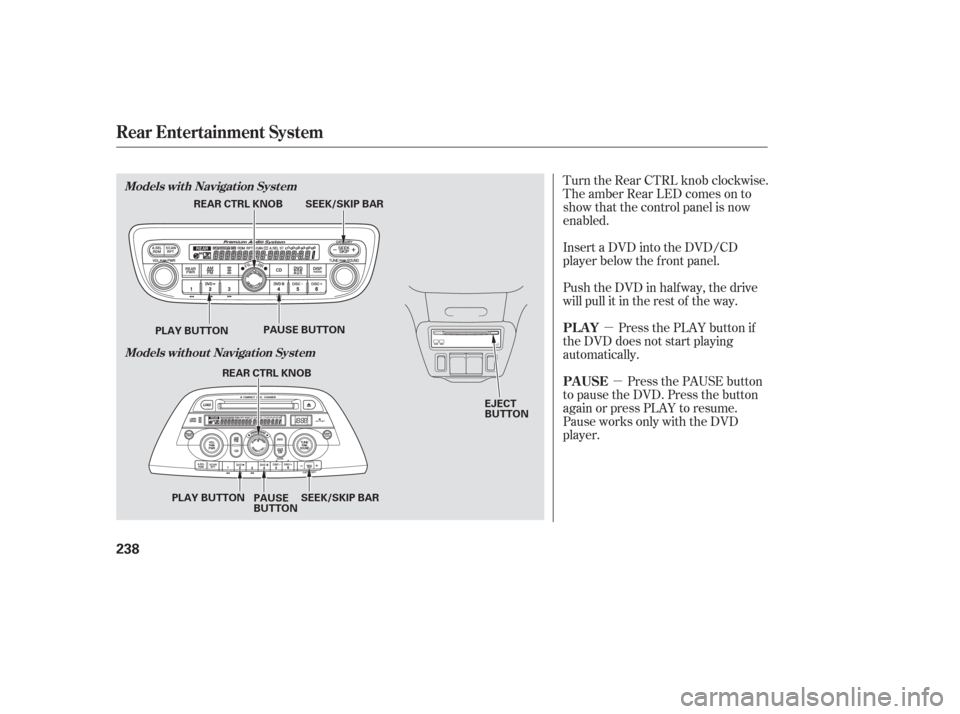
Turn the Rear CTRL knob clockwise.
The amber Rear LED comes on to
show that the control panel is now
enabled.
Insert a DVD into the DVD/CD
player below the f ront panel.
Push the DVD in half way, the drive
will pull it in the rest of the way.
Press the PLAY button if
the DVD does not start playing
automatically.
Press the PAUSE button
to pause the DVD. Press the button
again or press PLAY to resume.
Pause works only with the DVD
player. PL AY
PAUSE
Rear Entertainment System
Models with Navigation System
Models without Navigation System
238
EJECT
BUTTON
SEEK/SKIP BAR
REAR CTRL KNOB
PLAY BUTTON PAUSE BUTTON
SEEK/SKIP BAR
REAR CTRL KNOB
PLAY BUTTON PAUSE
BUTTON
Page 249 of 420
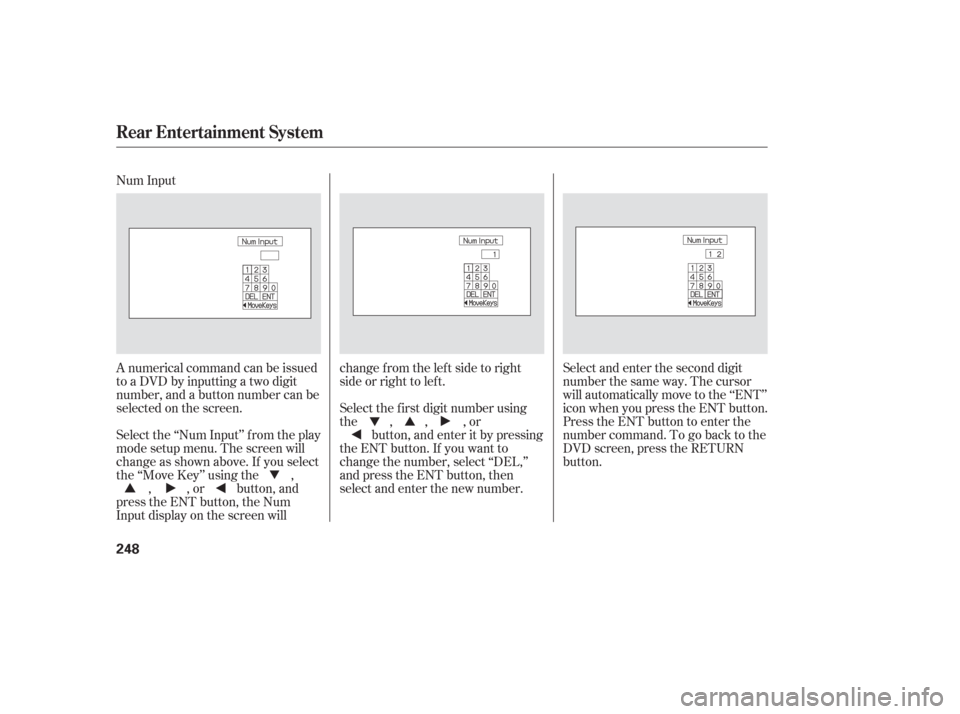
Num Input
A numerical command can be issued
to a DVD by inputting a two digit
number, and a button number can be
selected on the screen.Select and enter the second digit
number the same way. The cursor
will automatically move to the ‘‘ENT’’
icon when you press the ENT button.
Press the ENT button to enter the
number command. To go back to the
DVD screen, press the RETURN
button.
Select the f irst digit number using
the , , , or
button, and enter it by pressing
the ENT button. If you want to
change the number, select ‘‘DEL,’’
and press the ENT button, then
select and enter the new number.
Select the ‘‘Num Input’’ f rom the play
mode setup menu. The screen will
change as shown above. If you select
the ‘‘Move Key’’ using the ,
, , or button, and
press the ENT button, the Num
Input display on the screen will changefromtheleftsidetoright
side or right to lef t.
Rear Entertainment System
248
Page 256 of 420
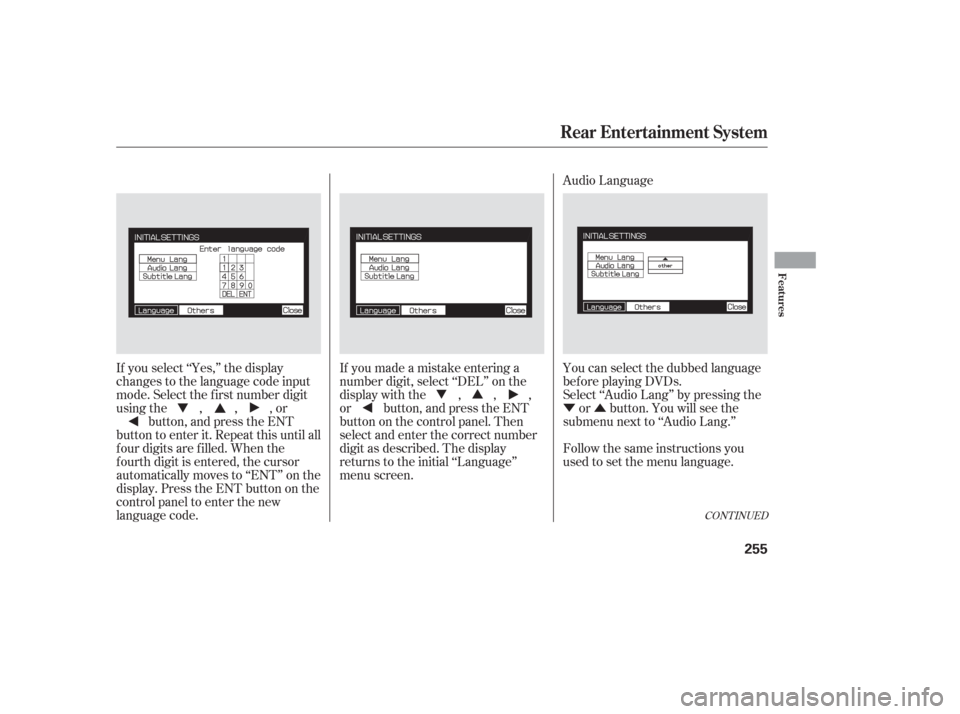
�Ý�Û Audio Language
If you select ‘‘Yes,’’ the display
changes to the language code input
mode. Select the f irst number digit
usingthe,,,or button, and press the ENT
button to enter it. Repeat this until all
f our digits are f illed. When the
f ourth digit is entered, the cursor
automatically moves to ‘‘ENT’’ on the
display. Press the ENT button on the
control panel to enter the new
language code. If you made a mistake entering a
number digit, select ‘‘DEL’’ on the
display with the , , ,
or button, and press the ENT
buttononthecontrolpanel.Then
select and enter the correct number
digit as described. The display
returns to the initial ‘‘Language’’
menu screen.
You can select the dubbed language
bef ore playing DVDs.
Select ‘‘Audio Lang’’ by pressing the
or button. You will see the
submenu next to ‘‘Audio Lang.’’
Follow the same instructions you
used to set the menu language.
CONT INUED
Rear Entertainment System
Features
255
Page 259 of 420
�Ý�Û
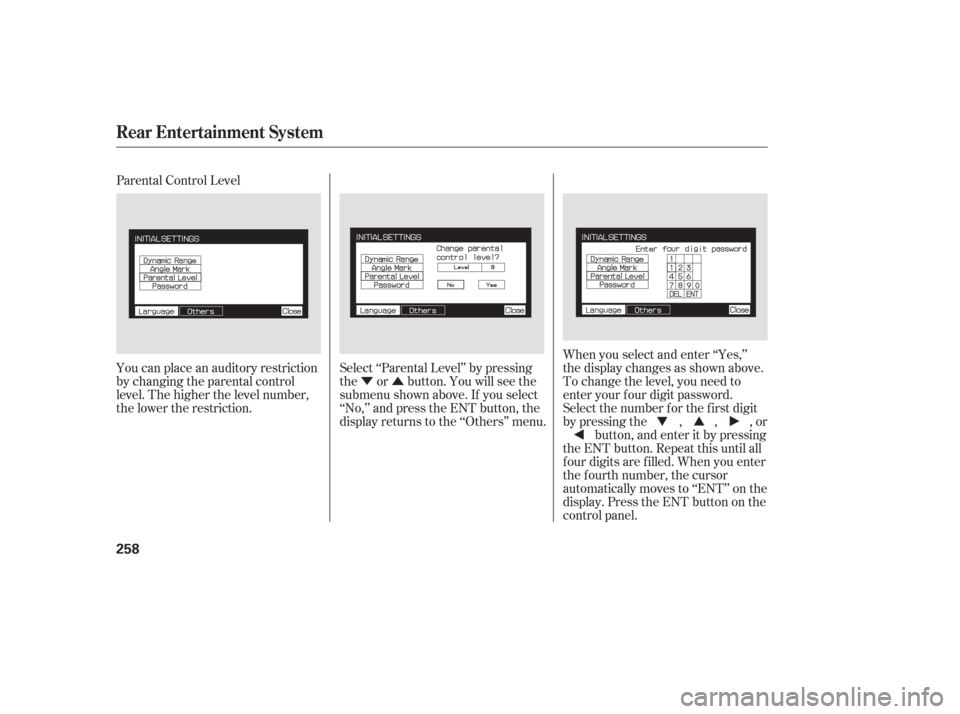
Parental Control Level
You can place an auditory restriction
by changing the parental control
level. The higher the level number,
the lower the restriction.
Select ‘‘Parental Level’’ by pressing
the or button. You will see the
submenu shown above. If you select
‘‘No,’’ and press the ENT button, the
display returns to the ‘‘Others’’ menu.When you select and enter ‘‘Yes,’’
the display changes as shown above.
To change the level, you need to
enter your f our digit password.
Select the number f or the f irst digit
by pressing the , , , or
button, and enter it by pressing
the ENT button. Repeat this until all
f our digits are f illed. When you enter
the f ourth number, the cursor
automatically moves to ‘‘ENT’’ on the
display. Press the ENT button on the
control panel.
Rear Entertainment System
258
Page 261 of 420
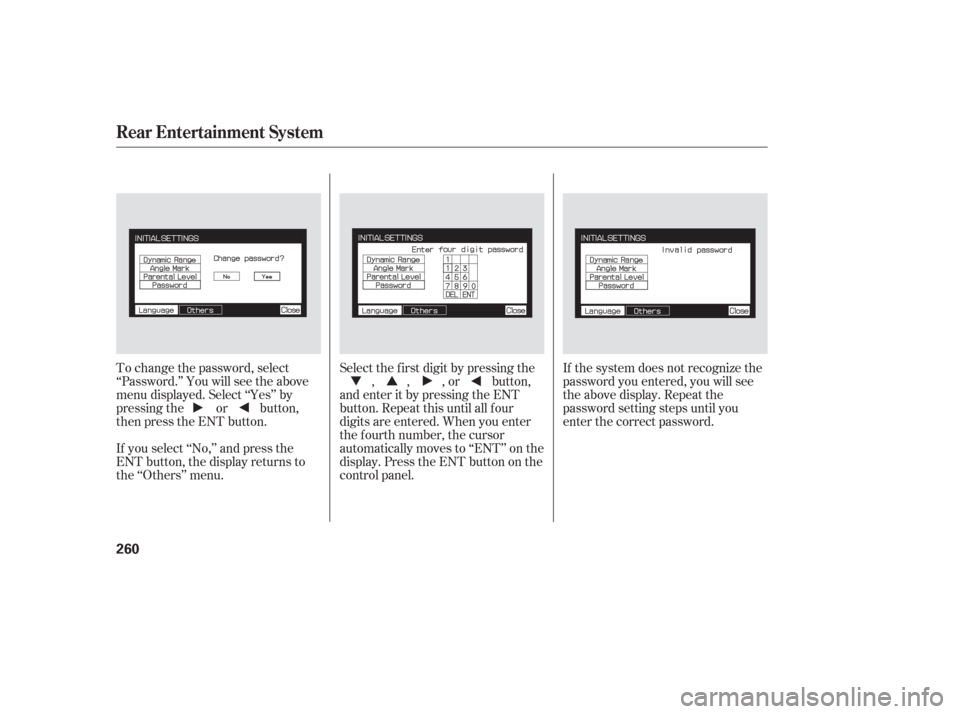
To change the password, select
‘‘Password.’’ You will see the above
menu displayed. Select ‘‘Yes’’ by
pressing the or button,
then press the ENT button.
If you select ‘‘No,’’ and press the
ENT button, the display returns to
the ‘‘Others’’ menu.Select the f irst digit by pressing the
, , , or button,
and enter it by pressing the ENT
button. Repeat this until all f our
digits are entered. When you enter
the f ourth number, the cursor
automatically moves to ‘‘ENT’’ on the
display. Press the ENT button on the
control panel. If the system does not recognize the
password you entered, you will see
the above display. Repeat the
password setting steps until you
enter the correct password.
Rear Entertainment System
260
Page 266 of 420
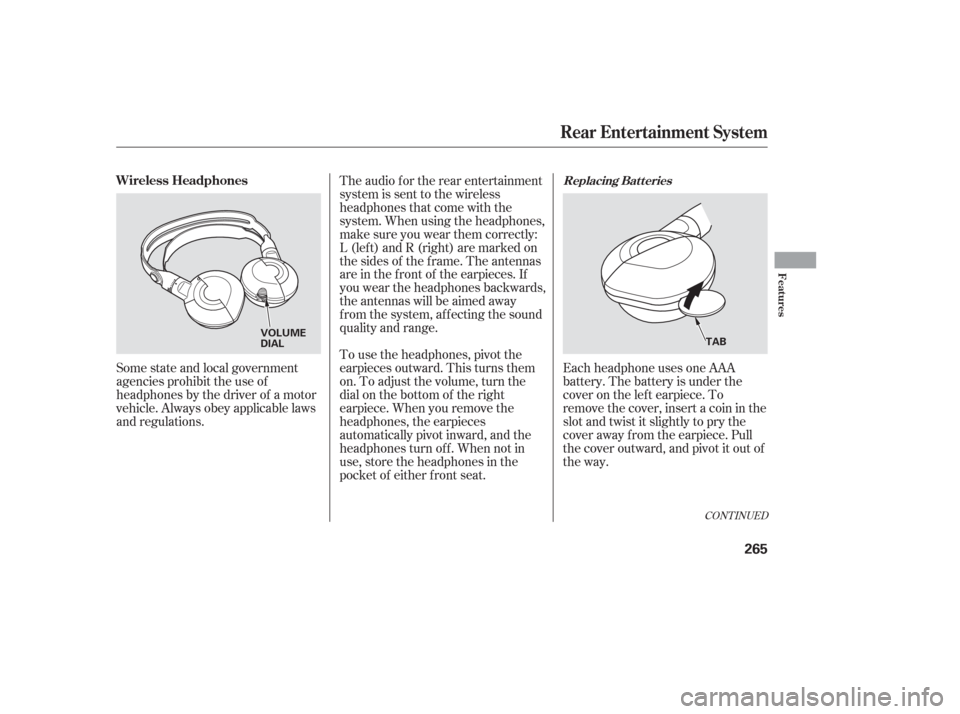
Each headphone uses one AAA
battery. The battery is under the
cover on the lef t earpiece. To
remove the cover, insert a coin in the
slot and twist it slightly to pry the
cover away f rom the earpiece. Pull
the cover outward, and pivot it out of
the way.
Some state and local government
agencies prohibit the use of
headphones by the driver of a motor
vehicle. Always obey applicable laws
and regulations. The audio f or the rear entertainment
system is sent to the wireless
headphones that come with the
system. When using the headphones,
make sure you wear them correctly:
L (lef t) and R (right) are marked on
the sides of the frame. The antennas
are in the f ront of the earpieces. If
you wear the headphones backwards,
the antennas will be aimed away
from the system, affecting the sound
quality and range.
To use the headphones, pivot the
earpieces outward. This turns them
on. To adjust the volume, turn the
dial on the bottom of the right
earpiece. When you remove the
headphones, the earpieces
automatically pivot inward, and the
headphones turn of f . When not in
use, store the headphones in the
pocket of either f ront seat.
CONT INUED
Replacing Bat t eriesWireless Headphones
Rear Entertainment System
Features
265
VOLUME
DIAL
TAB