Page 275 of 420
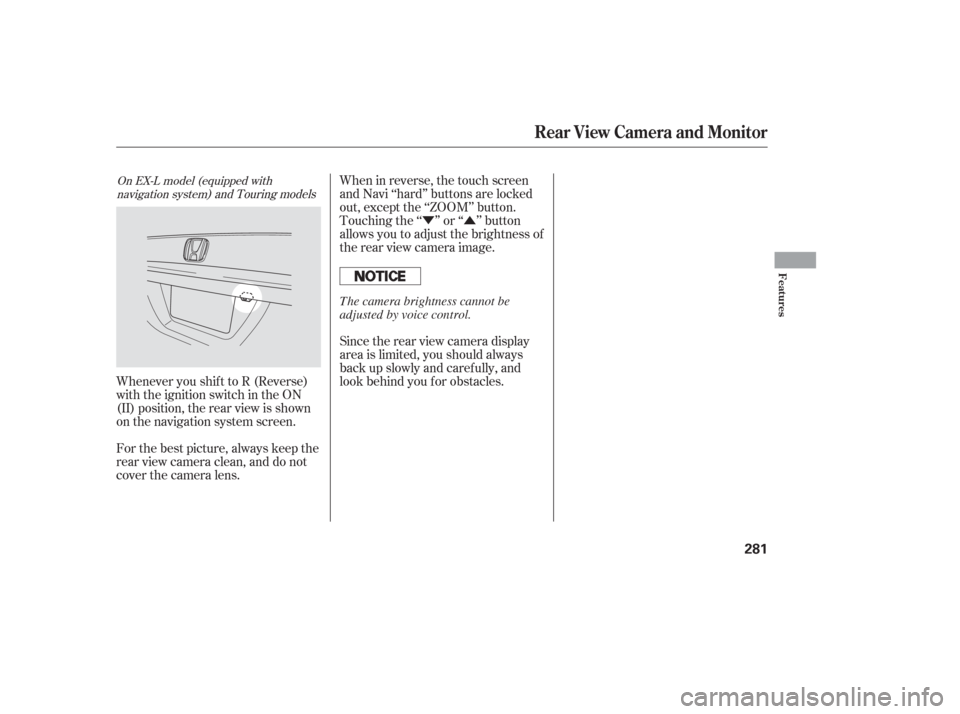
Press the training button on the
garage door opener unit until the
indicator next to the button comes
on. The indicator may blink, or
comeonandstayon.Youthen
have approximately 30 seconds to
complete the f ollowing steps.
For security purposes, newer garage
door opening systems use a ‘‘rolling’’
or variable code. Information from
the remote control and the garage
door opener are needed bef ore
HomeLink can operate the garage
door opener.
The ‘‘Training HomeLink’’
procedure trains HomeLink to the
proper garage door opener code.
The f ollowing procedure
synchronizes HomeLink to the
garage door opener so it sends and
receives the correct codes.
Make sure you have properly
completed the ‘‘Training
HomeLink’’ procedure.
Find the ‘‘training’’ button on your
garage door opener unit. The
location will vary, depending on
the manufacturer.
PushandholdtheHomeLink
button f or a f ew seconds, then
watch the red indicator on
HomeLink.
If the indicator stays on or
flashes slowly, repeat steps 2
thru 5.
If the indicator f lashes rapidly
f or 2 seconds then stays on, you
have a rolling code transmitter:
Go to ‘‘Training with a Rolling
Code System’’ (see page ).
Repeat these steps to train the
other two HomeLink buttons to
operate any other compatible
remotely controlled devices
around your home (lighting,
automatic gate, security system,
etc.).
6.
2. 1.3.
7. 274T raining With a Rolling Code
System
HomeL ink Universal Transceiver
274
TRAINING BUTTON
Page 276 of 420
Press and hold the button on
HomeLink f or 3 to 4 seconds.
Press and hold the HomeLink
button again f or 3 to 4 seconds.
This should turn of f the training
indicator on the garage door
opener unit. (Some systems may
require you to press the button up
to three times.)
Press the HomeLink button again.
It should operate the garage door.Toerasethecodesstoredinallthree
buttons, press and hold the two
outside buttons until the red
indicator begins to f lash, then
release the buttons.
Youshoulderaseallthreecodes
bef ore selling the vehicle.
If you want to retrain a programmed
button f or a new device, you do not
have to erase all button memory.
You can replace the existing memory
code using this procedure:
Press and hold the HomeLink
button to be trained until the
HomeLink indicator begins to
flash slowly.If a rolling code transmitter was
previously programmed, the
indicator will f lash rapidly f or 2
seconds, and then stay on f or
about 23 seconds. Once the HomeLink indicator
begins to f lash slowly, continue to
hold the HomeLink button, and
f ollow steps 3 thru 6 under
‘‘Training HomeLink’’ (see page
).
If a standard transmitter was
programmed, the indicator will
stay on f or about 25 seconds.
2.
1.
4.
5.
6.
273
Erasing Codes
Retraining a Button
HomeL ink Universal Transceiver
Features
275
Page 278 of 420

Your vehicle has a parking sensor
system. The system lets you know
theapproximatedistancebetween
your vehicle and most obstacles
while you are parking. When the
system is on and your vehicle is
nearinganobstacle,youwillhear
beeping and see parking messages in
the multi-information display.To activate the system, push the
button on the dashboard with the
ignition in the ON (II) position. The
indicator in the button comes on
when the system is on. To turn the
system of f , push the button again.The system has two front corner
sensors, two rear corner sensors,
and a rear center sensor.
The rear center sensor works only
when the shif t lever is in Reverse (R),
and the vehicle speed is less than 5
mph (8 km/h).
The corner sensors work only when
the shif t lever is in any position other
than P and the vehicle speed is less
than 5 mph (8 km/h).
All obstacles may not always be
sensed. Even when the system is on,
you should look f or obstacles near
yourvehicletomakesureitissafeto
park.
On Touring models
Parking Sensor System
Features
277
PARKING SENSOR SYSTEM BUTTON
MULTI-INFORMATION DISPLAY
Page 282 of 420
�Ý�Û
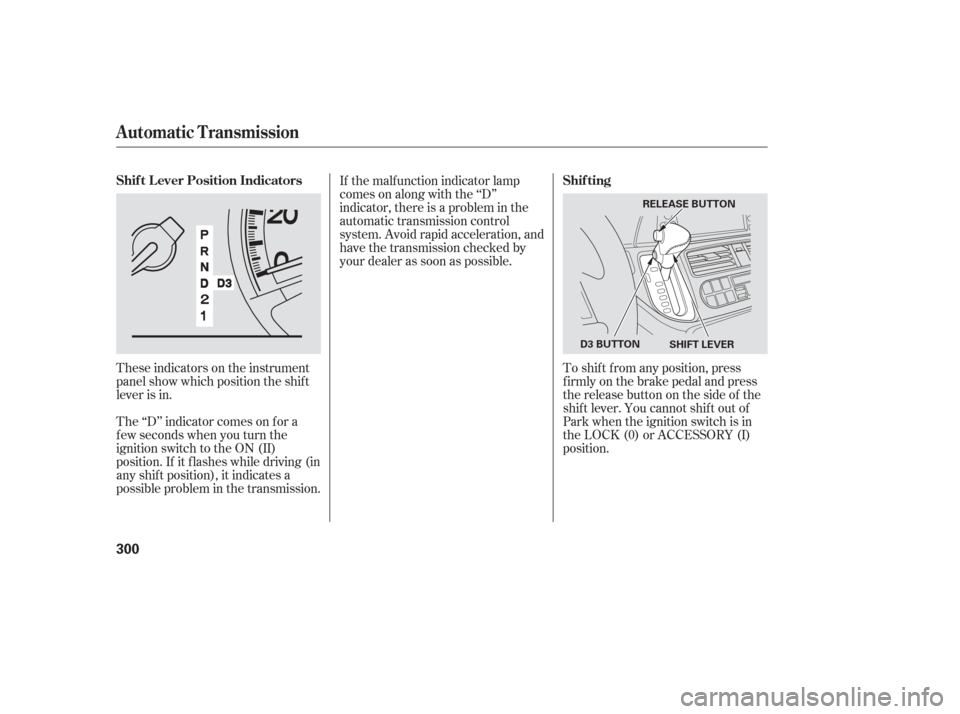
When in reverse, the touch screen
and Navi ‘‘hard’’ buttons are locked
out, except the ‘‘ZOOM’’ button.
Touching the ‘‘ ’’ or ‘‘ ’’ button
allows you to adjust the brightness of
the rear view camera image.
Whenever you shif t to R (Reverse)
with the ignition switch in the ON
(II) position, the rear view is shown
on the navigation system screen.
For the best picture, always keep the
rear view camera clean, and do not
cover the camera lens. Since the rear view camera display
area is limited, you should always
back up slowly and caref ully, and
look behind you f or obstacles.
On EX-L model (equipped with
navigation system) and Touring models
Rear View Camera and Monitor
Features
281
The camera brightness cannot be
adjusted by voice control.
Page 301 of 420
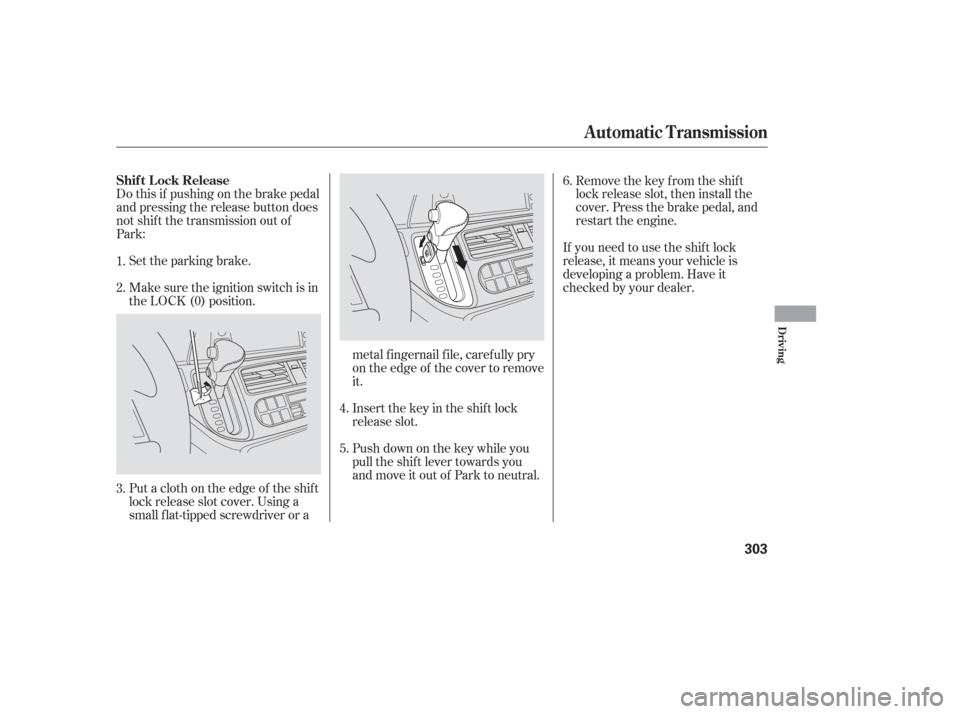
These indicators on the instrument
panel show which position the shif t
lever is in.
The ‘‘D’’ indicator comes on f or a
f ew seconds when you turn the
ignition switch to the ON (II)
position. If it f lashes while driving (in
any shif t position), it indicates a
possible problem in the transmission.If the malf unction indicator lamp
comes on along with the ‘‘D’’
indicator, there is a problem in the
automatic transmission control
system. Avoid rapid acceleration, and
have the transmission checked by
your dealer as soon as possible.
To shif t f rom any position, press
f irmly on the brake pedal and press
the release button on the side of the
shiftlever.Youcannotshiftoutof
Park when the ignition switch is in
the LOCK (0) or ACCESSORY (I)
position.
Automatic Transmission
Shif t L ever Position Indicators Shif ting
300
SHIFT LEVER
RELEASE BUTTON
D3 BUTTON
Page 302 of 420

�µ�µ�µ
�µ
This position mechani-
cally locks the transmission. Use
Park whenever you are turning of f or
starting the engine. To shif t out of
Park, you must press on the brake
pedal and have your f oot of f the
accelerator pedal. Press the release
button on the side of the shift lever
to move it.
If you have done all of the above and
still cannot move the lever out of
Park, see on
page . Use neutral if you
need to restart a stalled engine, or if
it is necessary to stop brief ly with
the engine idling. Shif t to the Park
position if you need to leave your
vehicle for any reason. Press on the
brake pedal when you are moving
the shift lever from neutral to
another gear.
Use this position f or
normal driving. The transmission
automatically selects a suitable gear
f or your speed and acceleration. You
may notice the transmission shif ting
up at higher speeds when the engine
is cold. This helps the engine warm
up f aster.
Press the brake
pedal and press the release button to
shif t f rom Park to reverse. To shif t
f rom reverse to neutral, come to a
completestop,andthenshift. 303
CONT INUED
To shift from:
PtoR
RtoP
NtoR
Dto2 2to1
1to2
2toD
DtoN
NtoD RtoN
DtoD
DtoD Do this:
Press the brake pedal, and
press the release button.
Press the release button.
Move the lever.
Press the D button.
3
3 3 3
Park (P)
Shif t L ock Release Neutral (N)
Drive (D)
Reverse (R)
Automatic Transmission
Driving
301
Page 303 of 420

�µ�µ �µ
If you exceed the maximum speed
f or the gear you are in, the engine
speed will enter into the tachometer’s
red zone. If this occurs, you may f eel
the engine cut in and out. This is
caused by a limiter in the engine’s
computer controls. The engine will
run normally when you reduce the
rpm below the red zone.
To use D , press the
D button when the shif t lever is in
the ‘‘D’’ position. This position is simi-
lartoD,exceptonlythefirstthree
gears are selected instead of all f ive.
Use D when towing a trailer in hilly
terrain, or to provide engine braking
when going down a steep hill. D can
also keep the transmission f rom
cycling between third and f ourth
gears in stop-and-go driving.
This position locks
the transmission in second gear. It
does not downshif t to f irst gear
when you come to a stop.
Use second gear: For more power when climbing.
To increase engine braking when
going down steep hills.
For starting out on a slippery
surf ace or in deep snow.
When driving downhill with a
trailer. This position locks the
transmission in f irst gear. By
upshif ting and downshif ting through
1, 2, and D, you can operate this
transmission much like a manual
transmission without a clutch pedal.3
3
3 3
Automatic Transmission
Engine Speed L imiter
Drive (D )
Second (2) First (1)3
302
Page 304 of 420
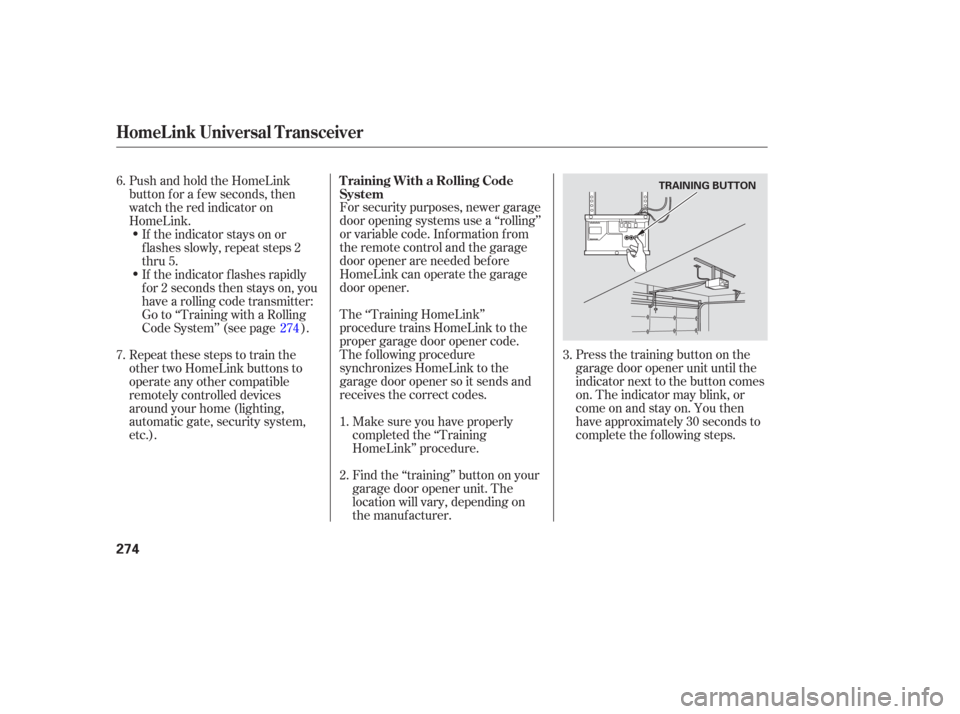
Do this if pushing on the brake pedal
and pressing the release button does
not shif t the transmission out of
Park:Set the parking brake.
Make sure the ignition switch is in
the LOCK (0) position.
Put a cloth on the edge of the shif t
lock release slot cover. Using a
small f lat-tipped screwdriver or a metal f ingernail f ile, caref ully pry
on the edge of the cover to remove
it.Remove the key from the shift
lock release slot, then install the
cover. Press the brake pedal, and
restart the engine.
If you need to use the shif t lock
release, it means your vehicle is
developing a problem. Have it
checked by your dealer.
Push down on the key while you
pull the shif t lever towards you
and move it out of Park to neutral. Insert the key in the shift lock
release slot.
5. 6.
4.
3. 1.
2.
Automatic Transmission
Shif t L ock Release
Driving
303