Page 27 of 320

3.Menu:Press to toggle through
the following modes:
Treble:Press to adjust the treble setting. Use
//SEEK.
Bass:Press to adjust the bass setting. Use
//SEEK.
Balance:Press to adjust the audio between the left and right speakers.
Use
//SEEK.
Fade:Press to adjust the audio between the front and rear speakers.
Use
//SEEK.
Speed sensitive volume (if equipped):Radio volume automatically
changes slightly with vehicle speed to compensate for road and wind
noise. Press MENU to access and use
//SEEKto adjust.
Setting the clock:Press MENU until SELECT HOUR or SELECT
MINUTE is displayed. Press
//SEEKto adjust the
hours/minutes.
If your vehicle is equipped with an in-dash clock, refer to “Setting the
clock” in theDriver Controlschapter.
Autoset:Allows you to set the strongest local radio stations without
losing your original manually set preset stations for AM/FM1/FM2 . Press
MENU to access. Use
//SEEKto set.
When the six strongest stations are filled, the station stored in preset 1
will begin playing. If there are less than six strong stations, the system
will store the last one in the remaining presets.
4.Aux:Press to toggle between
FES/DVD and AUX modes. If no
auxiliary sources are available, NO
AUX AUDIO will be displayed.
5.Seek:Press to access the next
strong station or track.
2006 Freestar(win)
Owners Guide (post-2002-fmt)
USA(fus)
Entertainment Systems
27
Page 43 of 320

HEADLAMP CONTROL
Turns the lamps off.
Turns on the parking lamps,
instrument panel lamps, license
plate lamps and tail lamps.
Turns the headlamps on.
Note:Some vehicles may be equipped with aheadlamps on with
wipers feature.In order for this feature to work:
•the ignition must be in run and the front wipers must be on greater
than 10 seconds except during a mist wipe or while the wipers are on
to clear washer fluid during a wash condition.
•the headlamps and park lamps must be turned off when the ignition is
in off or accessory position, or the front wipers are off for more than
30 seconds while the ambient light level is at daytime brightness.
Autolamp control (if equipped)
The autolamp system provides light
sensitive automatic on-off control of
the exterior lights normally
controlled by the headlamp control.
The autolamp system also keeps the
lights on for a fixed period of time
after the ignition switch is turned to
OFF.
•To turn autolamps on, rotate the
control counterclockwise to
.
•To turn autolamps off, rotate the control clockwise to
.
Autolamps - Programmable exit delay
Programmable exit delay allows the length of the autolamp exit delay to
be changed. Once in the programming mode, the headlamps and
parklamps will turn on to indicate the start of the time desired.
P
AP
2006 Freestar(win)
Owners Guide (post-2002-fmt)
USA(fus)
Lights
43
Page 45 of 320

Flash to pass
Pull toward you slightly to activate
and release to deactivate.
Battery saver
The battery saver will shut off the exterior lamps and interior lamps,
except the hazard warning lamps if activated, 10 minutes after the
ignition control has been turned off. The battery saver will extend the
time-out period for courtesy lamps to 30 minutes if the liftgate is ajar or
the dome lamp is on via manual activation using the dome lamp switch
or the headlamp switch, whichever is provided. The system will not turn
off the parking lamps if the headlamp control is in the PARK position.
For interior lights, refer toIlluminated entryin theLocks and security
chapter.
PANEL DIMMER CONTROL
Use to adjust the brightness of the
instrument panel during headlight
and parklamp operation.
•Rotate the thumbwheel from left
to right to brighten the
instrument panel.
•Rotate the thumbwheel from right
to left to dim the instrument
panel.
Your vehicle also contains a feature called “sleeping baby mode” — in
which the dome lamps will remain off and only the lower lamps will
illuminate. This lighting mode can be activated by rotating the
thumbwheel to the first left detent position (as denoted by the half filled
circle above).
Domelamp Control
The panel dimmer control also controls the domelamp operation.
•Rotate the thumbwheel fully to the right, past detent to activate the
domelamp.
2006 Freestar(win)
Owners Guide (post-2002-fmt)
USA(fus)
Lights
45
Page 47 of 320
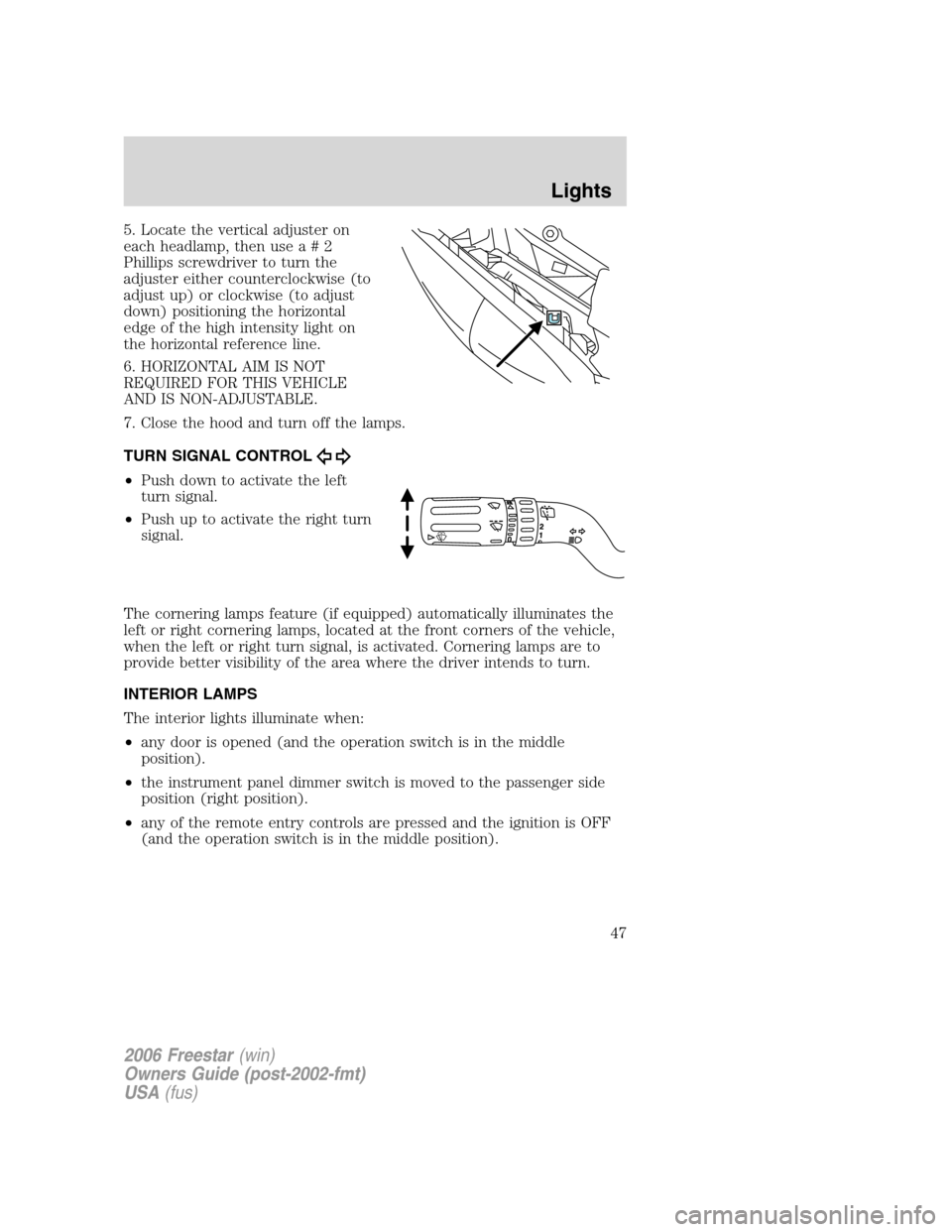
5. Locate the vertical adjuster on
each headlamp, then usea#2
Phillips screwdriver to turn the
adjuster either counterclockwise (to
adjust up) or clockwise (to adjust
down) positioning the horizontal
edge of the high intensity light on
the horizontal reference line.
6. HORIZONTAL AIM IS NOT
REQUIRED FOR THIS VEHICLE
AND IS NON-ADJUSTABLE.
7. Close the hood and turn off the lamps.
TURN SIGNAL CONTROL
•Push down to activate the left
turn signal.
•Push up to activate the right turn
signal.
The cornering lamps feature (if equipped) automatically illuminates the
left or right cornering lamps, located at the front corners of the vehicle,
when the left or right turn signal, is activated. Cornering lamps are to
provide better visibility of the area where the driver intends to turn.
INTERIOR LAMPS
The interior lights illuminate when:
•any door is opened (and the operation switch is in the middle
position).
•the instrument panel dimmer switch is moved to the passenger side
position (right position).
•any of the remote entry controls are pressed and the ignition is OFF
(and the operation switch is in the middle position).
2006 Freestar(win)
Owners Guide (post-2002-fmt)
USA(fus)
Lights
47
Page 51 of 320
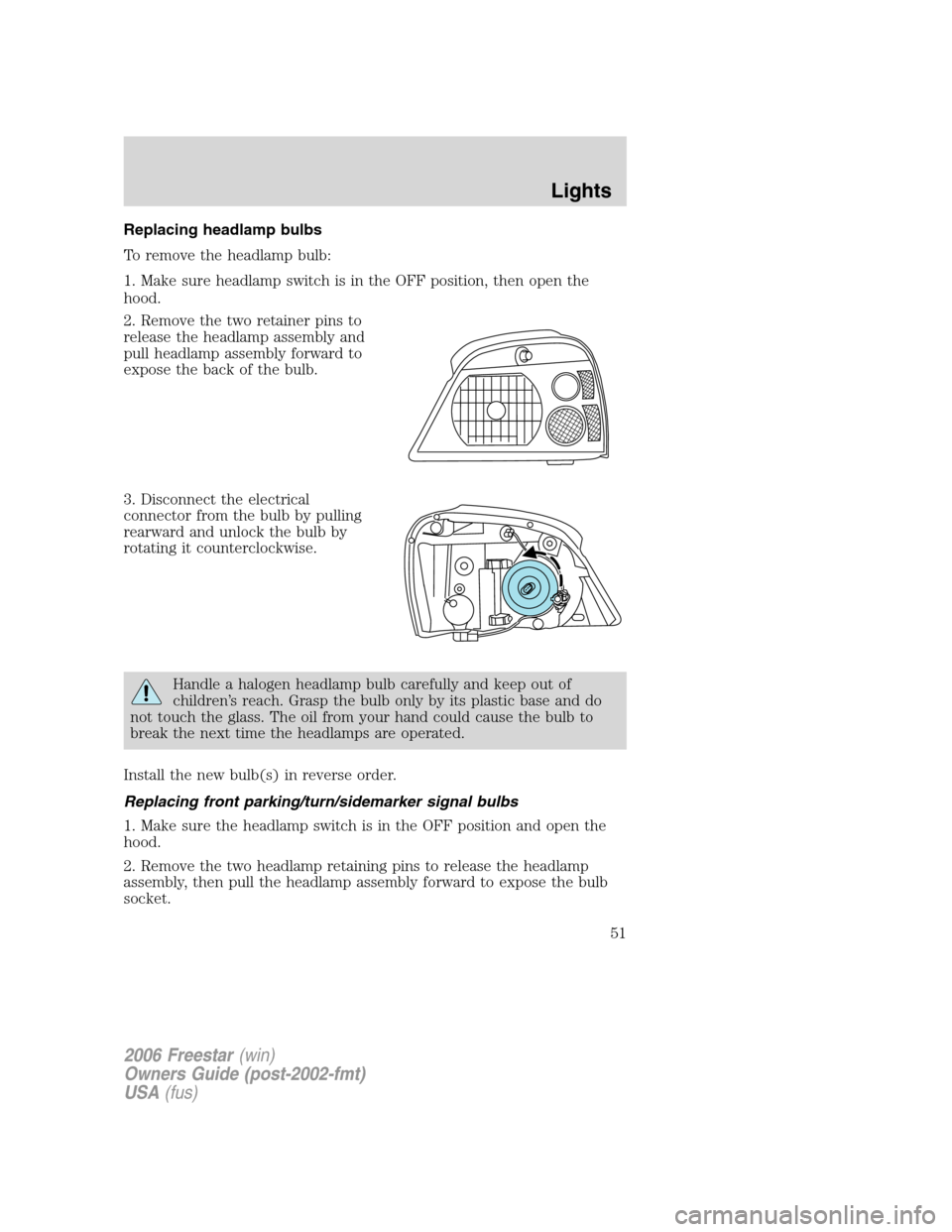
Replacing headlamp bulbs
To remove the headlamp bulb:
1. Make sure headlamp switch is in the OFF position, then open the
hood.
2. Remove the two retainer pins to
release the headlamp assembly and
pull headlamp assembly forward to
expose the back of the bulb.
3. Disconnect the electrical
connector from the bulb by pulling
rearward and unlock the bulb by
rotating it counterclockwise.
Handle a halogen headlamp bulb carefully and keep out of
children’s reach. Grasp the bulb only by its plastic base and do
not touch the glass. The oil from your hand could cause the bulb to
break the next time the headlamps are operated.
Install the new bulb(s) in reverse order.
Replacing front parking/turn/sidemarker signal bulbs
1. Make sure the headlamp switch is in the OFF position and open the
hood.
2. Remove the two headlamp retaining pins to release the headlamp
assembly, then pull the headlamp assembly forward to expose the bulb
socket.
2006 Freestar(win)
Owners Guide (post-2002-fmt)
USA(fus)
Lights
51
Page 52 of 320
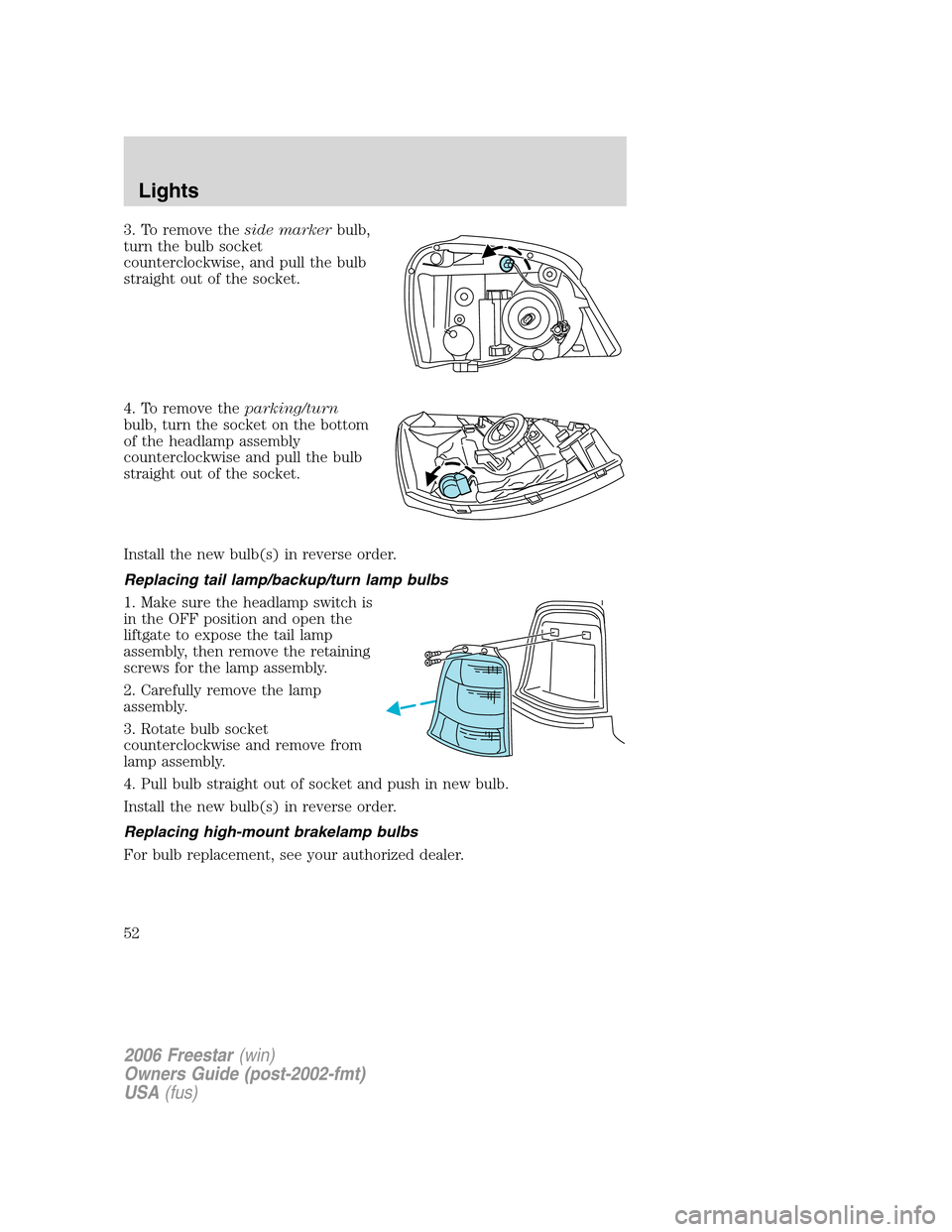
3. To remove theside markerbulb,
turn the bulb socket
counterclockwise, and pull the bulb
straight out of the socket.
4. To remove theparking/turn
bulb, turn the socket on the bottom
of the headlamp assembly
counterclockwise and pull the bulb
straight out of the socket.
Install the new bulb(s) in reverse order.
Replacing tail lamp/backup/turn lamp bulbs
1. Make sure the headlamp switch is
in the OFF position and open the
liftgate to expose the tail lamp
assembly, then remove the retaining
screws for the lamp assembly.
2. Carefully remove the lamp
assembly.
3. Rotate bulb socket
counterclockwise and remove from
lamp assembly.
4. Pull bulb straight out of socket and push in new bulb.
Install the new bulb(s) in reverse order.
Replacing high-mount brakelamp bulbs
For bulb replacement, see your authorized dealer.
2006 Freestar(win)
Owners Guide (post-2002-fmt)
USA(fus)
Lights
52
Page 53 of 320
Replacing license plate lamp bulb
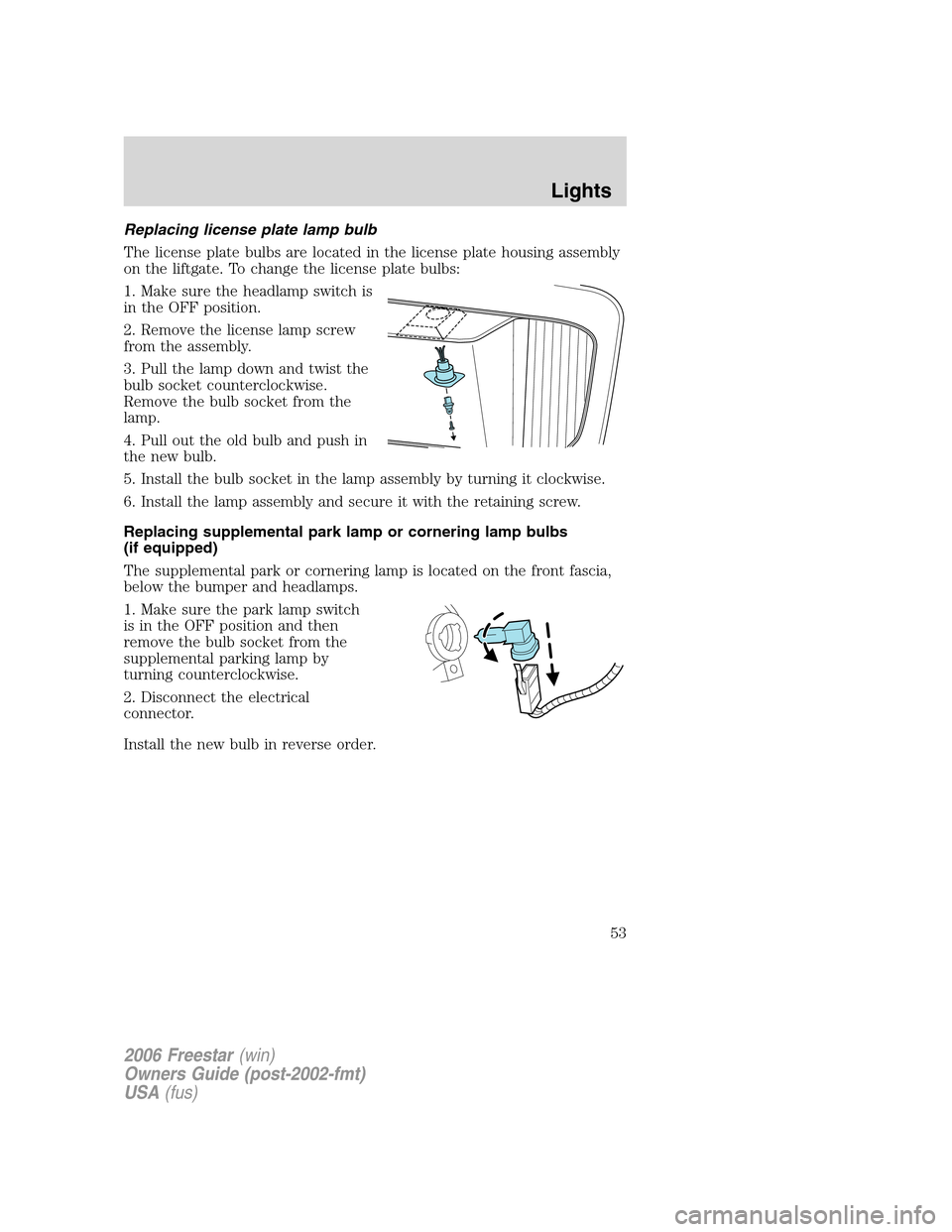
The license plate bulbs are located in the license plate housing assembly
on the liftgate. To change the license plate bulbs:
1. Make sure the headlamp switch is
in the OFF position.
2. Remove the license lamp screw
from the assembly.
3. Pull the lamp down and twist the
bulb socket counterclockwise.
Remove the bulb socket from the
lamp.
4. Pull out the old bulb and push in
the new bulb.
5. Install the bulb socket in the lamp assembly by turning it clockwise.
6. Install the lamp assembly and secure it with the retaining screw.
Replacing supplemental park lamp or cornering lamp bulbs
(if equipped)
The supplemental park or cornering lamp is located on the front fascia,
below the bumper and headlamps.
1. Make sure the park lamp switch
is in the OFF position and then
remove the bulb socket from the
supplemental parking lamp by
turning counterclockwise.
2. Disconnect the electrical
connector.
Install the new bulb in reverse order.
2006 Freestar(win)
Owners Guide (post-2002-fmt)
USA(fus)
Lights
53
Page 55 of 320
TILT STEERING WHEEL
To adjust the steering wheel:
1. Pull and hold the steering wheel
release control toward you.
2. Move the steering wheel up or
down until you find the desired
location.
3. Release the steering wheel
release control. This will lock the
steering wheel in position.
Never adjust the steering wheel when the vehicle is moving.
ILLUMINATED VISOR MIRROR (IF EQUIPPED)
Lift the mirror cover to turn on the
visor mirror lamp.
Slide on rod feature
Rotate the visor towards the side
window and extend it rearward for
additional sunlight coverage.
Note:To stow the visor back into
the headliner, visor must be
retracted before moving it back
towards the windshield.
OVERHEAD CONSOLE (IF EQUIPPED)
The appearance of your vehicle’s overhead console will vary according to
your option package.
2006 Freestar(win)
Owners Guide (post-2002-fmt)
USA(fus)
Driver Controls
55