2006 FORD FREESTAR interior lights
[x] Cancel search: interior lightsPage 40 of 320
7.:Distributes air through the windshield defroster vents and the
floor vents.
8.
:Distributes air through the floor vents.
9.
:Distributes air through the instrument panel vents and the floor
vents.
10.
:Distributes air through the instrument panel vents.
11.Manual override controls:Allows you to change the system
operation. To return to full automatic control, press AUTO.
12.
Driver heated seat control:Press once to activate the high
heat setting (2 indicator lights). Press again to activate the low heat
setting (1 indicator light). Press again to deactivate the passenger heated
seat.
13. F
Front fan speed control:Press to manually increase or
decrease the fan speed. To return to full automatic control, press AUTO.
14.
Recirculated air:Press to activate/deactivate air
recirculation in the vehicle cabin. Recirculated air may reduce the
amount of time to cool down the interior of the vehicle and may also
help reduce undesired odors from reaching the interior of the vehicle.
Recirculated air can be engaged manually in any airflow selection
except
. Recirculated air may turn off automatically in all airflow
selections.
15.A/C:Press to activate/deactivate air conditioning. Use with
recirculated air to improve cooling performance and efficiency. Engages
automatically in AUTO,
, and.
16.OFF:Outside air is shut out and the climate system is turned off.
17.Driver temperature control:Press to increase or decrease the
temperature on the driver side of the cabin. Sets the passenger side
temperature also when DUAL is disengaged.Note:The recommended
vehicle cabin setting is between 72°F (22°C) and 75°F (24°C).
•Dual temperature control:Press and hold AUTO to
engage/disengage separate passenger side temperature control.
18.AUTO:Press to engage full automatic operation, and select the
desired temperature using the temperature control. The system will
automatically determine fan speed, airflow location, A/C on or off, and
outside or recirculated air, to heat or cool the vehicle to reach the
desired temperature.
2006 Freestar(win)
Owners Guide (post-2002-fmt)
USA(fus)
Climate Controls
40
Page 45 of 320

Flash to pass
Pull toward you slightly to activate
and release to deactivate.
Battery saver
The battery saver will shut off the exterior lamps and interior lamps,
except the hazard warning lamps if activated, 10 minutes after the
ignition control has been turned off. The battery saver will extend the
time-out period for courtesy lamps to 30 minutes if the liftgate is ajar or
the dome lamp is on via manual activation using the dome lamp switch
or the headlamp switch, whichever is provided. The system will not turn
off the parking lamps if the headlamp control is in the PARK position.
For interior lights, refer toIlluminated entryin theLocks and security
chapter.
PANEL DIMMER CONTROL
Use to adjust the brightness of the
instrument panel during headlight
and parklamp operation.
•Rotate the thumbwheel from left
to right to brighten the
instrument panel.
•Rotate the thumbwheel from right
to left to dim the instrument
panel.
Your vehicle also contains a feature called “sleeping baby mode” — in
which the dome lamps will remain off and only the lower lamps will
illuminate. This lighting mode can be activated by rotating the
thumbwheel to the first left detent position (as denoted by the half filled
circle above).
Domelamp Control
The panel dimmer control also controls the domelamp operation.
•Rotate the thumbwheel fully to the right, past detent to activate the
domelamp.
2006 Freestar(win)
Owners Guide (post-2002-fmt)
USA(fus)
Lights
45
Page 47 of 320
5. Locate the vertical adjuster on
each headlamp, then usea#2
Phillips screwdriver to turn the
adjuster either counterclockwise (to
adjust up) or clockwise (to adjust
down) positioning the horizontal
edge of the high intensity light on
the horizontal reference line.
6. HORIZONTAL AIM IS NOT
REQUIRED FOR THIS VEHICLE
AND IS NON-ADJUSTABLE.
7. Close the hood and turn off the lamps.
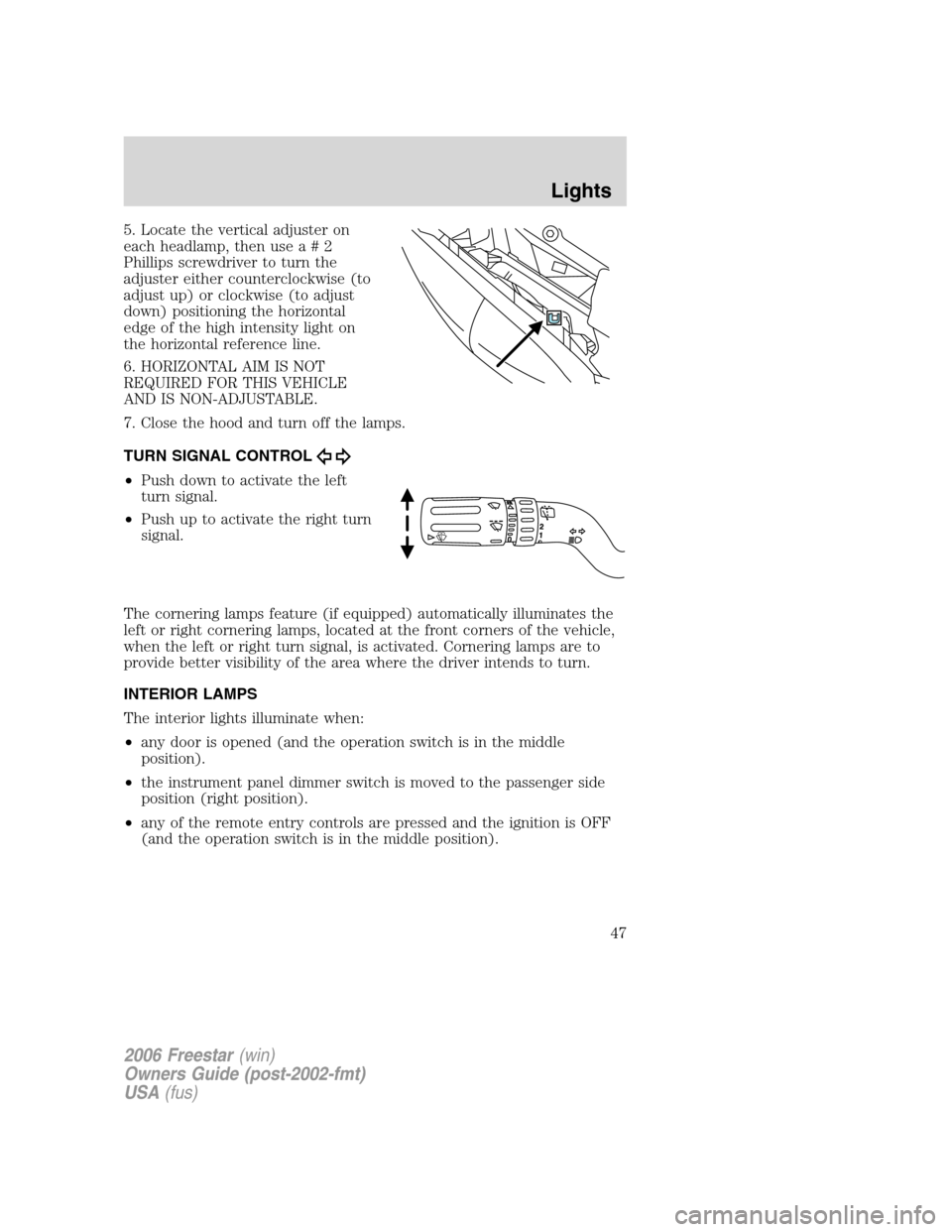
TURN SIGNAL CONTROL
•Push down to activate the left
turn signal.
•Push up to activate the right turn
signal.
The cornering lamps feature (if equipped) automatically illuminates the
left or right cornering lamps, located at the front corners of the vehicle,
when the left or right turn signal, is activated. Cornering lamps are to
provide better visibility of the area where the driver intends to turn.
INTERIOR LAMPS
The interior lights illuminate when:
•any door is opened (and the operation switch is in the middle
position).
•the instrument panel dimmer switch is moved to the passenger side
position (right position).
•any of the remote entry controls are pressed and the ignition is OFF
(and the operation switch is in the middle position).
2006 Freestar(win)
Owners Guide (post-2002-fmt)
USA(fus)
Lights
47
Page 85 of 320
Keep the keys out of the reach of children. Do not allow children
to play on or near an open or moving power liftgate.
Exercise care, when power opening or closing the PLG in a garage or
other enclosed area with a low ceiling or close to a wall/garage door. The
PLG could be damaged from the contact.
Do not attempt to manually force the PLG to travel faster than the
power system will permit.
When power operating the PLG at temperatures below 32° F (0° C), the
PLG may stop about 5 inches (12.7 cm) from the full open position. The
PLG can be fully opened by pushing it upward to the maximum open
position.
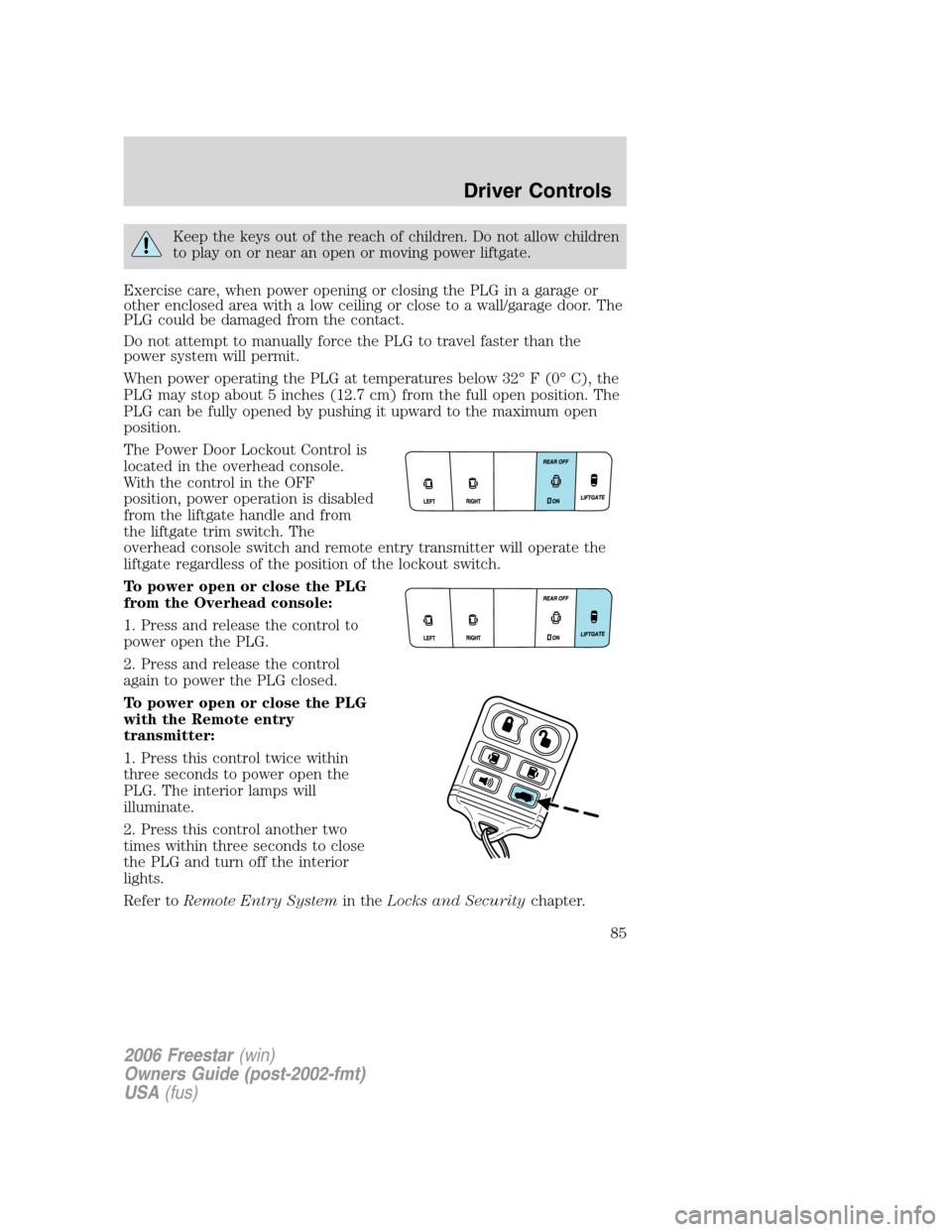
The Power Door Lockout Control is
located in the overhead console.
With the control in the OFF
position, power operation is disabled
from the liftgate handle and from
the liftgate trim switch. The
overhead console switch and remote entry transmitter will operate the
liftgate regardless of the position of the lockout switch.
To power open or close the PLG
from the Overhead console:
1. Press and release the control to
power open the PLG.
2. Press and release the control
again to power the PLG closed.
To power open or close the PLG
with the Remote entry
transmitter:
1. Press this control twice within
three seconds to power open the
PLG. The interior lamps will
illuminate.
2. Press this control another two
times within three seconds to close
the PLG and turn off the interior
lights.
Refer toRemote Entry Systemin theLocks and Securitychapter.
2006 Freestar(win)
Owners Guide (post-2002-fmt)
USA(fus)
Driver Controls
85
Page 95 of 320
If there are problems with the remote entry system, make sure to take
ALL remote entry transmitterswith you to the authorized dealer in
order to aid in troubleshooting the problem.
Unlocking the doors
1. Pressand release to unlock the driver’s door.Note:The interior
lamps will illuminate and the anti-theft system (if equipped) will disarm.
2. Press
and release again within three seconds to unlock all doors
and the liftgate.
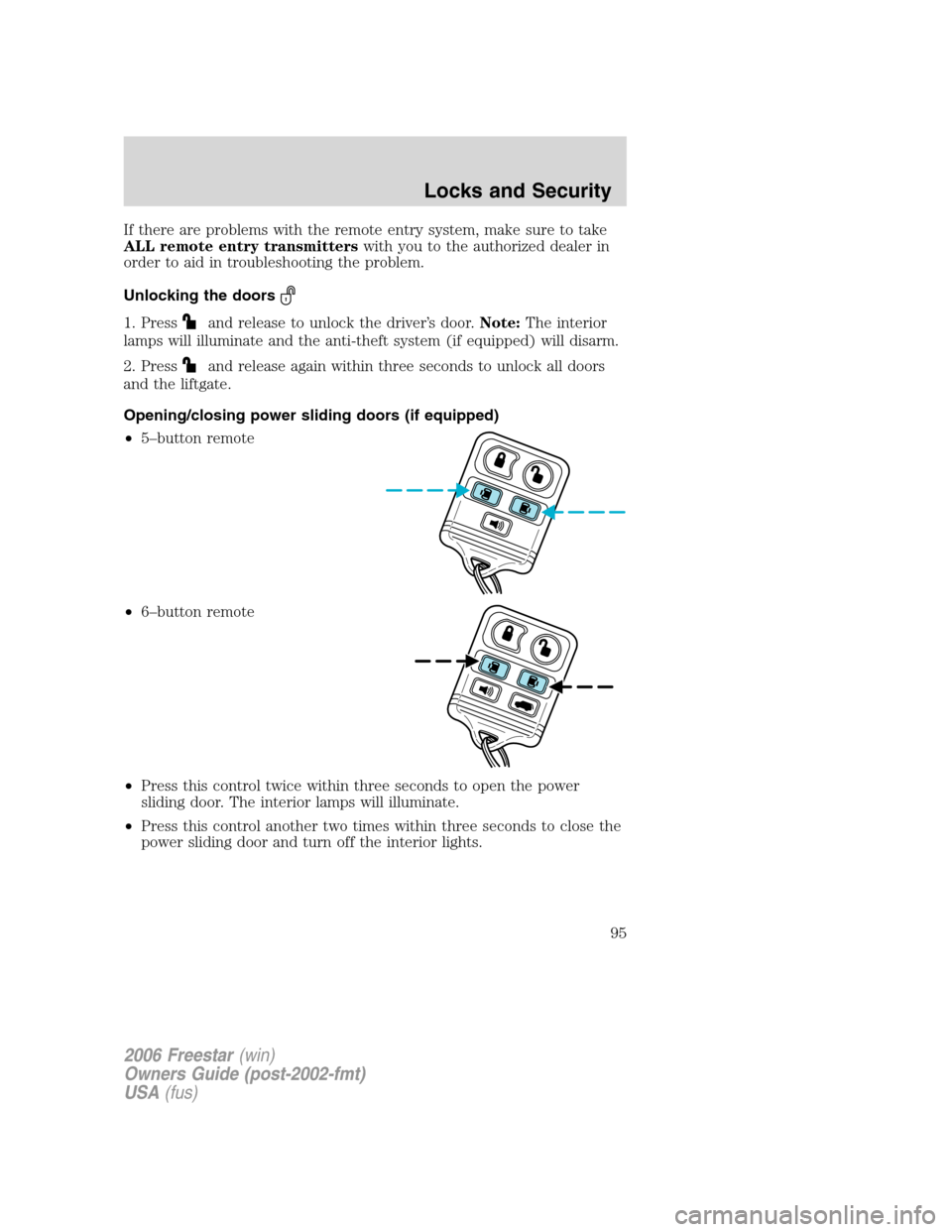
Opening/closing power sliding doors (if equipped)
•5–button remote
•6–button remote
•Press this control twice within three seconds to open the power
sliding door. The interior lamps will illuminate.
•Press this control another two times within three seconds to close the
power sliding door and turn off the interior lights.
2006 Freestar(win)
Owners Guide (post-2002-fmt)
USA(fus)
Locks and Security
95
Page 96 of 320
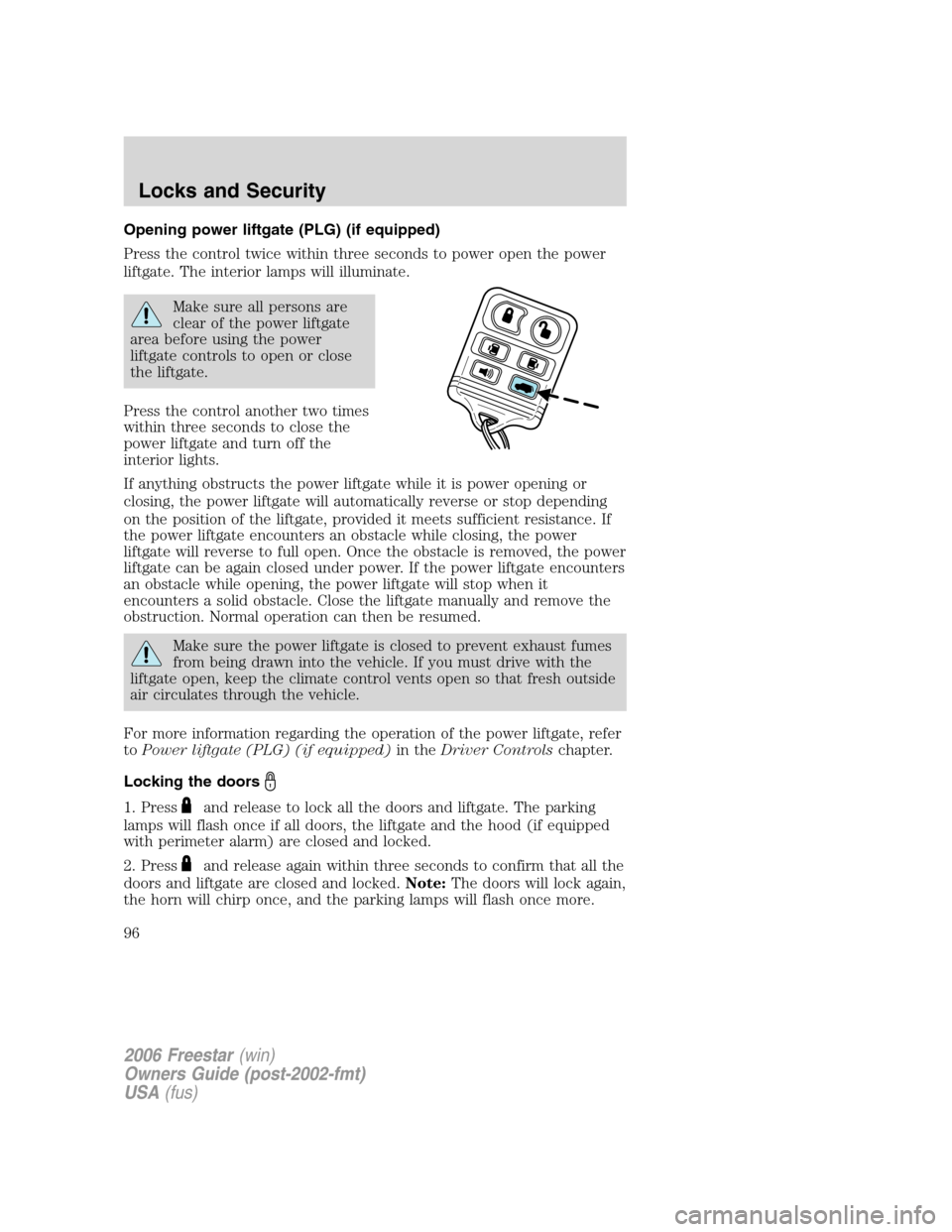
Opening power liftgate (PLG) (if equipped)
Press the control twice within three seconds to power open the power
liftgate. The interior lamps will illuminate.
Make sure all persons are
clear of the power liftgate
area before using the power
liftgate controls to open or close
the liftgate.
Press the control another two times
within three seconds to close the
power liftgate and turn off the
interior lights.
If anything obstructs the power liftgate while it is power opening or
closing, the power liftgate will automatically reverse or stop depending
on the position of the liftgate, provided it meets sufficient resistance. If
the power liftgate encounters an obstacle while closing, the power
liftgate will reverse to full open. Once the obstacle is removed, the power
liftgate can be again closed under power. If the power liftgate encounters
an obstacle while opening, the power liftgate will stop when it
encounters a solid obstacle. Close the liftgate manually and remove the
obstruction. Normal operation can then be resumed.
Make sure the power liftgate is closed to prevent exhaust fumes
from being drawn into the vehicle. If you must drive with the
liftgate open, keep the climate control vents open so that fresh outside
air circulates through the vehicle.
For more information regarding the operation of the power liftgate, refer
toPower liftgate (PLG) (if equipped)in theDriver Controlschapter.
Locking the doors
1. Pressand release to lock all the doors and liftgate. The parking
lamps will flash once if all doors, the liftgate and the hood (if equipped
with perimeter alarm) are closed and locked.
2. Press
and release again within three seconds to confirm that all the
doors and liftgate are closed and locked.Note:The doors will lock again,
the horn will chirp once, and the parking lamps will flash once more.
2006 Freestar(win)
Owners Guide (post-2002-fmt)
USA(fus)
Locks and Security
96
Page 99 of 320
9. Turn the ignition to the 3 (OFF) position after you have finished
programming all of the remote entry transmitters.
10. The doors will lock, then unlock, to confirm that the programming
mode has been exited.
Illuminated entry
The interior lamps illuminate when the key in the driver’s door lock
cylinder (if equipped with perimeter alarm), the keyless entry system or
the remote entry transmitter is used to unlock the door(s), power sliding
doors (if equipped) or liftgate.
The illuminated entry system will turn off the interior lights if:
•the ignition switch is turned to the 4 (ON) position, or
•the keyless entry system or the remote entry transmitter lock control
is pressed, or
•after 25 seconds of illumination.
The panel dimmer control mustnotbe set to the off position for the
illuminated entry system to operate.
The inside lights will not turn off if:
•they have been turned on with the panel dimmer control, or
•any door, power sliding door (if equipped) or the liftgate is open.
The battery saver will shut off the interior lamps 30 minutes after the
last door is closed, even if the panel dimmer control is left on.
Illuminated exit
•The interior lights will illuminate when the key is removed from the
ignition.
•When the headlamp control is on the “sleeping baby mode”, only the
lower interior lights will illuminate.
The system automatically turns off after 25 seconds. The panel dimmer
control mustnotbe set to the off position for the illuminated exit to
operate.
Perimeter lamps illuminated entry (if equipped)
The exterior lamps illuminate when the vehicle is unlocked using the
remote entry transmitter, keyless keypad, or the driver’s door key lock
cylinder (if equipped with perimeter alarm). The following items will
illuminate:
•Puddle lamps
2006 Freestar(win)
Owners Guide (post-2002-fmt)
USA(fus)
Locks and Security
99
Page 310 of 320
GENUINE FORD ACCESSORIES FOR YOUR VEHICLE
A wide selection of Genuine Ford Accessories are available for your
vehicle through your local authorized Ford or Ford of Canada dealer.
These quality accessories have been specifically engineered to fulfill your
automotive needs; they are custom designed to complement the style
and aerodynamic appearance of your vehicle. In addition, each accessory
is made from high quality materials and meets or exceeds Ford’s rigorous
engineering and safety specifications. Ford Motor Company will repair or
replace any properly dealer-installed Genuine Ford Accessory found to
be defective in factory-supplied materials or workmanship during the
warranty period, as well as any component damaged by the defective
accessory. The accessory will be warranted for whichever provides you
the greatest benefit:
•12 months or 12,000 miles (20,000 km) (whichever occurs first), or
•the remainder of your new vehicle limited warranty.
This means that Genuine Ford Accessories purchased along with your
new vehicle and installed by the authorized dealer are covered for the
full length of your New Vehicle’s Limited Warranty — 3 years or
36,000 miles (60,000 km) (whichever occurs first). Contact your
authorized dealer for details and a copy of the warranty.
Not all accessories are available for all models.
The following is a list of several Genuine Ford Accessory products. Not
all accessories are available for all models. For a complete listing of the
accessories that are available for your vehicle, please contact your
authorized dealer or visit our online store at:
www.fordaccessoriesstore.com.
Exterior style
Bug shields
Deflectors
Front end covers
Headlamps, fog lights and Daytime Running Lamps (DRLs)
Splash guards
Interior style
Electrochromatic compass/temperature interior mirrors
Floor mats
Lifestyle
Bike racks
Cargo organization and management
2006 Freestar(win)
Owners Guide (post-2002-fmt)
USA(fus)
Accessories
310