Page 191 of 394
Using the Auxiliary Input Jack
Your radio system has an auxiliary input jack located on
the lower right side of the faceplate. This is not an
audio output; do not plug the headphone set into the
front auxiliary input jack. You can however, connect an
external audio device such as an iPod, laptop
computer, MP3 player, CD changer, or cassette tape
player, etc. to the auxiliary input jack for use as another
source for audio listening.
To use a portable audio player, connect a 3.5 mm
(1/8 inch) cable to the radio’s front auxiliary input jack.
When a device is connected, press the radio CD/AUX
button to begin playing audio from the device over
the car speakers.
O(Power/Volume):Turn this knob clockwise or
counterclockwise to increase or decrease the volume of
the portable player. You may need to do additional
volume adjustments from the portable device if
the volume does not go loud or soft enough.
BAND:Press this button to listen to the radio while a
portable audio device is playing. The portable audio
device will continue playing, so you may want to stop it
or turn it off.
CD/AUX (CD/Auxiliary):Press this button to play a
CD while a portable audio device is playing. Press this
button again and the system will begin playing audio
from the connected portable audio player. If a portable
audio player is not connected, “no input device found”
will be displayed.
3-59
Page 209 of 394
Using the Auxiliary Input Jack
Your radio system has an auxiliary input jack located on
the lower right side of the faceplate. This is not an
audio output; do not plug the headphone set into the
front auxiliary input jack. You can however, connect
an external audio device such as an iPod, laptop
computer, MP3 player, CD changer, or cassette tape
player, etc. to the auxiliary input jack for use as another
source for audio listening.
To use a portable audio player, connect a 3.5 mm
(1/8 inch) cable to the radio’s front auxiliary input jack.
When a device is connected, press the radio CD/AUX
button to begin playing audio from the device over
the car speakers.
O(Power/Volume):Turn this knob clockwise or
counterclockwise to increase or decrease the volume of
the portable player. You may need to do additional
volume adjustments from the portable device if
the volume does not go loud or soft enough.BAND:Press this button to listen to the radio while a
portable audio device is playing. The portable audio
device will continue playing, so you may want to stop it
or turn it off.
CD/AUX (CD/Auxiliary):Press this button to play a CD
while a portable audio device is playing. Press this
button again and the system will begin playing audio
from the connected portable audio player. If a portable
audio player is not connected, “no input device
found” will be displayed.
Theft-Deterrent Feature
THEFTLOCK®is designed to discourage theft of your
vehicle’s radio. The feature works automatically by
learning a portion of the Vehicle Identication
Number (VIN). If the radio is moved to a different
vehicle, it will not operate and LOCK or LOCKED will
appear on the display.
With THEFTLOCK
®activated, the radio will not operate
if stolen.
3-77
Page 321 of 394

If a Tire Goes Flat
It is unusual for a tire to blowout while you are driving,
especially if you maintain your vehicle’s tires properly.
If air goes out of a tire, it is much more likely to leak out
slowly. But if you should ever have a blowout, here
are a few tips about what to expect and what to do:
If a front tire fails, the at tire will create a drag that
pulls the vehicle toward that side. Take your foot off the
accelerator pedal and grip the steering wheel rmly.
Steer to maintain lane position, and then gently brake
to a stop well out of the traffic lane.
A rear blowout, particularly on a curve, acts much like a
skid and may require the same correction you would
use in a skid. In any rear blowout remove your foot from
the accelerator pedal. Get the vehicle under control
by steering the way you want the vehicle to go. It may
be very bumpy and noisy, but you can still steer.
Gently brake to a stop, well off the road if possible.{CAUTION:
Lifting a vehicle and getting under it to do
maintenance or repairs is dangerous without
the appropriate safety equipment and training.
The jack provided with your vehicle is designed
only for changing a at tire. If it is used for
anything else, you or others could be badly
injured or killed if the vehicle slips off the jack.
Use the jack provided with your vehicle only for
changing a at tire.
If a tire goes at, the next part shows how to use the
jacking equipment to change a at tire safely.
5-61
Page 322 of 394
Changing a Flat Tire
If a tire goes at, avoid further tire and wheel damage
by driving slowly to a level place. Turn on your
hazard warning ashers.
{CAUTION:
Changing a tire can be dangerous. The vehicle
can slip off the jack and roll over or fall on you
or other people. You and they could be badly
injured or even killed. Find a level place to
change your tire. To help prevent the vehicle
from moving:
1. Set the parking brake rmly.
2. Put an automatic transaxle shift lever in
PARK (P), or shift a manual transaxle to
FIRST (1) or REVERSE (R).
3. Turn off the engine and do not restart
while the vehicle is raised.
4. Do not allow passengers to remain in
the vehicle.
CAUTION: (Continued)
CAUTION: (Continued)
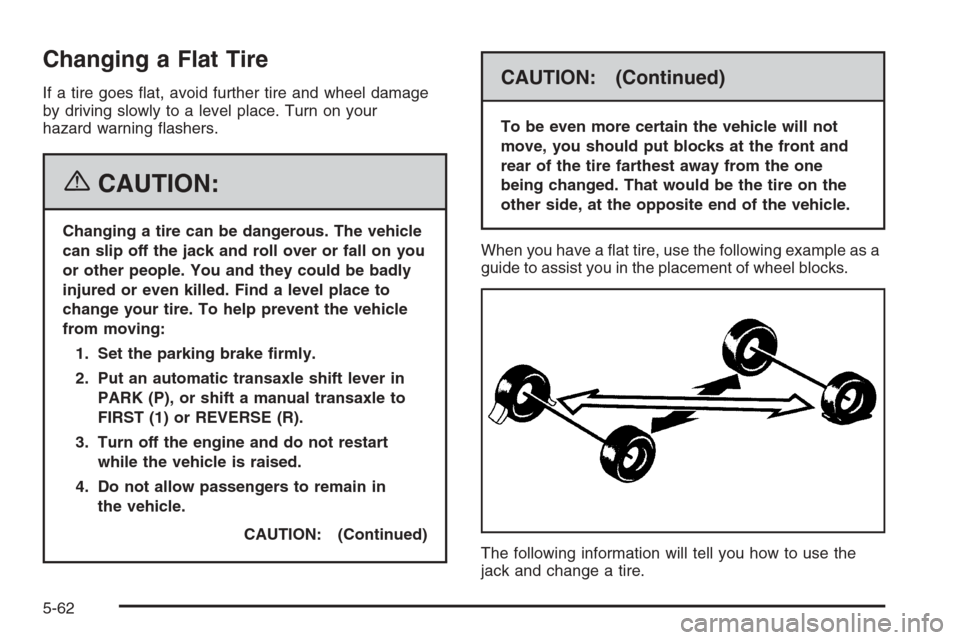
To be even more certain the vehicle will not
move, you should put blocks at the front and
rear of the tire farthest away from the one
being changed. That would be the tire on the
other side, at the opposite end of the vehicle.
When you have a at tire, use the following example as a
guide to assist you in the placement of wheel blocks.
The following information will tell you how to use the
jack and change a tire.
5-62
Page 323 of 394
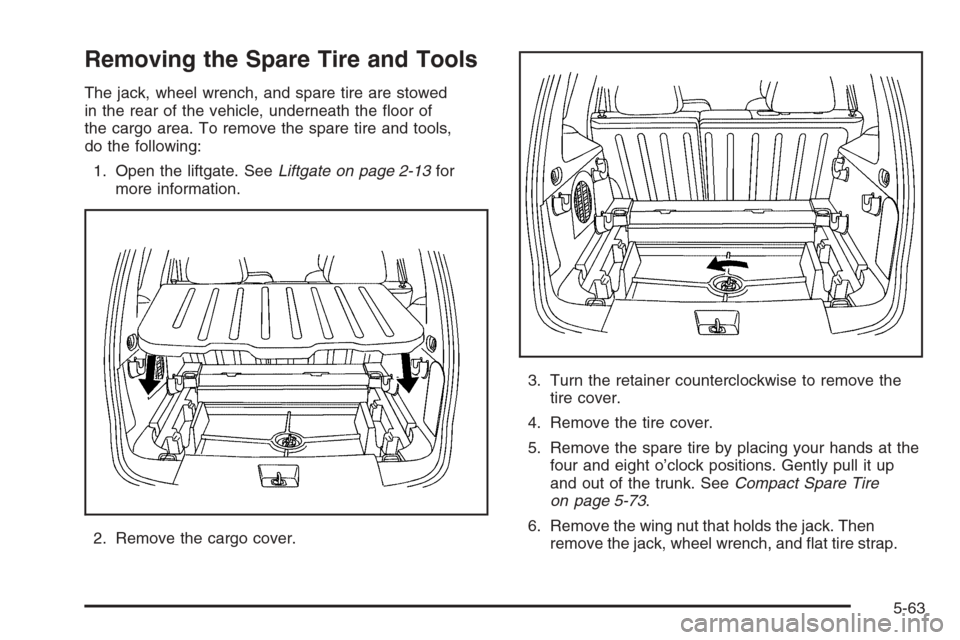
Removing the Spare Tire and Tools
The jack, wheel wrench, and spare tire are stowed
in the rear of the vehicle, underneath the oor of
the cargo area. To remove the spare tire and tools,
do the following:
1. Open the liftgate. SeeLiftgate on page 2-13for
more information.
2. Remove the cargo cover.3. Turn the retainer counterclockwise to remove the
tire cover.
4. Remove the tire cover.
5. Remove the spare tire by placing your hands at the
four and eight o’clock positions. Gently pull it up
and out of the trunk. SeeCompact Spare Tire
on page 5-73.
6. Remove the wing nut that holds the jack. Then
remove the jack, wheel wrench, and at tire strap.
5-63
Page 324 of 394
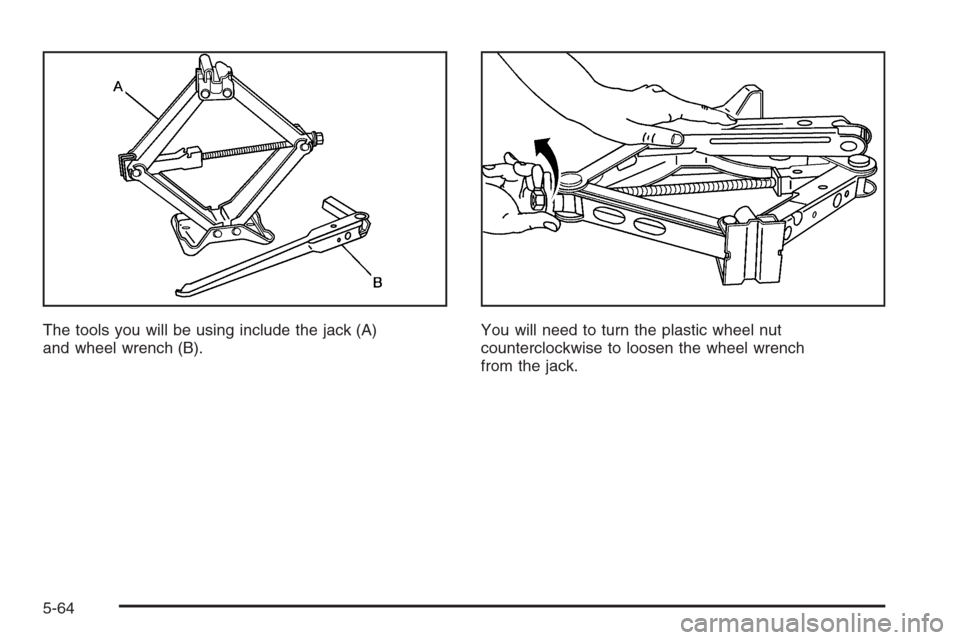
The tools you will be using include the jack (A)
and wheel wrench (B).You will need to turn the plastic wheel nut
counterclockwise to loosen the wheel wrench
from the jack.
5-64
Page 326 of 394
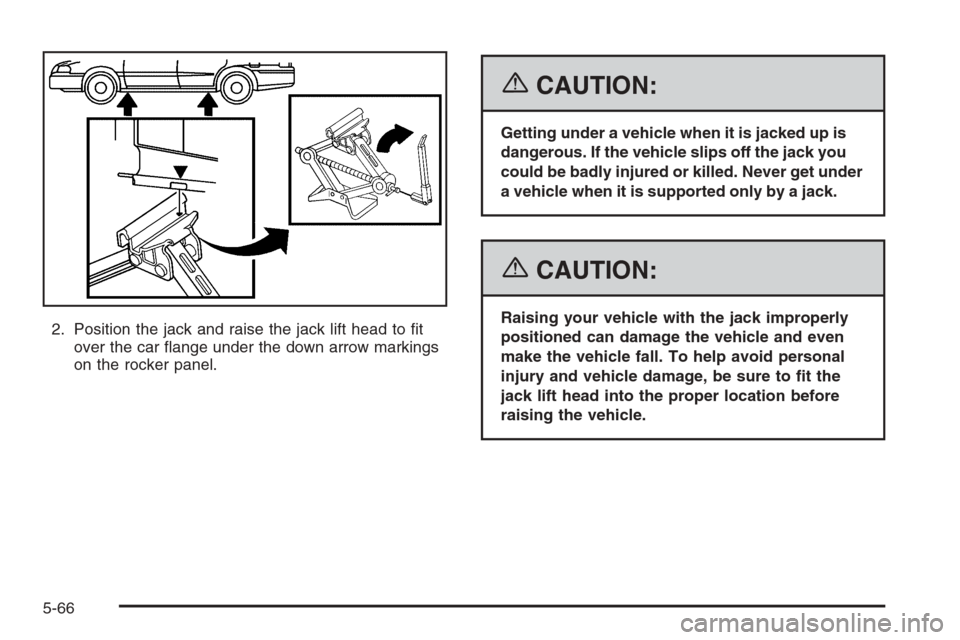
2. Position the jack and raise the jack lift head to t
over the car ange under the down arrow markings
on the rocker panel.
{CAUTION:
Getting under a vehicle when it is jacked up is
dangerous. If the vehicle slips off the jack you
could be badly injured or killed. Never get under
a vehicle when it is supported only by a jack.
{CAUTION:
Raising your vehicle with the jack improperly
positioned can damage the vehicle and even
make the vehicle fall. To help avoid personal
injury and vehicle damage, be sure to t the
jack lift head into the proper location before
raising the vehicle.
5-66
Page 327 of 394
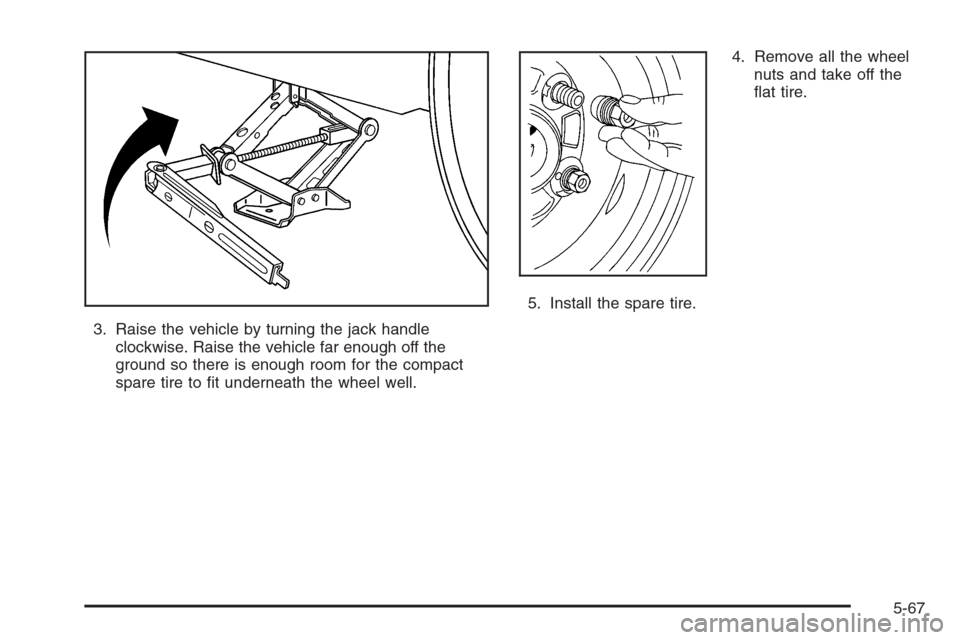
3. Raise the vehicle by turning the jack handle
clockwise. Raise the vehicle far enough off the
ground so there is enough room for the compact
spare tire to t underneath the wheel well.4. Remove all the wheel
nuts and take off the
at tire.
5. Install the spare tire.
5-67